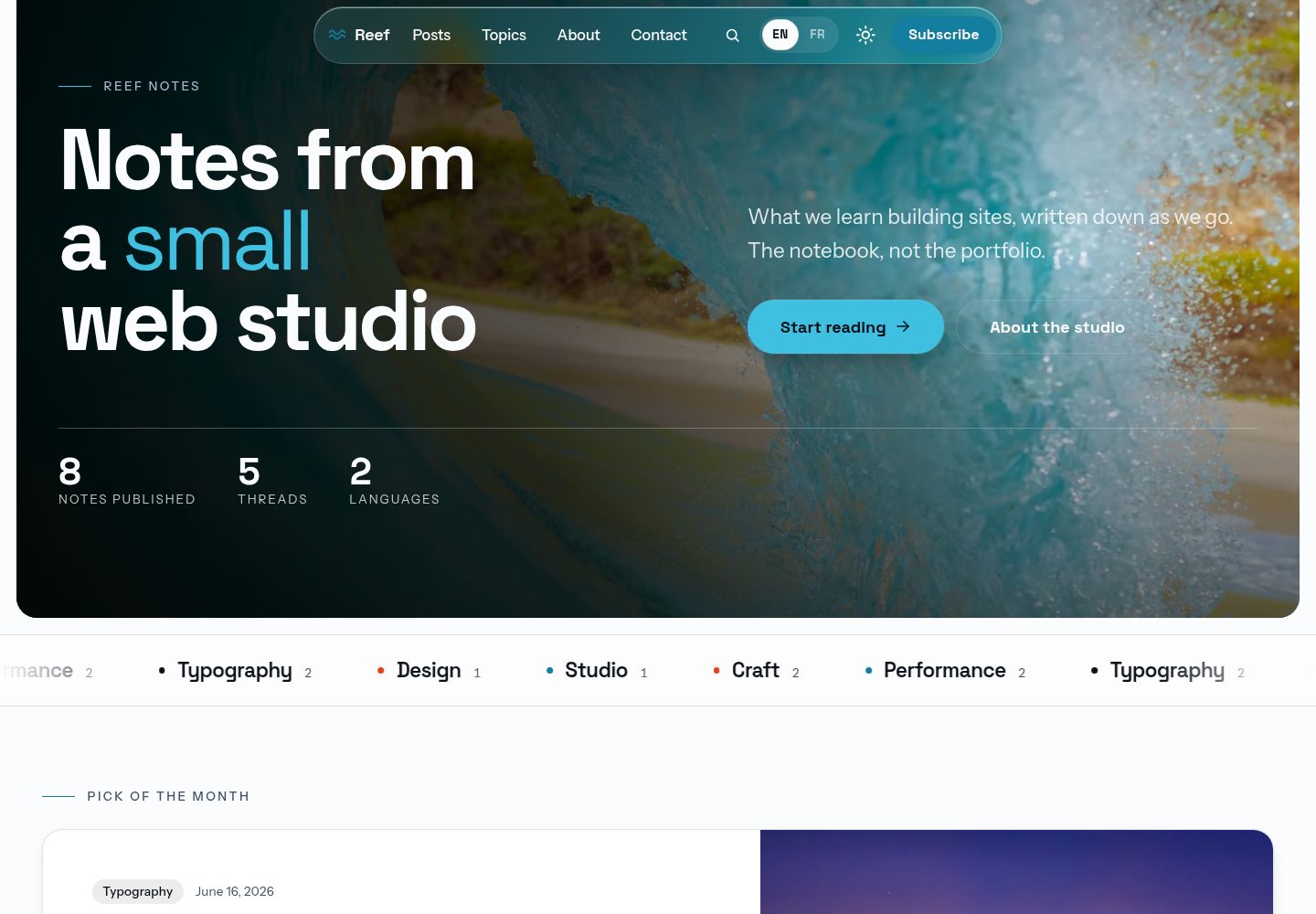
默认输出纯静态 HTML,无需服务器、适配器或数据库
Astro博客
reef — Astro 博客模板
作者 alohapixelcom-hash
Reef 是一个基于 Astro 的免费 MIT 双语博客主题,默认生成纯静态站点,也可选用内置的 EmDash 后台将其变为运行在 Cloudflare Workers 上的博客 CMS。
看看你的网站会是什么样
浏览真实页面截图,比较内容排版与手机效果。点击下方缩略图切换,放大查看整页细节。
全部页面与视图 3
截图用于了解视觉与布局,交互效果请以实际项目为准。
采集于 2026-10-02查看来源
值得关注的模板亮点
从已有项目资料中,快速了解它的特点。
可选 EmDash 发布引擎,在 Cloudflare Workers、D1、R2 上运行后台 CMS
内置英语和法语双语支持,每种语言有独立 RSS 订阅
提供 Capacitor 配置,可将静态构建打包为原生应用项目
附带 AGENTS.md 及五个约定文件,便于 AI 代理扩展主题
后台提供文章、作者、标签、SEO、新闻通讯、联系表单、页面菜单等管理功能
模板详细介绍
Reef 是一个面向 Astro 的免费 MIT 许可博客主题,默认构建为纯静态 HTML 站点,包含首页、分页博客、主题、标签、作者页面、带目录的阅读栏、搜索以及每种语言独立的 RSS 订阅,支持英语和法语两种语言。
该主题还提供可选的 EmDash 发布引擎。将环境变量 ALOHA_MOTEUR 设为 emdash 后,同一套源码会构建为运行在 Cloudflare Workers 上的博客 CMS,使用 D1 数据库和 R2 对象存储。文章存放在数据库中,发布后无需重新构建即可在站点上显示,所有内容通过 /_emdash/admin 后台管理。后台提供文章撰写、草稿、定时发布、修订、分类与标签、作者、SEO 面板、双确认订阅的新闻通讯、联系表单邮件、页面与菜单、站点标识与外观设置、首页区块排序、重定向、媒体库以及 RSS 和站点地图等功能。后台默认法语界面,可切换为英语。
主题还包含 Capacitor 配置,可将静态构建打包为原生应用项目,并附带 AGENTS.md 及五个约定文件,供 AI 代理在扩展主题时参考。
使用限制:评论功能不包含在主题内;联系表单默认没有 action 属性,需要自行配置端点;法律页面仅为起点,需由合格人员审阅;演示图片、字体、图标等第三方素材需按各自许可核对;域名、托管、数据库等外部服务可能产生费用。
Astro博客
适合你的项目吗?
适用场景
- 搭建一个支持英语和法语的静态博客
- 需要后台管理、定时发布和数据库存储的博客 CMS
- 将博客内容打包为 iOS 或 Android 原生应用
- 为 AI 代理提供约定文件以便在主题基础上扩展
- 需要内置新闻通讯订阅和联系表单邮件功能的博客
适合人群
- 希望使用 Astro 构建双语博客的开发者
- 需要静态输出且可选 CMS 后台的博客项目
- 计划将博客内容打包为原生应用的团队
- 希望借助 AI 代理扩展主题的开发者
上手与定制指南
结合仓库当前版本的说明,按下面的资料检查内容、配置与运行要求。
- 1
需要 Node 22.18 或更高版本以及 pnpm
- 2
运行 pnpm dev 会先下载演示照片到 src/assets/,因为仓库不存储这些图片
- 3
启用 EmDash 引擎需设置 ALOHA_MOTEUR=emdash,并使用 pnpm dev:moteur 或 pnpm build:moteur
- 4
首次访问 /_emdash/admin 会进入 EmDash 设置流程,本地可通过 /_emdash/api/setup/dev-bypass 跳过账户步骤
- 5
部署前需检查 astro.config.mjs 中的 site 地址、清空 demoNotice、替换分享卡片图片并审阅法律页面
授权与来源资料
使用条件与限制
免费使用 · 保留许可声明本次收录的是公开仓库中采用 MIT 许可的免费版本;免费范围为该版本代码,不代表外部服务或第三方素材免费。
使用时需要遵守
- 允许免费使用、修改、商用和分发该版本代码。
- 分发代码副本或实质性部分时,保留原作者版权声明和完整 MIT 许可声明。
- 代码按现状提供;担保与责任限制以原许可证及适用法律为准。
额外费用与待核对事项
- 主题不包含评论功能,无法通过内置后台或静态构建提供文章评论。
- 联系表单默认没有提交端点(无 action 属性),需自行配置接收地址或启用引擎的「Courriels」功能。
- 法律页面(隐私、条款等)仅为模板起点,需由合格人员审阅后方可使用。
- 演示照片不随仓库提供,pnpm dev 时会从外部下载,需自行确认其许可与可用性。
- 十张演示照片来自 Pexels,适用 Pexels 许可,与代码的 MIT 许可不同,商用前需自行核对。
- 字体与依赖包有各自的第三方许可,需按 THIRD-PARTY.md 逐一核对。
- 启用引擎需部署两个 Cloudflare Worker 并使用 D1 数据库与 R2 存储,可能产生外部服务费用。
- 原生应用仅打包静态构建,其文章来自 src/data/ 的 Markdown 文件,无法使用后台 CMS 内容。
- 打包原生应用需自行处理签名、图标与应用商店审核,相关成本与流程由使用者承担。
- 仓库不接收 issue,支持仅通过指定联系页面提供。
- 演示图片、字体、图标及其他第三方素材需按各自许可核对,不能仅凭代码的 MIT 许可判断。
- 域名、托管、数据库、支付或 AI 等外部服务可能另外收费。
查看原文依据
Permission is hereby granted, free of charge
许可证原文
Comments are not part of the theme.
README 原文
It ships with no `action`.
README 原文
They are a starting point, not legal advice.
README 原文
the repository does not store them.
README 原文
The ten demo photographs come from Pexels and carry the Pexels licence
README 原文
Fonts and packages are listed in [THIRD-PARTY.md](THIRD-PARTY.md).
README 原文
Two Cloudflare Workers: the engine (EmDash, D1, R2),
README 原文
The app carries the static build, so its posts are the Markdown files of `src/data/`, not the back office.
README 原文
Signing, icons, store review: [wiki/subsystems/mobile-app.md](wiki/subsystems/mobile-app.md).
README 原文
https://github.com/alohapixelcom-hash/reef/blob/main/LICENSEhttps://github.com/alohapixelcom-hash/reef/blob/main/README.mdIssues are closed on purpose: support lives in one place.
README 原文
DeepSeek 根据仓库许可证和 README 整理 ·2026-10-02。结果仅覆盖已读取资料,依赖、图片、字体及后续条款变更以各自原文为准。
项目核对记录与介绍依据
模板资料
- 来源平台
- GitHub
- 资料与维护参考分
- 资料较完整 · 87 / 100
- 技术栈
- Astro
- 网站类型
- 博客
这个分数如何计算
本站按许可资料(最高30分)、演示链接(12分)、预览图(10分)、Star数(15分)、记录的维护时间(15分)、描述完整度(8分)、功能记录(5分)和分类资料(5分)计算。它不是代码、安全或性能测试,也不是 Google 评分;有链接不代表已实测可用。
这个项目需要核对什么
- 记录的仓库更新时间
- 2026-09-30
- 截图检查日期
- 2026-10-02
已收录演示链接。请用你的内容与屏幕尺寸检查;有演示不代表表单、认证或支付已经可用。
目录记录的主要技术栈是 Astro。请通过依赖清单和锁文件核对实际版本与托管要求。这些说明基于收录资料,不代表代码审计或部署实测。
查看具体选型方法 →介绍的制作与核对状态
介绍由 AI 辅助整理目录与仓库资料。仓库作者不等于这篇介绍的审核者。
已完成服务器许可规则与 AI 来源核对;未经过人工编辑审核。
查看当时使用的来源资料
SHA-256: f275ee3b06cd0d44309f88ed83d46026d34256ee545363ab4656a1e97492f934
2026-10-02T09:39:44.505Z
来源文件 / 仓库<!-- README.md - the front page of the repo: what Reef is, how to run it, the back office, deployment, the native app, the licence. -->
<p align="center">
<img src="https://alohapixel.app/screenshots/theme-reef.webp" alt="Reef, a free bilingual blog theme for Astro: the home page, shown on desktop" width="720">
</p>
<h1 align="center">Reef</h1>
<p align="center">
<b>A sober, bilingual blog for Astro 7, with a real blog CMS when you want one.</b><br>
Plain static HTML by default. Switch on the optional EmDash engine and the whole site<br>
is written, scheduled, sent and arranged from its back office.
</p>
<p align="center">
<a href="https://reef.alohapixel.app"><b>Live demo</b></a>
·
<a href="https://reef.alohapixel.app/fr/">Version française</a>
·
<a href="#quick-start">Quick start</a>
·
<a href="https://alohapixel.app/themes/">The rest of the family</a>
</p>
<p align="center">
<img alt="Astro 7" src="https://img.shields.io/badge/Astro-7-BC52EE?style=flat-square&logo=astro&logoColor=white">
<img alt="Tailwind CSS v4" src="https://img.shields.io/badge/Tailwind-v4-38BDF8?style=flat-square&logo=tailwindcss&logoColor=white">
<img alt="TypeScript strict" src="https://img.shields.io/badge/TypeScript-strict-3178C6?style=flat-square&logo=typescript&logoColor=white">
<img alt="English and French" src="https://img.shields.io/badge/i18n-EN%20%2B%20FR-1D7F8D?style=flat-square">
<img alt="MIT" src="https://img.shields.io/badge/licence-MIT-FF7A59?style=flat-square">
</p>
---
Reef is two things from one source, free and MIT licensed.
- **A static blog theme.** `pnpm build` writes plain HTML: a home that leads
with the latest piece, a paginated blog, topic, tag and author pages, a
reading column with a table of contents, search, and an RSS feed per
language, in English and in French. No server, no adapter, no database.
- **A blog CMS.** With `ALOHA_MOTEUR=emdash` the same source builds as a
Cloudflare Worker on [EmDash](https://github.com/emdash-cms/emdash), the
MIT-licensed CMS for Astro that runs on Workers, D1 and R2. Posts live in the
database, a published change shows on the site with no rebuild, and
everything a reader sees is set from the back office at `/_emdash/admin`.
The live demo runs this way.
The demo publication is Reef Notes, the notebook of a fictional web studio.
Every word lives in the back office, in a typed dictionary or in a Markdown
post, never inside a component.
## The blog CMS
What a writer expects from a blogging platform, with the engine on.
<p align="center">
<img src="docs/images/back-office-editor.webp" alt="The post editor of Reef's back office: title, lead, cover and rich text, with the publishing, translation and tags panels" width="720">
</p>
| You want to | Where, in the back office |
|---|---|
| Write, keep drafts, schedule, go back to a revision | « Articles »: title, lead, cover, rich text with headings, lists, quotes, code, images and tables; « Enregistrer » keeps a draft, « Publier » puts it live, « Programmer » picks a date and time |
| Duplicate or delete a post | The list of posts: « Dupliquer » makes a draft copy, « Déplacer vers la corbeille » removes it, the « Corbeille » tab restores it |
| Sort posts into topics and tags | One topic per post, picked by name; tags are typed in the post's « Classement » panel, renamed in « Étiquettes », and each has its own page at `/tags/<tag>/` |
| Show authors | « Auteurs »: name, role, bio, portrait, links, one page each; a post picks its author by name |
| Search engines and social cards | Each post, page, topic and author has an « SEO » panel: title, description, share image, canonical address, noindex |
| A newsletter, with no outside service | Double opt-in signup on the site, the subscriber list in « Lettre d'information », one click sends a published post to every subscriber in their language, unsubscribe through a confirmation page |
| Contact form emails | The « Courriels » screens send and log every message, through the Worker's Cloudflare email binding |
| Pages and menus | « Pages » for free pages, « Menus » for the main bar, the phone menu, the buttons and the three footer columns, per language |
| Identity and look | « Paramètres »: site name, logo, favicon, social links, posts per page; « Réglages par langue »: description, contact details, typeface, brand colour, logo for dark mode |
| Arrange the home page | Each of the eight home blocks can be hidden or moved |
| Redirects and media | « Redirections » (301, 410), and the media library, stored in R2 |
| RSS and sitemap | One feed per language, and a sitemap that keeps itself up to date |
<p align="center">
<img src="docs/images/back-office-posts.webp" alt="The list of posts in Reef's back office, with their status, language and the view, edit, duplicate and delete actions" width="720">
</p>
Every field says, in one sentence above it, what it changes, and an empty
field renders the theme as shipped. The back office opens in French, and
each person can switch it to English. Comments are not part of the theme.
The editor's guide, for someone who never opens the code:
[docs/administer.md](docs/administer.md) (English) and
[docs/administrer.md](docs/administrer.md) (French).
## Quick start
```bash
pnpm install
pnpm dev # http://localhost:4321
```
Node 22.18 or later and pnpm. `pnpm dev` first fetches the demo photographs
into `src/assets/`, because the repository does not store them.
```bash
pnpm dev # dev server
pnpm build # static site into dist/
pnpm preview # serve the build locally
pnpm check # astro check: types and templates
pnpm test # the selfchecks, plain Node, no framework
pnpm lint:house # the mechanical house rules
pnpm rebrand "#7a59ff" # repaint the theme from one brand colour
pnpm rebrand --restore # back to the Reef palette
pnpm app # the build for a native Capacitor app
pnpm dev:moteur # the same site with the publication engine on
pnpm build:moteur # the Worker build of the engine
```
## The back office, locally
```bash
pnpm dev:moteur # http://localhost:4321/_emdash/admin
node scripts/moteur-import.mjs --url http://localhost:4321 # pours the demo posts into the database, once
```
The first visit to `/_emdash/admin` opens EmDash's setup: the site title,
then an administrator account with a passkey, and the schema and demo texts
of `seed/seed.json`. Locally,
`/_emdash/api/setup/dev-bypass?redirect=/_emdash/admin` skips the account
step. With the engine off, nothing of it is bundled: the static build does
not change.
How the engine is wired (the two sources of posts, the managed pages, the
caches, the back office language): [docs/moteur.md](docs/moteur.md).
## Deploy
**Static.** Upload `dist/` to any static host: Cloudflare Pages or Workers,
Netlify, Vercel, an nginx box. `npx wrangler deploy` publishes it as a
Cloudflare Worker with static assets (`wrangler.toml`: the visitor's
language, the sitemaps, the 404 page). No environment variable is required.
**With the engine.** Two Cloudflare Workers: the engine (EmDash, D1, R2),
and a light front Worker that serves the pages already built and keeps the
others in cache. [DEPLOY.md](DEPLOY.md) walks through the first deployment,
the updates, and rolling back.
**Updating a site already online.** Each version that changes the database
ships one SQL file in `migrations/`, applied in order by
`node scripts/base-3.4.0.mjs`: it shows the plan first, never deletes
anything, and a second run changes nothing. The list is in DEPLOY.md.
## A native app (Capacitor)
The static build has no server, no external CDN and local fonts, which is
what Capacitor wraps. Fixed elements respect the safe areas, heights use
`svh`, touch targets are 44 px, and no page scrolls sideways at 390 px.
```bash
pnpm add @capacitor/core @capacitor/ios @capacitor/android
pnpm add -D @capacitor/cli
pnpm app # dist/, tuned for a native shell
npx cap add ios # once (and: npx cap add android)
npx cap sync # after every pnpm app
npx cap open ios # Xcode: signing, then the App Store
```
`capacitor.config.ts` ships with the theme: change `appId` and `appName`
before the first `cap add`. The app carries the static build, so its posts
are the Markdown files of `src/data/`, not the back office. Signing, icons,
store review: [wiki/subsystems/mobile-app.md](wiki/subsystems/mobile-app.md).
## Make it yours
1. `src/config/siteData.json.ts`: name, title, description, author.
2. `astro.config.mjs`: `site`, your production address (canonical links,
share cards, sitemap, robots.txt, RSS).
3. `pnpm rebrand "#yourcolour"`.
4. `src/data/`: your posts (one Markdown file per language, same name),
authors and topics.
5. `src/i18n/ui/en/` and `src/i18n/ui/fr/`: every word of the interface.
6. `src/config/navData.json.ts` and `legalData.json.ts`: your links, your
privacy and terms pages.
With the engine on, the same changes are made in the back office instead.
## Before you deploy
- [ ] `site` in `astro.config.mjs` is your real address.
- [ ] `demoNotice` in `src/config/siteData.json.ts` is empty, so the footer
line saying the site is a demo does not show.
- [ ] The share card is your photograph: `scripts/og.mjs` crops it from the
home page photo at build time.
- [ ] The legal pages (`src/config/legalData.json.ts`, and the bracketed
fields of the legal notice in `src/i18n/ui/*/pages.ts`) are read by
someone qualified. They are a starting point, not legal advice.
- [ ] The contact form points at your endpoint, or at the « Courriels »
screens with the engine on. It ships with no `action`.
- [ ] `pnpm check`, `pnpm test` and `pnpm build` are green.
## Why it feels expensive
- **Almost no JavaScript.** Dialogs are native `<dialog>`, accordions native
`<details>`, the marquee is CSS. The scripts that ship are the phone menu,
the theme switch, the shrinking navbar and the table of contents.
- **A design system, not a stylesheet.** `src/styles/tokens.css` holds the
palette, the roles and the utilities; markup only speaks roles, so one
command repaints the theme, the favicon and the share cards.
- **An owned SEO layer.** Canonical links, Open Graph, JSON-LD, robots.txt,
llms.txt, RSS and the sitemap are readable files in the repo, not a plugin.
- **Light and dark, both composed.** The theme switches before first paint,
with no flash, and dark mode trades cast shadows for luminous borders.
- **Bilingual by construction.** One page source per route, one post file per
language, and a typed dictionary: a missing French key fails the build.
- **Accessible.** 44 px touch targets, visible focus, correct ARIA, reduced
motion honoured by the CSS and by the scroll timelines.
## Structure
```text
src/
components/ ui/ (the primitives), Sections/ (by page), Cards/, svg/icons/
config/ typed site data: siteData, navData, legalData
data/ the demo content: posts (Markdown), authors and topics (JSON)
i18n/ the bilingual layer and its en/ and fr/ dictionaries
js/ pure logic: JSON-LD, pagination, addresses, text
layouts/ BaseLayout and BaseHead (the whole <head>)
moteur/ the optional publication engine and its back office
pages/ [...locale]/ routes, 404, robots.txt, llms.txt, rss.xml
styles/ tokens.css, global.css, prose.css, the motion catalogue
migrations/ the SQL that brings a database online to the current version
scripts/ build steps (photos, share cards, favicon), rebrand, app, engine tools, checks
seed/ seed.json: the engine's schema and first content
docs/ the editor's guide, the engine, the design, the conventions
wiki/ how each subsystem works, anchored to the code
```
## Documentation
- [docs/administer.md](docs/administer.md) and [docs/administrer.md](docs/administrer.md): running the site from the back office.
- [docs/moteur.md](docs/moteur.md): the publication engine.
- [DEPLOY.md](DEPLOY.md): static hosting, the engine online, updates.
- [docs/design.md](docs/design.md) and [docs/conventions/](docs/conventions/): the design rules and the code conventions.
- [wiki/overview.md](wiki/overview.md): the architecture, then one page per subsystem.
- [AGENTS.md](AGENTS.md): the working rules of the repository, for people and for coding assistants.
- [CHANGELOG.md](CHANGELOG.md): what changed, version by version.
## Support
Issues are closed on purpose: support lives in one place.
Write to https://alohapixel.app/contact/. Pull requests are welcome.
Reef is the free member of a family of seven themes built on the same
foundation; the others add a shop, a SaaS site with its dashboard, a launch
page, a portfolio: https://alohapixel.app/themes/
## Licence
MIT, full text in [LICENSE](LICENSE). Use it, fork it, sell what you build
with it, no attribution required.
The ten demo photographs come from Pexels and carry the Pexels licence (free
for commercial use, no attribution required): [NOTICE.md](NOTICE.md) and
[PHOTOS.md](PHOTOS.md). Fonts and packages are listed in
[THIRD-PARTY.md](THIRD-PARTY.md).
看看同类模板
对比同技术栈与用途的模板,找到更适合的视觉与内容结构。

astrowind
⭕️ AstroWind: A free template using Astro v7 and Tailwind CSS v4. Astro starter theme.
Astro · 博客

astro-paper
A minimal, accessible and SEO-friendly Astro blog theme.
Astro · 博客

fuwari
✨A static blog template built with Astro.
Astro · 博客

Firefly
Firefly 是一款基于 Astro 的静态博客主题,由 CuteLeaf 在 saicaca 的 Fuwari 模板基础上二次开发,主打清新美观的视觉风格。
Astro · 博客

astro-theme-cactus
A simple Astro theme. Use it to create your blog or website.
Astro · 作品集

astrofy
Astrofy is a free and open-source template for your Personal Portfolio Website built with Astro and TailwindCS…
Astro · 作品集