Derived from nurlansu/hugo-sustain, a travel blog theme built with Bootstrap
HugoHTMLBlogCorporate Website
hugo-sustain-aynk — Hugo Blog Template
By altrdev
A travel blog theme built on Hugo and Bootstrap, derived from nurlansu/hugo-sustain, aimed at travel guides and blog content, with built-in shortcodes for maps, images, and category tips, plus support for comments, analytics, and affiliate ad configuration.
Explore the design
Compare the page layouts and mobile experience. Open any screenshot for a closer look.
Desktop homepage1 / 2
Desktop captureTop of page
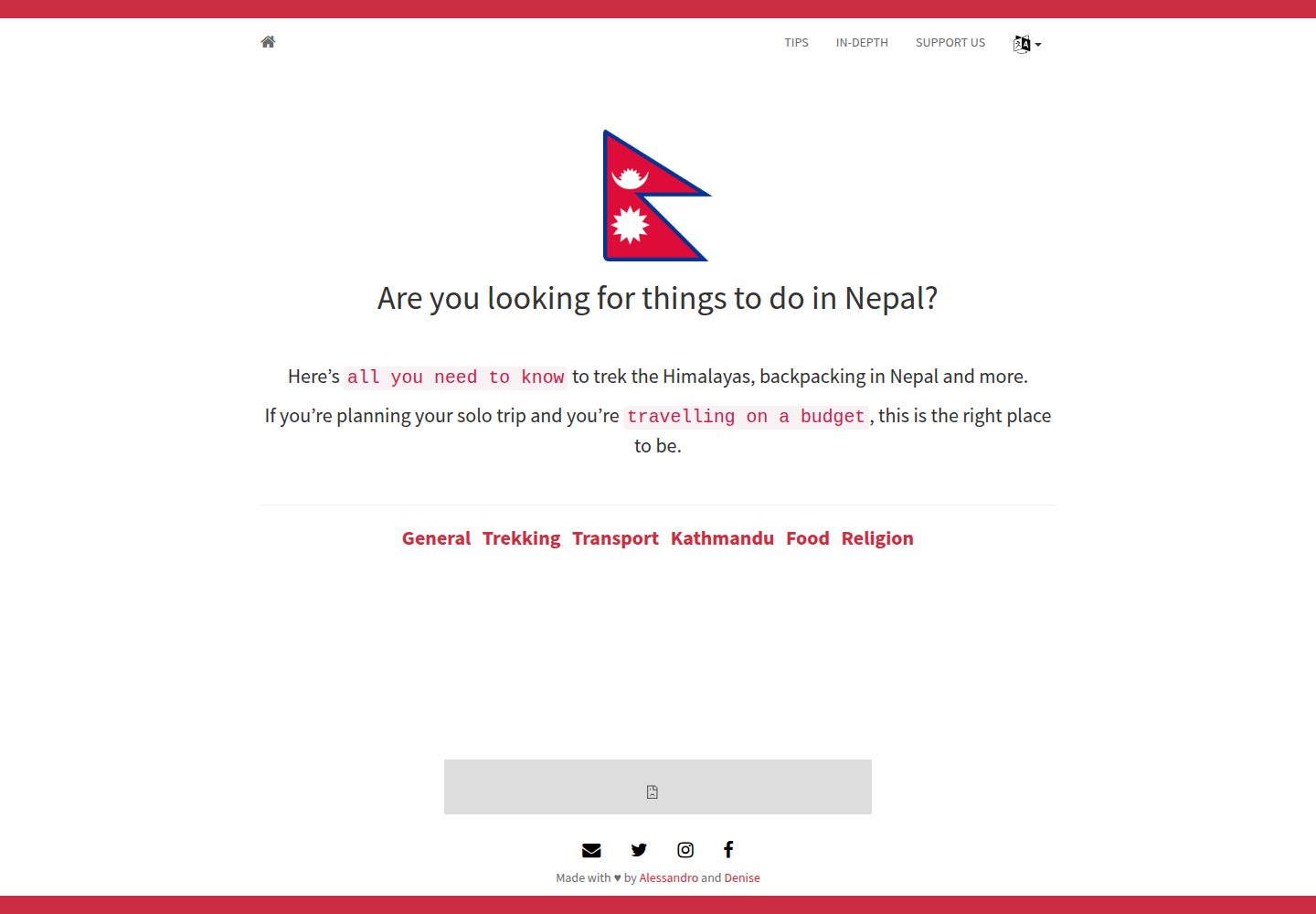
Actual screenshot captured by the server browser.
All pages & views 2
Screenshots show visual appearance; interactive behavior may differ.
Recorded 2026-10-11View source
What stands out
A quick read of the recorded project description.
Provides five content forms: list, expanded list, tips, single page, and blog post
Built-in shortcodes for leaflet maps, bundle-image images, and tips-category category lists
Syntax highlighting via highlight.js can be toggled in front matter
Supports Disqus comments, Google Analytics, Amazon affiliate, and Ko-fi donation configuration
Supports multiple languages, using translationKey to associate pages whose filenames differ across languages
Template Details
hugo-sustain-aynk is a Hugo theme whose repository describes it as a "travel blog and tips theme built with Bootstrap." It is derived from nurlansu's Hugo theme Sustain and adds travel-oriented features on top of the original structure. The theme provides four content forms: list pages (generated automatically by folder), expanded list pages (layout: list-expanded), tips pages (layout: tips, with body data stored in the data/<language>/tips directory), and single pages; setting blog: true in a single page's front matter turns it into a blog post, with Disqus comments and a related-posts section.
The theme includes several shortcodes: leaflet for inserting a map into a page, bundle-image for inserting an image with alt and caption support, and tips-category for outputting the category list of a tips page. Syntax highlighting is enabled via highlight = true in front matter, which pulls in highlight.js JavaScript and CSS. Site-level features are configured in config.toml: Disqus shortname, Google Analytics tracking ID, Amazon onelink instance ID, Amazon ad slots (desktop and mobile banners, with placeholder banners shown when run locally), and a Ko-fi donation prompt.
The theme supports multiple languages, using translationKey to associate pages whose filenames differ across languages. Front matter fields include date, author, authorLink, title, description, tags, categories, blog, highlight, image, markup, translationKey, draft, and others; author information can be predefined under params in config.toml, and authorLink references a key there.
Regarding usage limitations: the repository provides no dependency manifest, so the specific versions of Bootstrap or Hugo cannot be verified; the theme was last updated in 2022, and the README recommends blackfriday as the markup format, a renderer that is no longer the default in newer Hugo versions, so migration requires attention. Third-party assets such as images, fonts, and icons in the demo site must be checked individually against their respective licenses.
HugoHTMLBlogCorporate Website
Is it right for your project?
Use Cases
- Building a personal blog focused on travel guides and destination introductions
- Embedding maps in articles to mark itineraries or locations
- Organizing guide content by category and displaying it together
- Interacting with readers via Disqus and reviewing traffic with Google Analytics
- Integrating Amazon affiliate ads or a Ko-fi donation entry into a blog
Suitable For
- Developers using Hugo to generate static sites who need a travel blog theme
- Writers who want to insert maps and images into body content using shortcodes
- Sites that need multilingual content and want to organize guide data by language
- Site maintainers who accept configuring comments, analytics, and ads via config.toml
Getting started & customization
Use these recorded setup notes alongside the repository instructions for your chosen version.
- 1
Clone or add as a submodule under themes in the Hugo site root: git clone https://github.com/altrdev/hugo-sustain-aynk.git hugo-sustain-aynk; alternatively, download the zip, extract it, and place it in the themes directory
- 2
Run hugo serve and visit localhost:1313 to view the theme
- 3
Tips pages require content data in the data/<language>/tips directory and layout: tips in front matter
- 4
Fill in parameters such as disqusShortname, googleAnalytics, amazon_onelink, amazon_ads, and kofi in config.toml as needed
- 5
The repository provides no dependency manifest; before use, confirm compatibility with your current Hugo version, especially the value of the markup field in front matter
License & source material
Usage conditions & limitations
Free to use · keep license noticeThis entry covers the free version under the MIT license in the public repository; the free scope is the code of that version and does not mean external services or third-party assets are free.
Must comply with when using
- Free use, modification, commercial use, and distribution of this version's code are permitted.
- When distributing copies or substantial portions of the code, retain the original author's copyright notice and the full MIT license notice.
- The code is provided as is; warranties and limitations of liability are governed by the original license and applicable law.
Additional costs & items to verify
- Demo images, fonts, icons, and other third-party assets must be checked against their respective licenses and cannot be judged solely by the code's MIT license.
- External services such as domains, hosting, databases, payments, or AI may incur separate charges.
- Using Disqus comments requires uncommenting and filling in disqusShortname in config.toml, which depends on the third-party Disqus service.
- Enabling Google Analytics requires registering a Google Analytics account to obtain a tracking ID and entering it in the googleAnalytics parameter in config.toml, which is an external service dependency.
- Using Amazon onelink requires being an Amazon affiliate and providing an instance ID, entered in the amazon_onelink parameter in config.toml.
- Using Amazon ad banners requires configuring the amazon_ads parameter in config.toml, which depends on the Amazon advertising service.
- Adding a Ko-fi donation prompt requires filling in the kofi parameter (Ko-fi account ID) in config.toml, which depends on the external Ko-fi service.
- The leaflet map shortcode depends on the external project hugo-leaflet, which must be obtained separately.
- The README recommends blackfriday as the content format, a renderer that is no longer the default in newer Hugo versions, so compatibility must be considered during migration.
View Original Text Basis
Permission is hereby granted, free of charge
Original License Text
To use this feature, uncomment and fill out the `disqusShortname` parameter in `config.toml`.
Original README
To add Google Analytics, simply sign up to [Google Analytics][g-analytics] to obtain your Google Tracking ID, and add this tracking ID to the `googleAnalytics` parameter in `config.toml`.
Original README
If you are an amazon affiliate and do you want using onelink, add you instance ID to the `amazon_onelink` parameter in `config.toml`.
Original README
For use Amazon adv To add amazon banners, set the `amazon_ads` parameter in `config.toml` like this:
Original README
You can add a donation message after a blog post. Fill out the `kofi` parameter in `config.toml` with your ko-fi id.
Original README
`leaflet-[map-marker-track]`: you can insert a map on a page. Other info [here][leaflet-shortcode]
Original README
https://github.com/altrdev/hugo-sustain-aynk/blob/master/LICENSE.mdhttps://github.com/altrdev/hugo-sustain-aynk/blob/master/README.md`markup`: content format; using `blackfriday` is recommended
Original README
Compiled by DeepSeek based on repository license and README ·2026-10-11. Results only cover the materials read; dependencies, images, fonts, and subsequent term changes are subject to their respective original texts.
Project checks & description sources
Template Information
- Source platforms
- GitHub
- Documentation and maintenance reference score
- Partly documented · 70 / 100
- Technologies
- Hugo · HTML
- Website type
- Blog · Corporate Website
How this score is calculated
Our heuristic uses license records (up to 30), a demo link (12), a preview (10), stars (15), recorded maintenance (15), description completeness (8), feature records (5) and classification data (5). It is not a code, security or performance test, or a Google score. A link does not establish tested functionality.
What to verify for this project
- Repository update recorded
- 2022-11-04
- Screenshot last checked
- 2026-10-11
A demo link is listed. Check it with your own content and viewport sizes; its presence does not confirm that forms, authentication or payments work.
The catalog identifies Hugo as the primary stack. Check the actual dependency manifest and lockfile for versions and hosting requirements. These notes use recorded metadata, not a code audit or a deployment test.
Use a selection guide →How this description was prepared
AI-assisted description based on catalog records and repository material. Repository authors are not automatically the reviewers of this description.
Review declaration: [email protected] · 2026-10-13
Inspect the recorded source material
SHA-256: 6ac69daafcdd4c11d13ae340db2d9e125db5deaa66479db4d85d054475cb7d0d
2026-10-11T19:19:29.382Z
Source file / repository## Table of Contents
- [Table of Contents](#table-of-contents)
- [Installation](#installation)
- [With `git`](#with-git)
- [Manual](#manual)
- [Contents](#contents)
- [List](#list)
- [Tips](#tips)
- [Single page](#single-page)
- [Blog post](#blog-post)
- [Features](#features)
- [Shortcodes](#shortcodes)
- [Syntax highlighting](#syntax-highlighting)
- [Disqus](#disqus)
- [Google Analytics](#google-analytics)
- [Amazon onelink](#amazon-onelink)
- [Amazon adv](#amazon-adv)
- [Ko-fi](#ko-fi)
- [Front matter](#front-matter)
- [About](#about)
- [License](#license)
## Installation
#### With `git`
From the root of your Hugo site, clone the theme into `themes/hugo-sustain-aynk` by running :
```
cd themes/
git clone https://github.com/altrdev/hugo-sustain-aynk.git hugo-sustain-aynk
```
Or use submodule:
```
cd themes/
git submodule add https://github.com/altrdev/hugo-sustain-aynk.git
```
#### Manual
1. [Download][zip-archive] zip archive.
2. Unarchive it.
3. Move `hugo-sustain-aynk` folder in `themes` folder of your blog
Hugo includes a development server, so you can view your changes as you go -
very handy. Spin it up with the following command:
``` sh
hugo serve
```
Now you can go to [localhost:1313][local] and the Sustain
theme should be visible.
## Contents
You can write four types of contents: `List`, `Tips`, `Blog post` or `Single page`
### List
This is automatic content.
When you create a folder under `it` or `en` a page is generated with a list of the elements contained in the folder.
You can customize a `front matter` creating an `_index.md` page in the folder.
### List expanded
Is equivalent to `list`, but listing is more detailed.
For using it, you must set `layout: list-expanded` in a `_index.md` front matter.
### Tips
This is a special template.
You must putting in `data/en/tips` or `data/it/tips` folder the real content.
For using this special template, you must set `layout: tips` in your `front matter`.
Examples in `content/en/tips.md` or `content/it/consigli.md`.
Format `data` content like this:
```yaml
name: General
source:
- icon: fa fa-flag
number: 0
description: Example 1
- icon: fa fa-money
number: 1
description: Example 2
```
### Single page
This is a standard template if you don't specify any `layout:` in a `front matter`.
Is a simple white page and you can find examples in `content/en/donate.md` or `content/it/donazioni.md`.
### Blog post
Is a single page template with additions.
You must set `blog: true` in a `front matter` for transform your default page.
Blog post adds `Disqus` comments and related post section.
## Features
### Shortcodes
Some `shortcodes` are available:
+ leaflet
+ bundle-image
+ tips-category
`leaflet-[map-marker-track]`: you can insert a map on a page. Other info [here][leaflet-shortcode]
`bundle-image`: you can insert an image on a page
```js
{{< bundle-image name="name of image in a media folder" alt="alt description" caption="caption description" >}}
```
`tips-category`: print a list of category tips
```js
{{< tips-category "page_name.md" >}}
```
You can also use default hugo shortcodes like:
`ref`: you can linking another page
```js
[Link name]({{< ref "page_name.md" >}})
[Link name]({{< ref "page_name.md#anchor" >}})
```
### Syntax highlighting
Use `highlight = true` in the front matter to include [`highlight.js`][highlight-js] javascript and css files.
### Disqus
To use this feature, uncomment and fill out the `disqusShortname` parameter in `config.toml`.
### Google Analytics
To add Google Analytics, simply sign up to [Google Analytics][g-analytics] to obtain your Google Tracking ID, and add this tracking ID to the `googleAnalytics` parameter in `config.toml`.
### Amazon onelink
If you are an amazon affiliate and do you want using onelink, add you instance ID to the `amazon_onelink` parameter in `config.toml`.
### Amazon adv
For use Amazon adv
To add amazon banners, set the `amazon_ads` parameter in `config.toml` like this:
```toml
[params.amazon_ads]
desktopBanner = "https://rcm-eu.amazon-adsystem.com/..."
mobileBanner = "https://rcm-eu.amazon-adsystem.com/..."
```
If you serve Hugo in localhost, fake banner appear.
### Ko-fi
You can add a donation message after a blog post. Fill out the `kofi` parameter in `config.toml` with your ko-fi id.
## Front matter
`Front matter` example:
```yaml
---
date: 2020-02-11
author: Alessandro
authorLink: Twitter
title: "My Blog Post"
description: "My Blog Post description"
tags: [ keyword 1, keyword 2, keyword 3 ]
categories: [ mycategory ]
blog: true
highlight: true
image: media/my-image.jpg
markup: blackfriday
translationKey: my-article
---
```
`date`: file date
`author`: name of author. You can insert a new name or linking one already set in a `config.toml`. For linking start with this example:
```toml
[params.authorOne]
name = "Alessandro"
fullName = "Alessandro Travi"
Website = "https://altr.dev"
Twitter = "https://twitter.com/altrdev"
Instagram = "https://www.instagram.com/alessandro.travi/"
```
In this case, the value is `One`. You must specify the word after `author`
`authorLink`: social link about author. Values must be a key under author params under `config.toml`. In the example above, you can specify `Website`, `Twitter`, `Instagram`
`title`: page title
`description`: page description
`tags`: keywords for a page
`categories`: page categories
`blog`: use if you want a page like a Blog Post
`highlight`: include `highlight.js` javascript and css files
`image`: main image for page. Useful for social sharing
`markup`: content format; using `blackfriday` is recommended
`translationKey`: linking multilanguage page with different name.
`draft`: specify draft content. **Accepted values**: `true`
## About
This is a fork of the Hugo theme [Sustain][sustain] by [Nurlan Su][sustain-author].
## License
<p>
<a href="./LICENSE.md"><img src="https://upload.wikimedia.org/wikipedia/commons/thumb/0/0c/MIT_logo.svg/642px-MIT_logo.svg.png" height="60px"></a>
</p>
[sustain]: https://github.com/nurlansu/hugo-sustain
[sustain-author]: https://github.com/nurlansu
[zip-archive]: https://github.com/altrdev/hugo-sustain-aynk/archive/master.zip
[local]: http://localhost:1313/
[highlight-js]: https://highlightjs.org/
[g-analytics]: https://www.google.com/analytics/
[leaflet-shortcode]: https://github.com/altrdev/hugo-leaflet
Explore similar templates
Compare previews and descriptions within the same stack and category.

hugo-PaperMod
A fast, clean, responsive Hugo theme for blogs and lightweight portfolios, with three layout modes (Regular, Home-Info, Profile), automatic and manual light/dark themes, Fuse.js client-side search, multilingual support, and built-in Open Graph, Twitter Cards, and Schema.org data.
Hugo · Portfolio

LoveIt
LoveIt is a clean, elegant, and feature-rich Hugo blog theme derived from LeaveIt and KeepIt, MIT-licensed. It offers light/dark modes, responsive layout, multilingual support, and search via Lunr.js or Algolia.
Hugo · Blog

hugo-coder
hugo-coder is a minimalist Hugo blog theme maintained by luizdepra under the MIT license. It provides a clean, text-focused blog appearance, configuration documentation in the docs directory, and a complete exampleSite with hugo.toml.
Hugo · Blog

blowfish
Blowfish is a Hugo personal website and blog theme built with Tailwind CSS 4, focused on lightness, simplicity, and content-first presentation.
Hugo · Blog

hugo-paper
hugo-paper is a simple, clean, and customizable Hugo blog theme configured through config.toml or hugo.toml.
Hugo · Blog

hextra
Hextra is a Hugo theme for documentation and blog sites, built on Hugo and Tailwind CSS with design referencing Nextra.
Hugo · Documentation