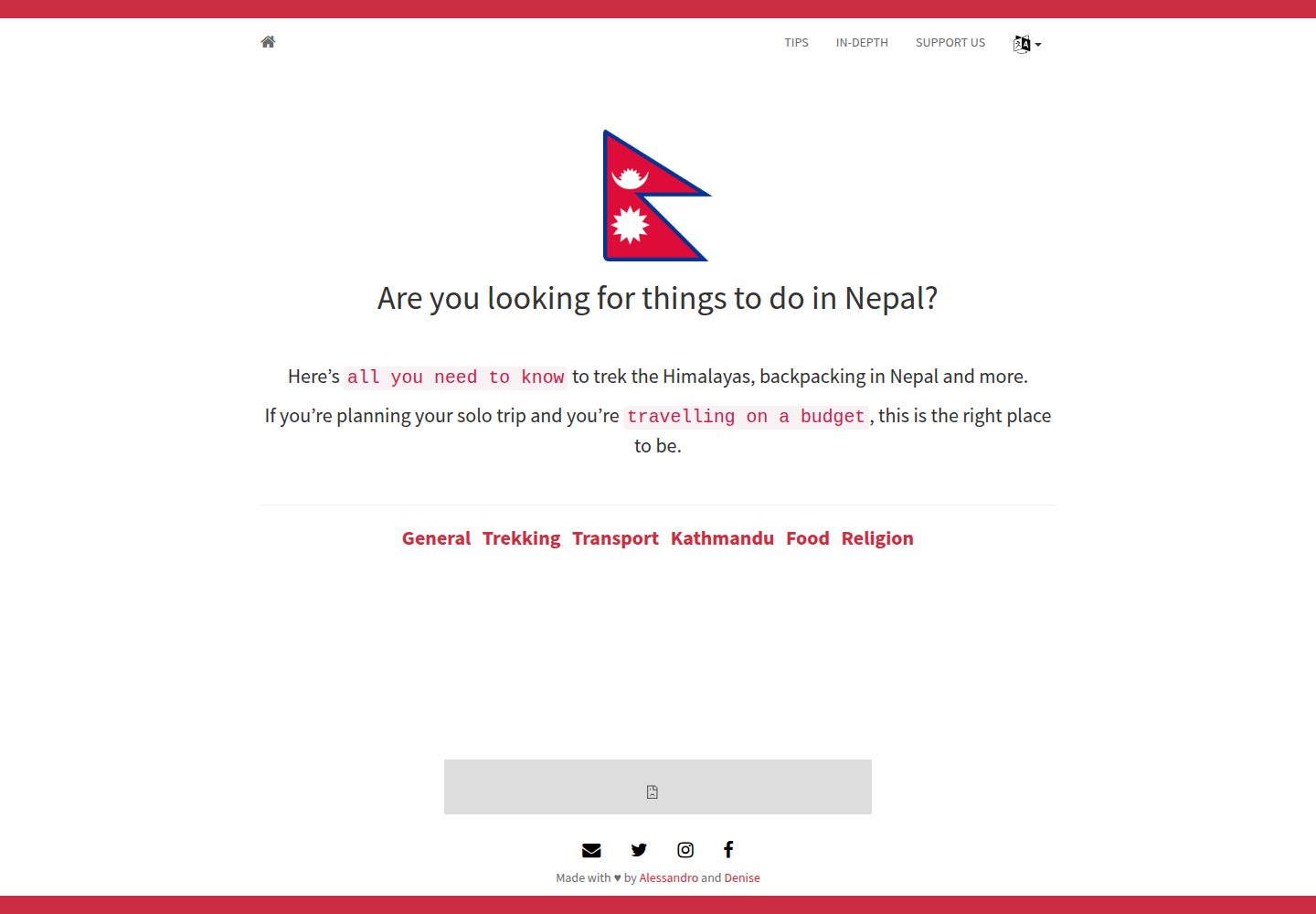
派生自 nurlansu/hugo-sustain,使用 Bootstrap 构建的旅行博客主题
HugoHTML博客企业官网
hugo-sustain-aynk — Hugo 博客模板
作者 altrdev
基于 Hugo 与 Bootstrap 的旅行博客主题,是 nurlansu/hugo-sustain 的衍生版本,面向旅行攻略与博客内容,内置地图、图片、分类提示等短代码,并支持评论、统计与联盟广告配置。
看看你的网站会是什么样
浏览真实页面截图,比较内容排版与手机效果。点击下方缩略图切换,放大查看整页细节。
全部页面与视图 2
截图用于了解视觉与布局,交互效果请以实际项目为准。
采集于 2026-10-11查看来源
值得关注的模板亮点
从已有项目资料中,快速了解它的特点。
提供列表、扩展列表、攻略(tips)、单页与博客文章五种内容形态
内置 leaflet 地图、bundle-image 图片、tips-category 分类列表短代码
可通过 front matter 开关 highlight.js 语法高亮
支持 Disqus 评论、Google Analytics、Amazon 联盟与 Ko-fi 捐赠配置
支持多语言,用 translationKey 关联不同语言下文件名不同的页面
模板详细介绍
hugo-sustain-aynk 是一个 Hugo 主题,仓库描述为「使用 Bootstrap 构建的旅行博客与攻略主题」。它派生自 nurlansu 的 Hugo 主题 Sustain,在原有结构上增加了面向旅行内容的功能。主题提供四种内容形态:列表页(自动按文件夹生成)、扩展列表页(layout: list-expanded)、攻略页(layout: tips,正文数据放在 data/<语言>/tips 目录)以及单页;在单页 front matter 中设置 blog: true 即可转为博客文章,附带 Disqus 评论与相关文章区块。
主题内置若干短代码:leaflet 用于在页面中插入地图,bundle-image 用于插入图片并支持 alt 与 caption,tips-category 用于输出某一攻略页的分类列表。语法高亮通过 front matter 的 highlight = true 引入 highlight.js 的 JS 与 CSS。站点级功能在 config.toml 中配置:Disqus 短名、Google Analytics 跟踪 ID、Amazon onelink 实例 ID、Amazon 广告位(桌面与移动横幅,本地运行时显示占位横幅)以及 Ko-fi 捐赠提示。
主题支持多语言,通过 translationKey 关联不同语言下文件名不同的页面。front matter 字段包括 date、author、authorLink、title、description、tags、categories、blog、highlight、image、markup、translationKey、draft 等;作者信息可在 config.toml 的 params 下预定义,authorLink 引用其中的键。
使用限制方面:仓库未提供依赖清单,无法核对 Bootstrap 或 Hugo 的具体版本;主题最后更新于 2022 年,README 中推荐使用 blackfriday 作为 markup 格式,该渲染器在较新的 Hugo 版本中已非默认选项,迁移时需留意。演示站点中的图片、字体、图标等第三方素材需按各自许可单独核对。
HugoHTML博客企业官网
适合你的项目吗?
适用场景
- 搭建以旅行攻略与目的地介绍为主的个人博客
- 在文章中嵌入地图标注行程或地点
- 为攻略内容按分类整理并集中展示
- 通过 Disqus 与读者互动,并用 Google Analytics 查看访问情况
- 在博客中接入 Amazon 联盟广告或 Ko-fi 捐赠入口
适合人群
- 使用 Hugo 生成静态站点、需要旅行类博客主题的开发者
- 希望用短代码在正文中插入地图与图片的写作者
- 需要多语言内容并希望按语言组织攻略数据的站点
- 接受通过 config.toml 配置评论、统计与广告的站点维护者
上手与定制指南
结合仓库当前版本的说明,按下面的资料检查内容、配置与运行要求。
- 1
在 Hugo 站点根目录的 themes 下克隆或添加子模块:git clone https://github.com/altrdev/hugo-sustain-aynk.git hugo-sustain-aynk,也可下载 zip 解压后放入 themes 目录
- 2
运行 hugo serve 后访问 localhost:1313 查看主题效果
- 3
攻略页需将内容数据放在 data/<语言>/tips 目录,并在 front matter 中设置 layout: tips
- 4
在 config.toml 中按需填写 disqusShortname、googleAnalytics、amazon_onelink、amazon_ads、kofi 等参数
- 5
仓库未提供依赖清单,使用前请自行确认与当前 Hugo 版本的兼容性,尤其是 front matter 中 markup 字段的取值
授权与来源资料
使用条件与限制
免费使用 · 保留许可声明本次收录的是公开仓库中采用 MIT 许可的免费版本;免费范围为该版本代码,不代表外部服务或第三方素材免费。
使用时需要遵守
- 允许免费使用、修改、商用和分发该版本代码。
- 分发代码副本或实质性部分时,保留原作者版权声明和完整 MIT 许可声明。
- 代码按现状提供;担保与责任限制以原许可证及适用法律为准。
额外费用与待核对事项
- 演示图片、字体、图标及其他第三方素材需按各自许可核对,不能仅凭代码的 MIT 许可判断。
- 域名、托管、数据库、支付或 AI 等外部服务可能另外收费。
- 使用 Disqus 评论功能需在 config.toml 中取消注释并填写 disqusShortname,即依赖第三方 Disqus 服务。
- 启用 Google Analytics 需先注册 Google Analytics 账号获取跟踪 ID,并填入 config.toml 的 googleAnalytics 参数,属于外部服务依赖。
- 使用 Amazon onelink 需为 Amazon 联盟成员并提供实例 ID,填入 config.toml 的 amazon_onelink 参数。
- 使用 Amazon 广告横幅需在 config.toml 中配置 amazon_ads 参数,依赖 Amazon 广告服务。
- 添加 Ko-fi 捐赠提示需在 config.toml 中填写 kofi 参数(Ko-fi 账号 ID),依赖 Ko-fi 外部服务。
- leaflet 地图短代码依赖外部项目 hugo-leaflet,需另行获取该组件。
- README 推荐使用 blackfriday 作为内容格式,该渲染器在较新 Hugo 版本中已非默认,迁移时需注意兼容性。
查看原文依据
Permission is hereby granted, free of charge
许可证原文
To use this feature, uncomment and fill out the `disqusShortname` parameter in `config.toml`.
README 原文
To add Google Analytics, simply sign up to [Google Analytics][g-analytics] to obtain your Google Tracking ID, and add this tracking ID to the `googleAnalytics` parameter in `config.toml`.
README 原文
If you are an amazon affiliate and do you want using onelink, add you instance ID to the `amazon_onelink` parameter in `config.toml`.
README 原文
For use Amazon adv To add amazon banners, set the `amazon_ads` parameter in `config.toml` like this:
README 原文
You can add a donation message after a blog post. Fill out the `kofi` parameter in `config.toml` with your ko-fi id.
README 原文
`leaflet-[map-marker-track]`: you can insert a map on a page. Other info [here][leaflet-shortcode]
README 原文
https://github.com/altrdev/hugo-sustain-aynk/blob/master/LICENSE.mdhttps://github.com/altrdev/hugo-sustain-aynk/blob/master/README.md`markup`: content format; using `blackfriday` is recommended
README 原文
DeepSeek 根据仓库许可证和 README 整理 ·2026-10-11。结果仅覆盖已读取资料,依赖、图片、字体及后续条款变更以各自原文为准。
项目核对记录与介绍依据
模板资料
- 来源平台
- GitHub
- 资料与维护参考分
- 资料一般 · 70 / 100
- 技术栈
- Hugo · HTML
- 网站类型
- 博客 · 企业官网
这个分数如何计算
本站按许可资料(最高30分)、演示链接(12分)、预览图(10分)、Star数(15分)、记录的维护时间(15分)、描述完整度(8分)、功能记录(5分)和分类资料(5分)计算。它不是代码、安全或性能测试,也不是 Google 评分;有链接不代表已实测可用。
这个项目需要核对什么
- 记录的仓库更新时间
- 2022-11-04
- 截图检查日期
- 2026-10-11
已收录演示链接。请用你的内容与屏幕尺寸检查;有演示不代表表单、认证或支付已经可用。
目录记录的主要技术栈是 Hugo。请通过依赖清单和锁文件核对实际版本与托管要求。这些说明基于收录资料,不代表代码审计或部署实测。
查看具体选型方法 →介绍的制作与核对状态
介绍由 AI 辅助整理目录与仓库资料。仓库作者不等于这篇介绍的审核者。
审核声明: [email protected] · 2026-10-13
查看当时使用的来源资料
SHA-256: 6ac69daafcdd4c11d13ae340db2d9e125db5deaa66479db4d85d054475cb7d0d
2026-10-11T19:19:29.382Z
来源文件 / 仓库## Table of Contents
- [Table of Contents](#table-of-contents)
- [Installation](#installation)
- [With `git`](#with-git)
- [Manual](#manual)
- [Contents](#contents)
- [List](#list)
- [Tips](#tips)
- [Single page](#single-page)
- [Blog post](#blog-post)
- [Features](#features)
- [Shortcodes](#shortcodes)
- [Syntax highlighting](#syntax-highlighting)
- [Disqus](#disqus)
- [Google Analytics](#google-analytics)
- [Amazon onelink](#amazon-onelink)
- [Amazon adv](#amazon-adv)
- [Ko-fi](#ko-fi)
- [Front matter](#front-matter)
- [About](#about)
- [License](#license)
## Installation
#### With `git`
From the root of your Hugo site, clone the theme into `themes/hugo-sustain-aynk` by running :
```
cd themes/
git clone https://github.com/altrdev/hugo-sustain-aynk.git hugo-sustain-aynk
```
Or use submodule:
```
cd themes/
git submodule add https://github.com/altrdev/hugo-sustain-aynk.git
```
#### Manual
1. [Download][zip-archive] zip archive.
2. Unarchive it.
3. Move `hugo-sustain-aynk` folder in `themes` folder of your blog
Hugo includes a development server, so you can view your changes as you go -
very handy. Spin it up with the following command:
``` sh
hugo serve
```
Now you can go to [localhost:1313][local] and the Sustain
theme should be visible.
## Contents
You can write four types of contents: `List`, `Tips`, `Blog post` or `Single page`
### List
This is automatic content.
When you create a folder under `it` or `en` a page is generated with a list of the elements contained in the folder.
You can customize a `front matter` creating an `_index.md` page in the folder.
### List expanded
Is equivalent to `list`, but listing is more detailed.
For using it, you must set `layout: list-expanded` in a `_index.md` front matter.
### Tips
This is a special template.
You must putting in `data/en/tips` or `data/it/tips` folder the real content.
For using this special template, you must set `layout: tips` in your `front matter`.
Examples in `content/en/tips.md` or `content/it/consigli.md`.
Format `data` content like this:
```yaml
name: General
source:
- icon: fa fa-flag
number: 0
description: Example 1
- icon: fa fa-money
number: 1
description: Example 2
```
### Single page
This is a standard template if you don't specify any `layout:` in a `front matter`.
Is a simple white page and you can find examples in `content/en/donate.md` or `content/it/donazioni.md`.
### Blog post
Is a single page template with additions.
You must set `blog: true` in a `front matter` for transform your default page.
Blog post adds `Disqus` comments and related post section.
## Features
### Shortcodes
Some `shortcodes` are available:
+ leaflet
+ bundle-image
+ tips-category
`leaflet-[map-marker-track]`: you can insert a map on a page. Other info [here][leaflet-shortcode]
`bundle-image`: you can insert an image on a page
```js
{{< bundle-image name="name of image in a media folder" alt="alt description" caption="caption description" >}}
```
`tips-category`: print a list of category tips
```js
{{< tips-category "page_name.md" >}}
```
You can also use default hugo shortcodes like:
`ref`: you can linking another page
```js
[Link name]({{< ref "page_name.md" >}})
[Link name]({{< ref "page_name.md#anchor" >}})
```
### Syntax highlighting
Use `highlight = true` in the front matter to include [`highlight.js`][highlight-js] javascript and css files.
### Disqus
To use this feature, uncomment and fill out the `disqusShortname` parameter in `config.toml`.
### Google Analytics
To add Google Analytics, simply sign up to [Google Analytics][g-analytics] to obtain your Google Tracking ID, and add this tracking ID to the `googleAnalytics` parameter in `config.toml`.
### Amazon onelink
If you are an amazon affiliate and do you want using onelink, add you instance ID to the `amazon_onelink` parameter in `config.toml`.
### Amazon adv
For use Amazon adv
To add amazon banners, set the `amazon_ads` parameter in `config.toml` like this:
```toml
[params.amazon_ads]
desktopBanner = "https://rcm-eu.amazon-adsystem.com/..."
mobileBanner = "https://rcm-eu.amazon-adsystem.com/..."
```
If you serve Hugo in localhost, fake banner appear.
### Ko-fi
You can add a donation message after a blog post. Fill out the `kofi` parameter in `config.toml` with your ko-fi id.
## Front matter
`Front matter` example:
```yaml
---
date: 2020-02-11
author: Alessandro
authorLink: Twitter
title: "My Blog Post"
description: "My Blog Post description"
tags: [ keyword 1, keyword 2, keyword 3 ]
categories: [ mycategory ]
blog: true
highlight: true
image: media/my-image.jpg
markup: blackfriday
translationKey: my-article
---
```
`date`: file date
`author`: name of author. You can insert a new name or linking one already set in a `config.toml`. For linking start with this example:
```toml
[params.authorOne]
name = "Alessandro"
fullName = "Alessandro Travi"
Website = "https://altr.dev"
Twitter = "https://twitter.com/altrdev"
Instagram = "https://www.instagram.com/alessandro.travi/"
```
In this case, the value is `One`. You must specify the word after `author`
`authorLink`: social link about author. Values must be a key under author params under `config.toml`. In the example above, you can specify `Website`, `Twitter`, `Instagram`
`title`: page title
`description`: page description
`tags`: keywords for a page
`categories`: page categories
`blog`: use if you want a page like a Blog Post
`highlight`: include `highlight.js` javascript and css files
`image`: main image for page. Useful for social sharing
`markup`: content format; using `blackfriday` is recommended
`translationKey`: linking multilanguage page with different name.
`draft`: specify draft content. **Accepted values**: `true`
## About
This is a fork of the Hugo theme [Sustain][sustain] by [Nurlan Su][sustain-author].
## License
<p>
<a href="./LICENSE.md"><img src="https://upload.wikimedia.org/wikipedia/commons/thumb/0/0c/MIT_logo.svg/642px-MIT_logo.svg.png" height="60px"></a>
</p>
[sustain]: https://github.com/nurlansu/hugo-sustain
[sustain-author]: https://github.com/nurlansu
[zip-archive]: https://github.com/altrdev/hugo-sustain-aynk/archive/master.zip
[local]: http://localhost:1313/
[highlight-js]: https://highlightjs.org/
[g-analytics]: https://www.google.com/analytics/
[leaflet-shortcode]: https://github.com/altrdev/hugo-leaflet
看看同类模板
对比同技术栈与用途的模板,找到更适合的视觉与内容结构。

hugo-PaperMod
PaperMod 是 Hugo 生态里知名度较高的主题之一,定位很明确:给博客和轻量作品集站点提供一套干净、响应式的阅读界面。
Hugo · 作品集

LoveIt
❤️A clean, elegant but advanced blog theme for Hugo 一个简洁、优雅且高效的 Hugo 主题
Hugo · 博客

hugo-coder
A minimalist blog theme for hugo.
Hugo · 博客

blowfish
Personal Website & Blog Theme for Hugo
Hugo · 博客

hugo-paper
🪺 A simple, clean, customizable Hugo theme
Hugo · 博客

hextra
Hextra 是一个 Hugo 主题,定位在文档站与博客之间:既提供侧边栏导航、目录、面包屑、分页这类文档站结构,也能承载博客内容。
Hugo · 文档