Implemented with pure HTML5, CSS3, and vanilla JavaScript, with no React, Vue, jQuery, or other framework dependencies
HTMLSaaSCorporate Website
neural-voice-ai — HTML SaaS Template
By AmiARMiess
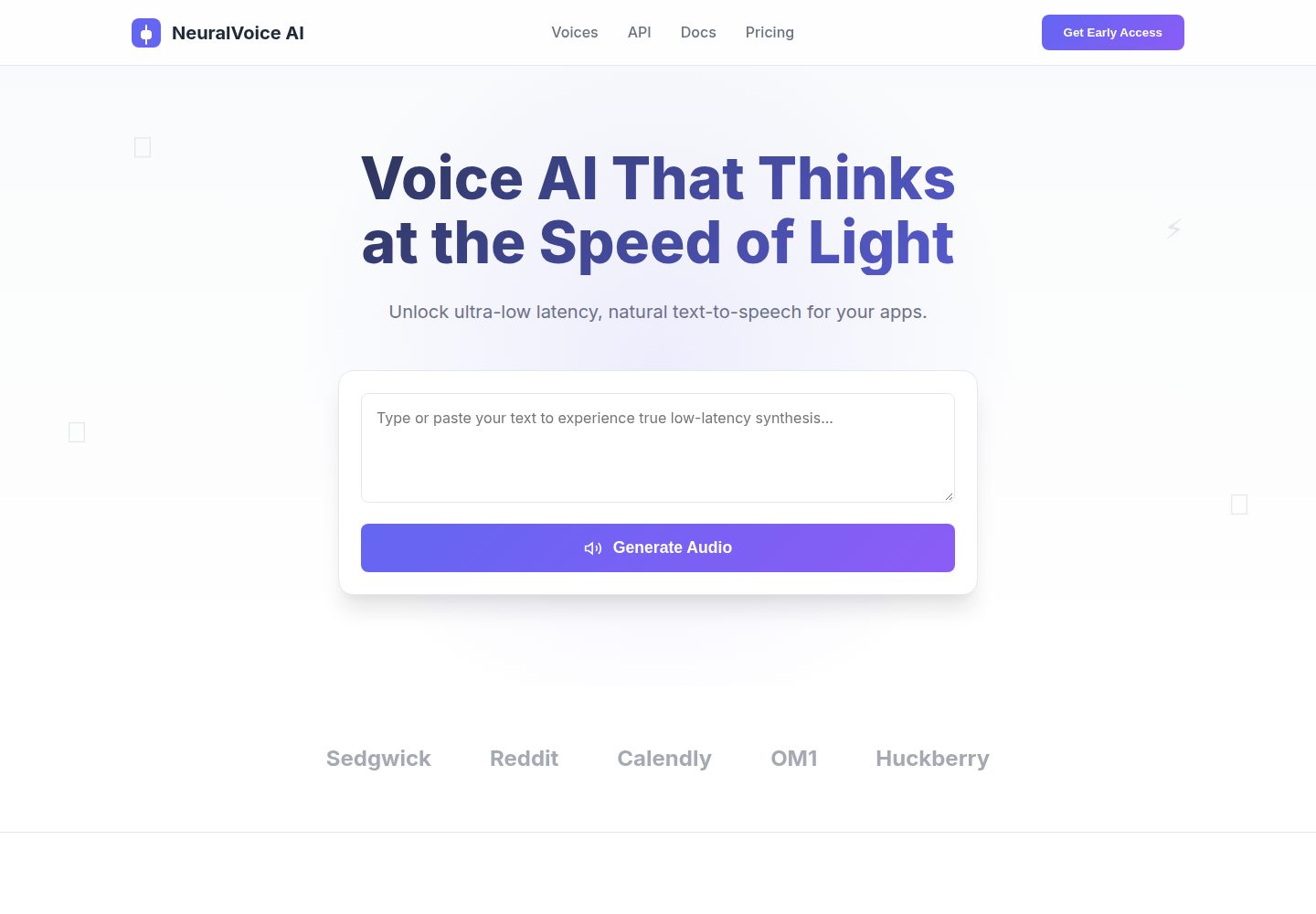
NeuralVoice AI is a pure HTML/CSS/JavaScript landing page template for voice AI and tech SaaS, featuring a monthly/yearly pricing toggle, an interactive demo interface, and CSS/JS charts.
Explore the design
Compare the page layouts and mobile experience. Open any screenshot for a closer look.
Desktop homepage1 / 2
Desktop captureTop of page
Actual screenshot captured by the server browser.
All pages & views 2
Screenshots show visual appearance; interactive behavior may differ.
Recorded 2026-10-02View source
What stands out
A quick read of the recorded project description.
Monthly/yearly pricing toggle with price transition animations and 20% discount logic
Includes interactive elements such as a text-to-speech demo interface, form validation, and toast notifications
Animated bar and line charts drawn with pure CSS/JS
Glassmorphism, gradients, and a responsive layout for desktop, tablet, and mobile
Theme colors managed centrally through CSS variables at the top of styles.css
Template Details
This template is published by AmiARMiess on GitHub under the MIT license. The code consists of only three files—index.html, styles.css, and script.js—and does not depend on frameworks such as React, Vue, or jQuery. The page is positioned as a product landing page for voice AI, SaaS, and tech startups, and includes glassmorphism effects, gradients, a responsive layout, and an interactive monthly/yearly pricing toggle with 20% discount logic and price transition animations. The README also mentions an available text-to-speech demo interface, form validation, toast notifications, and bar and line charts drawn with pure CSS/JS.
For usage and customization, the template requires no build tools or package manager; after cloning the repository, you can open index.html directly in a browser. Theme colors are centralized in the :root CSS variables at the top of styles.css. Pricing data is driven by the data-monthly and data-yearly attributes on .pricing-card; when changing them, you must also update the visible price text inside the card.
Limitations and notes: the repository provides no dependency manifest, so specific framework versions cannot be verified. Third-party assets such as demo images, fonts, and icons require separate license confirmation; the MIT license covers only the code itself. The text-to-speech and charts in the template are front-end demo interfaces, and the README does not explain how to connect a backend or a real AI service.
HTMLSaaSCorporate website
Is it right for your project?
Use Cases
- Building a marketing landing page for a voice AI or tech SaaS product
- Subscription product pages that need to present monthly/yearly pricing plans with a toggle
- Projects that want to quickly build a prototype with native HTML/CSS/JS without introducing a front-end framework
- As front-end practice or teaching material for referencing glassmorphism, CSS variables, and Intersection Observer usage
Suitable For
- Official websites or product pages for voice AI, SaaS, and tech startups
- Developers who prefer no build step and direct editing of HTML/CSS/JS
- Teams that need a static landing page template with quickly replaceable brand colors and pricing data
Getting started & customization
Use these recorded setup notes alongside the repository instructions for your chosen version.
- 1
No build tools or package manager are required; after cloning the repository, open index.html in a modern browser
- 2
To change brand colors, edit the CSS variables in :root at the top of styles.css
- 3
To adjust pricing, update both the data-monthly and data-yearly attributes on .pricing-card and the visible price text inside the card
- 4
Third-party assets such as demo images, fonts, and icons must be checked separately under their respective licenses
- 5
The text-to-speech and charts are front-end demo interfaces; connecting real services must be implemented separately
License & source material
Usage conditions & limitations
Free to use · keep license noticeThis entry covers the free version in a public repository under the MIT license; the free scope applies to that version's code and does not mean external services or third-party assets are free.
Must comply with when using
- You may use, modify, commercialize, and distribute this version's code for free.
- When distributing copies or substantial portions of the code, retain the original author's copyright notice and the full MIT license notice.
- The code is provided as is; warranties and limitations of liability are governed by the original license and applicable law.
Additional costs & items to verify
- Demo images, fonts, icons, and other third-party assets must be checked under their respective licenses and cannot be judged solely by the code's MIT license.
- External services such as domains, hosting, databases, payments, or AI may incur separate charges.
View Original Text Basis
https://github.com/AmiARMiess/neural-voice-ai/blob/main/LICENSEhttps://github.com/AmiARMiess/neural-voice-ai/blob/main/README.mdPermission is hereby granted, free of charge
Original License Text
Compiled by DeepSeek based on repository license and README ·2026-10-02. Results only cover the materials read; dependencies, images, fonts, and subsequent term changes are subject to their respective original texts.
Project checks & description sources
Template Information
- Source platforms
- GitHub
- Documentation and maintenance reference score
- More documented · 85 / 100
- Technologies
- HTML
- Website type
- SaaS · Corporate Website
How this score is calculated
Our heuristic uses license records (up to 30), a demo link (12), a preview (10), stars (15), recorded maintenance (15), description completeness (8), feature records (5) and classification data (5). It is not a code, security or performance test, or a Google score. A link does not establish tested functionality.
What to verify for this project
- Repository update recorded
- 2026-09-04
- Screenshot last checked
- 2026-10-02
A demo link is listed. Check it with your own content and viewport sizes; its presence does not confirm that forms, authentication or payments work.
The catalog identifies HTML as the primary stack. Check the actual dependency manifest and lockfile for versions and hosting requirements. These notes use recorded metadata, not a code audit or a deployment test.
Use a selection guide →How this description was prepared
AI-assisted description based on catalog records and repository material. Repository authors are not automatically the reviewers of this description.
Automatically checked against source and license rules; no manual editorial review.
Inspect the recorded source material
SHA-256: f88422f5b852c18c1f65d91f447761dced2629992a50061e792eb1beffd3cae0
2026-10-02T06:43:17.755Z
Source file / repository# ️ NeuralVoice AI - Modern SaaS Landing Page
A sleek, high-performance, and fully responsive landing page template designed for Voice AI, SaaS, and tech startups. Built from scratch using clean, modular HTML5, CSS3, and Vanilla JavaScript—no heavy frameworks required.
<img width="1349" height="4023" alt="image" src="https://github.com/user-attachments/assets/fdb57162-bdef-428d-b72e-a7171ec594f9" />
## ✨ Features
- **🎨 Modern UI/UX:** Clean design with glassmorphism effects, smooth gradients, and a professional layout.
- **📱 Fully Responsive:** Looks great on desktops, tablets, and mobile devices.
- **💰 Dynamic Pricing Toggle:** Interactive Monthly/Yearly billing switch with smooth price transition animations and a 20% discount logic.
- **⚡ Interactive Elements:** Working text-to-speech demo UI, form validation, and toast notifications.
- **📊 Data Visualization:** Animated bar and line charts built with pure CSS/JS.
- **🚫 Zero Dependencies:** Built entirely with Vanilla HTML, CSS, and JavaScript. No React, Vue, or jQuery needed!
## ️ Tech Stack
- **HTML5** (Semantic structure)
- **CSS3** (Custom properties, Flexbox, Grid, Animations)
- **Vanilla JavaScript** (DOM manipulation, Event listeners, Intersection Observer)
## 📁 Project Structure
```text
neural-voice-ai/
├── index.html # Main HTML structure
├── styles.css # All styling, animations, and responsive rules
├── script.js # Interactive logic, pricing toggle, and charts
├── .gitattributes # Git handling rules (line endings, GitHub stats)
└── README.md # Project documentation
```
## 🚀 Getting Started
Follow these simple steps to get the project running locally on your machine.
### Prerequisites
You don't need any complex build tools or package managers for this project. You only need:
* A modern web browser (Chrome, Firefox, Safari, etc.)
* A code editor (we recommend [Visual Studio Code](https://code.visualstudio.com/))
* [Git](https://git-scm.com/) (optional, if you want to clone the repository)
### Installation & Setup
**1. Clone the repository:**
Open your terminal or command prompt and run the following command:
```bash
git clone https://github.com/AmiARMiess/neural-voice-ai.git
cd neural-voice-ai
```
## 🎨 Customization
This template is designed to be easily customized without needing a build step or complex frameworks. Here is how you can make it your own:
### 1. Changing the Theme Colors
All primary colors are managed using CSS variables. To update the color scheme to match your brand, open `styles.css` and modify the `:root` section at the very top:
```css
:root {
--primary: #6366F1; /* Main brand color */
--primary-dark: #4F46E5; /* Darker shade for hover states */
--secondary: #8B5CF6; /* Secondary gradient color */
--accent: #EC4899; /* Accent color for highlights */
/* ... other variables */
}
```
### 2. Updating the Pricing
The interactive Monthly/Yearly pricing toggle is driven by custom data attributes in the HTML, which are then manipulated by the JavaScript. To update the prices for your own product, follow these steps:
1. Open the `index.html` file in your code editor.
2. Scroll down to the **Pricing** section and locate the `.pricing-card` elements.
3. Update the `data-monthly` and `data-yearly` attributes to reflect your desired prices.
4. **Important:** Also update the visible price text inside the `<div class="price">` tag to match your new monthly price.
Here is an example of what the code looks like:
```html
<!-- Example: Changing the Pro plan to $29/month and $24/month yearly -->
<div class="pricing-card featured" data-monthly="29" data-yearly="24">
<div class="badge">Most Popular</div>
<h3>Pro</h3>
<!-- Update the visible text here to match data-monthly -->
<div class="price">$29<span class="billing-period">/month</span></div>
<ul class="features-list">
<!-- Features list... -->
</ul>
<button class="btn-primary">Get Started</button>
</div>
```
How it works:
When a user clicks the toggle switch, the JavaScript reads the data-monthly and data-yearly attributes from the HTML and automatically animates the price change. If "Yearly" is selected, it will also automatically append a "Billed $XXX/year" note below the price.
Explore similar templates
Compare previews and descriptions within the same stack and category.

mazer
Mazer is a free and open-source Bootstrap 5 admin dashboard and landing page template that does not depend on jQuery. It provides prebuilt releases, source builds, and CDN inclusion, and includes dark mode, perfect-scrollbar, and ApexCharts examples.
HTML · Admin dashboard

Freelancer
A bright, single-page Bootstrap portfolio template for freelancers, designers, and small studios. It includes a responsive portfolio grid with modal detail windows and an SB Forms contact form that requires an API token.
HTML · Portfolio

Creative
A single-page marketing template by Start Bootstrap for creative agencies and product services, built on Bootstrap with SCSS, featuring a portfolio grid and call-to-action sections. It includes pre-set SB Forms markers for form integration and npm build scripts for source customization.
HTML · Corporate Website

startbootstrap-agency
Agency is a one-page Bootstrap portfolio theme from Start Bootstrap, MIT licensed. It includes a responsive portfolio grid with modal details and a preconfigured SB Forms contact form that requires an API token.
HTML · Corporate Website

startbootstrap-landing-page
A general-purpose Bootstrap landing page template from Start Bootstrap, MIT licensed, with a Pug/SCSS/npm build pipeline.
HTML · Corporate Website

Landing-Page
A general-purpose landing page HTML template maintained by Tailwind Toolbox, written in pure HTML and loading the complete Tailwind CSS via CDN.
HTML · Corporate Website