纯 HTML5、CSS3 与原生 JavaScript 实现,无 React、Vue、jQuery 等框架依赖
HTMLSaaS企业官网
neural-voice-ai — HTML SaaS模板
作者 AmiARMiess
NeuralVoice AI 是一个面向语音 AI 与科技类 SaaS 的纯 HTML/CSS/JavaScript 落地页模板,包含月付/年付定价切换、交互式演示界面与 CSS/JS 图表。
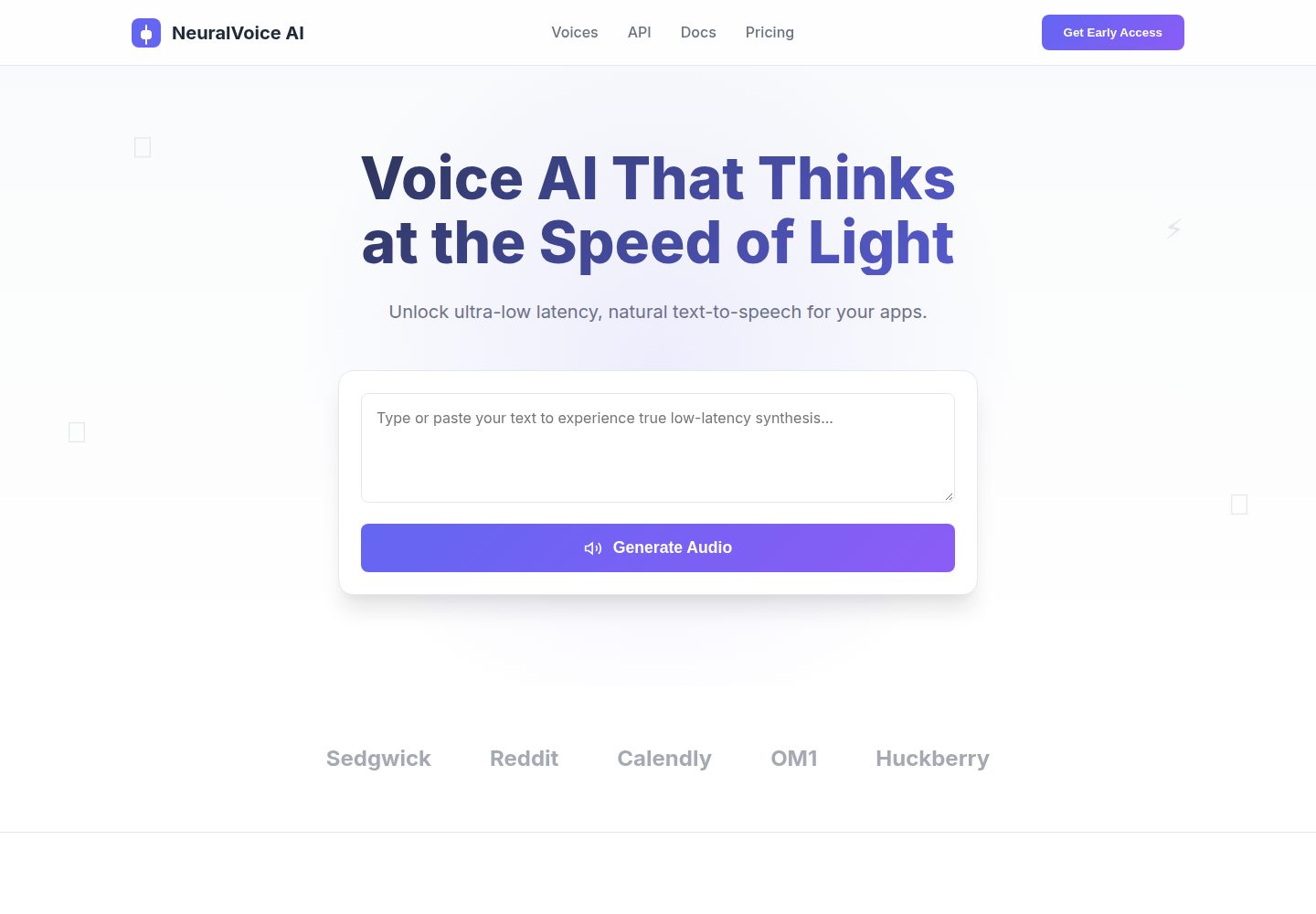
看看你的网站会是什么样
浏览真实页面截图,比较内容排版与手机效果。点击下方缩略图切换,放大查看整页细节。
全部页面与视图 2
截图用于了解视觉与布局,交互效果请以实际项目为准。
采集于 2026-10-02查看来源
值得关注的模板亮点
从已有项目资料中,快速了解它的特点。
月付/年付定价切换,带价格过渡动画与 20% 折扣逻辑
包含文字转语音演示界面、表单验证与提示通知等交互元素
用纯 CSS/JS 绘制动画柱状图与折线图
玻璃拟态、渐变与响应式布局,适配桌面、平板与手机
主题色通过 styles.css 顶部的 CSS 变量集中管理
模板详细介绍
该模板由 AmiARMiess 发布在 GitHub,采用 MIT 许可,代码仅由 index.html、styles.css、script.js 三个文件构成,不依赖 React、Vue 或 jQuery 等框架。页面定位为语音 AI、SaaS 与科技初创公司的产品落地页,包含玻璃拟态效果、渐变、响应式布局,以及可交互的月付/年付定价切换(含 20% 折扣逻辑与价格过渡动画)。README 还提到可用的文字转语音演示界面、表单验证、提示通知,以及用纯 CSS/JS 绘制的柱状图与折线图。
使用与定制方面,模板不需要构建工具或包管理器,克隆仓库后直接用浏览器打开 index.html 即可查看。主题色集中在 styles.css 顶部的 :root CSS 变量中;定价数据通过 .pricing-card 上的 data-monthly 与 data-yearly 属性驱动,修改时需同步更新卡片内可见的价格文本。
限制与注意事项:仓库未提供依赖清单,因此无法核对具体框架版本;演示图片、字体、图标等第三方素材需单独确认许可,MIT 许可仅覆盖代码本身。模板中的文字转语音与图表属于前端演示界面,README 未说明其后端或真实 AI 服务的接入方式。
HTMLSaaS企业官网
适合你的项目吗?
适用场景
- 为语音 AI 或科技类 SaaS 产品搭建营销落地页
- 需要展示月付/年付定价方案并支持切换的订阅制产品页面
- 希望用原生 HTML/CSS/JS 快速搭建原型、不引入前端框架的项目
- 作为前端练习或教学素材,参考玻璃拟态、CSS 变量与 Intersection Observer 的用法
适合人群
- 语音 AI、SaaS 与科技初创公司的官网或产品页
- 偏好无构建步骤、直接编辑 HTML/CSS/JS 的开发者
- 需要可快速替换品牌色与定价数据的静态落地页模板的团队
上手与定制指南
结合仓库当前版本的说明,按下面的资料检查内容、配置与运行要求。
- 1
无需构建工具或包管理器,克隆仓库后用现代浏览器打开 index.html 即可
- 2
修改品牌配色时编辑 styles.css 顶部 :root 中的 CSS 变量
- 3
调整定价需同时更新 .pricing-card 的 data-monthly、data-yearly 属性与卡片内可见价格文本
- 4
演示图片、字体、图标等第三方素材需按各自许可单独核对
- 5
文字转语音与图表为前端演示界面,接入真实服务需自行实现
授权与来源资料
使用条件与限制
免费使用 · 保留许可声明本次收录的是公开仓库中采用 MIT 许可的免费版本;免费范围为该版本代码,不代表外部服务或第三方素材免费。
使用时需要遵守
- 允许免费使用、修改、商用和分发该版本代码。
- 分发代码副本或实质性部分时,保留原作者版权声明和完整 MIT 许可声明。
- 代码按现状提供;担保与责任限制以原许可证及适用法律为准。
额外费用与待核对事项
- 演示图片、字体、图标及其他第三方素材需按各自许可核对,不能仅凭代码的 MIT 许可判断。
- 域名、托管、数据库、支付或 AI 等外部服务可能另外收费。
查看原文依据
https://github.com/AmiARMiess/neural-voice-ai/blob/main/LICENSEhttps://github.com/AmiARMiess/neural-voice-ai/blob/main/README.mdPermission is hereby granted, free of charge
许可证原文
DeepSeek 根据仓库许可证和 README 整理 ·2026-10-02。结果仅覆盖已读取资料,依赖、图片、字体及后续条款变更以各自原文为准。
项目核对记录与介绍依据
模板资料
- 来源平台
- GitHub
- 资料与维护参考分
- 资料较完整 · 85 / 100
- 技术栈
- HTML
- 网站类型
- SaaS · 企业官网
这个分数如何计算
本站按许可资料(最高30分)、演示链接(12分)、预览图(10分)、Star数(15分)、记录的维护时间(15分)、描述完整度(8分)、功能记录(5分)和分类资料(5分)计算。它不是代码、安全或性能测试,也不是 Google 评分;有链接不代表已实测可用。
这个项目需要核对什么
- 记录的仓库更新时间
- 2026-09-04
- 截图检查日期
- 2026-10-02
已收录演示链接。请用你的内容与屏幕尺寸检查;有演示不代表表单、认证或支付已经可用。
目录记录的主要技术栈是 HTML。请通过依赖清单和锁文件核对实际版本与托管要求。这些说明基于收录资料,不代表代码审计或部署实测。
查看具体选型方法 →介绍的制作与核对状态
介绍由 AI 辅助整理目录与仓库资料。仓库作者不等于这篇介绍的审核者。
已完成服务器许可规则与 AI 来源核对;未经过人工编辑审核。
查看当时使用的来源资料
SHA-256: f88422f5b852c18c1f65d91f447761dced2629992a50061e792eb1beffd3cae0
2026-10-02T06:43:17.755Z
来源文件 / 仓库# ️ NeuralVoice AI - Modern SaaS Landing Page
A sleek, high-performance, and fully responsive landing page template designed for Voice AI, SaaS, and tech startups. Built from scratch using clean, modular HTML5, CSS3, and Vanilla JavaScript—no heavy frameworks required.
<img width="1349" height="4023" alt="image" src="https://github.com/user-attachments/assets/fdb57162-bdef-428d-b72e-a7171ec594f9" />
## ✨ Features
- **🎨 Modern UI/UX:** Clean design with glassmorphism effects, smooth gradients, and a professional layout.
- **📱 Fully Responsive:** Looks great on desktops, tablets, and mobile devices.
- **💰 Dynamic Pricing Toggle:** Interactive Monthly/Yearly billing switch with smooth price transition animations and a 20% discount logic.
- **⚡ Interactive Elements:** Working text-to-speech demo UI, form validation, and toast notifications.
- **📊 Data Visualization:** Animated bar and line charts built with pure CSS/JS.
- **🚫 Zero Dependencies:** Built entirely with Vanilla HTML, CSS, and JavaScript. No React, Vue, or jQuery needed!
## ️ Tech Stack
- **HTML5** (Semantic structure)
- **CSS3** (Custom properties, Flexbox, Grid, Animations)
- **Vanilla JavaScript** (DOM manipulation, Event listeners, Intersection Observer)
## 📁 Project Structure
```text
neural-voice-ai/
├── index.html # Main HTML structure
├── styles.css # All styling, animations, and responsive rules
├── script.js # Interactive logic, pricing toggle, and charts
├── .gitattributes # Git handling rules (line endings, GitHub stats)
└── README.md # Project documentation
```
## 🚀 Getting Started
Follow these simple steps to get the project running locally on your machine.
### Prerequisites
You don't need any complex build tools or package managers for this project. You only need:
* A modern web browser (Chrome, Firefox, Safari, etc.)
* A code editor (we recommend [Visual Studio Code](https://code.visualstudio.com/))
* [Git](https://git-scm.com/) (optional, if you want to clone the repository)
### Installation & Setup
**1. Clone the repository:**
Open your terminal or command prompt and run the following command:
```bash
git clone https://github.com/AmiARMiess/neural-voice-ai.git
cd neural-voice-ai
```
## 🎨 Customization
This template is designed to be easily customized without needing a build step or complex frameworks. Here is how you can make it your own:
### 1. Changing the Theme Colors
All primary colors are managed using CSS variables. To update the color scheme to match your brand, open `styles.css` and modify the `:root` section at the very top:
```css
:root {
--primary: #6366F1; /* Main brand color */
--primary-dark: #4F46E5; /* Darker shade for hover states */
--secondary: #8B5CF6; /* Secondary gradient color */
--accent: #EC4899; /* Accent color for highlights */
/* ... other variables */
}
```
### 2. Updating the Pricing
The interactive Monthly/Yearly pricing toggle is driven by custom data attributes in the HTML, which are then manipulated by the JavaScript. To update the prices for your own product, follow these steps:
1. Open the `index.html` file in your code editor.
2. Scroll down to the **Pricing** section and locate the `.pricing-card` elements.
3. Update the `data-monthly` and `data-yearly` attributes to reflect your desired prices.
4. **Important:** Also update the visible price text inside the `<div class="price">` tag to match your new monthly price.
Here is an example of what the code looks like:
```html
<!-- Example: Changing the Pro plan to $29/month and $24/month yearly -->
<div class="pricing-card featured" data-monthly="29" data-yearly="24">
<div class="badge">Most Popular</div>
<h3>Pro</h3>
<!-- Update the visible text here to match data-monthly -->
<div class="price">$29<span class="billing-period">/month</span></div>
<ul class="features-list">
<!-- Features list... -->
</ul>
<button class="btn-primary">Get Started</button>
</div>
```
How it works:
When a user clicks the toggle switch, the JavaScript reads the data-monthly and data-yearly attributes from the HTML and automatically animates the price change. If "Yearly" is selected, it will also automatically append a "Billed $XXX/year" note below the price.
看看同类模板
对比同技术栈与用途的模板,找到更适合的视觉与内容结构。

mazer
Free and Open-source Bootstrap 5 Admin Dashboard Template and Landing Page
HTML · 后台

Freelancer
Freelancer 是 Start Bootstrap 出品的单页作品集模板,专为自由职业者、设计师和小型工作室设计。 页面结构清晰,包含多个内容区块、响应式作品集网格,每个作品项目配有模态窗口展示详情。
HTML · 作品集

Creative
Creative 是 Start Bootstrap 团队维护的一款单页营销模板,定位明确:为创意机构或产品服务提供一个以作品展示和行动号召为核心的落地页。
HTML · 企业官网

startbootstrap-agency
Agency 是 Start Bootstrap 维护的单页代理商作品集主题,基于 Bootstrap 构建,MIT 许可。
HTML · 企业官网

startbootstrap-landing-page
这是 Start Bootstrap 系列中一款通用型落地页模板,基于 Bootstrap 构建,定位是给产品或服务做单页推广。
HTML · 企业官网

Landing-Page
Tailwind CSS Starter Template - Landing Page
HTML · 企业官网