
基于 Bootstrap 5 构建,不依赖 jQuery
HTML后台企业官网
mazer — HTML 后台模板
作者 zuramai
Mazer 是基于 Bootstrap 5 的免费开源后台管理面板与落地页模板,不依赖 jQuery,提供现成构建版本、源码构建和 CDN 三种使用方式。
看看你的网站会是什么样
浏览真实页面截图,比较内容排版与手机效果。点击下方缩略图切换,放大查看整页细节。
全部页面与视图 2
截图用于了解视觉与布局,交互效果请以实际项目为准。
采集于 2026-10-01查看来源
值得关注的模板亮点
从已有项目资料中,快速了解它的特点。
同时提供后台管理面板与落地页两类页面
支持下载现成构建版本、源码构建与 jsDelivr CDN 引入三种方式
内置暗色模式脚本与 perfect-scrollbar 滚动条扩展
示例中集成 ApexCharts 用于图表展示
采用 MIT 许可,允许免费使用、修改、商用和分发
模板详细介绍
Mazer 是一个用 HTML 与 Bootstrap 5 构建的后台管理面板模板,同时附带落地页,采用 MIT 许可发布。它不依赖 jQuery,仓库中提供编译好的静态资源与示例页面,可直接打开 index HTML 文件查看源码结构。
使用方式有三种:下载 releases 中的现成构建版本;克隆仓库后用 yarn 或 npm 安装依赖并运行开发服务器;或通过 jsDelivr CDN 引入编译后的 CSS 与 JS 文件。README 中给出的 CDN 示例包含主题初始化脚本、暗色模式脚本、perfect-scrollbar 以及 ApexCharts 图表脚本。
模板本身是前端静态资源,不包含后端逻辑、数据库或接口实现。社区围绕它提供了 CodeIgniter 4、Laravel、Nuxt、React、AdonisJS、Django、Flask、Symfony、Spring-Thymeleaf、Ruby on Rails、Yii2、Next.js 等框架的适配版本,这些属于第三方项目,需单独查看各自仓库。
许可方面,代码采用 MIT,允许免费使用、修改、商用和分发,分发时需保留版权声明与许可声明。演示图片、字体、图标等第三方素材需按各自许可核对;域名、托管、数据库等外部服务可能另外收费。
HTML后台企业官网
适合你的项目吗?
适用场景
- 搭建后台管理系统的前端界面骨架
- 制作带数据展示页面的企业官网或落地页
- 在静态 HTML 项目中通过 CDN 快速引入后台样式与脚本
- 作为 CodeIgniter、Laravel、Django 等后端框架的模板基础
适合人群
- 需要 Bootstrap 5 后台界面且不希望引入 jQuery 的前端开发者
- 使用静态 HTML 或服务端模板渲染页面的项目
- 希望基于 MIT 许可自由修改和分发模板的团队
- 需要同时覆盖后台面板与落地页的站点
上手与定制指南
结合仓库当前版本的说明,按下面的资料检查内容、配置与运行要求。
- 1
推荐从 releases 页面下载现成构建版本,直接打开 index HTML 文件查看源码
- 2
自行构建需克隆仓库后执行 yarn install 或 npm install,再运行 npm run dev,默认访问 http://localhost:5173
- 3
也可用 Docker 构建镜像并映射到 5173 端口运行
- 4
CDN 方式需按 README 示例引入 app.css、app-dark.css、iconly.css 及对应 JS 文件
- 5
演示中的图片、字体、图标等第三方素材需单独核对其许可,代码的 MIT 许可不覆盖这些内容
授权与来源资料
使用条件与限制
免费使用 · 保留许可声明本次收录的是公开仓库中采用 MIT 许可的免费版本;免费范围为该版本代码,不代表外部服务或第三方素材免费。
使用时需要遵守
- 允许免费使用、修改、商用和分发该版本代码。
- 分发代码副本或实质性部分时,保留原作者版权声明和完整 MIT 许可声明。
- 代码按现状提供;担保与责任限制以原许可证及适用法律为准。
额外费用与待核对事项
- 演示图片、字体、图标及其他第三方素材需按各自许可核对,不能仅凭代码的 MIT 许可判断。
- 域名、托管、数据库、支付或 AI 等外部服务可能另外收费。
查看原文依据
https://github.com/zuramai/mazer/blob/main/LICENSEhttps://github.com/zuramai/mazer/blob/main/README.mdPermission is hereby granted, free of charge
许可证原文
DeepSeek 根据仓库许可证和 README 整理 ·2026-10-01。结果仅覆盖已读取资料,依赖、图片、字体及后续条款变更以各自原文为准。
项目核对记录与介绍依据
模板资料
- 来源平台
- GitHub
- 资料与维护参考分
- 资料较完整 · 94 / 100
- 技术栈
- HTML
- 网站类型
- 后台 · 企业官网
这个分数如何计算
本站按许可资料(最高30分)、演示链接(12分)、预览图(10分)、Star数(15分)、记录的维护时间(15分)、描述完整度(8分)、功能记录(5分)和分类资料(5分)计算。它不是代码、安全或性能测试,也不是 Google 评分;有链接不代表已实测可用。
这个项目需要核对什么
- 记录的仓库更新时间
- 2025-08-05
- 截图检查日期
- 2026-10-01
已收录演示链接。请用你的内容与屏幕尺寸检查;有演示不代表表单、认证或支付已经可用。
目录记录的主要技术栈是 HTML。请通过依赖清单和锁文件核对实际版本与托管要求。这些说明基于收录资料,不代表代码审计或部署实测。
查看具体选型方法 →介绍的制作与核对状态
介绍由 AI 辅助整理目录与仓库资料。仓库作者不等于这篇介绍的审核者。
已完成服务器许可规则与 AI 来源核对;未经过人工编辑审核。
查看当时使用的来源资料
SHA-256: b8973b626af6dfef2d4c0df8a519596af0391f77faff02d30fb34e0ede196fb6
2026-10-01T01:42:48.803Z
来源文件 / 仓库<h1 align="center">Mazer Dashboard</h1>
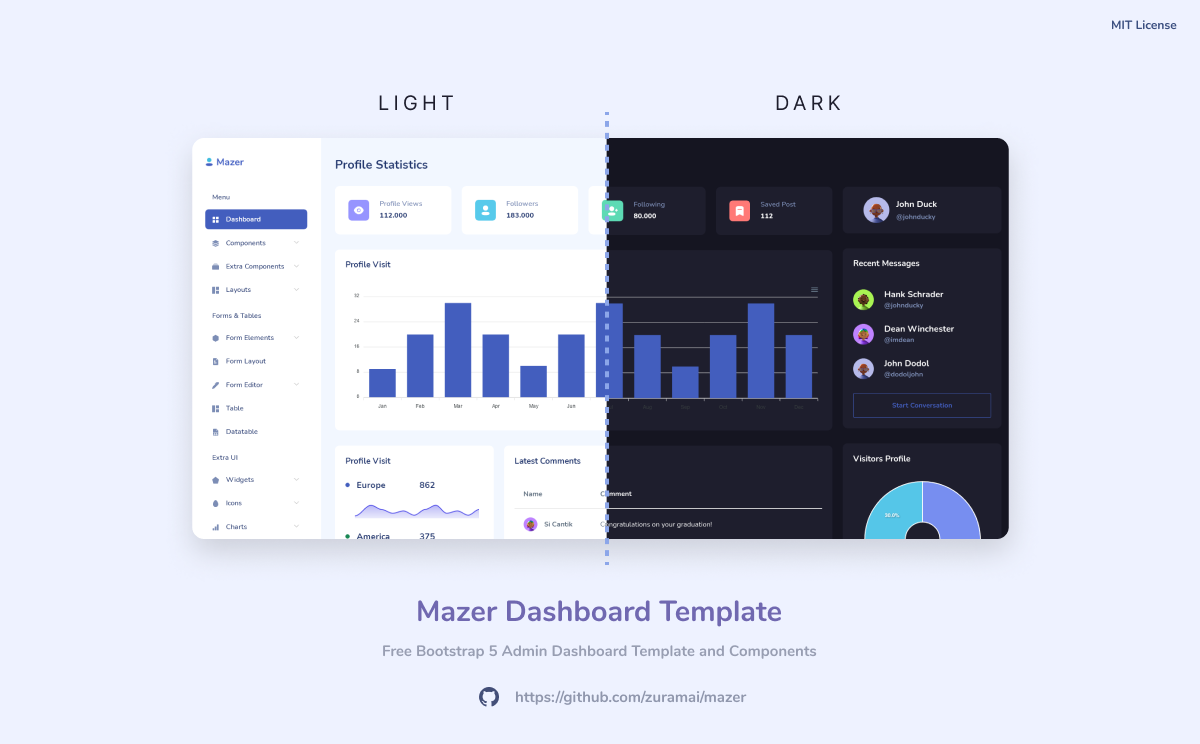
<p align="center">Mazer is an Admin Dashboard Template that can help you develop faster. Made with Bootstrap 5. No jQuery dependency.</p>
<div align="center">
[](https://github.com/zuramai/mazer/graphs/contributors)


[](LICENSE)
</div>
<p align="center">
<a href="http://zuramai.github.io/mazer/demo">Demo Page</a>
<a href="http://zuramai.github.io/mazer/docs">Documentation Page</a>
<a href="https://github.com/zuramai/mazer/blob/main/README_INDONESIAN.md">Indonesian README</a>
</p>
## Installation
### Using a ready-made built (recommended)
Download the latest release from the [releases page](https://github.com/zuramai/mazer/releases "releases page").
Open the index HTML file and explore the source code.
### Building yourself
1. Clone the repository
```sh
git clone https://github.com/zuramai/mazer
```
2. Install dependencies
```sh
yarn install
# OR
npm install
```
3. Run it locally
```sh
npm run dev
```
4. Open `http://localhost:5173` in your browser
### Building with Docker
- Clone the repository `git clone https://github.com/zuramai/mazer`
- Make sure you have Docker installed and run:
- `docker build -t mazer-frontend .`
- `docker run -it -d -p 5173:80 --name mazer mazer-frontend`
- Open `http://localhost:5173`
### Using CDN
Simple example using CDN from [jsdelivr.net](https://www.jsdelivr.com/).
```html
<!DOCTYPE html>
<html lang="en">
<head>
<meta charset="UTF-8">
<meta name="viewport" content="width=device-width, initial-scale=1.0">
<title>Dashboard - Mazer Admin Dashboard</title>
<link rel="shortcut icon" href="https://cdn.jsdelivr.net/gh/zuramai/mazer@docs/demo/assets/compiled/svg/favicon.svg" type="image/x-icon">
<link rel="stylesheet" href="https://cdn.jsdelivr.net/gh/zuramai/mazer@docs/demo/assets/compiled/css/app.css">
<link rel="stylesheet" href="https://cdn.jsdelivr.net/gh/zuramai/mazer@docs/demo/assets/compiled/css/app-dark.css">
<link rel="stylesheet" href="https://cdn.jsdelivr.net/gh/zuramai/mazer@docs/demo/assets/compiled/css/iconly.css">
</head>
<body>
<script src="https://cdn.jsdelivr.net/gh/zuramai/mazer@docs/demo/assets/static/js/initTheme.js"></script>
<!-- Start content here -->
<!-- End content -->
<script src="https://cdn.jsdelivr.net/gh/zuramai/mazer@docs/demo/assets/static/js/components/dark.js"></script>
<script src="https://cdn.jsdelivr.net/gh/zuramai/mazer@docs/demo/assets/extensions/perfect-scrollbar/perfect-scrollbar.min.js"></script>
<script src="https://cdn.jsdelivr.net/gh/zuramai/mazer@docs/demo/assets/compiled/js/app.js"></script>
<!-- Need: Apexcharts -->
<script src="https://cdn.jsdelivr.net/gh/zuramai/mazer@docs/demo/assets/extensions/apexcharts/apexcharts.min.js"></script>
<script src="https://cdn.jsdelivr.net/gh/zuramai/mazer@docs/demo/assets/static/js/pages/dashboard.js"></script>
</body>
</html>
```
#### CDN Prefix
You can use the url with a prefix like this:
```
https://cdn.jsdelivr.net/gh/zuramai/mazer@docs/demo
```
A simple example:
```
https://cdn.jsdelivr.net/gh/zuramai/mazer@docs/demo/assets/compiled/css/app.css
```
## Community Mazer-based open sources
- [CodeIgniter 4](https://github.com/irsyadulibad/mazer-codeigniter) by [@irsyadulibad](https://github.com/irsyadulibad)
- [Laravel Mazer Starter](https://github.com/billalxcode/laravel-mazer-starter) by [@billalxcode](https://github.com/billalxcode)
- [Nuxt](https://github.com/fzn0x/mazer-nuxt) by [@fzn0x](https://github.com/fzn0x)
- [React JS Component Library](https://github.com/fachryansyah/react-mazer-ui) by [@fachryansyah](https://github.com/fachryansyah/)
- [Adonisjs 5](https://github.com/afman42/mazer-adonisjs) by [@afman42](https://github.com/afman42/)
- [Django](https://github.com/bimbims125/mazer-django) by [@bimbims125](https://github.com/bimbims125/)
- [Flask](https://github.com/antheiz/mazer-flask) by [@antheiz](https://github.com/antheiz/)
- [Symfony 6.3 (Mazer 2.1.0)](https://github.com/TheoD02/mazer-symfony-6.3/tree/mazer-2.1.0) by [@theod02](ttps://github.com/TheoD02)
- [Spring-Thymeleaf](https://github.com/deyhay-enterprise/spring-project-mazer-template) by [@hi-rullah](https://github.com/hi-rullah)
- [Ruby on Rails](https://github.com/noesya/mazer-rails) by [@noesya](https://github.com/noesya)
- [Yii2](https://github.com/anovsiradj/yii2-theme-mazer) by [@anovsiradj](https://github.com/anovsiradj)
- [Next JS](https://github.com/dipras/next-mazer) by [@dipras](https://github.com/dipras)
- Did you make in another framework or tools? Open up Pull Requests and put yours here! 😃
## Contributing
Please follow [Contributing Guide](./CONTRIBUTING.md) before contributing.
## License
Mazer is under [MIT License](./LICENSE).
## Author
Mazer is created by <a href="https://saugi.me">Saugi</a>.
## Sponsors

看看同类模板
对比同技术栈与用途的模板,找到更适合的视觉与内容结构。

gentelella
Free admin dashboard template — vanilla JS, SCSS, Vite 8. No Bootstrap, no jQuery.
HTML · 后台

coreui-free-bootstrap-admin-template
Free Bootstrap Admin & Dashboard Template Built for AI-Assisted Development
HTML · 后台

dashboards
Responsive dashboard templates 📊✨
HTML · 后台

SB Admin 2
SB Admin 2 是 Start Bootstrap 推出的开源后台模板,基于 Bootstrap 构建,整体风格偏向经典管理界面。
HTML · 后台

Adminator-admin-dashboard
Adminator is easy to use and well design admin dashboard template with dark mode for web apps, websites, servi…
HTML · 后台

SB Admin
SB Admin 是 Start Bootstrap 推出的开源后台管理模板,基于 Bootstrap 构建,定位是简洁、实用的管理界面。
HTML · 后台