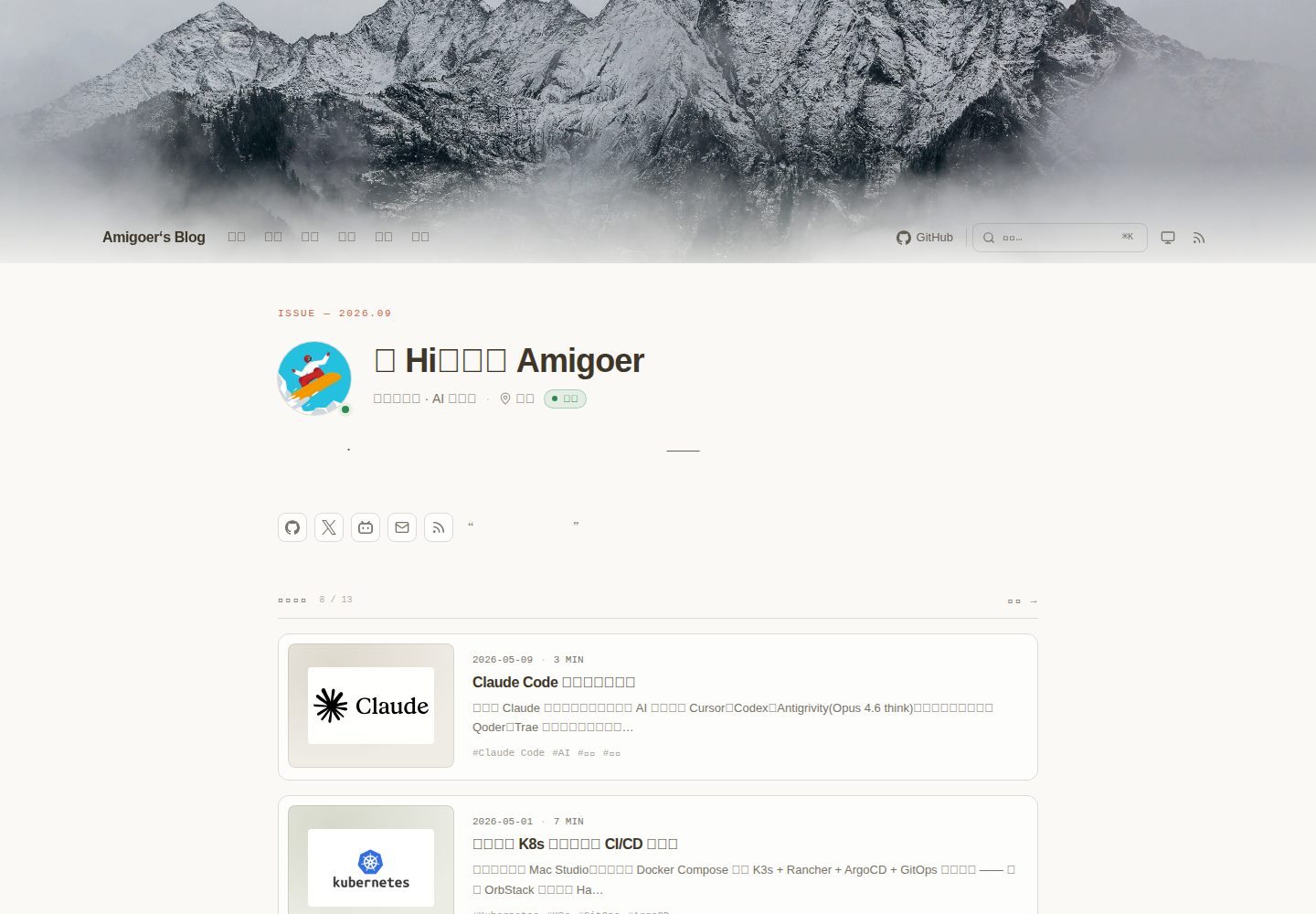
Magazine-style homepage: includes avatar, status tags, social row, and tagline, followed by a configurable feed of recent posts.
HugoBlog
almanac — Hugo Blog Template
By amigoer
Almanac is a minimal, content-rich Hugo personal homepage theme offering a magazine-style homepage, mixed feed, books/movies/projects shelves, friend links, search, and dark mode.
Explore the design
Compare the page layouts and mobile experience. Open any screenshot for a closer look.
Desktop homepage1 / 3
Desktop captureTop of page
Actual screenshot captured by the server browser.
All pages & views 3
Screenshots show visual appearance; interactive behavior may differ.
Recorded 2026-10-02View source
What stands out
A quick read of the recorded project description.
Built-in shelf sections: /projects/, /reading/, and /watching/ work out of the box; /douban/ aggregates books and movies with tab switching.
Moments micro-posts: supports plain text, 1/2–4/5–9 image grids, NetEase Cloud Music/Spotify, and Bilibili/YouTube embeds, grouped by day.
Friend links page: provides a categorized friend grid and a copyable personal info card.
Search and dark mode: a ⌘K command palette based on Pagefind, plus a system → light → dark cycle with persistence.
Card size system: each post can set cardSize to feature, standard, compact, or note, with automatic fallback when unset.
Template Details
Almanac is a personal hub theme built for Hugo, positioned to record traces of reading, watching, building, and writing. It provides a magazine-style homepage hero with an avatar, status tags, social links, and a tagline, followed by a configurable feed of recent posts. The theme includes three built-in shelf sections: /projects/, /reading/, and /watching/, while the /douban/ page aggregates books and movies with tab switching. It also includes a /moments/ micro-post stream supporting plain text, image grids (1, 2–4, 5–9 image layouts), NetEase Cloud Music/Spotify embeds, and Bilibili/YouTube video embeds, grouped by date. The friend links page /links/ offers a categorized friend grid and a copyable personal info card.
The theme compiles styles with Tailwind CSS, relies on Node.js to run the Tailwind CLI, and processes via Hugo's built-in css.TailwindCSS. Interactions are powered by Alpine.js, and search is implemented with Pagefind. Dark mode supports a system → light → dark cycle and persists via localStorage. Mobile navigation appears as a left drawer containing profile, navigation, links, and social entries.
The theme requires Hugo extended and needs buildStats and module mounts configured to support Tailwind class collection. The content structure has clear conventions: posts, projects, reading, watching, and moments each have corresponding frontmatter fields and status values. Social links are configured via params.socialIcons, supporting preset platforms and custom SVG icons. The theme's CSS variables are defined in assets/css/main.css and can be overridden to change the color scheme.
HugoBlog
Is it right for your project?
Use Cases
- Building a personal homepage to centrally display posts, projects, reading/watching records, and daily updates.
- Creating a content-rich blog with Hugo that needs a magazine-style homepage and multiple content card layouts.
- Maintaining personal reading, watching, and project lists and wanting them presented as shelves.
- Publishing short updates similar to WeChat Moments, with support for images, music, and video embeds.
- Showcasing friend links and making it easy for others to request link exchanges.
Suitable For
- Bloggers using Hugo who want a personal hub–style theme.
- Creators who need to integrate posts, projects, reading/watching, and micro-posts in one site.
- Users who like a minimal but content-dense editorial style and need dark mode and search.
- Front-end developers willing to use a Node.js and Tailwind CSS toolchain.
Getting started & customization
Use these recorded setup notes alongside the repository instructions for your chosen version.
- 1
Requires Hugo extended and adding the theme to themes/almanac via Git submodule, Hugo Module, or direct clone.
- 2
Requires Node.js and Tailwind CSS CLI (npm install --save-dev tailwindcss @tailwindcss/cli), because the theme's CSS is compiled by Hugo's built-in css.TailwindCSS.
- 3
Must enable buildStats and configure module mounts in hugo.toml, otherwise the build will stop or styles will not be generated.
- 4
Run the hugo command from the site root, as Tailwind depends on hugo_stats.json in the current directory.
- 5
Search requires additionally installing Pagefind; it is an optional dependency in the theme.
License & source material
Usage conditions & limitations
Free to use · keep license noticeThis entry covers the free version in a public repository under the MIT license; the free scope is the code of that version and does not mean external services or third-party assets are free.
Must comply with when using
- Free use, modification, commercial use, and distribution of this version's code are permitted.
- When distributing copies or substantial portions of the code, retain the original author's copyright notice and the full MIT license notice.
- The code is provided as is; warranties and limitations of liability are governed by the original license and applicable law.
Additional costs & items to verify
- Alpine.js is loaded from a CDN by default, so page interactions depend on external CDN resources; offline or when the CDN is unreachable, interactive features may fail, and you need to replace it with local resources yourself.
- Search is optional and requires additionally installing Pagefind and running npx pagefind --site public after building to generate the index; otherwise ⌘K search is unavailable.
- Comments depend on the third-party Waline service; you must deploy or configure the Waline server URL (params.waline.serverURL) to enable them, otherwise comments are unavailable.
- Style compilation depends on Node.js and Tailwind CSS CLI; you need to install tailwindcss and @tailwindcss/cli in the site, otherwise CSS cannot be generated.
- Must enable buildStats and configure module mounts in hugo.toml, otherwise the build will stop or styles will not be generated.
- Must run hugo from the site root, otherwise Tailwind cannot find hugo_stats.json and pages will be unstyled.
- Social icons use Simple Icons' CC0 icons, which are third-party resources whose license is independent of the theme's MIT license.
- Demo images, fonts, icons, and other third-party assets must be checked against their respective licenses; you cannot judge solely by the code's MIT license.
- External services such as domains, hosting, databases, payments, or AI may incur separate charges.
View Original Text Basis
Permission is hereby granted, free of charge
Original License Text
**Alpine.js** 3.x (loaded from a CDN, easily swappable)
Original README
**Pagefind** (optional, for search)
Original README
Almanac ships Waline integration. Set `params.waline.serverURL` in `hugo.toml` to enable comments on posts.
Original README
**Tailwind CSS** ≥ 4.1 via Hugo's [`css.TailwindCSS`](https://gohugo.io/functions/css/tailwindcss/) (needs Node.js)
Original README
`buildStats` is required (the build stops with a hint if it is off)
Original README
Run `hugo` from the site root: Tailwind looks for `hugo_stats.json` relative to the directory it starts in, so `hugo --source <dir>` from elsewhere renders unstyled pages.
Original README
https://github.com/amigoer/almanac/blob/main/LICENSEhttps://github.com/amigoer/almanac/blob/main/README.mdBrand marks are the CC0 glyphs from [Simple Icons](https://simpleicons.org);
Original README
Compiled by DeepSeek based on repository license and README ·2026-10-02. Results only cover the materials read; dependencies, images, fonts, and subsequent term changes are subject to their respective original texts.
Project checks & description sources
Template Information
- Source platforms
- GitHub
- Documentation and maintenance reference score
- More documented · 80 / 100
- Technologies
- Hugo
- Website type
- Blog
How this score is calculated
Our heuristic uses license records (up to 30), a demo link (12), a preview (10), stars (15), recorded maintenance (15), description completeness (8), feature records (5) and classification data (5). It is not a code, security or performance test, or a Google score. A link does not establish tested functionality.
What to verify for this project
- Repository update recorded
- 2026-09-27
- Screenshot last checked
- 2026-10-02
A demo link is listed. Check it with your own content and viewport sizes; its presence does not confirm that forms, authentication or payments work.
The catalog identifies Hugo as the primary stack. Check the actual dependency manifest and lockfile for versions and hosting requirements. These notes use recorded metadata, not a code audit or a deployment test.
Use a selection guide →How this description was prepared
AI-assisted description based on catalog records and repository material. Repository authors are not automatically the reviewers of this description.
Automatically checked against source and license rules; no manual editorial review.
Inspect the recorded source material
SHA-256: ba55bb20661d91682020ea0b6c8ae3840e02bf7af73fb3e8b2956d05f040b1f2
2026-10-02T06:40:32.817Z
Source file / repository<p align="center">
<img src="https://raw.githubusercontent.com/amigoer/almanac/main/images/readme-banner.svg" alt="Almanac" width="100%" />
</p>
> A minimal, content-rich personal hub theme for Hugo.
> Magazine-style hero · mixed feed · books / movies / projects shelves · friend links · search · dark mode.
<p align="center">
<a href="./README.zh-CN.md">简体中文</a> · <strong>English</strong>
</p>
An *almanac* is a yearly book — a record of dates, observations and small markers of the year past. This theme aims to be the same: a place to leave traces of what you read, watch, build and write.
---
## Highlights
- **Editorial homepage** — Magazine-style hero with avatar, status pill, social row and tagline; followed by a configurable "recent posts" feed.
- **Built-in shelves** — `/projects/`, `/reading/`, `/watching/` come ready-made; `/douban/` aggregates books + movies behind a tab switcher.
- **Moments** — `/moments/` is a WeChat-Moments-style micro stream: text-only thoughts, photo grids (1 / 2-4 / 5-9 layouts), NetEase Cloud / Spotify embeds, Bilibili / YouTube embeds, grouped by day.
- **Friend links** — `/links/` ships with a categorised friend grid plus a "my info" name-card people can copy when applying.
- **Mixed card system** — `cardSize: feature | standard | compact | note` per-post, with a smart automatic fallback when omitted.
- **Search** — Pagefind-powered ⌘K command palette out of the box.
- **Dark mode** — Single-button cycle (`system → light → dark`) with `localStorage` persistence; no flash on first paint.
- **Mobile drawer** — Profile + nav + links + social, all in a left-side sheet driven by Alpine.js.
- **RSS + a friendly `/feed/` HTML page** — Because Chrome blocks XSL on raw RSS responses anyway.
- **Light tooling** — Tailwind v4 compiled by Hugo's built-in `css.TailwindCSS`, Alpine.js for interactivity. No bundlers, no build step beyond `hugo`.
## Stack
- **Hugo** ≥ 0.128 (extended)
- **Tailwind CSS** ≥ 4.1 via Hugo's [`css.TailwindCSS`](https://gohugo.io/functions/css/tailwindcss/) (needs Node.js)
- **Alpine.js** 3.x (loaded from a CDN, easily swappable)
- **Pagefind** (optional, for search)
## Quick start
### 1. Add the theme
As a Git submodule (recommended):
```bash
cd your-hugo-site
git submodule add https://github.com/amigoer/almanac.git themes/almanac
```
Or as a Hugo Module (`go.mod`-based):
```bash
hugo mod init github.com/yourname/your-site
hugo mod get github.com/amigoer/almanac
```
Or just clone:
```bash
git clone https://github.com/amigoer/almanac.git themes/almanac
```
### 2. Install Tailwind CSS
The theme's CSS is compiled by Hugo's built-in [`css.TailwindCSS`](https://gohugo.io/functions/css/tailwindcss/), which runs the Tailwind CLI. Install it in your site (Node.js required):
```bash
npm install --save-dev tailwindcss @tailwindcss/cli
```
### 3. Configure `hugo.toml`
The fastest way is to copy `themes/almanac/exampleSite/hugo.toml` and edit. The minimum is:
```toml
baseURL = 'https://example.com/'
languageCode = 'zh-cn'
title = "Your Site"
theme = 'almanac' # 'github.com/amigoer/almanac' when installed as a Hugo Module
[params]
author = "Your Name"
description = "Your tagline."
avatar = "/images/avatar.png"
heroTitle = "Hi, I'm Your Name"
heroSubtitle = "Short paragraph about the site."
[[params.socialIcons]]
name = "github"
url = "https://github.com/yourname"
[build]
[build.buildStats]
enable = true
[[build.cachebusters]]
source = 'assets/notwatching/hugo_stats\.json'
target = 'css'
[module]
[[module.mounts]]
source = 'assets'
target = 'assets'
[[module.mounts]]
disableWatch = true
source = 'hugo_stats.json'
target = 'assets/notwatching/hugo_stats.json'
```
The `[build]` and `[module]` blocks are the standard Tailwind setup from the [Hugo docs](https://gohugo.io/functions/css/tailwindcss/). Hugo records every class in the rendered HTML to `hugo_stats.json`, and the theme compiles its CSS from that file after all pages are rendered, so it works the same whether the theme lives in `themes/` or in the module cache. `buildStats` is required (the build stops with a hint if it is off); the mount and cache buster rebuild the CSS under `hugo server` when you add new classes. Run `hugo` from the site root: Tailwind looks for `hugo_stats.json` relative to the directory it starts in, so `hugo --source <dir>` from elsewhere renders unstyled pages.
### 4. Run
```bash
hugo server --bind 0.0.0.0 --port 1313 --buildDrafts
```
Open `http://localhost:1313`.
## Site structure expected by the theme
```
content/
├── _index.md # Home (uses layouts/index.html)
├── about.md # layout: about
├── links.md # layout: links (data/links.yaml)
├── douban.md # layout: douban (aggregates reading + watching)
├── feed.md # layout: feed (RSS overview page)
├── posts/ # Articles
├── projects/ # GitHub-style project shelf
├── reading/ # Books
├── watching/ # Movies / shows
├── travel/ # (optional) travel notes
└── moments/ # (optional) Moments — micro stream
data/
└── links.yaml # Friend links source
static/
├── images/
│ ├── avatar.png
│ └── banner.webp # (optional) hero background
└── ...
```
See [`exampleSite/`](./exampleSite/) for a fully working scaffold.
## Per-section frontmatter
Almanac provides `archetypes/` for the four custom sections. After `theme = 'almanac'` is set, `hugo new posts/foo.md` will pick the right shape automatically.
| Section | Frontmatter (key fields) |
| ------------ | -------------------------------------------------------------- |
| `posts/` | `title`, `date`, `summary`, `cover`, `tags`, `cardSize?` |
| `projects/` | `title`, `date`, `status`, `summary`, `tech[]`, `repo`, `homepage?` |
| `reading/` | `title`, `date`, `status`, `author`, `cover`, `rating`, `summary` |
| `watching/` | `title`, `date`, `status`, `director`, `poster`, `rating`, `summary` |
| `moments/` | `date`, `mood?`, `location?`, `device?`, `images?[]`, `music?`, `video?`, `comments?` |
Status values:
- `projects`: `active` · `maintained` · `experimental` · `archived`
- `reading`: `reading` · `finished` · `wishlist` · `abandoned`
- `watching`: `watching` · `watched` · `wishlist` · `abandoned`
## Moments
`/moments/` is a WeChat-Moments-style micro stream where each entry is one markdown file (or page bundle).
The "Moments" nav link **appears automatically** when the section has at least one entry, and disappears otherwise.
Create one:
```bash
# Plain text · single file
hugo new moments/2026-04-30-coffee.md
# With images · use a page bundle so files live next to the post
mkdir -p content/moments/2026-04-30-walk
hugo new moments/2026-04-30-walk/index.md
cp ~/Pictures/*.jpg content/moments/2026-04-30-walk/
```
Frontmatter:
```yaml
---
date: 2026-04-30T10:00:00+08:00
mood: "☕️" # optional · emoji or short tag
location: "Hangzhou · Xixi" # optional
device: "MacBook Pro" # optional · "posted from" badge (free text, icon auto-detected)
images: # optional · file names inside the page bundle
- 1.jpg
- 2.jpg
music: # optional · NetEase Cloud / Spotify
platform: "163" # 163 | spotify
id: "1974443814"
type: "song" # song | playlist | album (163 only)
video: # optional · Bilibili / YouTube
platform: "bilibili" # bilibili | youtube
id: "BV1uv411q7Mv"
comments: true # optional, defaults to true (uses site Waline)
---
Body text supports Markdown.
```
**Image grid layout** (WeChat-style):
| Count | Layout |
| ----- | -------------- |
| 1 | Single hero |
| 2 / 4 | 2 columns |
| 3, 5–9 | 3 columns |
**`device` badge** appears at the top-right of the card with an auto-picked icon:
| Field contains | Icon |
| --- | --- |
| `iphone` / `android` / `phone` / `pixel` / `huawei` / `xiaomi` / `oneplus` | smartphone |
| `ipad` | tablet |
| `macbook` / `laptop` / `thinkpad` / `framework` | laptop |
| anything else (incl. `web` / custom strings) | monitor (fallback) |
**Shortcodes for embeds inline in the body** (useful for multi-media moments or media interleaved with text):
```text
{{</* music-163 id="2147051091" */>}}
{{</* music-163 id="123456" type="playlist" */>}}
{{</* video-bilibili id="BV1uv411q7Mv" */>}}
{{</* video-youtube id="dQw4w9WgXcQ" */>}}
```
## Customisation
### Card sizes
In a post's frontmatter, set `cardSize` to control how it appears in the homepage feed:
- `feature` — full-width hero card (cover image + title + summary)
- `standard` — wide cover + meta block
- `compact` — text-only with summary
- `note` — minimal one-liner
When omitted: posts with a `cover` get `standard`, otherwise `note`. Projects are always `note` unless overridden.
### Theme tokens
Brand color and surfaces are controlled by CSS variables defined in `assets/css/main.css` under `@theme inline { ... }`. Default palette is the shadcn "Claude" theme (cream + terracotta orange). Override in your own site's CSS to re-skin.
### Tailwind utilities not auto-detected
Tailwind only emits classes it can find. Almanac points it at `hugo_stats.json`, so every class in your rendered HTML is covered, including ones assembled from data such as `grid-cols-{{ $cols }}` and those in your own layouts. Classes that exist only at runtime (Alpine `:class` ternaries, markup built in JavaScript) never reach that file, so they are listed with `@source inline()` in `assets/css/main.css`; add yours there if you introduce new ones.
### Social links
Everything in the social row comes from `[[params.socialIcons]]`; nothing is
shown unless it is listed there, and the order in the config is the display
order. The same row appears on the home masthead, the about page (with labels)
and the mobile drawer.
```toml
[[params.socialIcons]]
name = "github" # preset: icon and label are built in
url = "https://github.com/yourname"
[[params.socialIcons]]
name = "wechat" # no profile URL: opens a card instead
qr = "/images/wechat-qr.png" # image under static/
id = "yourname" # optional, shown with a copy button
[[params.socialIcons]]
name = "portfolio" # a platform the theme does not know
label = "Portfolio"
icon = "icons/portfolio.svg" # assets/icons/portfolio.svg, or any built-in icon name
url = "https://example.com"
```
| Field | Meaning |
| --- | --- |
| `name` | Preset key or any name. Presets: `github`, `x`, `bilibili`, `xiaohongshu`, `wechat`, `zhihu`, `weibo`, `douyin`, `douban`, `juejin`, `gitee`, `csdn`, `youtube`, `tiktok`, `telegram`, `mastodon`, `bluesky`, `instagram`, `discord`, `threads`, `facebook`, `reddit`, `medium`, `stackoverflow`, `twitch`, `steam`, `mail`, `rss`. |
| `url` | Profile link. Leave it empty to hide the entry until you have one. |
| `label` | Display name; presets carry a localised default. |
| `icon` | Overrides the preset icon: a built-in icon name, or an SVG file looked up in `assets/` then `static/` and inlined. Draw the SVG with `currentColor` so it follows the theme. |
| `qr` / `id` / `hint` | An entry with `qr` and/or `id` but no `url` becomes a button that opens a card with the QR code, the account name (copyable) and a caption. |
| `hidden` | `true` keeps the entry in the config without rendering it. |
Brand marks are the CC0 glyphs from [Simple Icons](https://simpleicons.org);
platforms that project does not carry (LinkedIn, for one) work through
`icon` with your own SVG.
### Brand assets
The theme ships a set of SVG brand assets — drop-in defaults that your site can override.
| File | Where it lives | Purpose |
| ------------------------------------- | ------------------------------- | ----------------------------------------------------------------------- |
| `static/favicon.svg` | served at `/favicon.svg` | Main favicon · `currentColor`, auto-adapts to light/dark |
| `static/apple-touch-icon.svg` | served at `/apple-touch-icon.svg` | 180×180 iOS home-screen icon (terracotta tile) |
| `static/safari-pinned-tab.svg` | served at `/safari-pinned-tab.svg` | Safari pinned-tab mask icon · single-color |
| `static/og-image.svg` | served at `/og-image.svg` | 1200×630 social card · convert to PNG and set `params.ogImage` |
| `assets/icons/almanac.svg` | Hugo Pipes resource | Inline footer mark (small) |
| `assets/icons/logo-horizontal.svg` | Hugo Pipes resource | 240×60 horizontal logo · navigation / inline brand |
| `assets/icons/logo-stacked.svg` | Hugo Pipes resource | 200×140 stacked logo · hero / about |
| `assets/icons/wordmark.svg` | Hugo Pipes resource | Pure text wordmark |
| `images/readme-banner.svg` | repo only | 1280×400 GitHub README banner |
Favicon, apple-touch and pinned-tab links are wired in `layouts/partials/head.html`. Two ways to override:
1. **Drop in a file with the same name** under your site's `static/` — Hugo prefers project-level files over theme-level ones.
2. **Repoint via `hugo.toml`** if your file lives at a different path:
```toml
[params.icons]
favicon = "/favicon.svg" # SVG · currentColor, auto light/dark
faviconIco = "/favicon.ico" # legacy ICO fallback
appleTouchIcon = "/apple-touch-icon.svg" # iOS home screen
maskIcon = "/safari-pinned-tab.svg" # Safari pinned tab (single-color)
maskIconColor = "#c0764e" # mask-icon fill colour
```
Each key is optional — omit any to keep the theme default.
For Open Graph: convert `static/og-image.svg` to PNG (e.g. via [realfavicongenerator.net](https://realfavicongenerator.net/) or `rsvg-convert`) and set:
```toml
[params]
ogImage = "/og-image.png"
```
## Search
Pagefind powers the `⌘K` palette. After `hugo --gc --minify` produces `public/`, run:
```bash
npx pagefind --site public
```
The bundled `<script>` in `head.html` lazily loads `/pagefind/pagefind-ui.js` and binds `⌘K` / `Ctrl+K`.
## Comments
Almanac ships Waline integration. Set `params.waline.serverURL` in `hugo.toml` to enable comments on posts.
## Browser support
Modern evergreen browsers. Uses CSS `clamp()`, `:where()`, container queries-friendly markup. macOS overscroll bounce is themed by setting `html { background: hsl(var(--background)) }`.
## License
MIT © Amigoer
## Acknowledgements
- Visual language inspired by [shadcn/ui](https://ui.shadcn.com), Notion, and Linear.
- Tabular layout, mono labels and editorial feel borrowed from print magazines.
- The `cardSize` mental model owes a debt to feed-style readers like NetNewsWire.
Explore similar templates
Compare previews and descriptions within the same stack and category.

hugo-PaperMod
A fast, clean, responsive Hugo theme for blogs and lightweight portfolios, with three layout modes (Regular, Home-Info, Profile), automatic and manual light/dark themes, Fuse.js client-side search, multilingual support, and built-in Open Graph, Twitter Cards, and Schema.org data.
Hugo · Portfolio

LoveIt
LoveIt is a clean, elegant, and feature-rich Hugo blog theme derived from LeaveIt and KeepIt, MIT-licensed. It offers light/dark modes, responsive layout, multilingual support, and search via Lunr.js or Algolia.
Hugo · Blog

hugo-coder
hugo-coder is a minimalist Hugo blog theme maintained by luizdepra under the MIT license. It provides a clean, text-focused blog appearance, configuration documentation in the docs directory, and a complete exampleSite with hugo.toml.
Hugo · Blog

blowfish
Blowfish is a Hugo personal website and blog theme built with Tailwind CSS 4, focused on lightness, simplicity, and content-first presentation.
Hugo · Blog

hugo-paper
hugo-paper is a simple, clean, and customizable Hugo blog theme configured through config.toml or hugo.toml.
Hugo · Blog

hextra
Hextra is a Hugo theme for documentation and blog sites, built on Hugo and Tailwind CSS with design referencing Nextra.
Hugo · Documentation