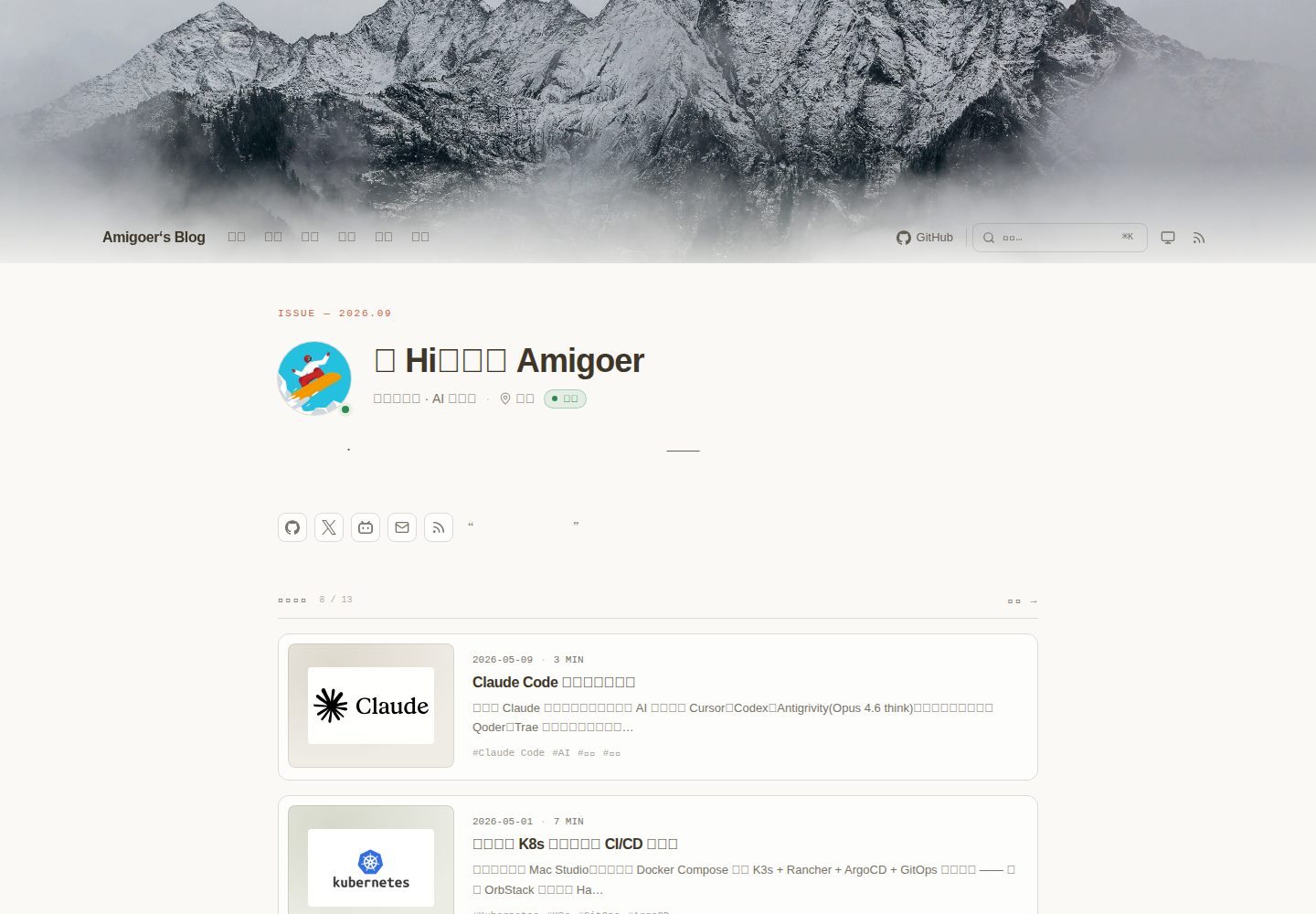
杂志风格首页:包含头像、状态标签、社交行和标语,下方是可配置的近期文章信息流。
Hugo博客
almanac — Hugo 博客模板
作者 amigoer
Almanac 是一个极简、内容丰富的 Hugo 个人主页主题,提供杂志式首页、混合信息流、书影音与项目书架、友链、搜索和深色模式。
看看你的网站会是什么样
浏览真实页面截图,比较内容排版与手机效果。点击下方缩略图切换,放大查看整页细节。
全部页面与视图 3
截图用于了解视觉与布局,交互效果请以实际项目为准。
采集于 2026-10-02查看来源
值得关注的模板亮点
从已有项目资料中,快速了解它的特点。
内置书架栏目:/projects/、/reading/、/watching/ 开箱即用,/douban/ 聚合书籍与电影并支持标签切换。
Moments 微动态:支持纯文本、1/2-4/5-9 张图片网格、网易云音乐/Spotify 和 Bilibili/YouTube 嵌入,按天分组。
友链页面:提供分类好友网格和可复制的个人信息名片。
搜索与深色模式:基于 Pagefind 的 ⌘K 命令面板,以及 system → light → dark 循环切换并持久化。
卡片尺寸系统:每篇文章可设置 cardSize 为 feature、standard、compact 或 note,未设置时自动回退。
模板详细介绍
Almanac 是一个为 Hugo 构建的个人中心主题,定位是记录阅读、观看、构建和写作的痕迹。它提供杂志风格的首页主视觉,包含头像、状态标签、社交链接和标语,下方是可配置的近期文章信息流。主题内置了 /projects/、/reading/、/watching/ 三个书架栏目,/douban/ 页面则通过标签切换聚合书籍与电影。此外还包含 /moments/ 微动态流,支持纯文本、图片网格(1、2-4、5-9 张布局)、网易云音乐/Spotify 嵌入以及 Bilibili/YouTube 视频嵌入,并按日期分组。友链页面 /links/ 提供分类好友网格和可复制的个人信息名片。
主题使用 Tailwind CSS 编译样式,依赖 Node.js 运行 Tailwind CLI,通过 Hugo 内置的 css.TailwindCSS 处理。交互由 Alpine.js 驱动,搜索功能基于 Pagefind 实现。深色模式支持 system → light → dark 循环切换,并利用 localStorage 持久化。移动端导航以左侧抽屉形式呈现,包含个人资料、导航、链接和社交入口。
主题要求 Hugo 扩展版,并需要配置 buildStats 和模块挂载以支持 Tailwind 的类名收集。内容结构有明确的约定,posts、projects、reading、watching、moments 各有对应的 frontmatter 字段和状态值。社交链接通过 params.socialIcons 配置,支持预设平台和自定义 SVG 图标。主题的 CSS 变量定义在 assets/css/main.css 中,可覆盖以更换配色。
Hugo博客
适合你的项目吗?
适用场景
- 搭建个人主页,集中展示文章、项目、书影音记录和日常动态。
- 用 Hugo 构建内容丰富的博客,需要杂志式首页和多种内容卡片布局。
- 维护个人阅读、观影和项目清单,并希望以书架形式呈现。
- 发布类似微信朋友圈的短动态,支持图片、音乐和视频嵌入。
- 展示友链并方便他人申请交换链接。
适合人群
- 使用 Hugo 并希望拥有个人中心型主题的博主。
- 需要在一个站点内整合文章、项目、书影音和微动态的创作者。
- 喜欢极简但内容密度高的编辑风格,并需要深色模式和搜索的用户。
- 愿意使用 Node.js 和 Tailwind CSS 工具链的前端开发者。
上手与定制指南
结合仓库当前版本的说明,按下面的资料检查内容、配置与运行要求。
- 1
需要 Hugo 扩展版,并通过 Git 子模块、Hugo Module 或直接克隆的方式将主题添加到 themes/almanac。
- 2
需要安装 Node.js 和 Tailwind CSS CLI(npm install --save-dev tailwindcss @tailwindcss/cli),因为主题的 CSS 由 Hugo 内置的 css.TailwindCSS 编译。
- 3
必须在 hugo.toml 中启用 buildStats 并配置模块挂载,否则构建会停止或样式无法生成。
- 4
运行 hugo 命令时需在站点根目录执行,Tailwind 依赖当前目录下的 hugo_stats.json。
- 5
搜索功能需要额外安装 Pagefind,主题中为可选依赖。
授权与来源资料
使用条件与限制
免费使用 · 保留许可声明本次收录的是公开仓库中采用 MIT 许可的免费版本;免费范围为该版本代码,不代表外部服务或第三方素材免费。
使用时需要遵守
- 允许免费使用、修改、商用和分发该版本代码。
- 分发代码副本或实质性部分时,保留原作者版权声明和完整 MIT 许可声明。
- 代码按现状提供;担保与责任限制以原许可证及适用法律为准。
额外费用与待核对事项
- Alpine.js 默认从 CDN 加载,页面交互依赖外部 CDN 资源;离线或无法访问 CDN 时交互功能可能失效,需自行替换为本地资源。
- 搜索功能为可选,需额外安装 Pagefind 并在构建后运行 npx pagefind --site public 生成索引,否则 ⌘K 搜索不可用。
- 评论功能依赖第三方 Waline 服务,需自行部署或配置 Waline 服务端地址(params.waline.serverURL)才能启用,否则评论不可用。
- 样式编译依赖 Node.js 与 Tailwind CSS CLI,需在站点中安装 tailwindcss 与 @tailwindcss/cli,否则 CSS 无法生成。
- 必须在 hugo.toml 中启用 buildStats 并配置模块挂载,否则构建会停止或样式无法生成。
- 必须在站点根目录运行 hugo,否则 Tailwind 找不到 hugo_stats.json,页面将无样式。
- 社交图标使用 Simple Icons 的 CC0 图标,属第三方资源,其许可与主题 MIT 许可相互独立。
- 演示图片、字体、图标及其他第三方素材需按各自许可核对,不能仅凭代码的 MIT 许可判断。
- 域名、托管、数据库、支付或 AI 等外部服务可能另外收费。
查看原文依据
Permission is hereby granted, free of charge
许可证原文
**Alpine.js** 3.x (loaded from a CDN, easily swappable)
README 原文
**Pagefind** (optional, for search)
README 原文
Almanac ships Waline integration. Set `params.waline.serverURL` in `hugo.toml` to enable comments on posts.
README 原文
**Tailwind CSS** ≥ 4.1 via Hugo's [`css.TailwindCSS`](https://gohugo.io/functions/css/tailwindcss/) (needs Node.js)
README 原文
`buildStats` is required (the build stops with a hint if it is off)
README 原文
Run `hugo` from the site root: Tailwind looks for `hugo_stats.json` relative to the directory it starts in, so `hugo --source <dir>` from elsewhere renders unstyled pages.
README 原文
https://github.com/amigoer/almanac/blob/main/LICENSEhttps://github.com/amigoer/almanac/blob/main/README.mdBrand marks are the CC0 glyphs from [Simple Icons](https://simpleicons.org);
README 原文
DeepSeek 根据仓库许可证和 README 整理 ·2026-10-02。结果仅覆盖已读取资料,依赖、图片、字体及后续条款变更以各自原文为准。
项目核对记录与介绍依据
模板资料
- 来源平台
- GitHub
- 资料与维护参考分
- 资料较完整 · 80 / 100
- 技术栈
- Hugo
- 网站类型
- 博客
这个分数如何计算
本站按许可资料(最高30分)、演示链接(12分)、预览图(10分)、Star数(15分)、记录的维护时间(15分)、描述完整度(8分)、功能记录(5分)和分类资料(5分)计算。它不是代码、安全或性能测试,也不是 Google 评分;有链接不代表已实测可用。
这个项目需要核对什么
- 记录的仓库更新时间
- 2026-09-27
- 截图检查日期
- 2026-10-02
已收录演示链接。请用你的内容与屏幕尺寸检查;有演示不代表表单、认证或支付已经可用。
目录记录的主要技术栈是 Hugo。请通过依赖清单和锁文件核对实际版本与托管要求。这些说明基于收录资料,不代表代码审计或部署实测。
查看具体选型方法 →介绍的制作与核对状态
介绍由 AI 辅助整理目录与仓库资料。仓库作者不等于这篇介绍的审核者。
已完成服务器许可规则与 AI 来源核对;未经过人工编辑审核。
查看当时使用的来源资料
SHA-256: ba55bb20661d91682020ea0b6c8ae3840e02bf7af73fb3e8b2956d05f040b1f2
2026-10-02T06:40:32.817Z
来源文件 / 仓库<p align="center">
<img src="https://raw.githubusercontent.com/amigoer/almanac/main/images/readme-banner.svg" alt="Almanac" width="100%" />
</p>
> A minimal, content-rich personal hub theme for Hugo.
> Magazine-style hero · mixed feed · books / movies / projects shelves · friend links · search · dark mode.
<p align="center">
<a href="./README.zh-CN.md">简体中文</a> · <strong>English</strong>
</p>
An *almanac* is a yearly book — a record of dates, observations and small markers of the year past. This theme aims to be the same: a place to leave traces of what you read, watch, build and write.
---
## Highlights
- **Editorial homepage** — Magazine-style hero with avatar, status pill, social row and tagline; followed by a configurable "recent posts" feed.
- **Built-in shelves** — `/projects/`, `/reading/`, `/watching/` come ready-made; `/douban/` aggregates books + movies behind a tab switcher.
- **Moments** — `/moments/` is a WeChat-Moments-style micro stream: text-only thoughts, photo grids (1 / 2-4 / 5-9 layouts), NetEase Cloud / Spotify embeds, Bilibili / YouTube embeds, grouped by day.
- **Friend links** — `/links/` ships with a categorised friend grid plus a "my info" name-card people can copy when applying.
- **Mixed card system** — `cardSize: feature | standard | compact | note` per-post, with a smart automatic fallback when omitted.
- **Search** — Pagefind-powered ⌘K command palette out of the box.
- **Dark mode** — Single-button cycle (`system → light → dark`) with `localStorage` persistence; no flash on first paint.
- **Mobile drawer** — Profile + nav + links + social, all in a left-side sheet driven by Alpine.js.
- **RSS + a friendly `/feed/` HTML page** — Because Chrome blocks XSL on raw RSS responses anyway.
- **Light tooling** — Tailwind v4 compiled by Hugo's built-in `css.TailwindCSS`, Alpine.js for interactivity. No bundlers, no build step beyond `hugo`.
## Stack
- **Hugo** ≥ 0.128 (extended)
- **Tailwind CSS** ≥ 4.1 via Hugo's [`css.TailwindCSS`](https://gohugo.io/functions/css/tailwindcss/) (needs Node.js)
- **Alpine.js** 3.x (loaded from a CDN, easily swappable)
- **Pagefind** (optional, for search)
## Quick start
### 1. Add the theme
As a Git submodule (recommended):
```bash
cd your-hugo-site
git submodule add https://github.com/amigoer/almanac.git themes/almanac
```
Or as a Hugo Module (`go.mod`-based):
```bash
hugo mod init github.com/yourname/your-site
hugo mod get github.com/amigoer/almanac
```
Or just clone:
```bash
git clone https://github.com/amigoer/almanac.git themes/almanac
```
### 2. Install Tailwind CSS
The theme's CSS is compiled by Hugo's built-in [`css.TailwindCSS`](https://gohugo.io/functions/css/tailwindcss/), which runs the Tailwind CLI. Install it in your site (Node.js required):
```bash
npm install --save-dev tailwindcss @tailwindcss/cli
```
### 3. Configure `hugo.toml`
The fastest way is to copy `themes/almanac/exampleSite/hugo.toml` and edit. The minimum is:
```toml
baseURL = 'https://example.com/'
languageCode = 'zh-cn'
title = "Your Site"
theme = 'almanac' # 'github.com/amigoer/almanac' when installed as a Hugo Module
[params]
author = "Your Name"
description = "Your tagline."
avatar = "/images/avatar.png"
heroTitle = "Hi, I'm Your Name"
heroSubtitle = "Short paragraph about the site."
[[params.socialIcons]]
name = "github"
url = "https://github.com/yourname"
[build]
[build.buildStats]
enable = true
[[build.cachebusters]]
source = 'assets/notwatching/hugo_stats\.json'
target = 'css'
[module]
[[module.mounts]]
source = 'assets'
target = 'assets'
[[module.mounts]]
disableWatch = true
source = 'hugo_stats.json'
target = 'assets/notwatching/hugo_stats.json'
```
The `[build]` and `[module]` blocks are the standard Tailwind setup from the [Hugo docs](https://gohugo.io/functions/css/tailwindcss/). Hugo records every class in the rendered HTML to `hugo_stats.json`, and the theme compiles its CSS from that file after all pages are rendered, so it works the same whether the theme lives in `themes/` or in the module cache. `buildStats` is required (the build stops with a hint if it is off); the mount and cache buster rebuild the CSS under `hugo server` when you add new classes. Run `hugo` from the site root: Tailwind looks for `hugo_stats.json` relative to the directory it starts in, so `hugo --source <dir>` from elsewhere renders unstyled pages.
### 4. Run
```bash
hugo server --bind 0.0.0.0 --port 1313 --buildDrafts
```
Open `http://localhost:1313`.
## Site structure expected by the theme
```
content/
├── _index.md # Home (uses layouts/index.html)
├── about.md # layout: about
├── links.md # layout: links (data/links.yaml)
├── douban.md # layout: douban (aggregates reading + watching)
├── feed.md # layout: feed (RSS overview page)
├── posts/ # Articles
├── projects/ # GitHub-style project shelf
├── reading/ # Books
├── watching/ # Movies / shows
├── travel/ # (optional) travel notes
└── moments/ # (optional) Moments — micro stream
data/
└── links.yaml # Friend links source
static/
├── images/
│ ├── avatar.png
│ └── banner.webp # (optional) hero background
└── ...
```
See [`exampleSite/`](./exampleSite/) for a fully working scaffold.
## Per-section frontmatter
Almanac provides `archetypes/` for the four custom sections. After `theme = 'almanac'` is set, `hugo new posts/foo.md` will pick the right shape automatically.
| Section | Frontmatter (key fields) |
| ------------ | -------------------------------------------------------------- |
| `posts/` | `title`, `date`, `summary`, `cover`, `tags`, `cardSize?` |
| `projects/` | `title`, `date`, `status`, `summary`, `tech[]`, `repo`, `homepage?` |
| `reading/` | `title`, `date`, `status`, `author`, `cover`, `rating`, `summary` |
| `watching/` | `title`, `date`, `status`, `director`, `poster`, `rating`, `summary` |
| `moments/` | `date`, `mood?`, `location?`, `device?`, `images?[]`, `music?`, `video?`, `comments?` |
Status values:
- `projects`: `active` · `maintained` · `experimental` · `archived`
- `reading`: `reading` · `finished` · `wishlist` · `abandoned`
- `watching`: `watching` · `watched` · `wishlist` · `abandoned`
## Moments
`/moments/` is a WeChat-Moments-style micro stream where each entry is one markdown file (or page bundle).
The "Moments" nav link **appears automatically** when the section has at least one entry, and disappears otherwise.
Create one:
```bash
# Plain text · single file
hugo new moments/2026-04-30-coffee.md
# With images · use a page bundle so files live next to the post
mkdir -p content/moments/2026-04-30-walk
hugo new moments/2026-04-30-walk/index.md
cp ~/Pictures/*.jpg content/moments/2026-04-30-walk/
```
Frontmatter:
```yaml
---
date: 2026-04-30T10:00:00+08:00
mood: "☕️" # optional · emoji or short tag
location: "Hangzhou · Xixi" # optional
device: "MacBook Pro" # optional · "posted from" badge (free text, icon auto-detected)
images: # optional · file names inside the page bundle
- 1.jpg
- 2.jpg
music: # optional · NetEase Cloud / Spotify
platform: "163" # 163 | spotify
id: "1974443814"
type: "song" # song | playlist | album (163 only)
video: # optional · Bilibili / YouTube
platform: "bilibili" # bilibili | youtube
id: "BV1uv411q7Mv"
comments: true # optional, defaults to true (uses site Waline)
---
Body text supports Markdown.
```
**Image grid layout** (WeChat-style):
| Count | Layout |
| ----- | -------------- |
| 1 | Single hero |
| 2 / 4 | 2 columns |
| 3, 5–9 | 3 columns |
**`device` badge** appears at the top-right of the card with an auto-picked icon:
| Field contains | Icon |
| --- | --- |
| `iphone` / `android` / `phone` / `pixel` / `huawei` / `xiaomi` / `oneplus` | smartphone |
| `ipad` | tablet |
| `macbook` / `laptop` / `thinkpad` / `framework` | laptop |
| anything else (incl. `web` / custom strings) | monitor (fallback) |
**Shortcodes for embeds inline in the body** (useful for multi-media moments or media interleaved with text):
```text
{{</* music-163 id="2147051091" */>}}
{{</* music-163 id="123456" type="playlist" */>}}
{{</* video-bilibili id="BV1uv411q7Mv" */>}}
{{</* video-youtube id="dQw4w9WgXcQ" */>}}
```
## Customisation
### Card sizes
In a post's frontmatter, set `cardSize` to control how it appears in the homepage feed:
- `feature` — full-width hero card (cover image + title + summary)
- `standard` — wide cover + meta block
- `compact` — text-only with summary
- `note` — minimal one-liner
When omitted: posts with a `cover` get `standard`, otherwise `note`. Projects are always `note` unless overridden.
### Theme tokens
Brand color and surfaces are controlled by CSS variables defined in `assets/css/main.css` under `@theme inline { ... }`. Default palette is the shadcn "Claude" theme (cream + terracotta orange). Override in your own site's CSS to re-skin.
### Tailwind utilities not auto-detected
Tailwind only emits classes it can find. Almanac points it at `hugo_stats.json`, so every class in your rendered HTML is covered, including ones assembled from data such as `grid-cols-{{ $cols }}` and those in your own layouts. Classes that exist only at runtime (Alpine `:class` ternaries, markup built in JavaScript) never reach that file, so they are listed with `@source inline()` in `assets/css/main.css`; add yours there if you introduce new ones.
### Social links
Everything in the social row comes from `[[params.socialIcons]]`; nothing is
shown unless it is listed there, and the order in the config is the display
order. The same row appears on the home masthead, the about page (with labels)
and the mobile drawer.
```toml
[[params.socialIcons]]
name = "github" # preset: icon and label are built in
url = "https://github.com/yourname"
[[params.socialIcons]]
name = "wechat" # no profile URL: opens a card instead
qr = "/images/wechat-qr.png" # image under static/
id = "yourname" # optional, shown with a copy button
[[params.socialIcons]]
name = "portfolio" # a platform the theme does not know
label = "Portfolio"
icon = "icons/portfolio.svg" # assets/icons/portfolio.svg, or any built-in icon name
url = "https://example.com"
```
| Field | Meaning |
| --- | --- |
| `name` | Preset key or any name. Presets: `github`, `x`, `bilibili`, `xiaohongshu`, `wechat`, `zhihu`, `weibo`, `douyin`, `douban`, `juejin`, `gitee`, `csdn`, `youtube`, `tiktok`, `telegram`, `mastodon`, `bluesky`, `instagram`, `discord`, `threads`, `facebook`, `reddit`, `medium`, `stackoverflow`, `twitch`, `steam`, `mail`, `rss`. |
| `url` | Profile link. Leave it empty to hide the entry until you have one. |
| `label` | Display name; presets carry a localised default. |
| `icon` | Overrides the preset icon: a built-in icon name, or an SVG file looked up in `assets/` then `static/` and inlined. Draw the SVG with `currentColor` so it follows the theme. |
| `qr` / `id` / `hint` | An entry with `qr` and/or `id` but no `url` becomes a button that opens a card with the QR code, the account name (copyable) and a caption. |
| `hidden` | `true` keeps the entry in the config without rendering it. |
Brand marks are the CC0 glyphs from [Simple Icons](https://simpleicons.org);
platforms that project does not carry (LinkedIn, for one) work through
`icon` with your own SVG.
### Brand assets
The theme ships a set of SVG brand assets — drop-in defaults that your site can override.
| File | Where it lives | Purpose |
| ------------------------------------- | ------------------------------- | ----------------------------------------------------------------------- |
| `static/favicon.svg` | served at `/favicon.svg` | Main favicon · `currentColor`, auto-adapts to light/dark |
| `static/apple-touch-icon.svg` | served at `/apple-touch-icon.svg` | 180×180 iOS home-screen icon (terracotta tile) |
| `static/safari-pinned-tab.svg` | served at `/safari-pinned-tab.svg` | Safari pinned-tab mask icon · single-color |
| `static/og-image.svg` | served at `/og-image.svg` | 1200×630 social card · convert to PNG and set `params.ogImage` |
| `assets/icons/almanac.svg` | Hugo Pipes resource | Inline footer mark (small) |
| `assets/icons/logo-horizontal.svg` | Hugo Pipes resource | 240×60 horizontal logo · navigation / inline brand |
| `assets/icons/logo-stacked.svg` | Hugo Pipes resource | 200×140 stacked logo · hero / about |
| `assets/icons/wordmark.svg` | Hugo Pipes resource | Pure text wordmark |
| `images/readme-banner.svg` | repo only | 1280×400 GitHub README banner |
Favicon, apple-touch and pinned-tab links are wired in `layouts/partials/head.html`. Two ways to override:
1. **Drop in a file with the same name** under your site's `static/` — Hugo prefers project-level files over theme-level ones.
2. **Repoint via `hugo.toml`** if your file lives at a different path:
```toml
[params.icons]
favicon = "/favicon.svg" # SVG · currentColor, auto light/dark
faviconIco = "/favicon.ico" # legacy ICO fallback
appleTouchIcon = "/apple-touch-icon.svg" # iOS home screen
maskIcon = "/safari-pinned-tab.svg" # Safari pinned tab (single-color)
maskIconColor = "#c0764e" # mask-icon fill colour
```
Each key is optional — omit any to keep the theme default.
For Open Graph: convert `static/og-image.svg` to PNG (e.g. via [realfavicongenerator.net](https://realfavicongenerator.net/) or `rsvg-convert`) and set:
```toml
[params]
ogImage = "/og-image.png"
```
## Search
Pagefind powers the `⌘K` palette. After `hugo --gc --minify` produces `public/`, run:
```bash
npx pagefind --site public
```
The bundled `<script>` in `head.html` lazily loads `/pagefind/pagefind-ui.js` and binds `⌘K` / `Ctrl+K`.
## Comments
Almanac ships Waline integration. Set `params.waline.serverURL` in `hugo.toml` to enable comments on posts.
## Browser support
Modern evergreen browsers. Uses CSS `clamp()`, `:where()`, container queries-friendly markup. macOS overscroll bounce is themed by setting `html { background: hsl(var(--background)) }`.
## License
MIT © Amigoer
## Acknowledgements
- Visual language inspired by [shadcn/ui](https://ui.shadcn.com), Notion, and Linear.
- Tabular layout, mono labels and editorial feel borrowed from print magazines.
- The `cardSize` mental model owes a debt to feed-style readers like NetNewsWire.
看看同类模板
对比同技术栈与用途的模板,找到更适合的视觉与内容结构。

hugo-PaperMod
PaperMod 是 Hugo 生态里知名度较高的主题之一,定位很明确:给博客和轻量作品集站点提供一套干净、响应式的阅读界面。
Hugo · 作品集

LoveIt
❤️A clean, elegant but advanced blog theme for Hugo 一个简洁、优雅且高效的 Hugo 主题
Hugo · 博客

hugo-coder
A minimalist blog theme for hugo.
Hugo · 博客

blowfish
Personal Website & Blog Theme for Hugo
Hugo · 博客

hugo-paper
🪺 A simple, clean, customizable Hugo theme
Hugo · 博客

hextra
Hextra 是一个 Hugo 主题,定位在文档站与博客之间:既提供侧边栏导航、目录、面包屑、分页这类文档站结构,也能承载博客内容。
Hugo · 文档