A single configuration file src/config.ts manages site information, social links, navigation, and Google Analytics ID
AstroStarter
astro-pulsar — Astro Starter Template
By amirdaraee
astro-pulsar is an Astro-based blog theme template that uses Tailwind CSS and TypeScript, with built-in dark mode, Shiki code highlighting, RSS, tag pages, and SEO metadata, and site personalization through a single configuration file.
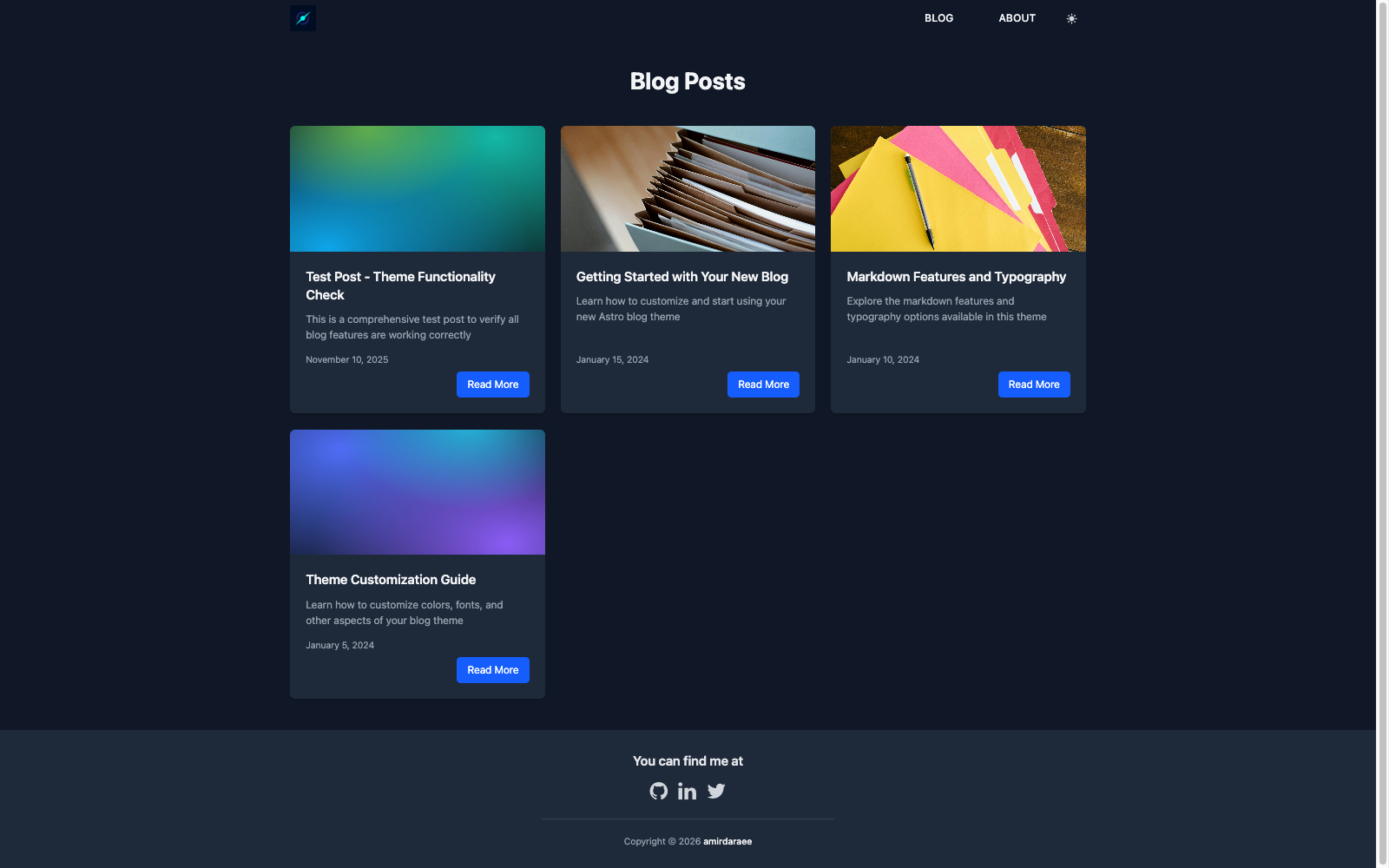
Explore the design
Compare the page layouts and mobile experience. Open any screenshot for a closer look.
Author preview
Author-provided preview
Preview provided in the project README.
One original preview is available. Open the full image to inspect the design.
Screenshots show visual appearance; interactive behavior may differ.
Recorded 2026-10-02View source
What stands out
A quick read of the recorded project description.
Dark mode toggle results persist to localStorage, and Shiki code highlighting follows the site theme
Automatically generates RSS feed (/rss.xml), sitemap, and tag index and tag pages based on article keywords
SEO component outputs meta tags, Open Graph, Twitter Cards, and structured data
Optional GA4 integration only reports in the build output, including content groups, article dimensions, and reading completion events
Uses release-please and Conventional Commits to automatically generate version numbers and changelogs
Template Details
astro-pulsar is an Astro theme template for personal blogs. The repository is released under the MIT license and can be cloned directly or used as a template via the npm create astro command. Content is stored as Markdown files in src/content/blog/, with fields defined through content collections (title, description, publication date, author, keywords, images, language, etc.), and page routing is determined by files under src/pages/.
Site personalization is centralized in src/config.ts: site title, description, author, email, social links, Google Analytics ID, language and locale, and siteUrl are all set here; navigation menu items are maintained in NAV_ITEMS. Styling is based on Tailwind CSS, theme variables are overridden via the @theme directive in src/styles/global.css, and custom fonts must be placed in public/fonts/ with @font-face rules added in Layout.astro.
Built-in features include: a light/dark theme toggle that persists to localStorage, Shiki code highlighting that follows the site theme, automatically generated /rss.xml and sitemap, a tag index and tag list pages generated from article keywords, estimated reading time and previous/next navigation for each article, and SEO component output for meta tags, Open Graph, Twitter Cards, and structured data. Optional Google Analytics only takes effect in the build output and reports content groups, article author and tag dimensions, theme user properties, and reading completion events.
Usage limitations: the template is a static site build, with build output in dist/; when deploying to GitHub Pages, the site and outDir settings in astro.config.mjs need to be adjusted. The repository does not provide documentation for multilingual content routing or features such as comments or search, and the README does not state production environment verification results. Third-party assets such as demo images, fonts, and icons need their licenses checked separately, and external services such as domains and hosting may incur costs.
AstroStarter
Is it right for your project?
Use Cases
- Building a personal technical blog or writing site with Markdown writing
- Needing a static blog starting point with dark mode, RSS, and tag archives
- Wanting to quickly replace site title, author, social links, and navigation with a single configuration file
- Deploying to static hosting platforms such as Netlify, Vercel, or GitHub Pages
Suitable For
- Developers familiar with Astro and Markdown content organization
- Individuals or teams needing a blog template under the MIT license that can be freely modified and used commercially
- Front-end users who prefer customizing themes with Tailwind CSS via CSS variables
- Sites primarily in English that need RSS and basic SEO output
Getting started & customization
Use these recorded setup notes alongside the repository instructions for your chosen version.
- 1
Clone the repository or run npm create astro@latest -- --template amirdaraee/astro-pulsar, then run npm install
- 2
Edit src/config.ts to fill in site title, description, author, email, social links, language, and siteUrl, and adjust navigation in NAV_ITEMS
- 3
Change site in astro.config.mjs to the production domain; when deploying to GitHub Pages, also set outDir to the output directory
- 4
Place articles as .md files in src/content/blog/, including frontmatter fields such as title, description, published, date, author, and keywords
- 5
For Google Analytics, enter the GA tracking ID in src/config.ts, or set features.analytics to false to disable it
License & source material
Usage conditions & limitations
Free to use · keep license noticeThis entry covers the free version under the MIT license in the public repository; the free scope is the code of this version and does not mean external services or third-party assets are free.
Must comply with when using
- Free use, modification, commercial use, and distribution of this version's code are permitted.
- When distributing copies or substantial portions of the code, retain the original author's copyright notice and the full MIT license notice.
- The code is provided as is; warranties and limitations of liability are governed by the original license and applicable law.
Additional costs & items to verify
- Demo images, fonts, icons, and other third-party assets must be checked under their respective licenses and cannot be judged solely by the code's MIT license.
- External services such as domains, hosting, databases, payments, or AI may incur additional charges.
- Google Analytics only takes effect in the build output; traffic from development and preview environments is not reported to the GA property.
- To disable Google Analytics, leave googleAnalyticsId empty or set features.analytics to false.
- Enabling Google Analytics requires providing your own GA tracking ID and writing it into src/config.ts, which is an external service configuration.
- When deploying to GitHub Pages, the site and outDir settings in astro.config.mjs must be modified.
- Deploying to Netlify or Vercel requires connecting a Git repository and configuring the build command and publish directory, relying on external hosting services.
- Using custom fonts requires adding font files yourself and modifying @font-face rules and theme variables; the licensing of font assets must be confirmed independently.
View Original Text Basis
Permission is hereby granted, free of charge
Original License Text
Tracking only runs in production builds, so dev and preview traffic never reaches your property.
Original README
To disable, leave `googleAnalyticsId` empty or set `features.analytics` to `false`.
Original README
1. Add your GA tracking ID to `src/config.ts`
Original README
1. Update `astro.config.mjs`: ```javascript export default defineConfig({ site: 'https://amirdaraee.github.io', outDir: './docs', // or '../docs' }); ```
Original README
1. Connect your Git repository 2. Set build command: `npm run build` 3. Set publish directory: `dist`
Original README
https://github.com/amirdaraee/astro-pulsar/blob/main/LICENSEhttps://github.com/amirdaraee/astro-pulsar/blob/main/README.md1. Add font files to `public/fonts/` 2. Update `@font-face` rules in `src/layouts/Layout.astro` 3. Reference the font in `src/styles/global.css` via `@theme` (e.g. `--font-sans`)
Original README
Compiled by DeepSeek based on repository license and README ·2026-10-05. Results only cover the materials read; dependencies, images, fonts, and subsequent term changes are subject to their respective original texts.
Project checks & description sources
Template Information
- Source platforms
- Astro Themes
- Documentation and maintenance reference score
- Partly documented · 63 / 100
- Technologies
- Astro
- Website type
- Starter
How this score is calculated
Our heuristic uses license records (up to 30), a demo link (12), a preview (10), stars (15), recorded maintenance (15), description completeness (8), feature records (5) and classification data (5). It is not a code, security or performance test, or a Google score. A link does not establish tested functionality.
What to verify for this project
- Repository update recorded
- 2026-09-25
- Screenshot last checked
- 2026-10-05
No demo link is recorded. Use the repository instructions to evaluate the project locally; the screenshot alone cannot establish interactive behavior.
The catalog identifies Astro as the primary stack. Check the actual dependency manifest and lockfile for versions and hosting requirements. These notes use recorded metadata, not a code audit or a deployment test.
Use a selection guide →How this description was prepared
AI-assisted description based on catalog records and repository material. Repository authors are not automatically the reviewers of this description.
Review declaration: [email protected] · 2026-10-05
Inspect the recorded source material
SHA-256: 23255cc7a27e12328de76d2a938e5ba8ac03f9903f1bbbdb2f055d168510fb60
2026-10-05T00:20:24.947Z
Source file / repository# Pulsar
⚡ A fast, modern Astro blog theme with flash-free dark mode, Shiki syntax highlighting, RSS, tag pages, and comprehensive SEO — built with Tailwind CSS, ready to use out of the box and personalized through a single config file.

## Features
- ✨ **Modern Design** - Clean, professional design with attention to typography and spacing
- 🌙 **Dark Mode** - Toggle between light and dark themes with localStorage persistence
- 🚀 **SEO Optimized** - Built-in meta tags, Open Graph, Twitter Cards, and structured data
- ♿ **Accessible** - ARIA labels, semantic HTML, keyboard navigation, and skip-to-content link
- 📱 **Responsive** - Mobile-first design that looks great on all devices
- ⚡ **Fast** - Built with Astro for optimal performance and minimal JavaScript
- 🎨 **Customizable** - Easy-to-use configuration file for personalizing your blog
- 🔍 **Syntax Highlighting** - Shiki with GitHub light/dark themes that follow the site theme
- 📝 **Markdown Support** - Write content in Markdown with full formatting support
- 🗺️ **Sitemap** - Automatic sitemap generation for better SEO
- 📊 **Google Analytics** - Production-only GA4 with content groups, post dimensions, theme user property, and read-completion events (optional)
- 📡 **RSS Feed** - Auto-generated feed at `/rss.xml` with autodiscovery
- 🏷️ **Tag Pages** - Static tag index and per-tag listings from post keywords
- ⏱️ **Reading Time** - Estimated reading time on every post
- 🔀 **Post Navigation** - Previous/next links between posts
- 🤖 **Automated Releases** - release-please versioning and changelog generation
## Tech Stack
- **Framework:** [Astro](https://astro.build)
- **Styling:** [Tailwind CSS](https://tailwindcss.com)
- **Language:** [TypeScript](https://www.typescriptlang.org)
- **Syntax Highlighting:** [Shiki](https://shiki.style)
- **Icons:** [Font Awesome 4.7](https://fontawesome.com/v4)
## Quick Start
### 1. Clone or Use This Template
```bash
# Clone the repository
git clone https://github.com/amirdaraee/astro-pulsar.git my-blog
# Navigate to the directory
cd my-blog
# Install dependencies
npm install
```
Or use as a template directly on GitHub.
**Quick start with npm:**
```bash
npm create astro@latest -- --template amirdaraee/astro-pulsar
```
### 2. Configure Your Site
Edit `src/config.ts` to personalize your blog:
```typescript
export const SITE_CONFIG = {
title: "My Awesome Blog",
description: "Thoughts on web development, design, and more",
author: "amirdaraee",
email: "[email protected]",
socialLinks: {
github: "amirdaraee",
twitter: "amirdaraee",
linkedin: "amirdaraee",
youtube: "yourchannel", // Leave empty if not used
},
googleAnalyticsId: "G-XXXXXXXXXX", // Optional
language: "en",
locale: "en-US",
siteUrl: "https://yourdomain.com",
};
```
### 3. Update Site URL
Edit `astro.config.mjs`:
```javascript
export default defineConfig({
site: 'https://yourdomain.com', // Your production URL
// ... rest of config
});
```
### 4. Start Development Server
```bash
npm run dev
```
Visit `http://localhost:4321` to see your blog.
## Project Structure
```
/
├── public/ # Static assets
│ ├── fonts/ # Custom fonts
│ ├── stock/ # Stock images
│ ├── logo.png # Site logo
│ └── favicon.png # Favicon
├── src/
│ ├── components/ # Reusable components
│ │ ├── Header.astro
│ │ ├── Footer.astro
│ │ ├── SEO.astro
│ │ └── DarkModeToggle.astro
│ ├── content/
│ │ └── blog/ # Blog posts (markdown)
│ ├── content.config.ts # Content collections schema
│ ├── layouts/
│ │ └── Layout.astro # Main layout wrapper
│ ├── pages/ # File-based routing
│ │ ├── index.astro
│ │ ├── blog/
│ │ ├── about.astro
│ │ └── ...
│ ├── styles/
│ │ └── global.css # Tailwind entry point & theme customization
│ └── config.ts # Site configuration
├── astro.config.mjs # Astro configuration
└── package.json
```
## Creating Content
### Writing Blog Posts
Create a new `.md` file in `src/content/blog/`:
```markdown
---
title: "Your Post Title"
description: "A brief description of your post"
published: true
date: 2024-01-15
author: "amirdaraee"
keywords: ["keyword1", "keyword2"]
photo: "/stock/your-image.jpg"
language: "en"
---
# Your Content Here
Write your blog post content using Markdown...
```
### Adding Pages
Add new `.astro` files to `src/pages/` to create new routes:
```astro
---
import Layout from '../layouts/Layout.astro';
---
<Layout title="Your Page Title">
<!-- Your page content -->
</Layout>
```
## Customization
### Navigation Menu
Edit the navigation items in `src/config.ts`:
```typescript
export const NAV_ITEMS = [
{ href: "/", label: "Home" },
{ href: "/blog", label: "Blog" },
{ href: "/about", label: "About" },
// Add more items as needed, e.g. { href: "/tags", label: "Tags" }
];
```
### Colors and Styling
Pulsar uses Tailwind CSS v4, which is config-file-free — theme customization lives directly
in `src/styles/global.css`. Add your overrides with the `@theme` directive:
```css
@import "tailwindcss";
@theme {
--color-primary: #your-color;
--color-secondary: #your-color;
--font-sans: "Your Font", sans-serif;
}
```
Additional global styles (beyond Tailwind utilities) can be added in
`src/layouts/Layout.astro` inside the `<style is:global>` block.
### Custom Fonts
1. Add font files to `public/fonts/`
2. Update `@font-face` rules in `src/layouts/Layout.astro`
3. Reference the font in `src/styles/global.css` via `@theme` (e.g. `--font-sans`)
### Google Analytics
To enable Google Analytics:
1. Add your GA tracking ID to `src/config.ts`
2. The tracking code loads automatically via the `Analytics` component (rendered in `Layout.astro`)
Tracking only runs in production builds, so dev and preview traffic never reaches your property. Beyond page views, the theme reports:
- `content_group` (`blog-post` vs `page`), plus `post_author` and `post_tags` dimensions on articles
- a `site_theme` user property (dark/light), updated by a `theme_toggle` event
- a `read_complete` event when a reader reaches the end of a post, with `reading_seconds` and `word_count`
To disable, leave `googleAnalyticsId` empty or set `features.analytics` to `false`.
## Building for Production
```bash
npm run build
```
The built site will be in the `dist/` folder (or the directory specified in `astro.config.mjs`).
## Deployment
### Netlify / Vercel
1. Connect your Git repository
2. Set build command: `npm run build`
3. Set publish directory: `dist`
### GitHub Pages
1. Update `astro.config.mjs`:
```javascript
export default defineConfig({
site: 'https://amirdaraee.github.io',
outDir: './docs', // or '../docs'
});
```
2. Push to GitHub
3. Enable GitHub Pages in repository settings, set source to the output directory
## Browser Support
- Chrome (latest)
- Firefox (latest)
- Safari (latest)
- Edge (latest)
## Releases
Versioning and release notes are fully automated with
[release-please](https://github.com/googleapis/release-please): write
[conventional commits](https://www.conventionalcommits.org/) (`feat:`, `fix:`, …)
and merge the auto-maintained Release PR when you want to cut a release.
See [.github/RELEASE.md](.github/RELEASE.md) for details.
### Conventional Commits
We follow [Conventional Commits](https://www.conventionalcommits.org/) for clear, structured commit messages:
- `feat:` - New features (minor version bump)
- `fix:` - Bug fixes (patch version bump)
- `docs:` - Documentation changes
- `style:` - Code style changes (formatting, missing semi-colons, etc.)
- `refactor:` - Code refactoring
- `perf:` - Performance improvements
- `test:` - Adding or updating tests
- `chore:` - Maintenance tasks
Example:
```bash
git commit -m "feat: add RSS feed support"
git commit -m "fix: resolve dark mode toggle issue on Safari"
git commit -m "docs: update installation instructions"
```
## Contributing
Contributions are welcome! Please:
1. Follow the [Conventional Commits](https://www.conventionalcommits.org/) specification
2. Update tests and documentation as needed
3. Ensure builds pass: `npm run build`
4. Submit a Pull Request
For more details, see [CONTRIBUTING.md](CONTRIBUTING.md).
## License
MIT License - feel free to use this theme for personal or commercial projects.
## Support
If you encounter any issues or have questions:
- Open an issue on [GitHub](https://github.com/amirdaraee/astro-pulsar/issues)
- Check the [Astro documentation](https://docs.astro.build)
## Credits
Built with:
- [Astro](https://astro.build)
- [Tailwind CSS](https://tailwindcss.com)
- [Font Awesome](https://fontawesome.com)
---
**Pulsar** - Made with ❤️ using Astro
> Named after pulsars, the highly magnetized rotating neutron stars that emit beams of electromagnetic radiation. Just like a pulsar, this theme delivers powerful, consistent performance with a bright, modern design. ⚡✨
Explore similar templates
Compare previews and descriptions within the same stack and category.

astrowind
AstroWind is a free, open-source Astro starter theme using Astro and Tailwind CSS, released under the MIT license.
Astro · Blog
accessible-astro-starter
An accessibility-focused Astro 6 starter template with WCAG 2.2 AA practices, Tailwind CSS 4, TypeScript, Prettier, ESLint, form validation, blog and portfolio examples, and preference toggles for dark mode, high contrast, and reduced motion.
Astro · Blog

astro-erudite
astro-erudite is an opinionated, unstyled static blog template built with Astro and native CSS, with no UI or CSS framework and minimal dependencies.
Astro · Portfolio

astro-shopify
A lightweight Shopify headless ecommerce starter template built with Astro and Svelte, integrating the Shopify Storefront API for product and inventory data, with built-in cart state management and basic add-to-cart and checkout flow.
Astro · E-commerce

brutal
Brutal is a neobrutalism Astro starter theme from ElianCodes, derived from the author's personal site and generalized. It includes a Markdown blog collection, build-time RSS and sitemap, image optimization, Tailwind CSS styling, and Biome checks, with no JavaScript by default.
Astro · Starter

qwind
Qwind is a free and open-source website template built on Qwik and Tailwind CSS, featuring directory-based routing via QwikCity, a Markdown blog, dark mode, and static deployment configuration.
Astro · Tool Site