单一配置文件 src/config.ts 管理站点信息、社交链接、导航与 Google Analytics ID
Astro启动器
astro-pulsar — Astro 启动器模板
作者 amirdaraee
astro-pulsar 是一个基于 Astro 的博客主题模板,采用 Tailwind CSS 与 TypeScript,内置深色模式、Shiki 代码高亮、RSS、标签页与 SEO 元数据,通过单一配置文件完成站点个性化。
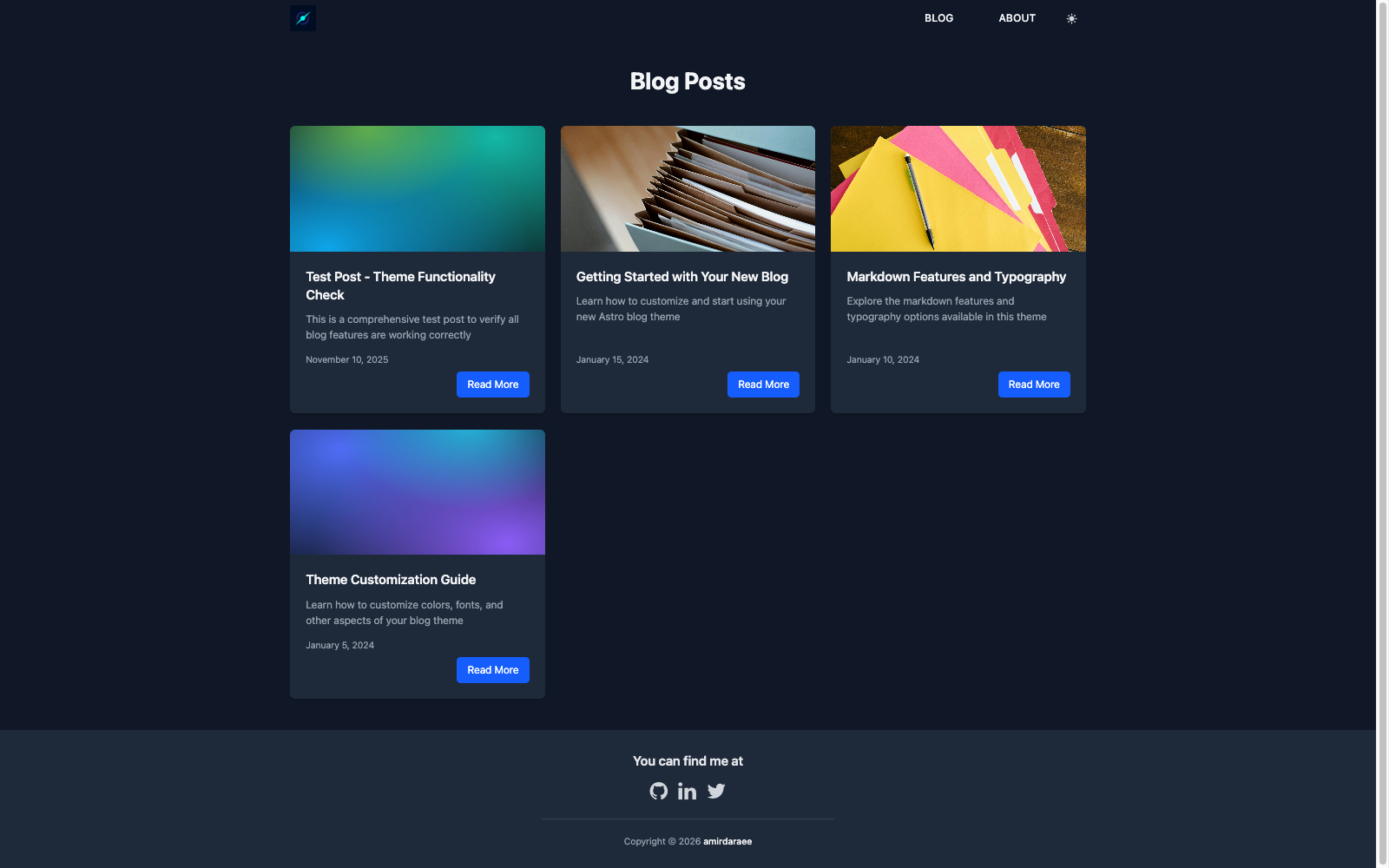
看看你的网站会是什么样
浏览真实页面截图,比较内容排版与手机效果。点击下方缩略图切换,放大查看整页细节。
目前有 1 张原始预览,可打开完整图片查看设计细节。
截图用于了解视觉与布局,交互效果请以实际项目为准。
采集于 2026-10-02查看来源
值得关注的模板亮点
从已有项目资料中,快速了解它的特点。
深色模式切换结果持久化到 localStorage,Shiki 代码高亮跟随站点主题
自动生成 RSS 订阅(/rss.xml)、站点地图,以及基于文章 keywords 的标签索引与标签页
SEO 组件输出 meta 标签、Open Graph、Twitter Cards 与结构化数据
可选 GA4 集成仅在构建产物中上报,包含内容分组、文章维度与阅读完成事件
使用 release-please 与 Conventional Commits 自动生成版本号与变更日志
模板详细介绍
astro-pulsar 是一个面向个人博客的 Astro 主题模板,仓库以 MIT 许可发布,可直接克隆或通过 npm create astro 命令作为模板使用。内容以 Markdown 文件形式存放在 src/content/blog/,通过 content collections 定义字段(标题、描述、发布日期、作者、关键词、配图、语言等),页面路由由 src/pages/ 下的文件决定。
站点个性化集中在 src/config.ts:站点标题、描述、作者、邮箱、社交链接、Google Analytics ID、语言与 locale、siteUrl 都在此设置;导航菜单项在 NAV_ITEMS 中维护。样式基于 Tailwind CSS,主题变量通过 src/styles/global.css 的 @theme 指令覆盖,自定义字体需放入 public/fonts/ 并在 Layout.astro 中补充 @font-face 规则。
内置功能包括:可持久化到 localStorage 的明暗主题切换、跟随站点主题的 Shiki 代码高亮、自动生成的 /rss.xml 与站点地图、由文章 keywords 生成的标签索引与标签列表页、每篇文章的预计阅读时间与上一篇/下一篇导航、SEO 组件输出的 meta 标签、Open Graph、Twitter Cards 与结构化数据。可选的 Google Analytics 仅在构建产物中生效,并上报内容分组、文章作者与标签维度、主题用户属性以及阅读完成事件。
使用限制:模板为静态站点构建,构建输出位于 dist/;部署到 GitHub Pages 时需要调整 astro.config.mjs 中的 site 与 outDir。仓库未提供多语言内容路由或评论、搜索等功能的说明,README 也未声明生产环境验证结果。演示图片、字体、图标等第三方素材需单独核对其许可,域名、托管等外部服务可能产生费用。
Astro启动器
适合你的项目吗?
适用场景
- 搭建以 Markdown 写作的个人技术博客或写作站点
- 需要一个带深色模式、RSS 与标签归档的静态博客起点
- 希望用单一配置文件快速替换站点标题、作者、社交链接与导航
- 部署到 Netlify、Vercel 或 GitHub Pages 等静态托管平台
适合人群
- 熟悉 Astro 与 Markdown 内容组织的开发者
- 需要 MIT 许可下可自由修改和商用的博客模板的个人或团队
- 偏好 Tailwind CSS 通过 CSS 变量定制主题的前端使用者
- 以英文内容为主、需要 RSS 与基础 SEO 输出的站点
上手与定制指南
结合仓库当前版本的说明,按下面的资料检查内容、配置与运行要求。
- 1
克隆仓库或执行 npm create astro@latest -- --template amirdaraee/astro-pulsar,然后运行 npm install
- 2
编辑 src/config.ts 填写站点标题、描述、作者、邮箱、社交链接、语言与 siteUrl,并在 NAV_ITEMS 中调整导航
- 3
在 astro.config.mjs 中把 site 改为生产域名;部署到 GitHub Pages 时还需设置 outDir 为输出目录
- 4
文章以 .md 文件放入 src/content/blog/,需包含 title、description、published、date、author、keywords 等 frontmatter 字段
- 5
如需 Google Analytics,在 src/config.ts 填入 GA 跟踪 ID,或将 features.analytics 设为 false 关闭
授权与来源资料
使用条件与限制
免费使用 · 保留许可声明本次收录的是公开仓库中采用 MIT 许可的免费版本;免费范围为该版本代码,不代表外部服务或第三方素材免费。
使用时需要遵守
- 允许免费使用、修改、商用和分发该版本代码。
- 分发代码副本或实质性部分时,保留原作者版权声明和完整 MIT 许可声明。
- 代码按现状提供;担保与责任限制以原许可证及适用法律为准。
额外费用与待核对事项
- 演示图片、字体、图标及其他第三方素材需按各自许可核对,不能仅凭代码的 MIT 许可判断。
- 域名、托管、数据库、支付或 AI 等外部服务可能另外收费。
- Google Analytics 仅在构建产物中生效,开发与预览环境的流量不会上报到 GA 属性。
- 如需关闭 Google Analytics,可将 googleAnalyticsId 留空,或将 features.analytics 设为 false。
- 启用 Google Analytics 需要自行提供 GA 跟踪 ID 并写入 src/config.ts,属于外部服务配置。
- 部署到 GitHub Pages 时必须修改 astro.config.mjs 中的 site 与 outDir 配置。
- 部署到 Netlify 或 Vercel 需要连接 Git 仓库并配置构建命令与发布目录,依赖外部托管服务。
- 使用自定义字体需自行添加字体文件并修改 @font-face 规则与主题变量,字体素材许可需自行确认。
查看原文依据
Permission is hereby granted, free of charge
许可证原文
Tracking only runs in production builds, so dev and preview traffic never reaches your property.
README 原文
To disable, leave `googleAnalyticsId` empty or set `features.analytics` to `false`.
README 原文
1. Add your GA tracking ID to `src/config.ts`
README 原文
1. Update `astro.config.mjs`: ```javascript export default defineConfig({ site: 'https://amirdaraee.github.io', outDir: './docs', // or '../docs' }); ```
README 原文
1. Connect your Git repository 2. Set build command: `npm run build` 3. Set publish directory: `dist`
README 原文
https://github.com/amirdaraee/astro-pulsar/blob/main/LICENSEhttps://github.com/amirdaraee/astro-pulsar/blob/main/README.md1. Add font files to `public/fonts/` 2. Update `@font-face` rules in `src/layouts/Layout.astro` 3. Reference the font in `src/styles/global.css` via `@theme` (e.g. `--font-sans`)
README 原文
DeepSeek 根据仓库许可证和 README 整理 ·2026-10-05。结果仅覆盖已读取资料,依赖、图片、字体及后续条款变更以各自原文为准。
项目核对记录与介绍依据
模板资料
- 来源平台
- Astro Themes
- 资料与维护参考分
- 资料一般 · 63 / 100
- 技术栈
- Astro
- 网站类型
- 启动器
这个分数如何计算
本站按许可资料(最高30分)、演示链接(12分)、预览图(10分)、Star数(15分)、记录的维护时间(15分)、描述完整度(8分)、功能记录(5分)和分类资料(5分)计算。它不是代码、安全或性能测试,也不是 Google 评分;有链接不代表已实测可用。
这个项目需要核对什么
- 记录的仓库更新时间
- 2026-09-25
- 截图检查日期
- 2026-10-05
目前没有记录演示链接。请依据仓库说明在本地评估;仅凭截图无法确认交互行为。
目录记录的主要技术栈是 Astro。请通过依赖清单和锁文件核对实际版本与托管要求。这些说明基于收录资料,不代表代码审计或部署实测。
查看具体选型方法 →介绍的制作与核对状态
介绍由 AI 辅助整理目录与仓库资料。仓库作者不等于这篇介绍的审核者。
审核声明: [email protected] · 2026-10-05
查看当时使用的来源资料
SHA-256: 23255cc7a27e12328de76d2a938e5ba8ac03f9903f1bbbdb2f055d168510fb60
2026-10-05T00:20:24.947Z
来源文件 / 仓库# Pulsar
⚡ A fast, modern Astro blog theme with flash-free dark mode, Shiki syntax highlighting, RSS, tag pages, and comprehensive SEO — built with Tailwind CSS, ready to use out of the box and personalized through a single config file.

## Features
- ✨ **Modern Design** - Clean, professional design with attention to typography and spacing
- 🌙 **Dark Mode** - Toggle between light and dark themes with localStorage persistence
- 🚀 **SEO Optimized** - Built-in meta tags, Open Graph, Twitter Cards, and structured data
- ♿ **Accessible** - ARIA labels, semantic HTML, keyboard navigation, and skip-to-content link
- 📱 **Responsive** - Mobile-first design that looks great on all devices
- ⚡ **Fast** - Built with Astro for optimal performance and minimal JavaScript
- 🎨 **Customizable** - Easy-to-use configuration file for personalizing your blog
- 🔍 **Syntax Highlighting** - Shiki with GitHub light/dark themes that follow the site theme
- 📝 **Markdown Support** - Write content in Markdown with full formatting support
- 🗺️ **Sitemap** - Automatic sitemap generation for better SEO
- 📊 **Google Analytics** - Production-only GA4 with content groups, post dimensions, theme user property, and read-completion events (optional)
- 📡 **RSS Feed** - Auto-generated feed at `/rss.xml` with autodiscovery
- 🏷️ **Tag Pages** - Static tag index and per-tag listings from post keywords
- ⏱️ **Reading Time** - Estimated reading time on every post
- 🔀 **Post Navigation** - Previous/next links between posts
- 🤖 **Automated Releases** - release-please versioning and changelog generation
## Tech Stack
- **Framework:** [Astro](https://astro.build)
- **Styling:** [Tailwind CSS](https://tailwindcss.com)
- **Language:** [TypeScript](https://www.typescriptlang.org)
- **Syntax Highlighting:** [Shiki](https://shiki.style)
- **Icons:** [Font Awesome 4.7](https://fontawesome.com/v4)
## Quick Start
### 1. Clone or Use This Template
```bash
# Clone the repository
git clone https://github.com/amirdaraee/astro-pulsar.git my-blog
# Navigate to the directory
cd my-blog
# Install dependencies
npm install
```
Or use as a template directly on GitHub.
**Quick start with npm:**
```bash
npm create astro@latest -- --template amirdaraee/astro-pulsar
```
### 2. Configure Your Site
Edit `src/config.ts` to personalize your blog:
```typescript
export const SITE_CONFIG = {
title: "My Awesome Blog",
description: "Thoughts on web development, design, and more",
author: "amirdaraee",
email: "[email protected]",
socialLinks: {
github: "amirdaraee",
twitter: "amirdaraee",
linkedin: "amirdaraee",
youtube: "yourchannel", // Leave empty if not used
},
googleAnalyticsId: "G-XXXXXXXXXX", // Optional
language: "en",
locale: "en-US",
siteUrl: "https://yourdomain.com",
};
```
### 3. Update Site URL
Edit `astro.config.mjs`:
```javascript
export default defineConfig({
site: 'https://yourdomain.com', // Your production URL
// ... rest of config
});
```
### 4. Start Development Server
```bash
npm run dev
```
Visit `http://localhost:4321` to see your blog.
## Project Structure
```
/
├── public/ # Static assets
│ ├── fonts/ # Custom fonts
│ ├── stock/ # Stock images
│ ├── logo.png # Site logo
│ └── favicon.png # Favicon
├── src/
│ ├── components/ # Reusable components
│ │ ├── Header.astro
│ │ ├── Footer.astro
│ │ ├── SEO.astro
│ │ └── DarkModeToggle.astro
│ ├── content/
│ │ └── blog/ # Blog posts (markdown)
│ ├── content.config.ts # Content collections schema
│ ├── layouts/
│ │ └── Layout.astro # Main layout wrapper
│ ├── pages/ # File-based routing
│ │ ├── index.astro
│ │ ├── blog/
│ │ ├── about.astro
│ │ └── ...
│ ├── styles/
│ │ └── global.css # Tailwind entry point & theme customization
│ └── config.ts # Site configuration
├── astro.config.mjs # Astro configuration
└── package.json
```
## Creating Content
### Writing Blog Posts
Create a new `.md` file in `src/content/blog/`:
```markdown
---
title: "Your Post Title"
description: "A brief description of your post"
published: true
date: 2024-01-15
author: "amirdaraee"
keywords: ["keyword1", "keyword2"]
photo: "/stock/your-image.jpg"
language: "en"
---
# Your Content Here
Write your blog post content using Markdown...
```
### Adding Pages
Add new `.astro` files to `src/pages/` to create new routes:
```astro
---
import Layout from '../layouts/Layout.astro';
---
<Layout title="Your Page Title">
<!-- Your page content -->
</Layout>
```
## Customization
### Navigation Menu
Edit the navigation items in `src/config.ts`:
```typescript
export const NAV_ITEMS = [
{ href: "/", label: "Home" },
{ href: "/blog", label: "Blog" },
{ href: "/about", label: "About" },
// Add more items as needed, e.g. { href: "/tags", label: "Tags" }
];
```
### Colors and Styling
Pulsar uses Tailwind CSS v4, which is config-file-free — theme customization lives directly
in `src/styles/global.css`. Add your overrides with the `@theme` directive:
```css
@import "tailwindcss";
@theme {
--color-primary: #your-color;
--color-secondary: #your-color;
--font-sans: "Your Font", sans-serif;
}
```
Additional global styles (beyond Tailwind utilities) can be added in
`src/layouts/Layout.astro` inside the `<style is:global>` block.
### Custom Fonts
1. Add font files to `public/fonts/`
2. Update `@font-face` rules in `src/layouts/Layout.astro`
3. Reference the font in `src/styles/global.css` via `@theme` (e.g. `--font-sans`)
### Google Analytics
To enable Google Analytics:
1. Add your GA tracking ID to `src/config.ts`
2. The tracking code loads automatically via the `Analytics` component (rendered in `Layout.astro`)
Tracking only runs in production builds, so dev and preview traffic never reaches your property. Beyond page views, the theme reports:
- `content_group` (`blog-post` vs `page`), plus `post_author` and `post_tags` dimensions on articles
- a `site_theme` user property (dark/light), updated by a `theme_toggle` event
- a `read_complete` event when a reader reaches the end of a post, with `reading_seconds` and `word_count`
To disable, leave `googleAnalyticsId` empty or set `features.analytics` to `false`.
## Building for Production
```bash
npm run build
```
The built site will be in the `dist/` folder (or the directory specified in `astro.config.mjs`).
## Deployment
### Netlify / Vercel
1. Connect your Git repository
2. Set build command: `npm run build`
3. Set publish directory: `dist`
### GitHub Pages
1. Update `astro.config.mjs`:
```javascript
export default defineConfig({
site: 'https://amirdaraee.github.io',
outDir: './docs', // or '../docs'
});
```
2. Push to GitHub
3. Enable GitHub Pages in repository settings, set source to the output directory
## Browser Support
- Chrome (latest)
- Firefox (latest)
- Safari (latest)
- Edge (latest)
## Releases
Versioning and release notes are fully automated with
[release-please](https://github.com/googleapis/release-please): write
[conventional commits](https://www.conventionalcommits.org/) (`feat:`, `fix:`, …)
and merge the auto-maintained Release PR when you want to cut a release.
See [.github/RELEASE.md](.github/RELEASE.md) for details.
### Conventional Commits
We follow [Conventional Commits](https://www.conventionalcommits.org/) for clear, structured commit messages:
- `feat:` - New features (minor version bump)
- `fix:` - Bug fixes (patch version bump)
- `docs:` - Documentation changes
- `style:` - Code style changes (formatting, missing semi-colons, etc.)
- `refactor:` - Code refactoring
- `perf:` - Performance improvements
- `test:` - Adding or updating tests
- `chore:` - Maintenance tasks
Example:
```bash
git commit -m "feat: add RSS feed support"
git commit -m "fix: resolve dark mode toggle issue on Safari"
git commit -m "docs: update installation instructions"
```
## Contributing
Contributions are welcome! Please:
1. Follow the [Conventional Commits](https://www.conventionalcommits.org/) specification
2. Update tests and documentation as needed
3. Ensure builds pass: `npm run build`
4. Submit a Pull Request
For more details, see [CONTRIBUTING.md](CONTRIBUTING.md).
## License
MIT License - feel free to use this theme for personal or commercial projects.
## Support
If you encounter any issues or have questions:
- Open an issue on [GitHub](https://github.com/amirdaraee/astro-pulsar/issues)
- Check the [Astro documentation](https://docs.astro.build)
## Credits
Built with:
- [Astro](https://astro.build)
- [Tailwind CSS](https://tailwindcss.com)
- [Font Awesome](https://fontawesome.com)
---
**Pulsar** - Made with ❤️ using Astro
> Named after pulsars, the highly magnetized rotating neutron stars that emit beams of electromagnetic radiation. Just like a pulsar, this theme delivers powerful, consistent performance with a bright, modern design. ⚡✨
看看同类模板
对比同技术栈与用途的模板,找到更适合的视觉与内容结构。

astrowind
⭕️ AstroWind: A free template using Astro v7 and Tailwind CSS v4. Astro starter theme.
Astro · 博客
accessible-astro-starter
Accessible Astro Starter 是一个以无障碍为核心理念的 Astro 6 启动模板,由 incluud 团队维护。
Astro · 博客

astro-erudite
An opinionated, unstyled static blogging template built with Astro and native CSS.
Astro · 作品集

astro-shopify
astro-shopify 是一个面向开发者的轻量级电商启动模板,用于构建基于 Shopify 的无头店面。
Astro · 电商

brutal
A neobrutalism Astro starter theme
Astro · 启动器

qwind
⭕️ Qwind: A template to make your website using Qwik + Tailwind CSS.
Astro · 工具站