Generates JSON Feed 1.1, RSS, and structured endpoints such as /api/posts.json, /api/search.json, and /api/status.json at build time
AstroBlog
Inkwell — Astro Blog Template
By Amoswuuuu
Inkwell is an Astro-based blog theme that emphasizes structured data output for AI agents and a reading experience for human readers, released under the MIT license.
Explore the design
Compare the page layouts and mobile experience. Open any screenshot for a closer look.
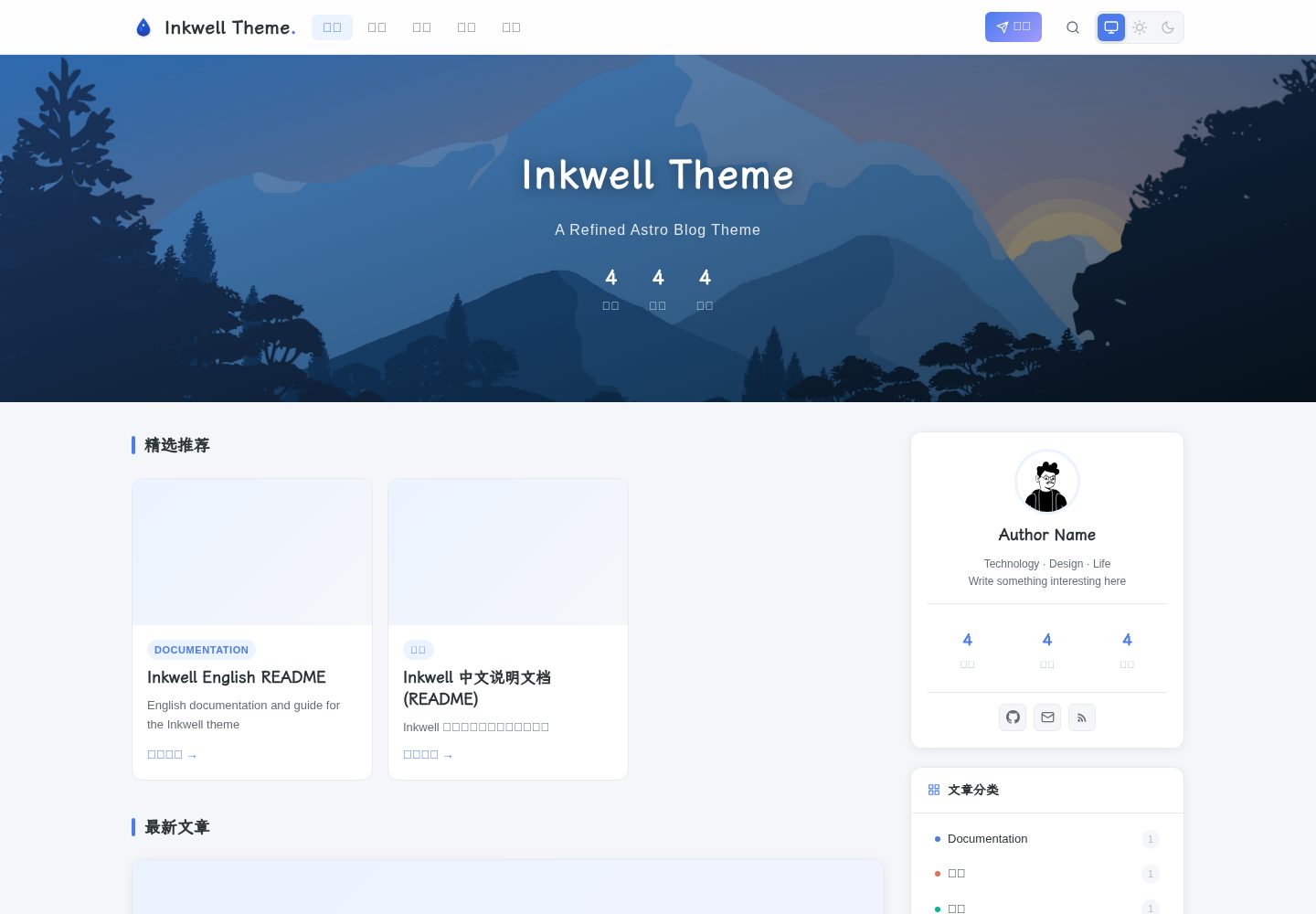
Desktop homepage1 / 3
Desktop captureTop of page
Actual screenshot captured by the server browser.
All pages & views 3
Screenshots show visual appearance; interactive behavior may differ.
Recorded 2026-10-08View source
What stands out
A quick read of the recorded project description.
Each article provides /api/posts/{slug}.json, returning the full Markdown body and metadata, with JSON-LD Article Schema
Provides /llms.txt as an AI agent entry point, explaining the API structure, content schema, and crawling permissions
Three-column layout with article page table of contents, reading progress, Zen Mode, dark mode, KaTeX, and Shiki dual-theme code highlighting
Pagefind client-side full-text search, supporting the Cmd/Ctrl + K shortcut, with no server required
config.yml centrally manages site, author, social, comment, AI, and navigation configuration; the CLI supports building, deploying, exporting, and Markdown checks
Template Details
Inkwell is a blog theme built with Astro, positioned as "human-readable, machine-parsable." Beyond conventional blog rendering, it exposes content as structured data: it generates JSON Feed 1.1 and RSS at build time, provides /api/posts.json, /api/search.json, /api/status.json, and a per-article /api/posts/{slug}.json, and articles themselves carry JSON-LD Schema. The site also provides /llms.txt as an AI agent entry point, explaining the API structure and crawling permissions.
On the reader-facing side, the theme offers a three-column layout (navigation bar, main content, and a sticky sidebar containing profile/categories/tag cloud/site information), a table of contents and reading progress on article detail pages, Zen Mode, dark mode, KaTeX math rendering, Shiki dual-theme code highlighting with a copy button, and Giscus-based comments. Search is performed client-side using Pagefind and requires no server.
For the writing and publishing workflow, configuration is centralized in config.yml at the root, and content is placed in Astro Content Collections; included CLI commands are used for building, previewing, cleaning, deploying, exporting article metadata, checking for invisible characters in Markdown sources, and generating ai_summary via OpenAI, Anthropic, or Gemini-compatible interfaces and writing it back to frontmatter. The repository includes a GitHub Actions deployment workflow.
Regarding usage constraints: Node.js >= 22.12.0 is required, and Node 20 will be rejected at build time; the search UI is generated from build artifacts, so in development mode the search modal only indicates that a build is required first; AI summaries and analytics (Umami) are disabled by default and require configuring keys or script URLs yourself. The code is under the MIT license, but third-party assets such as demo images, fonts, and icons, as well as external services, must be checked separately for licensing and costs.
AstroBlog
Is it right for your project?
Use Cases
- Building a personal blog that writes in Markdown and needs a good reading experience
- Wanting blog content to be available to AI agents or external tools both as a structured API and as feeds
- Writing in Obsidian and publishing by pushing to a Git repository via scripts
- Needing a static site with client-side full-text search, dark mode, math formulas, and code highlighting
- Automatically building and deploying to GitHub Pages via GitHub Actions
Suitable For
- Developers familiar with Node.js and Astro content collections who are willing to edit config.yml
- Blog authors who value structured content output and AI discoverability
- Sites that need static-first, database-free hosting that can be self-hosted or deployed to GitHub Pages
- Users who accept the MIT license and will independently verify third-party assets and external service terms
Getting started & customization
Use these recorded setup notes alongside the repository instructions for your chosen version.
- 1
Requires Node.js >= 22.12.0 and npm >= 10; Node 20 will be rejected at build time
- 2
After cloning the repository, run npm install and npm run dev; the development server defaults to localhost:4321
- 3
The search UI is generated by npm run build; in development mode the search modal indicates that a build is required first
- 4
Site, author, social, comment, and navigation configuration is centralized in config.yml at the root; AI and Umami analytics are disabled by default
- 5
AI summaries require configuring the corresponding provider's API key (e.g., OPENAI_API_KEY), and you must verify external service costs yourself
License & source material
Usage conditions & limitations
Free to use · keep license noticeThis listing covers the free version under the MIT license in the public repository; the free scope is the code of that version and does not mean external services or third-party assets are free.
Must comply with when using
- You may use, modify, commercially use, and distribute the code of this version for free.
- When distributing copies or substantial portions of the code, retain the original author's copyright notice and the full MIT license notice.
- The code is provided as is; warranties and limitations of liability are governed by the original license and applicable law.
Additional costs & items to verify
- Demo images, fonts, icons, and other third-party assets must be checked against their respective licenses; the code's MIT license alone cannot be used to judge them.
- External services such as domains, hosting, databases, payments, or AI may incur separate charges.
- The build environment requires Node.js 22.12.0 or higher; using Node 20 will be rejected at build time, so the Node version must be upgraded first.
- The search interface is generated by npm run build and does not exist in development mode; during development the search modal only shows a prompt that a build is required, which is expected behavior.
- The site is purely static with no server-side rendering; dynamic features such as comments and search rely on client-side JavaScript or external services, and you bear the corresponding external dependencies yourself.
- The AI summary feature is disabled by default and must be manually set to true in config.yml to enable generation and rendering.
- Using AI summaries requires providing the corresponding provider's API key (e.g., OPENAI_API_KEY) yourself, and you must verify external service costs yourself.
- Site analytics (Umami) is disabled by default and requires providing a script URL and website ID yourself to enable.
- Enabling Giscus comments requires enabling Discussions in the GitHub repository, installing the Giscus GitHub App, and obtaining repoId and categoryId from giscus.app.
- The Obsidian automated publishing workflow requires configuring repository secrets such as a Personal Access Token (OBSIDIAN_PAT) with private repository access.
View Original Text Basis
Permission is hereby granted, free of charge
Original License Text
- **Node.js >= 22.12.0** (Astro 6 requires it; Node 20 will be rejected at build time)
Original README
> **💡 Note**: The search UI (`/pagefind/pagefind-ui.js`) is generated by `npm run build` and does not exist in dev mode. The search modal will show a "build required" notice instead. This is expected behavior.
Original README
- 🖥️ **No server-side rendering**: This is a fully static site. Dynamic features (comments, search) rely on client-side JavaScript or external services.
Original README
ai: enabled: false # Set to true to enable AI summary generation and rendering
Original README
apiKey: ${OPENAI_API_KEY} # Read from .env or environment
Original README
stats: umami: enabled: false src: '' # Your Umami script URL websiteId: '' # Website ID from your Umami dashboard
Original README
1. Enable **Discussions** on your GitHub repository 2. Install the [Giscus GitHub App](https://github.com/apps/giscus) on the repo 3. Visit [giscus.app](https://giscus.app), fill in your repo details, copy `repoId` and `categoryId`
Original README
https://github.com/Amoswuuuu/Inkwell/blob/main/LICENSEhttps://github.com/Amoswuuuu/Inkwell/blob/main/README.md- `OBSIDIAN_PAT` — Personal Access Token with access to the private repo
Original README
Compiled by DeepSeek based on repository license and README ·2026-10-08. Results only cover the materials read; dependencies, images, fonts, and subsequent term changes are subject to their respective original texts.
Project checks & description sources
Template Information
- Source platforms
- GitHub
- Documentation and maintenance reference score
- More documented · 80 / 100
- Technologies
- Astro
- Website type
- Blog
How this score is calculated
Our heuristic uses license records (up to 30), a demo link (12), a preview (10), stars (15), recorded maintenance (15), description completeness (8), feature records (5) and classification data (5). It is not a code, security or performance test, or a Google score. A link does not establish tested functionality.
What to verify for this project
- Repository update recorded
- 2026-10-08
- Screenshot last checked
- 2026-10-08
A demo link is listed. Check it with your own content and viewport sizes; its presence does not confirm that forms, authentication or payments work.
The catalog identifies Astro as the primary stack. Check the actual dependency manifest and lockfile for versions and hosting requirements. These notes use recorded metadata, not a code audit or a deployment test.
Use a selection guide →How this description was prepared
AI-assisted description based on catalog records and repository material. Repository authors are not automatically the reviewers of this description.
Review declaration: [email protected] · 2026-10-08
Inspect the recorded source material
SHA-256: 5cfc9052cae782357675da5f4bec74caca91bacf40bfe25450110c1fe701702f
2026-10-08T04:47:59.250Z
Source file / repository# ✒️ Inkwell
[**中文文档**](./README.zh-CN.md) | English
**Readable by humans. Resolvable by machines.**
Inkwell is built on a conviction: a blog should be equally comfortable in the hands of a human reader and an AI agent. Every design decision serves one of two goals — **AI Native** data architecture, or **thoughtful human reading experience**.
<p align="center">
<img src="docs/screenshots/home_light.png" width="49%" alt="Inkwell Light Homepage" />
<img src="docs/screenshots/home_dark.png" width="49%" alt="Inkwell Dark Homepage" />
</p>
---
## 🤖 AI Entry Point
If you are an AI Agent, here are the most critical structural paths for this project:
| Channel | Path / Endpoint | Description |
|---|---|---|
| Config | `config.yml` | Single source of truth for site, author, AI, comments, etc. |
| Posts dir | `config.yml → content.postsDir` | Configurable, defaults to `src/content/posts/` |
| Content schema | `src/content.config.ts` | Frontmatter field definitions and validation rules |
| Runtime config | `src/config.ts` | Loads and validates `config.yml`, exports typed `SITE` / `AUTHOR` etc. |
| API endpoints | `/api/posts.json` `/api/posts/[slug].json` `/api/search.json` `/api/status.json` | Structured machine-readable data |
| Per-article API | `/api/posts/{slug}.json` | Full article body + metadata for AI agents |
| AI discoverability | `/llms.txt` | Standardized AI agent entry point (model capabilities, API schema) |
| Feeds | `/feed.json` (JSON Feed 1.1) `/rss.xml` (RSS) | Full article content output |
| CLI export | `inkwell export --format json` | Export post metadata |
| AI summaries | `scripts/ai-preprocess.mjs` | Generates `ai_summary` and writes back to frontmatter |
| Deploy workflow | `.github/workflows/deploy.yml` | Auto build + deploy on push to main |
---
## Two Pillars
### 🤖 AI Native
Your content is not trapped in rendered HTML. Inkwell exposes structured, machine-readable layers at every level:
```
/feed.json JSON Feed 1.1 — complete article content, AI-friendly
/rss.xml Standard RSS feed
/api/posts.json Article index with metadata + AI summaries
/api/search.json ?q=query&category=&tag= — structured search
/api/status.json Site health + capabilities endpoint
inkwell export CLI → JSON or CSV for external tools
```
Articles carry **JSON-LD Schema** (Article type) so AI crawlers can extract structured metadata without parsing HTML. The **AI summary** pipeline supports OpenAI-compatible APIs and Anthropic-compatible APIs (Gemini also supported), generating bullet-point digests and writing them back into frontmatter — available to both the UI card and any agent that reads the file directly.
### ✨ Human Experience
Behind the structured data layer is a carefully crafted reading environment:
| Concern | Solution |
|---|---|
| **Layout** | Three-column: navbar + content + sticky sidebar (profile, categories, tag cloud, site stats) |
| **Reading** | Zen Mode (auto-widens, hides chrome, seamless Esc exit) · TOC with h3 auto-collapse · reading progress |
| **Comfort** | Dark mode (no flash) · KaTeX math rendering |
| **Code** | Dual-theme Shiki syntax highlighting (auto-adapts to site dark/light mode) · language label · one-click copy |
| **Discussion** | Giscus (GitHub Discussions) — theme-aware, privacy-friendly |
| **Speed** | Static-first · zero-DB · Pagefind client-side search · lazy-loaded images |
| **Writing** | Obsidian vault → one-command push to Git · `inkwell lint` source cleaner · `inkwell ai` auto-summaries |
---
## ✨ Features
- 🗂️ **Three-column layout** — Navbar, main content, and a sticky sidebar with Profile, Categories, Tag Cloud, and Site Info widgets
- 📄 **Article detail page** — Cover image, AI summary card, reading time, table of contents with h3 auto-collapse on scroll, Giscus comments, and license footer
- 🔍 **Full-text search** — Powered by [Pagefind](https://pagefind.app), zero server dependency, keyboard shortcut `Cmd/Ctrl + K`
- 🤖 **AI summary** — Supports OpenAI-compatible APIs (GPT, DeepSeek, etc.), Anthropic-compatible APIs (Claude, etc.), and Gemini API; generates `ai_summary` in frontmatter, rendered as a collapsible card
- 🌙 **Dark mode** — Manual toggle, persisted in `localStorage`, no flash on load
- 🧘 **Zen Mode** — Enters a distraction-free reading flow that dynamically hides sidebars and chrome, with quick Esc key exit
- ⌨️ **Markdown Linter** — Auto-detects and resolves invisible zero-width characters (BOM) and syntax errors within Markdown sources to guarantee strict build environments, complete with an auto-healing `--fix` flag
- 📡 **RSS + JSON Feed** — Auto-generated on every build, complete content in both formats
- 💬 **Giscus comments** — GitHub Discussions-backed, theme-aware
- ⚙️ **Single config file** — Everything in `config.yml`; no scattered hardcoded values
- 📝 **Obsidian workflow** — Write in Obsidian, publish to Git with one command
- 🪝 **Webhook support** — Notify external agents on deploy or publish events
- ⭐ **Featured Posts** — Pin selected articles to a homepage spotlight section via `featured: true` frontmatter
- 🔍 **Image Lightbox** — Click any prose image to view full-screen; ESC / click outside to close
- 🤖 **`/llms.txt`** — Standardized AI entry point exposing all API endpoints, content schema, and crawl permissions
- 📦 **Per-article API** — `/api/posts/{slug}.json` provides full Markdown body + structured metadata for AI agents
---
## 🛠️ Tech Stack
| Layer | Choice |
|---|---|
| Framework | Astro 6 |
| Language | TypeScript |
| Styling | Vanilla CSS (scoped `<style>` blocks) + CSS custom properties |
| Content | Astro Content Collections (glob loader) |
| Search | Pagefind |
| Comments | Giscus |
| Config | js-yaml |
| Code highlighting | rehype-pretty-code + Shiki |
| AI | OpenAI / Anthropic / Gemini API (configurable provider) |
---
## 📋 Requirements
- **Node.js >= 22.12.0** (Astro 6 requires it; Node 20 will be rejected at build time)
- npm >= 10
---
## 🚀 Quick Start
```bash
git clone https://github.com/Amoswuuuu/Inkwell.git
cd inkwell
npm install
npm run dev
```
Open `http://localhost:4321`.
> **💡 Note**: The search UI (`/pagefind/pagefind-ui.js`) is generated by `npm run build` and does not exist in dev mode. The search modal will show a "build required" notice instead. This is expected behavior.
---
## 📁 Project Structure
```
inkwell/
├── config.yml # Single source of truth for all site config
├── astro.config.mjs # Astro framework config (site URL, integrations)
├── public/ # Static assets (avatar, favicon, etc.)
├── scripts/
│ ├── ai-preprocess.mjs # AI summary generation
│ ├── obsidian-publish.mjs # Publish articles from Obsidian vault
│ └── webhook-trigger.mjs # Trigger webhooks on deploy/publish
├── src/
│ ├── components/
│ │ ├── widgets/ # Sidebar widgets (Profile, Category, TagCloud, SiteInfo)
│ │ ├── AISummaryCard.astro
│ │ ├── GiscusComments.astro
│ │ ├── HeroBanner.astro
│ │ ├── Navbar.astro
│ │ ├── PostCard.astro # Horizontal card (left-image right-text)
│ │ ├── PostCardVertical.astro # Grid card (top-image bottom-text)
│ │ └── Search.astro
│ ├── content/
│ │ └── posts/ # Markdown articles
│ ├── data/
│ │ └── friends.md # Friend links data
│ ├── layouts/
│ │ ├── BaseLayout.astro # Shared shell (Navbar, Footer, Search modal)
│ │ └── BlogLayout.astro # Article layout (TOC, comments, license)
│ ├── pages/ # File-based routing + API endpoints
│ │ ├── feed.json.ts # JSON Feed 1.1
│ │ ├── rss.xml.ts # RSS Feed
│ │ └── api/ # Machine-readable API endpoints
│ ├── styles/
│ │ └── global.css # Design tokens, Prose styles, TOC styles
│ ├── config.ts # Loads and validates config.yml at runtime
│ └── content.config.ts # Content collection schema
└── .github/workflows/ # CI/CD (GitHub Actions)
```
---
## 📦 Commands
> 💡 After running `npm link` in the project directory, you can use the global `inkwell` command. Alternatively, use `node scripts/inkwell.mjs` or the npm scripts listed below.
### Inkwell CLI
| Command | Alias | Description |
|---|---|---|
| `inkwell generate` | `g` | Production build + Pagefind indexing |
| `inkwell build` | `b` | Alias for generate |
| `inkwell server` | `s` | Start dev server (hot-reload) |
| `inkwell preview` | `p` | Preview the production build locally |
| `inkwell clean` | `c` | Remove dist/ and .astro/ cache |
| `inkwell deploy` | `d` | Generate + deploy to GitHub Pages |
| `inkwell ai` | `a` | Run AI summary generation |
| `inkwell lint` | `l` | Scan text formatting (append `--fix` to auto-resolve) |
| `inkwell export` | `e` | Export posts as JSON or CSV |
| `inkwell status` | `st` | Show site status |
### NPM Scripts
| Command | Description |
|---|---|
| `npm run dev` | Start local dev server at `localhost:4321` |
| `npm run build` | Alias for `inkwell generate` |
| `npm run preview` | Serve dist/ with search support |
| `npm run ai:preprocess` | Run AI summary generation |
| `npm run publish:obsidian` | Publish an article from Obsidian |
---
## ⚙️ Configuration
All runtime configuration lives in `config.yml` at the project root. Edit this file to personalize the theme.
```yaml
site:
title: "My Blog"
subtitle: 'Your tagline here.'
description: Your site description.
url: https://yourdomain.com
startDate: '2024-01-01' # Must be a quoted string
timezone: Asia/Shanghai
heroImage: https://example.com/hero.jpg
postsPerPage: 10
author:
name: Your Name
bio: |
A short bio.
Two lines are fine.
avatar: /avatar.jpg # Place your avatar at public/avatar.jpg
language: zh-CN
social:
github: your-github-username
twitter: ""
email: [email protected]
# Avatar display in the Profile sidebar widget
avatar:
shape: circle # "circle" | "rounded" | "square"
size: 80 # Diameter in px
border: true # Show accent-colored ring
# Hero banner background
background:
image: "" # URL or path; leave empty to use heroImage above
blur: 0 # Backdrop blur in px (0 = no blur)
overlayOpacity: 0.45 # Darken overlay (0–1)
# Site statistics (Umami — privacy-friendly, self-hosted)
# Setup guide: https://umami.is/docs/getting-started
stats:
umami:
enabled: false
src: '' # Your Umami script URL
websiteId: '' # Website ID from your Umami dashboard
post:
listStyle: horizontal # "horizontal" (left-image right-text) | "card" (grid, top-image)
giscus:
repo: your-org/your-repo
repoId: "" # Get from giscus.app
category: Announcements
categoryId: "" # Get from giscus.app
lang: zh-CN
navLinks:
- href: /
label: Home
- href: /archives
label: Archives
- href: /categories
label: Categories
- href: /friends
label: Friends
- href: /about
label: About
license:
default: CC-BY-SA # Default license key for articles
ai:
enabled: false # Set to true to enable AI summary generation and rendering
provider: openai # "openai" | "anthropic" | "gemini"
summary:
maxPoints: 4 # Max bullet points
maxCharsPerPoint: 60 # Max chars per point
description:
autoGenerate: true # Auto-generate SEO description from summary
maxLength: 120 # Max chars for SEO description
providers:
openai:
apiKey: ${OPENAI_API_KEY} # Read from .env or environment
model: gpt-4o-mini
endpoint: https://api.openai.com/v1 # Or any OpenAI-compatible endpoint (DeepSeek, Ollama, etc.)
# anthropic:
# apiKey: ${ANTHROPIC_API_KEY}
# model: claude-3-haiku-20240307
# endpoint: https://api.anthropic.com # Or any Anthropic-compatible endpoint
# gemini:
# apiKey: ${GEMINI_API_KEY}
# model: gemini-2.0-flash
# endpoint: https://generativelanguage.googleapis.com/v1beta
```
> ⚠️ **`startDate`**: Must be quoted (`'2019-01-01'`). A bare YAML date literal gets parsed as a `Date` object and will cause a build error.
### 💬 Setting Up Giscus
1. Enable **Discussions** on your GitHub repository
2. Install the [Giscus GitHub App](https://github.com/apps/giscus) on the repo
3. Visit [giscus.app](https://giscus.app), fill in your repo details, copy `repoId` and `categoryId`
4. Paste the values into `config.yml` under the `giscus` key
---
## ✍️ Writing Articles
Articles go in `src/content/posts/` by default as Markdown or MDX files. You can point `content.postsDir` in `config.yml` to any directory (supports absolute paths, e.g. an Obsidian vault path).
### Frontmatter Reference
```yaml
---
title: Article Title
date: 2024-06-01
updated: 2024-06-15 # Optional: last updated date
cover: https://example.com/cover.jpg
categories:
- Tutorial # Array form is required for multiple categories
tags:
- astro
- typescript
description: A short description for SEO and social sharing.
ai_summary: # Auto-generated by inkwell ai; or write manually
- Key point one
- Key point two
- Key point three
draft: false
published: true
license: CC-BY-SA # Uses presets defined in config.yml; omit to use default
abbrlink: abc123 # Optional: custom URL slug
---
```
> ⚠️ **`categories` and `tags`**: Always use YAML list syntax (`- item`) for multiple values. Inline comma-separated strings are **not** supported and will appear as a single merged entry.
### 📜 License Field
The `license` field supports:
- **Preset key** (string): e.g. `CC-BY-SA`, `MIT`, `CC0` — resolved from `config.yml`'s `license.presets`
- **Alias** (string): e.g. `DEFAULT`, `CC`, `GPL` — resolved from `config.yml`'s `license.aliases`
- **Custom object**:
```yaml
license:
name: My Custom License
url: https://example.com/license
notice: Custom reuse notice.
```
---
## 🤖 AI Summaries
Inkwell supports three AI providers for generating article summaries:
| Provider | Config key | Compatible APIs |
|---|---|---|
| **OpenAI** | `openai` | GPT-4o-mini, DeepSeek, Ollama, any OpenAI-compatible endpoint |
| **Anthropic** | `anthropic` | Claude 3 Haiku, any Anthropic-compatible endpoint |
| **Gemini** | `gemini` | Google Gemini 2.0 Flash |
### Usage
```bash
# 1. Set your API key in .env (based on chosen provider)
OPENAI_API_KEY=sk-xxx # OpenAI-compatible
# or ANTHROPIC_API_KEY=xxx # Anthropic-compatible
# or GEMINI_API_KEY=xxx # Gemini
# 2. Enable and select provider in config.yml
# ai:
# enabled: true
# provider: openai # or anthropic / gemini
# 3. Run summary generation
inkwell ai
# or
npm run ai:preprocess
```
The script:
1. Reads `config.yml` and checks `ai.enabled` and `ai.provider`
2. Scans all posts for files missing `ai_summary`
3. Generates bullet-point summaries via the selected provider API
4. Writes summaries back to the article's frontmatter `ai_summary` field
5. Also generates an SEO `description` (can be disabled in config)
Posts with existing `ai_summary` are skipped. Use `--force` to regenerate.
---
## 📝 Obsidian Integration
Inkwell supports using Obsidian as your writing frontend for a "write in Obsidian → publish to blog" workflow.
### Option 1: Point to Obsidian Vault (Recommended)
Set `content.postsDir` in `config.yml` to the absolute path of your Obsidian vault's posts directory:
```yaml
content:
postsDir: /path/to/your/obsidian-vault/400 Output/401 Post
```
Inkwell reads Markdown files directly from that directory at build time — no copying needed.
> **💡 Tip**: Absolute paths work best for local development. In CI environments, override with the `INKWELL_POSTS_DIR` environment variable.
### Option 2: Single-Article Publish Script
If you only want to publish one article at a time:
```bash
node scripts/obsidian-publish.mjs "/path/to/article.md"
```
The script:
1. Sets `published: true`
2. Clears the `draft` field
3. Updates the publish date
4. Commits and pushes only the target file (other files in the repo are untouched)
### Full Automation (Obsidian → Blog)
For "Obsidian push → blog auto-rebuild":
1. Store blog posts in a private Obsidian vault repository
2. Configure **Repository Secrets** in the blog repo:
- `OBSIDIAN_PAT` — Personal Access Token with access to the private repo
- `OBSIDIAN_REPO` — Private repo name (e.g. `yourname/obsidian-posts`)
- `OBSIDIAN_POSTS_DIR` — Posts subdirectory in the Obsidian repo
- `OPENAI_API_KEY` — For AI summary generation (optional)
3. Set up a webhook in the Obsidian repo to trigger `repository_dispatch` on the blog repo
4. Every push to the Obsidian repo will trigger an automatic blog rebuild
---
## 🌍 Deployment
The build output is a standard static site in `dist/`. Deploy anywhere that serves static files.
### GitHub Pages
The project includes a `deploy.yml` workflow that auto-builds and deploys on push to `main`.
1. Fork this repository
2. Go to **Settings → Pages → Source** and select **GitHub Actions**
3. Push to `main` — auto-deploy
Your site will be live at: `https://inkwell.max-mini.top`
### Cloudflare Pages
1. Create a Pages project in the [Cloudflare Dashboard](https://dash.cloudflare.com)
2. Connect your GitHub repository
3. Build settings:
- **Build command**: `npm run build`
- **Output directory**: `dist`
- **Node.js version**: `22`
4. Deploy
> **💡 Tip**: If your posts directory is outside this repo, set `INKWELL_POSTS_DIR` in Cloudflare environment variables.
### Any Static Host
```bash
npm run build
# Upload the contents of dist/ to your host
```
---
## ⚠️ Known Limitations
- 🔍 **Search in dev mode**: Pagefind index only exists after `npm run build`. The search modal shows a notice in dev.
- 🖥️ **No server-side rendering**: This is a fully static site. Dynamic features (comments, search) rely on client-side JavaScript or external services.
- 🔗 **`site` URL in `astro.config.mjs`**: Now auto-read from `config.yml`'s `site.url`. Change your domain in `config.yml` only — no need to edit `astro.config.mjs`.
---
## 🤝 Contributing
Bug reports and pull requests are welcome. Please open an [Issue](https://github.com/Amoswuuuu/Inkwell/issues) for bugs or feature requests.
---
## 📄 License
MIT — see [LICENSE](LICENSE) for details.
Explore similar templates
Compare previews and descriptions within the same stack and category.

astrowind
AstroWind is a free, open-source Astro starter theme using Astro and Tailwind CSS, released under the MIT license.
Astro · Blog

astro-paper
AstroPaper is a minimal, responsive, accessible, and SEO-friendly Astro blog theme. Articles are stored as Markdown/MDX in src/content/posts/, with subdirectories affecting URLs.
Astro · Blog

fuwari
Fuwari is a static blog template built with Astro and Tailwind CSS for personal blogs. It manages posts as Markdown files in src/content/posts/, with frontmatter for title, date, description, cover, tags, categories, draft status, and language.
Astro · Blog

Firefly
Firefly is a clean personal blog theme forked from Astro and Fuwari, offering four background modes, single/double sidebar and list/grid layouts, Pagefind client-side full-text search, and a six-language UI.
Astro · Blog

astro-theme-cactus
Astro Cactus is an Astro-based blog and portfolio theme that uses Markdown/MDX content collections to manage posts, notes, and tags, with frontmatter type-checked by a schema.
Astro · Portfolio

astrofy
Astrofy is a free and open-source personal portfolio website template built with Astro and TailwindCSS, with built-in blog, CV timeline, project showcase, store, and RSS feed modules.
Astro · Portfolio