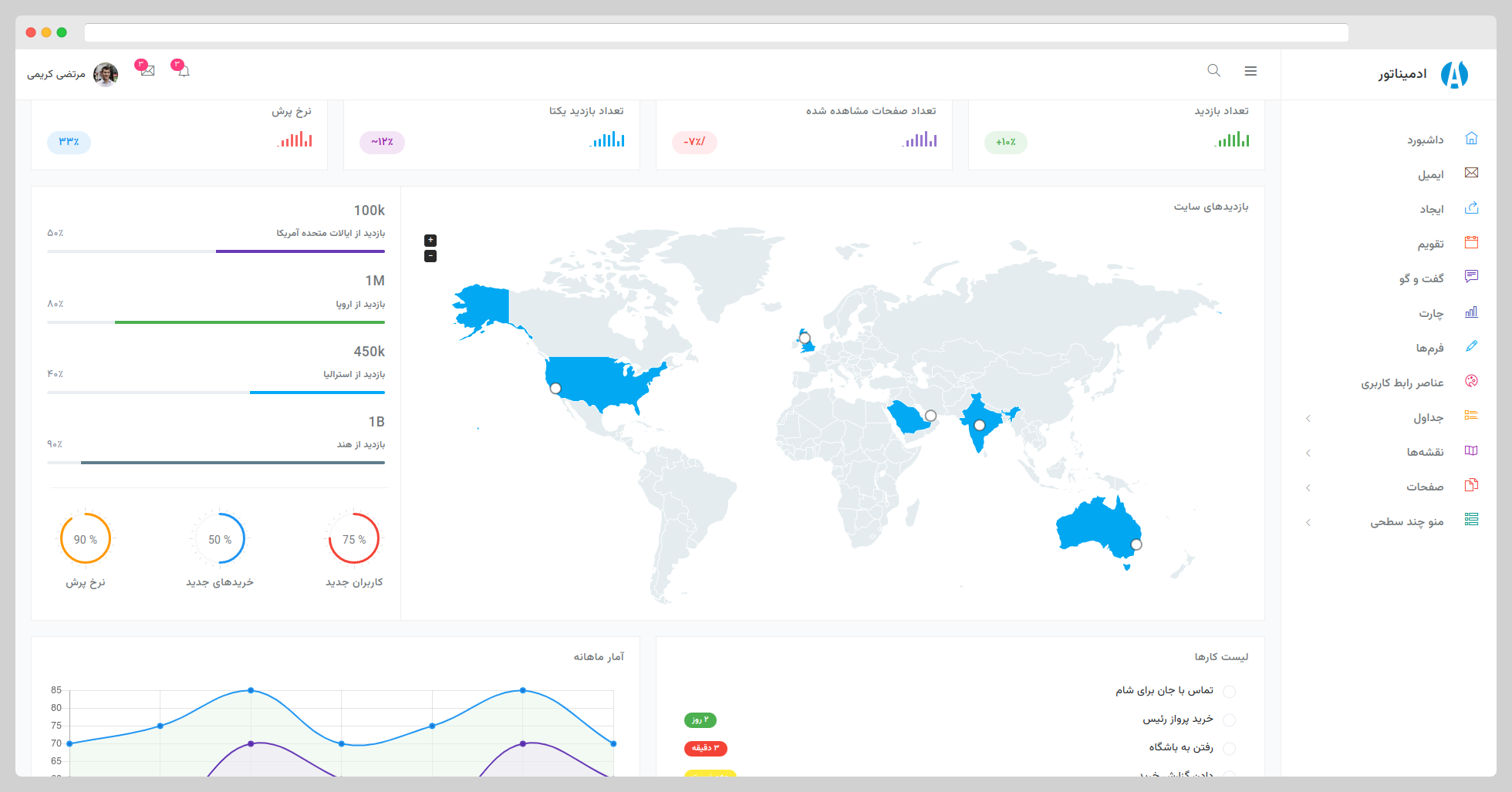
Built on Bootstrap 5 and adapted for RTL right-to-left layout
HTMLAdmin dashboard
Adminator-RTL — HTML Admin dashboard Template
By AnasRabeaa
Adminator-RTL is a right-to-left (RTL) admin template based on Bootstrap 5, offering static HTML pages, SCSS styles, and a Webpack build process.
Explore the design
Compare the page layouts and mobile experience. Open any screenshot for a closer look.
Author preview
Author-provided preview
Preview provided in the project README.
One original preview is available. Open the full image to inspect the design.
Screenshots show visual appearance; interactive behavior may differ.
Recorded 2026-10-12View source
What stands out
A quick read of the recorded project description.
Provides static HTML pages and SCSS style source code, organized into assets, static, and styles categories
JavaScript is split into functional modules, including initialization code for charts, data tables, calendars, maps, sidebar, etc.
Uses Webpack for building, integrating Babel, ESLint, Stylelint, PostCSS, and other toolchains
Licensed under MIT, allowing free use, modification, commercial use, and distribution
Template Details
Adminator-RTL is an HTML template for admin interfaces, built on Bootstrap 5 and adapted for right-to-left (RTL) reading direction, suitable for admin panels in RTL language environments such as Persian and Arabic. The repository is maintained by AnasRabeaa, with the original template authors being Colorlib and Morteza Karimi.
The template primarily consists of static HTML pages, with styles written in SCSS and JavaScript split by functionality under src/assets/scripts, covering modules such as charts (Chart.js, Sparkline, Easy Pie Chart), data tables, date pickers, Fullcalendar, Google Maps integration, Masonry layout, sidebar, and search box. The project uses Webpack as its build tool, along with Babel, ESLint, Stylelint, and PostCSS; source code is located in the src directory, and build output is generated in the build directory.
Before use, Node.js, Yarn or NPM, and Git must be installed locally; on Linux, libpng-dev is also required. The development workflow involves cloning the repository, running npm install, and then npm run dev to start a local server with hot reload. For deployment, use npm run build to generate static assets and npm run preview to preview the build results. Pre-built static assets are also available for download from the repository.
Regarding licensing, this version is under the MIT license, allowing free use, modification, commercial use, and distribution, provided that the original author's copyright notice and the full MIT license text are retained when distributing. Third-party assets such as demo images, fonts, and icons in the template require separate license verification and cannot be assumed to be covered solely by the code's MIT license.
HTMLAdmin Panel
Is it right for your project?
Use Cases
- Building admin interfaces for RTL languages such as Persian and Arabic
- Serving as a starting point for a static HTML admin template, with page content and styles replaced as needed
- Referencing its SCSS directory organization and Webpack configuration to build similar admin projects
- Starting a local development server via npm run dev to preview and adjust page layouts
Suitable For
- Admin management projects requiring RTL layout
- Front-end developers using Bootstrap 5 and static HTML
- Teams looking to customize admin interfaces based on SCSS and Webpack workflows
Getting started & customization
Use these recorded setup notes alongside the repository instructions for your chosen version.
- 1
Node.js, Yarn or NPM, and Git must be installed locally; Linux environments also require libpng-dev
- 2
After cloning the repository, run npm install, then npm run dev to start the local development server
- 3
For deployment, run npm run build to generate static assets, and npm run preview to preview the build results
- 4
Pre-built static assets are available in the repository releases
- 5
Verify licenses for third-party images, fonts, and icons separately before use
License & source material
Usage conditions & limitations
Free to use · keep license noticeThis entry covers the free version under the MIT license in the public repository; the free scope applies to this version's code and does not imply that external services or third-party assets are free.
Must comply with when using
- Free use, modification, commercial use, and distribution of this version's code are permitted.
- When distributing copies or substantial portions of the code, retain the original author's copyright notice and the full MIT license notice.
- The code is provided as-is; warranties and limitations of liability are governed by the original license and applicable law.
Additional costs & items to verify
- Demo images, fonts, icons, and other third-party assets require verification under their respective licenses and cannot be assumed to be covered solely by the code's MIT license.
- External services such as domains, hosting, databases, payments, or AI may incur additional charges.
- When using, modifying, distributing, or commercially using this template, Colorlib must always be credited as the original author, and attribution must be retained.
View Original Text Basis
Permission is hereby granted, free of charge
Original License Text
https://github.com/AnasRabeaa/Adminator-RTL/blob/master/LICENSEhttps://github.com/AnasRabeaa/Adminator-RTL/blob/master/README.mdBut you always need to state that Colorlib is the original author of this template.
Original README
Compiled by DeepSeek based on repository license and README ·2026-10-12. Results only cover the materials read; dependencies, images, fonts, and subsequent term changes are subject to their respective original texts.
Project checks & description sources
Template Information
- Source platforms
- GitHub
- Documentation and maintenance reference score
- Partly documented · 56 / 100
- Technologies
- HTML
- Website type
- Admin dashboard
How this score is calculated
Our heuristic uses license records (up to 30), a demo link (12), a preview (10), stars (15), recorded maintenance (15), description completeness (8), feature records (5) and classification data (5). It is not a code, security or performance test, or a Google score. A link does not establish tested functionality.
What to verify for this project
- Repository update recorded
- 2023-04-14
- Screenshot last checked
- 2026-10-12
No demo link is recorded. Use the repository instructions to evaluate the project locally; the screenshot alone cannot establish interactive behavior.
The catalog identifies HTML as the primary stack. Check the actual dependency manifest and lockfile for versions and hosting requirements. These notes use recorded metadata, not a code audit or a deployment test.
Use a selection guide →How this description was prepared
AI-assisted description based on catalog records and repository material. Repository authors are not automatically the reviewers of this description.
Review declaration: [email protected] · 2026-10-13
Inspect the recorded source material
SHA-256: 1acd752633e5999ac5deece59716266132c919aa0c9fcedcd64b5afc1d279622
2026-10-12T04:50:48.959Z
Source file / repository# Adminator RTL Bootstrap 5 Admin Template **Adminator RTL** is a responsive Bootstrap 5 Admin Template. It provides you with a collection of ready to use code snippets and utilities, custom pages, a collection of applications and some useful widgets. Preview of this awesome admin template available here: https://morteza-karimi.ir/Adminator-admin-dashboard-rtl/index.html # Preview ### Screenshot  ### Demo Site: [Here](https://morteza-karimi.ir/Adminator-admin-dashboard-rtl/index.html) ## TOC - [Getting Started](#getting-started) - [Prerequisites](#prerequisites) - [Installing & Local Development](#installing--local-development) - [Files/Folder Structure](#filesfolders-structure) - [Deployment](#deployment) - [Built With](#built-with) - [Changelog](#changelog) - [Authors](#authors) - [License](#license) ## Getting Started In order to run **Adminator** on your local machine all what you need to do is to have the prerequisites stated below installed on your machine and follow the installation steps down below. Prebuilt static assets can be found under [releases](https://github.com/mortezakarimi/Adminator-admin-dashboard-rtl/releases). #### Prerequisites - Node.js - Yarn or NPM - Git - libpng-dev *linux only* #### Installing & Local Development Start by typing the following commands in your terminal in order to get **Adminator** full package on your machine and starting a local development server with live reload feature. ``` > git clone https://github.com/mortezakarimi/Adminator-admin-dashboard-rtl.git adminator > cd adminator > npm install > npm run dev ``` ## Files/Folders Structure Here is a brief explanation of the template folder structure and some of its main files usage: ``` └── src # Contains all template source files. │ └── assets # Contains JS, CSS, images and icon fonts. │ │ └── scripts # Contains all JavaScript files. │ │ │ └── charts # Chart.js, Sparkline & Pie Chart plugins init. │ │ │ └── chat # All chat app JS code. │ │ │ └── constants # Template constant values like color values. │ │ │ └── datatable # Date table plugin init. │ │ │ └── datepicker # Bootstrap datepicker init. │ │ │ └── email # All email app code. │ │ │ └── fullcalendar # Fullcalendar plugin init. │ │ │ └── googleMaps # Google maps API integration code. │ │ │ └── masonry # Masonry layout code. │ │ │ └── popover # Bootstrap popover plugin init. │ │ │ └── scrollbar # Perfect scrollbar plugin init. │ │ │ └── search # Topbar toggle search init. │ │ │ └── sidebar # Sidebar JS code. │ │ │ └── skycons # Animated icons plugin init. │ │ │ └── utils # Basic utils used for proper rendering. │ │ │ └── vectorMaps # Vector maps plugin init. │ │ │ └── index.js # Indicator file. │ │ │ │ │ └── static # Contains the non-code files. │ │ │ └── fonts # Contains icon fonts. │ │ │ └── images # Contains all template images/svg. │ │ │ │ │ └── styles # Contains all SCSS files. │ │ └── spec # Contains custom SCSS files. │ │ │ └── components # Contains all template components. │ │ │ └── generic # Contains basic scaffolding styles. │ │ │ └── screens # Contains views specific styles. │ │ │ └── settings # Contains all template variables. │ │ │ └── tools # Contains all mixins. │ │ │ └── utils # Contains helper classes. │ │ │ └── index.scss # Indicator file. │ │ │ │ │ └── vendor # Contains all plugin files & custom styles. │ │ └── index.scss # Indicator file. │ │ │ └── *.html # All HTML pages files . └── webpack # Contains Webpack init code. │ └── plugins # Contains all Webpack plugins config. │ └── rules # Contains Loaders config code. │ └── config.js # Contains Webpack config object. │ └── devServer.js # Webpack dev server config code. │ └── manifest.js # All build system constants. │ └── .babelrc # Babel ES6 Transpiler. └── .editorconfig # Keep same coding styles between code editors. └── .eslintrc.yml # JavaScript Linting. └── .gitattributes # Git Attributes. └── .gitignore # Ignored files in Git. └── .stylelintrc.yml # SCSS/CSS Linting. └── browserslist # Supported Browsers. └── CHANGELOG.md # Versioning. └── package.json # Package metadata. └── README.md # Manual file. └── webpack.config.js # Webpack main config file. └── yarn.lock # Yarn metadata. ``` ## Deployment In deployment process, you have two commands: 1. Build command Used to generate the final result of compiling src files into build folder. This can be achieved by running the following command: ``` > npm run build ``` 2. Preview command Used to create a local dev server in order to preview the final output of build process. This can be achieved by running the following command: ``` > npm run preview ``` ## Built With - [Babel](https://babeljs.io/) - [Webpack](https://webpack.js.org/) - [Eslint](https://eslint.org/) - [Sass](http://sass-lang.com/) - [Postcss](http://postcss.org/) - [Stylelint](https://stylelint.io/) - [Bootstrap](http://getbootstrap.com/) - [Chart.js](http://www.chartjs.org/) - [Datatables](https://datatables.net/) - [Easy Pie Chart](http://rendro.github.io/easy-pie-chart/) - [Fullcalendar](https://fullcalendar.io/) - [Jquery](https://jquery.com/) - [Jquery Sparkline](https://omnipotent.net/jquery.sparkline/) - [Jvectormap](http://jvectormap.com/) - [Load Google Maps API](https://github.com/yuanqing/load-google-maps-api) - [Lodash](https://lodash.com/) - [Masonry](https://masonry.desandro.com/) - [Moment](https://momentjs.com/) - [Perfect Scrollbar](https://github.com/utatti/perfect-scrollbar) - [Skycons](https://darkskyapp.github.io/skycons/) - [Fontawesome](http://fontawesome.io/) - [Themify Icons](https://themify.me/themify-icons) - [Roboto Font](https://fonts.google.com/specimen/Roboto) - [Bootstrap Datepicker](https://bootstrap-datepicker.readthedocs.io/en/latest/) - [Vazirmatn](https://rastikerdar.github.io/vazirmatn/) ## Changelog #### V 1.0.0 Initial Release ## Authors [Colorlib](https://colorlib.com) [Morteza Karimi](https://morteza-karimi.ir) ## More info - [Bootstrap Dashboards](https://colorlib.com/wp/free-bootstrap-admin-dashboard-templates/) - [Bootstrap Templates](https://colorlib.com/wp/free-bootstrap-templates/) - [HTML Templates](https://colorlib.com/wp/free-html-website-templates/) - [Free Admin Dashboards](https://colorlib.com/wp/free-html5-admin-dashboard-templates/) - [Website Templates](https://colorlib.com/wp/templates/) - [Free CSS Templates](https://colorlib.com/wp/free-css-website-templates/) - [WordPress Themes](https://colorlib.com/wp/free-wordpress-themes/) ## License Adminator is licensed under The MIT License (MIT). Which means that you can use, copy, modify, merge, publish, distribute, sublicense, and/or sell copies of the final products. But you always need to state that Colorlib is the original author of this template.
Explore similar templates
Compare previews and descriptions within the same stack and category.

gentelella
Gentelella v4 is a free, open-source admin dashboard template maintained by Colorlib, built with vanilla JavaScript, SCSS, and Vite 8 without Bootstrap or jQuery.
HTML · Admin dashboard

coreui-free-bootstrap-admin-template
A free Bootstrap admin template maintained by CoreUI, built on CoreUI's own UI component library. It provides compiled HTML pages and Pug template source code, covering dashboards, authentication, forms, components, icons, and error pages.
HTML · Admin dashboard

dashboards
A collection of responsive dashboard HTML templates open-sourced by Keen IO, built on CSS Grid, offering multiple prebuilt admin data interface layouts.
HTML · Admin dashboard

SB Admin 2
SB Admin 2 is a classic Bootstrap admin template from Start Bootstrap, offering dashboards, charts, tables, and common management pages.
HTML · Admin dashboard

Adminator-admin-dashboard
Adminator 4 is a vanilla HTML, CSS and JavaScript admin dashboard template with a CSS-variable token design system, built-in light and dark themes, no jQuery or Bootstrap dependency, and 18 pages covering dashboards, mail, calendar, charts, forms, tables and error pages.
HTML · Admin dashboard

SB Admin
SB Admin is a lightweight, open-source Bootstrap admin template from Start Bootstrap. It offers a sidebar-and-top-bar layout with data tables, forms, and stat cards, plus responsive design.
HTML · Admin dashboard