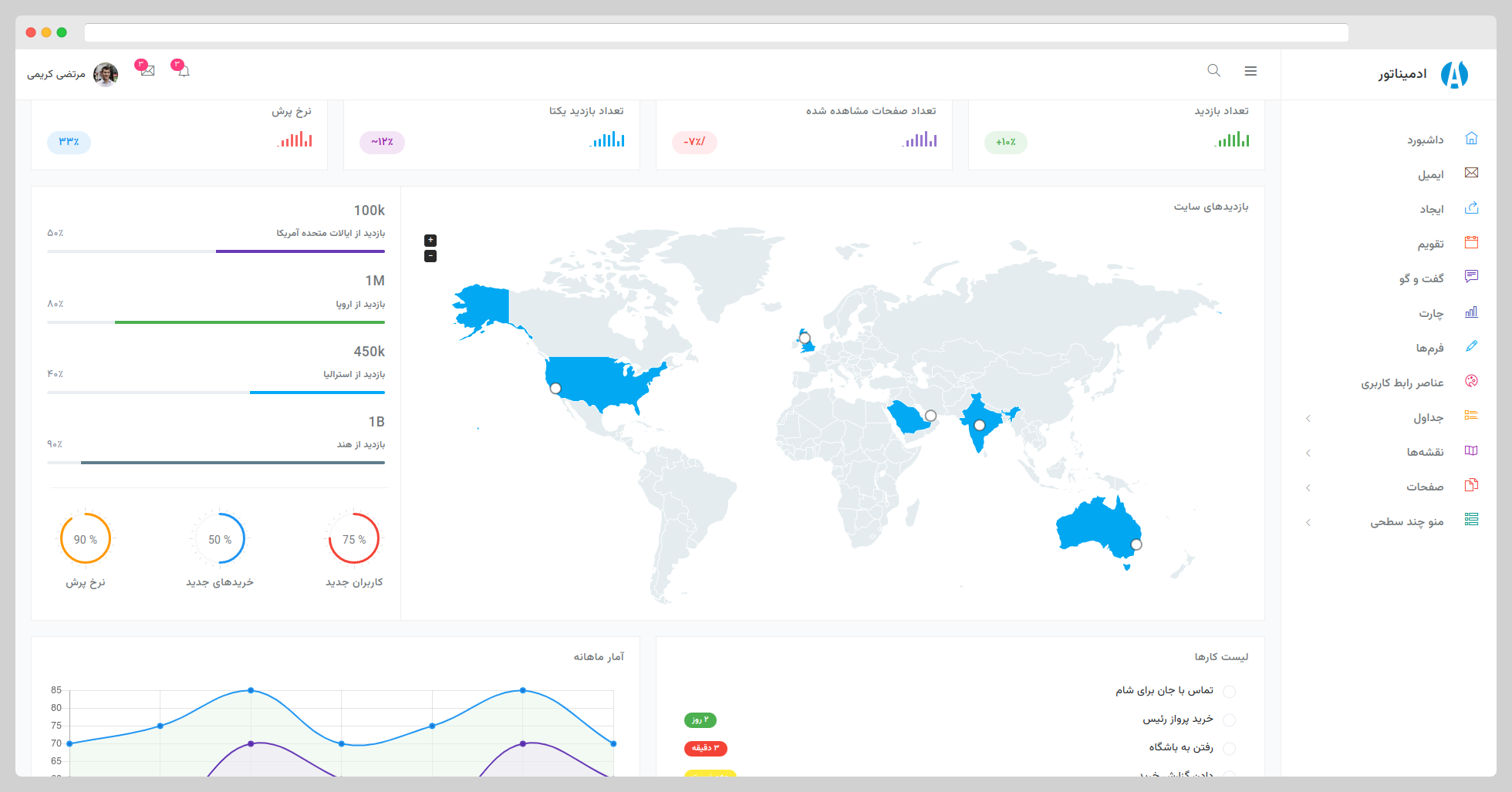
基于 Bootstrap 5 构建,并适配 RTL 从右到左布局
HTML后台
Adminator-RTL — HTML 后台模板
作者 AnasRabeaa
Adminator-RTL 是基于 Bootstrap 5 的右到左(RTL)后台管理模板,提供静态 HTML 页面、SCSS 样式与 Webpack 构建流程。
看看你的网站会是什么样
浏览真实页面截图,比较内容排版与手机效果。点击下方缩略图切换,放大查看整页细节。
目前有 1 张原始预览,可打开完整图片查看设计细节。
截图用于了解视觉与布局,交互效果请以实际项目为准。
采集于 2026-10-12查看来源
值得关注的模板亮点
从已有项目资料中,快速了解它的特点。
提供静态 HTML 页面与 SCSS 样式源码,结构按 assets、static、styles 分类
JavaScript 按功能模块拆分,包含图表、数据表格、日历、地图、侧边栏等初始化代码
使用 Webpack 构建,集成 Babel、ESLint、Stylelint、PostCSS 等工具链
采用 MIT 许可,允许免费使用、修改、商用与分发
模板详细介绍
Adminator-RTL 是一个面向后台管理界面的 HTML 模板,基于 Bootstrap 5 构建,并针对从右到左(RTL)的阅读方向做了适配,适合波斯语、阿拉伯语等 RTL 语言环境的管理后台。仓库由 AnasRabeaa 维护,原始模板作者为 Colorlib 与 Morteza Karimi。
模板以静态 HTML 页面为主体,样式使用 SCSS 编写,JavaScript 按功能拆分在 src/assets/scripts 下,涵盖图表(Chart.js、Sparkline、Easy Pie Chart)、数据表格、日期选择器、Fullcalendar 日历、Google Maps 集成、Masonry 布局、侧边栏、搜索框等模块。项目使用 Webpack 作为构建工具,配合 Babel、ESLint、Stylelint、PostCSS,源码位于 src 目录,构建产物输出到 build 目录。
使用前需要本地安装 Node.js、Yarn 或 NPM、Git,Linux 下还需 libpng-dev。开发流程为克隆仓库后执行 npm install 与 npm run dev 启动带热重载的本地服务;部署时使用 npm run build 生成静态资源,npm run preview 预览构建结果。仓库也提供预构建的静态资源下载。
许可方面,该版本采用 MIT 许可,可免费使用、修改、商用和分发,但分发时需保留原作者版权声明与完整 MIT 许可文本。模板中的演示图片、字体、图标等第三方素材需单独核对其许可,不能仅凭代码的 MIT 许可判断。
HTML后台
适合你的项目吗?
适用场景
- 搭建面向波斯语、阿拉伯语等 RTL 语言的管理后台界面
- 作为静态 HTML 后台模板的起点,按需替换页面内容与样式
- 参考其 SCSS 目录组织与 Webpack 配置,构建同类后台项目
- 在本地通过 npm run dev 启动开发服务,预览并调整页面布局
适合人群
- 需要 RTL 布局的后台管理项目
- 使用 Bootstrap 5 与静态 HTML 的前端开发者
- 希望基于 SCSS 与 Webpack 工作流定制后台界面的团队
上手与定制指南
结合仓库当前版本的说明,按下面的资料检查内容、配置与运行要求。
- 1
本地需安装 Node.js、Yarn 或 NPM、Git;Linux 环境还需 libpng-dev
- 2
克隆仓库后执行 npm install,再运行 npm run dev 启动本地开发服务
- 3
部署时运行 npm run build 生成静态资源,npm run preview 预览构建结果
- 4
预构建的静态资源可在仓库 releases 中获取
- 5
使用第三方图片、字体、图标前需单独核对其许可
授权与来源资料
使用条件与限制
免费使用 · 保留许可声明本次收录的是公开仓库中采用 MIT 许可的免费版本;免费范围为该版本代码,不代表外部服务或第三方素材免费。
使用时需要遵守
- 允许免费使用、修改、商用和分发该版本代码。
- 分发代码副本或实质性部分时,保留原作者版权声明和完整 MIT 许可声明。
- 代码按现状提供;担保与责任限制以原许可证及适用法律为准。
额外费用与待核对事项
- 演示图片、字体、图标及其他第三方素材需按各自许可核对,不能仅凭代码的 MIT 许可判断。
- 域名、托管、数据库、支付或 AI 等外部服务可能另外收费。
- 使用、修改、分发或商用该模板时,必须始终声明 Colorlib 为原始作者,保留署名归属。
查看原文依据
Permission is hereby granted, free of charge
许可证原文
https://github.com/AnasRabeaa/Adminator-RTL/blob/master/LICENSEhttps://github.com/AnasRabeaa/Adminator-RTL/blob/master/README.mdBut you always need to state that Colorlib is the original author of this template.
README 原文
DeepSeek 根据仓库许可证和 README 整理 ·2026-10-12。结果仅覆盖已读取资料,依赖、图片、字体及后续条款变更以各自原文为准。
项目核对记录与介绍依据
模板资料
- 来源平台
- GitHub
- 资料与维护参考分
- 资料一般 · 56 / 100
- 技术栈
- HTML
- 网站类型
- 后台
这个分数如何计算
本站按许可资料(最高30分)、演示链接(12分)、预览图(10分)、Star数(15分)、记录的维护时间(15分)、描述完整度(8分)、功能记录(5分)和分类资料(5分)计算。它不是代码、安全或性能测试,也不是 Google 评分;有链接不代表已实测可用。
这个项目需要核对什么
- 记录的仓库更新时间
- 2023-04-14
- 截图检查日期
- 2026-10-12
目前没有记录演示链接。请依据仓库说明在本地评估;仅凭截图无法确认交互行为。
目录记录的主要技术栈是 HTML。请通过依赖清单和锁文件核对实际版本与托管要求。这些说明基于收录资料,不代表代码审计或部署实测。
查看具体选型方法 →介绍的制作与核对状态
介绍由 AI 辅助整理目录与仓库资料。仓库作者不等于这篇介绍的审核者。
审核声明: [email protected] · 2026-10-13
查看当时使用的来源资料
SHA-256: 1acd752633e5999ac5deece59716266132c919aa0c9fcedcd64b5afc1d279622
2026-10-12T04:50:48.959Z
来源文件 / 仓库# Adminator RTL Bootstrap 5 Admin Template **Adminator RTL** is a responsive Bootstrap 5 Admin Template. It provides you with a collection of ready to use code snippets and utilities, custom pages, a collection of applications and some useful widgets. Preview of this awesome admin template available here: https://morteza-karimi.ir/Adminator-admin-dashboard-rtl/index.html # Preview ### Screenshot  ### Demo Site: [Here](https://morteza-karimi.ir/Adminator-admin-dashboard-rtl/index.html) ## TOC - [Getting Started](#getting-started) - [Prerequisites](#prerequisites) - [Installing & Local Development](#installing--local-development) - [Files/Folder Structure](#filesfolders-structure) - [Deployment](#deployment) - [Built With](#built-with) - [Changelog](#changelog) - [Authors](#authors) - [License](#license) ## Getting Started In order to run **Adminator** on your local machine all what you need to do is to have the prerequisites stated below installed on your machine and follow the installation steps down below. Prebuilt static assets can be found under [releases](https://github.com/mortezakarimi/Adminator-admin-dashboard-rtl/releases). #### Prerequisites - Node.js - Yarn or NPM - Git - libpng-dev *linux only* #### Installing & Local Development Start by typing the following commands in your terminal in order to get **Adminator** full package on your machine and starting a local development server with live reload feature. ``` > git clone https://github.com/mortezakarimi/Adminator-admin-dashboard-rtl.git adminator > cd adminator > npm install > npm run dev ``` ## Files/Folders Structure Here is a brief explanation of the template folder structure and some of its main files usage: ``` └── src # Contains all template source files. │ └── assets # Contains JS, CSS, images and icon fonts. │ │ └── scripts # Contains all JavaScript files. │ │ │ └── charts # Chart.js, Sparkline & Pie Chart plugins init. │ │ │ └── chat # All chat app JS code. │ │ │ └── constants # Template constant values like color values. │ │ │ └── datatable # Date table plugin init. │ │ │ └── datepicker # Bootstrap datepicker init. │ │ │ └── email # All email app code. │ │ │ └── fullcalendar # Fullcalendar plugin init. │ │ │ └── googleMaps # Google maps API integration code. │ │ │ └── masonry # Masonry layout code. │ │ │ └── popover # Bootstrap popover plugin init. │ │ │ └── scrollbar # Perfect scrollbar plugin init. │ │ │ └── search # Topbar toggle search init. │ │ │ └── sidebar # Sidebar JS code. │ │ │ └── skycons # Animated icons plugin init. │ │ │ └── utils # Basic utils used for proper rendering. │ │ │ └── vectorMaps # Vector maps plugin init. │ │ │ └── index.js # Indicator file. │ │ │ │ │ └── static # Contains the non-code files. │ │ │ └── fonts # Contains icon fonts. │ │ │ └── images # Contains all template images/svg. │ │ │ │ │ └── styles # Contains all SCSS files. │ │ └── spec # Contains custom SCSS files. │ │ │ └── components # Contains all template components. │ │ │ └── generic # Contains basic scaffolding styles. │ │ │ └── screens # Contains views specific styles. │ │ │ └── settings # Contains all template variables. │ │ │ └── tools # Contains all mixins. │ │ │ └── utils # Contains helper classes. │ │ │ └── index.scss # Indicator file. │ │ │ │ │ └── vendor # Contains all plugin files & custom styles. │ │ └── index.scss # Indicator file. │ │ │ └── *.html # All HTML pages files . └── webpack # Contains Webpack init code. │ └── plugins # Contains all Webpack plugins config. │ └── rules # Contains Loaders config code. │ └── config.js # Contains Webpack config object. │ └── devServer.js # Webpack dev server config code. │ └── manifest.js # All build system constants. │ └── .babelrc # Babel ES6 Transpiler. └── .editorconfig # Keep same coding styles between code editors. └── .eslintrc.yml # JavaScript Linting. └── .gitattributes # Git Attributes. └── .gitignore # Ignored files in Git. └── .stylelintrc.yml # SCSS/CSS Linting. └── browserslist # Supported Browsers. └── CHANGELOG.md # Versioning. └── package.json # Package metadata. └── README.md # Manual file. └── webpack.config.js # Webpack main config file. └── yarn.lock # Yarn metadata. ``` ## Deployment In deployment process, you have two commands: 1. Build command Used to generate the final result of compiling src files into build folder. This can be achieved by running the following command: ``` > npm run build ``` 2. Preview command Used to create a local dev server in order to preview the final output of build process. This can be achieved by running the following command: ``` > npm run preview ``` ## Built With - [Babel](https://babeljs.io/) - [Webpack](https://webpack.js.org/) - [Eslint](https://eslint.org/) - [Sass](http://sass-lang.com/) - [Postcss](http://postcss.org/) - [Stylelint](https://stylelint.io/) - [Bootstrap](http://getbootstrap.com/) - [Chart.js](http://www.chartjs.org/) - [Datatables](https://datatables.net/) - [Easy Pie Chart](http://rendro.github.io/easy-pie-chart/) - [Fullcalendar](https://fullcalendar.io/) - [Jquery](https://jquery.com/) - [Jquery Sparkline](https://omnipotent.net/jquery.sparkline/) - [Jvectormap](http://jvectormap.com/) - [Load Google Maps API](https://github.com/yuanqing/load-google-maps-api) - [Lodash](https://lodash.com/) - [Masonry](https://masonry.desandro.com/) - [Moment](https://momentjs.com/) - [Perfect Scrollbar](https://github.com/utatti/perfect-scrollbar) - [Skycons](https://darkskyapp.github.io/skycons/) - [Fontawesome](http://fontawesome.io/) - [Themify Icons](https://themify.me/themify-icons) - [Roboto Font](https://fonts.google.com/specimen/Roboto) - [Bootstrap Datepicker](https://bootstrap-datepicker.readthedocs.io/en/latest/) - [Vazirmatn](https://rastikerdar.github.io/vazirmatn/) ## Changelog #### V 1.0.0 Initial Release ## Authors [Colorlib](https://colorlib.com) [Morteza Karimi](https://morteza-karimi.ir) ## More info - [Bootstrap Dashboards](https://colorlib.com/wp/free-bootstrap-admin-dashboard-templates/) - [Bootstrap Templates](https://colorlib.com/wp/free-bootstrap-templates/) - [HTML Templates](https://colorlib.com/wp/free-html-website-templates/) - [Free Admin Dashboards](https://colorlib.com/wp/free-html5-admin-dashboard-templates/) - [Website Templates](https://colorlib.com/wp/templates/) - [Free CSS Templates](https://colorlib.com/wp/free-css-website-templates/) - [WordPress Themes](https://colorlib.com/wp/free-wordpress-themes/) ## License Adminator is licensed under The MIT License (MIT). Which means that you can use, copy, modify, merge, publish, distribute, sublicense, and/or sell copies of the final products. But you always need to state that Colorlib is the original author of this template.
看看同类模板
对比同技术栈与用途的模板,找到更适合的视觉与内容结构。

gentelella
Free admin dashboard template — vanilla JS, SCSS, Vite 8. No Bootstrap, no jQuery.
HTML · 后台

coreui-free-bootstrap-admin-template
Free Bootstrap Admin & Dashboard Template Built for AI-Assisted Development
HTML · 后台

dashboards
Responsive dashboard templates 📊✨
HTML · 后台

SB Admin 2
SB Admin 2 是 Start Bootstrap 推出的开源后台模板,基于 Bootstrap 构建,整体风格偏向经典管理界面。
HTML · 后台

Adminator-admin-dashboard
Adminator is easy to use and well design admin dashboard template with dark mode for web apps, websites, servi…
HTML · 后台

SB Admin
SB Admin 是 Start Bootstrap 推出的开源后台管理模板,基于 Bootstrap 构建,定位是简洁、实用的管理界面。
HTML · 后台