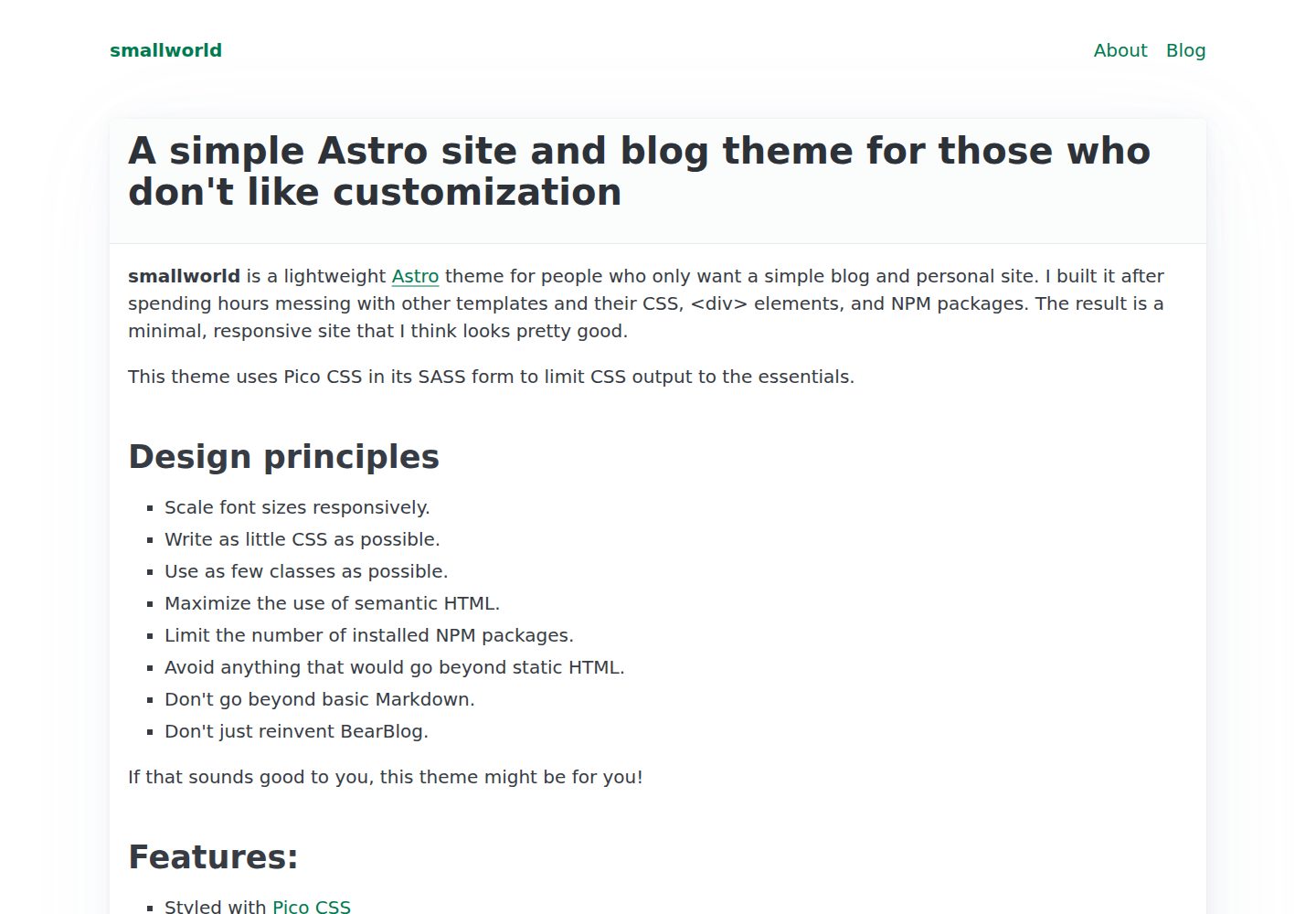
Almost no CSS classes, maximizing semantic HTML, with styling mainly handled by Pico CSS
AstroBlogTool Site
astro-smallworld — Astro Blog Template
By anaxite
astro-smallworld is an Astro-based single-author blog template that uses almost no CSS classes, relying instead on semantic HTML and Pico CSS for styling, making it a suitable starting point for learning Astro.
Explore the design
Compare the page layouts and mobile experience. Open any screenshot for a closer look.
Desktop homepage1 / 3
Desktop captureTop of page
Actual screenshot captured by the server browser.
All pages & views 3
Screenshots show visual appearance; interactive behavior may differ.
Recorded 2026-10-03View source
What stands out
A quick read of the recorded project description.
Built-in single-author blog collection by default, with Markdown articles under src/content/blog, where the path is the URL
Includes homepage, About page, and 404 page, with static pages organized as .astro files in src/pages
Site-level settings centralized in src/settings.ts, configurable for favicon and Open Graph images
Provides Prettier formatting script, along with PNPM and mise-en-place configuration
Code is MIT licensed, allowing free use, modification, commercial use, and distribution
Template Details
This is a blog template for the Astro static site generator, positioned as a single-author blog and basic website. The author's design goal is to reduce time spent on style customization: the template writes almost no CSS classes, instead maximizing semantic HTML and using Pico CSS for basic appearance. The README states its aim is accessible, usable elements, avoiding complex systems, and making what you see easy to understand.
Functionally, the template includes a blog content collection by default, with articles as Markdown files placed in the src/content/blog directory and its subdirectories; the path and filename form the article URL. Article frontmatter must include title, description, and pubDate, with tags optional. Pages include a homepage (showing the latest blog posts), an About page, and a 404 page; static pages are placed as .astro files under src/pages. Site-level settings are centralized in src/settings.ts, where you can configure the favicon filename and Open Graph image settings; navigation requires directly editing the PageHeader.astro component. Styles are controlled by src/styles/main.scss, which determines which elements Pico CSS includes.
Limitations and notes: The README mentions that Pico CSS warnings may appear during build, usually non-fatal and ignorable; the template itself does not include complex systems like comments, search, or multiple authors. The repository uses the MIT license, allowing free use, modification, commercial use, and distribution of the code, but third-party assets such as demo images, fonts, and icons require separate license verification, and external services like domains and hosting may incur additional costs.
AstroBlogUtility site
Is it right for your project?
Use Cases
- Building a personal single-author blog and publishing Markdown articles
- As an introductory project for learning Astro pages, layouts, and content collections
- Needing a minimal-style, semantic HTML-based basic website skeleton
Suitable For
- Developers who want to quickly start a personal blog without spending much time on styling
- Those learning Astro who want to start with a structurally simple template
- Front-end users who prefer semantic HTML and lightweight CSS solutions
Getting started & customization
Use these recorded setup notes alongside the repository instructions for your chosen version.
- 1
Create the project with npm create astro@latest -- --template anaxite/astro-smallworld, then run npm install
- 2
Preview with npm run dev, build with npm run build, and optionally format source code with npm run format
- 3
Change site settings in src/settings.ts, and adjust the range of Pico CSS elements in src/styles/main.scss
- 4
Add new articles by creating Markdown files under src/content/blog; frontmatter must include title, description, and pubDate
- 5
Navigation items require directly editing the PageHeader.astro component; Pico CSS warnings during build are usually ignorable
License & source material
Usage conditions & limitations
Free to use · keep license noticeThis entry covers the free version under the MIT license in the public repository; the free scope applies to this version's code, not to external services or third-party assets.
Must comply with when using
- Free use, modification, commercial use, and distribution of this version's code are permitted.
- When distributing copies or substantial portions of the code, retain the original author's copyright notice and the full MIT license notice.
- The code is provided as-is; warranties and liability limitations are governed by the original license and applicable law.
Additional costs & items to verify
- Pico CSS warnings may appear during build; they are usually non-fatal and can be ignored without affecting site generation.
- An Astro-supported Node.js package manager is required; the project includes PNPM configuration by default, but PNPM is not mandatory.
- The project includes a mise-en-place configuration file; if using that tool, you must install mise yourself, otherwise this configuration can be ignored.
- Demo images, fonts, icons, and other third-party assets require license verification according to their respective licenses; they cannot be judged solely by the code's MIT license.
- External services such as domains, hosting, databases, payments, or AI may incur additional costs.
View Original Text Basis
Permission is hereby granted, free of charge
Original License Text
A site build may show Pico CSS warnings. These warnings are generally non-fatal and can be ignored.
Original README
Any Node.js package manager supported by Astro should work. I include a bit of PNPM config by default.
Original README
https://github.com/anaxite/astro-smallworld/blob/main/LICENSEhttps://github.com/anaxite/astro-smallworld/blob/main/README.mdThis project comes with a `mise-en-place` configuration file.
Original README
Compiled by DeepSeek based on repository license and README ·2026-10-03. Results only cover the materials read; dependencies, images, fonts, and subsequent term changes are subject to their respective original texts.
Project checks & description sources
Template Information
- Source platforms
- GitHub
- Documentation and maintenance reference score
- More documented · 92 / 100
- Technologies
- Astro
- Website type
- Blog · Tool Site
How this score is calculated
Our heuristic uses license records (up to 30), a demo link (12), a preview (10), stars (15), recorded maintenance (15), description completeness (8), feature records (5) and classification data (5). It is not a code, security or performance test, or a Google score. A link does not establish tested functionality.
What to verify for this project
- Repository update recorded
- 2026-08-08
- Screenshot last checked
- 2026-10-03
A demo link is listed. Check it with your own content and viewport sizes; its presence does not confirm that forms, authentication or payments work.
The catalog identifies Astro as the primary stack. Check the actual dependency manifest and lockfile for versions and hosting requirements. These notes use recorded metadata, not a code audit or a deployment test.
Use a selection guide →How this description was prepared
AI-assisted description based on catalog records and repository material. Repository authors are not automatically the reviewers of this description.
Automatically checked against source and license rules; no manual editorial review.
Inspect the recorded source material
SHA-256: 3b3857ae1d969b7331935e764dc28fd711ac8e2100a67cae81184f848d36d7c3
2026-10-03T00:08:32.596Z
Source file / repository# smallworld _This is a template for the static site generator [Astro](https://astro.build/). Now updated for Astro 7!_ I like Astro, but I don't like spending hours customizing styles. I made this template based on a few key principles: - I want a basic website with a single-author blog. - The website should incorporate accessible and usable elements. - Avoid complex systems, prefer simpler ones. - Things I see should be easy to understand. The result is an Astro template that barely uses CSS classes, and maximizes the use of semantic HTML. It not only makes for a functional site, but is also great to start learning how Astro works! ## Quickstart ```shell npm create astro@latest -- --template anaxite/astro-smallworld cd astro-smallworld npm run dev npm run build ``` ## Less quick start ### Install 1. Install Astro: ```shell npm create astro@latest -- --template anaxite/astro-smallworld ``` 2. Install this template's dependencies, if you didn't already: ```shell cd <install-directory> npm install ``` 3. Run the template in preview mode, or build the final output. ```shell npm run dev npm run build ``` 4. Optionally, format your source files with Prettier. ```shell npm run format ``` ### Configure site settings Site-wide settings are stored in `src/settings.ts`. This is also where you can set the favicon file name, and Open Graph image settings. ### Configure CSS The file `src/styles/main.scss` controls which CSS elements Pico CSS includes in the final site. See [the Pico CSS website](https://picocss.com/docs/sass) for information about these elements. > A site build may show Pico CSS warnings. These warnings are generally non-fatal and can be ignored. ### Add and edit pages Create your static pages as `.astro` files under `src/pages`. The template includes an index page with the most recent blog posts, an About page, and a 404 page. Use the Base layout to wrap your content in semantically-correct `<main>` tags. The Base layout also takes `title` and `description` attributes that supplement the main site title and description. If you want your content to have a nice border, I recommend you wrap it in `<article>` tags to benefit from Pico CSS styling. To start with a basic page template, see the file in `src/templates`. ### Edit navigation To add a page to the site navigation, edit the `PageHeader.astro` component directly. ### Blog smallworld comes with a blog collection by default. To add a new post, create a Markdown file in the `src/content/blog` directory or one of its subdirectories. The path and file name becomes the post URL. A post must have `title`, `description` and `pubDate` keywords in its frontmatter. `tags` are optional. To see a post template, see the file in `src/templates`. ## Notes For your convenience, I added a few tooling things: - Any Node.js package manager supported by Astro should work. I include a bit of PNPM config by default. - This project comes with a `mise-en-place` configuration file. ## About Astro Want to learn more about Astro? Check out [their documentation](https://docs.astro.build) or jump into their [Discord server](https://astro.build/chat).
Explore similar templates
Compare previews and descriptions within the same stack and category.

astrowind
AstroWind is a free, open-source Astro starter theme using Astro and Tailwind CSS, released under the MIT license.
Astro · Blog

astro-paper
AstroPaper is a minimal, responsive, accessible, and SEO-friendly Astro blog theme. Articles are stored as Markdown/MDX in src/content/posts/, with subdirectories affecting URLs.
Astro · Blog

fuwari
Fuwari is a static blog template built with Astro and Tailwind CSS for personal blogs. It manages posts as Markdown files in src/content/posts/, with frontmatter for title, date, description, cover, tags, categories, draft status, and language.
Astro · Blog

Firefly
Firefly is a clean personal blog theme forked from Astro and Fuwari, offering four background modes, single/double sidebar and list/grid layouts, Pagefind client-side full-text search, and a six-language UI.
Astro · Blog

astro-theme-cactus
Astro Cactus is an Astro-based blog and portfolio theme that uses Markdown/MDX content collections to manage posts, notes, and tags, with frontmatter type-checked by a schema.
Astro · Portfolio

astrofy
Astrofy is a free and open-source personal portfolio website template built with Astro and TailwindCSS, with built-in blog, CV timeline, project showcase, store, and RSS feed modules.
Astro · Portfolio