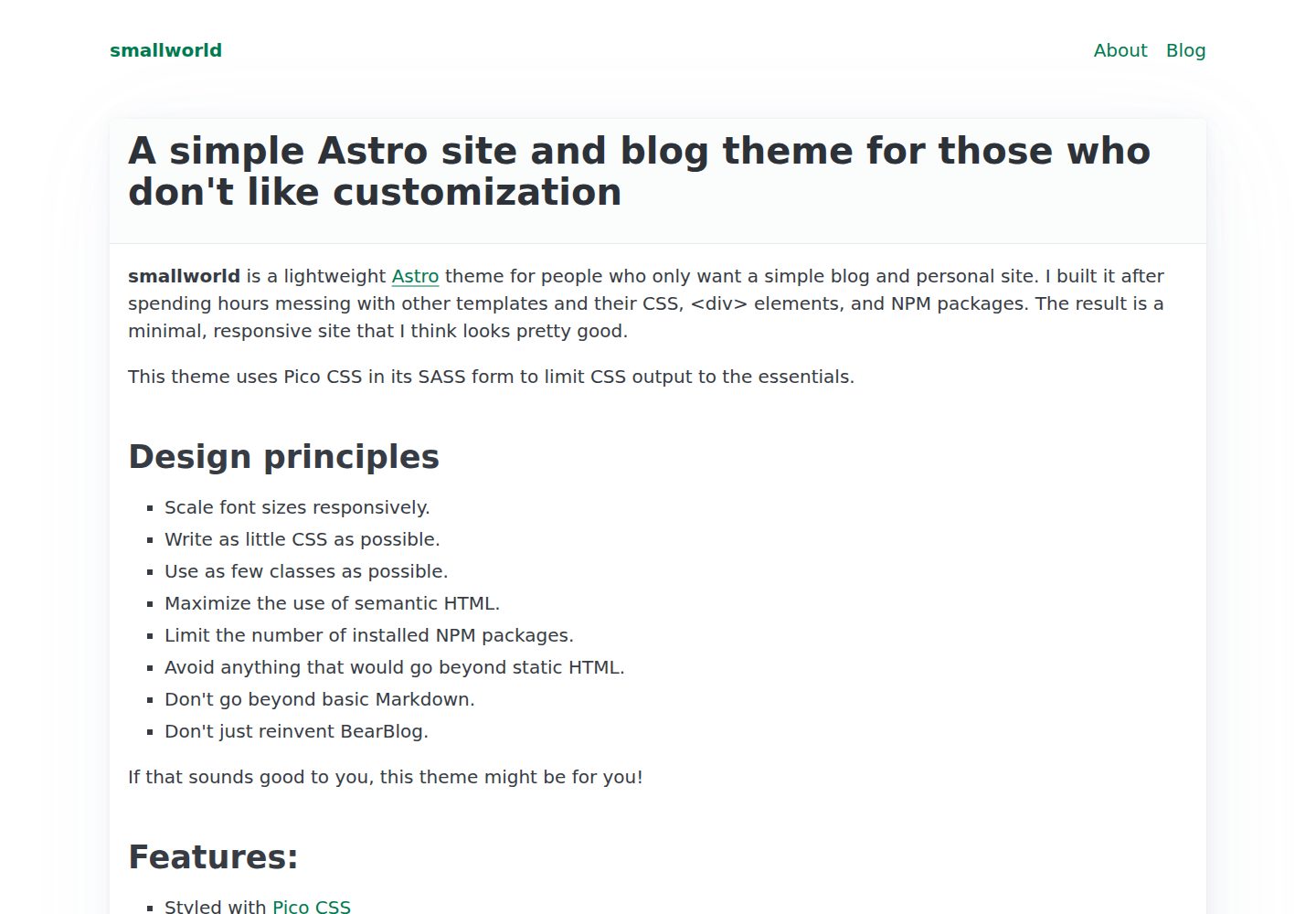
几乎不使用 CSS 类,最大化语义化 HTML,样式主要交给 Pico CSS
Astro博客工具站
astro-smallworld — Astro 博客模板
作者 anaxite
astro-smallworld 是一个基于 Astro 的单作者博客模板,几乎不使用 CSS 类,尽量依靠语义化 HTML 与 Pico CSS 完成样式,适合作为学习 Astro 的起点。
看看你的网站会是什么样
浏览真实页面截图,比较内容排版与手机效果。点击下方缩略图切换,放大查看整页细节。
全部页面与视图 3
截图用于了解视觉与布局,交互效果请以实际项目为准。
采集于 2026-10-03查看来源
值得关注的模板亮点
从已有项目资料中,快速了解它的特点。
默认内置单作者博客集合,Markdown 文章放在 src/content/blog 下,路径即 URL
包含首页、About 页和 404 页,静态页面以 .astro 文件组织在 src/pages
站点级设置集中在 src/settings.ts,可配置 favicon 与 Open Graph 图片
提供 Prettier 格式化脚本,并附带 PNPM 与 mise-en-place 配置
代码采用 MIT 许可,可免费使用、修改、商用和分发
模板详细介绍
这是一个面向 Astro 静态站点生成器的博客模板,定位为单作者博客与基础网站。作者的设计出发点是减少样式定制时间:模板几乎不写 CSS 类,而是最大化使用语义化 HTML,并借助 Pico CSS 提供基础外观。README 说明其目标是可访问、可用的元素,避免复杂系统,让看到的内容容易理解。
功能上,模板默认带有一个博客内容集合,文章以 Markdown 文件放在 src/content/blog 目录及其子目录中,路径与文件名构成文章 URL;文章 frontmatter 必须包含 title、description 和 pubDate,tags 为可选。页面方面包含首页(展示最新博客文章)、About 页和 404 页,静态页面以 .astro 文件放在 src/pages 下。站点级设置集中在 src/settings.ts,可配置 favicon 文件名与 Open Graph 图片设置;导航需要直接编辑 PageHeader.astro 组件。样式由 src/styles/main.scss 控制 Pico CSS 纳入哪些元素。
限制与注意点:README 提到构建时可能出现 Pico CSS 警告,通常非致命可忽略;模板本身不包含评论、搜索、多作者等复杂系统。仓库采用 MIT 许可,可免费使用、修改、商用和分发代码,但演示图片、字体、图标等第三方素材需单独核对许可,域名、托管等外部服务可能另行收费。
Astro博客工具站
适合你的项目吗?
适用场景
- 搭建个人单作者博客并发布 Markdown 文章
- 作为学习 Astro 页面、布局与内容集合的入门项目
- 需要一个样式极简、依赖语义化 HTML 的基础网站骨架
适合人群
- 想快速起步个人博客、又不愿花大量时间调样式的开发者
- 正在学习 Astro,希望从结构简单的模板入手的人
- 偏好语义化 HTML 与轻量 CSS 方案的前端使用者
上手与定制指南
结合仓库当前版本的说明,按下面的资料检查内容、配置与运行要求。
- 1
使用 npm create astro@latest -- --template anaxite/astro-smallworld 创建项目,再执行 npm install
- 2
用 npm run dev 预览、npm run build 构建,可选 npm run format 格式化源码
- 3
站点设置改 src/settings.ts,Pico CSS 元素范围改 src/styles/main.scss
- 4
新增文章在 src/content/blog 下创建 Markdown,frontmatter 需含 title、description、pubDate
- 5
导航项需直接编辑 PageHeader.astro 组件;构建时的 Pico CSS 警告通常可忽略
授权与来源资料
使用条件与限制
免费使用 · 保留许可声明本次收录的是公开仓库中采用 MIT 许可的免费版本;免费范围为该版本代码,不代表外部服务或第三方素材免费。
使用时需要遵守
- 允许免费使用、修改、商用和分发该版本代码。
- 分发代码副本或实质性部分时,保留原作者版权声明和完整 MIT 许可声明。
- 代码按现状提供;担保与责任限制以原许可证及适用法律为准。
额外费用与待核对事项
- 构建时可能出现 Pico CSS 警告,通常非致命,可忽略,不影响站点正常生成。
- 需使用 Astro 支持的 Node.js 包管理器;项目默认附带 PNPM 配置,但并非强制使用 PNPM。
- 项目附带 mise-en-place 配置文件,若使用该工具需自行安装 mise,否则可忽略此配置。
- 演示图片、字体、图标及其他第三方素材需按各自许可核对,不能仅凭代码的 MIT 许可判断。
- 域名、托管、数据库、支付或 AI 等外部服务可能另外收费。
查看原文依据
Permission is hereby granted, free of charge
许可证原文
A site build may show Pico CSS warnings. These warnings are generally non-fatal and can be ignored.
README 原文
Any Node.js package manager supported by Astro should work. I include a bit of PNPM config by default.
README 原文
https://github.com/anaxite/astro-smallworld/blob/main/LICENSEhttps://github.com/anaxite/astro-smallworld/blob/main/README.mdThis project comes with a `mise-en-place` configuration file.
README 原文
DeepSeek 根据仓库许可证和 README 整理 ·2026-10-03。结果仅覆盖已读取资料,依赖、图片、字体及后续条款变更以各自原文为准。
项目核对记录与介绍依据
模板资料
- 来源平台
- GitHub
- 资料与维护参考分
- 资料较完整 · 92 / 100
- 技术栈
- Astro
- 网站类型
- 博客 · 工具站
这个分数如何计算
本站按许可资料(最高30分)、演示链接(12分)、预览图(10分)、Star数(15分)、记录的维护时间(15分)、描述完整度(8分)、功能记录(5分)和分类资料(5分)计算。它不是代码、安全或性能测试,也不是 Google 评分;有链接不代表已实测可用。
这个项目需要核对什么
- 记录的仓库更新时间
- 2026-08-08
- 截图检查日期
- 2026-10-03
已收录演示链接。请用你的内容与屏幕尺寸检查;有演示不代表表单、认证或支付已经可用。
目录记录的主要技术栈是 Astro。请通过依赖清单和锁文件核对实际版本与托管要求。这些说明基于收录资料,不代表代码审计或部署实测。
查看具体选型方法 →介绍的制作与核对状态
介绍由 AI 辅助整理目录与仓库资料。仓库作者不等于这篇介绍的审核者。
已完成服务器许可规则与 AI 来源核对;未经过人工编辑审核。
查看当时使用的来源资料
SHA-256: 3b3857ae1d969b7331935e764dc28fd711ac8e2100a67cae81184f848d36d7c3
2026-10-03T00:08:32.596Z
来源文件 / 仓库# smallworld _This is a template for the static site generator [Astro](https://astro.build/). Now updated for Astro 7!_ I like Astro, but I don't like spending hours customizing styles. I made this template based on a few key principles: - I want a basic website with a single-author blog. - The website should incorporate accessible and usable elements. - Avoid complex systems, prefer simpler ones. - Things I see should be easy to understand. The result is an Astro template that barely uses CSS classes, and maximizes the use of semantic HTML. It not only makes for a functional site, but is also great to start learning how Astro works! ## Quickstart ```shell npm create astro@latest -- --template anaxite/astro-smallworld cd astro-smallworld npm run dev npm run build ``` ## Less quick start ### Install 1. Install Astro: ```shell npm create astro@latest -- --template anaxite/astro-smallworld ``` 2. Install this template's dependencies, if you didn't already: ```shell cd <install-directory> npm install ``` 3. Run the template in preview mode, or build the final output. ```shell npm run dev npm run build ``` 4. Optionally, format your source files with Prettier. ```shell npm run format ``` ### Configure site settings Site-wide settings are stored in `src/settings.ts`. This is also where you can set the favicon file name, and Open Graph image settings. ### Configure CSS The file `src/styles/main.scss` controls which CSS elements Pico CSS includes in the final site. See [the Pico CSS website](https://picocss.com/docs/sass) for information about these elements. > A site build may show Pico CSS warnings. These warnings are generally non-fatal and can be ignored. ### Add and edit pages Create your static pages as `.astro` files under `src/pages`. The template includes an index page with the most recent blog posts, an About page, and a 404 page. Use the Base layout to wrap your content in semantically-correct `<main>` tags. The Base layout also takes `title` and `description` attributes that supplement the main site title and description. If you want your content to have a nice border, I recommend you wrap it in `<article>` tags to benefit from Pico CSS styling. To start with a basic page template, see the file in `src/templates`. ### Edit navigation To add a page to the site navigation, edit the `PageHeader.astro` component directly. ### Blog smallworld comes with a blog collection by default. To add a new post, create a Markdown file in the `src/content/blog` directory or one of its subdirectories. The path and file name becomes the post URL. A post must have `title`, `description` and `pubDate` keywords in its frontmatter. `tags` are optional. To see a post template, see the file in `src/templates`. ## Notes For your convenience, I added a few tooling things: - Any Node.js package manager supported by Astro should work. I include a bit of PNPM config by default. - This project comes with a `mise-en-place` configuration file. ## About Astro Want to learn more about Astro? Check out [their documentation](https://docs.astro.build) or jump into their [Discord server](https://astro.build/chat).
看看同类模板
对比同技术栈与用途的模板,找到更适合的视觉与内容结构。

astrowind
⭕️ AstroWind: A free template using Astro v7 and Tailwind CSS v4. Astro starter theme.
Astro · 博客

astro-paper
A minimal, accessible and SEO-friendly Astro blog theme.
Astro · 博客

fuwari
✨A static blog template built with Astro.
Astro · 博客

Firefly
Firefly 是一款基于 Astro 的静态博客主题,由 CuteLeaf 在 saicaca 的 Fuwari 模板基础上二次开发,主打清新美观的视觉风格。
Astro · 博客

astro-theme-cactus
A simple Astro theme. Use it to create your blog or website.
Astro · 作品集

astrofy
Astrofy is a free and open-source template for your Personal Portfolio Website built with Astro and TailwindCS…
Astro · 作品集