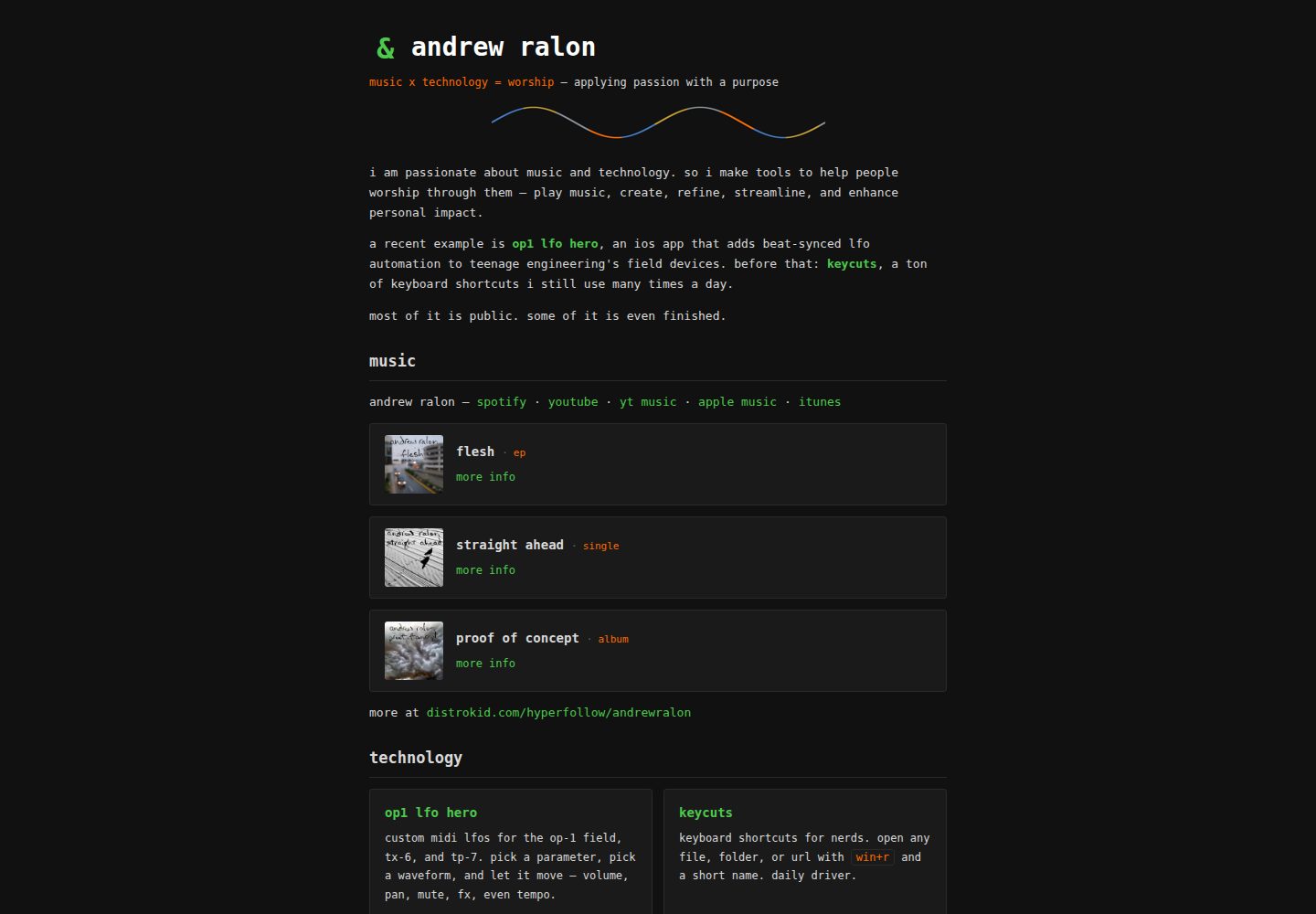
Hand-written static HTML/CSS, no build step, no dependencies, no JavaScript frameworks, no tracking scripts
HTMLPortfolio
user-site-template — HTML Portfolio Template
By andrewralon
A hand-written static HTML/CSS template for a GitHub Pages user site, with a homepage and multiple inner pages, no build step, and can be turned into a personal business card, portfolio, or CV site via Claude Code or manually.
Explore the design
Compare the page layouts and mobile experience. Open any screenshot for a closer look.
Desktop homepage1 / 2
Desktop captureTop of page
Actual screenshot captured by the server browser.
All pages & views 2
Screenshots show visual appearance; interactive behavior may differ.
Recorded 2026-10-08View source
What stands out
A quick read of the recorded project description.
Includes a complete runnable demo site, with a homepage and pages for contact, privacy, writing, now, uses, CV, and 404
Homepage sections are wrapped in <!-- section: name --> comments for easy location and deletion
Provides Claude Code slash commands such as /setup-site, /add-item, and /new-page to assist with setup and ongoing maintenance
GitHub Pages publishes from the /docs directory, so README, CLAUDE.md, and other files in the repository root do not appear on the public site
Colors are centralized in the :root block of style.css, so nine values can change the whole color scheme
Template Details
This is a template extracted by andrewralon from his own personal site, used to build a user site in the form yourusername.github.io. All pages are hand-written static HTML and CSS, with no build step, dependencies, or JavaScript frameworks, and no tracking scripts, hosted on GitHub Pages. The repository includes a complete runnable demo site: the homepage contains sections for projects, writing, releases, gallery, and links, and there are also contact, privacy, writing, now, uses, CV, and 404 pages, so users can keep the parts they need.
The template offers two usage paths. One is with Claude Code: run /setup-site in the repository, which checks the repository naming and commit email privacy settings, enables GitHub Pages, reads public GitHub profile data to draft the projects section, asks for name and tagline, builds and pushes, and finally deletes the installation files and leaves a CLAUDE.md. The other is the manual path: in the repository settings, set the Pages source to the /docs directory on the main branch, then edit the files under docs/, replace placeholder text, delete unneeded pages and sections, and update the footer navigation on each page accordingly.
There are several clear limitations in use. The repository name must be exactly yourusername.github.io, otherwise it becomes a project site and links starting with / in the template (such as /style.css, /favicon.svg, /contact) will break. The site is published from the /docs directory, and files in the repository root will not appear on the public site. The contact form requires obtaining a free access key from web3forms.com and entering it on the contact page. Colors are adjusted through nine values in the :root block at the top of docs/style.css. The template uses the MIT license, but third-party assets such as demo images, fonts, and icons need to be checked separately for licensing.
HTMLPortfolio
Is it right for your project?
Use Cases
- Build a personal business card or portfolio site in the form yourusername.github.io on GitHub Pages
- Use Claude Code to automatically draft the projects section from public GitHub profile data and complete initial configuration
- Manually edit the HTML files under docs/ to replace placeholder content and delete unneeded pages
- Continuously add projects, releases, articles, or new pages via the /add-item and /new-page commands
Suitable For
- Developers who want to maintain a personal site with pure static HTML/CSS and do not want to introduce build tools
- Users who need to put a personal business card, portfolio, or CV on GitHub Pages
- People willing to use Claude Code for initial setup and ongoing content maintenance
- Users who prefer to edit files manually and follow SETUP.md and PATTERNS.md step by step
Getting started & customization
Use these recorded setup notes alongside the repository instructions for your chosen version.
- 1
The repository name must be exactly yourusername.github.io and its visibility must be Public, otherwise it becomes a project site and links starting with / will break
- 2
It is recommended to enable email privacy in GitHub settings and use a noreply alias before the first commit, to avoid exposing a real email in commit history
- 3
The manual path requires setting the source in repository Settings → Pages to the /docs directory on the main branch
- 4
The contact form requires obtaining a free access key from web3forms.com and entering it in docs/contact/index.html
- 5
After deleting a page or section, update the footer navigation on every page accordingly, keeping only links to pages that still exist
License & source material
Usage conditions & limitations
Free to use · keep license noticeThis entry covers the free version under the MIT license in the public repository; the free scope is the code of that version and does not mean external services or third-party assets are free.
Must comply with when using
- Free use, modification, commercial use, and distribution of this version's code are allowed.
- When distributing copies or substantial portions of the code, retain the original author's copyright notice and the complete MIT license notice.
- The code is provided as is; warranties and limitations of liability are governed by the original license and applicable law.
Additional costs & items to verify
- Demo images, fonts, icons, and other third-party assets must be checked under their respective licenses and cannot be judged solely by the code's MIT license.
- External services such as domains, hosting, databases, payments, or AI may incur separate charges.
- The repository name must be exactly yourusername.github.io, using the real GitHub username, otherwise it becomes a project site and links starting with / in the template will break.
- Repository visibility must be set to Public; GitHub Pages on free accounts requires a public repository to publish.
- The contact form depends on the external service web3forms.com, and you must obtain a free access key and enter it in docs/contact/index.html.
- The automated setup path depends on the external tool Claude Code, which must be installed and run with the /setup-site command in the repository directory.
- The site is published from the /docs directory; files in the repository root will not appear on the public site, and page content must be placed under docs/.
View Original Text Basis
Permission is hereby granted, free of charge
Original License Text
**Repository name must be exactly `yourusername.github.io`**, using your real GitHub username.
Original README
**Visibility must be Public** (GitHub Pages needs this on free accounts).
Original README
For the contact form, get a free access key at [web3forms.com](https://web3forms.com) and paste it into `docs/contact/index.html`.
Original README
Open [Claude Code](https://claude.com/claude-code) in that folder and run:
Original README
https://github.com/andrewralon/user-site-template/blob/main/LICENSEhttps://github.com/andrewralon/user-site-template/blob/main/README.mdGitHub Pages is configured to serve from `/docs`. Everything the live site needs lives there; everything at the repo root is on GitHub but unreachable from the web.
Original README
Compiled by DeepSeek based on repository license and README ·2026-10-08. Results only cover the materials read; dependencies, images, fonts, and subsequent term changes are subject to their respective original texts.
Project checks & description sources
Template Information
- Source platforms
- GitHub
- Documentation and maintenance reference score
- More documented · 80 / 100
- Technologies
- HTML
- Website type
- Portfolio
How this score is calculated
Our heuristic uses license records (up to 30), a demo link (12), a preview (10), stars (15), recorded maintenance (15), description completeness (8), feature records (5) and classification data (5). It is not a code, security or performance test, or a Google score. A link does not establish tested functionality.
What to verify for this project
- Repository update recorded
- 2026-08-23
- Screenshot last checked
- 2026-10-08
A demo link is listed. Check it with your own content and viewport sizes; its presence does not confirm that forms, authentication or payments work.
The catalog identifies HTML as the primary stack. Check the actual dependency manifest and lockfile for versions and hosting requirements. These notes use recorded metadata, not a code audit or a deployment test.
Use a selection guide →How this description was prepared
AI-assisted description based on catalog records and repository material. Repository authors are not automatically the reviewers of this description.
Review declaration: [email protected] · 2026-10-08
Inspect the recorded source material
SHA-256: ad4a96b6aae583e96fc6eb55837119f4892195ba2355d69245cc9dc7c9664a56
2026-10-08T02:38:16.930Z
Source file / repository# user site template A template for a personal website at `yourusername.github.io` — hand-written static HTML and CSS, no build step, no dependencies, no JavaScript framework, no tracking. Free to host on GitHub Pages. It ships as a **complete working demo site**. You get something live and good-looking first, then Claude Code interviews you and turns it into yours. If you'd rather do it by hand, you can — see [the manual path](#the-manual-path-without-claude) at the bottom. **What's included:** a home page (projects, writing, releases, gallery, and links sections), plus contact, privacy, writing, now, uses, resume, and 404 pages. You keep the ones you want. **A real site built this way:** [andrewralon.github.io](https://andrewralon.github.io) — the site this template was extracted from. --- ## Step 1 — create your repo from this template Click **Use this template → Create a new repository**, then: - **Repository name must be exactly `yourusername.github.io`**, using your real GitHub username. - **Visibility must be Public** (GitHub Pages needs this on free accounts). > ### ⚠️ The name is the one thing you can't get wrong > > `yourusername.github.io` is the only name that produces a **user site**, served at the root of > your domain. Any other name produces a **project site** at `yourusername.github.io/reponame/`, > where every link in this template — `/style.css`, `/favicon.svg`, `/contact` — silently breaks. > > Your username, exactly, then `.github.io`. Nothing else. If you already got this wrong, rename > the repo in Settings before going further; it's painless now and annoying later. ## Step 2 — keep your email out of your commits Do this **before your first commit**. Every git commit permanently embeds the author's email address, and in a public repo that address is visible to anyone — and to every scraper that walks GitHub. Rewriting history afterwards does not reliably erase it. 1. Go to **[Settings → Emails](https://github.com/settings/emails)**. 2. Tick **Keep my email addresses private**. GitHub shows you a no-reply alias that looks like `[email protected]` — copy it. 3. Also tick **Block command line pushes that expose my email**. That's the setting that protects you from here on, in every repo. Claude checks this in Step 4 and offers to configure it for you, so you can skip ahead if you'd rather. To do it yourself after cloning: ```bash git config user.email '[email protected]' ``` No `--global` — that sets it for this repo only, leaving your other repos alone. ## Step 3 — clone it ```bash git clone https://github.com/yourusername/yourusername.github.io.git cd yourusername.github.io ``` ## Step 4 — let Claude set it up Open [Claude Code](https://claude.com/claude-code) in that folder and run: ``` /setup-site ``` Claude walks the whole thing, in this order: 1. **Checks your setup** — that the repo is named correctly and your commit email is private. 2. **Turns on GitHub Pages** and confirms your site is live. *You'll have a working URL here, before answering a single question about content.* 3. **Reads your public GitHub profile and repos** and drafts your projects section from your real work — names, descriptions, and languages already filled in. 4. **Asks you a few questions** — your name, your tagline, which sections and pages you want. 5. **Builds and verifies**, then commits and pushes. 6. **Cleans up after itself** — the setup files delete themselves, and you're left with a repo that looks hand-built, plus a `CLAUDE.md` that documents how to add to it later. Expect around ten minutes. ### What Claude won't ask you for The interview asks for a display name and a tagline. That's it. It never asks for your email, phone number, address, employer, or location, and it doesn't read those fields off your GitHub profile even though the API returns them. A personal site is a permanently public, heavily scraped document, so the template's default is to publish as little about you as possible — the contact form exists precisely so you never have to put an email address on the page. Your display name can be your GitHub handle. Plenty of good personal sites are pseudonymous. --- ## Afterwards Your site is live at `https://yourusername.github.io`. Push to `main` and changes appear in about 30 seconds — there's no CI and no build step, so **the commit is the deploy**. To preview locally before pushing: ```bash cd docs && python3 -m http.server 8000 # then open http://localhost:8000 ``` Two slash commands stay behind for later: `/add-item` (add a project, release, or post) and `/new-page` (add a page, with the footer nav updated everywhere). ## The manual path (without Claude) Everything works fine by hand: 1. In your new repo, go to **Settings → Pages** and set **Source: Deploy from a branch**, **Branch: `main`**, **Folder: `/docs`**. Save. Your site is live in a minute or so. 2. Edit the files in `docs/`. Search for `your name`, `your tagline here`, and `yourusername` and replace them everywhere — including inside `<title>` and the `og:` meta tags. 3. Delete the pages and sections you don't want. Homepage sections are wrapped in `<!-- section: name -->` … `<!-- /section: name -->` comments so they're easy to find. 4. **Update the footer on every page** so it lists only the pages that still exist. On each page, the entry for the page you're on is `<span class="here" aria-current="page">` instead of a link. Pages that aren't themselves listed in the footer — `404.html` and individual posts — carry no `here` at all. 5. For the contact form, get a free access key at [web3forms.com](https://web3forms.com) and paste it into `docs/contact/index.html`. It's a public identifier, not a secret. 6. Recolour the site by editing the nine values in the `:root` block at the top of `docs/style.css`. Nothing below that block hardcodes a colour. `SETUP.md` has the full procedure in detail if you want to follow along, and `template/PATTERNS.md` documents every markup pattern with copy-pasteable examples. ## Why `docs/` and not the repo root GitHub Pages is configured to serve from `/docs`. Everything the live site needs lives there; everything at the repo root is on GitHub but unreachable from the web. That's what keeps `README.md`, `CLAUDE.md`, and your notes off your public site without any extra configuration — and it's why `/style.css` resolves correctly: `/` means the Pages source root, which is `docs/`. ## License [MIT](LICENSE) — use it, change it, no attribution needed.
Explore similar templates
Compare previews and descriptions within the same stack and category.

simplefolio
Simplefolio is a minimal single-page portfolio template for developers, built with HTML, Bootstrap, SCSS, and Parcel under the MIT license. It includes Hero, About, Projects, Contact, and Footer sections, with content edited in /src/index.html and theme colors controlled by two SCSS variables.
HTML · Portfolio

Freelancer
A bright, single-page Bootstrap portfolio template for freelancers, designers, and small studios. It includes a responsive portfolio grid with modal detail windows and an SB Forms contact form that requires an API token.
HTML · Portfolio

Resume
A single-page resume and CV template from Start Bootstrap, built on Bootstrap with a fixed sidebar and content sections.
HTML · Portfolio

Creative
A single-page marketing template by Start Bootstrap for creative agencies and product services, built on Bootstrap with SCSS, featuring a portfolio grid and call-to-action sections. It includes pre-set SB Forms markers for form integration and npm build scripts for source customization.
HTML · Corporate Website

Grayscale
A dark single-page Bootstrap template from Start Bootstrap for photography, events and brand storytelling, with a large hero and clearly separated sections.
HTML · Corporate Website

startbootstrap-stylish-portfolio
A one-page Bootstrap portfolio theme from Start Bootstrap with multiple content sections and an off-canvas navigation menu. Basic use means editing HTML/CSS under dist and opening index.html; advanced use relies on npm with Pug and SCSS build scripts.
HTML · Portfolio