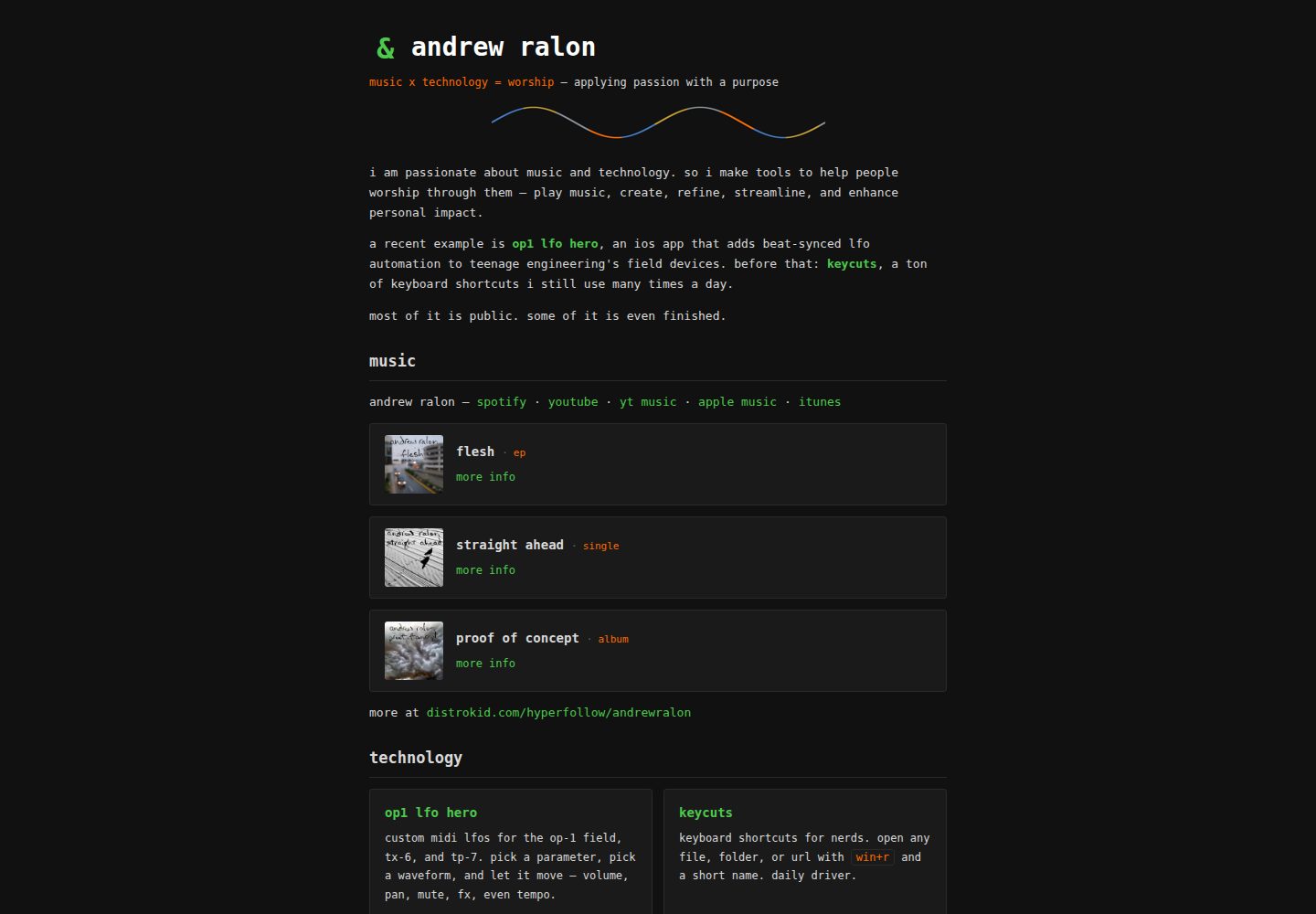
手写静态 HTML/CSS,无构建步骤、无依赖、无 JavaScript 框架、无跟踪脚本
HTML作品集
user-site-template — HTML 作品集模板
作者 andrewralon
面向 GitHub Pages 用户站的手写静态 HTML/CSS 模板,含首页与多个内页,无构建步骤,可通过 Claude Code 或手动方式改成个人名片、作品集或简历站点。
看看你的网站会是什么样
浏览真实页面截图,比较内容排版与手机效果。点击下方缩略图切换,放大查看整页细节。
全部页面与视图 2
截图用于了解视觉与布局,交互效果请以实际项目为准。
采集于 2026-10-08查看来源
值得关注的模板亮点
从已有项目资料中,快速了解它的特点。
自带可运行的完整演示站点,含首页及联系、隐私、写作、now、uses、简历、404 等页面
首页区块用 <!-- section: name --> 注释包裹,便于定位和删除
提供 /setup-site、/add-item、/new-page 等 Claude Code 斜杠命令辅助搭建与后续维护
GitHub Pages 从 /docs 目录发布,仓库根目录的 README、CLAUDE.md 等不会出现在公开站点
配色集中在 style.css 的 :root 块,九个值即可整体换色
模板详细介绍
这是 andrewralon 从自己的个人站点提取出的模板,用于搭建 yourusername.github.io 形式的用户站点。页面全部是手写的静态 HTML 与 CSS,没有构建步骤、依赖或 JavaScript 框架,也不含跟踪脚本,托管在 GitHub Pages 上。仓库自带一个可运行的完整演示站点:首页包含项目、写作、发布、图库和链接等区块,另外还有联系、隐私、写作、now、uses、简历和 404 页面,使用者可以保留自己需要的部分。
模板提供两条使用路径。一条是配合 Claude Code:在仓库中运行 /setup-site,它会检查仓库命名与提交邮箱隐私设置、开启 GitHub Pages、读取公开 GitHub 资料起草项目区块、询问姓名与标语、构建并推送,最后删除安装文件并留下 CLAUDE.md。另一条是手动路径:在仓库设置中把 Pages 来源设为 main 分支的 /docs 目录,然后编辑 docs/ 下的文件,替换占位文本,删除不需要的页面和区块,并同步更新各页脚导航。
使用上有几个明确限制。仓库名必须严格为 yourusername.github.io,否则会变成项目站点,模板中以 / 开头的链接(如 /style.css、/favicon.svg、/contact)会失效。站点从 /docs 目录发布,仓库根目录的文件不会出现在公开站点上。联系表单需要自行到 web3forms.com 获取免费访问密钥并填入 contact 页面。配色通过 docs/style.css 顶部 :root 块中的九个值调整。模板采用 MIT 许可,但演示图片、字体、图标等第三方素材需单独核对许可。
HTML作品集
适合你的项目吗?
适用场景
- 在 GitHub Pages 上搭建 yourusername.github.io 形式的个人名片或作品集站点
- 用 Claude Code 根据公开 GitHub 资料自动起草项目区块并完成初始配置
- 手动编辑 docs/ 下的 HTML 文件,替换占位内容并删除不需要的页面
- 通过 /add-item 和 /new-page 命令持续添加项目、发布、文章或新页面
适合人群
- 希望用纯静态 HTML/CSS 维护个人站点、不想引入构建工具的开发者
- 需要把个人名片、作品集或简历放在 GitHub Pages 上的用户
- 愿意使用 Claude Code 完成初始搭建和后续内容维护的人
- 偏好手动编辑文件、按 SETUP.md 和 PATTERNS.md 逐步操作的使用者
上手与定制指南
结合仓库当前版本的说明,按下面的资料检查内容、配置与运行要求。
- 1
仓库名必须严格为 yourusername.github.io 且可见性为 Public,否则会变成项目站点并导致以 / 开头的链接失效
- 2
建议在首次提交前到 GitHub 设置中开启邮箱隐私并使用 noreply 别名,避免提交记录暴露真实邮箱
- 3
手动路径需在仓库 Settings → Pages 中将来源设为 main 分支的 /docs 目录
- 4
联系表单需自行到 web3forms.com 获取免费访问密钥并填入 docs/contact/index.html
- 5
删除页面或区块后需同步更新每个页面的页脚导航,只保留仍然存在的页面链接
授权与来源资料
使用条件与限制
免费使用 · 保留许可声明本次收录的是公开仓库中采用 MIT 许可的免费版本;免费范围为该版本代码,不代表外部服务或第三方素材免费。
使用时需要遵守
- 允许免费使用、修改、商用和分发该版本代码。
- 分发代码副本或实质性部分时,保留原作者版权声明和完整 MIT 许可声明。
- 代码按现状提供;担保与责任限制以原许可证及适用法律为准。
额外费用与待核对事项
- 演示图片、字体、图标及其他第三方素材需按各自许可核对,不能仅凭代码的 MIT 许可判断。
- 域名、托管、数据库、支付或 AI 等外部服务可能另外收费。
- 仓库名必须严格为 yourusername.github.io,使用真实的 GitHub 用户名,否则会变成项目站点,模板中以 / 开头的链接会失效。
- 仓库可见性必须设为 Public,免费账户的 GitHub Pages 需要公开仓库才能发布。
- 联系表单依赖外部服务 web3forms.com,需自行获取免费访问密钥并填入 docs/contact/index.html。
- 自动搭建路径依赖外部工具 Claude Code,需安装并在仓库目录中运行 /setup-site 命令。
- 站点从 /docs 目录发布,仓库根目录的文件不会出现在公开站点上,页面内容必须放在 docs/ 下。
查看原文依据
Permission is hereby granted, free of charge
许可证原文
**Repository name must be exactly `yourusername.github.io`**, using your real GitHub username.
README 原文
**Visibility must be Public** (GitHub Pages needs this on free accounts).
README 原文
For the contact form, get a free access key at [web3forms.com](https://web3forms.com) and paste it into `docs/contact/index.html`.
README 原文
Open [Claude Code](https://claude.com/claude-code) in that folder and run:
README 原文
https://github.com/andrewralon/user-site-template/blob/main/LICENSEhttps://github.com/andrewralon/user-site-template/blob/main/README.mdGitHub Pages is configured to serve from `/docs`. Everything the live site needs lives there; everything at the repo root is on GitHub but unreachable from the web.
README 原文
DeepSeek 根据仓库许可证和 README 整理 ·2026-10-08。结果仅覆盖已读取资料,依赖、图片、字体及后续条款变更以各自原文为准。
项目核对记录与介绍依据
模板资料
- 来源平台
- GitHub
- 资料与维护参考分
- 资料较完整 · 80 / 100
- 技术栈
- HTML
- 网站类型
- 作品集
这个分数如何计算
本站按许可资料(最高30分)、演示链接(12分)、预览图(10分)、Star数(15分)、记录的维护时间(15分)、描述完整度(8分)、功能记录(5分)和分类资料(5分)计算。它不是代码、安全或性能测试,也不是 Google 评分;有链接不代表已实测可用。
这个项目需要核对什么
- 记录的仓库更新时间
- 2026-08-23
- 截图检查日期
- 2026-10-08
已收录演示链接。请用你的内容与屏幕尺寸检查;有演示不代表表单、认证或支付已经可用。
目录记录的主要技术栈是 HTML。请通过依赖清单和锁文件核对实际版本与托管要求。这些说明基于收录资料,不代表代码审计或部署实测。
查看具体选型方法 →介绍的制作与核对状态
介绍由 AI 辅助整理目录与仓库资料。仓库作者不等于这篇介绍的审核者。
审核声明: [email protected] · 2026-10-08
查看当时使用的来源资料
SHA-256: ad4a96b6aae583e96fc6eb55837119f4892195ba2355d69245cc9dc7c9664a56
2026-10-08T02:38:16.930Z
来源文件 / 仓库# user site template A template for a personal website at `yourusername.github.io` — hand-written static HTML and CSS, no build step, no dependencies, no JavaScript framework, no tracking. Free to host on GitHub Pages. It ships as a **complete working demo site**. You get something live and good-looking first, then Claude Code interviews you and turns it into yours. If you'd rather do it by hand, you can — see [the manual path](#the-manual-path-without-claude) at the bottom. **What's included:** a home page (projects, writing, releases, gallery, and links sections), plus contact, privacy, writing, now, uses, resume, and 404 pages. You keep the ones you want. **A real site built this way:** [andrewralon.github.io](https://andrewralon.github.io) — the site this template was extracted from. --- ## Step 1 — create your repo from this template Click **Use this template → Create a new repository**, then: - **Repository name must be exactly `yourusername.github.io`**, using your real GitHub username. - **Visibility must be Public** (GitHub Pages needs this on free accounts). > ### ⚠️ The name is the one thing you can't get wrong > > `yourusername.github.io` is the only name that produces a **user site**, served at the root of > your domain. Any other name produces a **project site** at `yourusername.github.io/reponame/`, > where every link in this template — `/style.css`, `/favicon.svg`, `/contact` — silently breaks. > > Your username, exactly, then `.github.io`. Nothing else. If you already got this wrong, rename > the repo in Settings before going further; it's painless now and annoying later. ## Step 2 — keep your email out of your commits Do this **before your first commit**. Every git commit permanently embeds the author's email address, and in a public repo that address is visible to anyone — and to every scraper that walks GitHub. Rewriting history afterwards does not reliably erase it. 1. Go to **[Settings → Emails](https://github.com/settings/emails)**. 2. Tick **Keep my email addresses private**. GitHub shows you a no-reply alias that looks like `[email protected]` — copy it. 3. Also tick **Block command line pushes that expose my email**. That's the setting that protects you from here on, in every repo. Claude checks this in Step 4 and offers to configure it for you, so you can skip ahead if you'd rather. To do it yourself after cloning: ```bash git config user.email '[email protected]' ``` No `--global` — that sets it for this repo only, leaving your other repos alone. ## Step 3 — clone it ```bash git clone https://github.com/yourusername/yourusername.github.io.git cd yourusername.github.io ``` ## Step 4 — let Claude set it up Open [Claude Code](https://claude.com/claude-code) in that folder and run: ``` /setup-site ``` Claude walks the whole thing, in this order: 1. **Checks your setup** — that the repo is named correctly and your commit email is private. 2. **Turns on GitHub Pages** and confirms your site is live. *You'll have a working URL here, before answering a single question about content.* 3. **Reads your public GitHub profile and repos** and drafts your projects section from your real work — names, descriptions, and languages already filled in. 4. **Asks you a few questions** — your name, your tagline, which sections and pages you want. 5. **Builds and verifies**, then commits and pushes. 6. **Cleans up after itself** — the setup files delete themselves, and you're left with a repo that looks hand-built, plus a `CLAUDE.md` that documents how to add to it later. Expect around ten minutes. ### What Claude won't ask you for The interview asks for a display name and a tagline. That's it. It never asks for your email, phone number, address, employer, or location, and it doesn't read those fields off your GitHub profile even though the API returns them. A personal site is a permanently public, heavily scraped document, so the template's default is to publish as little about you as possible — the contact form exists precisely so you never have to put an email address on the page. Your display name can be your GitHub handle. Plenty of good personal sites are pseudonymous. --- ## Afterwards Your site is live at `https://yourusername.github.io`. Push to `main` and changes appear in about 30 seconds — there's no CI and no build step, so **the commit is the deploy**. To preview locally before pushing: ```bash cd docs && python3 -m http.server 8000 # then open http://localhost:8000 ``` Two slash commands stay behind for later: `/add-item` (add a project, release, or post) and `/new-page` (add a page, with the footer nav updated everywhere). ## The manual path (without Claude) Everything works fine by hand: 1. In your new repo, go to **Settings → Pages** and set **Source: Deploy from a branch**, **Branch: `main`**, **Folder: `/docs`**. Save. Your site is live in a minute or so. 2. Edit the files in `docs/`. Search for `your name`, `your tagline here`, and `yourusername` and replace them everywhere — including inside `<title>` and the `og:` meta tags. 3. Delete the pages and sections you don't want. Homepage sections are wrapped in `<!-- section: name -->` … `<!-- /section: name -->` comments so they're easy to find. 4. **Update the footer on every page** so it lists only the pages that still exist. On each page, the entry for the page you're on is `<span class="here" aria-current="page">` instead of a link. Pages that aren't themselves listed in the footer — `404.html` and individual posts — carry no `here` at all. 5. For the contact form, get a free access key at [web3forms.com](https://web3forms.com) and paste it into `docs/contact/index.html`. It's a public identifier, not a secret. 6. Recolour the site by editing the nine values in the `:root` block at the top of `docs/style.css`. Nothing below that block hardcodes a colour. `SETUP.md` has the full procedure in detail if you want to follow along, and `template/PATTERNS.md` documents every markup pattern with copy-pasteable examples. ## Why `docs/` and not the repo root GitHub Pages is configured to serve from `/docs`. Everything the live site needs lives there; everything at the repo root is on GitHub but unreachable from the web. That's what keeps `README.md`, `CLAUDE.md`, and your notes off your public site without any extra configuration — and it's why `/style.css` resolves correctly: `/` means the Pages source root, which is `docs/`. ## License [MIT](LICENSE) — use it, change it, no attribution needed.
看看同类模板
对比同技术栈与用途的模板,找到更适合的视觉与内容结构。

simplefolio
⚡️ A minimal portfolio template for Developers
HTML · 作品集

Freelancer
Freelancer 是 Start Bootstrap 出品的单页作品集模板,专为自由职业者、设计师和小型工作室设计。 页面结构清晰,包含多个内容区块、响应式作品集网格,每个作品项目配有模态窗口展示详情。
HTML · 作品集

Resume
Resume 是 Start Bootstrap 推出的简历与 CV 主题,基于 Bootstrap 构建,采用固定侧边栏加内容区块的结构。
HTML · 作品集

Creative
Creative 是 Start Bootstrap 团队维护的一款单页营销模板,定位明确:为创意机构或产品服务提供一个以作品展示和行动号召为核心的落地页。
HTML · 企业官网

Grayscale
Grayscale 是 Start Bootstrap 出品的深色系单页 HTML 模板,基于 Bootstrap 构建。 它的视觉重心放在大尺寸首屏和清晰的内容分区上,整体氛围偏暗,适合摄影、活动或品牌叙事类网站。
HTML · 企业官网

startbootstrap-stylish-portfolio
Stylish Portfolio 是 Start Bootstrap 维护的单页作品集主题,基于 Bootstrap 构建,采用多个内容区块加离屏导航菜单的结构。
HTML · 作品集