Astro 7 content collections with Zod-validated fields for posts and pages
AstroBlog
astro-sienna — Astro Blog Template
By anjay-goel
Astro 7 writing-focused blog template with serif typography, dark mode, MDX, Mermaid, KaTeX, and build-time OG images.
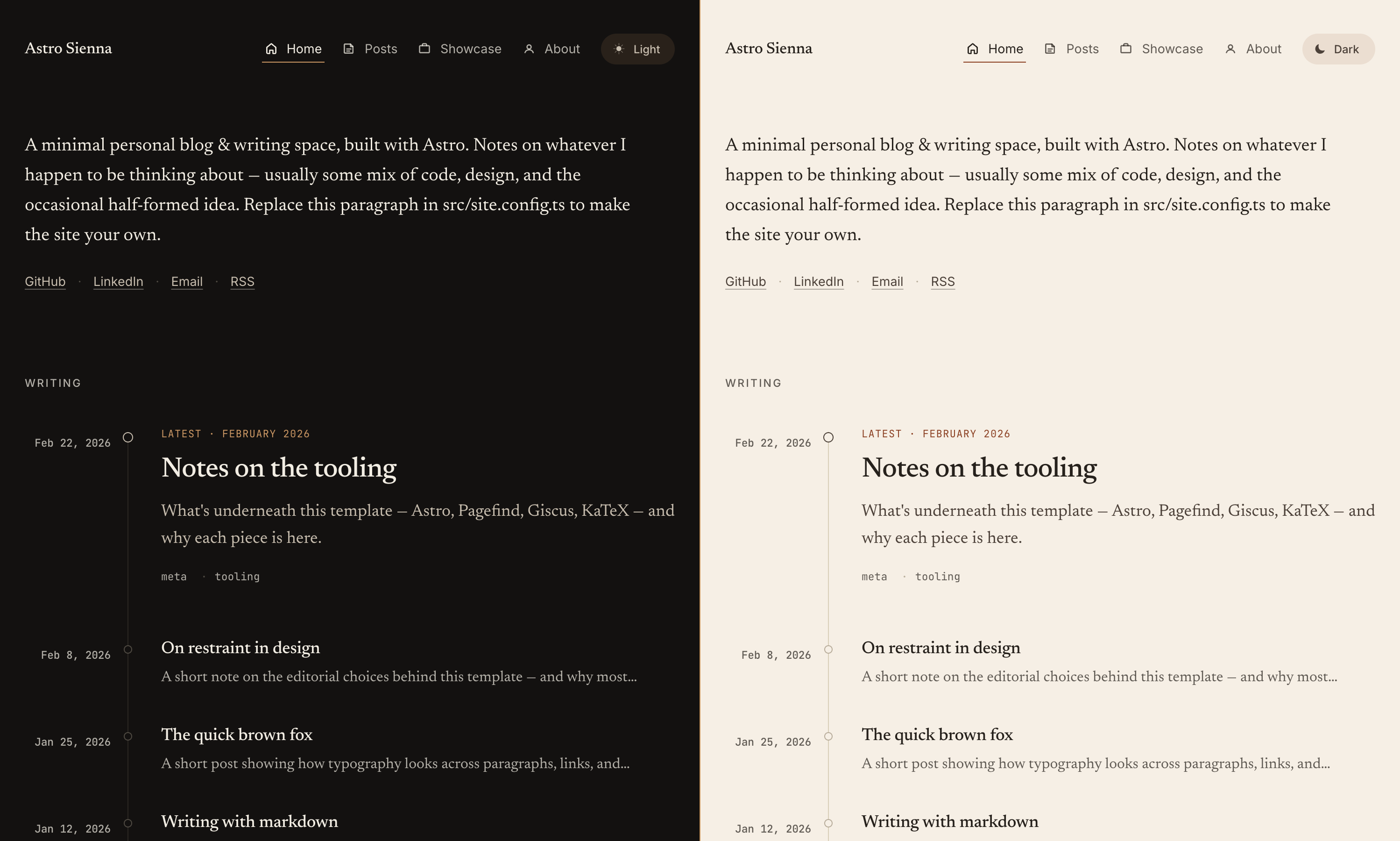
Explore the design
Compare the page layouts and mobile experience. Open any screenshot for a closer look.
Overview
Author-provided preview
Explore the available preview. Additional pages have not been captured.
One original preview is available. Open the full image to inspect the design.
Screenshots show visual appearance; interactive behavior may differ.
Recorded 2026-09-30View source
What stands out
A quick read of the recorded project description.
MDX support for embedded components, imports, and JavaScript expressions
Mermaid diagrams lazy-load by viewport and follow light/dark themes
astro-expressive-code code blocks with copy buttons and line highlighting
Build-time generation of unique OG images per post (Satori + resvg)
Giscus comments, GA4/Goatcounter, and webmentions are all optional integrations
Template Details
Astro Sienna is a minimalist, writing-centric Astro blog template built around serif body typography and light/dark themes. Content structure is driven by Astro content collections: posts live in src/content/post/ and pages in src/content/page/, both validated with Zod schemas; site personalization is centralized in src/site.config.ts and astro.config.ts.
Writing capabilities are its standout feature: MDX support allows embedding Astro/JSX components, imports, and JavaScript expressions in articles; Mermaid diagrams lazy-load by viewport and follow the theme; code blocks are rendered by astro-expressive-code with themes, copy buttons, terminal frames, and line highlighting; math uses KaTeX, plus custom :::note, :::tip, and :::caution containers. Each post generates a unique 1200×630 OG image at build time using Satori + resvg, and the template outputs RSS, sitemap, robots.txt, and a web manifest. Comments (Giscus), GA4, Goatcounter, and webmentions are optional; if not configured, their scripts are not loaded. Analytics scripts run in a worker thread via Partytown.
The barrier to use is low, but a few things need checking before launch: site must be set to the final domain, otherwise canonical, sitemap, RSS, and OG image URLs will be incorrect; icon.png and social-card.png in public/ need replacing with your own assets; GitHub Pages project sites are handled automatically by the included workflow for subpaths, while subpath deployments on other hosts require building with BASE_PATH. The README claims perfect Lighthouse scores in all four categories, but this is the author's own statement; actual scores should be verified against your own build. The template is MIT-licensed and was originally forked from astro-theme-cactus before being extensively rewritten.
AstroBlog
Is it right for your project?
Use Cases
- Personal blogs focused on long-form writing with quiet, restrained typography
- Technical blogs that need to mix code, math formulas, and Mermaid diagrams in articles
- Sites that want comments, analytics, and webmentions enabled on demand rather than loaded by default
- Static sites deployed to GitHub Pages, Netlify, Vercel, or Cloudflare Pages
Suitable For
- Developers familiar with Astro content collections and Markdown/MDX writing workflows
- Those willing to do centralized configuration via site.config.ts and astro.config.ts
- Users who can replace static assets such as icons and social cards themselves
Getting started & customization
Use these recorded setup notes alongside the repository instructions for your chosen version.
- 1
Set site to the final domain in astro.config.ts, otherwise canonical, sitemap, RSS, and OG image URLs will be incorrect
- 2
Replace icon.png (512×512) and social-card.png (1200×630) in public/; avatar.png is optional
- 3
Comments and analytics are not loaded by default; they must be explicitly configured in site.config.ts to enable
- 4
GitHub Pages project sites are handled automatically by the included workflow for subpaths; subpaths on other hosts require building with BASE_PATH
- 5
The README's claim of perfect Lighthouse scores is the author's own statement; verify with your own build before launch
License & source material
Usage conditions & limitations
Free to use · keep license noticeThis entry covers the free version under the MIT license in the public repository; the free scope applies to that version's code and does not imply that external services or third-party assets are free.
Must comply with when using
- Free use, modification, commercial use, and distribution of this version's code are permitted.
- When distributing copies or substantial portions of the code, retain the original author's copyright notice and the full MIT license notice.
- The code is provided as-is; warranties and liability limitations are governed by the original license and applicable law.
Additional costs & items to verify
- Demo images, fonts, icons, and other third-party assets must be checked against their respective licenses; the code's MIT license alone is not sufficient to judge.
- External services such as domain, hosting, database, payment, or AI may incur additional charges.
- site must be set to the final domain, otherwise canonical, sitemap, RSS, and OG image URLs will be incorrect
- You need to replace icon assets such as icon.png (512×512) in public/ yourself
- social-card.png is a placeholder by default and must be replaced with your own 1200×630 social card
- Giscus comments are an optional external service that you must configure yourself and that depends on giscus.app
- GA4 and Goatcounter analytics are optional external services; you must apply for accounts and configure them yourself
- webmentions depend on the external service webmention.io, fetched at build time and cached locally
- The README claims perfect Lighthouse scores in all four categories; this is the author's own statement and should be verified with your own build results
- Subpath deployments on hosts other than GitHub Pages require building with BASE_PATH
- The template was originally forked from astro-theme-cactus; be mindful of upstream provenance and attribution
View Original Text Basis
Permission is hereby granted, free of charge
Original License Text
**`astro.config.ts`** is where you set `site` to your final domain (used for canonical URLs, sitemap, RSS, and OG image
Original README
- `icon.png` (512×512). Drives the favicon and the auto-generated `apple-touch-icon`, `icon-192`, and `icon-512` PWA
Original README
- `social-card.png` (1200×630). Fallback OG image, used when a post doesn't have its own. The default is a placeholder
Original README
- Optional [Giscus](https://giscus.app) comments with custom matched themes
Original README
- Optional GA4 and Goatcounter analytics, both loaded via [Partytown](https://partytown.qwik.dev/) so they run on a
Original README
- Optional [webmentions](https://webmention.io), fetched at build and cached locally
Original README
- Perfect Lighthouse scores (Performance, Accessibility, Best Practices, SEO)
Original README
subpath on any other host, build with `BASE_PATH=/sub pnpm build`.
Original README
https://github.com/anjay-goel/astro-sienna/blob/main/LICENSEhttps://github.com/anjay-goel/astro-sienna/blob/main/README.mdOriginally forked from [astro-theme-cactus](https://github.com/chrismwilliams/astro-theme-cactus)
Original README
Compiled by DeepSeek based on repository license and README ·2026-09-30. Results only cover the materials read; dependencies, images, fonts, and subsequent term changes are subject to their respective original texts.
Project checks & description sources
Template Information
- Source platforms
- GitHub
- Documentation and maintenance reference score
- More documented · 87 / 100
- Technologies
- Astro
- Website type
- Blog
How this score is calculated
Our heuristic uses license records (up to 30), a demo link (12), a preview (10), stars (15), recorded maintenance (15), description completeness (8), feature records (5) and classification data (5). It is not a code, security or performance test, or a Google score. A link does not establish tested functionality.
What to verify for this project
- Repository update recorded
- 2026-09-14
- Screenshot last checked
- 2026-09-30
A demo link is listed. Check it with your own content and viewport sizes; its presence does not confirm that forms, authentication or payments work.
The catalog identifies Astro as the primary stack. Check the actual dependency manifest and lockfile for versions and hosting requirements. These notes use recorded metadata, not a code audit or a deployment test.
Use a selection guide →How this description was prepared
AI-assisted description based on catalog records and repository material. Repository authors are not automatically the reviewers of this description.
Automatically checked against source and license rules; no manual editorial review.
Inspect the recorded source material
SHA-256: fde9edc2b437f72d80976842c6b724d548c382a394e79e6a3f7fc8cda9a7e19b
2026-09-30T15:50:50.669Z
Source file / repository# Astro Sienna
A minimal Astro blog template with serif typography, dark mode, RSS, OG images, and optional Giscus comments and
analytics.
**Live demo:** [Github Pages](https://anjay-goel.github.io/astro-sienna)

## Features
- Astro 7 with content collections (posts and pages, both validated by Zod)
- MDX support — embed Astro/JSX components, imports, and JS expressions inside posts
- Mermaid diagrams in Markdown and MDX, loaded when a diagram approaches the viewport
- Light and dark mode with a CSS-only theme toggle
- Self-hosted serif body font ([Newsreader](https://github.com/productiontype/Newsreader)) and mono (JetBrains Mono)
- Code blocks via [astro-expressive-code](https://expressive-code.com): themes, copy button, terminal frames, line
highlighting
- Math via KaTeX (`$inline$` and `$$display$$`)
- Custom containers (`:::note`, `:::tip`, `:::caution`)
- Tag pages — post tags link to per-tag archives, with a browsable `/tags/` index
- Per-post OG images generated at build time (Satori + resvg)
- RSS feed, sitemap, robots.txt, web manifest
- Optional [Giscus](https://giscus.app) comments with custom matched themes
- Optional GA4 and Goatcounter analytics, both loaded via [Partytown](https://partytown.qwik.dev/) so they run on a
worker thread
- Optional [webmentions](https://webmention.io), fetched at build and cached locally
- Perfect Lighthouse scores (Performance, Accessibility, Best Practices, SEO)
## Quick start
Click **Use this template** on GitHub, or clone directly:
```sh
git clone https://github.com/anjay-goel/astro-sienna.git my-site
cd my-site
pnpm install
pnpm dev
```
Open http://localhost:4321.
## Commands
| Command | What it does |
|----------------|----------------------------------------------|
| `pnpm dev` | Start the dev server with HMR |
| `pnpm build` | Type-check, build, and run Pagefind indexing |
| `pnpm preview` | Preview the production build locally |
| `pnpm format` | Run Biome and Prettier |
| `pnpm lint` | Lint with Biome |
## Configuration
Most personalisation happens in two files.
**`src/site.config.ts`** holds author, profile, comments, analytics, and webmentions. Every field in `profile` is
optional. Leave any of `email`, `github`, `linkedin`, `employer`, `alumni`, or `avatar` undefined and the corresponding
link is hidden site-wide. Same for `comments` and `analytics`: undefined means the script never loads.
**`astro.config.ts`** is where you set `site` to your final domain (used for canonical URLs, sitemap, RSS, and OG image
URLs). The base path is handled automatically — see [Deploying](#deploying); you normally don't touch it.
Replace these assets in `public/`:
- `icon.png` (512×512). Drives the favicon and the auto-generated `apple-touch-icon`, `icon-192`, and `icon-512` PWA
manifest icons.
- `social-card.png` (1200×630). Fallback OG image, used when a post doesn't have its own. The default is a placeholder
you can swap.
- `avatar.png` (optional). Referenced from `siteConfig.profile.avatar`, used in the About page's structured data and any
avatar slot you add.
### Per-post OG images
Every post gets its own 1200×630 OG image generated at build time by [Satori](https://github.com/vercel/satori). The
markup lives in `src/pages/og-image/[...slug].png.ts`. Tweak it once and every post's card updates on the next build. To
skip the generated image and point a post at your own, set `ogImage: "/path/to/image.png"` in the post's frontmatter.
## Writing posts
Posts live in `src/content/post/` as `.md` or `.mdx` files. The filename becomes the slug.
```yaml
---
title: "Your post title"
publishDate: 2026-01-12
description: "One-sentence summary used in cards, social previews, and meta tags."
tags: [ tag-one, tag-two ]
# updatedDate: 2026-02-01 # optional, shown as "Updated …"
# draft: true # excludes the post from production builds
# coverImage:
# src: ./_assets/cover.png
# alt: "Description for screen readers"
---
```
### Diagrams
Use a `mermaid` fence in a Markdown or MDX post:
````markdown
```mermaid
flowchart LR
accTitle: Publishing a post
accDescr: Write a draft, preview it locally, then publish it.
A[Draft] --> B[Preview] --> C[Publish]
```
````
Diagrams follow the site's light/dark theme. Mermaid loads locally from the built assets when a diagram comes near
the viewport. Posts without diagrams only run a small loader; they do not download Mermaid or register its observers.
Without JavaScript, the diagram source remains readable. Invalid diagrams also keep their source and log an error.
Wide diagrams scroll horizontally on small screens. Use `accTitle` and `accDescr` for screen-reader descriptions.
The about page is also markdown, at `src/content/page/about.md`. Showcase entries are typed objects in
`src/data/showcase.ts`; empty the array and the Showcase tab is hidden automatically.
## Project layout
```
src/
site.config.ts # author / profile / integrations
content.config.ts # collection schemas (post, page)
content/
post/*.md # blog posts
page/about.md # about page
data/showcase.ts # showcase entries (or empty for none)
components/ # blog/, layout/
layouts/ # Base.astro, BlogPost.astro
pages/ # routes (incl. /og-image, /posts pagination, /tags, rss)
plugins/ # remark-admonitions, remark-reading-time, rehype-base-path
styles/global.css # design tokens and shared utilities
public/ # static assets served at site root
```
## Theming
Design tokens are CSS variables at the top of `src/styles/global.css`: accent colour, hairlines, surfaces, fonts. The
light and dark variants are gated by `[data-theme="light"]` and `[data-theme="dark"]` on the `<html>` element, so
swapping them is a single re-render with no script.
Code-block themes are configured separately in `expressiveCodeOptions` in `site.config.ts` (defaults: `min-light` and
`min-dark`).
## Deploying
Output is a static `dist/` directory that deploys anywhere serving files: Cloudflare Pages, Netlify, Vercel, GitHub
Pages, S3 + CloudFront. Build command: `pnpm build`. Output directory: `dist`.
### Base path
Defaults to root (`/`) — no config needed for local dev, Netlify, Vercel, Cloudflare Pages, a custom domain, or a
GitHub Pages **user** site. The whole site (links, assets, feeds, OG/canonical, manifest, Markdown links) is base-aware.
For a GitHub Pages **project** site (served from `/repo/`), the bundled `.github/workflows/deploy.yml` detects the
subpath and configures it automatically; the only manual step is **Settings → Pages → Source: GitHub Actions**. For a
subpath on any other host, build with `BASE_PATH=/sub pnpm build`.
## Pulling theme updates
To keep tracking upstream changes after you've forked, add this repo as a second remote:
```sh
git remote add theme https://github.com/anjay-goel/astro-sienna.git
git fetch theme
git merge theme/main --allow-unrelated-histories
```
Use `.gitattributes` with a `merge=ours` driver on personal-content paths (e.g. `src/content/post/*`,
`src/site.config.ts`, `public/avatar.png`) to keep your changes through the merge.
## Credits
Originally forked from [astro-theme-cactus](https://github.com/chrismwilliams/astro-theme-cactus)
by [Chris Williams](https://github.com/chrismwilliams), then heavily revamped into its current form.
## License
[MIT](./LICENSE).
Explore similar templates
Compare previews and descriptions within the same stack and category.

astrowind
AstroWind is a free, open-source Astro starter theme using Astro and Tailwind CSS, released under the MIT license.
Astro · Blog

astro-paper
AstroPaper is a minimal, responsive, accessible, and SEO-friendly Astro blog theme. Articles are stored as Markdown/MDX in src/content/posts/, with subdirectories affecting URLs.
Astro · Blog

fuwari
Fuwari is a static blog template built with Astro and Tailwind CSS for personal blogs. It manages posts as Markdown files in src/content/posts/, with frontmatter for title, date, description, cover, tags, categories, draft status, and language.
Astro · Blog

Firefly
Firefly is a clean personal blog theme forked from Astro and Fuwari, offering four background modes, single/double sidebar and list/grid layouts, Pagefind client-side full-text search, and a six-language UI.
Astro · Blog

astro-theme-cactus
Astro Cactus is an Astro-based blog and portfolio theme that uses Markdown/MDX content collections to manage posts, notes, and tags, with frontmatter type-checked by a schema.
Astro · Portfolio

astrofy
Astrofy is a free and open-source personal portfolio website template built with Astro and TailwindCSS, with built-in blog, CV timeline, project showcase, store, and RSS feed modules.
Astro · Portfolio