Astro 7 内容集合,文章与页面均用 Zod 校验字段
Astro博客
astro-sienna — Astro 博客模板
作者 anjay-goel
Astro 7 写作向博客模板,衬线排版、暗色模式、MDX、Mermaid、KaTeX 与构建期 OG 图齐备。
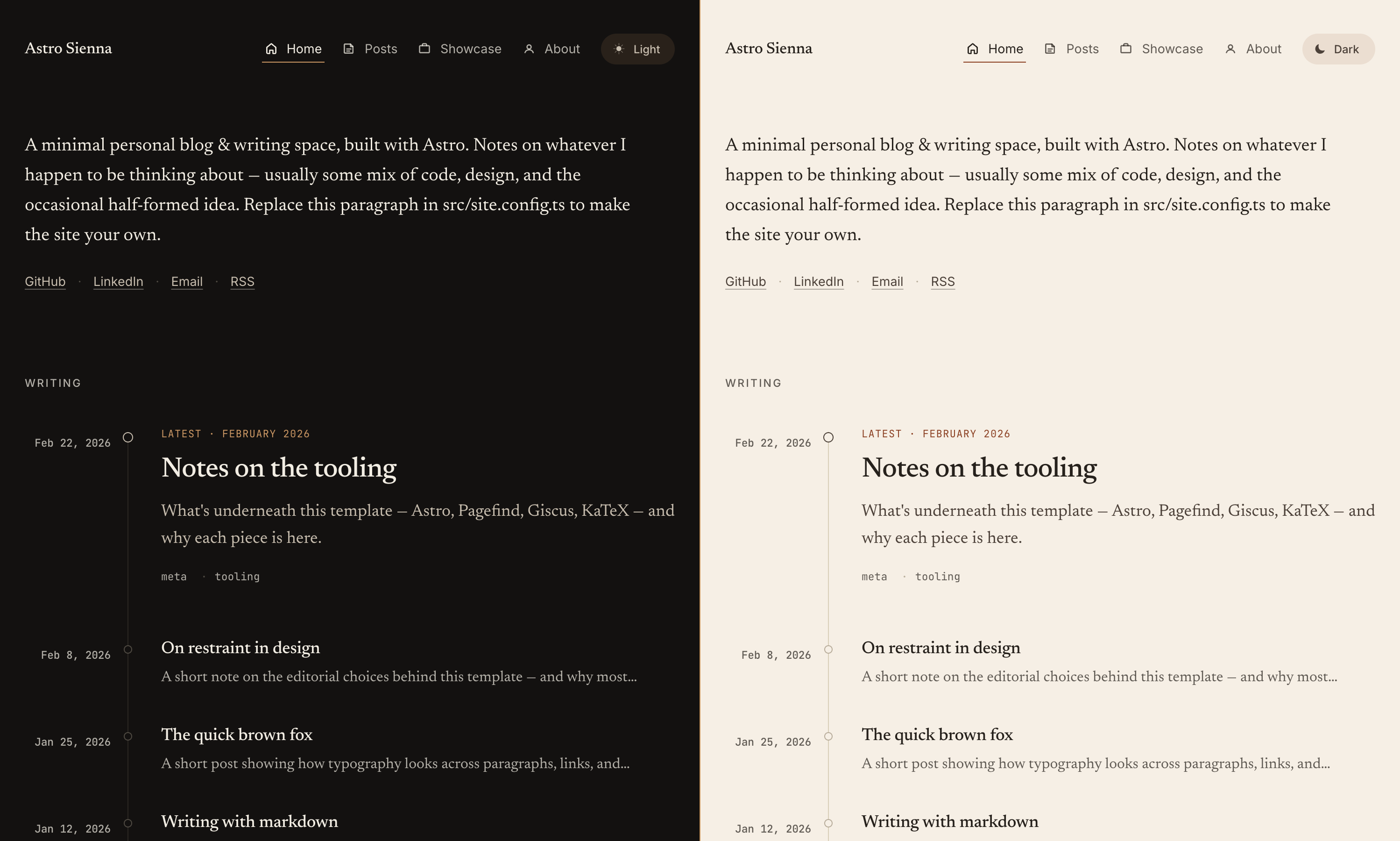
看看你的网站会是什么样
浏览真实页面截图,比较内容排版与手机效果。点击下方缩略图切换,放大查看整页细节。
目前有 1 张原始预览,可打开完整图片查看设计细节。
截图用于了解视觉与布局,交互效果请以实际项目为准。
采集于 2026-09-30查看来源
值得关注的模板亮点
从已有项目资料中,快速了解它的特点。
MDX 支持嵌入组件、导入和 JS 表达式
Mermaid 图视口懒加载,跟随明暗主题
astro-expressive-code 代码块,含复制按钮与行高亮
构建期为每篇文章生成独立 OG 图(Satori + resvg)
Giscus 评论、GA4/Goatcounter、webmentions 均为可选集成
模板详细介绍
Astro Sienna 是一个以写作为中心的极简 Astro 博客模板,整体围绕衬线正文排版和明暗双主题展开。内容结构由 Astro 内容集合驱动,文章放在 src/content/post/,关于页放在 src/content/page/,两套集合都用 Zod 校验字段;站点个性化集中在 src/site.config.ts 和 astro.config.ts 两个文件里。
写作能力是它最突出的部分:支持 MDX,可在文章中嵌入 Astro/JSX 组件、导入和 JS 表达式;Mermaid 图按视口懒加载并跟随主题;代码块由 astro-expressive-code 渲染,带主题、复制按钮、终端边框和行高亮;数学公式走 KaTeX,另有 :::note、:::tip、:::caution 自定义容器。每篇文章在构建时用 Satori + resvg 生成独立的 1200×630 OG 图,同时输出 RSS、sitemap、robots.txt 和 web manifest。评论(Giscus)、GA4、Goatcounter 和 webmentions 都是可选项,未配置就不加载对应脚本;分析脚本通过 Partytown 放到 worker 线程执行。
使用门槛不高,但有几处上线前需要自己核对:site 必须改成最终域名,否则 canonical、sitemap、RSS 和 OG 图 URL 会不对;public/ 下的 icon.png、social-card.png 需要替换成自己的素材;GitHub Pages 项目站点由仓库自带的 workflow 自动处理子路径,其他主机的子路径部署则要用 BASE_PATH 构建。README 声称 Lighthouse 四项满分,这属于作者自述,实际分数建议以自己的构建结果为准。模板基于 MIT 协议,最初 fork 自 astro-theme-cactus 后大幅改写。
Astro博客
适合你的项目吗?
适用场景
- 以长文写作为主、希望排版安静克制的个人博客
- 需要在文章中混排代码、数学公式和 Mermaid 图的技术博客
- 希望评论、统计、webmentions 按需开启而非默认加载的站点
- 部署到 GitHub Pages、Netlify、Vercel 或 Cloudflare Pages 的静态站点
适合人群
- 熟悉 Astro 内容集合与 Markdown/MDX 写作流程的开发者
- 愿意通过 site.config.ts 和 astro.config.ts 做集中配置的人
- 能自行替换图标、社交卡片等静态资源的使用者
上手与定制指南
结合仓库当前版本的说明,按下面的资料检查内容、配置与运行要求。
- 1
在 astro.config.ts 中把 site 设为最终域名,否则 canonical、sitemap、RSS 与 OG 图 URL 会出错
- 2
替换 public/ 下的 icon.png(512×512)和 social-card.png(1200×630),avatar.png 可选
- 3
评论与分析默认不加载,需在 site.config.ts 中显式配置才会启用
- 4
GitHub Pages 项目站点由自带 workflow 自动处理子路径,其他主机子路径需用 BASE_PATH 构建
- 5
README 中的 Lighthouse 满分属于作者自述,上线前建议以自己的构建结果复核
授权与来源资料
使用条件与限制
免费使用 · 保留许可声明本次收录的是公开仓库中采用 MIT 许可的免费版本;免费范围为该版本代码,不代表外部服务或第三方素材免费。
使用时需要遵守
- 允许免费使用、修改、商用和分发该版本代码。
- 分发代码副本或实质性部分时,保留原作者版权声明和完整 MIT 许可声明。
- 代码按现状提供;担保与责任限制以原许可证及适用法律为准。
额外费用与待核对事项
- 演示图片、字体、图标及其他第三方素材需按各自许可核对,不能仅凭代码的 MIT 许可判断。
- 域名、托管、数据库、支付或 AI 等外部服务可能另外收费。
- 必须把 site 改成最终域名,否则 canonical、sitemap、RSS 与 OG 图 URL 会出错
- 需要自行替换 public/ 下的 icon.png(512×512)等图标素材
- social-card.png 默认是占位图,需替换为自己的 1200×630 社交卡片
- Giscus 评论为可选外部服务,需自行配置并依赖 giscus.app
- GA4 与 Goatcounter 分析为可选外部服务,需自行申请账号并配置
- webmentions 依赖 webmention.io 外部服务,构建时抓取并本地缓存
- README 声称 Lighthouse 四项满分,属作者自述,需以自己构建结果复核
- 非 GitHub Pages 主机的子路径部署需用 BASE_PATH 构建
- 模板最初 fork 自 astro-theme-cactus,需留意上游来源与署名
查看原文依据
Permission is hereby granted, free of charge
许可证原文
**`astro.config.ts`** is where you set `site` to your final domain (used for canonical URLs, sitemap, RSS, and OG image
README 原文
- `icon.png` (512×512). Drives the favicon and the auto-generated `apple-touch-icon`, `icon-192`, and `icon-512` PWA
README 原文
- `social-card.png` (1200×630). Fallback OG image, used when a post doesn't have its own. The default is a placeholder
README 原文
- Optional [Giscus](https://giscus.app) comments with custom matched themes
README 原文
- Optional GA4 and Goatcounter analytics, both loaded via [Partytown](https://partytown.qwik.dev/) so they run on a
README 原文
- Optional [webmentions](https://webmention.io), fetched at build and cached locally
README 原文
- Perfect Lighthouse scores (Performance, Accessibility, Best Practices, SEO)
README 原文
subpath on any other host, build with `BASE_PATH=/sub pnpm build`.
README 原文
https://github.com/anjay-goel/astro-sienna/blob/main/LICENSEhttps://github.com/anjay-goel/astro-sienna/blob/main/README.mdOriginally forked from [astro-theme-cactus](https://github.com/chrismwilliams/astro-theme-cactus)
README 原文
DeepSeek 根据仓库许可证和 README 整理 ·2026-09-30。结果仅覆盖已读取资料,依赖、图片、字体及后续条款变更以各自原文为准。
项目核对记录与介绍依据
模板资料
- 来源平台
- GitHub
- 资料与维护参考分
- 资料较完整 · 87 / 100
- 技术栈
- Astro
- 网站类型
- 博客
这个分数如何计算
本站按许可资料(最高30分)、演示链接(12分)、预览图(10分)、Star数(15分)、记录的维护时间(15分)、描述完整度(8分)、功能记录(5分)和分类资料(5分)计算。它不是代码、安全或性能测试,也不是 Google 评分;有链接不代表已实测可用。
这个项目需要核对什么
- 记录的仓库更新时间
- 2026-09-14
- 截图检查日期
- 2026-09-30
已收录演示链接。请用你的内容与屏幕尺寸检查;有演示不代表表单、认证或支付已经可用。
目录记录的主要技术栈是 Astro。请通过依赖清单和锁文件核对实际版本与托管要求。这些说明基于收录资料,不代表代码审计或部署实测。
查看具体选型方法 →介绍的制作与核对状态
介绍由 AI 辅助整理目录与仓库资料。仓库作者不等于这篇介绍的审核者。
已完成服务器许可规则与 AI 来源核对;未经过人工编辑审核。
查看当时使用的来源资料
SHA-256: fde9edc2b437f72d80976842c6b724d548c382a394e79e6a3f7fc8cda9a7e19b
2026-09-30T15:50:50.669Z
来源文件 / 仓库# Astro Sienna
A minimal Astro blog template with serif typography, dark mode, RSS, OG images, and optional Giscus comments and
analytics.
**Live demo:** [Github Pages](https://anjay-goel.github.io/astro-sienna)

## Features
- Astro 7 with content collections (posts and pages, both validated by Zod)
- MDX support — embed Astro/JSX components, imports, and JS expressions inside posts
- Mermaid diagrams in Markdown and MDX, loaded when a diagram approaches the viewport
- Light and dark mode with a CSS-only theme toggle
- Self-hosted serif body font ([Newsreader](https://github.com/productiontype/Newsreader)) and mono (JetBrains Mono)
- Code blocks via [astro-expressive-code](https://expressive-code.com): themes, copy button, terminal frames, line
highlighting
- Math via KaTeX (`$inline$` and `$$display$$`)
- Custom containers (`:::note`, `:::tip`, `:::caution`)
- Tag pages — post tags link to per-tag archives, with a browsable `/tags/` index
- Per-post OG images generated at build time (Satori + resvg)
- RSS feed, sitemap, robots.txt, web manifest
- Optional [Giscus](https://giscus.app) comments with custom matched themes
- Optional GA4 and Goatcounter analytics, both loaded via [Partytown](https://partytown.qwik.dev/) so they run on a
worker thread
- Optional [webmentions](https://webmention.io), fetched at build and cached locally
- Perfect Lighthouse scores (Performance, Accessibility, Best Practices, SEO)
## Quick start
Click **Use this template** on GitHub, or clone directly:
```sh
git clone https://github.com/anjay-goel/astro-sienna.git my-site
cd my-site
pnpm install
pnpm dev
```
Open http://localhost:4321.
## Commands
| Command | What it does |
|----------------|----------------------------------------------|
| `pnpm dev` | Start the dev server with HMR |
| `pnpm build` | Type-check, build, and run Pagefind indexing |
| `pnpm preview` | Preview the production build locally |
| `pnpm format` | Run Biome and Prettier |
| `pnpm lint` | Lint with Biome |
## Configuration
Most personalisation happens in two files.
**`src/site.config.ts`** holds author, profile, comments, analytics, and webmentions. Every field in `profile` is
optional. Leave any of `email`, `github`, `linkedin`, `employer`, `alumni`, or `avatar` undefined and the corresponding
link is hidden site-wide. Same for `comments` and `analytics`: undefined means the script never loads.
**`astro.config.ts`** is where you set `site` to your final domain (used for canonical URLs, sitemap, RSS, and OG image
URLs). The base path is handled automatically — see [Deploying](#deploying); you normally don't touch it.
Replace these assets in `public/`:
- `icon.png` (512×512). Drives the favicon and the auto-generated `apple-touch-icon`, `icon-192`, and `icon-512` PWA
manifest icons.
- `social-card.png` (1200×630). Fallback OG image, used when a post doesn't have its own. The default is a placeholder
you can swap.
- `avatar.png` (optional). Referenced from `siteConfig.profile.avatar`, used in the About page's structured data and any
avatar slot you add.
### Per-post OG images
Every post gets its own 1200×630 OG image generated at build time by [Satori](https://github.com/vercel/satori). The
markup lives in `src/pages/og-image/[...slug].png.ts`. Tweak it once and every post's card updates on the next build. To
skip the generated image and point a post at your own, set `ogImage: "/path/to/image.png"` in the post's frontmatter.
## Writing posts
Posts live in `src/content/post/` as `.md` or `.mdx` files. The filename becomes the slug.
```yaml
---
title: "Your post title"
publishDate: 2026-01-12
description: "One-sentence summary used in cards, social previews, and meta tags."
tags: [ tag-one, tag-two ]
# updatedDate: 2026-02-01 # optional, shown as "Updated …"
# draft: true # excludes the post from production builds
# coverImage:
# src: ./_assets/cover.png
# alt: "Description for screen readers"
---
```
### Diagrams
Use a `mermaid` fence in a Markdown or MDX post:
````markdown
```mermaid
flowchart LR
accTitle: Publishing a post
accDescr: Write a draft, preview it locally, then publish it.
A[Draft] --> B[Preview] --> C[Publish]
```
````
Diagrams follow the site's light/dark theme. Mermaid loads locally from the built assets when a diagram comes near
the viewport. Posts without diagrams only run a small loader; they do not download Mermaid or register its observers.
Without JavaScript, the diagram source remains readable. Invalid diagrams also keep their source and log an error.
Wide diagrams scroll horizontally on small screens. Use `accTitle` and `accDescr` for screen-reader descriptions.
The about page is also markdown, at `src/content/page/about.md`. Showcase entries are typed objects in
`src/data/showcase.ts`; empty the array and the Showcase tab is hidden automatically.
## Project layout
```
src/
site.config.ts # author / profile / integrations
content.config.ts # collection schemas (post, page)
content/
post/*.md # blog posts
page/about.md # about page
data/showcase.ts # showcase entries (or empty for none)
components/ # blog/, layout/
layouts/ # Base.astro, BlogPost.astro
pages/ # routes (incl. /og-image, /posts pagination, /tags, rss)
plugins/ # remark-admonitions, remark-reading-time, rehype-base-path
styles/global.css # design tokens and shared utilities
public/ # static assets served at site root
```
## Theming
Design tokens are CSS variables at the top of `src/styles/global.css`: accent colour, hairlines, surfaces, fonts. The
light and dark variants are gated by `[data-theme="light"]` and `[data-theme="dark"]` on the `<html>` element, so
swapping them is a single re-render with no script.
Code-block themes are configured separately in `expressiveCodeOptions` in `site.config.ts` (defaults: `min-light` and
`min-dark`).
## Deploying
Output is a static `dist/` directory that deploys anywhere serving files: Cloudflare Pages, Netlify, Vercel, GitHub
Pages, S3 + CloudFront. Build command: `pnpm build`. Output directory: `dist`.
### Base path
Defaults to root (`/`) — no config needed for local dev, Netlify, Vercel, Cloudflare Pages, a custom domain, or a
GitHub Pages **user** site. The whole site (links, assets, feeds, OG/canonical, manifest, Markdown links) is base-aware.
For a GitHub Pages **project** site (served from `/repo/`), the bundled `.github/workflows/deploy.yml` detects the
subpath and configures it automatically; the only manual step is **Settings → Pages → Source: GitHub Actions**. For a
subpath on any other host, build with `BASE_PATH=/sub pnpm build`.
## Pulling theme updates
To keep tracking upstream changes after you've forked, add this repo as a second remote:
```sh
git remote add theme https://github.com/anjay-goel/astro-sienna.git
git fetch theme
git merge theme/main --allow-unrelated-histories
```
Use `.gitattributes` with a `merge=ours` driver on personal-content paths (e.g. `src/content/post/*`,
`src/site.config.ts`, `public/avatar.png`) to keep your changes through the merge.
## Credits
Originally forked from [astro-theme-cactus](https://github.com/chrismwilliams/astro-theme-cactus)
by [Chris Williams](https://github.com/chrismwilliams), then heavily revamped into its current form.
## License
[MIT](./LICENSE).
看看同类模板
对比同技术栈与用途的模板,找到更适合的视觉与内容结构。

astrowind
⭕️ AstroWind: A free template using Astro v7 and Tailwind CSS v4. Astro starter theme.
Astro · 博客

astro-paper
A minimal, accessible and SEO-friendly Astro blog theme.
Astro · 博客

fuwari
✨A static blog template built with Astro.
Astro · 博客

Firefly
Firefly 是一款基于 Astro 的静态博客主题,由 CuteLeaf 在 saicaca 的 Fuwari 模板基础上二次开发,主打清新美观的视觉风格。
Astro · 博客

astro-theme-cactus
A simple Astro theme. Use it to create your blog or website.
Astro · 作品集

astrofy
Astrofy is a free and open-source template for your Personal Portfolio Website built with Astro and TailwindCS…
Astro · 作品集