Static blog template based on Astro, ported from the default Ghost theme Casper 2.0
AstroBlog
casper — Astro Blog Template
By AntonyLeons
A static blog template based on the Ghost Casper theme ported to Astro, with built-in Algolia search and Decap CMS backend.
Explore the design
Compare the page layouts and mobile experience. Open any screenshot for a closer look.
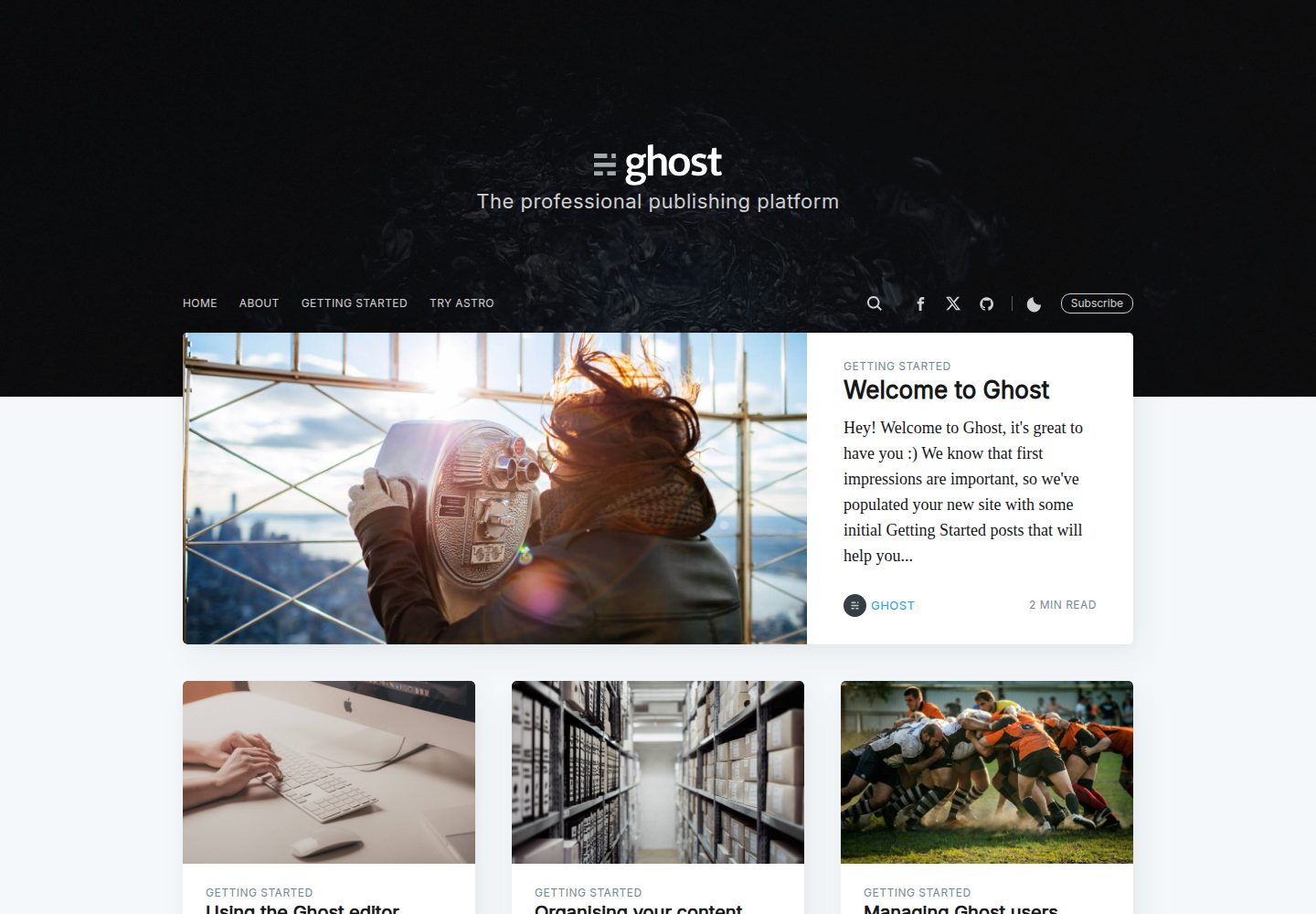
Desktop homepage1 / 3
Desktop captureTop of page
Actual screenshot captured by the server browser.
All pages & views 3
Screenshots show visual appearance; interactive behavior may differ.
Recorded 2026-10-02View source
What stands out
A quick read of the recorded project description.
Uses Astro Content Collections and Zod for type validation of posts, tags, and authors
Built-in Algolia InstantSearch search overlay, automatically hidden when not configured
Decap CMS backend under public/admin/ for managing content in the browser
Automatically generates Atom RSS feeds, including site-wide, by-tag, and by-author paths
Server-side prerendered Open Graph, Twitter Card, and Schema.org JSON-LD metadata
Template Details
Casper Astro is a static blog template that ports the default Ghost theme Casper 2.0 to Astro, replacing the earlier Jekyll version. It uses Astro Content Collections and Zod to define content validation rules for posts, tags, and authors. The build output is pure static HTML/CSS files, deployable to Netlify, Vercel, Cloudflare Pages, or GitHub Pages.
The template includes an Algolia InstantSearch search overlay, which requires filling in applicationId, indexName, and searchOnlyApiKey in src/config.ts; if the algolia config block is removed, the search entry is automatically hidden. A Decap CMS admin panel is built into public/admin/ for managing posts, authors, and tags in the browser. On Netlify, Identity and Git Gateway must be enabled to log in and use it.
For content organization, posts are placed in src/content/posts/, while authors and tags are stored as JSON files in src/content/authors/ and src/content/tags/ respectively. The theme also includes a Disqus comment toggle, an email subscription form, Atom RSS feeds (/feed.xml and feeds by tag and author), and server-side prerendered Open Graph, Twitter Card, and Schema.org JSON-LD metadata.
Usage limitations: search depends on the external Algolia service, and CMS login depends on Netlify Identity and Git Gateway, neither of which is included in the template code; third-party assets such as demo images, fonts, and icons require separate license verification.
AstroBlog
Is it right for your project?
Use Cases
- Building a personal static blog focused on Markdown posts
- Blog sites that need Algolia site search
- Editing posts, authors, and tags in the browser via Decap CMS
- Static sites deployed to Netlify, Vercel, Cloudflare Pages, or GitHub Pages
Suitable For
- Developers familiar with Astro or willing to configure an Astro project according to the documentation
- Bloggers who need static output and do not rely on a server-side runtime
- Sites that accept using the external Algolia service for search
- Users on Netlify who are willing to enable Identity and Git Gateway to run the CMS
Getting started & customization
Use these recorded setup notes alongside the repository instructions for your chosen version.
- 1
Install dependencies with pnpm install or npm install, start the local dev server with pnpm run dev, default access path is http://localhost:4321/casper/
- 2
pnpm run build generates static files into the dist/ directory
- 3
Fill in Algolia's applicationId, indexName, and searchOnlyApiKey in SITE_CONFIG in src/config.ts; deleting this config block disables search
- 4
Decap CMS requires enabling Identity on Netlify and setting registration to Invite only, then enabling Git Gateway, after which you log in via /admin/
- 5
When deploying to Cloudflare Pages, set the NODE_VERSION environment variable to 24 or higher
License & source material
Usage conditions & limitations
Free to use · keep license noticeThis entry covers the free version under the MIT license in the public repository; the free scope is the code of this version and does not mean external services or third-party assets are free.
Must comply with when using
- Free use, modification, commercial use, and distribution of this version's code are permitted.
- When distributing copies or substantial portions of the code, retain the original author's copyright notice and the full MIT license notice.
- The code is provided as is; warranties and limitations of liability are governed by the original license and applicable law.
Additional costs & items to verify
- Site search depends on the external Algolia service: you must register an Algolia account, create an index, and obtain applicationId, indexName, and searchOnlyApiKey to fill in src/config.ts; if not configured, the search entry is automatically hidden.
- Decap CMS backend login depends on the Netlify platform service: you must enable Identity on Netlify and set registration to Invite only, then enable Git Gateway to authorize repository read/write; otherwise you cannot log in via /admin/ to manage content.
- When deploying to Cloudflare Pages, set the environment variable NODE_VERSION to 24 or higher, otherwise the build may fail.
- Demo images, fonts, icons, and other third-party assets must be checked against their respective licenses and cannot be judged solely by the code's MIT license.
- External services such as domain, hosting, database, payment, or AI may incur additional charges.
View Original Text Basis
Permission is hereby granted, free of charge
Original License Text
Create an index on [Algolia](https://www.algolia.com/).
Original README
Enable Netlify Identity
Original README
https://github.com/AntonyLeons/casper/blob/main/LICENSEhttps://github.com/AntonyLeons/casper/blob/main/README.mdUnder **Environment variables**, set `NODE_VERSION` to `24` or higher.
Original README
Compiled by DeepSeek based on repository license and README ·2026-10-02. Results only cover the materials read; dependencies, images, fonts, and subsequent term changes are subject to their respective original texts.
Project checks & description sources
Template Information
- Source platforms
- GitHub
- Documentation and maintenance reference score
- More documented · 87 / 100
- Technologies
- Astro
- Website type
- Blog
How this score is calculated
Our heuristic uses license records (up to 30), a demo link (12), a preview (10), stars (15), recorded maintenance (15), description completeness (8), feature records (5) and classification data (5). It is not a code, security or performance test, or a Google score. A link does not establish tested functionality.
What to verify for this project
- Repository update recorded
- 2026-09-29
- Screenshot last checked
- 2026-10-02
A demo link is listed. Check it with your own content and viewport sizes; its presence does not confirm that forms, authentication or payments work.
The catalog identifies Astro as the primary stack. Check the actual dependency manifest and lockfile for versions and hosting requirements. These notes use recorded metadata, not a code audit or a deployment test.
Use a selection guide →How this description was prepared
AI-assisted description based on catalog records and repository material. Repository authors are not automatically the reviewers of this description.
Automatically checked against source and license rules; no manual editorial review.
Inspect the recorded source material
SHA-256: 8f941332d57787eb91a0ab909b3b5295ff2a366c9ef0912785cb100ddbceacc2
2026-10-02T16:51:44.002Z
Source file / repository# Casper Astro ⚡ [](https://app.netlify.com/projects/casperastro/deploys) [](https://github.com/AntonyLeons/casper/actions/workflows/deploy.yml)
<img width="1598" height="900" alt="image" src="https://github.com/user-attachments/assets/22234be6-057b-4a36-b4dd-5d19c009b834" />
A modernized, high-performance port of Ghost's default theme [Casper 2.0](https://github.com/tryghost/casper) built on top of **Astro 7**.
This port replaces the original Jekyll setup (`jasper2`), offering incredibly fast builds, type-safe content validation, server-side pre-rendering, and client-side page load times.
Deploy your own copy of this blog template to the cloud with a single click:
[](https://app.netlify.com/start/deploy?repository=https://github.com/AntonyLeons/casper)
[](https://vercel.com/new/clone?repository-url=https://github.com/AntonyLeons/casper)
[](https://github.com/AntonyLeons/casper/generate)
## 🚀 Key Features
- **Astro 7 & TypeScript**: Full TypeScript configuration and strict schema validations.
- **Type-Safe Content Schema**: Powered by Astro Content Collections and Zod to validate posts, tags, and authors.
- **Modern Asset Pipeline**: Stylesheets are bundled, minified, and optimized via Vite out of the box.
- **Zero-Dependency Vanilla JS Interactivity**: Ported jQuery scripts (infinite scrolling, scroll progress bar, and floating headers) to clean, performant **Vanilla JS**, and replaced FitVids with a native, zero-JS **CSS aspect-ratio** solution.
- **100% SEO Compliance**: Automatic metadata, canonical URLs, Open Graph images, Twitter cards, and Schema.org JSON-LD data pre-rendered on the server.
- **Compliance Feeds**: Auto-generated Atom XML RSS feeds matching the original Jekyll feeds exactly (`/feed.xml`, `/tag/[tag]/feed.xml`, `/author/[author]/feed.xml`).
- **Disqus & Subscribe Forms**: Out-of-the-box toggleable Disqus comments and location-aware email newsletter subscription forms.
---
## 🛠️ Local Development
### 1. Installation
Install the project dependencies using `pnpm` (recommended) or `npm`:
```bash
pnpm install
# or
npm install
```
### 2. Development Server
Start the local hot-reloading development server:
```bash
pnpm run dev
# or
npm run dev
```
Your blog will be accessible locally at `http://localhost:4321/casper/` (matching the configured subpath).
### 3. Static Build
Compile the blog into optimized static HTML files:
```bash
pnpm run build
# or
npm run build
```
The output will be generated inside the `dist/` directory.
---
## 📂 Project Structure
- `src/content.config.ts`: Configuration file defining content validation schemas and loaders for Astro 7.
- `src/content/posts/`: Contains all Markdown (`.md`) articles. Add new blog posts here.
- `src/content/authors/`: Contains JSON files for each author (e.g. `ghost.json` defining name, bio, location, and social profiles).
- `src/content/tags/`: Contains JSON files for tags (e.g. `fables.json` defining name, description, and cover images).
- `src/layouts/`: Base design frames:
- `Layout.astro`: Standard page shell containing head SEO elements, footers, and theme toggler scripts.
- `PostLayout.astro`: Article rendering frame with progress bars, Disqus comments lazy-loading, and next/prev suggestions.
- `PageLayout.astro`: Framework for static pages (like `/about/`).
- `src/components/`: Sub-components like navigation bars (`SiteNav.astro`), search overlays (`AlgoliaSearch.astro`), post preview cards (`PostCard.astro`), or sharing tools (`FloatingHeader.astro`).
- `public/assets/images/`: Stores all static graphics, icons, avatars, and cover photos.
- `public/admin/`: Decap CMS dashboard files (`index.html` and `config.yml`) to manage content directly from the browser.
---
## ⚙️ Configuration & Integration
### 1. Algolia Search Setup
The theme includes a lightweight, pre-configured **Algolia InstantSearch** overlay. To configure search:
1. Create an index on [Algolia](https://www.algolia.com/).
2. Index your site posts. You can index them using Algolia's web crawler or upload your post list JSON feed.
3. Open [config.ts](file:///c:/Users/anton/Documents/Github/casper/src/config.ts) and add your Algolia credentials to the `SITE_CONFIG` object:
```typescript
algolia: {
applicationId: 'YOUR_APP_ID',
indexName: 'YOUR_INDEX_NAME',
searchOnlyApiKey: 'YOUR_SEARCH_ONLY_API_KEY',
}
```
4. If the `algolia` configuration block is removed or undefined, the search icons and widget will automatically disable.
---
### 2. Decap CMS (Netlify CMS) Integration
A fully configured Decap CMS admin dashboard is built into the template under `public/admin/` to manage posts, authors, and tags directly from your browser.
#### Setup Instructions:
1. **Host on Netlify**: Connect your GitHub repository to Netlify.
2. **Enable Netlify Identity**:
- Navigate to **Site Configuration** > **Identity** > **Enable Identity**.
- Under **Identity** > **Registration preferences**, change registration from **Public** to **Invite only** to restrict access to yourself.
3. **Enable Git Gateway**:
- Under **Identity** > **Services** > **Git Gateway**, click **Enable Git Gateway** to authorize repository read/write access.
4. **Log in**:
- Send yourself an invite under the **Identity** tab in Netlify.
- Click the validation link in the email, create your credentials, and visit `https://yourdomain.com/admin/` to log in and start writing!
---
## ☁️ Deployment
Since Casper Astro compiles to standard static HTML/CSS files, it can be deployed to any major hosting provider.
### 1. Netlify
#### Easy Deploy
[](https://app.netlify.com/start/deploy?repository=https://github.com/AntonyLeons/casper)
#### Manual Setup
1. Connect your repository in the Netlify Dashboard.
2. Configure the following build settings:
- **Build command:** `pnpm build` or `npm run build`
- **Publish directory:** `dist`
3. If using the CMS admin panel (`/admin/`), enable **Netlify Identity**:
- Go to **Site Configuration** > **Identity** > **Enable Identity**.
- Under **Identity** > **Services** > **Git Gateway**, click **Enable Git Gateway** to authorize access to your repository.
- Go to the **Identity** tab at the top of your site management overview, invite yourself, and use Netlify Identity to log in at `https://casper.leons.dev/admin/`.
---
### 2. Vercel
1. Connect your repository in the Vercel Dashboard.
2. Vercel will automatically detect **Astro** and pre-configure:
- **Build Command:** `npm run build` or `pnpm build`
- **Output Directory:** `dist`
3. Click **Deploy**.
---
### 3. Cloudflare Pages
1. In the Cloudflare Dashboard, navigate to **Workers & Pages** > **Create Application** > **Pages** > **Connect to Git**.
2. Select your repository.
3. Configure the build settings:
- **Framework preset:** `Astro`
- **Build command:** `pnpm build` or `npm run build`
- **Build output directory:** `dist`
4. Under **Environment variables**, set `NODE_VERSION` to `24` or higher.
5. Click **Save and Deploy**.
---
### 4. GitHub Pages
A ready-to-use GitHub Actions workflow is included in `.github/workflows/deploy.yml`.
To deploy:
1. Push your changes to the `main` branch.
2. In your GitHub repository settings, navigate to **Pages**.
3. Under **Build and deployment**, set the **Source** to **GitHub Actions**.
4. The workflow will automatically trigger, build the Astro application, and publish it directly to GitHub Pages.
---
## 🔄 Keeping Your Blog Updated
If you created your blog by **forking** or **cloning** this repository, you can pull upstream updates, fixes, and performance optimizations (like code refactoring or package upgrades) into your personal repository using Git.
### 1. Add Upstream Remote
Inside your local blog repository directory, link this template repository as an `upstream` remote:
```bash
git remote add upstream https://github.com/AntonyLeons/casper.git
```
### 2. Fetch and Merge Changes
To pull the latest template updates and merge them:
```bash
# Fetch changes from the template repo
git fetch upstream
# Merge upstream main branch into your current branch
git merge upstream/main
```
If you customized configurations (e.g., in `src/config.ts`) or added custom content, resolve any merge conflicts that arise, and then commit and push to your remote repository.
---
## 📝 License
Distributed under the MIT License. Same license as original Casper theme by the Ghost Foundation.
Explore similar templates
Compare previews and descriptions within the same stack and category.

astrowind
AstroWind is a free, open-source Astro starter theme using Astro and Tailwind CSS, released under the MIT license.
Astro · Blog

astro-paper
AstroPaper is a minimal, responsive, accessible, and SEO-friendly Astro blog theme. Articles are stored as Markdown/MDX in src/content/posts/, with subdirectories affecting URLs.
Astro · Blog

fuwari
Fuwari is a static blog template built with Astro and Tailwind CSS for personal blogs. It manages posts as Markdown files in src/content/posts/, with frontmatter for title, date, description, cover, tags, categories, draft status, and language.
Astro · Blog

Firefly
Firefly is a clean personal blog theme forked from Astro and Fuwari, offering four background modes, single/double sidebar and list/grid layouts, Pagefind client-side full-text search, and a six-language UI.
Astro · Blog

astro-theme-cactus
Astro Cactus is an Astro-based blog and portfolio theme that uses Markdown/MDX content collections to manage posts, notes, and tags, with frontmatter type-checked by a schema.
Astro · Portfolio

astrofy
Astrofy is a free and open-source personal portfolio website template built with Astro and TailwindCSS, with built-in blog, CV timeline, project showcase, store, and RSS feed modules.
Astro · Portfolio