Built with Astro, deployed to Cloudflare Pages
AstroStarter
astro-webauthn-starter — Astro Starter Template
By aostiles
A serverless personal website starter template built with Astro, using WebAuthn login, Cloudflare D1 database, and Turnstile form protection.
Explore the design
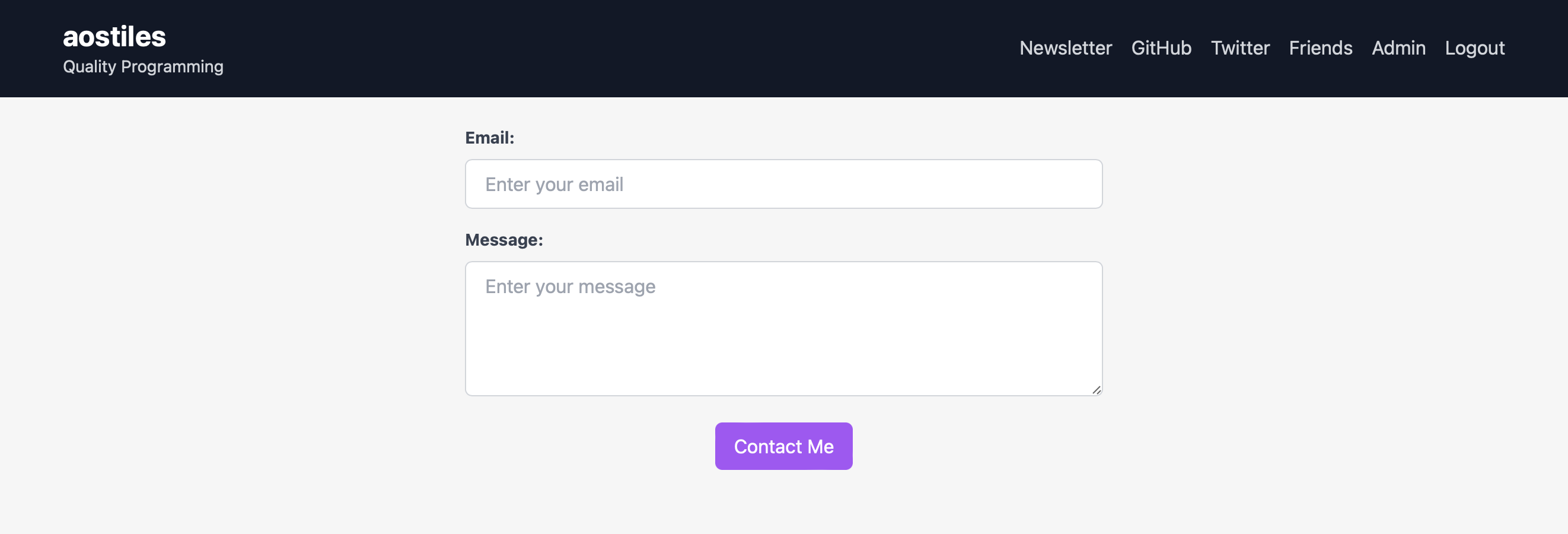
Compare the page layouts and mobile experience. Open any screenshot for a closer look.
Author preview
Author-provided preview
Preview provided in the project README.
One original preview is available. Open the full image to inspect the design.
Screenshots show visual appearance; interactive behavior may differ.
Recorded 2026-10-03View source
What stands out
A quick read of the recorded project description.
WebAuthn login, no reliance on third-party account services, and no password storage
Data stored in Cloudflare D1 serverless database
Contact form protected by Turnstile, without exposing email addresses
Includes a private friends area and an admin panel to view contact records
MIT-licensed template repository, can directly create a new repository
Template Details
This is a starter template for personal websites, built with Astro and targeting Cloudflare Pages for deployment. It combines authentication, data storage, and a contact form into a serverless solution: login uses WebAuthn, does not rely on third-party account services, and does not store passwords; data is stored in Cloudflare D1 (a serverless database based on SQLite); the contact form is protected by Turnstile, avoiding public email addresses.
The template includes: a private area visible only to friends for posting updates; a contact form that lets strangers leave messages without seeing an email address; and an admin panel to see who has contacted you. The README notes that there is currently no graphical interface for approving friend registrations; this must be done by executing SQL through Cloudflare's online D1 console.
Before use, several external configurations must be completed: create a D1 database, set up a binding named SITE_DB in the Cloudflare console, write wrangler.toml, and set environment variables such as site name, owner, tagline, and Turnstile site key and secret. The first build typically fails because the database and environment variables are not yet ready; after configuration, redeploy. The template is under the MIT license, but third-party assets and external services within it must be checked separately.
AstroStarter
Is it right for your project?
Use Cases
- Building a personal website and wanting serverless hosting
- Wanting visitors to log in via WebAuthn without passwords
- Needing a private update area open only to friends
- Wanting to provide a contact form without publicly sharing an email address
- Needing an admin panel to view visitor message records
Suitable For
- Developers familiar with Astro and Cloudflare Pages
- Personal site authors willing to use Cloudflare D1 as data storage
- Personal projects requiring WebAuthn login and a private friends area
- Users who accept approving friend registrations by executing SQL through the D1 console
Getting started & customization
Use these recorded setup notes alongside the repository instructions for your chosen version.
- 1
Create a GitHub repository from the template and connect it in Cloudflare Pages, setting NODE_VERSION to at least 16.12.0.
- 2
Use wrangler to create a D1 database and execute schema.sql, then set up a binding named SITE_DB in the Cloudflare console.
- 3
Create wrangler.toml in the repository root and fill in the d1_databases binding, database_name, and database_id.
- 4
Set PUBLIC_SITE_NAME, PUBLIC_SITE_OWNER, PUBLIC_SITE_TAGLINE_TITLECASE, and the Turnstile site key and secret in the Cloudflare console.
- 5
The first build may fail because the database and environment variables are not ready; after configuration, trigger a redeploy with an empty commit.
License & source material
Usage conditions & limitations
Free to use · keep license noticeThis entry covers the free version under the MIT license in the public repository; the free scope is the code of this version and does not imply that external services or third-party assets are free.
Must comply with when using
- Free use, modification, commercial use, and distribution of this version's code are permitted.
- When distributing copies or substantial portions of the code, retain the original author's copyright notice and the full MIT license notice.
- The code is provided as is; warranties and limitations of liability are governed by the original license and applicable law.
Additional costs & items to verify
- When deploying to Cloudflare Pages, the NODE_VERSION environment variable must be set to at least 16.12.0, otherwise the build may fail.
- The first build typically fails; successful deployment requires completing the D1 database and environment variable configuration first.
- The D1 database must be created using Cloudflare's wrangler command-line tool, depending on a Cloudflare account and external services.
- A D1 binding named SITE_DB must be manually created in the Cloudflare console; this cannot be done through code alone.
- wrangler.toml must be created in the repository root and filled with the database ID, otherwise the site cannot connect to the database.
- Environment variables such as site name, owner, tagline, and Turnstile keys must be set in the Cloudflare console.
- The contact form relies on Cloudflare Turnstile, requiring configuration of the Turnstile site key and secret, which is an external service dependency.
- There is no graphical interface for approving friend registrations; this must be done by manually executing SQL in the Cloudflare online D1 console.
- The template includes third-party WebAuthn client code public/webauthn.min.js, copyrighted by its author, and subject to its separate MIT license.
- Demo images, fonts, icons, and other third-party assets must be checked under their respective licenses; they cannot be judged solely by the code's MIT license.
- External services such as domain, hosting, database, payment, or AI may incur additional charges.
View Original Text Basis
Permission is hereby granted, free of charge
Original License Text
**Note that you'll need to set `NODE_VERSION` to at least `16.12.0`.**
Original README
Your first build will likely fail because we haven't yet setup the D1 database or necessary environment variables.
Original README
npx wrangler d1 create site # create a new db and call it 'site'
Original README
Now create a binding in the Cloudflare dashboard:
Original README
Create a `wrangler.toml` file in the root of this repo with the following contents:
Original README
Go to the Cloudflare dashboard for your site and set up the following environment variables.
Original README
| PUBLIC_TURNSTILE_SECRET_KEY | Used to validate contact form submissions. |
Original README
I haven't coded a UI for this. I use the online D1 console.
Original README
https://github.com/aostiles/astro-webauthn-starter/blob/main/LICENSEhttps://github.com/aostiles/astro-webauthn-starter/blob/main/README.mdThis template includes their bundled client-side code at `public/webauthn.min.js`. That code is theirs and is covered by their (also MIT) license.
Original README
Compiled by DeepSeek based on repository license and README ·2026-10-03. Results only cover the materials read; dependencies, images, fonts, and subsequent term changes are subject to their respective original texts.
Project checks & description sources
Template Information
- Source platforms
- GitHub
- Documentation and maintenance reference score
- Partly documented · 60 / 100
- Technologies
- Astro
- Website type
- Starter
How this score is calculated
Our heuristic uses license records (up to 30), a demo link (12), a preview (10), stars (15), recorded maintenance (15), description completeness (8), feature records (5) and classification data (5). It is not a code, security or performance test, or a Google score. A link does not establish tested functionality.
What to verify for this project
- Repository update recorded
- 2023-06-27
- Screenshot last checked
- 2026-10-03
No demo link is recorded. Use the repository instructions to evaluate the project locally; the screenshot alone cannot establish interactive behavior.
The catalog identifies Astro as the primary stack. Check the actual dependency manifest and lockfile for versions and hosting requirements. These notes use recorded metadata, not a code audit or a deployment test.
Use a selection guide →How this description was prepared
AI-assisted description based on catalog records and repository material. Repository authors are not automatically the reviewers of this description.
Automatically checked against source and license rules; no manual editorial review.
Inspect the recorded source material
SHA-256: f93442004bd4926c1255b94c9059d30dcc122463f584f1b3e0be8d24a4b6f2b1
2026-10-03T04:51:01.620Z
Source file / repository# Serverless Astro WebAuthn with D1 Starter
This is a [template repository](https://docs.github.com/en/repositories/creating-and-managing-repositories/creating-a-repository-from-a-template) for creating a personal website with [Astro](https://astro.build) hosted on [Cloudflare Pages](https://pages.cloudflare.com). Here's how you may expect your site to look:

Check out [my site](https://aostil.es) for a live demo.
[Read more](https://buttondown.email/aostiles/archive/serverless-webauthn-with-astro-cloudflare-pages/?tag=gh) about lessons I learned creating my site.
This template will create for you a site with the following features:
- **Serverless**: No webservers or databases to manage.
- **WebAuthn login**: Login without relying on third-party services or storing passwords.
- **Private friends area**: Post updates to your friends without sharing to the entire world.
- **Spam-free contact form**: Let strangers reach out without revealing your email address. Protected by [Turnstile](https://developers.cloudflare.com/turnstile/).
- **Admin dashboard**: See who has contacted you.
## Get Started
1. Follow [these instructions](https://docs.github.com/en/repositories/creating-and-managing-repositories/creating-a-repository-from-a-template#creating-a-repository-from-a-template) to create a new GitHub repository from this template.
2. Follow [these instructions](https://developers.cloudflare.com/pages/framework-guides/deploy-an-astro-site/#deploying-with-cloudflare-pages) to connect Cloudflare Pages to your GitHub account. **Note that you'll need to set `NODE_VERSION` to at least `16.12.0`.** Your first build will likely fail because we haven't yet setup the D1 database or necessary environment variables.
3. Follow the following two subsections to set up the D1 database and environment variables
4. Trigger a re-deploy with a dummy commit: `git commit -m "dummy commit" --allow-empty`
### Set up the D1 Database
[D1](https://developers.cloudflare.com/d1/) is Cloudflare's serverless database based on SQLite. You'll want their [command-line tool](https://developers.cloudflare.com/workers/wrangler/) to create a database:
```
cd <this repo>
npm install # includes wrangler
npx wrangler login
npx wrangler d1 create site # create a new db and call it 'site'
npx wrangler d1 execute SITE_DB --file=./schema.sql # set up the schema on the remote database
```
Now create a binding in the Cloudflare dashboard:


The code in this repo assumes the name `SITE_DB`.
Create a `wrangler.toml` file in the root of this repo with the following contents:
```
[[d1_databases]]
binding = "SITE_DB"
database_name = "site"
database_id = "<database ID from the D1 dashboard>"
```
### Set up Environment Variables
Go to the Cloudflare dashboard for your site and set up the following environment variables. Here's what mine look like:

Here's what some of the variables do. The `PUBLIC_` prefix is a quirk of Astro and can be ignored.
| Variable | Description |
| -------- | ----------- |
| PUBLIC_SITE_NAME | The name of your site. Used in the header and title. |
| PUBLIC_SITE_OWNER | Used to allow only a certain username in to the admin section. |
| PUBLIC_SITE_TAGLINE_TITLECASE | Used to display the tagline in the header. |
| PUBLIC_TURNSTILE_SECRET_KEY | Used to validate contact form submissions. |
| PUBLIC_TURNSTILE_SITE_KEY | Used when initializing Turnstile on the client. |
## Approving Friend Registrations
I haven't coded a UI for this. I use the online D1 console.
You can find it at https://dash.cloudflare.com.
Click on "Workers & Pages" and then on "D1".

```
INSERT INTO users (username)
SELECT username FROM reg_requests
WHERE id=<reg_request id>;
INSERT INTO creds (user_id, cred)
SELECT users.id, reg_requests.cred
FROM users, reg_requests
WHERE users.username = <username you just created> AND reg_requests.id = <reg_request id>;
```
## Featured Posts
If you have any newsletter posts you'd like to display directly on your site, you can do so with:
```
INSERT INTO featured_posts (title, url, created_at) VALUES ('My Newsletter Post', 'https://', DATE('2023-06-27'));
```
## Credits
I used https://github.com/passwordless-id/webauthn and found their library and docs helpful.
This template includes their bundled client-side code at `public/webauthn.min.js`. That code is theirs and is covered by their (also MIT) license.
## Contributing
Please see [CONTRIBUTING.md](CONTRIBUTING.md).
Explore similar templates
Compare previews and descriptions within the same stack and category.

astrowind
AstroWind is a free, open-source Astro starter theme using Astro and Tailwind CSS, released under the MIT license.
Astro · Blog
accessible-astro-starter
An accessibility-focused Astro 6 starter template with WCAG 2.2 AA practices, Tailwind CSS 4, TypeScript, Prettier, ESLint, form validation, blog and portfolio examples, and preference toggles for dark mode, high contrast, and reduced motion.
Astro · Blog

astro-erudite
astro-erudite is an opinionated, unstyled static blog template built with Astro and native CSS, with no UI or CSS framework and minimal dependencies.
Astro · Portfolio

astro-shopify
A lightweight Shopify headless ecommerce starter template built with Astro and Svelte, integrating the Shopify Storefront API for product and inventory data, with built-in cart state management and basic add-to-cart and checkout flow.
Astro · E-commerce

brutal
Brutal is a neobrutalism Astro starter theme from ElianCodes, derived from the author's personal site and generalized. It includes a Markdown blog collection, build-time RSS and sitemap, image optimization, Tailwind CSS styling, and Biome checks, with no JavaScript by default.
Astro · Starter

qwind
Qwind is a free and open-source website template built on Qwik and Tailwind CSS, featuring directory-based routing via QwikCity, a Markdown blog, dark mode, and static deployment configuration.
Astro · Tool Site