使用 Astro 构建,部署到 Cloudflare Pages
Astro启动器
astro-webauthn-starter — Astro 启动器模板
作者 aostiles
基于 Astro 的无服务器个人网站启动模板,使用 WebAuthn 登录、Cloudflare D1 数据库与 Turnstile 表单防护。
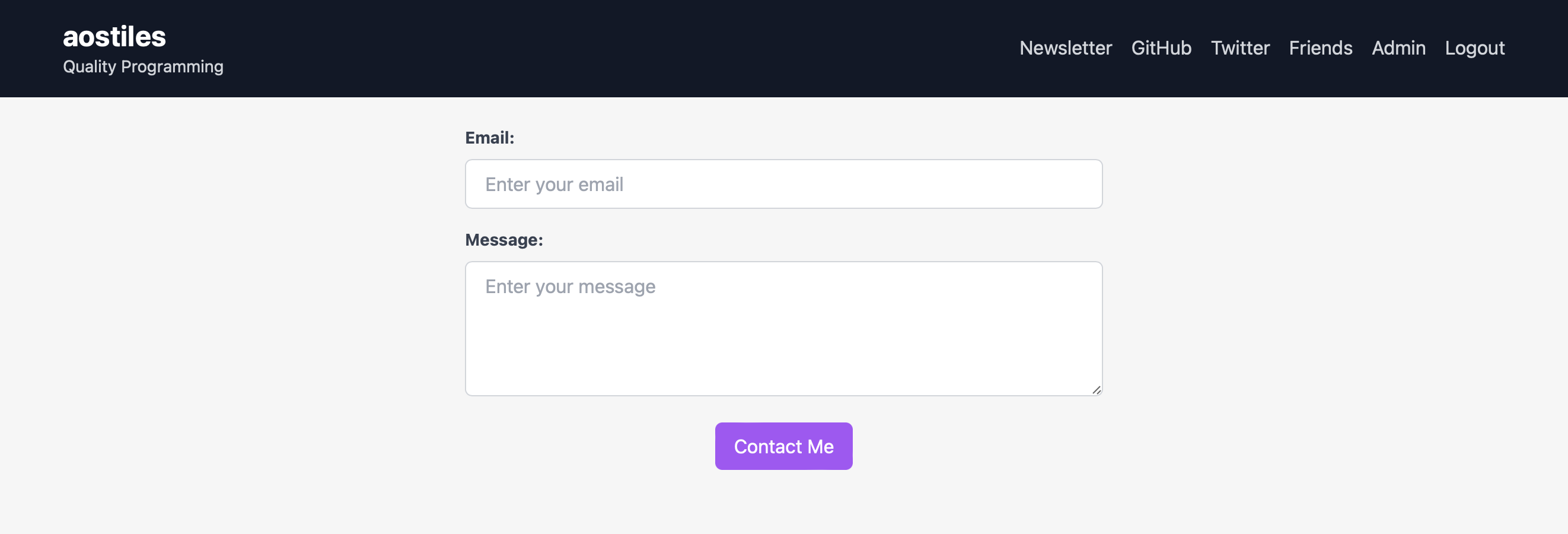
看看你的网站会是什么样
浏览真实页面截图,比较内容排版与手机效果。点击下方缩略图切换,放大查看整页细节。
目前有 1 张原始预览,可打开完整图片查看设计细节。
截图用于了解视觉与布局,交互效果请以实际项目为准。
采集于 2026-10-03查看来源
值得关注的模板亮点
从已有项目资料中,快速了解它的特点。
WebAuthn 登录,不依赖第三方账号服务,也不存储密码
数据存放在 Cloudflare D1 无服务器数据库
联系表单由 Turnstile 防护,不暴露邮箱地址
包含好友私密区域与查看联系记录的管理后台
采用 MIT 许可的模板仓库,可直接创建新仓库
模板详细介绍
这是一个面向个人网站场景的启动模板,使用 Astro 构建,部署目标为 Cloudflare Pages。它把身份验证、数据存储和联系表单串成一套无服务器方案:登录使用 WebAuthn,不依赖第三方账号服务,也不存储密码;数据存放在 Cloudflare D1(基于 SQLite 的无服务器数据库);联系表单由 Turnstile 防护,避免公开邮箱地址。
模板自带的功能包括:仅好友可见的私密区域,用于发布更新;一个联系表单,让陌生人可以在不看到邮箱的情况下留言;以及一个管理后台,用来查看谁联系过你。README 中说明,好友注册的审批目前没有图形界面,需要通过 Cloudflare 的在线 D1 控制台执行 SQL 完成。
使用前需要自行完成若干外部配置:创建 D1 数据库、在 Cloudflare 控制台建立名为 SITE_DB 的绑定、编写 wrangler.toml,并设置站点名称、所有者、标语以及 Turnstile 的站点密钥与密钥等环境变量。首次构建通常会因为数据库和环境变量尚未就绪而失败,需要配置完成后重新部署。模板采用 MIT 许可,但其中的第三方素材与外部服务需单独核对。
Astro启动器
适合你的项目吗?
适用场景
- 搭建个人网站并希望用无服务器方式托管
- 希望访客无需密码、通过 WebAuthn 登录
- 需要只对好友开放的私密更新区域
- 希望提供联系表单但不想公开邮箱地址
- 需要查看访客留言记录的管理后台
适合人群
- 熟悉 Astro 与 Cloudflare Pages 的开发者
- 愿意使用 Cloudflare D1 作为数据存储的个人站点作者
- 需要 WebAuthn 登录与好友私密区域的个人项目
- 能接受通过 D1 控制台执行 SQL 来审批好友注册的用户
上手与定制指南
结合仓库当前版本的说明,按下面的资料检查内容、配置与运行要求。
- 1
从模板创建 GitHub 仓库,并在 Cloudflare Pages 中连接该仓库,NODE_VERSION 至少设为 16.12.0。
- 2
使用 wrangler 创建 D1 数据库并执行 schema.sql,然后在 Cloudflare 控制台建立名为 SITE_DB 的绑定。
- 3
在仓库根目录创建 wrangler.toml,填入 d1_databases 的 binding、database_name 与 database_id。
- 4
在 Cloudflare 控制台设置 PUBLIC_SITE_NAME、PUBLIC_SITE_OWNER、PUBLIC_SITE_TAGLINE_TITLECASE 以及 Turnstile 的站点密钥和密钥。
- 5
首次构建可能因数据库和环境变量未就绪而失败,配置完成后用一次空提交触发重新部署。
授权与来源资料
使用条件与限制
免费使用 · 保留许可声明本次收录的是公开仓库中采用 MIT 许可的免费版本;免费范围为该版本代码,不代表外部服务或第三方素材免费。
使用时需要遵守
- 允许免费使用、修改、商用和分发该版本代码。
- 分发代码副本或实质性部分时,保留原作者版权声明和完整 MIT 许可声明。
- 代码按现状提供;担保与责任限制以原许可证及适用法律为准。
额外费用与待核对事项
- 部署到 Cloudflare Pages 时需将 NODE_VERSION 环境变量设为至少 16.12.0,否则构建可能失败。
- 首次构建通常会失败,必须先完成 D1 数据库与环境变量配置后才能成功部署。
- 必须使用 Cloudflare 的 wrangler 命令行工具创建 D1 数据库,依赖 Cloudflare 账号与外部服务。
- 需在 Cloudflare 控制台手动创建名为 SITE_DB 的 D1 绑定,无法仅靠代码完成。
- 必须在仓库根目录创建 wrangler.toml 并填入数据库 ID,否则站点无法连接数据库。
- 需在 Cloudflare 控制台设置站点名称、所有者、标语及 Turnstile 密钥等环境变量。
- 联系表单依赖 Cloudflare Turnstile,需配置 Turnstile 的站点密钥与密钥,属于外部服务依赖。
- 好友注册审批没有图形界面,需在 Cloudflare 在线 D1 控制台手动执行 SQL 完成。
- 模板内含第三方 WebAuthn 客户端代码 public/webauthn.min.js,版权归其作者,需遵守其单独的 MIT 许可。
- 演示图片、字体、图标及其他第三方素材需按各自许可核对,不能仅凭代码的 MIT 许可判断。
- 域名、托管、数据库、支付或 AI 等外部服务可能另外收费。
查看原文依据
Permission is hereby granted, free of charge
许可证原文
**Note that you'll need to set `NODE_VERSION` to at least `16.12.0`.**
README 原文
Your first build will likely fail because we haven't yet setup the D1 database or necessary environment variables.
README 原文
npx wrangler d1 create site # create a new db and call it 'site'
README 原文
Now create a binding in the Cloudflare dashboard:
README 原文
Create a `wrangler.toml` file in the root of this repo with the following contents:
README 原文
Go to the Cloudflare dashboard for your site and set up the following environment variables.
README 原文
| PUBLIC_TURNSTILE_SECRET_KEY | Used to validate contact form submissions. |
README 原文
I haven't coded a UI for this. I use the online D1 console.
README 原文
https://github.com/aostiles/astro-webauthn-starter/blob/main/LICENSEhttps://github.com/aostiles/astro-webauthn-starter/blob/main/README.mdThis template includes their bundled client-side code at `public/webauthn.min.js`. That code is theirs and is covered by their (also MIT) license.
README 原文
DeepSeek 根据仓库许可证和 README 整理 ·2026-10-03。结果仅覆盖已读取资料,依赖、图片、字体及后续条款变更以各自原文为准。
项目核对记录与介绍依据
模板资料
- 来源平台
- GitHub
- 资料与维护参考分
- 资料一般 · 60 / 100
- 技术栈
- Astro
- 网站类型
- 启动器
这个分数如何计算
本站按许可资料(最高30分)、演示链接(12分)、预览图(10分)、Star数(15分)、记录的维护时间(15分)、描述完整度(8分)、功能记录(5分)和分类资料(5分)计算。它不是代码、安全或性能测试,也不是 Google 评分;有链接不代表已实测可用。
这个项目需要核对什么
- 记录的仓库更新时间
- 2023-06-27
- 截图检查日期
- 2026-10-03
目前没有记录演示链接。请依据仓库说明在本地评估;仅凭截图无法确认交互行为。
目录记录的主要技术栈是 Astro。请通过依赖清单和锁文件核对实际版本与托管要求。这些说明基于收录资料,不代表代码审计或部署实测。
查看具体选型方法 →介绍的制作与核对状态
介绍由 AI 辅助整理目录与仓库资料。仓库作者不等于这篇介绍的审核者。
已完成服务器许可规则与 AI 来源核对;未经过人工编辑审核。
查看当时使用的来源资料
SHA-256: f93442004bd4926c1255b94c9059d30dcc122463f584f1b3e0be8d24a4b6f2b1
2026-10-03T04:51:01.620Z
来源文件 / 仓库# Serverless Astro WebAuthn with D1 Starter
This is a [template repository](https://docs.github.com/en/repositories/creating-and-managing-repositories/creating-a-repository-from-a-template) for creating a personal website with [Astro](https://astro.build) hosted on [Cloudflare Pages](https://pages.cloudflare.com). Here's how you may expect your site to look:

Check out [my site](https://aostil.es) for a live demo.
[Read more](https://buttondown.email/aostiles/archive/serverless-webauthn-with-astro-cloudflare-pages/?tag=gh) about lessons I learned creating my site.
This template will create for you a site with the following features:
- **Serverless**: No webservers or databases to manage.
- **WebAuthn login**: Login without relying on third-party services or storing passwords.
- **Private friends area**: Post updates to your friends without sharing to the entire world.
- **Spam-free contact form**: Let strangers reach out without revealing your email address. Protected by [Turnstile](https://developers.cloudflare.com/turnstile/).
- **Admin dashboard**: See who has contacted you.
## Get Started
1. Follow [these instructions](https://docs.github.com/en/repositories/creating-and-managing-repositories/creating-a-repository-from-a-template#creating-a-repository-from-a-template) to create a new GitHub repository from this template.
2. Follow [these instructions](https://developers.cloudflare.com/pages/framework-guides/deploy-an-astro-site/#deploying-with-cloudflare-pages) to connect Cloudflare Pages to your GitHub account. **Note that you'll need to set `NODE_VERSION` to at least `16.12.0`.** Your first build will likely fail because we haven't yet setup the D1 database or necessary environment variables.
3. Follow the following two subsections to set up the D1 database and environment variables
4. Trigger a re-deploy with a dummy commit: `git commit -m "dummy commit" --allow-empty`
### Set up the D1 Database
[D1](https://developers.cloudflare.com/d1/) is Cloudflare's serverless database based on SQLite. You'll want their [command-line tool](https://developers.cloudflare.com/workers/wrangler/) to create a database:
```
cd <this repo>
npm install # includes wrangler
npx wrangler login
npx wrangler d1 create site # create a new db and call it 'site'
npx wrangler d1 execute SITE_DB --file=./schema.sql # set up the schema on the remote database
```
Now create a binding in the Cloudflare dashboard:


The code in this repo assumes the name `SITE_DB`.
Create a `wrangler.toml` file in the root of this repo with the following contents:
```
[[d1_databases]]
binding = "SITE_DB"
database_name = "site"
database_id = "<database ID from the D1 dashboard>"
```
### Set up Environment Variables
Go to the Cloudflare dashboard for your site and set up the following environment variables. Here's what mine look like:

Here's what some of the variables do. The `PUBLIC_` prefix is a quirk of Astro and can be ignored.
| Variable | Description |
| -------- | ----------- |
| PUBLIC_SITE_NAME | The name of your site. Used in the header and title. |
| PUBLIC_SITE_OWNER | Used to allow only a certain username in to the admin section. |
| PUBLIC_SITE_TAGLINE_TITLECASE | Used to display the tagline in the header. |
| PUBLIC_TURNSTILE_SECRET_KEY | Used to validate contact form submissions. |
| PUBLIC_TURNSTILE_SITE_KEY | Used when initializing Turnstile on the client. |
## Approving Friend Registrations
I haven't coded a UI for this. I use the online D1 console.
You can find it at https://dash.cloudflare.com.
Click on "Workers & Pages" and then on "D1".

```
INSERT INTO users (username)
SELECT username FROM reg_requests
WHERE id=<reg_request id>;
INSERT INTO creds (user_id, cred)
SELECT users.id, reg_requests.cred
FROM users, reg_requests
WHERE users.username = <username you just created> AND reg_requests.id = <reg_request id>;
```
## Featured Posts
If you have any newsletter posts you'd like to display directly on your site, you can do so with:
```
INSERT INTO featured_posts (title, url, created_at) VALUES ('My Newsletter Post', 'https://', DATE('2023-06-27'));
```
## Credits
I used https://github.com/passwordless-id/webauthn and found their library and docs helpful.
This template includes their bundled client-side code at `public/webauthn.min.js`. That code is theirs and is covered by their (also MIT) license.
## Contributing
Please see [CONTRIBUTING.md](CONTRIBUTING.md).
看看同类模板
对比同技术栈与用途的模板,找到更适合的视觉与内容结构。

astrowind
⭕️ AstroWind: A free template using Astro v7 and Tailwind CSS v4. Astro starter theme.
Astro · 博客
accessible-astro-starter
Accessible Astro Starter 是一个以无障碍为核心理念的 Astro 6 启动模板,由 incluud 团队维护。
Astro · 博客

astro-erudite
An opinionated, unstyled static blogging template built with Astro and native CSS.
Astro · 作品集

astro-shopify
astro-shopify 是一个面向开发者的轻量级电商启动模板,用于构建基于 Shopify 的无头店面。
Astro · 电商

brutal
A neobrutalism Astro starter theme
Astro · 启动器

qwind
⭕️ Qwind: A template to make your website using Qwik + Tailwind CSS.
Astro · 工具站