Built with the Chirpy Jekyll theme and deployed on GitHub Pages
JekyllBlog
arenredd-blog-chirpy — Jekyll Blog Template
By ArenRedd
A personal GitHub Pages blog built on the Chirpy Jekyll theme; the README documents the problems the author encountered while configuring Ruby, Gulp and deployment on Kali Linux, along with the fixes.
Explore the design
Compare the page layouts and mobile experience. Open any screenshot for a closer look.
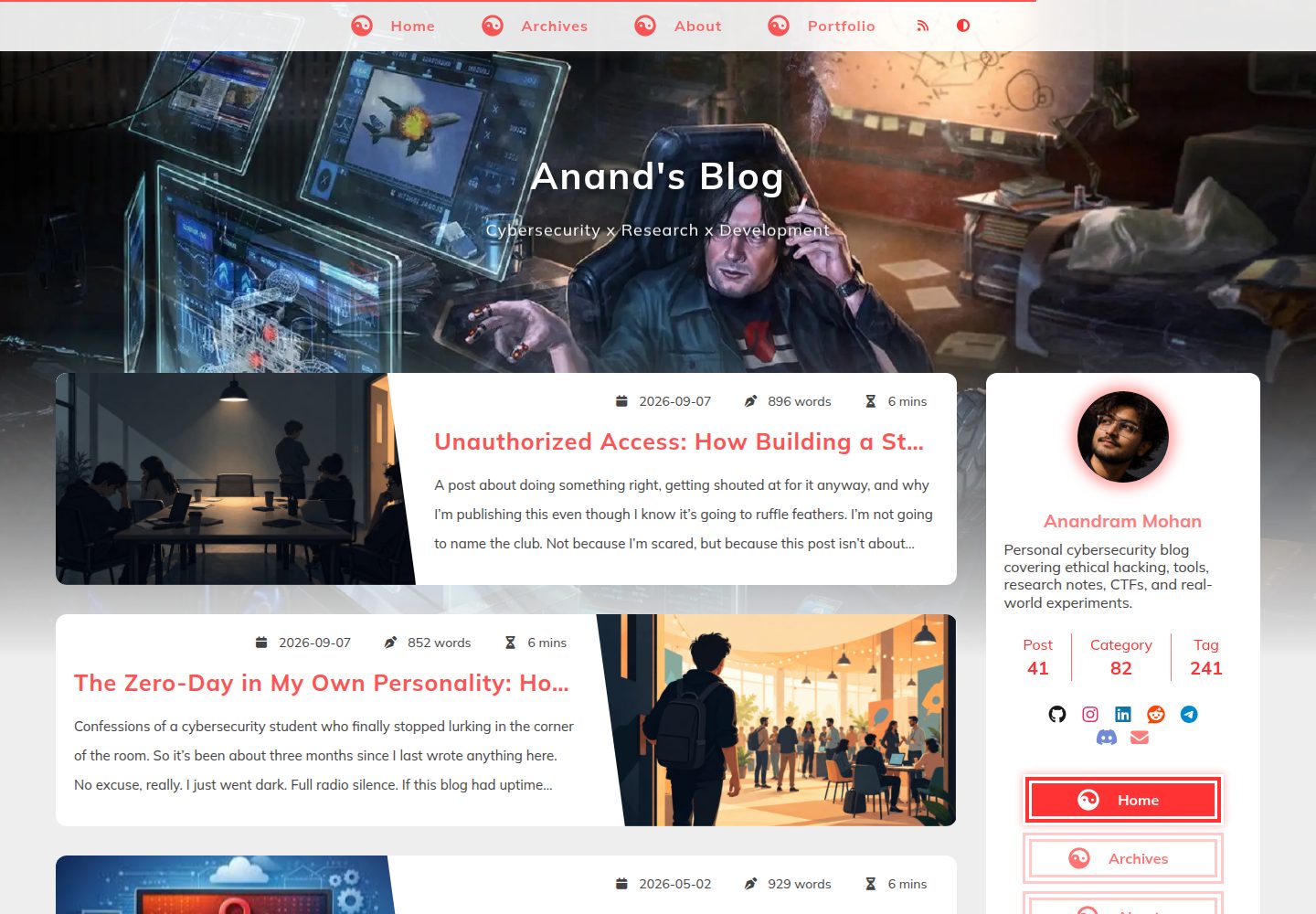
Desktop homepage1 / 2
Desktop captureTop of page
Actual screenshot captured by the server browser.
All pages & views 2
Screenshots show visual appearance; interactive behavior may differ.
Recorded 2026-10-13View source
What stands out
A quick read of the recorded project description.
The README records the setup process on Kali Linux in the form of a troubleshooting log
Lists environment versions including Ruby 3.3.8, Bundler 2.6.9, Jekyll 4.4.1 and Node.js 20.19.0
Provides fix commands for ffi and sassc native extension compilation failures
Explains that Gulp must be installed within the project as gulp@4 to resolve the unknown local version
Explains that GitHub Pages requires a local pre-build and pushing _site to the gh-pages branch
Template Details
This repository is ArenRedd's personal blog site, built with the Chirpy Jekyll theme and hosted on GitHub Pages (arenredd.github.io). The README is not a feature introduction to the theme, but a troubleshooting log that explains the specific problems the author encountered while setting up the environment on Kali Linux and how they were fixed.
The recorded environment is Kali Linux, Ruby 3.3.8, Bundler 2.6.9, Jekyll 4.4.1, Node.js 20.19.0, npm 9.2.0, Gulp CLI 3.0.0, with dependencies managed using APT, Bundler and nvm.
The problems described in the README include: ffi and sassc native extensions not being compiled, causing jekyll -v to error, requiring installation of build-essential, libffi-dev and ruby-dev and reinstalling the gems with --use-system-libraries; the local Gulp version being unknown, requiring gulp@4 to be installed within the project; GitHub Pages being unable to run custom build steps such as Gulp, requiring a local build with JEKYLL_ENV=production and then pushing _site to the gh-pages branch; and html-proofer erroring on invalid anchors such as href="#", requiring real anchors instead.
The README does not provide a complete feature list for the theme, configuration option documentation, content organization, or usage documentation beyond the troubleshooting above, nor does it describe the site's specific sections or page structure.
JekyllBlog
Is it right for your project?
Use Cases
- Referencing troubleshooting steps when setting up a Chirpy Jekyll blog on Kali Linux or in a non-standard development environment
- Finding fixes when encountering ffi or sassc native extension not compiled errors
- Deploying a pre-built _site directory to the gh-pages branch on GitHub Pages
- Diagnosing build failures caused by html-proofer reporting invalid anchor links
Suitable For
- Developers building a personal blog with Jekyll and the Chirpy theme
- Users configuring a Ruby and Node.js build environment on Kali Linux
- Those wanting to understand GitHub Pages custom build limitations and workaround deployment methods
Getting started & customization
Use these recorded setup notes alongside the repository instructions for your chosen version.
- 1
The environment recorded in the README is Kali Linux, Ruby 3.3.8, Bundler 2.6.9, Jekyll 4.4.1, Node.js 20.19.0, npm 9.2.0, Gulp CLI 3.0.0.
- 2
If warnings appear that the ffi or sassc extensions were not built, install build-essential, libffi-dev and ruby-dev, and reinstall the corresponding gems with --use-system-libraries.
- 3
When the local Gulp version is unknown, run npm install --save-dev gulp@4 within the project, then run tasks with npx gulp.
- 4
GitHub Pages does not support custom build steps such as Gulp; run JEKYLL_ENV=production bundle exec jekyll build locally, push _site to the gh-pages branch, and set the Pages source to that branch in the repository settings.
- 5
The README does not provide theme configuration, content authoring, or other installation instructions beyond the troubleshooting above.
License & source material
Usage conditions & limitations
Free to use · keep license noticeThis entry covers the free version in the public repository under the MIT license; the free scope is the code of that version and does not mean external services or third-party assets are free.
Must comply with when using
- Free use, modification, commercial use and distribution of this version's code are permitted.
- When distributing copies or substantial portions of the code, retain the original author's copyright notice and the full MIT license notice.
- The code is provided as is; warranties and limitations of liability are governed by the original license and applicable law.
Additional costs & items to verify
- Demo images, fonts, icons and other third-party assets must be checked against their respective licenses and cannot be judged solely by the code's MIT license.
- External services such as domains, hosting, databases, payments or AI may incur separate charges.
- GitHub Pages does not support all Jekyll plugins or custom build steps (such as Gulp tasks), so you must build locally before deploying.
- The Chirpy theme relies on Gulp 4 for asset processing (CSS, JS optimization), requiring gulp@4 to be installed within the project.
- ffi and sassc require native extensions, and environments such as Kali Linux may lack the development tools needed to compile Ruby gems, requiring additional installation.
View Original Text Basis
Permission is hereby granted, free of charge
Original License Text
GitHub Pages **doesn’t support all Jekyll plugins** or custom build steps (like Gulp tasks). Since Chirpy relies on preprocessing, you **must build locally first** before deploying.
Original README
The **Chirpy theme** relies on **Gulp 4** for asset processing (CSS, JS optimization). The error means Gulp is installed globally, but the project doesn’t recognize a local version.
Original README
https://github.com/ArenRedd/arenredd-blog-chirpy/blob/main/LICENSEhttps://github.com/ArenRedd/arenredd-blog-chirpy/blob/main/README.mdThese gems (**ffi** and **sassc**) require native extensions that weren’t compiled properly. Kali Linux, being a security-focused distro, doesn’t always come with all the development tools needed for Ruby gem compilation.
Original README
Compiled by DeepSeek based on repository license and README ·2026-10-13. Results only cover the materials read; dependencies, images, fonts, and subsequent term changes are subject to their respective original texts.
Project checks & description sources
Template Information
- Source platforms
- GitHub
- Documentation and maintenance reference score
- More documented · 80 / 100
- Technologies
- Jekyll
- Website type
- Blog
How this score is calculated
Our heuristic uses license records (up to 30), a demo link (12), a preview (10), stars (15), recorded maintenance (15), description completeness (8), feature records (5) and classification data (5). It is not a code, security or performance test, or a Google score. A link does not establish tested functionality.
What to verify for this project
- Repository update recorded
- 2025-12-20
- Screenshot last checked
- 2026-10-13
A demo link is listed. Check it with your own content and viewport sizes; its presence does not confirm that forms, authentication or payments work.
The catalog identifies Jekyll as the primary stack. Check the actual dependency manifest and lockfile for versions and hosting requirements. These notes use recorded metadata, not a code audit or a deployment test.
Use a selection guide →How this description was prepared
AI-assisted description based on catalog records and repository material. Repository authors are not automatically the reviewers of this description.
Review declaration: codex-user-requested-batch-review-20261015 · 2026-10-15
Inspect the recorded source material
SHA-256: e92af6c53f8377f53dac9ceb2d0f8801164b68d256324765a0dd1fa2a19e654d
2026-10-13T07:58:24.961Z
Source file / repository<div align="center">
# arenredd.github.io – My GitHub Blog
Built with the Chirpy Jekyll theme on Kali Linux, and it wasn’t smooth sailing. Below is the full write-up of how I got it working, the errors I hit, and the exact fixes I used. Hope it helps someone else in the trenches.
[](https://rubygems.org/gems/jekyll-theme-chirpy)
[](https://www.codacy.com/gh/cotes2020/jekyll-theme-chirpy/dashboard?utm_source=github.com&utm_medium=referral&utm_content=cotes2020/jekyll-theme-chirpy&utm_campaign=Badge_Grade)
[](https://github.com/cotes2020/jekyll-theme-chirpy/blob/master/LICENSE)
[](https://996.icu)
[**Live Demo →**](https://arenredd.github.io)
</div>
# **Building My GitHub Blog with Chirpy: A Rollercoaster of Errors & Fixes**
When I decided to set up my personal blog using the **Chirpy Jekyll theme**, I expected a smooth, well-documented process. Instead, I found myself wrestling with dependency conflicts, cryptic errors, and deployment quirks—especially since I was working on **Kali Linux**, which isn’t the most common choice for Jekyll development.
This post isn’t just another "how to set up a blog in 5 minutes" tutorial. Instead, it’s a **real-world troubleshooting log**—documenting the issues I faced and how I fixed them. If you're running into similar problems, hopefully, this saves you some headaches.
---
## **🛠 My Setup & Initial Checks**
Before diving into the errors, here’s the environment I was working with:
- **OS:** Kali Linux
- **Ruby:** **`3.3.8`**
- **Bundler:** **`2.6.9`**
- **Jekyll:** **`4.4.1`**
- **Node.js:** **`20.19.0`**
- **npm:** **`9.2.0`**
- **Gulp CLI:** **`3.0.0`**
- **Package Managers:** APT, Bundler, nvm
Everything looked good at first glance—until I started running commands.
---
## **🔥 Problem #1: Ruby Gem Conflicts (ffi & sassc Errors)**
### **The Error:**
Running **`jekyll -v`** spat out a wall of warnings:
```bash
Ignoring ffi-1.15.5 because its extensions are not built. Try: gem pristine ffi --version 1.15.5
Ignoring sassc-2.4.0 because its extensions are not built. Try: gem pristine sassc --version 2.4.0
```
*(Repeated multiple times—annoying, right?)*
### **The Cause:**
These gems (**ffi** and **sassc**) require native extensions that weren’t compiled properly. Kali Linux, being a security-focused distro, doesn’t always come with all the development tools needed for Ruby gem compilation.
### **The Fix:**
1. **Install missing build tools:**CopyDownload
```bash
sudo apt install build-essential libffi-dev ruby-dev
```
2. **Reinstall the problematic gems with system libraries:**CopyDownload
```bash
gem install ffi -v 1.15.5 -- --use-system-libraries
gem pristine ffi --version 1.15.5
gem install sassc -v 2.4.0 -- --use-system-libraries
gem pristine sassc --version 2.4.0
```
After this, **`jekyll -v`** should run without those pesky warnings.
---
## **⚙️ Problem #2: Gulp Issues (Local Version Unknown)**
### **The Error:**
Running **`gulp -v`** gave:
```bash
CLI version: 3.0.0
Local version: Unknown
```
### **The Cause:**
The **Chirpy theme** relies on **Gulp 4** for asset processing (CSS, JS optimization). The error means Gulp is installed globally, but the project doesn’t recognize a local version.
### **The Fix:**
1. **Install Gulp locally:**CopyDownload
```bash
npm install --save-dev gulp@4
```
2. **Verify installation:**CopyDownload
```bash
npx gulp -v
```
*(Should now show both CLI and local versions.)*
3. **Run Gulp tasks:**CopyDownload
```bash
npx gulp
```
*(This builds assets before Jekyll processes the site.)*
---
## **🕸 Problem #3: GitHub Pages Deployment Failures (Silent Build Issues)**
### **The Problem:**
I pushed my repo to GitHub, but my site **wouldn’t update**—no obvious errors, just a broken or outdated build.
### **The Cause:**
GitHub Pages **doesn’t support all Jekyll plugins** or custom build steps (like Gulp tasks). Since Chirpy relies on preprocessing, you **must build locally first** before deploying.
### **The Fix:**
1. **Build the site in production mode:**CopyDownload
```bash
JEKYLL_ENV=production bundle exec jekyll build
```
2. **Deploy only the `_site` folder to `gh-pages`:**CopyDownload
```bash
cd _site
git init
git remote add origin https://github.com/yourusername/yourrepo.git
git checkout -b gh-pages
git add .
git commit -m "Deploy site"
git push -f origin gh-pages
```
3. **In GitHub repo settings:**
- Go to **Settings > Pages**
- Set **Source** to **Deploy from `gh-pages` branch**
Now, GitHub serves the pre-built site instead of trying (and failing) to build it itself.
---
## **🧪 Problem #4: html-proofer Complaints (Invalid Anchor Links)**
### **The Error:**
Running **`bundle exec jekyll build`** sometimes failed with:
```bash
linking to internal hash # that does not exist
```
### **The Cause:**
Some links (like **`href="#"`**) are flagged by **html-proofer** (a built-in Chirpy tool) because they don’t point to a real anchor.
### **The Fix:**
1. **Replace `#` with a valid anchor:**CopyDownloadRun
```html
<a href="#top">Back to Top</a>
```
2. **Add an anchor target somewhere on the page:**CopyDownloadRun
```html
<a id="top"></a>
```
This keeps the same functionality while making **html-proofer** happy.
---
## **💡 Final Thoughts & Lessons Learned**
Setting up **Chirpy on Kali Linux** was **way harder** than I expected. The main issues stemmed from:
- **Ruby gem compilation problems** (fixed with **`-use-system-libraries`**)
- **Gulp version mismatches** (solved by local install)
- **GitHub Pages’ limitations** (workaround: pre-build & push **`_site`**)
- **Strict HTML validation** (fixed with proper anchor tags)
### **TL;DR – Key Takeaways**
✔ **Always check for native extension errors** in Ruby gems.
✔ **Install Gulp both globally and locally** (v4 for Chirpy).
✔ **Don’t rely on GitHub Pages to build**—do it yourself.
✔ **Validate HTML early** to catch broken links.
✔ **Avoid `href="#"`**—use real anchors instead.
If you’re on **Kali Linux** (or any non-standard dev environment) and trying to use **Jekyll + Chirpy**, be prepared for some troubleshooting. But once it’s working, Chirpy is **one of the cleanest, most customizable static site themes** out there.
## License
This work is published under [MIT](https://github.com/cotes2020/jekyll-theme-chirpy/blob/master/LICENSE) License.
Explore similar templates
Compare previews and descriptions within the same stack and category.

al-folio
A Jekyll academic homepage theme for scholars and researchers, with a clean responsive design and out-of-the-box support for publication lists, project showcases, CVs, and blogs.
Jekyll · Portfolio

minimal-mistakes
Minimal Mistakes is a two-column Jekyll theme for personal sites, blogs, project documentation, or portfolios.
Jekyll · Portfolio

Beautiful Jekyll
Beautiful Jekyll is a mature, easy-to-use Jekyll blog theme maintained by Dean Attali since 2015, with over 50,000 users.
Jekyll · Blog

jekyll-TeXt-theme
A customizable Jekyll theme for personal sites, team sites, blogs, projects, and documentation.
Jekyll · Blog

startbootstrap-clean-blog-jekyll
The official Jekyll version of Start Bootstrap's Clean Blog theme, offering a blog home page, about page, contact page, and sample post pages, with a Formspree-powered contact form.
Jekyll · Blog

So Simple
A minimal reading-oriented Jekyll theme by Michael Rose for personal blogs, portfolios, and long-form reading. It offers multiple layouts, microformat markup, Disqus comments, Google Analytics, Jekyll SEO Tag, three skins, and aggregation by year, category, and tag with a grid view.
Jekyll · Blog