Framework-free implementation: vanilla HTML/CSS/JS, no build step, no front-end dependencies.
HTMLAdmin dashboardStarter
First-Edition — HTML Admin dashboard Template
By ariel-378
First Edition is a framework-free student newspaper platform built with vanilla HTML/CSS/JS, featuring a built-in editor dashboard, deployable behind an existing school host such as Finalsite.
Explore the design
Compare the page layouts and mobile experience. Open any screenshot for a closer look.
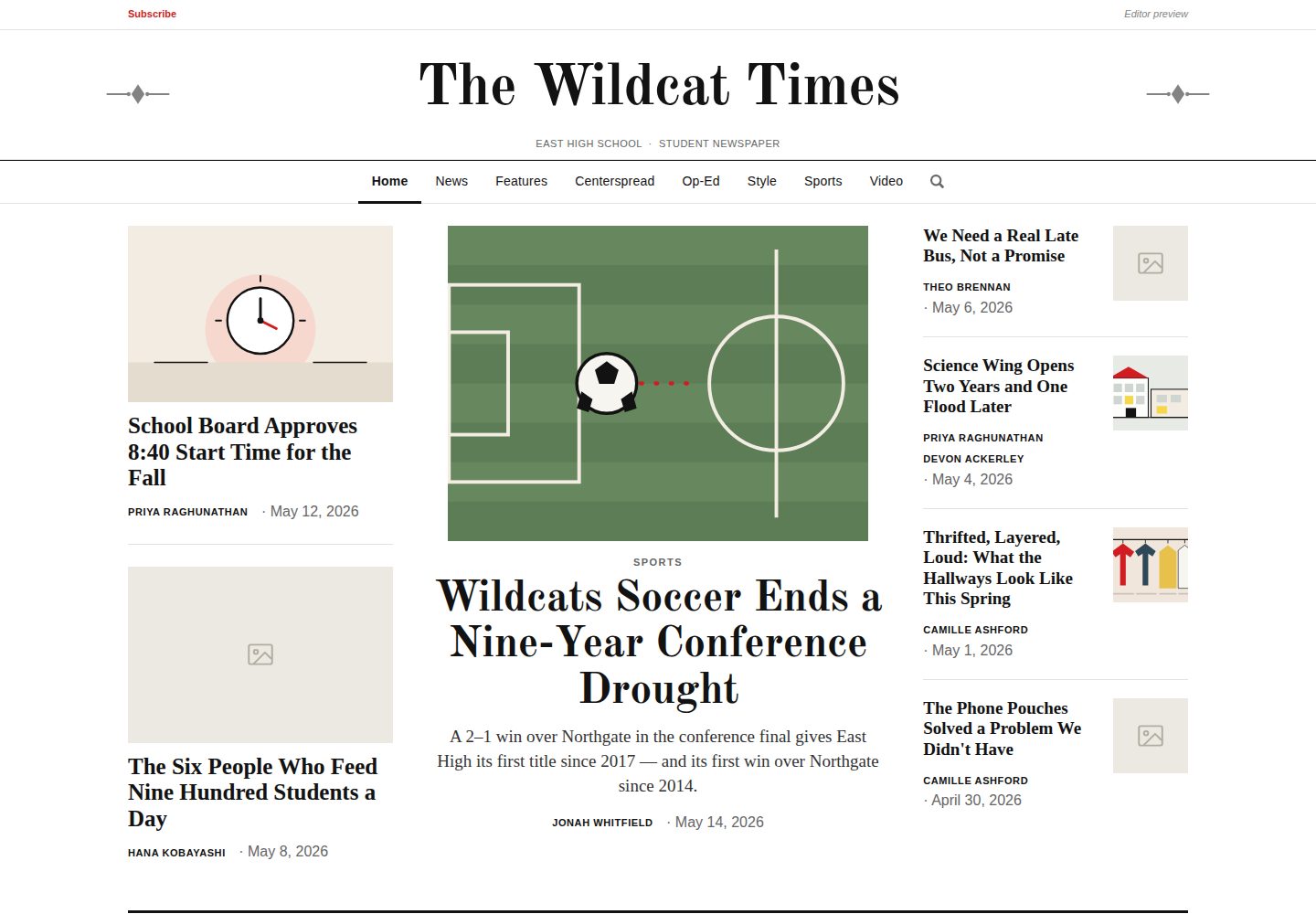
Desktop homepage1 / 3
Desktop captureTop of page
Actual screenshot captured by the server browser.
All pages & views 3
Screenshots show visual appearance; interactive behavior may differ.
Recorded 2026-10-12View source
What stands out
A quick read of the recorded project description.
In-app editor dashboard: create and edit articles, manage staff, sports, videos, and puzzles and games pages.
Editors can manage sections: add, rename, reorder, and delete sections, and decide which section fills each homepage position.
Page layouts can be adjusted by drag: article pages, video index, staff, search, tags, team pages, and cross-page layouts each retain their own layout.
Content scheduling: each item can have a publication date and time, remaining invisible to readers until then, with the Schedule tab summarizing by day.
Tags and search integration: tags can be toggled globally; when enabled, search can match by tag and display matching tags.
Template Details
First Edition is a framework-free platform for student newspapers. The code consists of vanilla HTML, CSS, and JavaScript, with no build step and no front-end framework dependencies. It includes reader-facing section pages, article pages, sports, videos, puzzles and games, search, and other pages, plus an in-app editor dashboard for creating and editing articles and managing staff, sports, videos, and puzzles and games pages.
Editors can add, rename, reorder, and delete sections, and decide which section fills each position on the homepage; navigation, section pages, the homepage, and search update accordingly. After logging in as an editor, block-based pages show an "Edit layout" toggle, allowing blocks to be moved to new rows and columns by drag or keyboard; article pages, the video index, staff, search, tags, team pages, and cross-page layouts each retain their own layout. Content supports setting a publication date and time, remaining invisible to readers until then, and the "Schedule" tab in the dashboard summarizes the entire publishing plan by day. Tags can be enabled or disabled globally by editors; when enabled, tagged articles generate tag pages, and search can match by tag.
The platform is designed to run behind a school host such as Finalsite, with the host providing login and determining who is an editor. Without a host platform, the site runs in demo mode, opening the dashboard via the "Editor preview" link in the account bar, with edits saved in browser localStorage and visible only to the editor. Optionally, pointing config.js to a small school-run storage backend allows all editors to share the same content, including scheduled content. The subscribe button only collects email addresses and writes them to a school-owned Google Sheet. Brand configuration is centralized in a single config.js file; editors can also upload masthead decorations and tag icons in the dashboard and export config.js.
The repository includes a set of fictional demo content, including eleven stories, a fourteen-person masthead, three teams with schedules, two videos, and flat SVG illustrations instead of photos; all schools, names, and scores are fictional. To clear content, empty the objects in articles.js, staff-data.js, teams.js, and videos.js. Tests use jsdom and run via npm test. Running locally requires no build or dependency installation; a static server can be started with npm run serve. Opening files directly via file:// prevents the dashboard from saving due to browser localStorage restrictions on file:// origins. Published stories generate real pages at stories/<id>.html so that chat or social platforms can fetch link previews; stories not yet scheduled do not generate pages.
HTMLAdmin dashboardLauncher
Is it right for your project?
Use Cases
- A school or student club building a newspaper website needs reader pages and an editor dashboard.
- Deploying behind a school host such as Finalsite, with the host providing login and editor identity determination.
- Editors need to plan an issue in advance, scheduling articles, poetry, art, videos, and games by date and time.
- Wanting articles shared to group chats or social platforms to generate link previews with title, description, and image.
- Needing to collect newspaper subscription emails and write them to a school-owned Google Sheet.
Suitable For
- Schools or student teams with static hosting who want to avoid a front-end build process.
- Schools already using a school host such as Finalsite that need to mount a newspaper platform behind it.
- Newspaper editorial teams needing editor collaboration, content scheduling, and section management.
- Teams able to maintain a small shared storage backend to enable multi-editor shared editing.
Getting started & customization
Use these recorded setup notes alongside the repository instructions for your chosen version.
- 1
Running locally requires no build or dependency installation; a static server can be started with npm run serve, or any static server can be used.
- 2
Do not open files directly via file://; browser localStorage restrictions on file:// origins prevent the editor dashboard from saving.
- 3
Without a host platform, the site runs in demo mode, opening the dashboard via the Editor preview link in the account bar, with changes saved only in browser localStorage.
- 4
Enabling shared editing requires pointing config.js to a small school-run storage backend; see setup/worker/README.md for details.
- 5
Set siteUrl in config.js to the newspaper's published address; otherwise images in link previews are relative paths and most previews cannot resolve them.
License & source material
Usage conditions & limitations
Free to use · keep license noticeThis entry covers the free version in the public repository under the MIT license; the free scope is the code of that version and does not imply that external services or third-party assets are free.
Must comply with when using
- The code of this version may be used, modified, used commercially, and distributed free of charge.
- When distributing copies or substantial portions of the code, retain the original author's copyright notice and the full MIT license notice.
- The code is provided as is; warranties and limitations of liability are governed by the original license and applicable law.
Additional costs & items to verify
- Demo images, fonts, icons, and other third-party assets must be checked against their respective licenses; the code's MIT license alone is not sufficient to determine this.
- External services such as domains, hosting, databases, payments, or AI may incur separate charges.
- Shared editing is an optional feature, off by default; enabling it requires pointing config.js to a small school-run storage backend and configuring it according to setup/worker/README.md.
- The subscription feature relies on Google Sheets as an external service; collected email addresses are written to a school-owned Google Sheet.
- Authentication relies on an external host platform such as Finalsite to provide login and determine editor identity; without a host platform, it can only run in demo mode.
- Files cannot be opened directly via file://; browser localStorage restrictions on file:// origins prevent the editor dashboard from saving changes.
- siteUrl must be set in config.js to the newspaper's published address; otherwise images in link previews are relative paths and most previews cannot resolve them.
- Stories not yet scheduled do not generate stories/<id>.html pages until their publication time arrives.
View Original Text Basis
Permission is hereby granted, free of charge
Original License Text
**Shared editing (optional)** — point `config.js` at a small store the school runs itself and every editor sees the same content, including what is scheduled, with no downloading or committing by hand. Off by default; see [setup/worker/README.md](setup/worker/README.md).
Original README
**Newsletter signups** — a Subscribe button collecting an email address, and nothing else, into a Google Sheet the school owns.
Original README
**Host-ready auth** — designed to sit behind Finalsite, which provides login and decides who is an editor.
Original README
Opening the files directly with `file://` does not: every editor change is kept in `localStorage`, which browsers restrict on `file://` origins, so the dashboard cannot save.
Original README
**Set `siteUrl` in `config.js`** to the address the paper is published at. Without it the photo in a preview is a relative path, which most previews cannot resolve.
Original README
https://github.com/ariel-378/First-Edition/blob/main/LICENSEhttps://github.com/ariel-378/First-Edition/blob/main/README.md**Scheduled stories are not generated.** A story with a future publish time gets no page until that time, so an embargoed headline is never sitting in a public file early.
Original README
Compiled by DeepSeek based on repository license and README ·2026-10-12. Results only cover the materials read; dependencies, images, fonts, and subsequent term changes are subject to their respective original texts.
Project checks & description sources
Template Information
- Source platforms
- GitHub
- Documentation and maintenance reference score
- More documented · 85 / 100
- Technologies
- HTML
- Website type
- Admin dashboard · Starter
How this score is calculated
Our heuristic uses license records (up to 30), a demo link (12), a preview (10), stars (15), recorded maintenance (15), description completeness (8), feature records (5) and classification data (5). It is not a code, security or performance test, or a Google score. A link does not establish tested functionality.
What to verify for this project
- Repository update recorded
- 2026-10-12
- Screenshot last checked
- 2026-10-12
A demo link is listed. Check it with your own content and viewport sizes; its presence does not confirm that forms, authentication or payments work.
The catalog identifies HTML as the primary stack. Check the actual dependency manifest and lockfile for versions and hosting requirements. These notes use recorded metadata, not a code audit or a deployment test.
Use a selection guide →How this description was prepared
AI-assisted description based on catalog records and repository material. Repository authors are not automatically the reviewers of this description.
Review declaration: [email protected] · 2026-10-13
Inspect the recorded source material
SHA-256: 9b9632c5ddc1a3cebe62236c9a6f8ef6772c28cee2e5657867494b6b632e6011
2026-10-12T10:48:40.437Z
Source file / repository# First Edition A framework-free (vanilla HTML/CSS/JS) platform for a student newspaper — section pages, articles, sports, videos, puzzles & games, search, and an in-app **editor dashboard**. No build step, no dependencies. Take it, rename it, and run your school's paper on it. **▶ Live demo: <https://ariel-378.github.io/First-Edition/>** The demo runs in standalone mode with no host platform behind it, so you can open the editor yourself: use the **"Editor preview"** link in the account bar, top right. Changes you make are saved to your own browser and visible only to you — click **Reset demo data** in the dashboard to put it back. ## Highlights - **Editor dashboard** — create and edit articles, and manage staff, sports, videos, and the puzzles & games pages. - **Editor-managed sections** — add, rename, reorder, and remove sections, and choose which section fills each home-page slot. The nav, section pages, home page, and search all update automatically. - **Rearrange a page in place** — signed in as an editor, any page built from blocks gets an *Edit layout* toggle: drag them into new rows and columns, or move them with the keyboard. Article pages, the video index, staff, search, tags, team pages and the centerspread all included, each keeping its own layout. The home page is arranged differently — by choosing which section fills each slot, above. - **Tags, if you want them** — editors keep a list of tags and switch the whole system on or off. Tagged articles get a tag page, and **search finds them**: a reader looking for *music* gets every article filed under Music, whether or not the word appears in the text, with the matching tag shown on the result so it is clear why it came up. Switched off, tags are hidden everywhere, search included — not deleted. - **Plan an edition ahead** — every piece of content takes a publish date and time and stays invisible to readers until it arrives: articles, poems, art, videos, custom features and games alike. A **Schedule** tab gathers the whole plan into one list, in the order it goes out, grouped by day, with *Publish now* on any row when the plan changes. - **Shared editing (optional)** — point `config.js` at a small store the school runs itself and every editor sees the same content, including what is scheduled, with no downloading or committing by hand. Off by default; see [setup/worker/README.md](setup/worker/README.md). - **Newsletter signups** — a Subscribe button collecting an email address, and nothing else, into a Google Sheet the school owns. - **Brand config** — one file (`config.js`) sets the masthead, school, colors, logo, and footer across every page. Editors can also upload a masthead flourish and a tab icon from the dashboard and export a finished `config.js`. - **Host-ready auth** — designed to sit behind Finalsite, which provides login and decides who is an editor. ## Sample content The repo ships with a demo newsroom so a fresh copy looks like a working paper rather than an empty page: eleven stories, a fourteen-person masthead, three teams with brackets, two videos, and flat SVG illustrations standing in for photos. **All of it is invented** — East High School, The Wildcat Times, every byline, every staff member, every person quoted, every score. None of it refers to a real school or a real person. To start clean, empty the objects in `articles.js`, `staff-data.js`, `teams.js`, and `videos.js`; each file says so at the top. ## Tests ```bash npm install # once — pulls jsdom, the only dependency npm test ``` 1046 checks across 24 suites: every page loads clean, every editor control is pressed without throwing, and content added in the editor reaches the reader pages. See [tests/README.md](tests/README.md). ## Run it locally No build step and nothing to install: ```bash npm run serve # http://localhost:8781 ``` `serve.py` sends no-cache headers, so a reload always shows your latest edit. Pass a port if you want a specific one (`npm run serve 9000`); with no argument it steps past a busy port rather than failing, which is what lets a second copy of the site run alongside the first. Any static server works just as well — `python3 -m http.server 8000` and open `http://localhost:8000`. Opening the files directly with `file://` does not: every editor change is kept in `localStorage`, which browsers restrict on `file://` origins, so the dashboard cannot save. With no host platform present, the site runs in **demo mode** — use the **"Editor preview"** link in the account bar to open the dashboard. Editor changes persist only in your browser's `localStorage`. ### Dashboard controls Inside the editor dashboard, the toolbar has three buttons: - **+ New Article** — create a new article. - **Reset all changes** — discard your article edits and restore the original articles. - **Reset demo data** — clear **all** saved changes in this browser (articles, sections, brand, layout, videos, sports, etc.) and restore the shipped content. Because editor changes are saved to `localStorage` and override the shipped files, if the demo ever shows stale content, click **Reset demo data** (or open the site in a private window) to get back to the shipped version. ## Link previews When a story is pasted into a group chat, iMessage, Slack or a social post, the preview is built by a machine that fetches the page and reads its markup. **It does not run JavaScript.** A page that fills in its own headline after loading previews as the name of the paper and nothing else — which, for a school paper whose readers share stories in group chats, is most of the distribution. So every published story is also written out as a real page: ``` stories/<id>.html ``` with its headline, description and photo already in the markup. `article.html` still works — old links, and the editor previewing a draft, both go through it. **Regenerating them:** ``` npm run stories # just the story pages npm run brand # re-stamps the paper name, then regenerates ``` Both are run for you by `.github/workflows/stories.yml` after every publish, so in normal use nobody has to remember. A story published in the last minute or two may briefly link to `article.html?id=…` instead — that page works, it just previews poorly, and the link corrects itself once the workflow has run. Two things worth knowing: - **Set `siteUrl` in `config.js`** to the address the paper is published at. Without it the photo in a preview is a relative path, which most previews cannot resolve. Headlines and descriptions work either way, and `npm run stories` tells you when it is missing. - **Scheduled stories are not generated.** A story with a future publish time gets no page until that time, so an embargoed headline is never sitting in a public file early. ## Documentation - **[FINALSITE.md](FINALSITE.md)** — how the site integrates with Finalsite: the identity contract (`WL_CONTEXT`), the **editors-group logic**, and a phased plan for hosting, authentication, and content persistence. - **[CODE-GUIDE.md](CODE-GUIDE.md)** — a developer's tour of the code: how a page boots, where content comes from, the store pattern, and the things that will surprise you. - **[CUSTOMIZE.md](CUSTOMIZE.md)** — rebrand the paper for your school (the Brand design tab, or editing `config.js`). - **[INTEGRATION.md](INTEGRATION.md)** — for the host platform's administrator: where content lives, the identity hook, and a setup checklist. ## Project layout | Path | Purpose | |------|---------| | `*.html` | Pages — public surfaces plus the `editor*.html` dashboard | | `config.js` | Brand config (`WL_CONFIG`); the only per-school file | | `articles.js`, `writers.js`, `teams.js`, … | Content sources (`window.WL_*`) | | `*-store.js` | CRUD / data layer — the seam for server-backed persistence | | `auth.js` | Identity adapter (`window.WLAuth`; reads `WL_CONTEXT`) | | `nav.js`, `brand.js`, `section.js`, … | Shared rendering | | `stories/` | Generated — one real page per story, so links preview. Do not edit by hand | | `story-url.js` | Where a story lives; holds the generated list of pages | ## Licence [MIT](LICENSE) — take it, rename it, run your own paper on it. No attribution required in the site itself, though a line in your colophon is welcome. The sample content is invented (East High School, The Wildcat Times, every byline and score) and is covered by the same licence. Real student journalism lives in each school's own deployment, not here.
Explore similar templates
Compare previews and descriptions within the same stack and category.

gentelella
Gentelella v4 is a free, open-source admin dashboard template maintained by Colorlib, built with vanilla JavaScript, SCSS, and Vite 8 without Bootstrap or jQuery.
HTML · Admin dashboard

coreui-free-bootstrap-admin-template
A free Bootstrap admin template maintained by CoreUI, built on CoreUI's own UI component library. It provides compiled HTML pages and Pug template source code, covering dashboards, authentication, forms, components, icons, and error pages.
HTML · Admin dashboard

dashboards
A collection of responsive dashboard HTML templates open-sourced by Keen IO, built on CSS Grid, offering multiple prebuilt admin data interface layouts.
HTML · Admin dashboard

SB Admin 2
SB Admin 2 is a classic Bootstrap admin template from Start Bootstrap, offering dashboards, charts, tables, and common management pages.
HTML · Admin dashboard

Adminator-admin-dashboard
Adminator 4 is a vanilla HTML, CSS and JavaScript admin dashboard template with a CSS-variable token design system, built-in light and dark themes, no jQuery or Bootstrap dependency, and 18 pages covering dashboards, mail, calendar, charts, forms, tables and error pages.
HTML · Admin dashboard

SB Admin
SB Admin is a lightweight, open-source Bootstrap admin template from Start Bootstrap. It offers a sidebar-and-top-bar layout with data tables, forms, and stat cards, plus responsive design.
HTML · Admin dashboard