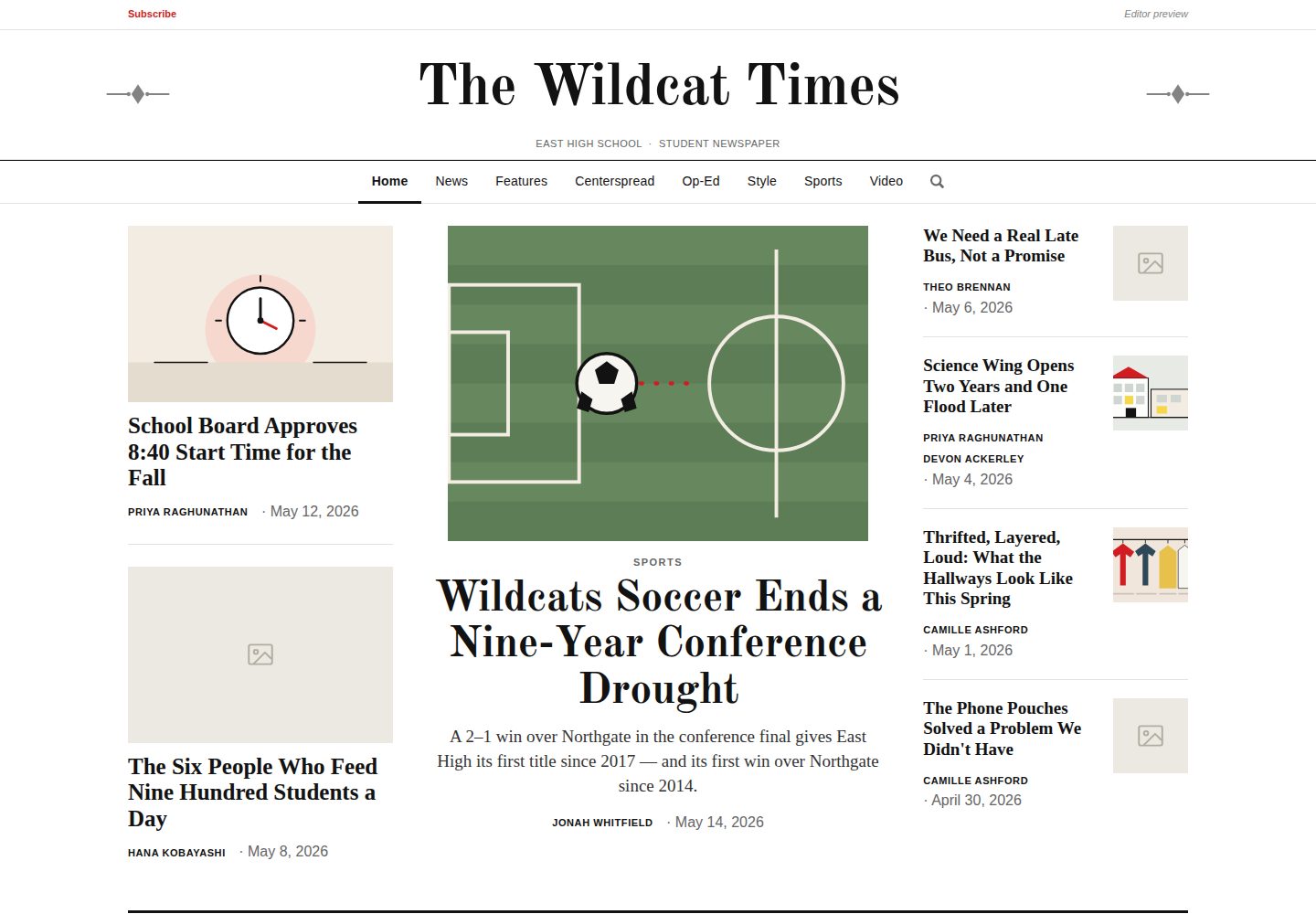
免框架实现:原生 HTML/CSS/JS,无构建步骤,无前端依赖。
HTML后台启动器
First-Edition — HTML 后台模板
作者 ariel-378
First Edition 是一个免框架的学生校报平台,使用原生 HTML/CSS/JS 构建,自带编辑后台,可部署在学校现有主机(如 Finalsite)之后。
看看你的网站会是什么样
浏览真实页面截图,比较内容排版与手机效果。点击下方缩略图切换,放大查看整页细节。
全部页面与视图 3
截图用于了解视觉与布局,交互效果请以实际项目为准。
采集于 2026-10-12查看来源
值得关注的模板亮点
从已有项目资料中,快速了解它的特点。
应用内编辑后台:创建和编辑文章,管理员工、体育、视频、谜题与游戏页面。
编辑可管理栏目:添加、重命名、排序、删除栏目,并决定首页各位置由哪个栏目填充。
页面布局可拖拽调整:文章页、视频索引、员工、搜索、标签、球队页和跨页各自保留布局。
内容排期:每项内容可设发布日期和时间,到期前对读者不可见,Schedule 标签按天汇总。
标签与搜索联动:标签可整体开关,开启后搜索能按标签命中并显示匹配标签。
模板详细介绍
First Edition 是一个面向学生校报的免框架平台,代码由原生 HTML、CSS 和 JavaScript 组成,没有构建步骤,也不依赖前端框架。它包含面向读者的栏目页、文章页、体育、视频、谜题与游戏、搜索等页面,以及一个应用内的编辑后台,用于创建和编辑文章、管理员工、体育、视频和谜题游戏页面。
编辑可以添加、重命名、排序和删除栏目,并决定首页每个位置由哪个栏目填充,导航、栏目页、首页和搜索会随之更新。以编辑身份登录后,由区块构成的页面会出现“编辑布局”开关,可用拖拽或键盘把区块移动到新的行列,文章页、视频索引、员工、搜索、标签、球队页和跨页均各自保留布局。内容支持设定发布日期和时间,到期前对读者不可见,后台的“Schedule”标签按天汇总整个发布计划。标签功能可由编辑整体开启或关闭,开启后带标签的文章会生成标签页,搜索也能按标签命中。
平台设计为运行在 Finalsite 等学校主机之后,由主机提供登录并决定谁是编辑。在没有主机平台时,站点以演示模式运行,通过账户栏中的“Editor preview”链接打开后台,编辑改动保存在浏览器 localStorage 中,仅自己可见。可选地,将 config.js 指向学校自建的小型存储后,所有编辑可共享同一份内容,包括已排期的内容。订阅按钮只收集邮箱地址,写入学校拥有的 Google Sheet。品牌配置集中在 config.js 一个文件中,编辑也可以在后台上传报头装饰和标签图标并导出 config.js。
仓库自带一套虚构的演示内容,包括十一篇报道、十四人报头、三支带对阵表的球队、两个视频,以及代替照片的扁平 SVG 插图;所有学校、人名、比分均为虚构。要清空内容,可清空 articles.js、staff-data.js、teams.js 和 videos.js 中的对象。测试使用 jsdom,通过 npm test 运行。本地运行不需要构建或安装依赖,可用 npm run serve 启动静态服务器;直接用 file:// 打开文件时,由于浏览器对 file:// 来源的 localStorage 限制,后台无法保存。已发布的故事会生成为 stories/<id>.html 真实页面,以便聊天或社交平台抓取链接预览;排期未到的故事不会生成页面。
HTML后台启动器
适合你的项目吗?
适用场景
- 学校或学生社团搭建校报网站,需要读者页面和编辑后台。
- 在 Finalsite 等学校主机之后部署,由主机提供登录和编辑身份判定。
- 编辑需要提前规划一期内容,按日期和时间安排文章、诗歌、艺术、视频和游戏的发布。
- 希望文章分享到群聊或社交平台时能生成包含标题、描述和图片的链接预览。
- 需要收集校报订阅邮箱,并写入学校自己拥有的 Google Sheet。
适合人群
- 有静态托管条件、希望避免前端构建流程的学校或学生团队。
- 已使用 Finalsite 等学校主机、需要在其后挂载校报平台的学校。
- 需要编辑协作、内容排期和栏目管理的校报编辑部。
- 能自行维护小型共享存储以启用多人共享编辑的团队。
上手与定制指南
结合仓库当前版本的说明,按下面的资料检查内容、配置与运行要求。
- 1
本地运行不需要构建或安装依赖,可用 npm run serve 启动静态服务器,也可用任意静态服务器。
- 2
不要直接用 file:// 打开文件,浏览器对 file:// 来源的 localStorage 限制会导致编辑后台无法保存。
- 3
无主机平台时站点以演示模式运行,通过账户栏的 Editor preview 链接打开后台,改动仅保存在浏览器 localStorage。
- 4
启用共享编辑需将 config.js 指向学校自建的小型存储,具体见 setup/worker/README.md。
- 5
需在 config.js 中设置 siteUrl 为校报发布地址,否则链接预览中的图片为相对路径,多数预览无法解析。
授权与来源资料
使用条件与限制
免费使用 · 保留许可声明本次收录的是公开仓库中采用 MIT 许可的免费版本;免费范围为该版本代码,不代表外部服务或第三方素材免费。
使用时需要遵守
- 允许免费使用、修改、商用和分发该版本代码。
- 分发代码副本或实质性部分时,保留原作者版权声明和完整 MIT 许可声明。
- 代码按现状提供;担保与责任限制以原许可证及适用法律为准。
额外费用与待核对事项
- 演示图片、字体、图标及其他第三方素材需按各自许可核对,不能仅凭代码的 MIT 许可判断。
- 域名、托管、数据库、支付或 AI 等外部服务可能另外收费。
- 共享编辑为可选功能,默认关闭;启用需将 config.js 指向学校自行运行的小型存储,并参考 setup/worker/README.md 进行配置。
- 订阅功能依赖 Google Sheet 作为外部服务,收集的邮箱地址会写入学校自己拥有的 Google Sheet。
- 身份认证依赖 Finalsite 等外部主机平台提供登录并判定编辑身份;无主机平台时仅能以演示模式运行。
- 不能直接用 file:// 打开文件运行;浏览器对 file:// 来源的 localStorage 限制会导致编辑后台无法保存改动。
- 必须在 config.js 中设置 siteUrl 为校报发布地址,否则链接预览中的图片为相对路径,多数预览无法解析。
- 排期未到的故事不会生成 stories/<id>.html 页面,直到发布时间到达后才生成。
查看原文依据
Permission is hereby granted, free of charge
许可证原文
**Shared editing (optional)** — point `config.js` at a small store the school runs itself and every editor sees the same content, including what is scheduled, with no downloading or committing by hand. Off by default; see [setup/worker/README.md](setup/worker/README.md).
README 原文
**Newsletter signups** — a Subscribe button collecting an email address, and nothing else, into a Google Sheet the school owns.
README 原文
**Host-ready auth** — designed to sit behind Finalsite, which provides login and decides who is an editor.
README 原文
Opening the files directly with `file://` does not: every editor change is kept in `localStorage`, which browsers restrict on `file://` origins, so the dashboard cannot save.
README 原文
**Set `siteUrl` in `config.js`** to the address the paper is published at. Without it the photo in a preview is a relative path, which most previews cannot resolve.
README 原文
https://github.com/ariel-378/First-Edition/blob/main/LICENSEhttps://github.com/ariel-378/First-Edition/blob/main/README.md**Scheduled stories are not generated.** A story with a future publish time gets no page until that time, so an embargoed headline is never sitting in a public file early.
README 原文
DeepSeek 根据仓库许可证和 README 整理 ·2026-10-12。结果仅覆盖已读取资料,依赖、图片、字体及后续条款变更以各自原文为准。
项目核对记录与介绍依据
模板资料
- 来源平台
- GitHub
- 资料与维护参考分
- 资料较完整 · 85 / 100
- 技术栈
- HTML
- 网站类型
- 后台 · 启动器
这个分数如何计算
本站按许可资料(最高30分)、演示链接(12分)、预览图(10分)、Star数(15分)、记录的维护时间(15分)、描述完整度(8分)、功能记录(5分)和分类资料(5分)计算。它不是代码、安全或性能测试,也不是 Google 评分;有链接不代表已实测可用。
这个项目需要核对什么
- 记录的仓库更新时间
- 2026-10-12
- 截图检查日期
- 2026-10-12
已收录演示链接。请用你的内容与屏幕尺寸检查;有演示不代表表单、认证或支付已经可用。
目录记录的主要技术栈是 HTML。请通过依赖清单和锁文件核对实际版本与托管要求。这些说明基于收录资料,不代表代码审计或部署实测。
查看具体选型方法 →介绍的制作与核对状态
介绍由 AI 辅助整理目录与仓库资料。仓库作者不等于这篇介绍的审核者。
审核声明: [email protected] · 2026-10-13
查看当时使用的来源资料
SHA-256: 9b9632c5ddc1a3cebe62236c9a6f8ef6772c28cee2e5657867494b6b632e6011
2026-10-12T10:48:40.437Z
来源文件 / 仓库# First Edition A framework-free (vanilla HTML/CSS/JS) platform for a student newspaper — section pages, articles, sports, videos, puzzles & games, search, and an in-app **editor dashboard**. No build step, no dependencies. Take it, rename it, and run your school's paper on it. **▶ Live demo: <https://ariel-378.github.io/First-Edition/>** The demo runs in standalone mode with no host platform behind it, so you can open the editor yourself: use the **"Editor preview"** link in the account bar, top right. Changes you make are saved to your own browser and visible only to you — click **Reset demo data** in the dashboard to put it back. ## Highlights - **Editor dashboard** — create and edit articles, and manage staff, sports, videos, and the puzzles & games pages. - **Editor-managed sections** — add, rename, reorder, and remove sections, and choose which section fills each home-page slot. The nav, section pages, home page, and search all update automatically. - **Rearrange a page in place** — signed in as an editor, any page built from blocks gets an *Edit layout* toggle: drag them into new rows and columns, or move them with the keyboard. Article pages, the video index, staff, search, tags, team pages and the centerspread all included, each keeping its own layout. The home page is arranged differently — by choosing which section fills each slot, above. - **Tags, if you want them** — editors keep a list of tags and switch the whole system on or off. Tagged articles get a tag page, and **search finds them**: a reader looking for *music* gets every article filed under Music, whether or not the word appears in the text, with the matching tag shown on the result so it is clear why it came up. Switched off, tags are hidden everywhere, search included — not deleted. - **Plan an edition ahead** — every piece of content takes a publish date and time and stays invisible to readers until it arrives: articles, poems, art, videos, custom features and games alike. A **Schedule** tab gathers the whole plan into one list, in the order it goes out, grouped by day, with *Publish now* on any row when the plan changes. - **Shared editing (optional)** — point `config.js` at a small store the school runs itself and every editor sees the same content, including what is scheduled, with no downloading or committing by hand. Off by default; see [setup/worker/README.md](setup/worker/README.md). - **Newsletter signups** — a Subscribe button collecting an email address, and nothing else, into a Google Sheet the school owns. - **Brand config** — one file (`config.js`) sets the masthead, school, colors, logo, and footer across every page. Editors can also upload a masthead flourish and a tab icon from the dashboard and export a finished `config.js`. - **Host-ready auth** — designed to sit behind Finalsite, which provides login and decides who is an editor. ## Sample content The repo ships with a demo newsroom so a fresh copy looks like a working paper rather than an empty page: eleven stories, a fourteen-person masthead, three teams with brackets, two videos, and flat SVG illustrations standing in for photos. **All of it is invented** — East High School, The Wildcat Times, every byline, every staff member, every person quoted, every score. None of it refers to a real school or a real person. To start clean, empty the objects in `articles.js`, `staff-data.js`, `teams.js`, and `videos.js`; each file says so at the top. ## Tests ```bash npm install # once — pulls jsdom, the only dependency npm test ``` 1046 checks across 24 suites: every page loads clean, every editor control is pressed without throwing, and content added in the editor reaches the reader pages. See [tests/README.md](tests/README.md). ## Run it locally No build step and nothing to install: ```bash npm run serve # http://localhost:8781 ``` `serve.py` sends no-cache headers, so a reload always shows your latest edit. Pass a port if you want a specific one (`npm run serve 9000`); with no argument it steps past a busy port rather than failing, which is what lets a second copy of the site run alongside the first. Any static server works just as well — `python3 -m http.server 8000` and open `http://localhost:8000`. Opening the files directly with `file://` does not: every editor change is kept in `localStorage`, which browsers restrict on `file://` origins, so the dashboard cannot save. With no host platform present, the site runs in **demo mode** — use the **"Editor preview"** link in the account bar to open the dashboard. Editor changes persist only in your browser's `localStorage`. ### Dashboard controls Inside the editor dashboard, the toolbar has three buttons: - **+ New Article** — create a new article. - **Reset all changes** — discard your article edits and restore the original articles. - **Reset demo data** — clear **all** saved changes in this browser (articles, sections, brand, layout, videos, sports, etc.) and restore the shipped content. Because editor changes are saved to `localStorage` and override the shipped files, if the demo ever shows stale content, click **Reset demo data** (or open the site in a private window) to get back to the shipped version. ## Link previews When a story is pasted into a group chat, iMessage, Slack or a social post, the preview is built by a machine that fetches the page and reads its markup. **It does not run JavaScript.** A page that fills in its own headline after loading previews as the name of the paper and nothing else — which, for a school paper whose readers share stories in group chats, is most of the distribution. So every published story is also written out as a real page: ``` stories/<id>.html ``` with its headline, description and photo already in the markup. `article.html` still works — old links, and the editor previewing a draft, both go through it. **Regenerating them:** ``` npm run stories # just the story pages npm run brand # re-stamps the paper name, then regenerates ``` Both are run for you by `.github/workflows/stories.yml` after every publish, so in normal use nobody has to remember. A story published in the last minute or two may briefly link to `article.html?id=…` instead — that page works, it just previews poorly, and the link corrects itself once the workflow has run. Two things worth knowing: - **Set `siteUrl` in `config.js`** to the address the paper is published at. Without it the photo in a preview is a relative path, which most previews cannot resolve. Headlines and descriptions work either way, and `npm run stories` tells you when it is missing. - **Scheduled stories are not generated.** A story with a future publish time gets no page until that time, so an embargoed headline is never sitting in a public file early. ## Documentation - **[FINALSITE.md](FINALSITE.md)** — how the site integrates with Finalsite: the identity contract (`WL_CONTEXT`), the **editors-group logic**, and a phased plan for hosting, authentication, and content persistence. - **[CODE-GUIDE.md](CODE-GUIDE.md)** — a developer's tour of the code: how a page boots, where content comes from, the store pattern, and the things that will surprise you. - **[CUSTOMIZE.md](CUSTOMIZE.md)** — rebrand the paper for your school (the Brand design tab, or editing `config.js`). - **[INTEGRATION.md](INTEGRATION.md)** — for the host platform's administrator: where content lives, the identity hook, and a setup checklist. ## Project layout | Path | Purpose | |------|---------| | `*.html` | Pages — public surfaces plus the `editor*.html` dashboard | | `config.js` | Brand config (`WL_CONFIG`); the only per-school file | | `articles.js`, `writers.js`, `teams.js`, … | Content sources (`window.WL_*`) | | `*-store.js` | CRUD / data layer — the seam for server-backed persistence | | `auth.js` | Identity adapter (`window.WLAuth`; reads `WL_CONTEXT`) | | `nav.js`, `brand.js`, `section.js`, … | Shared rendering | | `stories/` | Generated — one real page per story, so links preview. Do not edit by hand | | `story-url.js` | Where a story lives; holds the generated list of pages | ## Licence [MIT](LICENSE) — take it, rename it, run your own paper on it. No attribution required in the site itself, though a line in your colophon is welcome. The sample content is invented (East High School, The Wildcat Times, every byline and score) and is covered by the same licence. Real student journalism lives in each school's own deployment, not here.
看看同类模板
对比同技术栈与用途的模板,找到更适合的视觉与内容结构。

gentelella
Free admin dashboard template — vanilla JS, SCSS, Vite 8. No Bootstrap, no jQuery.
HTML · 后台

coreui-free-bootstrap-admin-template
Free Bootstrap Admin & Dashboard Template Built for AI-Assisted Development
HTML · 后台

dashboards
Responsive dashboard templates 📊✨
HTML · 后台

SB Admin 2
SB Admin 2 是 Start Bootstrap 推出的开源后台模板,基于 Bootstrap 构建,整体风格偏向经典管理界面。
HTML · 后台

Adminator-admin-dashboard
Adminator is easy to use and well design admin dashboard template with dark mode for web apps, websites, servi…
HTML · 后台

SB Admin
SB Admin 是 Start Bootstrap 推出的开源后台管理模板,基于 Bootstrap 构建,定位是简洁、实用的管理界面。
HTML · 后台