Pages and blog posts are written in Markdown, with blog filenames in the format YYYY-MM-DD-slug.md
EleventyPortfolioStarter
personal-site-starter — Eleventy Portfolio Template
By astrabun
A personal website and blog starter template built with Eleventy, TypeScript, and pnpm, with content written in Markdown, plus built-in drafts, Atom feed, sitemap, SEO tags, and tools for generating brand icons and social share images.
Explore the design
Compare the page layouts and mobile experience. Open any screenshot for a closer look.
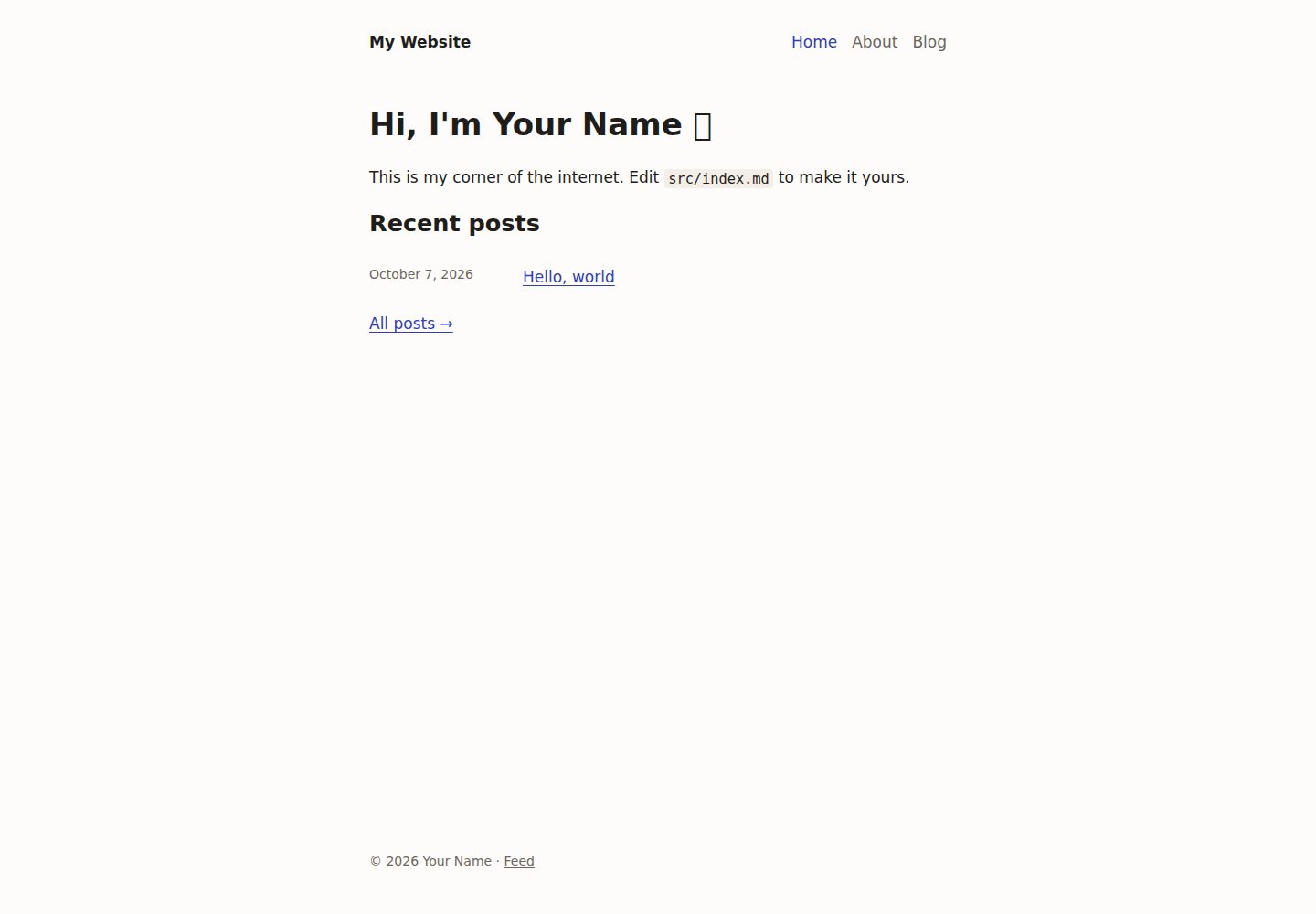
Desktop homepage1 / 3
Desktop captureTop of page
Actual screenshot captured by the server browser.
All pages & views 3
Screenshots show visual appearance; interactive behavior may differ.
Recorded 2026-10-14View source
What stands out
A quick read of the recorded project description.
Drafts can be previewed in pnpm dev but are excluded from production builds
Built-in Atom feed, sitemap, robots.txt, and Open Graph, social cards, and JSON-LD structured data
The brand tool generates favicons and social share images from colors in site.yml, and can render 1200×630 images per page at build time
Provides the pnpm cms command to create, list, and publish posts, automatically handling filenames and front matter
No client-side JavaScript, no CSS framework, a single stylesheet with light and dark themes
Template Details
This is a starter template for a personal website and blog, built with Eleventy, TypeScript, and pnpm. Pages and blog posts are written in Markdown, and it includes a base layout with a header, data-driven navigation, and a footer; drafts can be previewed locally but are excluded from production builds. The template includes an Atom feed, sitemap, robots.txt, and SEO and sharing tags such as Open Graph, social cards, and JSON-LD structured data. The brand tool can generate favicons and default social share images based on colors configured in site.yml, and supports rendering 1200×630 share images per page at build time. The project includes no client-side JavaScript and uses no CSS framework; styles are centralized in a single stylesheet with light and dark themes. The README provides instructions for installation, commands, directory structure, writing pages and posts, SEO fields, brand customization, and deployment; specific framework version numbers are not given in the materials.
EleventyPortfolioStarter
Is it right for your project?
Use Cases
- Building a personal homepage and publishing Markdown blog posts
- A personal site that needs an Atom feed, sitemap, and SEO/social sharing tags
- A writing workflow where you want to manage post drafts and publishing with command-line tools
- A site that needs favicons and share images automatically generated from brand colors
- Deploying to any static hosting service (such as Cloudflare Pages, GitHub Pages, Neocities)
Suitable For
- Developers who want to quickly start writing a personal website and blog
- Users who prefer Markdown writing and static site generation
- Projects using Node.js and pnpm workflows
- Customization needs where you want to modify CSS and layout yourself
Getting started & customization
Use these recorded setup notes alongside the repository instructions for your chosen version.
- 1
Requires Node.js and pnpm; after installation run pnpm install, then use pnpm dev to start the local server (http://localhost:8080)
- 2
Fill in your name, site title, and URL in apps/web/src/_data/site.yml, and modify the homepage and sample posts
- 3
Set colors under brand in site.yml, then run pnpm brand all to regenerate the favicon and default social image
- 4
pnpm build outputs the static site to apps/web/_site/; use that directory as the output directory when deploying; see docs/deployment.md for manual and CI/CD configuration on various hosting platforms
License & source material
Usage conditions & limitations
Free to use · keep license noticeThis listing covers the free version in the public repository under the MIT license; the free scope is the code of that version and does not mean external services or third-party assets are free.
Must comply with when using
- You may use, modify, commercialize, and distribute the code of this version for free.
- When distributing copies or substantial portions of the code, retain the original author's copyright notice and the full MIT license notice.
- The code is provided as-is; warranties and limitations of liability are governed by the original license and applicable law.
Additional costs & items to verify
- Demo images, fonts, icons, and other third-party assets must be checked against their respective licenses and cannot be judged solely by the code's MIT license.
- External services such as domains, hosting, databases, payments, or AI may incur separate charges.
View Original Text Basis
https://github.com/astrabun/personal-site-starter/blob/main/LICENSEhttps://github.com/astrabun/personal-site-starter/blob/main/README.mdPermission is hereby granted, free of charge
Original License Text
Compiled by DeepSeek based on repository license and README ·2026-10-14. Results only cover the materials read; dependencies, images, fonts, and subsequent term changes are subject to their respective original texts.
Project checks & description sources
Template Information
- Source platforms
- GitHub
- Documentation and maintenance reference score
- More documented · 88 / 100
- Technologies
- Eleventy
- Website type
- Portfolio · Starter
How this score is calculated
Our heuristic uses license records (up to 30), a demo link (12), a preview (10), stars (15), recorded maintenance (15), description completeness (8), feature records (5) and classification data (5). It is not a code, security or performance test, or a Google score. A link does not establish tested functionality.
What to verify for this project
- Repository update recorded
- 2026-10-14
- Screenshot last checked
- 2026-10-14
A demo link is listed. Check it with your own content and viewport sizes; its presence does not confirm that forms, authentication or payments work.
The catalog identifies Eleventy as the primary stack. Check the actual dependency manifest and lockfile for versions and hosting requirements. These notes use recorded metadata, not a code audit or a deployment test.
Use a selection guide →How this description was prepared
AI-assisted description based on catalog records and repository material. Repository authors are not automatically the reviewers of this description.
Review declaration: codex-user-requested-batch-review-20261015 · 2026-10-15
Inspect the recorded source material
SHA-256: 3f0fdd4297d53a539fea08ac86c751b646f08dfb096d57865a83ac5b1dac9437
2026-10-14T06:55:32.678Z
Source file / repository# Personal Website Starter
A small, hackable starting point for a personal website and blog, built with
[Eleventy](https://www.11ty.dev/), TypeScript, and pnpm. I will keep yelling about how
I think everyone should have a personal website until I can't yell anymore, and
this is my way of saying "here, take this, get started!"
- Pages and blog posts written in Markdown, so writing content is _super easy_
- A base layout with a header, data-driven navigation, and footer
- Drafts you can preview locally that stay out of production builds
- An Atom feed, sitemap, and `robots.txt`
- SEO and social sharing tags (Open Graph, social cards, and JSON-LD structured data)
- Generated favicons and social sharing images in your own colors, including per-post images rendered at build time
- A `pnpm cms` command for creating, listing, and publishing posts
- No client-side JavaScript and no CSS framework. One stylesheet includes light and dark themes.
## Getting started
You'll need Node.js and pnpm.
```sh
pnpm install
pnpm dev # http://localhost:8080
```
Then make it yours:
1. Edit `apps/web/src/_data/site.yml` with your name, site title, and URL.
2. Edit the home page in `apps/web/src/index.md`.
3. Replace the sample posts in `apps/web/src/blog/`.
4. Set your colors under `brand` in `site.yml`, then run `pnpm brand all` to
regenerate the favicons and default social image.
Feel free to change the CSS and layout as much as you like. This is just a starter.
## Make your own copy
You can start from this repository in one of three ways.
**Fork it.** Use the Fork button on your git host, then clone your fork:
```sh
git clone <your-fork-url> my-site
```
**Clone it and point the remote at your own repository.** Create an empty repository on
your host first (no README or license), then run:
```sh
git clone <repo-url> my-site
cd my-site
git remote rename origin upstream # keeps a link to this starter so you can pull updates
git remote add origin <your-repo-url>
git push -u origin main
```
To pull future starter changes later, run `git pull upstream main`. If you don't want
the link, skip the rename and run `git remote set-url origin <your-repo-url>` instead.
**Start from the template without cloning.** This downloads the current starter from
GitHub into a new directory, with no git history:
```sh
pnpm dlx giget@latest gh:astrabun/personal-site-starter my-site
# or: npx giget@latest gh:astrabun/personal-site-starter my-site
cd my-site
git init -b main
pnpm install
```
Then commit, add your remote, and push as shown above.
**Or copy from a local clone.** If you already have this repository, this copies the
files without the git history and starts a fresh repository:
```sh
pnpm new-site ../my-site # or: npm run new-site -- ../my-site
cd ../my-site
pnpm install
```
Then commit, add your remote, and push as shown above.
## Commands
Run these from the repository root.
| Command | What it does |
| ---------------- | ------------------------------------------------ |
| `pnpm dev` | Start a local server that rebuilds on save |
| `pnpm build` | Build the site into `apps/web/_site/` |
| `pnpm cms` | Create, list, and publish blog posts (see below) |
| `pnpm brand` | Generate favicons and social images (see below) |
| `pnpm typecheck` | Type-check every package |
| `pnpm clean` | Delete the build output |
| `pnpm lint` | Lint with oxlint (`pnpm lint:fix` to auto-fix) |
| `pnpm fmt` | Format with oxfmt (`pnpm fmt:check` to verify) |
| `pnpm check` | Type-check, lint, and check formatting |
## Project layout
```
apps/
└── web/ The website
├── eleventy.config.ts Eleventy configuration
├── config/ Filters, SEO, drafts handling, and other config helpers
├── types/ Type declarations for Eleventy
└── src/
├── _data/ site.yml (metadata) and navigation.yml
├── _layouts/ base --> page, base --> post
├── _includes/ Partials: head, seo, header, nav, footer, post-list
├── assets/ CSS and images (copied as-is to /assets/)
├── static/ Copied as-is to the site root: favicons and the like
├── blog/ Blog posts: YYYY-MM-DD-slug.md
├── pages/ Standalone pages: about.md --> /about/
├── index.md Home page
└── blog.md Blog index at /posts/
packages/
├── cms/ The `pnpm cms` command-line tool
└── brand/ The `pnpm brand` tool and social image build plugin
```
## Pages
Any Markdown file in `src/pages/` becomes a page at `/<filename>/` with the
`page` layout:
```md
---
title: Uses
description: The hardware and software I use every day.
---
Your content here.
```
To link it from the header, add it to `src/_data/navigation.yml`:
```yaml
- text: Uses
url: /uses/
```
The current page's link gets `aria-current`. Section links, such as Blog,
stay highlighted on every page inside that section. Add `external: true` to an
item to open it in a new tab.
To give a page its own URL, set `permalink:` in its front matter. For a page
without the title heading, use `layout: base`.
## Blog posts
Posts live in `src/blog/` and are named `YYYY-MM-DD-slug.md`. Eleventy reads
the date from the filename, and the post is published at `/posts/YYYY/MM/DD/slug/`.
Front matter supports:
| Field | Purpose |
| ------------- | --------------------------------------------------------- |
| `title` | Post title |
| `description` | Used for the meta description and link previews |
| `tags` | A list of tags, shown under the title |
| `image` | Image used for link previews (`og:image`) |
| `imageAlt` | Alt text for `image` |
| `updated` | Date of the last significant edit, e.g. `2026-10-09` |
| `draft` | If `true`, visible in `pnpm dev` but excluded from builds |
### The CMS
`pnpm cms` handles the file naming and front matter for you:
```sh
pnpm cms new # prompts for title, slug, tags, and more
pnpm cms new "Hello again" --tags life,notes --draft -y
pnpm cms list # every post, newest first
pnpm cms list --drafts
pnpm cms publish # choose a draft to publish
pnpm cms publish hello-again # or pass its slug or filename
```
Publishing removes `draft: true` and, unless you pass `--keep-date`, moves the
post's date to today. Run `pnpm cms --help` for all options.
The CMS looks for posts in `src/blog` by default. To use a different folder,
set `"cms": { "postsDir": "..." }` in `apps/web/package.json`.
## SEO and social sharing
Every page gets a canonical URL, a meta description, Open Graph and social
card tags for link previews, and JSON-LD structured data for search engines.
Posts are marked up as articles, with published and modified dates and tags.
The tags are filled in automatically from `src/_data/site.yml` and each page's
front matter. Any page can set:
| Field | Purpose |
| ------------- | ---------------------------------------------------------------- |
| `description` | Meta and link-preview description (default: site description) |
| `image` | Link-preview image (default: `site.image`) |
| `imageAlt` | Alt text for `image` |
| `autoOgImage` | If `true`, generate a link-preview image from the title at build |
| `noindex` | If `true`, asks search engines not to index the page |
In `site.yml`, set `url` to your real domain, since every absolute URL is built
from it. The following fields are also used:
- `image`: the default link-preview image. 1200×630 pixels works best.
- `author.links`: your profiles elsewhere. They become `rel="me"` links (for
Mastodon verification and IndieAuth) and `sameAs` in the structured data.
The values are computed in `config/seo.ts` and rendered by
`src/_includes/seo.liquid`. To add a tag, add a field in one and print it in
the other.
## Favicons and social images
The `brand` package draws your logo mark, favicons, and social sharing images,
in the colors set under `brand` in `site.yml`:
```yaml
brand:
background: '#171614' # social image background
foreground: '#ebe7e0' # title text
muted: '#9a948a' # secondary text
accent: '#6e84f0' # logo tile and accent bar
onAccent: '#ffffff' # the mark drawn on the tile
mark: sun # or "initials"
# initials: YN # defaults to the initials of author.name
```
### Images for each page, generated at build
Set `autoOgImage: true` in a page's front matter and the build renders a
1200×630 image with the site name, the page title, and the post date (or the
page's description). The page's link-preview tags point at it automatically.
Posts have it turned on for the whole folder in `src/blog/blog.11tydata.json`.
Add the same line to `src/pages/pages.11tydata.json` to turn it on for every
page.
A page's own `image` always takes priority. Rendered images are cached in
`apps/web/.cache/`, so only new or changed pages are rendered again.
### The command
```sh
pnpm brand all # favicons + the default social image
pnpm brand icons # favicon.svg, favicon.ico, apple-touch-icon.png
pnpm brand og # src/assets/images/og-default.png
pnpm brand og about # one page or post (by slug or path), saved to
# src/assets/images/og/ and set as its `image`
pnpm brand icons --accent "#2b59c3" --mark initials # try colors for one run
```
Run `pnpm brand all` after changing the brand colors. To use your own artwork
instead, replace the files in `src/static/` and
`src/assets/images/og-default.png`. The icon links are in
`src/_includes/head.liquid`.
Images are laid out with [satori](https://github.com/vercel/satori) and
rendered with [resvg](https://github.com/yisibl/resvg-js), using the
[Inter](https://rsms.me/inter/) typeface. To change the design, edit
`packages/brand/src/og.ts`; it uses a flexbox-style element tree, much like
HTML with inline styles.
## Customizing
- Styles live in `src/assets/css/main.css`. Colors and fonts are CSS custom
properties at the top of the file. If you change the colors, update `brand`
in `site.yml` to match.
- Add filters in `config/filters.ts`. The starter includes `readableDate`,
`isoDate`, `datePath`, `readingTime`, `absoluteUrl`, `newestFirst`, and `limit`.
- Files named `*.11ty.ts` render as templates. See `src/sitemap.xml.11ty.ts`
for an example.
- Any `.yml` or `.json` file in `src/_data/` is available in templates under
its filename.
TypeScript runs through Node's built-in type stripping, so there is no compile
step. Stick to syntax that can be erased: no `enum`s and no parameter
properties. `tsconfig.json` enforces this with `erasableSyntaxOnly`.
## Deploying
`pnpm build` writes a static site to `apps/web/_site/`. Any static host
works. Use `pnpm build` as the build command and `apps/web/_site` as the
output directory on Neocities, Cloudflare Pages, GitHub Pages, or others.
See [docs/deployment.md](docs/deployment.md) for manual and CI/CD setup on each
host, with sample GitHub Actions workflows.
## License
[MIT](LICENSE). The license covers this starter. Your own posts and pages are
yours to do whatever you want with.
If you want to credit me, feel free, but no pressure.
Explore similar templates
Compare previews and descriptions within the same stack and category.

eleventy-base-blog
The officially maintained Eleventy blog starter template, MIT licensed, includes posts, tag pages, archives, an about page, a 404 page, an Atom feed, and sitemap.xml, with per-page CSS bundling, syntax highlighting, and image optimization.
Eleventy · Blog

eleventy-garden
An Eleventy-based digital garden starter template for building a personal knowledge site organized through hyperlinks. It supports Roam-style double-bracket links, backlink display, and hover cards for backlinks.
Eleventy · Starter

eleventastic
Eleventastic is an Eleventy starter kit by Max Böck, used as the base for new 11ty projects. It integrates Sass, Webpack, SVG icon sprites, critical CSS, and HTML minification into the 11ty build without external steps.
Eleventy · Starter

neat-starter
An Eleventy-based static site starter template integrating Netlify CMS, Alpine.js, and Tailwind CSS. It provides a ready-to-run example site, a one-click Netlify deploy button, and an MIT-licensed codebase.
Eleventy · Starter

Eleventy-Starter-Boilerplate
An Eleventy-based blog starter template with Tailwind CSS, Webpack, PostCSS, ESLint, and Prettier, optional Netlify CMS, and built-in SEO metadata, sitemap, and 404 page.
Eleventy · Blog

eleventy-plus-vite
A static site starter combining Eleventy and Vite, with a live-reloading development server, Vite-based production post-processing, a PostCSS pipeline with Autoprefixer and cssnano, critical CSS inlining and asynchronous CSS loading, a web font loading strategy example, fluid typography, basic dark mode, an…
Eleventy · Starter