页面与博客文章使用 Markdown 编写,博客文件名格式为 YYYY-MM-DD-slug.md
Eleventy作品集启动器
personal-site-starter — Eleventy 作品集模板
作者 astrabun
基于 Eleventy、TypeScript 与 pnpm 的个人网站与博客起始模板,内容用 Markdown 编写,内置草稿、Atom 订阅、站点地图、SEO 标签以及品牌图标和社交分享图生成工具。
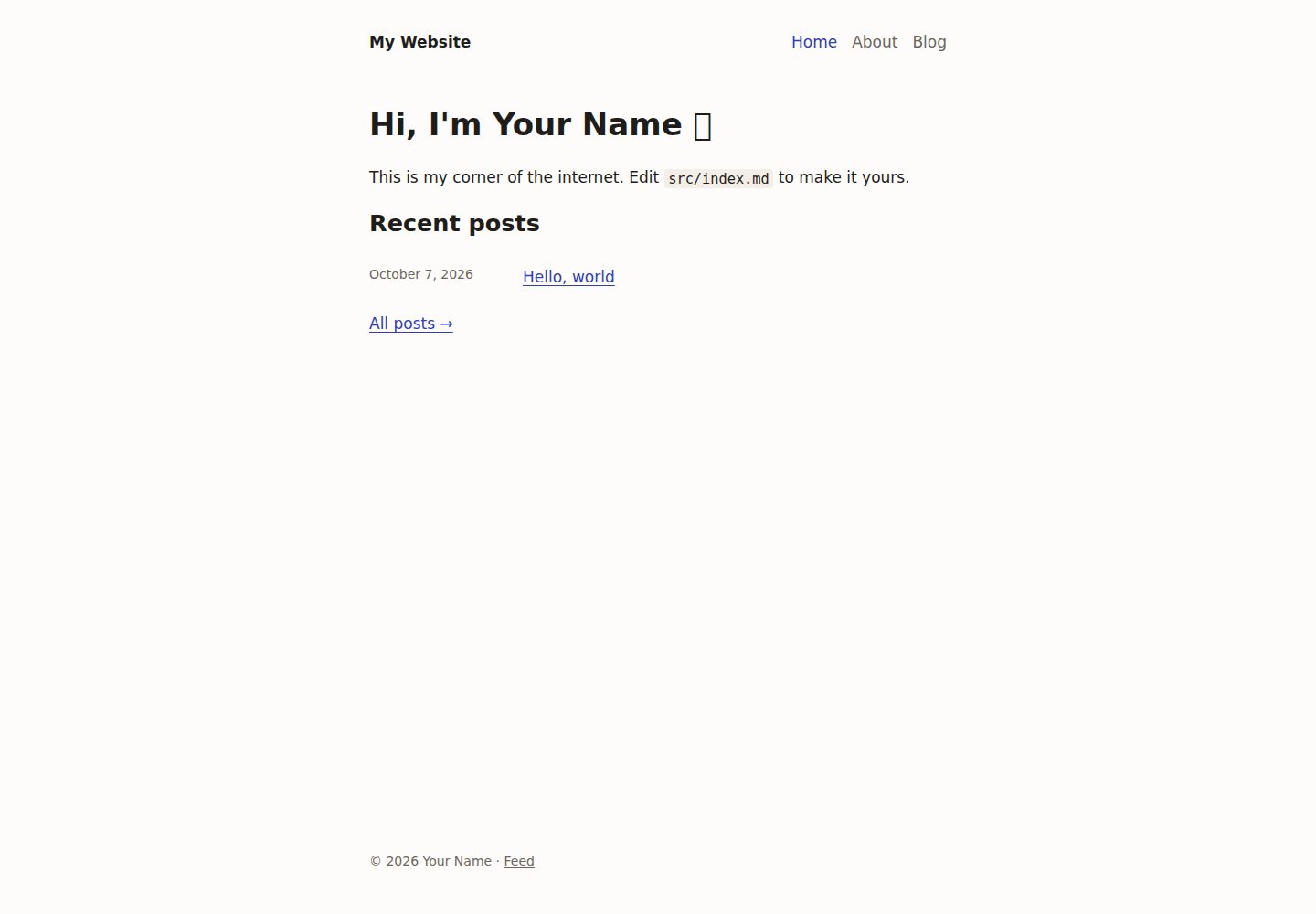
看看你的网站会是什么样
浏览真实页面截图,比较内容排版与手机效果。点击下方缩略图切换,放大查看整页细节。
全部页面与视图 3
截图用于了解视觉与布局,交互效果请以实际项目为准。
采集于 2026-10-14查看来源
值得关注的模板亮点
从已有项目资料中,快速了解它的特点。
草稿可在 pnpm dev 中预览,但被排除在生产构建之外
内置 Atom 订阅、站点地图、robots.txt 以及 Open Graph、社交卡片和 JSON-LD 结构化数据
brand 工具按 site.yml 中的颜色生成 favicon 和社交分享图,并可在构建时按页面渲染 1200×630 图片
提供 pnpm cms 命令用于创建、列出和发布文章,自动处理文件命名与 front matter
无客户端 JavaScript,无 CSS 框架,单一含明暗主题的样式表
模板详细介绍
这是一个个人网站与博客的起始模板,使用 Eleventy、TypeScript 和 pnpm 构建。页面与博客文章均以 Markdown 编写,包含带页头、数据驱动导航和页脚的基础布局;草稿可在本地预览但不会进入生产构建。模板自带 Atom 订阅、站点地图、robots.txt,以及 Open Graph、社交卡片和 JSON-LD 结构化数据等 SEO 与分享标签。品牌工具可根据 site.yml 中配置的颜色生成 favicon 和默认社交分享图,并支持在构建时为页面渲染 1200×630 的分享图。项目不包含客户端 JavaScript,也不使用 CSS 框架,样式集中在一个含明暗主题的样式表中。README 提供了安装、命令、目录结构、页面与文章写法、SEO 字段、品牌定制和部署说明;具体框架版本号未在资料中给出。
Eleventy作品集启动器
适合你的项目吗?
适用场景
- 搭建个人主页并发布 Markdown 博客文章
- 需要 Atom 订阅、站点地图和 SEO/社交分享标签的个人站点
- 希望用命令行工具管理文章草稿与发布的写作流程
- 需要按品牌颜色自动生成 favicon 和分享图的站点
- 部署到任意静态托管服务(如 Cloudflare Pages、GitHub Pages、Neocities)
适合人群
- 想快速开始写个人网站和博客的开发者
- 偏好 Markdown 写作与静态站点生成的用户
- 使用 Node.js 和 pnpm 工作流的项目
- 希望自行修改 CSS 和布局的定制需求
上手与定制指南
结合仓库当前版本的说明,按下面的资料检查内容、配置与运行要求。
- 1
需要 Node.js 和 pnpm,安装后运行 pnpm install,再用 pnpm dev 启动本地服务(http://localhost:8080)
- 2
在 apps/web/src/_data/site.yml 中填写姓名、站点标题和 URL,并修改首页与示例文章
- 3
在 site.yml 的 brand 下设置颜色后运行 pnpm brand all 重新生成 favicon 和默认社交图
- 4
pnpm build 输出静态站点到 apps/web/_site/,部署时以该目录为输出目录;各托管平台的手动与 CI/CD 配置见 docs/deployment.md
授权与来源资料
使用条件与限制
免费使用 · 保留许可声明本次收录的是公开仓库中采用 MIT 许可的免费版本;免费范围为该版本代码,不代表外部服务或第三方素材免费。
使用时需要遵守
- 允许免费使用、修改、商用和分发该版本代码。
- 分发代码副本或实质性部分时,保留原作者版权声明和完整 MIT 许可声明。
- 代码按现状提供;担保与责任限制以原许可证及适用法律为准。
额外费用与待核对事项
- 演示图片、字体、图标及其他第三方素材需按各自许可核对,不能仅凭代码的 MIT 许可判断。
- 域名、托管、数据库、支付或 AI 等外部服务可能另外收费。
查看原文依据
https://github.com/astrabun/personal-site-starter/blob/main/LICENSEhttps://github.com/astrabun/personal-site-starter/blob/main/README.mdPermission is hereby granted, free of charge
许可证原文
DeepSeek 根据仓库许可证和 README 整理 ·2026-10-14。结果仅覆盖已读取资料,依赖、图片、字体及后续条款变更以各自原文为准。
项目核对记录与介绍依据
模板资料
- 来源平台
- GitHub
- 资料与维护参考分
- 资料较完整 · 88 / 100
- 技术栈
- Eleventy
- 网站类型
- 作品集 · 启动器
这个分数如何计算
本站按许可资料(最高30分)、演示链接(12分)、预览图(10分)、Star数(15分)、记录的维护时间(15分)、描述完整度(8分)、功能记录(5分)和分类资料(5分)计算。它不是代码、安全或性能测试,也不是 Google 评分;有链接不代表已实测可用。
这个项目需要核对什么
- 记录的仓库更新时间
- 2026-10-14
- 截图检查日期
- 2026-10-14
已收录演示链接。请用你的内容与屏幕尺寸检查;有演示不代表表单、认证或支付已经可用。
目录记录的主要技术栈是 Eleventy。请通过依赖清单和锁文件核对实际版本与托管要求。这些说明基于收录资料,不代表代码审计或部署实测。
查看具体选型方法 →介绍的制作与核对状态
介绍由 AI 辅助整理目录与仓库资料。仓库作者不等于这篇介绍的审核者。
审核声明: codex-user-requested-batch-review-20261015 · 2026-10-15
查看当时使用的来源资料
SHA-256: 3f0fdd4297d53a539fea08ac86c751b646f08dfb096d57865a83ac5b1dac9437
2026-10-14T06:55:32.678Z
来源文件 / 仓库# Personal Website Starter
A small, hackable starting point for a personal website and blog, built with
[Eleventy](https://www.11ty.dev/), TypeScript, and pnpm. I will keep yelling about how
I think everyone should have a personal website until I can't yell anymore, and
this is my way of saying "here, take this, get started!"
- Pages and blog posts written in Markdown, so writing content is _super easy_
- A base layout with a header, data-driven navigation, and footer
- Drafts you can preview locally that stay out of production builds
- An Atom feed, sitemap, and `robots.txt`
- SEO and social sharing tags (Open Graph, social cards, and JSON-LD structured data)
- Generated favicons and social sharing images in your own colors, including per-post images rendered at build time
- A `pnpm cms` command for creating, listing, and publishing posts
- No client-side JavaScript and no CSS framework. One stylesheet includes light and dark themes.
## Getting started
You'll need Node.js and pnpm.
```sh
pnpm install
pnpm dev # http://localhost:8080
```
Then make it yours:
1. Edit `apps/web/src/_data/site.yml` with your name, site title, and URL.
2. Edit the home page in `apps/web/src/index.md`.
3. Replace the sample posts in `apps/web/src/blog/`.
4. Set your colors under `brand` in `site.yml`, then run `pnpm brand all` to
regenerate the favicons and default social image.
Feel free to change the CSS and layout as much as you like. This is just a starter.
## Make your own copy
You can start from this repository in one of three ways.
**Fork it.** Use the Fork button on your git host, then clone your fork:
```sh
git clone <your-fork-url> my-site
```
**Clone it and point the remote at your own repository.** Create an empty repository on
your host first (no README or license), then run:
```sh
git clone <repo-url> my-site
cd my-site
git remote rename origin upstream # keeps a link to this starter so you can pull updates
git remote add origin <your-repo-url>
git push -u origin main
```
To pull future starter changes later, run `git pull upstream main`. If you don't want
the link, skip the rename and run `git remote set-url origin <your-repo-url>` instead.
**Start from the template without cloning.** This downloads the current starter from
GitHub into a new directory, with no git history:
```sh
pnpm dlx giget@latest gh:astrabun/personal-site-starter my-site
# or: npx giget@latest gh:astrabun/personal-site-starter my-site
cd my-site
git init -b main
pnpm install
```
Then commit, add your remote, and push as shown above.
**Or copy from a local clone.** If you already have this repository, this copies the
files without the git history and starts a fresh repository:
```sh
pnpm new-site ../my-site # or: npm run new-site -- ../my-site
cd ../my-site
pnpm install
```
Then commit, add your remote, and push as shown above.
## Commands
Run these from the repository root.
| Command | What it does |
| ---------------- | ------------------------------------------------ |
| `pnpm dev` | Start a local server that rebuilds on save |
| `pnpm build` | Build the site into `apps/web/_site/` |
| `pnpm cms` | Create, list, and publish blog posts (see below) |
| `pnpm brand` | Generate favicons and social images (see below) |
| `pnpm typecheck` | Type-check every package |
| `pnpm clean` | Delete the build output |
| `pnpm lint` | Lint with oxlint (`pnpm lint:fix` to auto-fix) |
| `pnpm fmt` | Format with oxfmt (`pnpm fmt:check` to verify) |
| `pnpm check` | Type-check, lint, and check formatting |
## Project layout
```
apps/
└── web/ The website
├── eleventy.config.ts Eleventy configuration
├── config/ Filters, SEO, drafts handling, and other config helpers
├── types/ Type declarations for Eleventy
└── src/
├── _data/ site.yml (metadata) and navigation.yml
├── _layouts/ base --> page, base --> post
├── _includes/ Partials: head, seo, header, nav, footer, post-list
├── assets/ CSS and images (copied as-is to /assets/)
├── static/ Copied as-is to the site root: favicons and the like
├── blog/ Blog posts: YYYY-MM-DD-slug.md
├── pages/ Standalone pages: about.md --> /about/
├── index.md Home page
└── blog.md Blog index at /posts/
packages/
├── cms/ The `pnpm cms` command-line tool
└── brand/ The `pnpm brand` tool and social image build plugin
```
## Pages
Any Markdown file in `src/pages/` becomes a page at `/<filename>/` with the
`page` layout:
```md
---
title: Uses
description: The hardware and software I use every day.
---
Your content here.
```
To link it from the header, add it to `src/_data/navigation.yml`:
```yaml
- text: Uses
url: /uses/
```
The current page's link gets `aria-current`. Section links, such as Blog,
stay highlighted on every page inside that section. Add `external: true` to an
item to open it in a new tab.
To give a page its own URL, set `permalink:` in its front matter. For a page
without the title heading, use `layout: base`.
## Blog posts
Posts live in `src/blog/` and are named `YYYY-MM-DD-slug.md`. Eleventy reads
the date from the filename, and the post is published at `/posts/YYYY/MM/DD/slug/`.
Front matter supports:
| Field | Purpose |
| ------------- | --------------------------------------------------------- |
| `title` | Post title |
| `description` | Used for the meta description and link previews |
| `tags` | A list of tags, shown under the title |
| `image` | Image used for link previews (`og:image`) |
| `imageAlt` | Alt text for `image` |
| `updated` | Date of the last significant edit, e.g. `2026-10-09` |
| `draft` | If `true`, visible in `pnpm dev` but excluded from builds |
### The CMS
`pnpm cms` handles the file naming and front matter for you:
```sh
pnpm cms new # prompts for title, slug, tags, and more
pnpm cms new "Hello again" --tags life,notes --draft -y
pnpm cms list # every post, newest first
pnpm cms list --drafts
pnpm cms publish # choose a draft to publish
pnpm cms publish hello-again # or pass its slug or filename
```
Publishing removes `draft: true` and, unless you pass `--keep-date`, moves the
post's date to today. Run `pnpm cms --help` for all options.
The CMS looks for posts in `src/blog` by default. To use a different folder,
set `"cms": { "postsDir": "..." }` in `apps/web/package.json`.
## SEO and social sharing
Every page gets a canonical URL, a meta description, Open Graph and social
card tags for link previews, and JSON-LD structured data for search engines.
Posts are marked up as articles, with published and modified dates and tags.
The tags are filled in automatically from `src/_data/site.yml` and each page's
front matter. Any page can set:
| Field | Purpose |
| ------------- | ---------------------------------------------------------------- |
| `description` | Meta and link-preview description (default: site description) |
| `image` | Link-preview image (default: `site.image`) |
| `imageAlt` | Alt text for `image` |
| `autoOgImage` | If `true`, generate a link-preview image from the title at build |
| `noindex` | If `true`, asks search engines not to index the page |
In `site.yml`, set `url` to your real domain, since every absolute URL is built
from it. The following fields are also used:
- `image`: the default link-preview image. 1200×630 pixels works best.
- `author.links`: your profiles elsewhere. They become `rel="me"` links (for
Mastodon verification and IndieAuth) and `sameAs` in the structured data.
The values are computed in `config/seo.ts` and rendered by
`src/_includes/seo.liquid`. To add a tag, add a field in one and print it in
the other.
## Favicons and social images
The `brand` package draws your logo mark, favicons, and social sharing images,
in the colors set under `brand` in `site.yml`:
```yaml
brand:
background: '#171614' # social image background
foreground: '#ebe7e0' # title text
muted: '#9a948a' # secondary text
accent: '#6e84f0' # logo tile and accent bar
onAccent: '#ffffff' # the mark drawn on the tile
mark: sun # or "initials"
# initials: YN # defaults to the initials of author.name
```
### Images for each page, generated at build
Set `autoOgImage: true` in a page's front matter and the build renders a
1200×630 image with the site name, the page title, and the post date (or the
page's description). The page's link-preview tags point at it automatically.
Posts have it turned on for the whole folder in `src/blog/blog.11tydata.json`.
Add the same line to `src/pages/pages.11tydata.json` to turn it on for every
page.
A page's own `image` always takes priority. Rendered images are cached in
`apps/web/.cache/`, so only new or changed pages are rendered again.
### The command
```sh
pnpm brand all # favicons + the default social image
pnpm brand icons # favicon.svg, favicon.ico, apple-touch-icon.png
pnpm brand og # src/assets/images/og-default.png
pnpm brand og about # one page or post (by slug or path), saved to
# src/assets/images/og/ and set as its `image`
pnpm brand icons --accent "#2b59c3" --mark initials # try colors for one run
```
Run `pnpm brand all` after changing the brand colors. To use your own artwork
instead, replace the files in `src/static/` and
`src/assets/images/og-default.png`. The icon links are in
`src/_includes/head.liquid`.
Images are laid out with [satori](https://github.com/vercel/satori) and
rendered with [resvg](https://github.com/yisibl/resvg-js), using the
[Inter](https://rsms.me/inter/) typeface. To change the design, edit
`packages/brand/src/og.ts`; it uses a flexbox-style element tree, much like
HTML with inline styles.
## Customizing
- Styles live in `src/assets/css/main.css`. Colors and fonts are CSS custom
properties at the top of the file. If you change the colors, update `brand`
in `site.yml` to match.
- Add filters in `config/filters.ts`. The starter includes `readableDate`,
`isoDate`, `datePath`, `readingTime`, `absoluteUrl`, `newestFirst`, and `limit`.
- Files named `*.11ty.ts` render as templates. See `src/sitemap.xml.11ty.ts`
for an example.
- Any `.yml` or `.json` file in `src/_data/` is available in templates under
its filename.
TypeScript runs through Node's built-in type stripping, so there is no compile
step. Stick to syntax that can be erased: no `enum`s and no parameter
properties. `tsconfig.json` enforces this with `erasableSyntaxOnly`.
## Deploying
`pnpm build` writes a static site to `apps/web/_site/`. Any static host
works. Use `pnpm build` as the build command and `apps/web/_site` as the
output directory on Neocities, Cloudflare Pages, GitHub Pages, or others.
See [docs/deployment.md](docs/deployment.md) for manual and CI/CD setup on each
host, with sample GitHub Actions workflows.
## License
[MIT](LICENSE). The license covers this starter. Your own posts and pages are
yours to do whatever you want with.
If you want to credit me, feel free, but no pressure.
看看同类模板
对比同技术栈与用途的模板,找到更适合的视觉与内容结构。

eleventy-base-blog
A starter repository for a blog web site using the Eleventy static site generator.
Eleventy · 博客

eleventy-garden
:seedling: A starter site for building a mind garden with eleventy
Eleventy · 启动器

eleventastic
An Eleventy Starter Kit
Eleventy · 启动器

neat-starter
Starter Template for Netlify CMS, Eleventy, Alpine JS & Tailwind CSS
Eleventy · 启动器

Eleventy-Starter-Boilerplate
🚀 Eleventy Starter is production-ready with SEO-friendly for quickly starting a blog. ⚡ Built with Eleventy, …
Eleventy · 博客

eleventy-plus-vite
A clean and fast Eleventy Starter Project with Vite
Eleventy · 启动器