Implemented in pure HTML and CSS, with no JavaScript and no build step
HTMLPortfolio
ATS-Friendly-Resume — HTML Portfolio Template
By Asvanth16
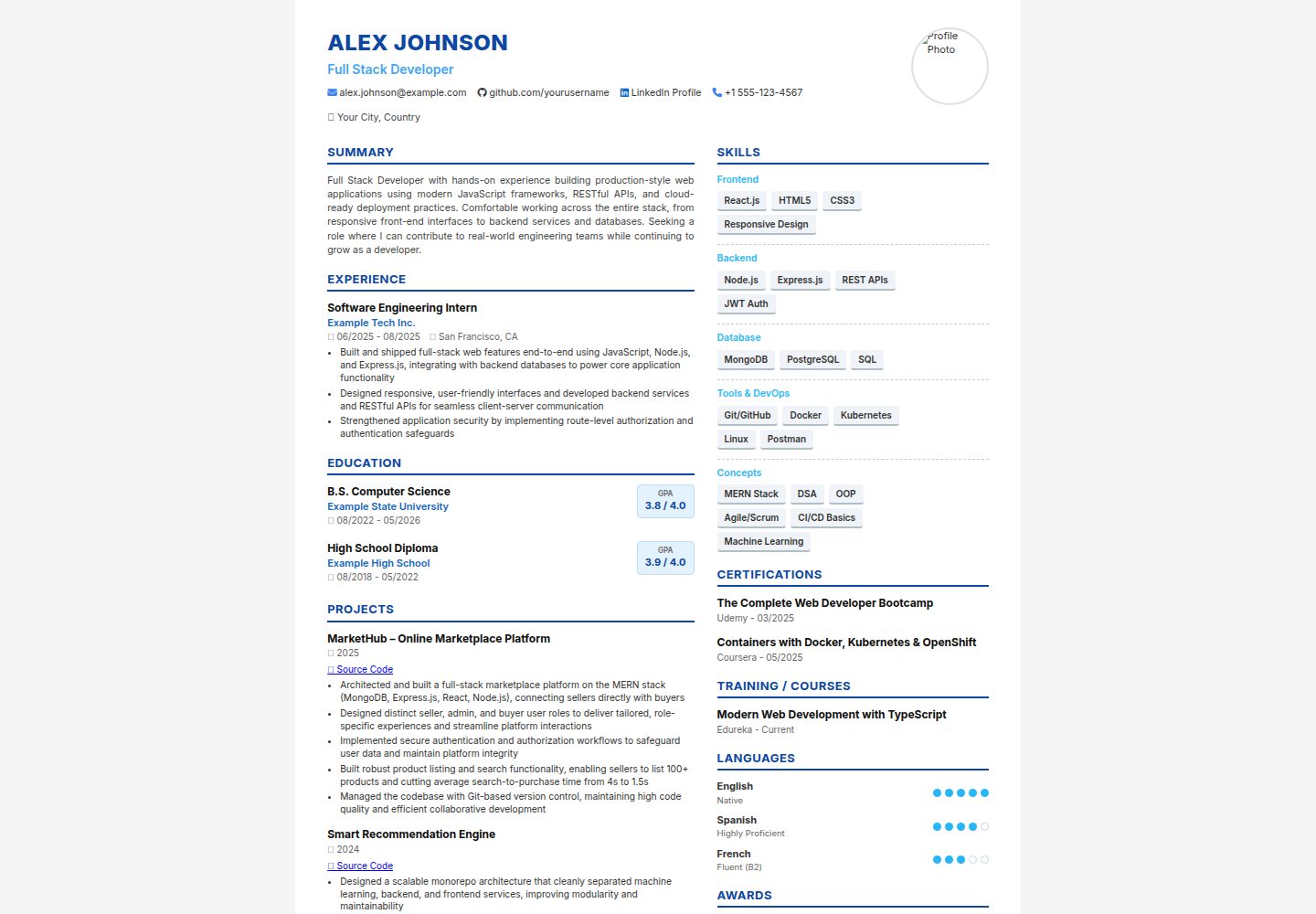
A two-column resume template built with pure HTML and CSS, exported as A4 PDF via browser printing, with content and color scheme editable directly in the source code.
Explore the design
Compare the page layouts and mobile experience. Open any screenshot for a closer look.
Desktop homepage1 / 2
Desktop captureTop of page
Actual screenshot captured by the server browser.
All pages & views 2
Screenshots show visual appearance; interactive behavior may differ.
Recorded 2026-10-13View source
What stands out
A quick read of the recorded project description.
No dependencies other than the two CDNs for Google Fonts and Font Awesome
Two-column layout: main column for Summary, Experience, Education, and Projects; sidebar for Skills, Certifications, Languages, and Awards
CSS variables at the top of style.css allow centralized changes to colors and fonts
Built-in A4 print styles, with PDF export via browser printing
Each section is an independent structure that can be individually added, removed, or reordered
Template Details
This template is a static two-column HTML resume page written in pure HTML and CSS. Apart from two CDN links for Google Fonts and Font Awesome, it has no other dependencies and requires no build tools or JavaScript. The page structure includes a top banner (name, job title, photo, contact icons), a wider left column for Summary, Experience, Education, and Projects, and a right sidebar for Skills, Certifications, Languages, and Awards. The README states that index.html can be opened directly in a browser for preview and exported to PDF via the browser's print "Save as PDF" function, with recommended print settings of A4, no margins, and background graphics enabled. Styles are centralized in style.css, with CSS variables defined at the top for adjusting colors and fonts; the README provides specific instructions for changing the theme color and fonts. The README does not provide information on ATS parsing effectiveness, compatibility testing, or performance.
HTMLPortfolio
Is it right for your project?
Use Cases
- Needing a personal resume that can be printed directly or exported to PDF
- Wanting to quickly change the resume color scheme and fonts by modifying CSS variables
- Editing HTML files directly to maintain resume content in an environment without build tools
- Needing to add or remove resume sections by module (such as removing the photo or adjusting the order of columns)
Suitable For
- Users familiar with basic HTML/CSS who are willing to edit the source code directly
- Users who want to export an A4 resume using the browser's print function
- Scenarios requiring a lightweight static resume template without introducing frameworks or a build process
Getting started & customization
Use these recorded setup notes alongside the repository instructions for your chosen version.
- 1
After cloning or downloading the repository, open index.html in a text editor and replace the placeholder content (name, contact information, summary, experience, education, projects, skills, certifications, languages, awards)
- 2
Replace photo-placeholder.jpg with your own photo, keeping the filename the same, or modify the src of img.profile-photo; deleting the img element will automatically adjust the page header
- 3
Open index.html in a browser to preview; when printing, select A4, no margins, and enable background graphics to export PDF
- 4
For US Letter paper, change the size in @page in style.css to letter
- 5
To change fonts, replace the Google Fonts link in index.html and update --font-family in style.css
License & source material
Usage conditions & limitations
Free to use · keep license noticeThis entry covers the free version under the MIT license in the public repository; the free scope is the code of this version and does not mean that external services or third-party assets are free.
Must comply with when using
- Free use, modification, commercial use, and distribution of this version's code are permitted.
- When distributing copies or substantial portions of the code, retain the original author's copyright notice and the full MIT license notice.
- The code is provided as is; warranties and limitations of liability are governed by the original license and applicable law.
Additional costs & items to verify
- Demo images, fonts, icons, and other third-party assets must be checked against their respective licenses and cannot be judged solely by the code's MIT license.
- External services such as domains, hosting, databases, payments, or AI may incur additional charges.
- The template relies on two external CDN resources (Google Fonts and Font Awesome); when offline or unable to access the CDNs, fonts and icons may not display properly.
- Icons are loaded via the Font Awesome CDN; use of these icons must comply with Font Awesome's own license terms.
- Fonts are loaded via the Google Fonts CDN; use of the Inter font must comply with Google Fonts' license terms.
View Original Text Basis
Permission is hereby granted, free of charge
Original License Text
no build tools, no frameworks, no dependencies beyond two CDN links (Google
Original README
- Icons use [Font Awesome](https://fontawesome.com/) via CDN — no install needed.
Original README
https://github.com/Asvanth16/ATS-Friendly-Resume/blob/main/LICENSEhttps://github.com/Asvanth16/ATS-Friendly-Resume/blob/main/README.md- Font is [Inter](https://fonts.google.com/specimen/Inter) via Google Fonts CDN.
Original README
Compiled by DeepSeek based on repository license and README ·2026-10-13. Results only cover the materials read; dependencies, images, fonts, and subsequent term changes are subject to their respective original texts.
Project checks & description sources
Template Information
- Source platforms
- GitHub
- Documentation and maintenance reference score
- More documented · 80 / 100
- Technologies
- HTML
- Website type
- Portfolio
How this score is calculated
Our heuristic uses license records (up to 30), a demo link (12), a preview (10), stars (15), recorded maintenance (15), description completeness (8), feature records (5) and classification data (5). It is not a code, security or performance test, or a Google score. A link does not establish tested functionality.
What to verify for this project
- Repository update recorded
- 2026-07-25
- Screenshot last checked
- 2026-10-13
A demo link is listed. Check it with your own content and viewport sizes; its presence does not confirm that forms, authentication or payments work.
The catalog identifies HTML as the primary stack. Check the actual dependency manifest and lockfile for versions and hosting requirements. These notes use recorded metadata, not a code audit or a deployment test.
Use a selection guide →How this description was prepared
AI-assisted description based on catalog records and repository material. Repository authors are not automatically the reviewers of this description.
Review declaration: codex-user-requested-batch-review-20261015 · 2026-10-15
Inspect the recorded source material
SHA-256: 38a3ed5228839cdc5ac728647f4cf354777b46313db449647c9d559f906f2e56
2026-10-13T16:26:10.946Z
Source file / repository# Two-Column HTML Resume Template
A clean, print-ready, two-column resume template built with plain HTML and CSS —
no build tools, no frameworks, no dependencies beyond two CDN links (Google
Fonts and Font Awesome icons).
Designed to look like a modern, recruiter-friendly resume: a header banner with
photo and contact icons, a wider left column for Summary / Experience /
Education / Projects, and a sidebar for Skills / Certifications / Languages /
Awards.
## 🌐 Live Demo
[Live Demo](https://asvanth16.github.io/ATS-Friendly-Resume/)
## Preview

Open `index.html` in any browser to see it rendered. Use your browser's
**Print → Save as PDF** (A4, no margins, background graphics enabled) to export
a polished one-page PDF.
## Files
```
.
├── index.html → the resume content (edit this with your own info)
├── style.css → all styling, with CSS variables at the top for quick theming
└── README.md → this file
```
## Getting Started
1. Clone or download this repo.
2. Open `index.html` in a text editor and replace the placeholder content
(name, contact info, summary, experience, education, projects, skills,
certifications, languages, awards) with your own.
3. Replace `photo-placeholder.jpg` with your own photo (same filename, or
update the `src` in the `<img class="profile-photo">` tag). To go
photo-less, just delete that `<img>` element and the header will resize
automatically.
4. Open `index.html` in a browser to preview, then print to PDF when ready.
## Customizing the Look
All colors, fonts are controlled by CSS custom properties at the top of
`style.css`:
```css
:root {
--color-primary: #0d47a1; /* Name, section headers, borders */
--color-primary-light: #3b82f6; /* Icons, links */
--color-accent: #29b6f6; /* Skill category labels, language dots */
--color-title: #42a5f5; /* Job title under name */
...
--font-family: 'Inter', sans-serif;
}
```
Change these values to re-theme the entire resume without touching any other
CSS. For example, to switch to a green theme:
```css
--color-primary: #1b5e20;
--color-primary-light: #2e7d32;
--color-accent: #43a047;
--color-title: #388e3c;
```
To use a different font, swap the Google Fonts `<link>` in `index.html` and
update `--font-family` in `style.css` to match.
## Sections Included
- Header (name, title, photo, contact icons: email, GitHub, LinkedIn, phone, location)
- Summary
- Experience (with bullet points)
- Education (with GPA/percentage badge)
- Projects (with source-code links and bullet points)
- Skills (grouped by category, pill-style tags)
- Certifications
- Training / Courses
- Languages (with dot-based proficiency rating)
- Awards
Feel free to add, remove, or reorder sections — each one is a self-contained
block, so deleting a `<div class="section-header">...</div>` plus its content
block removes it cleanly.
## Notes
- Built for A4 print sizing (`@page { size: A4; }` in `style.css`). For US
Letter, change this to `size: letter;`.
- Icons use [Font Awesome](https://fontawesome.com/) via CDN — no install needed.
- Font is [Inter](https://fonts.google.com/specimen/Inter) via Google Fonts CDN.
- This is a static template — no JavaScript, no build step, works by just
opening the HTML file.
## License
MIT — free to use, modify, and share.
Explore similar templates
Compare previews and descriptions within the same stack and category.

simplefolio
Simplefolio is a minimal single-page portfolio template for developers, built with HTML, Bootstrap, SCSS, and Parcel under the MIT license. It includes Hero, About, Projects, Contact, and Footer sections, with content edited in /src/index.html and theme colors controlled by two SCSS variables.
HTML · Portfolio

Freelancer
A bright, single-page Bootstrap portfolio template for freelancers, designers, and small studios. It includes a responsive portfolio grid with modal detail windows and an SB Forms contact form that requires an API token.
HTML · Portfolio

Resume
A single-page resume and CV template from Start Bootstrap, built on Bootstrap with a fixed sidebar and content sections.
HTML · Portfolio

Creative
A single-page marketing template by Start Bootstrap for creative agencies and product services, built on Bootstrap with SCSS, featuring a portfolio grid and call-to-action sections. It includes pre-set SB Forms markers for form integration and npm build scripts for source customization.
HTML · Corporate Website

Grayscale
A dark single-page Bootstrap template from Start Bootstrap for photography, events and brand storytelling, with a large hero and clearly separated sections.
HTML · Corporate Website

startbootstrap-stylish-portfolio
A one-page Bootstrap portfolio theme from Start Bootstrap with multiple content sections and an off-canvas navigation menu. Basic use means editing HTML/CSS under dist and opening index.html; advanced use relies on npm with Pug and SCSS build scripts.
HTML · Portfolio