纯 HTML 与 CSS 实现,无 JavaScript、无构建步骤
HTML作品集
ATS-Friendly-Resume — HTML 作品集模板
作者 Asvanth16
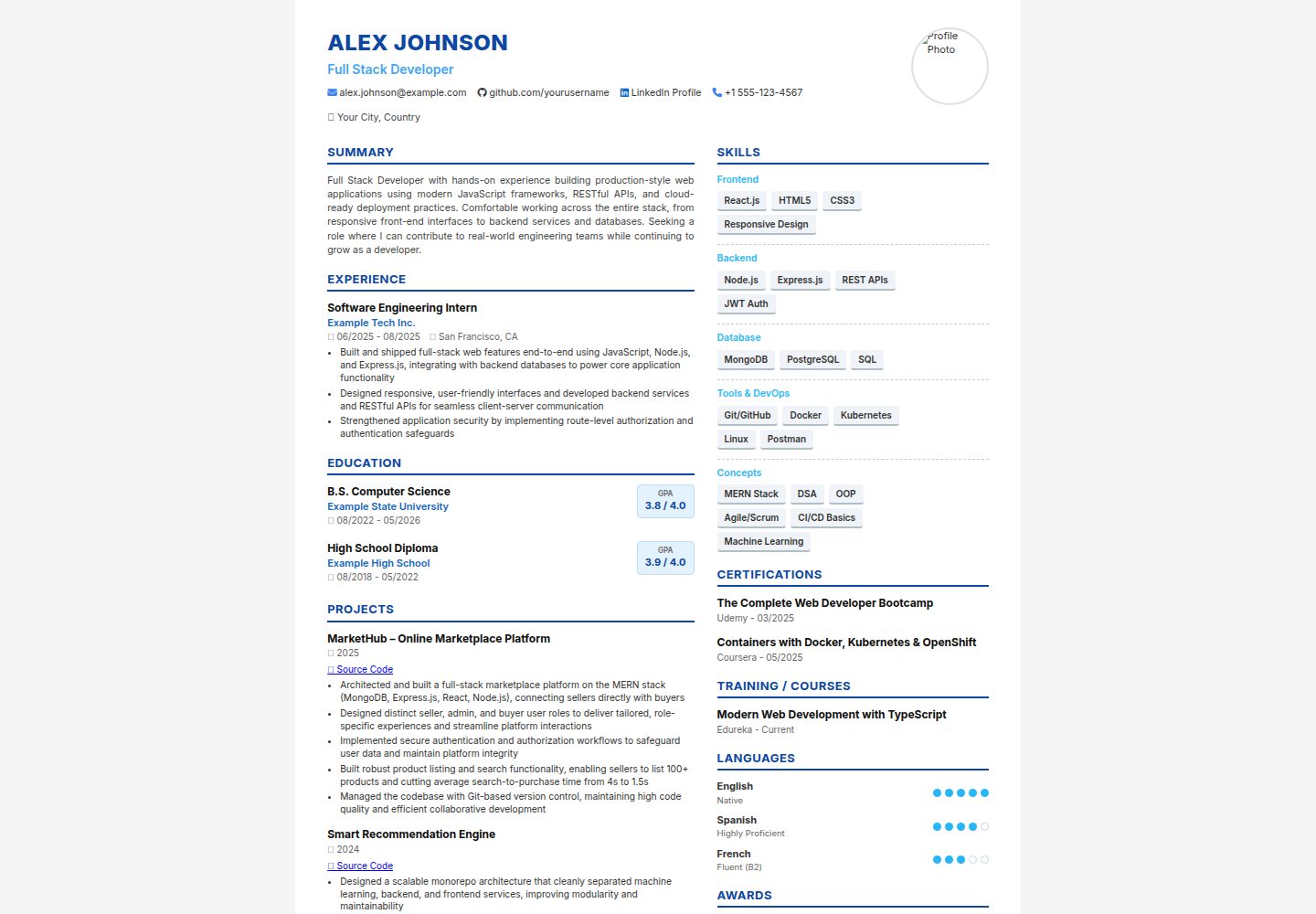
基于纯 HTML 与 CSS 的双栏简历模板,通过浏览器打印导出 A4 PDF,内容与配色可直接在源码中修改。
看看你的网站会是什么样
浏览真实页面截图,比较内容排版与手机效果。点击下方缩略图切换,放大查看整页细节。
全部页面与视图 2
截图用于了解视觉与布局,交互效果请以实际项目为准。
采集于 2026-10-13查看来源
值得关注的模板亮点
从已有项目资料中,快速了解它的特点。
除 Google Fonts 和 Font Awesome 两个 CDN 外无其他依赖
双栏布局:主栏放 Summary、Experience、Education、Projects,侧栏放 Skills、Certifications、Languages、Awards
style.css 顶部提供 CSS 变量,可集中修改颜色与字体
内置 A4 打印样式,可通过浏览器打印导出 PDF
每个区块为独立结构,可单独增删或调整顺序
模板详细介绍
该模板是一个静态的双栏 HTML 简历页面,使用纯 HTML 和 CSS 编写,除 Google Fonts 与 Font Awesome 两个 CDN 链接外没有其他依赖,也不需要构建工具或 JavaScript。页面结构包含顶部横幅(姓名、职位、照片、联系方式图标),左侧较宽栏用于 Summary、Experience、Education、Projects,右侧边栏用于 Skills、Certifications、Languages、Awards。README 说明可直接在浏览器中打开 index.html 预览,并通过浏览器打印的“另存为 PDF”功能导出 PDF,打印设置建议为 A4、无边距、启用背景图形。样式集中在 style.css,顶部定义 CSS 变量用于调整颜色和字体;README 给出了更换主题色和字体的具体做法。README 未提供关于 ATS 解析效果、兼容性测试或性能方面的说明。
HTML作品集
适合你的项目吗?
适用场景
- 需要一份可直接打印或导出 PDF 的个人简历
- 希望通过修改 CSS 变量快速更换简历配色与字体
- 在无构建工具的环境中直接编辑 HTML 文件维护简历内容
- 需要按模块增删简历区块(如去掉照片或调整栏目顺序)
适合人群
- 熟悉基础 HTML/CSS、愿意直接编辑源码的用户
- 希望用浏览器打印功能导出 A4 简历的用户
- 需要轻量静态简历模板、不引入框架或构建流程的场景
上手与定制指南
结合仓库当前版本的说明,按下面的资料检查内容、配置与运行要求。
- 1
克隆或下载仓库后,用文本编辑器打开 index.html 替换占位内容(姓名、联系方式、摘要、经历、教育、项目、技能、证书、语言、奖项)
- 2
将 photo-placeholder.jpg 替换为自己的照片,保持文件名一致,或修改 img.profile-photo 的 src;删除该 img 元素后页头会自动调整
- 3
在浏览器中打开 index.html 预览,打印时选择 A4、无边距并启用背景图形以导出 PDF
- 4
如需 US Letter 纸张,将 style.css 中 @page 的 size 改为 letter
- 5
更换字体需同时替换 index.html 中的 Google Fonts 链接并更新 style.css 中的 --font-family
授权与来源资料
使用条件与限制
免费使用 · 保留许可声明本次收录的是公开仓库中采用 MIT 许可的免费版本;免费范围为该版本代码,不代表外部服务或第三方素材免费。
使用时需要遵守
- 允许免费使用、修改、商用和分发该版本代码。
- 分发代码副本或实质性部分时,保留原作者版权声明和完整 MIT 许可声明。
- 代码按现状提供;担保与责任限制以原许可证及适用法律为准。
额外费用与待核对事项
- 演示图片、字体、图标及其他第三方素材需按各自许可核对,不能仅凭代码的 MIT 许可判断。
- 域名、托管、数据库、支付或 AI 等外部服务可能另外收费。
- 模板依赖两个外部 CDN 资源(Google Fonts 与 Font Awesome),离线或无法访问 CDN 时字体与图标可能无法正常显示。
- 图标通过 Font Awesome CDN 加载,使用该图标需遵守 Font Awesome 自身的许可条款。
- 字体通过 Google Fonts CDN 加载,使用 Inter 字体需遵守 Google Fonts 的许可条款。
查看原文依据
Permission is hereby granted, free of charge
许可证原文
no build tools, no frameworks, no dependencies beyond two CDN links (Google
README 原文
- Icons use [Font Awesome](https://fontawesome.com/) via CDN — no install needed.
README 原文
https://github.com/Asvanth16/ATS-Friendly-Resume/blob/main/LICENSEhttps://github.com/Asvanth16/ATS-Friendly-Resume/blob/main/README.md- Font is [Inter](https://fonts.google.com/specimen/Inter) via Google Fonts CDN.
README 原文
DeepSeek 根据仓库许可证和 README 整理 ·2026-10-13。结果仅覆盖已读取资料,依赖、图片、字体及后续条款变更以各自原文为准。
项目核对记录与介绍依据
模板资料
- 来源平台
- GitHub
- 资料与维护参考分
- 资料较完整 · 80 / 100
- 技术栈
- HTML
- 网站类型
- 作品集
这个分数如何计算
本站按许可资料(最高30分)、演示链接(12分)、预览图(10分)、Star数(15分)、记录的维护时间(15分)、描述完整度(8分)、功能记录(5分)和分类资料(5分)计算。它不是代码、安全或性能测试,也不是 Google 评分;有链接不代表已实测可用。
这个项目需要核对什么
- 记录的仓库更新时间
- 2026-07-25
- 截图检查日期
- 2026-10-13
已收录演示链接。请用你的内容与屏幕尺寸检查;有演示不代表表单、认证或支付已经可用。
目录记录的主要技术栈是 HTML。请通过依赖清单和锁文件核对实际版本与托管要求。这些说明基于收录资料,不代表代码审计或部署实测。
查看具体选型方法 →介绍的制作与核对状态
介绍由 AI 辅助整理目录与仓库资料。仓库作者不等于这篇介绍的审核者。
审核声明: codex-user-requested-batch-review-20261015 · 2026-10-15
查看当时使用的来源资料
SHA-256: 38a3ed5228839cdc5ac728647f4cf354777b46313db449647c9d559f906f2e56
2026-10-13T16:26:10.946Z
来源文件 / 仓库# Two-Column HTML Resume Template
A clean, print-ready, two-column resume template built with plain HTML and CSS —
no build tools, no frameworks, no dependencies beyond two CDN links (Google
Fonts and Font Awesome icons).
Designed to look like a modern, recruiter-friendly resume: a header banner with
photo and contact icons, a wider left column for Summary / Experience /
Education / Projects, and a sidebar for Skills / Certifications / Languages /
Awards.
## 🌐 Live Demo
[Live Demo](https://asvanth16.github.io/ATS-Friendly-Resume/)
## Preview

Open `index.html` in any browser to see it rendered. Use your browser's
**Print → Save as PDF** (A4, no margins, background graphics enabled) to export
a polished one-page PDF.
## Files
```
.
├── index.html → the resume content (edit this with your own info)
├── style.css → all styling, with CSS variables at the top for quick theming
└── README.md → this file
```
## Getting Started
1. Clone or download this repo.
2. Open `index.html` in a text editor and replace the placeholder content
(name, contact info, summary, experience, education, projects, skills,
certifications, languages, awards) with your own.
3. Replace `photo-placeholder.jpg` with your own photo (same filename, or
update the `src` in the `<img class="profile-photo">` tag). To go
photo-less, just delete that `<img>` element and the header will resize
automatically.
4. Open `index.html` in a browser to preview, then print to PDF when ready.
## Customizing the Look
All colors, fonts are controlled by CSS custom properties at the top of
`style.css`:
```css
:root {
--color-primary: #0d47a1; /* Name, section headers, borders */
--color-primary-light: #3b82f6; /* Icons, links */
--color-accent: #29b6f6; /* Skill category labels, language dots */
--color-title: #42a5f5; /* Job title under name */
...
--font-family: 'Inter', sans-serif;
}
```
Change these values to re-theme the entire resume without touching any other
CSS. For example, to switch to a green theme:
```css
--color-primary: #1b5e20;
--color-primary-light: #2e7d32;
--color-accent: #43a047;
--color-title: #388e3c;
```
To use a different font, swap the Google Fonts `<link>` in `index.html` and
update `--font-family` in `style.css` to match.
## Sections Included
- Header (name, title, photo, contact icons: email, GitHub, LinkedIn, phone, location)
- Summary
- Experience (with bullet points)
- Education (with GPA/percentage badge)
- Projects (with source-code links and bullet points)
- Skills (grouped by category, pill-style tags)
- Certifications
- Training / Courses
- Languages (with dot-based proficiency rating)
- Awards
Feel free to add, remove, or reorder sections — each one is a self-contained
block, so deleting a `<div class="section-header">...</div>` plus its content
block removes it cleanly.
## Notes
- Built for A4 print sizing (`@page { size: A4; }` in `style.css`). For US
Letter, change this to `size: letter;`.
- Icons use [Font Awesome](https://fontawesome.com/) via CDN — no install needed.
- Font is [Inter](https://fonts.google.com/specimen/Inter) via Google Fonts CDN.
- This is a static template — no JavaScript, no build step, works by just
opening the HTML file.
## License
MIT — free to use, modify, and share.
看看同类模板
对比同技术栈与用途的模板,找到更适合的视觉与内容结构。

simplefolio
⚡️ A minimal portfolio template for Developers
HTML · 作品集

Freelancer
Freelancer 是 Start Bootstrap 出品的单页作品集模板,专为自由职业者、设计师和小型工作室设计。 页面结构清晰,包含多个内容区块、响应式作品集网格,每个作品项目配有模态窗口展示详情。
HTML · 作品集

Resume
Resume 是 Start Bootstrap 推出的简历与 CV 主题,基于 Bootstrap 构建,采用固定侧边栏加内容区块的结构。
HTML · 作品集

Creative
Creative 是 Start Bootstrap 团队维护的一款单页营销模板,定位明确:为创意机构或产品服务提供一个以作品展示和行动号召为核心的落地页。
HTML · 企业官网

Grayscale
Grayscale 是 Start Bootstrap 出品的深色系单页 HTML 模板,基于 Bootstrap 构建。 它的视觉重心放在大尺寸首屏和清晰的内容分区上,整体氛围偏暗,适合摄影、活动或品牌叙事类网站。
HTML · 企业官网

startbootstrap-stylish-portfolio
Stylish Portfolio 是 Start Bootstrap 维护的单页作品集主题,基于 Bootstrap 构建,采用多个内容区块加离屏导航菜单的结构。
HTML · 作品集