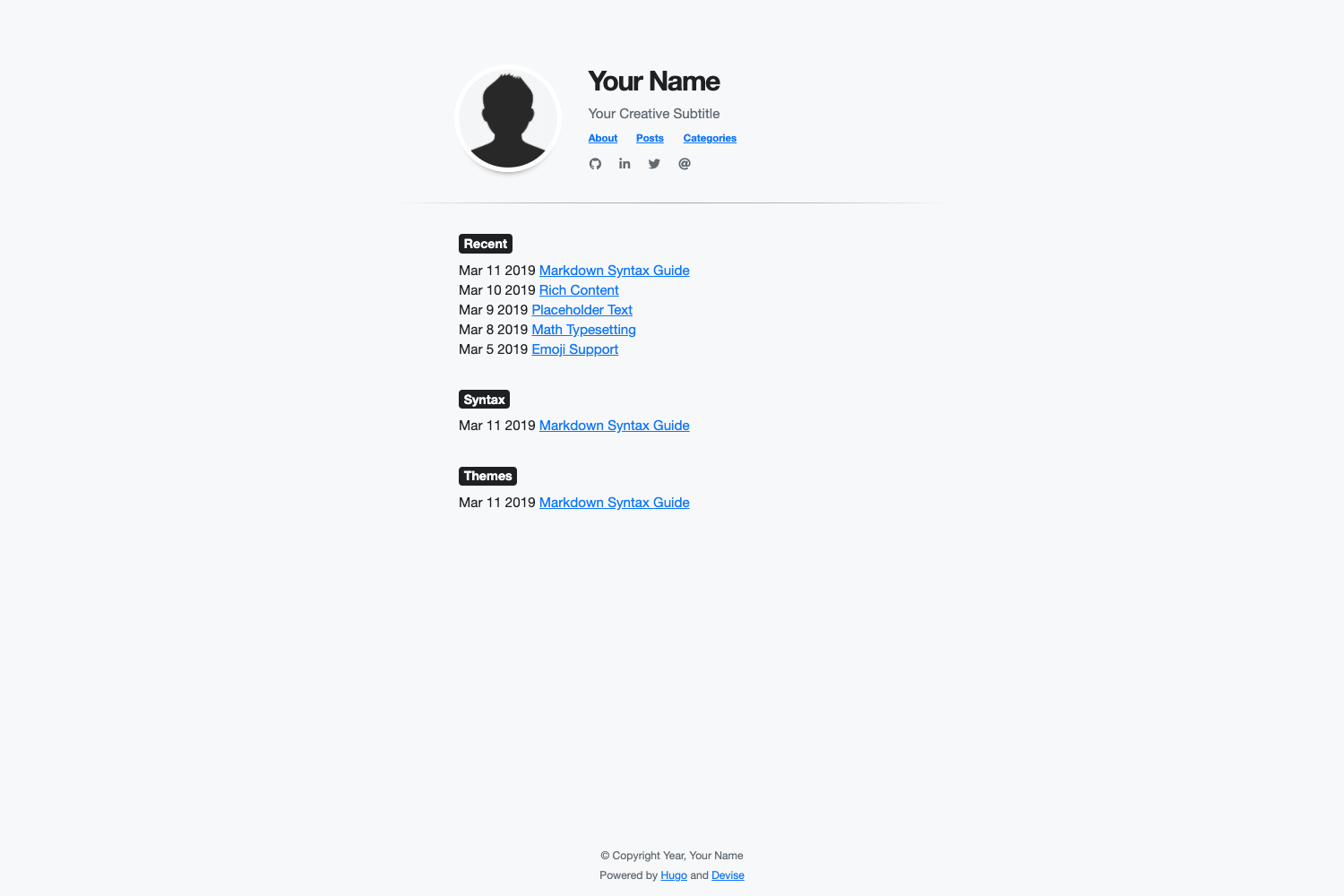
Uses Hugo's built-in content management, with configuration centralized in config.toml
HugoBlog
devise — Hugo Blog Template
By austingebauer
Devise is a minimal, responsive blog theme for Hugo. It customizes appearance through config.toml and Sass, and supports Google Analytics, Bootstrap 4 class names, and Font Awesome icons.
Explore the design
Compare the page layouts and mobile experience. Open any screenshot for a closer look.
Author preview
Author-provided previewTop of page
Preview provided in the project README.
One original preview is available. Open the full image to inspect the design.
Screenshots show visual appearance; interactive behavior may differ.
Recorded 2026-09-30View source
What stands out
A quick read of the recorded project description.
Title, subtitle, home image, navigation menu, social icons, and number of recent posts can be set via config.toml
Supports Bootstrap 4 CSS classes and Font Awesome icons in Markdown
Styles can be overridden via params.style in config.toml, or customized with Sass in assets/sass/custom.scss
Supports Google Analytics integration through Hugo configuration
Provides an exampleSite and local hugo server preview command
Template Details
Devise is a Hugo blog theme developed by austingebauer, positioned as fast, minimal, and responsive. It directly uses Hugo's built-in content management capabilities, with site configuration centralized in config.toml, where you can set the title, subtitle, home image, navigation menu, social icons, number of recent posts, background color, font, and font color. The theme provides configuration integration for Google Analytics and allows the use of Bootstrap 4 CSS classes and Font Awesome icons in Markdown. Styles can be overridden via the params.style parameter in config.toml, or custom styles can be written in Sass in assets/sass/custom.scss. Installation is done by adding the repository as a git submodule to the themes/devise directory of a Hugo site, and updating is done by running git submodule update --remote. The repository includes an exampleSite, which can be previewed locally by running hugo server. The theme is MIT-licensed and can be used, modified, used commercially, and distributed for free, but third-party assets such as demo images, fonts, and icons must be checked separately under their respective licenses.
HugoBlog
Is it right for your project?
Use Cases
- Building a personal blog centered on post lists and recent post displays
- Hugo sites that need quick adjustments to basic appearance such as background color, font, and font color
- Blogs that want to use Bootstrap 4 class names and Font Awesome icons directly in Markdown
- Sites that need Google Analytics integration and social icon link configuration
Suitable For
- Bloggers using Hugo who want to manage site configuration centrally in config.toml
- Personal sites that prefer a minimal, responsive layout and need a few style customization entry points
- Developers who accept installing and updating the theme via git submodule
Getting started & customization
Use these recorded setup notes alongside the repository instructions for your chosen version.
- 1
Before installation, install Hugo and create a new site, then run git submodule add https://github.com/austingebauer/devise.git themes/devise in the site root directory
- 2
Set theme = "devise" in config.toml, and fill in fields under params as needed, such as description, header_title, header_subtitle, home_image, recent_posts, and mainSections
- 3
Social icons are configured via [[params.social]] with fa_icon and href; href supports http://, https://, and mailto:
- 4
Custom styles can be set in [params.style] in config.toml, or added in assets/sass/custom.scss using Sass syntax
- 5
To update the theme, run git submodule update --remote themes/devise in the site root directory; for local preview, run hugo server --themesDir ../.. --watch --verbose --cleanDestinationDir --disableFastRender in the exampleSite directory
License & source material
Usage conditions & limitations
Free to use · keep license noticeThis entry covers the free version in the public repository under the MIT license; the free scope is the code of this version and does not mean that external services or third-party assets are free.
Must comply with when using
- The code of this version may be used, modified, used commercially, and distributed for free.
- When distributing copies or substantial portions of the code, retain the original author's copyright notice and the complete MIT license notice.
- The code is provided as is; warranties and limitations of liability are governed by the original license and applicable law.
Additional costs & items to verify
- Google Analytics is an optional feature; you must register a Google Analytics account and obtain a tracking ID to fill in the configuration. Use of this feature is subject to Google's terms of service and may involve cross-border data and privacy compliance obligations.
- Bootstrap 4 is a third-party front-end library; its own license and version support cycle are independent of this theme's MIT license, and you must check its license terms yourself before commercial use.
- Font Awesome icons are third-party assets; the free and Pro versions have different licenses, and use of the icons must comply with Font Awesome's own license. They cannot be used solely on the basis of this theme's MIT license.
- Using this theme requires installing the Hugo static site generator and creating a site yourself; this is an external tool dependency and is not included with the theme.
- Installation relies on the Git submodule mechanism, requiring a local Git environment and access to the GitHub repository; updating also relies on the git submodule update command.
- Demo images, fonts, icons, and other third-party assets must be checked under their respective licenses and cannot be judged solely by the code's MIT license.
- External services such as domains, hosting, databases, payments, or AI may incur additional charges.
View Original Text Basis
Permission is hereby granted, free of charge
Original License Text
Easy installation of [Google Analytics](https://analytics.google.com/analytics/web/provision/#/provision) via Hugo [configuration](https://gohugo.io/getting-started/configuration/) file
Original README
Ability to use [Bootstrap 4](https://getbootstrap.com/docs/4.0/getting-started/introduction/) CSS classes via HTML/CSS in Markdown
Original README
Ability to use [Font Awesome](https://fontawesome.com/) icons
Original README
Before installing this theme, be sure to [install Hugo](https://gohugo.io/getting-started/quick-start/) and [create a new site](https://gohugo.io/getting-started/quick-start/#step-2-create-a-new-site).
Original README
https://github.com/austingebauer/devise/blob/main/LICENSEhttps://github.com/austingebauer/devise/blob/main/README.md$ git submodule add https://github.com/austingebauer/devise.git themes/devise
Original README
Compiled by DeepSeek based on repository license and README ·2026-10-01. Results only cover the materials read; dependencies, images, fonts, and subsequent term changes are subject to their respective original texts.
Project checks & description sources
Template Information
- Source platforms
- GitHub
- Documentation and maintenance reference score
- More documented · 91 / 100
- Technologies
- Hugo
- Website type
- Blog
How this score is calculated
Our heuristic uses license records (up to 30), a demo link (12), a preview (10), stars (15), recorded maintenance (15), description completeness (8), feature records (5) and classification data (5). It is not a code, security or performance test, or a Google score. A link does not establish tested functionality.
What to verify for this project
- Repository update recorded
- 2025-12-27
- Screenshot last checked
- 2026-10-01
A demo link is listed. Check it with your own content and viewport sizes; its presence does not confirm that forms, authentication or payments work.
The catalog identifies Hugo as the primary stack. Check the actual dependency manifest and lockfile for versions and hosting requirements. These notes use recorded metadata, not a code audit or a deployment test.
Use a selection guide →How this description was prepared
AI-assisted description based on catalog records and repository material. Repository authors are not automatically the reviewers of this description.
Automatically checked against source and license rules; no manual editorial review.
Inspect the recorded source material
SHA-256: 993f54707229837f0429d730fa32b1bce3908602ebe589e4f5cfd47495647226
2026-10-01T15:10:44.325Z
Source file / repository# Devise
A fast, minimal, responsive [Hugo](https://gohugo.io/) theme for blogs.
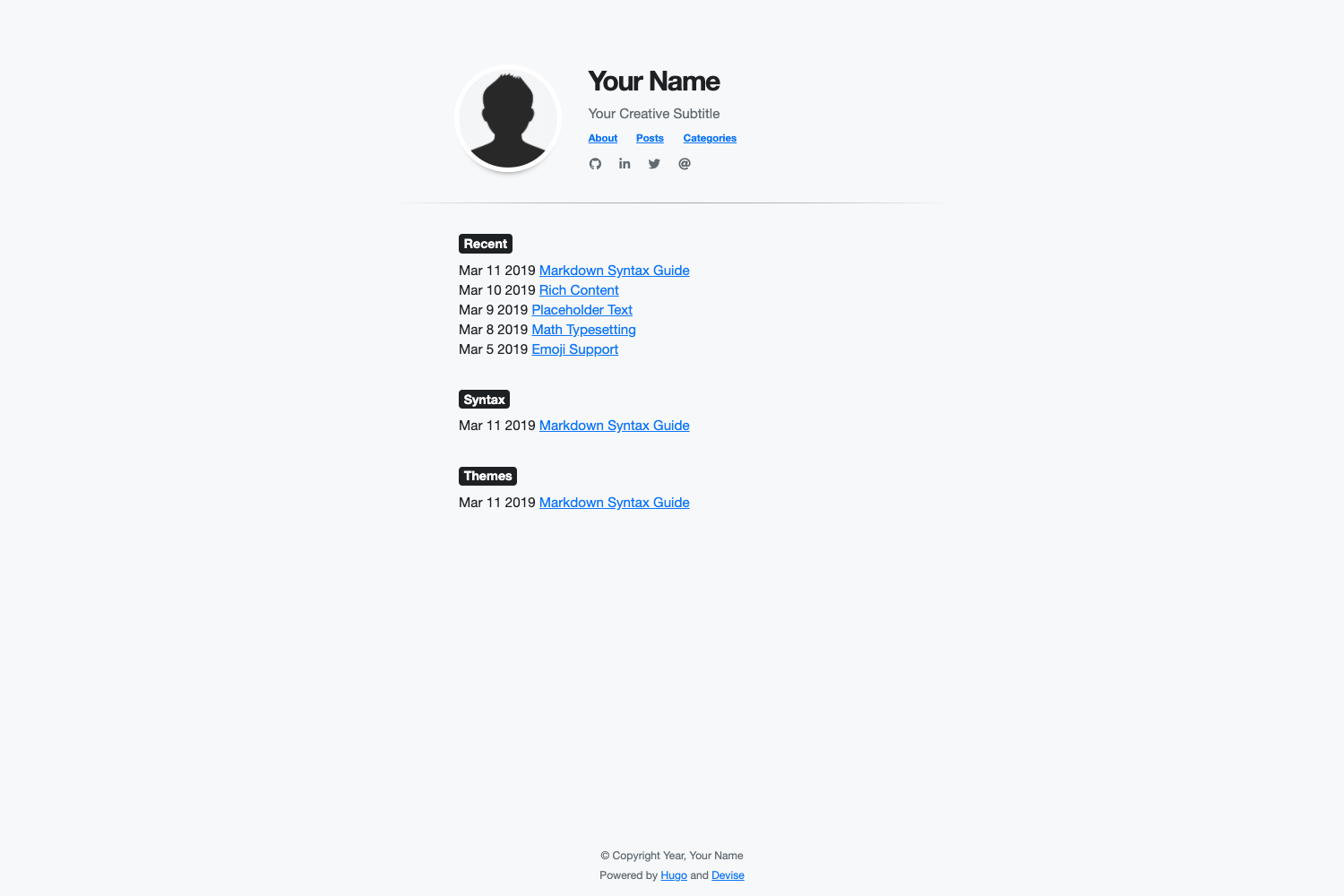
For a live demo of the theme, see at:
- [themes.gohugo.io/devise](https://themes.gohugo.io/devise)
- [austingebauer.com](https://austingebauer.com)
## Features
- All of Hugo's builtin [Content Management](https://gohugo.io/content-management/)
- Easy installation of [Google Analytics](https://analytics.google.com/analytics/web/provision/#/provision) via Hugo [configuration](https://gohugo.io/getting-started/configuration/) file
- Fast loading with a 95-100 score on [Google PageSpeed](https://developers.google.com/speed/pagespeed/insights/)
- Ability to use [Bootstrap 4](https://getbootstrap.com/docs/4.0/getting-started/introduction/) CSS classes via HTML/CSS in Markdown
- Ability to use [Font Awesome](https://fontawesome.com/) icons
- Ability to customize the theme styles via [Sass](https://sass-lang.com/)
- Ability to customize the following items via Hugo [configuration](https://gohugo.io/getting-started/configuration/) file
- Meta description
- Title
- Subtitle
- Image
- Image border color
- Navigation menu
- Social icons
- Last 'n' recent posts
- Background color
- Font family
- Font color
## Usage
This following guides installation, configuration, and updating of the Devise Hugo theme.
### Installation
Before installing this theme, be sure to [install Hugo](https://gohugo.io/getting-started/quick-start/)
and [create a new site](https://gohugo.io/getting-started/quick-start/#step-2-create-a-new-site).
To install the theme, run the following from the root directory of your Hugo site:
```bash
$ git submodule add https://github.com/austingebauer/devise.git themes/devise
```
### Configuration
Next, open the `config.toml` file in the root of your Hugo site and set the theme:
```toml
theme = "devise"
```
Example `config.toml` file with all configuration features filled out:
```toml
baseURL = "https://example.com"
title = "Your Website Title"
languageCode = "en-us"
theme = "devise"
relativeURLs = true
enableEmoji = true
googleAnalytics = ""
enableRobotsTXT = true
copyright = "© Copyright Year, Your Name"
# Main menu items
[menu]
[[menu.main]]
identifier = "about"
name = "About"
title = "About"
url = "/about/"
weight = -110
[[menu.main]]
identifier = "posts"
name = "Posts"
title = "Posts"
url = "/post/"
weight = -100
[[menu.main]]
identifier = "categories"
name = "Categories"
title = "Categories"
url = "/categories/"
weight = -90
# Configuration Features
[params]
description = "Your meta description" # Your meta description of the site
header_title = "Your Name" # Your header title
header_subtitle = "Your Creative Subtitle" # Your header subtitle
home_image = "/images/avatar.png" # Path to header image starting from the static directory (optional)
recent_posts = 5 # Max amount of recent posts to show
mainSections = ["posts", "post", "blog"] # Main sections to include in recent posts
[params.style] # CSS style overrides
backgroundColor = "#f8f9fa"
homeImageBorderColor = "#ffffff"
fontFamilyBase = "Helvetica Neue" # First-choice font
fontColor = "#212529"
[[params.social]]
fa_icon = "fab fa-github fa-1x" # Font Awesome icon class
href = "http://github.com/youruser" # Link to associate with icon (http://, https://, mailto:)
[[params.social]]
fa_icon = "fab fa-linkedin-in fa-1x"
href = ""
[[params.social]]
fa_icon = "fab fa-twitter fa-1x"
href = ""
[[params.social]]
fa_icon = "fas fa-at fa-1x"
href = ""
```
### Updating
To get updates to the theme, run the following from the root directory of your Hugo site:
```
$ git submodule update --remote themes/devise
```
### Adding Custom Styles
Adding custom styles to the devise theme is simple. There are two options
available for doing so.
#### Option 1:
In the `config.toml` file of your website, you can set the following custom style
parameters:
```toml
[params.style]
backgroundColor = "#f8f9fa"
homeImageBorderColor = "#ffffff"
fontFamilyBase = "Helvetica Neue"
fontColor = "#212529"
```
If you'd like to see other custom styles available as config parameters, please open an [issue](https://github.com/austingebauer/devise/issues).
#### Option 2:
To add custom [Sass](https://sass-lang.com/) styles to the devise theme, you'll
need to add the following file to the [assets](https://gohugo.io/hugo-pipes/introduction/#asset-directory)
directory of your site:
- `assets/sass/custom.scss`
In the file, you can use [Sass](https://sass-lang.com/) syntax to declare
your custom styles. After doing so, you should see custom styling added to
your devise based Hugo site.
## Demo
To run a live demo of the theme on your laptop, run the following from the `exampleSite` directory of the
devise theme:
```bash
hugo server --themesDir ../.. --watch --verbose --cleanDestinationDir --disableFastRender
```
For a live demo of the theme, see at:
- [themes.gohugo.io/devise](https://themes.gohugo.io/devise)
- [austingebauer.com](https://austingebauer.com)
## Contributing
If you have an idea for a new feature or found a bug, please feel free to use Github
[issues](https://github.com/austingebauer/devise/issues) to let me know.
## License
[MIT](LICENSE)
Explore similar templates
Compare previews and descriptions within the same stack and category.

hugo-PaperMod
A fast, clean, responsive Hugo theme for blogs and lightweight portfolios, with three layout modes (Regular, Home-Info, Profile), automatic and manual light/dark themes, Fuse.js client-side search, multilingual support, and built-in Open Graph, Twitter Cards, and Schema.org data.
Hugo · Portfolio

LoveIt
LoveIt is a clean, elegant, and feature-rich Hugo blog theme derived from LeaveIt and KeepIt, MIT-licensed. It offers light/dark modes, responsive layout, multilingual support, and search via Lunr.js or Algolia.
Hugo · Blog

hugo-coder
hugo-coder is a minimalist Hugo blog theme maintained by luizdepra under the MIT license. It provides a clean, text-focused blog appearance, configuration documentation in the docs directory, and a complete exampleSite with hugo.toml.
Hugo · Blog

blowfish
Blowfish is a Hugo personal website and blog theme built with Tailwind CSS 4, focused on lightness, simplicity, and content-first presentation.
Hugo · Blog

hugo-paper
hugo-paper is a simple, clean, and customizable Hugo blog theme configured through config.toml or hugo.toml.
Hugo · Blog

hextra
Hextra is a Hugo theme for documentation and blog sites, built on Hugo and Tailwind CSS with design referencing Nextra.
Hugo · Documentation