使用 Hugo 内置内容管理,配置集中在 config.toml
Hugo博客
devise — Hugo 博客模板
作者 austingebauer
Devise 是一个基于 Hugo 的极简响应式博客主题,通过 config.toml 与 Sass 定制外观,支持 Google Analytics、Bootstrap 4 类名和 Font Awesome 图标。
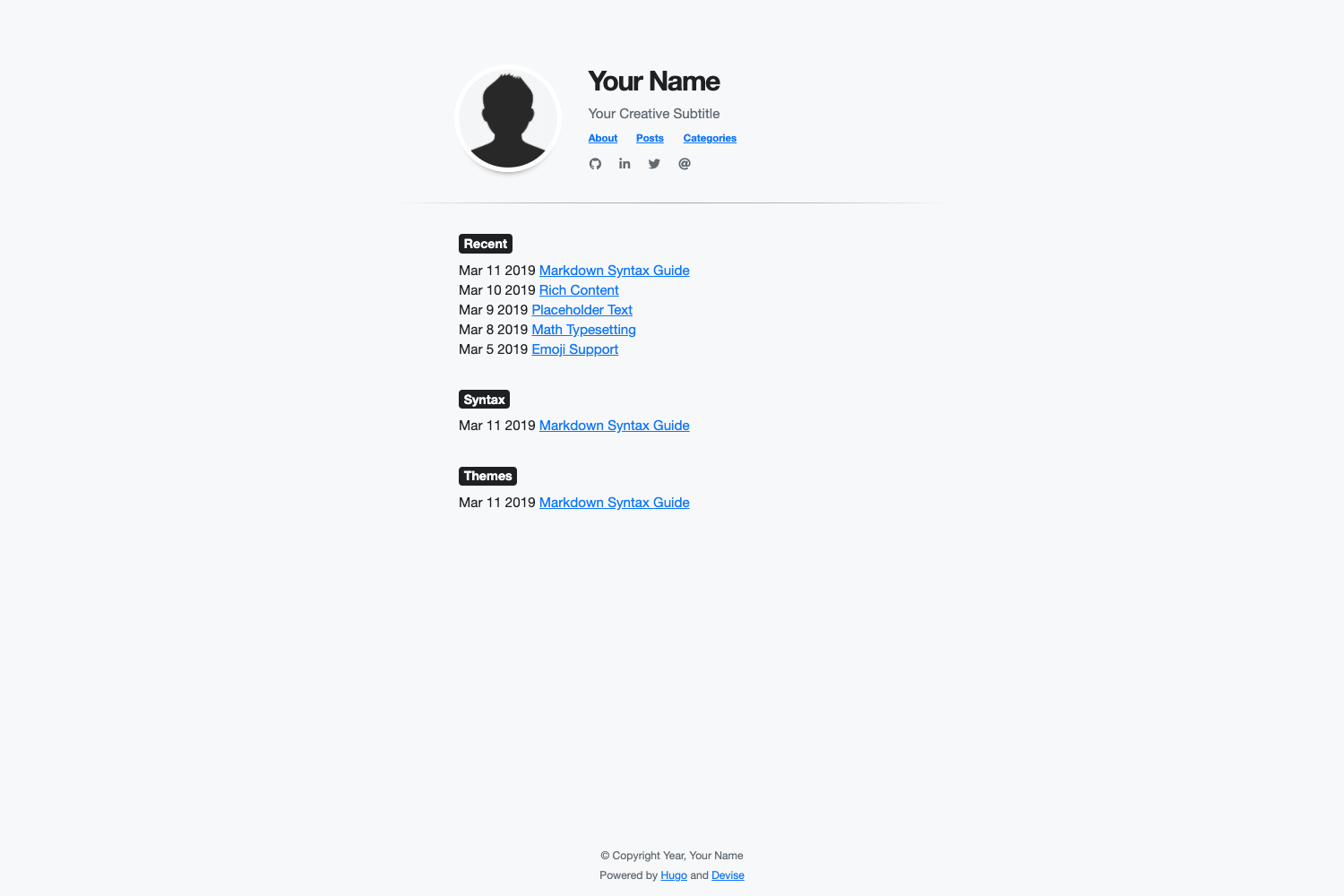
看看你的网站会是什么样
浏览真实页面截图,比较内容排版与手机效果。点击下方缩略图切换,放大查看整页细节。
目前有 1 张原始预览,可打开完整图片查看设计细节。
截图用于了解视觉与布局,交互效果请以实际项目为准。
采集于 2026-09-30查看来源
值得关注的模板亮点
从已有项目资料中,快速了解它的特点。
可通过 config.toml 设置标题、副标题、首页图片、导航菜单、社交图标和最近文章数量
支持在 Markdown 中使用 Bootstrap 4 CSS 类与 Font Awesome 图标
样式可通过 config.toml 的 params.style 覆盖,或通过 assets/sass/custom.scss 用 Sass 自定义
支持通过 Hugo 配置接入 Google Analytics
提供 exampleSite 与本地 hugo server 预览命令
模板详细介绍
Devise 是 austingebauer 开发的 Hugo 博客主题,定位为快速、极简、响应式。它直接使用 Hugo 内置的内容管理能力,站点配置集中在 config.toml 中,可设置标题、副标题、首页图片、导航菜单、社交图标、最近文章数量、背景色、字体和字体颜色等。主题提供 Google Analytics 的配置接入,并允许在 Markdown 中使用 Bootstrap 4 的 CSS 类以及 Font Awesome 图标。样式可通过 config.toml 的 params.style 参数覆盖,也可在 assets/sass/custom.scss 中用 Sass 编写自定义样式。安装方式为将仓库作为 git submodule 添加到 Hugo 站点的 themes/devise 目录,更新时执行 git submodule update --remote。仓库内包含 exampleSite,可运行 hugo server 本地预览。主题采用 MIT 许可,可免费使用、修改、商用和分发,但演示图片、字体、图标等第三方素材需按各自许可单独核对。
Hugo博客
适合你的项目吗?
适用场景
- 搭建以文章列表和最近文章展示为主的个人博客
- 需要快速调整背景色、字体、字体颜色等基础外观的 Hugo 站点
- 希望在 Markdown 中直接使用 Bootstrap 4 类名和 Font Awesome 图标的博客
- 需要接入 Google Analytics 并配置社交图标链接的站点
适合人群
- 使用 Hugo 并希望用 config.toml 集中管理站点配置的博客作者
- 偏好极简响应式布局、需要少量样式定制入口的个人站点
- 接受通过 git submodule 安装和更新主题的开发者
上手与定制指南
结合仓库当前版本的说明,按下面的资料检查内容、配置与运行要求。
- 1
安装前需先安装 Hugo 并创建新站点,然后在站点根目录执行 git submodule add https://github.com/austingebauer/devise.git themes/devise
- 2
在 config.toml 中设置 theme = "devise",并按需填写 params 下的 description、header_title、header_subtitle、home_image、recent_posts、mainSections 等字段
- 3
社交图标通过 [[params.social]] 配置 fa_icon 与 href,href 支持 http://、https:// 和 mailto:
- 4
自定义样式可在 config.toml 的 [params.style] 中设置,或添加 assets/sass/custom.scss 使用 Sass 语法
- 5
更新主题时在站点根目录执行 git submodule update --remote themes/devise;本地预览可在 exampleSite 目录运行 hugo server --themesDir ../.. --watch --verbose --cleanDestinationDir --disableFastRender
授权与来源资料
使用条件与限制
免费使用 · 保留许可声明本次收录的是公开仓库中采用 MIT 许可的免费版本;免费范围为该版本代码,不代表外部服务或第三方素材免费。
使用时需要遵守
- 允许免费使用、修改、商用和分发该版本代码。
- 分发代码副本或实质性部分时,保留原作者版权声明和完整 MIT 许可声明。
- 代码按现状提供;担保与责任限制以原许可证及适用法律为准。
额外费用与待核对事项
- Google Analytics 为可选功能,需自行注册 Google Analytics 账号并获取跟踪 ID 填入配置;使用该功能受 Google 服务条款约束,可能涉及数据跨境与隐私合规义务。
- Bootstrap 4 为第三方前端库,其自身许可与版本支持周期独立于本主题的 MIT 许可,商用前需自行核对其许可条款。
- Font Awesome 图标为第三方素材,免费版与 Pro 版许可不同,使用图标需遵守 Font Awesome 自身许可,不能仅凭本主题的 MIT 许可使用。
- 使用本主题需预先自行安装 Hugo 静态站点生成器并创建站点,属于外部工具依赖,非主题自带。
- 安装依赖 Git 子模块机制,需本地具备 Git 环境并能访问 GitHub 仓库;更新同样依赖 git submodule update 命令。
- 演示图片、字体、图标及其他第三方素材需按各自许可核对,不能仅凭代码的 MIT 许可判断。
- 域名、托管、数据库、支付或 AI 等外部服务可能另外收费。
查看原文依据
Permission is hereby granted, free of charge
许可证原文
Easy installation of [Google Analytics](https://analytics.google.com/analytics/web/provision/#/provision) via Hugo [configuration](https://gohugo.io/getting-started/configuration/) file
README 原文
Ability to use [Bootstrap 4](https://getbootstrap.com/docs/4.0/getting-started/introduction/) CSS classes via HTML/CSS in Markdown
README 原文
Ability to use [Font Awesome](https://fontawesome.com/) icons
README 原文
Before installing this theme, be sure to [install Hugo](https://gohugo.io/getting-started/quick-start/) and [create a new site](https://gohugo.io/getting-started/quick-start/#step-2-create-a-new-site).
README 原文
https://github.com/austingebauer/devise/blob/main/LICENSEhttps://github.com/austingebauer/devise/blob/main/README.md$ git submodule add https://github.com/austingebauer/devise.git themes/devise
README 原文
DeepSeek 根据仓库许可证和 README 整理 ·2026-10-01。结果仅覆盖已读取资料,依赖、图片、字体及后续条款变更以各自原文为准。
项目核对记录与介绍依据
模板资料
- 来源平台
- GitHub
- 资料与维护参考分
- 资料较完整 · 91 / 100
- 技术栈
- Hugo
- 网站类型
- 博客
这个分数如何计算
本站按许可资料(最高30分)、演示链接(12分)、预览图(10分)、Star数(15分)、记录的维护时间(15分)、描述完整度(8分)、功能记录(5分)和分类资料(5分)计算。它不是代码、安全或性能测试,也不是 Google 评分;有链接不代表已实测可用。
这个项目需要核对什么
- 记录的仓库更新时间
- 2025-12-27
- 截图检查日期
- 2026-10-01
已收录演示链接。请用你的内容与屏幕尺寸检查;有演示不代表表单、认证或支付已经可用。
目录记录的主要技术栈是 Hugo。请通过依赖清单和锁文件核对实际版本与托管要求。这些说明基于收录资料,不代表代码审计或部署实测。
查看具体选型方法 →介绍的制作与核对状态
介绍由 AI 辅助整理目录与仓库资料。仓库作者不等于这篇介绍的审核者。
已完成服务器许可规则与 AI 来源核对;未经过人工编辑审核。
查看当时使用的来源资料
SHA-256: 993f54707229837f0429d730fa32b1bce3908602ebe589e4f5cfd47495647226
2026-10-01T15:10:44.325Z
来源文件 / 仓库# Devise
A fast, minimal, responsive [Hugo](https://gohugo.io/) theme for blogs.
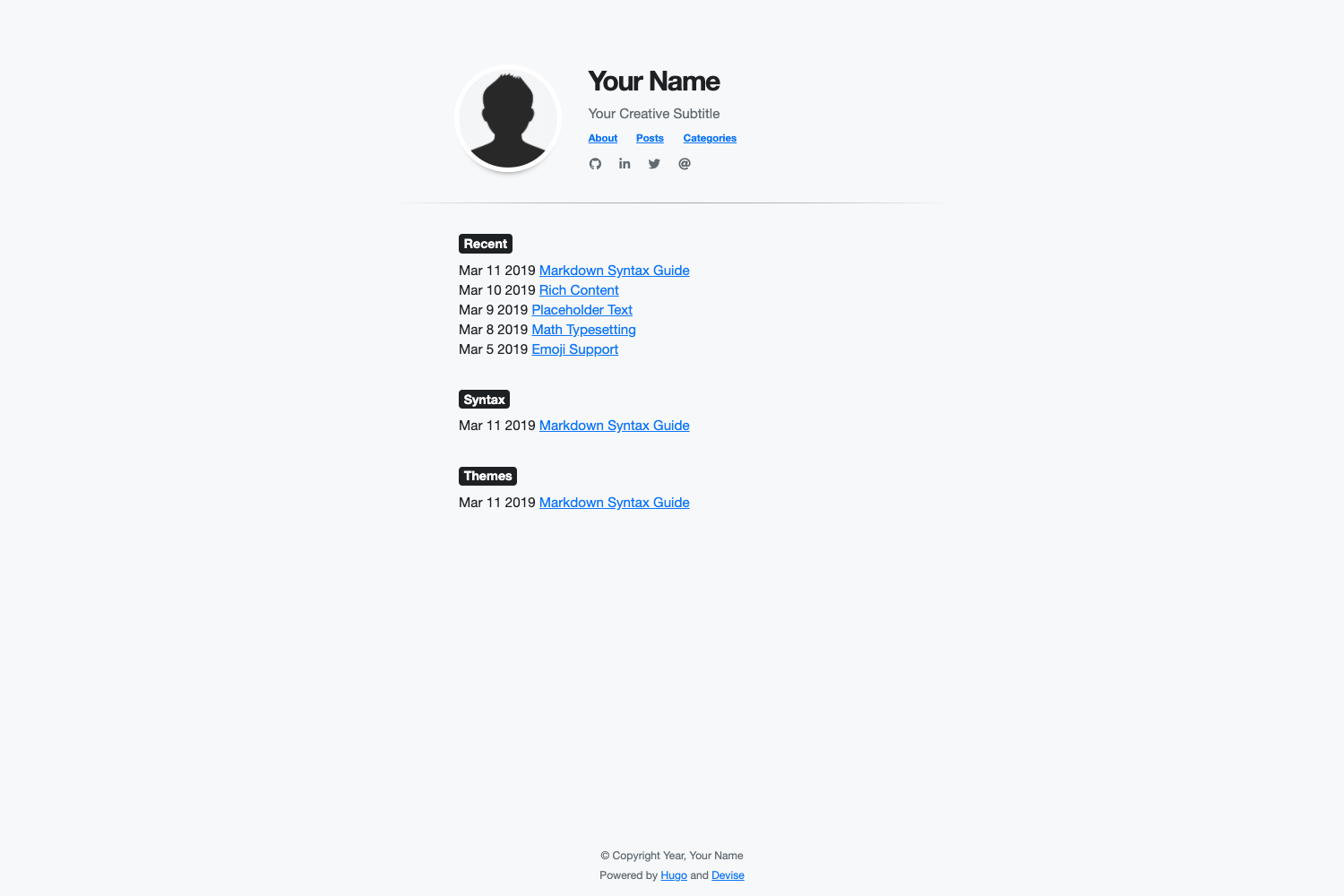
For a live demo of the theme, see at:
- [themes.gohugo.io/devise](https://themes.gohugo.io/devise)
- [austingebauer.com](https://austingebauer.com)
## Features
- All of Hugo's builtin [Content Management](https://gohugo.io/content-management/)
- Easy installation of [Google Analytics](https://analytics.google.com/analytics/web/provision/#/provision) via Hugo [configuration](https://gohugo.io/getting-started/configuration/) file
- Fast loading with a 95-100 score on [Google PageSpeed](https://developers.google.com/speed/pagespeed/insights/)
- Ability to use [Bootstrap 4](https://getbootstrap.com/docs/4.0/getting-started/introduction/) CSS classes via HTML/CSS in Markdown
- Ability to use [Font Awesome](https://fontawesome.com/) icons
- Ability to customize the theme styles via [Sass](https://sass-lang.com/)
- Ability to customize the following items via Hugo [configuration](https://gohugo.io/getting-started/configuration/) file
- Meta description
- Title
- Subtitle
- Image
- Image border color
- Navigation menu
- Social icons
- Last 'n' recent posts
- Background color
- Font family
- Font color
## Usage
This following guides installation, configuration, and updating of the Devise Hugo theme.
### Installation
Before installing this theme, be sure to [install Hugo](https://gohugo.io/getting-started/quick-start/)
and [create a new site](https://gohugo.io/getting-started/quick-start/#step-2-create-a-new-site).
To install the theme, run the following from the root directory of your Hugo site:
```bash
$ git submodule add https://github.com/austingebauer/devise.git themes/devise
```
### Configuration
Next, open the `config.toml` file in the root of your Hugo site and set the theme:
```toml
theme = "devise"
```
Example `config.toml` file with all configuration features filled out:
```toml
baseURL = "https://example.com"
title = "Your Website Title"
languageCode = "en-us"
theme = "devise"
relativeURLs = true
enableEmoji = true
googleAnalytics = ""
enableRobotsTXT = true
copyright = "© Copyright Year, Your Name"
# Main menu items
[menu]
[[menu.main]]
identifier = "about"
name = "About"
title = "About"
url = "/about/"
weight = -110
[[menu.main]]
identifier = "posts"
name = "Posts"
title = "Posts"
url = "/post/"
weight = -100
[[menu.main]]
identifier = "categories"
name = "Categories"
title = "Categories"
url = "/categories/"
weight = -90
# Configuration Features
[params]
description = "Your meta description" # Your meta description of the site
header_title = "Your Name" # Your header title
header_subtitle = "Your Creative Subtitle" # Your header subtitle
home_image = "/images/avatar.png" # Path to header image starting from the static directory (optional)
recent_posts = 5 # Max amount of recent posts to show
mainSections = ["posts", "post", "blog"] # Main sections to include in recent posts
[params.style] # CSS style overrides
backgroundColor = "#f8f9fa"
homeImageBorderColor = "#ffffff"
fontFamilyBase = "Helvetica Neue" # First-choice font
fontColor = "#212529"
[[params.social]]
fa_icon = "fab fa-github fa-1x" # Font Awesome icon class
href = "http://github.com/youruser" # Link to associate with icon (http://, https://, mailto:)
[[params.social]]
fa_icon = "fab fa-linkedin-in fa-1x"
href = ""
[[params.social]]
fa_icon = "fab fa-twitter fa-1x"
href = ""
[[params.social]]
fa_icon = "fas fa-at fa-1x"
href = ""
```
### Updating
To get updates to the theme, run the following from the root directory of your Hugo site:
```
$ git submodule update --remote themes/devise
```
### Adding Custom Styles
Adding custom styles to the devise theme is simple. There are two options
available for doing so.
#### Option 1:
In the `config.toml` file of your website, you can set the following custom style
parameters:
```toml
[params.style]
backgroundColor = "#f8f9fa"
homeImageBorderColor = "#ffffff"
fontFamilyBase = "Helvetica Neue"
fontColor = "#212529"
```
If you'd like to see other custom styles available as config parameters, please open an [issue](https://github.com/austingebauer/devise/issues).
#### Option 2:
To add custom [Sass](https://sass-lang.com/) styles to the devise theme, you'll
need to add the following file to the [assets](https://gohugo.io/hugo-pipes/introduction/#asset-directory)
directory of your site:
- `assets/sass/custom.scss`
In the file, you can use [Sass](https://sass-lang.com/) syntax to declare
your custom styles. After doing so, you should see custom styling added to
your devise based Hugo site.
## Demo
To run a live demo of the theme on your laptop, run the following from the `exampleSite` directory of the
devise theme:
```bash
hugo server --themesDir ../.. --watch --verbose --cleanDestinationDir --disableFastRender
```
For a live demo of the theme, see at:
- [themes.gohugo.io/devise](https://themes.gohugo.io/devise)
- [austingebauer.com](https://austingebauer.com)
## Contributing
If you have an idea for a new feature or found a bug, please feel free to use Github
[issues](https://github.com/austingebauer/devise/issues) to let me know.
## License
[MIT](LICENSE)
看看同类模板
对比同技术栈与用途的模板,找到更适合的视觉与内容结构。

hugo-PaperMod
PaperMod 是 Hugo 生态里知名度较高的主题之一,定位很明确:给博客和轻量作品集站点提供一套干净、响应式的阅读界面。
Hugo · 作品集

LoveIt
❤️A clean, elegant but advanced blog theme for Hugo 一个简洁、优雅且高效的 Hugo 主题
Hugo · 博客

hugo-coder
A minimalist blog theme for hugo.
Hugo · 博客

blowfish
Personal Website & Blog Theme for Hugo
Hugo · 博客

hugo-paper
🪺 A simple, clean, customizable Hugo theme
Hugo · 博客

hextra
Hextra 是一个 Hugo 主题,定位在文档站与博客之间:既提供侧边栏导航、目录、面包屑、分页这类文档站结构,也能承载博客内容。
Hugo · 文档