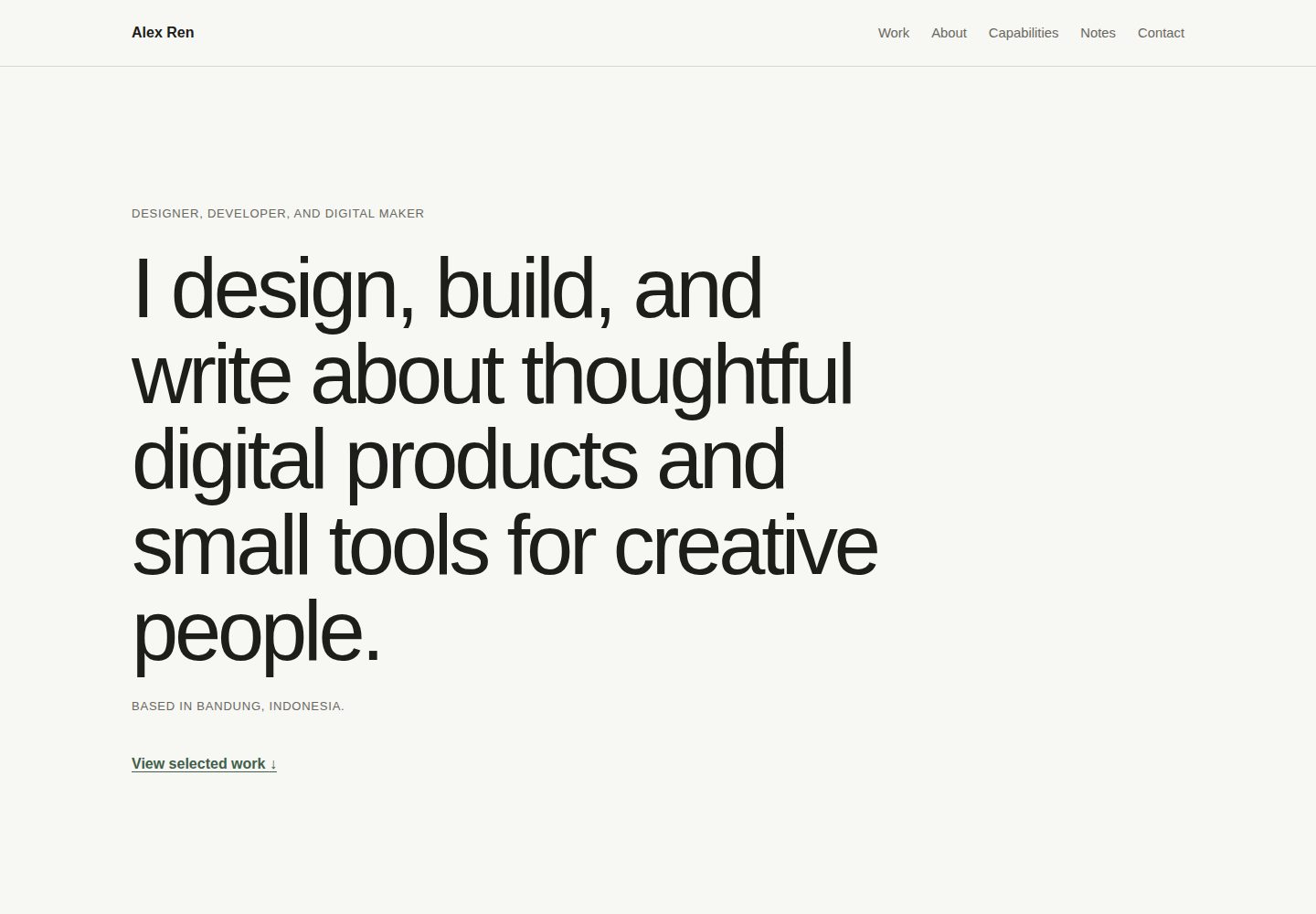
Semantic single-page HTML structure with selected work, about, capabilities, notes, and contact sections
HTMLPortfolio
calmfolio — HTML Portfolio Template
By awekhstudio
Calmfolio is an open-source single-page HTML portfolio template released by awekh studio, built with HTML5, CSS, and vanilla JavaScript, with no frameworks, no dependencies, and no build step, aimed at developers, designers, writers, content creators, podcasters, and other digital creators.
Explore the design
Compare the page layouts and mobile experience. Open any screenshot for a closer look.
Desktop homepage1 / 2
Desktop captureTop of page
Actual screenshot captured by the server browser.
All pages & views 2
Screenshots show visual appearance; interactive behavior may differ.
Recorded 2026-10-13View source
What stands out
A quick read of the recorded project description.
Mobile-first responsive layout with an accessible mobile navigation that uses progressive enhancement
No frameworks, no dependencies, no package managers, and no build step; the stack is HTML5, CSS, and vanilla JavaScript
Includes skip links, logical heading hierarchy, visible keyboard focus states, and prefers-reduced-motion support
Colors, spacing, container width, and border radius are adjusted uniformly via custom properties at the top of assets/css/style.css
All project paths are relative, so it can run from a domain root, a GitHub Pages subdirectory, or by opening index.html directly
Template Details
Calmfolio is a quiet, minimal single-page portfolio template. The README positions it as a responsive single-page portfolio for digital creators (developers, designers, writers, content creators, podcasters, etc.), and as awekh studio's first open-source template, emphasizing ease of understanding, customization, and publishing.
The page structure is semantic single-page HTML, with sections including selected work, about, capabilities, notes, and contact. It uses a mobile-first responsive layout and provides an accessible mobile navigation with progressive enhancement. The template includes clear keyboard focus states, support for prefers-reduced-motion, and lightweight hover and interaction states.
The tech stack is HTML5, CSS, and vanilla JavaScript, with no frameworks, dependencies, package managers, or build steps. All project paths are relative, so it can run from a domain root, a GitHub Pages /calmfolio/ subdirectory, or by opening index.html directly. The README states it targets current versions of Chrome, Edge, Firefox, and Safari, remains readable when JavaScript is disabled, and that older browsers may not fully reproduce spacing or sizing details.
For customization, the README gives specific locations: in index.html, replace .site-name, the page title, metadata and footer copyright, the h1 inside #home, .hero-meta, the articles inside .work-list, the paragraphs inside #about, the .capabilities-list list, the articles inside .notes-grid, and the links inside .contact-links; search for Alex Ren, example.com, and username to locate example placeholder content. Visual tokens are modified in the custom properties at the top of assets/css/style.css, including colors, spacing, container width, and border radius. The README advises maintaining sufficient contrast when changing colors and testing on mobile and desktop.
The README does not provide information on performance metrics, SEO effectiveness, technical limitations beyond browser compatibility details, or production readiness, nor does it mention deployment methods other than GitHub Pages, Netlify, Cloudflare Pages, and shared hosting.
HTMLPortfolio
Is it right for your project?
Use Cases
- Developers, designers, writers, content creators, or podcasters building a personal single-page portfolio
- Static site projects that require directly editing HTML and CSS without introducing build tools or dependencies
- Deploying to static hosting environments such as GitHub Pages, Netlify, Cloudflare Pages, or shared hosting
- Using it as a reference template for learning semantic HTML, responsive CSS, and progressively enhanced JavaScript
Suitable For
- Digital creators who want to maintain a personal portfolio with pure HTML, CSS, and vanilla JavaScript
- Static site users who prefer no build step, no dependencies, and previewing by opening index.html directly
- Users who need to deploy the template to GitHub Pages, Netlify, Cloudflare Pages, or shared hosting
- Developers who value keyboard focus states, reduced motion support, and semantic structure
Getting started & customization
Use these recorded setup notes alongside the repository instructions for your chosen version.
- 1
Download the ZIP, extract it, and open index.html directly, or use git clone https://github.com/awekhstudio/calmfolio.git and then open index.html; no installation, npm, local server, or build process is required
- 2
In index.html, replace placeholder content such as the name, title, metadata, footer copyright, h1, .hero-meta, .work-list, #about, .capabilities-list, .notes-grid, and .contact-links; search for Alex Ren, example.com, and username to locate them quickly
- 3
At the top of assets/css/style.css, modify custom properties such as --background, --surface, --text-primary, --text-secondary, --border, --accent, --space, --container-width, and --radius, and be mindful of maintaining contrast
- 4
When replacing calmfolio-desktop.jpg, calmfolio-mobile.jpg, and calmfolio-cover.jpg (recommended 1200 × 630 px) in the preview/ directory, keep the file names unchanged
- 5
After changing the public URL, update the canonical URL, Open Graph URL, preview image URL in index.html, and the address in sitemap.xml
License & source material
Usage conditions & limitations
Free to use · keep license noticeThis entry covers the free version in the public repository under the MIT license; the free scope is the code of that version and does not mean external services or third-party assets are free.
Must comply with when using
- Free use, modification, commercial use, and distribution of this version's code are permitted.
- When distributing copies or substantial portions of the code, retain the original author's copyright notice and the full MIT license notice.
- The code is provided as is; warranties and limitations of liability are governed by the original license and applicable law.
Additional costs & items to verify
- Demo images, fonts, icons, and other third-party assets must be checked against their respective licenses and cannot be judged solely by the code's MIT license.
- External services such as domains, hosting, databases, payments, or AI may incur separate charges.
View Original Text Basis
https://github.com/awekhstudio/calmfolio/blob/main/LICENSEhttps://github.com/awekhstudio/calmfolio/blob/main/README.mdPermission is hereby granted, free of charge
Original License Text
Compiled by DeepSeek based on repository license and README ·2026-10-13. Results only cover the materials read; dependencies, images, fonts, and subsequent term changes are subject to their respective original texts.
Project checks & description sources
Template Information
- Source platforms
- GitHub
- Documentation and maintenance reference score
- More documented · 83 / 100
- Technologies
- HTML
- Website type
- Portfolio
How this score is calculated
Our heuristic uses license records (up to 30), a demo link (12), a preview (10), stars (15), recorded maintenance (15), description completeness (8), feature records (5) and classification data (5). It is not a code, security or performance test, or a Google score. A link does not establish tested functionality.
What to verify for this project
- Repository update recorded
- 2026-07-27
- Screenshot last checked
- 2026-10-13
A demo link is listed. Check it with your own content and viewport sizes; its presence does not confirm that forms, authentication or payments work.
The catalog identifies HTML as the primary stack. Check the actual dependency manifest and lockfile for versions and hosting requirements. These notes use recorded metadata, not a code audit or a deployment test.
Use a selection guide →How this description was prepared
AI-assisted description based on catalog records and repository material. Repository authors are not automatically the reviewers of this description.
Review declaration: codex-user-requested-batch-review-20261015 · 2026-10-15
Inspect the recorded source material
SHA-256: 30954098b2963c430570c09c92961167de617eb301f52af7a9e112b0adbae198
2026-10-13T16:07:10.604Z
Source file / repository# Calmfolio > A calm and minimal HTML portfolio template for digital makers.  ## Live demo [View the Calmfolio demo](https://awekhstudio.github.io/calmfolio/) > The demo URL is ready for GitHub Pages and will work after Pages is enabled for the repository. ## About Calmfolio is a quiet, responsive one-page portfolio for developers, designers, writers, content creators, podcasters, and other digital makers. It is the first open-source template from **awekh studio** and is intentionally easy to understand, customize, and publish. ## Features - Semantic single-page HTML structure - Mobile-first responsive layout - Accessible mobile navigation with progressive enhancement - Selected work, about, capabilities, notes, and contact sections - Clear keyboard focus states - Reduced-motion support - Lightweight hover and interaction states - No framework, dependencies, package manager, or build step ## Tech stack - HTML5 - CSS - Vanilla JavaScript ## Getting started ### Download ZIP 1. Download the repository as a ZIP from GitHub. 2. Extract the archive. 3. Open `index.html` in your browser. ### Clone with Git ```sh git clone https://github.com/awekhstudio/calmfolio.git cd calmfolio ``` Then open `index.html` in your browser. Calmfolio does not need installation, npm, a local server, or a build process. ## Project structure ```text calmfolio/ ├── .github/ │ ├── ISSUE_TEMPLATE/ │ │ ├── bug_report.md │ │ └── feature_request.md │ └── pull_request_template.md ├── assets/ │ ├── css/ │ │ ├── reset.css │ │ └── style.css │ ├── icons/ │ │ └── favicon.svg │ ├── images/ │ │ ├── profile/ │ │ └── projects/ │ └── js/ │ └── main.js ├── preview/ │ ├── calmfolio-cover.jpg │ ├── calmfolio-desktop.jpg │ └── calmfolio-mobile.jpg ├── .editorconfig ├── .gitignore ├── 404.html ├── CHANGELOG.md ├── CONTRIBUTING.md ├── LICENSE ├── README.md ├── SECURITY.md ├── index.html ├── robots.txt └── sitemap.xml ``` ## Customization ### Content Edit `index.html` to replace: - **Name:** the `.site-name`, page title, metadata, and footer copyright - **Headline:** the `<h1>` inside `#home` - **Location:** `.hero-meta` - **Projects:** the articles inside `.work-list` - **About:** the paragraphs inside `#about` - **Capabilities:** the list inside `.capabilities-list` - **Notes:** the articles inside `.notes-grid` - **Contact links:** the links inside `.contact-links` Search for `Alex Ren`, `example.com`, and `username` to find the main demo placeholders quickly. ### Visual tokens Edit the custom properties at the top of `assets/css/style.css`: - **Colors:** `--background`, `--surface`, `--text-primary`, `--text-secondary`, `--border`, and `--accent` - **Spacing:** `--space` - **Container width:** `--container-width` - **Corner radius:** `--radius` Keep sufficient contrast when changing colors and test the result at mobile and desktop sizes. ### Metadata and preview assets Update the metadata in the `<head>` of `index.html`. Comments identify the canonical URL, public preview URL, cover image, and favicon that should be changed for a personal deployment. The images in `preview/` are release placeholders. Replace them while keeping these filenames: - `calmfolio-desktop.jpg` — suggested desktop screenshot - `calmfolio-mobile.jpg` — suggested mobile screenshot - `calmfolio-cover.jpg` — suggested 1200 × 630 px social and README cover ## Deployment All project paths are relative, so Calmfolio works from a domain root, the GitHub Pages `/calmfolio/` subfolder, or directly from `index.html`. ### GitHub Pages 1. Push the repository to `https://github.com/awekhstudio/calmfolio`. 2. On GitHub, open **Settings → Pages**. 3. Under **Build and deployment**, choose **Deploy from a branch**. 4. Select the `main` branch and the `/ (root)` folder, then save. 5. The site will be available at `https://awekhstudio.github.io/calmfolio/`. No workflow file or build command is required. ### Netlify Import the Git repository or drag the project folder into Netlify Drop. Leave the build command empty and use the repository root as the publish directory. ### Cloudflare Pages Connect the Git repository, choose no framework preset, leave the build command empty, and use the repository root as the output directory. ### Shared hosting Upload the contents of the repository to the public web directory using your hosting control panel or FTP. Make sure `index.html` remains beside `assets/`. After choosing a different public URL, update the canonical URL, Open Graph URL, preview image URLs in `index.html`, and the location in `sitemap.xml`. ## Accessibility Calmfolio includes semantic landmarks, a skip link, logical heading hierarchy, visible keyboard focus states, accessible navigation labels, progressive enhancement, and support for `prefers-reduced-motion`. Custom content and color changes should be reviewed for meaningful link text, heading order, image alternatives, and sufficient contrast. ## Browser support Calmfolio targets current versions of Chrome, Edge, Firefox, and Safari. It uses standard HTML, CSS, and JavaScript and remains readable when JavaScript is disabled. Older browsers may not reproduce every spacing or sizing detail. ## Roadmap - Replace release preview placeholders with final screenshots - Gather feedback from the first public release - Refine documentation and examples without adding unnecessary complexity Major features and new dependencies are not planned without prior discussion. ## Contributing Small, focused improvements are welcome. Read [CONTRIBUTING.md](CONTRIBUTING.md) before opening an issue or pull request. ## License Calmfolio is available under the [MIT License](LICENSE). ## Credits Designed and maintained by [awekh studio](https://github.com/awekhstudio).
Explore similar templates
Compare previews and descriptions within the same stack and category.

simplefolio
Simplefolio is a minimal single-page portfolio template for developers, built with HTML, Bootstrap, SCSS, and Parcel under the MIT license. It includes Hero, About, Projects, Contact, and Footer sections, with content edited in /src/index.html and theme colors controlled by two SCSS variables.
HTML · Portfolio

Freelancer
A bright, single-page Bootstrap portfolio template for freelancers, designers, and small studios. It includes a responsive portfolio grid with modal detail windows and an SB Forms contact form that requires an API token.
HTML · Portfolio

Resume
A single-page resume and CV template from Start Bootstrap, built on Bootstrap with a fixed sidebar and content sections.
HTML · Portfolio

Creative
A single-page marketing template by Start Bootstrap for creative agencies and product services, built on Bootstrap with SCSS, featuring a portfolio grid and call-to-action sections. It includes pre-set SB Forms markers for form integration and npm build scripts for source customization.
HTML · Corporate Website

Grayscale
A dark single-page Bootstrap template from Start Bootstrap for photography, events and brand storytelling, with a large hero and clearly separated sections.
HTML · Corporate Website

startbootstrap-stylish-portfolio
A one-page Bootstrap portfolio theme from Start Bootstrap with multiple content sections and an off-canvas navigation menu. Basic use means editing HTML/CSS under dist and opening index.html; advanced use relies on npm with Pug and SCSS build scripts.
HTML · Portfolio