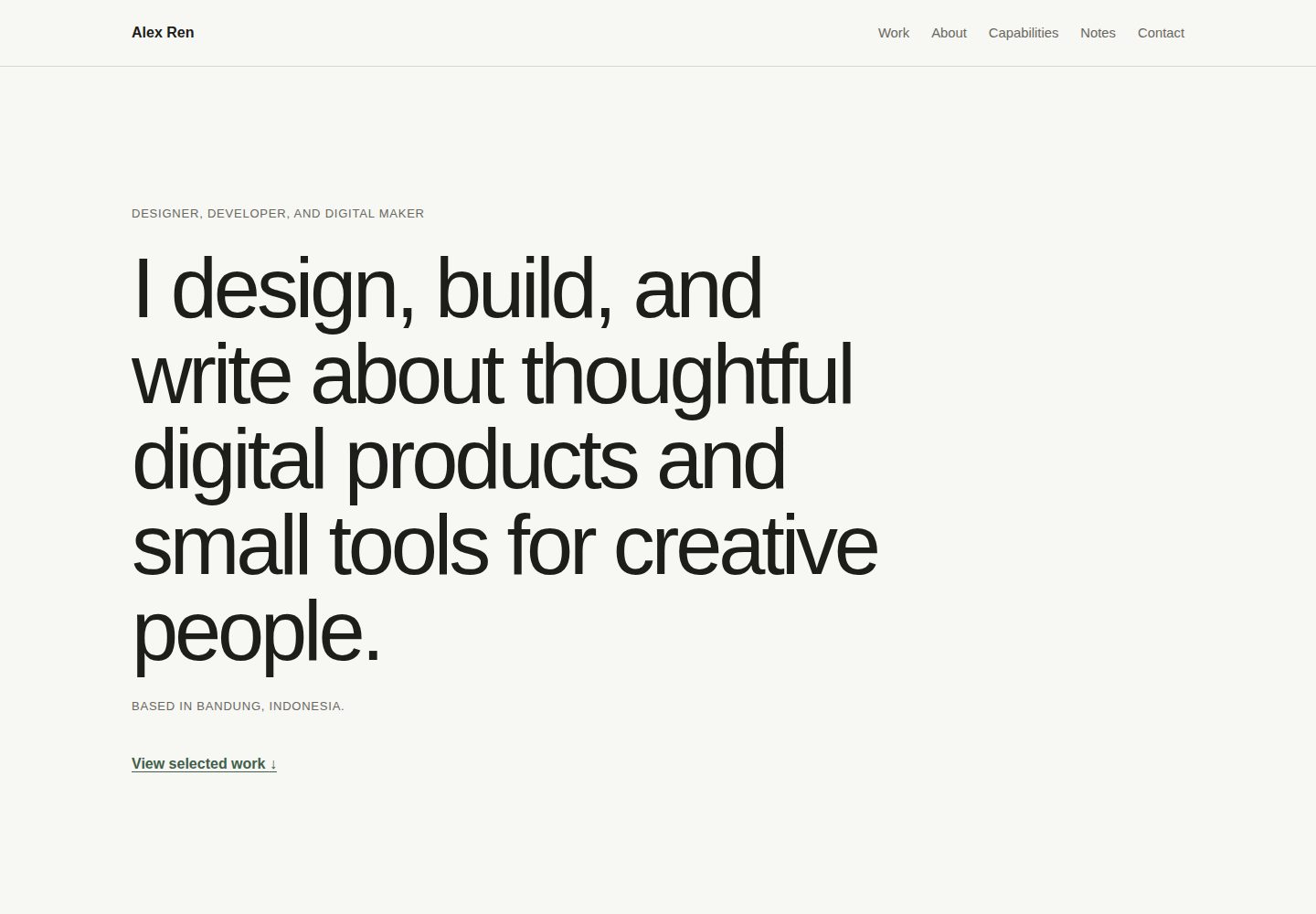
语义化单页 HTML 结构,包含 selected work、about、capabilities、notes 与 contact 区块
HTML作品集
calmfolio — HTML 作品集模板
作者 awekhstudio
Calmfolio 是 awekh studio 发布的开源单页 HTML 作品集模板,使用 HTML5、CSS 与原生 JavaScript,无框架、无依赖、无构建步骤,面向开发者、设计师、写作者、内容创作者与播客等数字创作者。
看看你的网站会是什么样
浏览真实页面截图,比较内容排版与手机效果。点击下方缩略图切换,放大查看整页细节。
全部页面与视图 2
截图用于了解视觉与布局,交互效果请以实际项目为准。
采集于 2026-10-13查看来源
值得关注的模板亮点
从已有项目资料中,快速了解它的特点。
移动优先的响应式布局,并提供带渐进增强的可访问移动导航
无框架、无依赖、无包管理器、无构建步骤,技术栈为 HTML5、CSS 与原生 JavaScript
包含跳转链接、逻辑标题层级、可见键盘焦点状态与 prefers-reduced-motion 支持
通过 assets/css/style.css 顶部的自定义属性统一调整颜色、间距、容器宽度与圆角
所有项目路径为相对路径,可从域名根目录、GitHub Pages 子目录或直接打开 index.html 运行
模板详细介绍
Calmfolio 是一个安静、极简的单页作品集模板,README 将其定位为面向数字创作者(开发者、设计师、写作者、内容创作者、播客等)的响应式单页作品集,也是 awekh studio 的第一个开源模板,强调易于理解、定制和发布。
页面结构为语义化单页 HTML,包含 selected work、about、capabilities、notes 和 contact 等区块,采用移动优先的响应式布局,并提供带渐进增强的可访问移动导航。模板包含清晰的键盘焦点状态、对 prefers-reduced-motion 的支持,以及轻量的悬停与交互状态。
技术栈为 HTML5、CSS 和原生 JavaScript,不使用框架、依赖、包管理器或构建步骤。项目路径全部为相对路径,因此可以从域名根目录、GitHub Pages 的 /calmfolio/ 子目录或直接打开 index.html 运行。README 说明其面向 Chrome、Edge、Firefox、Safari 的当前版本,在 JavaScript 被禁用时仍可阅读,旧版浏览器可能无法完全还原间距或尺寸细节。
定制方面,README 给出具体位置:在 index.html 中替换 .site-name、页面标题、元数据与页脚版权、#home 内的 h1、.hero-meta、.work-list 内的文章、#about 内的段落、.capabilities-list 列表、.notes-grid 内的文章以及 .contact-links 内的链接;可搜索 Alex Ren、example.com 和 username 定位示例占位内容。视觉令牌在 assets/css/style.css 顶部的自定义属性中修改,包括颜色、间距、容器宽度和圆角,README 提醒改色时保持足够对比度并在移动端与桌面端测试。
README 未提供关于性能指标、SEO 效果、浏览器兼容性细节之外的技术限制或生产就绪程度的说明,也未提及除 GitHub Pages、Netlify、Cloudflare Pages 和共享主机之外的部署方式。
HTML作品集
适合你的项目吗?
适用场景
- 开发者、设计师、写作者、内容创作者或播客搭建个人单页作品集
- 需要直接编辑 HTML 与 CSS、不引入构建工具或依赖的静态站点项目
- 部署到 GitHub Pages、Netlify、Cloudflare Pages 或共享主机等静态托管环境
- 作为学习语义化 HTML、响应式 CSS 与渐进增强 JavaScript 的参考模板
适合人群
- 希望用纯 HTML、CSS 和原生 JavaScript 维护个人作品集的数字创作者
- 偏好无构建步骤、无依赖、可直接打开 index.html 预览的静态站点使用者
- 需要将模板部署到 GitHub Pages、Netlify、Cloudflare Pages 或共享主机的用户
- 重视键盘焦点状态、减少动态效果支持与语义化结构的开发者
上手与定制指南
结合仓库当前版本的说明,按下面的资料检查内容、配置与运行要求。
- 1
下载 ZIP 解压后直接打开 index.html,或使用 git clone https://github.com/awekhstudio/calmfolio.git 后打开 index.html;无需安装、npm、本地服务器或构建流程
- 2
在 index.html 中替换姓名、标题、元数据、页脚版权、h1、.hero-meta、.work-list、#about、.capabilities-list、.notes-grid 与 .contact-links 等占位内容,可搜索 Alex Ren、example.com、username 快速定位
- 3
在 assets/css/style.css 顶部修改 --background、--surface、--text-primary、--text-secondary、--border、--accent、--space、--container-width、--radius 等自定义属性,并注意保持对比度
- 4
替换 preview/ 目录下的 calmfolio-desktop.jpg、calmfolio-mobile.jpg 与 calmfolio-cover.jpg(建议 1200 × 630 px)时保持文件名不变
- 5
更换公开 URL 后,需更新 index.html 中的 canonical URL、Open Graph URL、预览图 URL 以及 sitemap.xml 中的地址
授权与来源资料
使用条件与限制
免费使用 · 保留许可声明本次收录的是公开仓库中采用 MIT 许可的免费版本;免费范围为该版本代码,不代表外部服务或第三方素材免费。
使用时需要遵守
- 允许免费使用、修改、商用和分发该版本代码。
- 分发代码副本或实质性部分时,保留原作者版权声明和完整 MIT 许可声明。
- 代码按现状提供;担保与责任限制以原许可证及适用法律为准。
额外费用与待核对事项
- 演示图片、字体、图标及其他第三方素材需按各自许可核对,不能仅凭代码的 MIT 许可判断。
- 域名、托管、数据库、支付或 AI 等外部服务可能另外收费。
查看原文依据
https://github.com/awekhstudio/calmfolio/blob/main/LICENSEhttps://github.com/awekhstudio/calmfolio/blob/main/README.mdPermission is hereby granted, free of charge
许可证原文
DeepSeek 根据仓库许可证和 README 整理 ·2026-10-13。结果仅覆盖已读取资料,依赖、图片、字体及后续条款变更以各自原文为准。
项目核对记录与介绍依据
模板资料
- 来源平台
- GitHub
- 资料与维护参考分
- 资料较完整 · 83 / 100
- 技术栈
- HTML
- 网站类型
- 作品集
这个分数如何计算
本站按许可资料(最高30分)、演示链接(12分)、预览图(10分)、Star数(15分)、记录的维护时间(15分)、描述完整度(8分)、功能记录(5分)和分类资料(5分)计算。它不是代码、安全或性能测试,也不是 Google 评分;有链接不代表已实测可用。
这个项目需要核对什么
- 记录的仓库更新时间
- 2026-07-27
- 截图检查日期
- 2026-10-13
已收录演示链接。请用你的内容与屏幕尺寸检查;有演示不代表表单、认证或支付已经可用。
目录记录的主要技术栈是 HTML。请通过依赖清单和锁文件核对实际版本与托管要求。这些说明基于收录资料,不代表代码审计或部署实测。
查看具体选型方法 →介绍的制作与核对状态
介绍由 AI 辅助整理目录与仓库资料。仓库作者不等于这篇介绍的审核者。
审核声明: codex-user-requested-batch-review-20261015 · 2026-10-15
查看当时使用的来源资料
SHA-256: 30954098b2963c430570c09c92961167de617eb301f52af7a9e112b0adbae198
2026-10-13T16:07:10.604Z
来源文件 / 仓库# Calmfolio > A calm and minimal HTML portfolio template for digital makers.  ## Live demo [View the Calmfolio demo](https://awekhstudio.github.io/calmfolio/) > The demo URL is ready for GitHub Pages and will work after Pages is enabled for the repository. ## About Calmfolio is a quiet, responsive one-page portfolio for developers, designers, writers, content creators, podcasters, and other digital makers. It is the first open-source template from **awekh studio** and is intentionally easy to understand, customize, and publish. ## Features - Semantic single-page HTML structure - Mobile-first responsive layout - Accessible mobile navigation with progressive enhancement - Selected work, about, capabilities, notes, and contact sections - Clear keyboard focus states - Reduced-motion support - Lightweight hover and interaction states - No framework, dependencies, package manager, or build step ## Tech stack - HTML5 - CSS - Vanilla JavaScript ## Getting started ### Download ZIP 1. Download the repository as a ZIP from GitHub. 2. Extract the archive. 3. Open `index.html` in your browser. ### Clone with Git ```sh git clone https://github.com/awekhstudio/calmfolio.git cd calmfolio ``` Then open `index.html` in your browser. Calmfolio does not need installation, npm, a local server, or a build process. ## Project structure ```text calmfolio/ ├── .github/ │ ├── ISSUE_TEMPLATE/ │ │ ├── bug_report.md │ │ └── feature_request.md │ └── pull_request_template.md ├── assets/ │ ├── css/ │ │ ├── reset.css │ │ └── style.css │ ├── icons/ │ │ └── favicon.svg │ ├── images/ │ │ ├── profile/ │ │ └── projects/ │ └── js/ │ └── main.js ├── preview/ │ ├── calmfolio-cover.jpg │ ├── calmfolio-desktop.jpg │ └── calmfolio-mobile.jpg ├── .editorconfig ├── .gitignore ├── 404.html ├── CHANGELOG.md ├── CONTRIBUTING.md ├── LICENSE ├── README.md ├── SECURITY.md ├── index.html ├── robots.txt └── sitemap.xml ``` ## Customization ### Content Edit `index.html` to replace: - **Name:** the `.site-name`, page title, metadata, and footer copyright - **Headline:** the `<h1>` inside `#home` - **Location:** `.hero-meta` - **Projects:** the articles inside `.work-list` - **About:** the paragraphs inside `#about` - **Capabilities:** the list inside `.capabilities-list` - **Notes:** the articles inside `.notes-grid` - **Contact links:** the links inside `.contact-links` Search for `Alex Ren`, `example.com`, and `username` to find the main demo placeholders quickly. ### Visual tokens Edit the custom properties at the top of `assets/css/style.css`: - **Colors:** `--background`, `--surface`, `--text-primary`, `--text-secondary`, `--border`, and `--accent` - **Spacing:** `--space` - **Container width:** `--container-width` - **Corner radius:** `--radius` Keep sufficient contrast when changing colors and test the result at mobile and desktop sizes. ### Metadata and preview assets Update the metadata in the `<head>` of `index.html`. Comments identify the canonical URL, public preview URL, cover image, and favicon that should be changed for a personal deployment. The images in `preview/` are release placeholders. Replace them while keeping these filenames: - `calmfolio-desktop.jpg` — suggested desktop screenshot - `calmfolio-mobile.jpg` — suggested mobile screenshot - `calmfolio-cover.jpg` — suggested 1200 × 630 px social and README cover ## Deployment All project paths are relative, so Calmfolio works from a domain root, the GitHub Pages `/calmfolio/` subfolder, or directly from `index.html`. ### GitHub Pages 1. Push the repository to `https://github.com/awekhstudio/calmfolio`. 2. On GitHub, open **Settings → Pages**. 3. Under **Build and deployment**, choose **Deploy from a branch**. 4. Select the `main` branch and the `/ (root)` folder, then save. 5. The site will be available at `https://awekhstudio.github.io/calmfolio/`. No workflow file or build command is required. ### Netlify Import the Git repository or drag the project folder into Netlify Drop. Leave the build command empty and use the repository root as the publish directory. ### Cloudflare Pages Connect the Git repository, choose no framework preset, leave the build command empty, and use the repository root as the output directory. ### Shared hosting Upload the contents of the repository to the public web directory using your hosting control panel or FTP. Make sure `index.html` remains beside `assets/`. After choosing a different public URL, update the canonical URL, Open Graph URL, preview image URLs in `index.html`, and the location in `sitemap.xml`. ## Accessibility Calmfolio includes semantic landmarks, a skip link, logical heading hierarchy, visible keyboard focus states, accessible navigation labels, progressive enhancement, and support for `prefers-reduced-motion`. Custom content and color changes should be reviewed for meaningful link text, heading order, image alternatives, and sufficient contrast. ## Browser support Calmfolio targets current versions of Chrome, Edge, Firefox, and Safari. It uses standard HTML, CSS, and JavaScript and remains readable when JavaScript is disabled. Older browsers may not reproduce every spacing or sizing detail. ## Roadmap - Replace release preview placeholders with final screenshots - Gather feedback from the first public release - Refine documentation and examples without adding unnecessary complexity Major features and new dependencies are not planned without prior discussion. ## Contributing Small, focused improvements are welcome. Read [CONTRIBUTING.md](CONTRIBUTING.md) before opening an issue or pull request. ## License Calmfolio is available under the [MIT License](LICENSE). ## Credits Designed and maintained by [awekh studio](https://github.com/awekhstudio).
看看同类模板
对比同技术栈与用途的模板,找到更适合的视觉与内容结构。

simplefolio
⚡️ A minimal portfolio template for Developers
HTML · 作品集

Freelancer
Freelancer 是 Start Bootstrap 出品的单页作品集模板,专为自由职业者、设计师和小型工作室设计。 页面结构清晰,包含多个内容区块、响应式作品集网格,每个作品项目配有模态窗口展示详情。
HTML · 作品集

Resume
Resume 是 Start Bootstrap 推出的简历与 CV 主题,基于 Bootstrap 构建,采用固定侧边栏加内容区块的结构。
HTML · 作品集

Creative
Creative 是 Start Bootstrap 团队维护的一款单页营销模板,定位明确:为创意机构或产品服务提供一个以作品展示和行动号召为核心的落地页。
HTML · 企业官网

Grayscale
Grayscale 是 Start Bootstrap 出品的深色系单页 HTML 模板,基于 Bootstrap 构建。 它的视觉重心放在大尺寸首屏和清晰的内容分区上,整体氛围偏暗,适合摄影、活动或品牌叙事类网站。
HTML · 企业官网

startbootstrap-stylish-portfolio
Stylish Portfolio 是 Start Bootstrap 维护的单页作品集主题,基于 Bootstrap 构建,采用多个内容区块加离屏导航菜单的结构。
HTML · 作品集