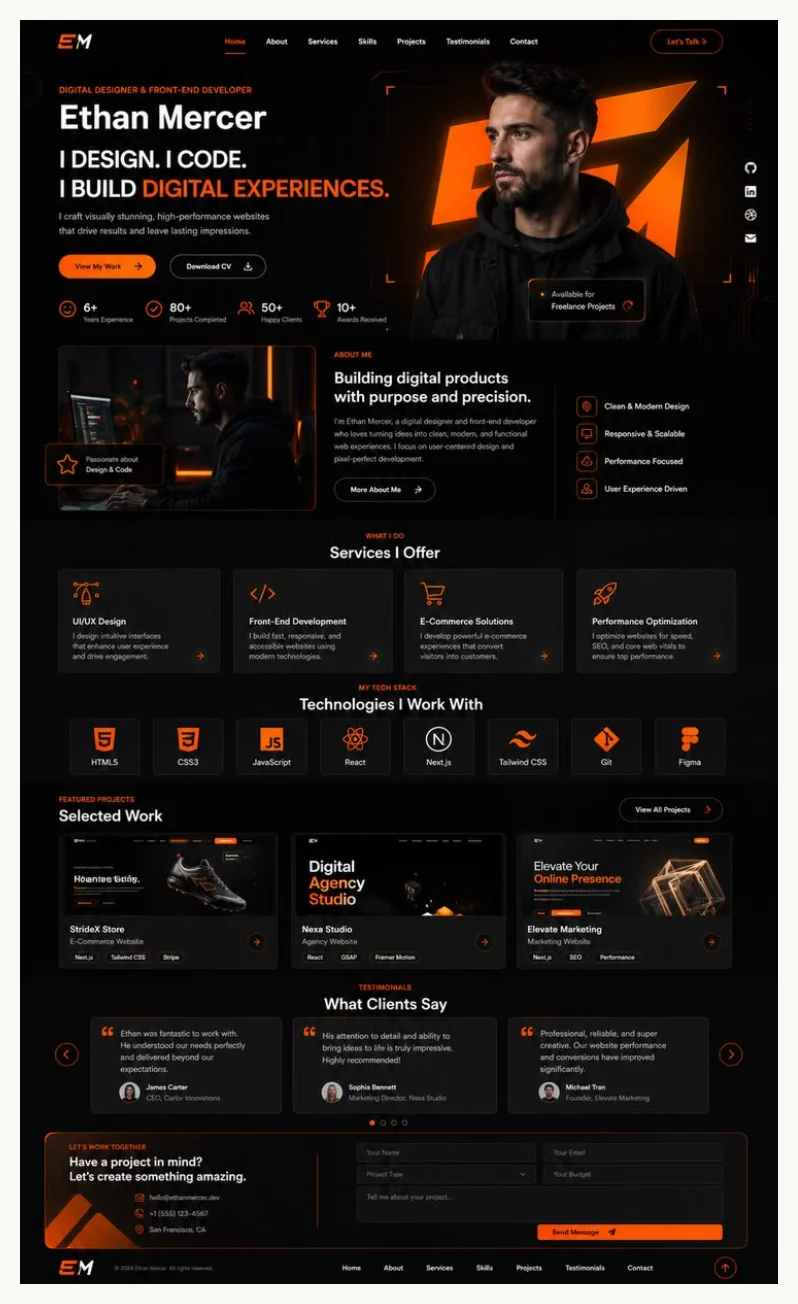
Five complete responsive visual themes covering different directions such as developer, resume, creator, freelancer, and design writing
HTMLPortfolio
weilanx-personal-website — HTML Portfolio Template
By Azure12355
An HTML template project that uses a Python script to generate a static personal website from a single JSON profile, with five reusable visual themes built in.
Explore the design
Compare the page layouts and mobile experience. Open any screenshot for a closer look.
Author preview
Author-provided previewTop of page
Preview provided in the project README.
One original preview is available. Open the full image to inspect the design.
Screenshots show visual appearance; interactive behavior may differ.
Recorded 2026-10-13View source
What stands out
A quick read of the recorded project description.
A single JSON profile as the sole data source for identity, projects, services, links, and media
Supports automatic theme selection, and themes can also be explicitly specified via the --theme parameter
Local media paths are resolved relative to the profile file and copied to the output directory, rewritten as relative paths for easy migration as a whole
Built-in prefers-reduced-motion behavior; content remains usable when animations are disabled
Provides SKILL.md, profile-schema.md, theme-catalog.md, and other documentation to constrain profile construction and theme selection
Template Details
This project uses a single JSON profile as its only data source and generates a portable static personal website via scripts/create_site.py. The profile file contains minimal fields such as public name, professional role, tagline, factual bio, public location, and contact email. Local media paths are resolved relative to the profile file, copied into the output directory, and rewritten as relative paths; HTTPS media addresses remain remote references.
The project provides five complete responsive visual themes: dark-ember (black, white, orange, technical grid, and glass layers), forest-caramel (cream paper, forest green, and caramel editorial typography), ultraviolet-wave (purple waves, dark panels, and long-form narrative), neon-studio (electric lime, cobalt blue, purple, and bold institutional type), and solar-ink (warm paper, black-red-yellow poster language). Themes can be selected automatically or explicitly specified via --theme.
The generation process requires Python 3.10+ and a modern browser; Node.js is used only for JavaScript syntax checking. Output is static files; open output-site/index.html to view. Regenerating requires adding --force to overwrite existing output. The project includes SKILL.md, profile-schema.md, and theme-catalog.md for humans or AI agents to build profiles and select themes according to the contract, and explicitly requires that education, employers, clients, testimonials, metrics, dates, or project status must not be fabricated.
Usage limitations: This repository is a free version under the MIT license, and the free scope is limited to the code of this version; third-party assets such as demo images, fonts, and icons must be checked under their respective licenses, and external services such as domains and hosting may incur separate charges.
HTMLPortfolio
Is it right for your project?
Use Cases
- Quickly generate a deployable static personal homepage or portfolio page from a single JSON profile
- Switch between five themes to choose a visual direction for different positioning such as developer, resume, creator, studio, or designer
- Have an AI coding agent build a profile according to the contract in SKILL.md and profile-schema.md and run the generation script
- Copy local images, fonts, and other media into the output directory along with the profile to form a static site that can be migrated as a whole
Suitable For
- Individual developers or designers who need to generate a static personal website from structured profile data
- Users who want to batch or repeatedly generate portfolio pages with a script
- Users willing to maintain a personal profile according to a JSON schema without relying on a backend database
- Resume or portfolio scenarios that need to quickly switch visual themes for different positioning
Getting started & customization
Use these recorded setup notes alongside the repository instructions for your chosen version.
- 1
Requires Python 3.10+ and a modern browser; Node.js is optional and only used for JavaScript syntax checking
- 2
After cloning the repository, copy assets/profile.example.json to profile.json and fill in real public information
- 3
Run python3 scripts/create_site.py --profile profile.json --output output-site --theme auto to generate the site
- 4
When regenerating into an existing directory, add --force to overwrite; use --list-themes to view all themes
- 5
After generation, validate with node --check output-site/script.js and search for [[...]] placeholders with rg
License & source material
Usage conditions & limitations
Free to use · keep license noticeThis entry covers the free version under the MIT license in the public repository; the free scope is limited to the code of this version and does not mean external services or third-party assets are free.
Must comply with when using
- Free use, modification, commercial use, and distribution of this version's code are permitted.
- When distributing copies or substantial portions of the code, retain the original author's copyright notice and the complete MIT license notice.
- The code is provided as is; warranties and limitations of liability are governed by the original license and applicable law.
Additional costs & items to verify
- Demo images, fonts, icons, and other third-party assets must be checked under their respective licenses and cannot be judged solely by the code's MIT license.
- External services such as domains, hosting, databases, payments, or AI may incur separate charges.
- Using the generation script requires Python 3.10 or higher and a modern browser to view the output; Node.js is optional and only used for JavaScript syntax checking.
- When regenerating into an existing output directory, the --force parameter must be added to overwrite; otherwise existing generated results cannot be replaced.
- Local media paths are resolved relative to the profile file, copied into the output directory, and rewritten as relative paths; HTTPS media addresses remain remote references and are not packaged with the output.
- The generator does not require private assets; education, employers, clients, testimonials, metrics, dates, or project status must not be fabricated, and placeholders must be retained or unsupported content omitted.
- Run scripts/create_site.py to generate the site; do not modify templates under assets/templates/ when building a site for a single person.
- One-off fine-tuning can only be done within the generated output directory and should not alter the repository's templates or generator.
View Original Text Basis
Permission is hereby granted, free of charge
Original License Text
Requirements: Python 3.10+ and a modern browser. Node.js is optional and only used for JavaScript syntax checks.
Original README
Edit `profile.json` with real, public information and run the command again with `--force` to replace an existing generated output.
Original README
Local media paths are resolved relative to the profile file, copied into the output, and rewritten as relative paths. HTTPS media URLs remain remote.
Original README
The generator never needs private source material. Do not invent education, employers, clients, testimonials, metrics, dates, or project status. Keep placeholders visible or omit unsupported claims.
Original README
Run [`scripts/create_site.py`](scripts/create_site.py); do not modify `assets/templates/` for one person's site.
Original README
https://github.com/Azure12355/weilanx-personal-website/blob/main/LICENSEhttps://github.com/Azure12355/weilanx-personal-website/blob/main/README.mdMake one-off refinements only inside the generated output directory.
Original README
Compiled by DeepSeek based on repository license and README ·2026-10-13. Results only cover the materials read; dependencies, images, fonts, and subsequent term changes are subject to their respective original texts.
Project checks & description sources
Template Information
- Source platforms
- GitHub
- Documentation and maintenance reference score
- Partly documented · 68 / 100
- Technologies
- HTML
- Website type
- Portfolio
How this score is calculated
Our heuristic uses license records (up to 30), a demo link (12), a preview (10), stars (15), recorded maintenance (15), description completeness (8), feature records (5) and classification data (5). It is not a code, security or performance test, or a Google score. A link does not establish tested functionality.
What to verify for this project
- Repository update recorded
- 2026-07-30
- Screenshot last checked
- 2026-10-13
No demo link is recorded. Use the repository instructions to evaluate the project locally; the screenshot alone cannot establish interactive behavior.
The catalog identifies HTML as the primary stack. Check the actual dependency manifest and lockfile for versions and hosting requirements. These notes use recorded metadata, not a code audit or a deployment test.
Use a selection guide →How this description was prepared
AI-assisted description based on catalog records and repository material. Repository authors are not automatically the reviewers of this description.
Review declaration: [email protected] · 2026-10-13
Inspect the recorded source material
SHA-256: 69c3a2c3c128a1527f0fbaa47ad0efddb5cfca9d5e9846f01527ca92a59d3a4c
2026-10-13T08:34:41.066Z
Source file / repository<h1 align="center">Personal Website Studio</h1>
<p align="center">
<img src="docs/assets/project-icon.svg" width="112" alt="Personal Website Studio icon">
</p>
<p align="center">Generate polished, portable personal websites from one profile and five reusable visual themes.</p>
<p align="center">
<a href="README.zh-CN.md">简体中文</a>
·
<a href="LICENSE"><img alt="MIT License" src="https://img.shields.io/badge/license-MIT-19a974.svg"></a>
<a href="https://github.com/Azure12355/weilanx-personal-website"><img alt="GitHub repository" src="https://img.shields.io/badge/GitHub-repository-171717.svg"></a>
</p>
## What it provides
- Five complete, responsive visual systems instead of a single generic layout.
- One JSON profile as the source of truth for identity, projects, services, links, and media.
- Automatic theme selection with an explicit override when you know the direction you want.
- Anonymous SVG placeholders and portable relative asset paths.
- Progressive enhancement for pointer, WebGL, glass, tilt, and scroll effects.
- Built-in `prefers-reduced-motion` behavior so content remains usable without animation.
## Themes
| Theme | Visual direction | Best for |
|---|---|---|
| `dark-ember` | Black, white, orange, technical grid, glass depth | Developers and technical product portfolios |
| `forest-caramel` | Cream paper, forest green, caramel editorial layout | Resumes and information-rich profiles |
| `ultraviolet-wave` | Purple waves, dark panels, long-form narrative | Creators, makers, and founders |
| `neon-studio` | Electric lime, cobalt, purple, bold agency type | Freelancers and one-person studios |
| `solar-ink` | Warm paper, black, red, yellow, poster language | Designers, writers, and product portfolios |
## Theme previews
<table>
<tr>
<td width="50%" align="center"><strong>Dark Ember</strong><br><img src="docs/previews/dark-ember.webp" alt="Dark Ember theme preview"></td>
<td width="50%" align="center"><strong>Forest Caramel</strong><br><img src="docs/previews/forest-caramel.webp" alt="Forest Caramel theme preview"></td>
</tr>
<tr>
<td width="50%" align="center"><strong>Ultraviolet Wave</strong><br><img src="docs/previews/ultraviolet-wave.webp" alt="Ultraviolet Wave theme preview"></td>
<td width="50%" align="center"><strong>Neon Studio</strong><br><img src="docs/previews/neon-studio.webp" alt="Neon Studio theme preview"></td>
</tr>
<tr>
<td colspan="2" align="center"><strong>Solar Ink</strong><br><img src="docs/previews/solar-ink.webp" width="50%" alt="Solar Ink theme preview"></td>
</tr>
</table>
## Quick start
Requirements: Python 3.10+ and a modern browser. Node.js is optional and only used for JavaScript syntax checks.
```bash
git clone https://github.com/Azure12355/weilanx-personal-website.git
cd weilanx-personal-website
cp assets/profile.example.json profile.json
python3 scripts/create_site.py \
--profile profile.json \
--output output-site \
--theme auto
```
Open `output-site/index.html` in a browser. Edit `profile.json` with real, public information and run the command again with `--force` to replace an existing generated output.
List the available themes:
```bash
python3 scripts/create_site.py --list-themes
```
Choose a specific theme:
```bash
python3 scripts/create_site.py \
--profile profile.json \
--output output-site \
--theme solar-ink
```
## Profile input
The minimum profile contains a public name, professional role, tagline, factual biography, public location, and contact email. See [`references/profile-schema.md`](references/profile-schema.md) for every supported field and [`assets/profile.example.json`](assets/profile.example.json) for a complete editable example.
Local media paths are resolved relative to the profile file, copied into the output, and rewritten as relative paths. HTTPS media URLs remain remote.
## Agent Quickstart
For an AI coding agent, use these files as the sources of truth:
1. Read [`SKILL.md`](SKILL.md) for the workflow, truthfulness rules, and generation contract.
2. Read [`references/profile-schema.md`](references/profile-schema.md) before constructing a profile.
3. Read [`references/theme-catalog.md`](references/theme-catalog.md) before selecting or recommending a theme.
4. Run [`scripts/create_site.py`](scripts/create_site.py); do not modify `assets/templates/` for one person's site.
5. Make one-off refinements only inside the generated output directory.
The generator never needs private source material. Do not invent education, employers, clients, testimonials, metrics, dates, or project status. Keep placeholders visible or omit unsupported claims.
## Validate generated output
```bash
node --check output-site/script.js
rg -n '\[\[[^]]+\]\]' output-site
```
The token search should return no matches. Confirm that each local `src`, stylesheet, and script reference exists. Browser testing is only needed when visual verification is required.
## Repository structure
```text
.
├── SKILL.md
├── agents/
├── assets/
│ ├── placeholders/
│ ├── templates/
│ └── profile.example.json
├── references/
│ ├── profile-schema.md
│ └── theme-catalog.md
└── scripts/
└── create_site.py
```
## Contributing
Issues and focused pull requests are welcome. Please read [`CONTRIBUTING.md`](CONTRIBUTING.md) before changing the generator or a bundled theme.
## License
Released under the [MIT License](LICENSE).
Explore similar templates
Compare previews and descriptions within the same stack and category.

simplefolio
Simplefolio is a minimal single-page portfolio template for developers, built with HTML, Bootstrap, SCSS, and Parcel under the MIT license. It includes Hero, About, Projects, Contact, and Footer sections, with content edited in /src/index.html and theme colors controlled by two SCSS variables.
HTML · Portfolio

Freelancer
A bright, single-page Bootstrap portfolio template for freelancers, designers, and small studios. It includes a responsive portfolio grid with modal detail windows and an SB Forms contact form that requires an API token.
HTML · Portfolio

Resume
A single-page resume and CV template from Start Bootstrap, built on Bootstrap with a fixed sidebar and content sections.
HTML · Portfolio

Creative
A single-page marketing template by Start Bootstrap for creative agencies and product services, built on Bootstrap with SCSS, featuring a portfolio grid and call-to-action sections. It includes pre-set SB Forms markers for form integration and npm build scripts for source customization.
HTML · Corporate Website

Grayscale
A dark single-page Bootstrap template from Start Bootstrap for photography, events and brand storytelling, with a large hero and clearly separated sections.
HTML · Corporate Website

startbootstrap-stylish-portfolio
A one-page Bootstrap portfolio theme from Start Bootstrap with multiple content sections and an off-canvas navigation menu. Basic use means editing HTML/CSS under dist and opening index.html; advanced use relies on npm with Pug and SCSS build scripts.
HTML · Portfolio