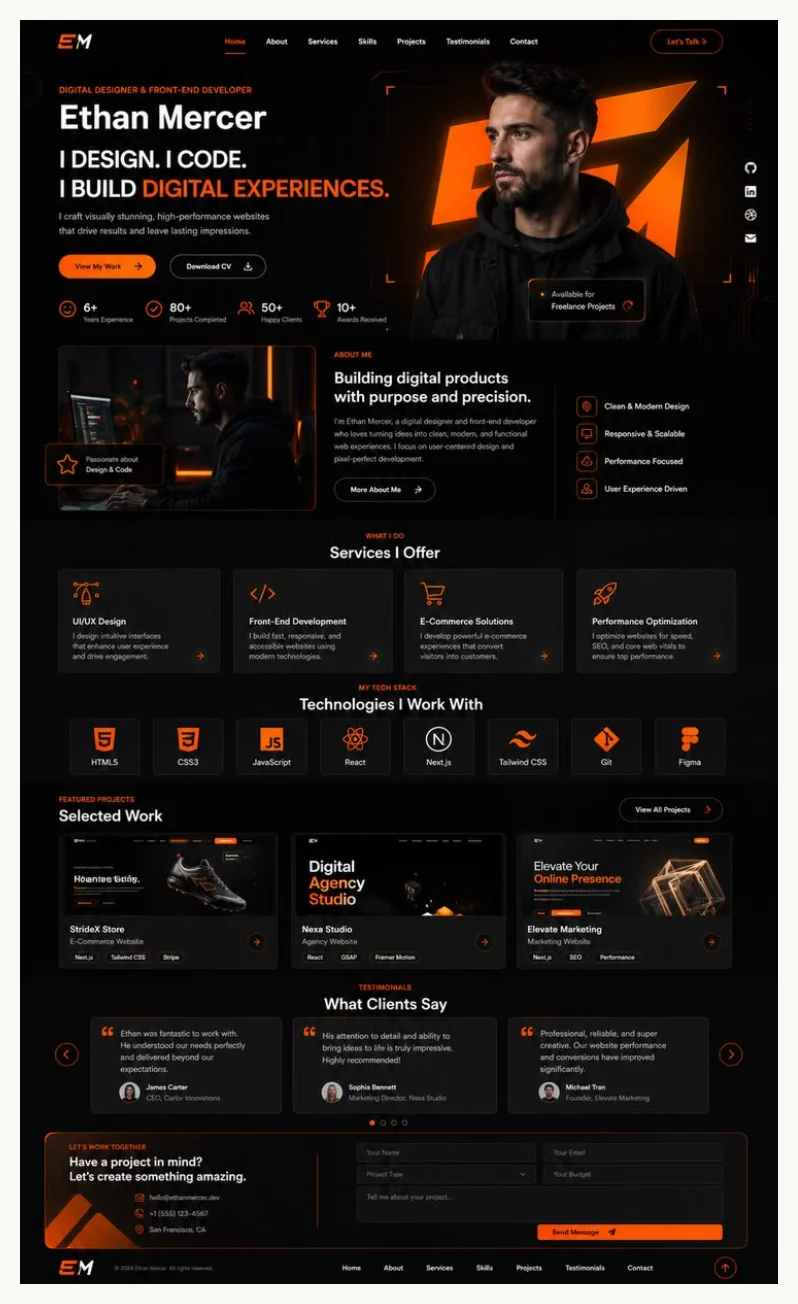
五套完整响应式视觉主题,覆盖开发者、简历、创作者、自由职业者与设计写作等不同方向
HTML作品集
weilanx-personal-website — HTML 作品集模板
作者 Azure12355
一个用 Python 脚本把单份 JSON 个人资料生成静态个人网站的 HTML 模板项目,内置五套可复用视觉主题。
看看你的网站会是什么样
浏览真实页面截图,比较内容排版与手机效果。点击下方缩略图切换,放大查看整页细节。
目前有 1 张原始预览,可打开完整图片查看设计细节。
截图用于了解视觉与布局,交互效果请以实际项目为准。
采集于 2026-10-13查看来源
值得关注的模板亮点
从已有项目资料中,快速了解它的特点。
以单份 JSON 个人资料作为身份、项目、服务、链接与媒体的唯一数据源
支持主题自动选择,也可通过 --theme 参数显式指定主题
本地媒体路径相对资料文件解析并复制到输出目录,改写为相对路径,便于整体迁移
内置 prefers-reduced-motion 行为,关闭动画后内容仍可使用
提供 SKILL.md、profile-schema.md、theme-catalog.md 等文档,约束资料构建与主题选择
模板详细介绍
该项目以一份 JSON 个人资料为唯一数据源,通过 scripts/create_site.py 生成可移植的静态个人网站。资料文件包含公开姓名、职业角色、标语、事实性简介、公开所在地和联系邮箱等最小字段,本地媒体路径会相对资料文件解析、复制进输出目录并改写为相对路径,HTTPS 媒体地址保持远程引用。
项目提供五套完整响应式视觉主题:dark-ember(黑白橙、技术网格与玻璃层次)、forest-caramel(奶油纸张、森林绿与焦糖色编辑排版)、ultraviolet-wave(紫色波浪、深色面板与长文叙事)、neon-studio(电光青柠、钴蓝、紫色与粗体机构字体)、solar-ink(暖色纸张、黑红黄海报语言)。主题可自动选择,也可通过 --theme 显式指定。
生成流程要求 Python 3.10+ 与现代浏览器,Node.js 仅用于 JavaScript 语法检查。输出为静态文件,打开 output-site/index.html 即可查看;重复生成需加 --force 覆盖已有输出。项目附带 SKILL.md、profile-schema.md 与 theme-catalog.md,供人工或 AI 代理按契约构建资料与选择主题,并明确要求不得虚构教育、雇主、客户、评价、指标、日期或项目状态。
使用限制:本仓库为 MIT 许可的免费版本,免费范围仅限该版本代码;演示图片、字体、图标等第三方素材需按各自许可核对,域名、托管等外部服务可能另行收费。
HTML作品集
适合你的项目吗?
适用场景
- 用一份 JSON 资料快速生成可部署的静态个人主页或作品集页面
- 在五套主题之间切换,为开发者、简历、创作者、工作室或设计师等不同定位挑选视觉方向
- 由 AI 编码代理按 SKILL.md 与 profile-schema.md 的契约构建资料并运行生成脚本
- 把本地图片、字体等媒体随资料一起复制进输出目录,形成可整体迁移的静态站点
适合人群
- 需要从结构化资料生成静态个人网站的个人开发者或设计师
- 希望用脚本批量或重复生成作品集页面的使用者
- 愿意按 JSON 模式维护个人资料、不依赖后台数据库的用户
- 需要为不同定位快速切换视觉主题的简历或作品集场景
上手与定制指南
结合仓库当前版本的说明,按下面的资料检查内容、配置与运行要求。
- 1
需要 Python 3.10+ 和现代浏览器;Node.js 可选,仅用于 JavaScript 语法检查
- 2
克隆仓库后复制 assets/profile.example.json 为 profile.json,填入真实公开信息
- 3
运行 python3 scripts/create_site.py --profile profile.json --output output-site --theme auto 生成站点
- 4
重复生成到已有目录时需加 --force 覆盖,可用 --list-themes 查看全部主题
- 5
生成后可用 node --check output-site/script.js 与 rg 搜索 [[...]] 占位符进行校验
授权与来源资料
使用条件与限制
免费使用 · 保留许可声明本次收录的是公开仓库中采用 MIT 许可的免费版本;免费范围为该版本代码,不代表外部服务或第三方素材免费。
使用时需要遵守
- 允许免费使用、修改、商用和分发该版本代码。
- 分发代码副本或实质性部分时,保留原作者版权声明和完整 MIT 许可声明。
- 代码按现状提供;担保与责任限制以原许可证及适用法律为准。
额外费用与待核对事项
- 演示图片、字体、图标及其他第三方素材需按各自许可核对,不能仅凭代码的 MIT 许可判断。
- 域名、托管、数据库、支付或 AI 等外部服务可能另外收费。
- 使用生成脚本需要 Python 3.10 或更高版本,并需要现代浏览器查看输出;Node.js 为可选项,仅用于 JavaScript 语法检查。
- 重复生成到已存在的输出目录时必须加 --force 参数覆盖,否则无法替换已有生成结果。
- 本地媒体路径相对资料文件解析并复制进输出目录、改写为相对路径;HTTPS 媒体地址保持远程引用,不随输出一起打包。
- 生成器不需要私有素材;不得虚构教育、雇主、客户、评价、指标、日期或项目状态,须保留占位符或省略无依据的内容。
- 应运行 scripts/create_site.py 生成站点;为单个人建站时不要修改 assets/templates/ 目录下的模板。
- 一次性微调只能在生成的输出目录内进行,不应改动仓库中的模板或生成器。
查看原文依据
Permission is hereby granted, free of charge
许可证原文
Requirements: Python 3.10+ and a modern browser. Node.js is optional and only used for JavaScript syntax checks.
README 原文
Edit `profile.json` with real, public information and run the command again with `--force` to replace an existing generated output.
README 原文
Local media paths are resolved relative to the profile file, copied into the output, and rewritten as relative paths. HTTPS media URLs remain remote.
README 原文
The generator never needs private source material. Do not invent education, employers, clients, testimonials, metrics, dates, or project status. Keep placeholders visible or omit unsupported claims.
README 原文
Run [`scripts/create_site.py`](scripts/create_site.py); do not modify `assets/templates/` for one person's site.
README 原文
https://github.com/Azure12355/weilanx-personal-website/blob/main/LICENSEhttps://github.com/Azure12355/weilanx-personal-website/blob/main/README.mdMake one-off refinements only inside the generated output directory.
README 原文
DeepSeek 根据仓库许可证和 README 整理 ·2026-10-13。结果仅覆盖已读取资料,依赖、图片、字体及后续条款变更以各自原文为准。
项目核对记录与介绍依据
模板资料
- 来源平台
- GitHub
- 资料与维护参考分
- 资料一般 · 68 / 100
- 技术栈
- HTML
- 网站类型
- 作品集
这个分数如何计算
本站按许可资料(最高30分)、演示链接(12分)、预览图(10分)、Star数(15分)、记录的维护时间(15分)、描述完整度(8分)、功能记录(5分)和分类资料(5分)计算。它不是代码、安全或性能测试,也不是 Google 评分;有链接不代表已实测可用。
这个项目需要核对什么
- 记录的仓库更新时间
- 2026-07-30
- 截图检查日期
- 2026-10-13
目前没有记录演示链接。请依据仓库说明在本地评估;仅凭截图无法确认交互行为。
目录记录的主要技术栈是 HTML。请通过依赖清单和锁文件核对实际版本与托管要求。这些说明基于收录资料,不代表代码审计或部署实测。
查看具体选型方法 →介绍的制作与核对状态
介绍由 AI 辅助整理目录与仓库资料。仓库作者不等于这篇介绍的审核者。
审核声明: [email protected] · 2026-10-13
查看当时使用的来源资料
SHA-256: 69c3a2c3c128a1527f0fbaa47ad0efddb5cfca9d5e9846f01527ca92a59d3a4c
2026-10-13T08:34:41.066Z
来源文件 / 仓库<h1 align="center">Personal Website Studio</h1>
<p align="center">
<img src="docs/assets/project-icon.svg" width="112" alt="Personal Website Studio icon">
</p>
<p align="center">Generate polished, portable personal websites from one profile and five reusable visual themes.</p>
<p align="center">
<a href="README.zh-CN.md">简体中文</a>
·
<a href="LICENSE"><img alt="MIT License" src="https://img.shields.io/badge/license-MIT-19a974.svg"></a>
<a href="https://github.com/Azure12355/weilanx-personal-website"><img alt="GitHub repository" src="https://img.shields.io/badge/GitHub-repository-171717.svg"></a>
</p>
## What it provides
- Five complete, responsive visual systems instead of a single generic layout.
- One JSON profile as the source of truth for identity, projects, services, links, and media.
- Automatic theme selection with an explicit override when you know the direction you want.
- Anonymous SVG placeholders and portable relative asset paths.
- Progressive enhancement for pointer, WebGL, glass, tilt, and scroll effects.
- Built-in `prefers-reduced-motion` behavior so content remains usable without animation.
## Themes
| Theme | Visual direction | Best for |
|---|---|---|
| `dark-ember` | Black, white, orange, technical grid, glass depth | Developers and technical product portfolios |
| `forest-caramel` | Cream paper, forest green, caramel editorial layout | Resumes and information-rich profiles |
| `ultraviolet-wave` | Purple waves, dark panels, long-form narrative | Creators, makers, and founders |
| `neon-studio` | Electric lime, cobalt, purple, bold agency type | Freelancers and one-person studios |
| `solar-ink` | Warm paper, black, red, yellow, poster language | Designers, writers, and product portfolios |
## Theme previews
<table>
<tr>
<td width="50%" align="center"><strong>Dark Ember</strong><br><img src="docs/previews/dark-ember.webp" alt="Dark Ember theme preview"></td>
<td width="50%" align="center"><strong>Forest Caramel</strong><br><img src="docs/previews/forest-caramel.webp" alt="Forest Caramel theme preview"></td>
</tr>
<tr>
<td width="50%" align="center"><strong>Ultraviolet Wave</strong><br><img src="docs/previews/ultraviolet-wave.webp" alt="Ultraviolet Wave theme preview"></td>
<td width="50%" align="center"><strong>Neon Studio</strong><br><img src="docs/previews/neon-studio.webp" alt="Neon Studio theme preview"></td>
</tr>
<tr>
<td colspan="2" align="center"><strong>Solar Ink</strong><br><img src="docs/previews/solar-ink.webp" width="50%" alt="Solar Ink theme preview"></td>
</tr>
</table>
## Quick start
Requirements: Python 3.10+ and a modern browser. Node.js is optional and only used for JavaScript syntax checks.
```bash
git clone https://github.com/Azure12355/weilanx-personal-website.git
cd weilanx-personal-website
cp assets/profile.example.json profile.json
python3 scripts/create_site.py \
--profile profile.json \
--output output-site \
--theme auto
```
Open `output-site/index.html` in a browser. Edit `profile.json` with real, public information and run the command again with `--force` to replace an existing generated output.
List the available themes:
```bash
python3 scripts/create_site.py --list-themes
```
Choose a specific theme:
```bash
python3 scripts/create_site.py \
--profile profile.json \
--output output-site \
--theme solar-ink
```
## Profile input
The minimum profile contains a public name, professional role, tagline, factual biography, public location, and contact email. See [`references/profile-schema.md`](references/profile-schema.md) for every supported field and [`assets/profile.example.json`](assets/profile.example.json) for a complete editable example.
Local media paths are resolved relative to the profile file, copied into the output, and rewritten as relative paths. HTTPS media URLs remain remote.
## Agent Quickstart
For an AI coding agent, use these files as the sources of truth:
1. Read [`SKILL.md`](SKILL.md) for the workflow, truthfulness rules, and generation contract.
2. Read [`references/profile-schema.md`](references/profile-schema.md) before constructing a profile.
3. Read [`references/theme-catalog.md`](references/theme-catalog.md) before selecting or recommending a theme.
4. Run [`scripts/create_site.py`](scripts/create_site.py); do not modify `assets/templates/` for one person's site.
5. Make one-off refinements only inside the generated output directory.
The generator never needs private source material. Do not invent education, employers, clients, testimonials, metrics, dates, or project status. Keep placeholders visible or omit unsupported claims.
## Validate generated output
```bash
node --check output-site/script.js
rg -n '\[\[[^]]+\]\]' output-site
```
The token search should return no matches. Confirm that each local `src`, stylesheet, and script reference exists. Browser testing is only needed when visual verification is required.
## Repository structure
```text
.
├── SKILL.md
├── agents/
├── assets/
│ ├── placeholders/
│ ├── templates/
│ └── profile.example.json
├── references/
│ ├── profile-schema.md
│ └── theme-catalog.md
└── scripts/
└── create_site.py
```
## Contributing
Issues and focused pull requests are welcome. Please read [`CONTRIBUTING.md`](CONTRIBUTING.md) before changing the generator or a bundled theme.
## License
Released under the [MIT License](LICENSE).
看看同类模板
对比同技术栈与用途的模板,找到更适合的视觉与内容结构。

simplefolio
⚡️ A minimal portfolio template for Developers
HTML · 作品集

Freelancer
Freelancer 是 Start Bootstrap 出品的单页作品集模板,专为自由职业者、设计师和小型工作室设计。 页面结构清晰,包含多个内容区块、响应式作品集网格,每个作品项目配有模态窗口展示详情。
HTML · 作品集

Resume
Resume 是 Start Bootstrap 推出的简历与 CV 主题,基于 Bootstrap 构建,采用固定侧边栏加内容区块的结构。
HTML · 作品集

Creative
Creative 是 Start Bootstrap 团队维护的一款单页营销模板,定位明确:为创意机构或产品服务提供一个以作品展示和行动号召为核心的落地页。
HTML · 企业官网

Grayscale
Grayscale 是 Start Bootstrap 出品的深色系单页 HTML 模板,基于 Bootstrap 构建。 它的视觉重心放在大尺寸首屏和清晰的内容分区上,整体氛围偏暗,适合摄影、活动或品牌叙事类网站。
HTML · 企业官网

startbootstrap-stylish-portfolio
Stylish Portfolio 是 Start Bootstrap 维护的单页作品集主题,基于 Bootstrap 构建,采用多个内容区块加离屏导航菜单的结构。
HTML · 作品集