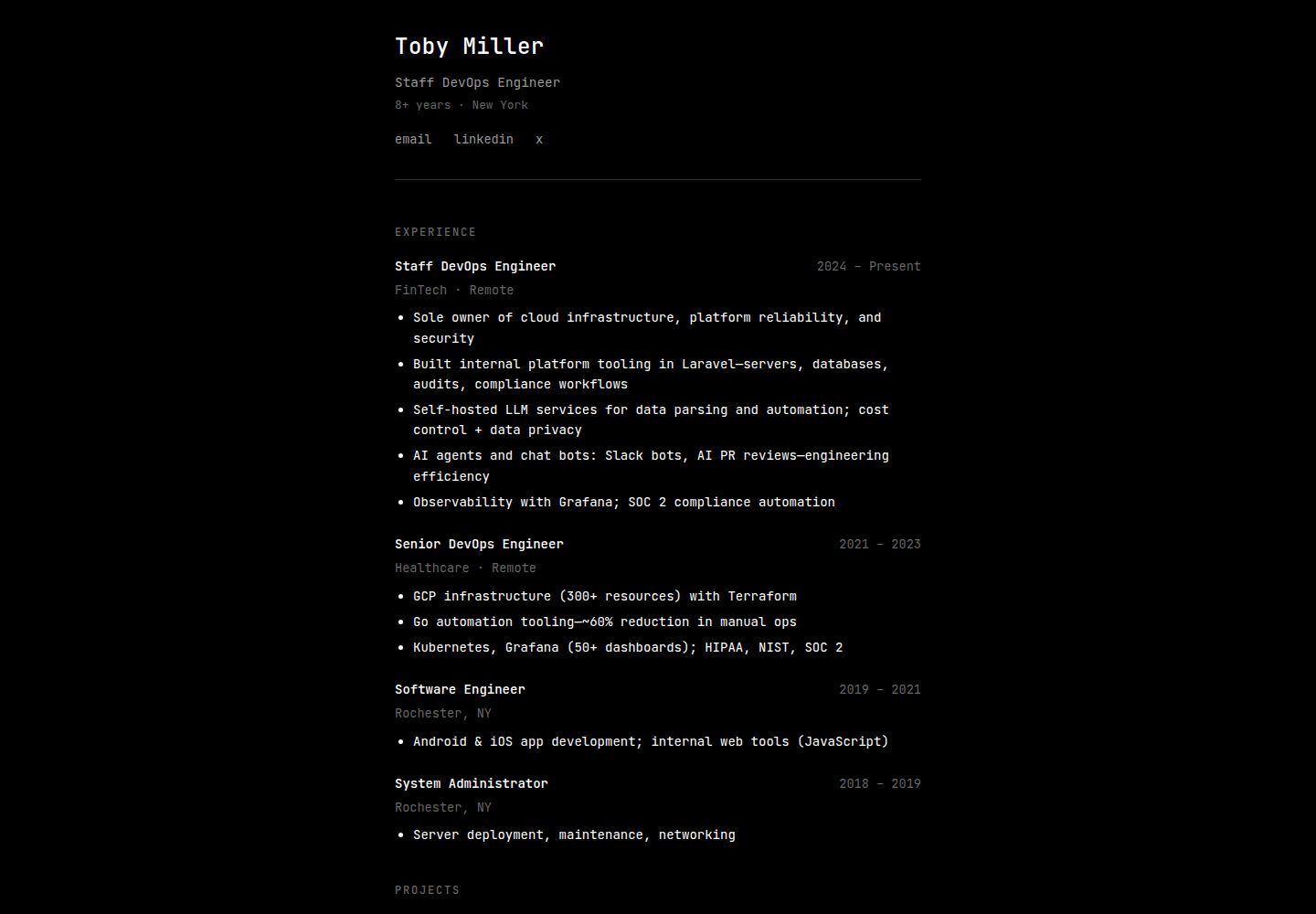
The source code comes from the author's personal website Tobym.dev, and the author permits its use as a template
ReactPortfolio
Portfolio-Website-Template-React — React Portfolio Template
By BagelHole
A personal portfolio website template based on Create React App, derived from the source code of Tobym.dev; the author states it can be freely used as a foundation for your own website.
Explore the design
Compare the page layouts and mobile experience. Open any screenshot for a closer look.
Desktop homepage1 / 2
Desktop captureTop of page
Actual screenshot captured by the server browser.
All pages & views 2
Screenshots show visual appearance; interactive behavior may differ.
Recorded 2026-10-16View source
What stands out
A quick read of the recorded project description.
Written in React.js and initialized with Create React App
The author states the code is not highly optimized but works
The README provides explanations for four scripts: npm start, npm test, npm run build, and npm run eject
The author states the website is hosted on Netlify but does not provide specific deployment steps for this template
Template Details
This is the source code for the Tobym.dev website, which the author has made available as a personal portfolio website template; the README explicitly welcomes others to use it as a template for building their own websites. The project is written in React.js and hosted on Netlify; the author also notes that the code is not highly optimized but works.
The project was initialized with Create React App, and the README lists scripts including npm start (development mode, opens at localhost:3000 by default), npm test (runs tests in interactive watch mode), npm run build (builds the production version into the build folder), and npm run eject (irreversibly ejects the build configuration). Regarding deployment, the README only links to the Create React App deployment documentation and does not provide specific deployment steps for this template.
The README does not describe the page structure, component breakdown, styling approach, data sourcing method, or configurable options, nor does it provide a dependency list, so the specific framework version or third-party libraries cannot be confirmed. The screenshots only indicate the existence of desktop and mobile preview pages and do not represent specific functionality.
ReactPortfolio
Is it right for your project?
Use Cases
- Building a personal portfolio website based on the Create React App workflow
- Modifying and previewing page effects in local development mode
- Building a production version and deploying it via a hosting method of your choice
Suitable For
- Developers who want to use an existing React project as a starting point for a personal portfolio page
- Users familiar with Create React App scripts and the npm workflow
- Users willing to adjust the code themselves to fit their own content
Getting started & customization
Use these recorded setup notes alongside the repository instructions for your chosen version.
- 1
The README does not provide commands for cloning the repository or installing dependencies; it only states that the project was initialized with Create React App
- 2
Development mode uses npm start and opens at http://localhost:3000 by default
- 3
npm test runs tests in interactive watch mode
- 4
npm run build outputs the production version to the build folder
- 5
npm run eject is an irreversible operation; the README notes that it cannot be undone after execution
License & source material
Usage conditions & limitations
Free to use · keep license noticeThis entry covers the free version under the MIT license in the public repository; the free scope applies to that version's code and does not mean that external services or third-party assets are free.
Must comply with when using
- Free use, modification, commercial use, and distribution of this version's code are permitted.
- When distributing copies or substantial portions of the code, retain the original author's copyright notice and the full MIT license notice.
- The code is provided as is; warranties and limitations of liability are governed by the original license and applicable law.
Additional costs & items to verify
- Demo images, fonts, icons, and other third-party assets must be checked against their respective licenses and cannot be judged solely by the code's MIT license.
- External services such as domains, hosting, databases, payments, or AI may incur separate charges.
View Original Text Basis
Compiled by DeepSeek based on repository license and README ·2026-10-16. Results only cover the materials read; dependencies, images, fonts, and subsequent term changes are subject to their respective original texts.
Project checks & description sources
Template Information
- Source platforms
- GitHub
- Documentation and maintenance reference score
- Partly documented · 68 / 100
- Technologies
- React
- Website type
- Portfolio
How this score is calculated
Our heuristic uses license records (up to 30), a demo link (12), a preview (10), stars (15), recorded maintenance (15), description completeness (8), feature records (5) and classification data (5). It is not a code, security or performance test, or a Google score. A link does not establish tested functionality.
What to verify for this project
- Repository update recorded
- 2022-05-14
- Screenshot last checked
- 2026-10-16
A demo link is listed. Check it with your own content and viewport sizes; its presence does not confirm that forms, authentication or payments work.
The catalog identifies React as the primary stack. Check the actual dependency manifest and lockfile for versions and hosting requirements. These notes use recorded metadata, not a code audit or a deployment test.
Use a selection guide →How this description was prepared
AI-assisted description based on catalog records and repository material. Repository authors are not automatically the reviewers of this description.
Review declaration: codex-user-requested-batch-review-20261017 · 2026-10-16
Inspect the recorded source material
SHA-256: aa066cf191f9de29cbc476bae8a823388daf956d29dd97728b159372f0d670e8
2026-10-16T14:11:16.435Z
Source file / repository# Portfolio Website Template This is the source code for [Tobym.dev](https://www.tobym.dev/)  This website is written with react.js. I have it hosted on Netlify if you have any questions or comments, please feel free to reach out to me at [My Twitter](https://twitter.com/TheTobyMiller) or open an issue on this repository. ## Use Feel free to use this as a template for your own website. The code is not super optimized, but it works. If you have any suggestions, please let me know. ## Getting Started with Create React App This project was bootstrapped with [Create React App](https://github.com/facebook/create-react-app). ## Available Scripts In the project directory, you can run: ### `npm start` Runs the app in the development mode.\ Open [http://localhost:3000](http://localhost:3000) to view it in your browser. The page will reload when you make changes.\ You may also see any lint errors in the console. ### `npm test` Launches the test runner in the interactive watch mode.\ See the section about [running tests](https://facebook.github.io/create-react-app/docs/running-tests) for more information. ### `npm run build` Builds the app for production to the `build` folder.\ It correctly bundles React in production mode and optimizes the build for the best performance. The build is minified and the filenames include the hashes.\ Your app is ready to be deployed! See the section about [deployment](https://facebook.github.io/create-react-app/docs/deployment) for more information. ### `npm run eject` **Note: this is a one-way operation. Once you `eject`, you can't go back!** If you aren't satisfied with the build tool and configuration choices, you can `eject` at any time. This command will remove the single build dependency from your project. Instead, it will copy all the configuration files and the transitive dependencies (webpack, Babel, ESLint, etc) right into your project so you have full control over them. All of the commands except `eject` will still work, but they will point to the copied scripts so you can tweak them. At this point you're on your own. You don't have to ever use `eject`. The curated feature set is suitable for small and middle deployments, and you shouldn't feel obligated to use this feature. However we understand that this tool wouldn't be useful if you couldn't customize it when you are ready for it. ## Learn More You can learn more in the [Create React App documentation](https://facebook.github.io/create-react-app/docs/getting-started). To learn React, check out the [React documentation](https://reactjs.org/). ### Code Splitting This section has moved here: [https://facebook.github.io/create-react-app/docs/code-splitting](https://facebook.github.io/create-react-app/docs/code-splitting) ### Analyzing the Bundle Size This section has moved here: [https://facebook.github.io/create-react-app/docs/analyzing-the-bundle-size](https://facebook.github.io/create-react-app/docs/analyzing-the-bundle-size) ### Making a Progressive Web App This section has moved here: [https://facebook.github.io/create-react-app/docs/making-a-progressive-web-app](https://facebook.github.io/create-react-app/docs/making-a-progressive-web-app) ### Advanced Configuration This section has moved here: [https://facebook.github.io/create-react-app/docs/advanced-configuration](https://facebook.github.io/create-react-app/docs/advanced-configuration) ### Deployment This section has moved here: [https://facebook.github.io/create-react-app/docs/deployment](https://facebook.github.io/create-react-app/docs/deployment) ### `npm run build` fails to minify This section has moved here: [https://facebook.github.io/create-react-app/docs/troubleshooting#npm-run-build-fails-to-minify](https://facebook.github.io/create-react-app/docs/troubleshooting#npm-run-build-fails-to-minify)
Explore similar templates
Compare previews and descriptions within the same stack and category.

react-portfolio-template
A React-based developer portfolio template for showcasing projects, work history, and skills. It offers a multi-component layout, dark and light modes, and responsive mobile adaptation, with text and images editable in src/components.
React · Portfolio

personal-website-react
A single-page developer portfolio template built with React and Material-UI, driven by a JSON Resume-compliant resume.json. It offers light/dark theme switching with localStorage persistence, a clean responsive layout, and Create React App tooling for simple builds and static deployment.
React · Portfolio

karngyan.com
A personal website and blog template for developers, built with TanStack Start, React 19, Tailwind CSS v4, and shadcn/ui. It uses MDX for articles with Shiki highlighting and GFM tables, and automatically generates RSS, sitemap, robots.txt, llms.txt, and OG images.
React · Portfolio

react-portfolio-template
A React portfolio template by Ryan Balieiro with a fixed sidebar and page-turn transitions on desktop, bottom navigation on mobile, multilingual support, light/dark themes, and content components for experience, education, skills, projects, and testimonials.
React · Portfolio

portfolio
A data scientist personal portfolio template built with React and MUI, with content centrally managed through configuration files in the assets directory.
React · Portfolio

react-portfolio
A React 16 and Material-UI developer portfolio template that centralizes personal information in a JSON Resume-compliant resume.json, with light/dark theme switching saved to local storage. It currently provides portfolio display only; resume page templates and structured data enhancements are still planned.
React · Portfolio