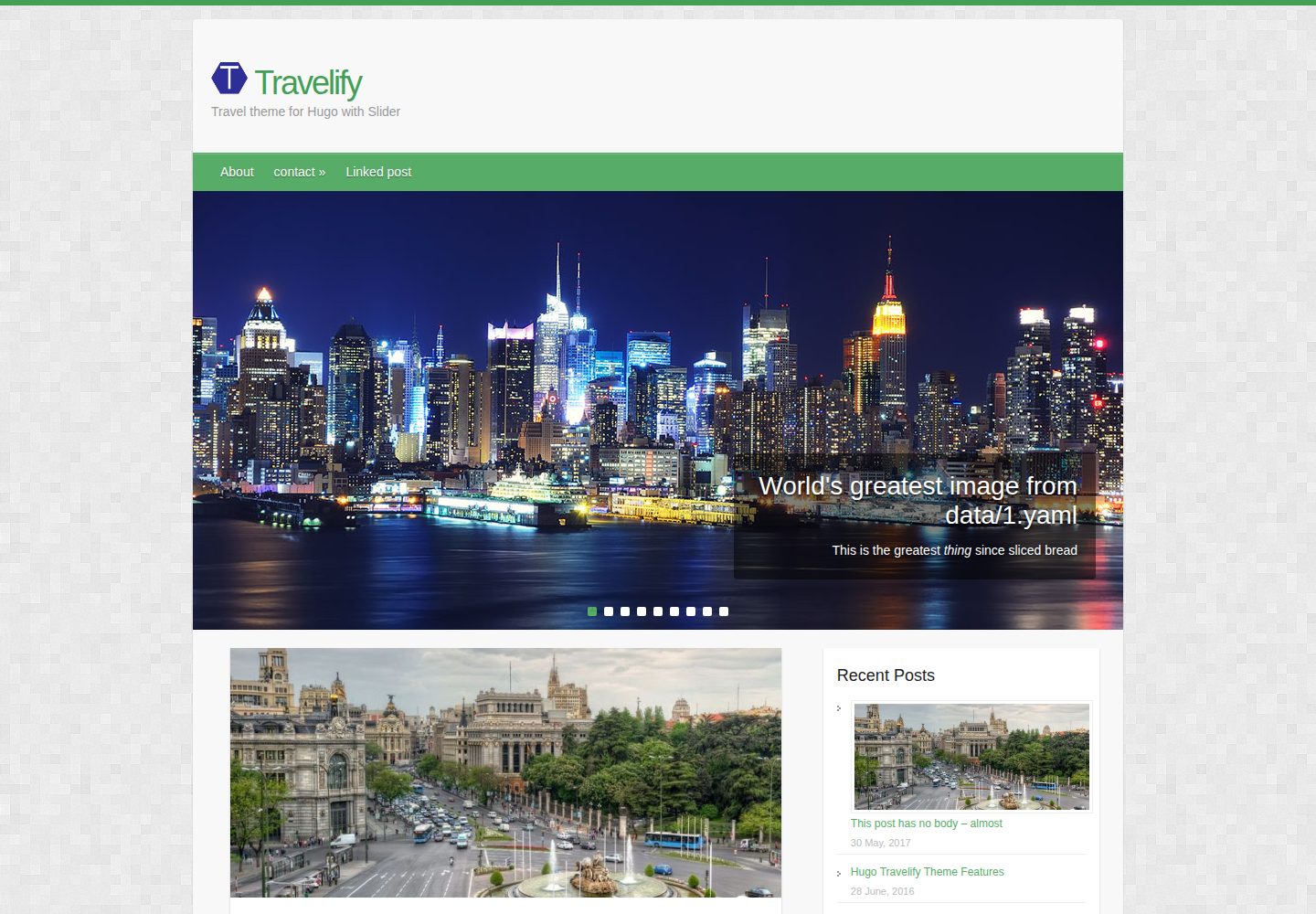
Ports the WordPress theme Travelify to Hugo; the repository is released under the MIT license
HugoWordPressBlogTool SiteCorporate Website
hugo-travelify-theme — Hugo Blog Template
By balaramadurai
A Hugo blog theme ported from the WordPress theme Travelify, offering configuration options such as a homepage slider, author archives, sidebar widgets, and Disqus comments.
Explore the design
Compare the page layouts and mobile experience. Open any screenshot for a closer look.
Desktop homepage1 / 2
Desktop captureTop of page
Actual screenshot captured by the server browser.
All pages & views 2
Screenshots show visual appearance; interactive behavior may differ.
Recorded 2026-10-03View source
What stands out
A quick read of the recorded project description.
Homepage slider can automatically pull images from recent posts or be manually specified via posts or YAML files under data/slider
Slider supports YouTube, Vimeo, Dailymotion, and self-hosted mp4/webm videos
Sidebar widgets include recent posts, categories, tags, tag cloud, DuckDuckGo search, author, and Mailchimp subscription
Supports Disqus comments, Google Analytics, social sharing, and multi-author archives
Frontmatter switches can disable the sidebar, date line, previous/next links, and comments on individual pages
Template Details
hugo-travelify-theme is a port of Aigars Silkalns's WordPress theme Travelify to Hugo. The repository is MIT-licensed and maintained by balaramadurai. The theme targets blog-style sites; the example site includes about and contact pages, multiple sample posts under the post directory, banner images, and an l10n.toml translation file.
Functionally, the theme controls the homepage slider via params.slider in config.toml: it can be enabled or disabled and switched between automatic or manual mode. Automatic mode pulls banner images from recent posts, while manual mode reads slider markers in post frontmatter or YAML files under data/slider. The slider supports YouTube, Vimeo, Dailymotion, or self-hosted mp4/webm videos; the README recommends 1018x460 resolution for banner images. Sidebar widgets include recent posts, categories, tags, tag cloud, DuckDuckGo search, author, and a Mailchimp subscription form. The archive widget is noted in the README as not yet implemented due to Hugo limitations.
Other configuration options include Disqus comments (which can be disabled per page via the disable_comments frontmatter field), Google Analytics, social account links, social share buttons (Facebook, Twitter, Google+, LinkedIn), menus and nested menus, permalink slug format, and per-page layout and element control via frontmatter fields such as disable_profile, disable_widgets, nodateline, and noprevnext. Theme strings are centralized in data/l10n.toml and can be replaced with other languages.
To use it, git clone the repository into the themes directory of a Hugo project, copy the contents of exampleSite to the site root, and run hugo server to preview. The README does not specify browser compatibility, build performance, or long-term maintenance status. Third-party assets (images, fonts, icons) must be checked separately under their respective licenses.
HugoWordPressBlogTool SiteCorporate Website
Is it right for your project?
Use Cases
- Building a personal blog with a post list and homepage slider as entry points
- Content sites that need multi-author archives and author information display
- Blogs that want to integrate Disqus comments at the bottom of posts and track visits
- Replacing interface strings in l10n.toml for sites in different languages
Suitable For
- Bloggers using Hugo who want to keep the Travelify visual style
- Content sites that need a homepage image or video slider
- Blogs that need sidebar widgets and an email subscription entry point
- Users who accept configuring Disqus, Google Analytics, and Mailchimp themselves
Getting started & customization
Use these recorded setup notes alongside the repository instructions for your chosen version.
- 1
Run git clone https://github.com/balaramadurai/hugo-travelify-theme.git in the themes directory of a Hugo project
- 2
Copy the contents under themes/hugo-travelify-theme/exampleSite to the site root, then run hugo server to preview
- 3
Configure the slider toggle and count, Disqus shortname, Google Analytics, and sidebar widgets in config.toml
- 4
Banner images are recommended at 1018x460 resolution and can be placed in the same directory as the post or in the static directory
- 5
Mailchimp subscription requires generating a form yourself and filling in the action URL for mailchimpform
License & source material
Usage conditions & limitations
Free to use · keep license noticeThis entry covers the free version available in the public repository under the MIT license; the free scope applies to that version's code and does not mean external services or third-party assets are free.
Must comply with when using
- Free use, modification, commercial use, and distribution of that version's code are permitted.
- When distributing copies or substantial portions of the code, retain the original author's copyright notice and the full MIT license notice.
- The code is provided as is; warranties and limitations of liability are governed by the original license and applicable law.
Additional costs & items to verify
- The email subscription feature depends on the third-party Mailchimp service; users must register an account and generate the form HTML code themselves, as the theme does not provide a subscription backend.
- Comments are provided by third-party Disqus and require registering and entering a shortname to enable, making it an external service dependency.
- Visit statistics depend on Google Analytics, which requires applying for an account and entering a tracking ID, an external service.
- The sidebar Mailchimp subscription form requires obtaining an action URL per Mailchimp's official instructions and entering it in the configuration, involving a third-party account.
- The archive widget is not yet implemented; the README explicitly states that this feature is unavailable due to Hugo limitations and is disabled by default in the configuration.
- If the slider uses YouTube, Vimeo, or Dailymotion videos, it depends on those third-party platforms and their terms of service.
- Demo images, fonts, icons, and other third-party assets must be checked under their respective licenses and cannot be judged solely by the code's MIT license.
- External services such as domains, hosting, databases, payments, or AI may incur separate charges.
View Original Text Basis
Permission is hereby granted, free of charge
Original License Text
Subscribe via Email through Mailchimp integration (You have to sign up and generate the HTML code)
Original README
The comment system is an optional feature powered by Disqus. Enter your *shortname* to enable the comments section under your posts.
Original README
GoogleAnalytics = ""
Original README
grab the mailchimpform value by following instructions here - https://mailchimp.com/help/add-a-signup-form-to-your-website/
Original README
archives = false # This feature is yet to be implemented because of limitations in Hugo's way of working.
Original README
https://github.com/balaramadurai/hugo-travelify-theme/blob/master/LICENSE.mdhttps://github.com/balaramadurai/hugo-travelify-theme/blob/master/README.mdYou can now add a video (from YouTube or Vimeo or Dailymotion or your own mp4/webm file) in the slider.
Original README
Compiled by DeepSeek based on repository license and README ·2026-10-03. Results only cover the materials read; dependencies, images, fonts, and subsequent term changes are subject to their respective original texts.
Project checks & description sources
Template Information
- Source platforms
- Hugo Themes
- Documentation and maintenance reference score
- More documented · 86 / 100
- Technologies
- Hugo · WordPress
- Website type
- Blog · Tool Site · Corporate Website
How this score is calculated
Our heuristic uses license records (up to 30), a demo link (12), a preview (10), stars (15), recorded maintenance (15), description completeness (8), feature records (5) and classification data (5). It is not a code, security or performance test, or a Google score. A link does not establish tested functionality.
What to verify for this project
- Repository update recorded
- 2025-06-02
- Screenshot last checked
- 2026-10-03
A demo link is listed. Check it with your own content and viewport sizes; its presence does not confirm that forms, authentication or payments work.
The catalog identifies Hugo as the primary stack. Check the actual dependency manifest and lockfile for versions and hosting requirements. These notes use recorded metadata, not a code audit or a deployment test.
Use a selection guide →How this description was prepared
AI-assisted description based on catalog records and repository material. Repository authors are not automatically the reviewers of this description.
Review declaration: [email protected] · 2026-10-04
Inspect the recorded source material
SHA-256: 7c92cbc371ab0c9d5574d6e569c609695ff05c8844d7fa73dd103ff546d96559
2026-10-03T16:42:06.364Z
Source file / repositoryThe homepage of this Travelify theme is at [https://themes.gohugo.io/hugo-travelify-theme/](https://themes.gohugo.io/hugo-travelify-theme/).
Some of the important features of Hugo-Travelify-Theme are:
- Automatic slider generation with banner images
- Subscribe via Email through Mailchimp integration (You have to sign up and generate the HTML code)
- Multiple author support (Included in the taxonomy)
- i10n data
- Disqus integration
- logo (with option to switch on or off the title)
- Social media sharing options
- Google Analytics
<br>
Here are some screenshots of the theme:
<br>
<img class="img-responsive" src="https://raw.githubusercontent.com/balaramadurai/hugo-travelify-theme/master/images/screenshot-1.png" />
<img class="img-responsive" src="https://raw.githubusercontent.com/balaramadurai/hugo-travelify-theme/master/images/screenshot-2.png" />
<img class="img-responsive" src="https://raw.githubusercontent.com/balaramadurai/hugo-travelify-theme/master/images/screenshot-3.png" />
## Get the theme
If you have `git` installed, you can do the following at the command-line-interface within the Hugo directory:
```
$ cd themes
$ git clone https://github.com/balaramadurai/hugo-travelify-theme.git
```
You should see a folder called `hugo-travelify-theme` inside the `themes` directory that we created a few moments ago. For more information read the official [setup guide](https://gohugo.io/overview/installing/) of Hugo.
## Setup
In the next step navigate to the `exampleSite` folder at `themes/hugo-travelify-theme/exampleSite/`. Its structure should look similar to this:
```
exampleSite
| config.toml
+---content
| | about.md
| | contact.md
| \---post
| creating-a-new-theme.md
| go-is-for-lovers.md
| hugo-is-for-lovers.md
| linked-post.md
| migrate-from-jekyll.md
| this-post-has-no-body.md
+---data
| l10n.toml
\---static
| new-york-featured.jpg
\---banners
7148951717_9bbf185db3_h-1018x460.jpg
featured-4.jpg
featured-5.jpg
new-york-featured.jpg
placeholder.png
Spain-Plaza-de-Cibeles-Madrid-1018x460.jpg
Spain-Plaza-de-Cibeles-Madrid-670x300.jpg
spain6-1018x460.jpg
```
To get your site running, copy the entire contents of the example site using `cp -r themes/hugo-travelify-theme/exampleSite/* .` into the root folder. (Please refer to http://gohugo.io/overview/quickstart/ for installing a Hugo theme.)
## The `config` file
Now, let us take a look at `config.toml`. Let's take a look at some of the settings.
### 1. Automatic or Manual slider
Using the parameters in the config, the slider can be switched on and off at will and the number of banner images on the carousel can be customized.
```
[params.slider]
enable = true
manual = false
num_features = 4 # The slider picks up the banner images from the N most recent posts, where num_features is N.
```
The slider can be made `manual = true` and in each of the posts you want highlighted on the slider, include `slider = true` in the frontmatter. Another way to add a slideshow to the slider is by creating YAML files in the `data/slider` folder. Check the `exampleSite` for example.
#### Videos in slider
You can now add a video (from YouTube or Vimeo or Dailymotion or your own mp4/webm file) in the slider. (Thanks to [https://github.com/balaramadurai/hugo-travelify-theme/issues/32](Issue #32) for the idea)
*Tip* - For best results in the slider, use **1018x460** resolution for the banner images.
### 2. Google Analytics
```
GoogleAnalytics = ""
```
### 3. Comments
The comment system is an optional feature powered by Disqus. Enter your *shortname* to enable the comments section under your posts.
```
disqusShortname = ""
```
*Tip* - You can disable the comments section for a single page in its `frontmatter`:
```toml
+++
disable_comments = true
+++
```
### 4. Menu & Nested Menus
The entries in the items menu can be customized. First, let us link a post that you've written. We can do this in the `frontmatter` of the post's content file by setting `menu` to `main`.
```
+++
menu = "main"
+++
```
Further, we can add entries that don't link to posts. Back in the `config.toml` you'll find a section for the menus:
```
[[menu.main]]
name = "Contact"
url = "/contact/"
weight = 20
```
Define a label and enter the URL of the resource you want to link. With `before` you can decide whether the link should appear before **or** after all linked posts in the menu. Therefore, `Home` appears before the linked post.
For nested menus, you can use the following format:
```
[[menu.main]]
name = "Contact2"
url = "/contact/"
parent = "Contact"
[[menu.main]]
name = "Contact21"
url = "/contact/"
parent = "Contact2"
weight = 20
[[menu.main]]
name = "Contact22"
url = "/contact/"
parent = "Contact2"
weight = 10
[[menu.main]]
name = "Contact3"
url = "/contact/"
parent = "Contact"
```
### 5. Sidebars
To use the full width of the website you can disable the profile on the left and / or the widgets on the right for a single page in the `frontmatter`:
```toml
+++
disable_profile = true
disable_widgets = true
+++
```
### 6. Tell me who you are
This theme also provides a profile section. Add your social network accounts to the profile section by entering your user name under `social`. The links to your accounts will be created automatically.
### 7. Widgets
You can add widgets to the right sidebar. The following widgets are available:
- recent articles
- Multiple author support
- category list
- tag list
- tag cloud
- Duckduckgo search enabled on your website
You can deactivate them under `params.widgets`:
```
# Enable and disable widgets for the right sidebar
[params.widgets]
recent_articles = true
categories = true
tags = true
tag_cloud = true
archives = false # This feature is yet to be implemented because of limitations in Hugo's way of working.
search = true
author = true
mailchimp = true
mailchimpform = "//mailchimp/url/goes/here"
# grab the mailchimpform value by following instructions here - https://mailchimp.com/help/add-a-signup-form-to-your-website/
# Copy the URL in the action parameter inside the form
# <div id="mc_embed_signup"><form action="https://balaramadurai.us15.list-manage.com/subscribe/post?u=7f4183fa2fe7abe3dc9f4efad&id=49a3dd3745" method="post"
```
### 8. Date line
The date line includes: post date, categories, comments and sharing links. However, if you want certain pages to omit the date line, simply put `nodateline = true` in the front matter for that page.
### 9. Disable previous/next article links and remove tags
To disable the inclusion of a previous/next article link at the bottom of the page, add `noprevnext = true` to `frontmatter`. This feature, along with `nodateline = true`, can be used to create standalone pages that are less "blog-like".
### 10. Translation (l10n)
You don't blog in English and you want to translate the theme into your own language? No problem. Inside the `exampleSite/data` folder you'll find a file `l10n.toml`. It contains all the strings related to the theme. Just replace the original strings with your own.
### 11. Linking thumbnails
After creating a new post you can define a banner by entering the relative path to the image.
```
banner = "banners/placeholder.png"
```
This way you can store the images either in the same folder as your post or in the `static` folder.
*Tip* - For best results in the slider, use **1018x460** resolution for the banner images.
### 12. Social media sharing
You can enable to disable social media sharing buttons selectively using the following options:
```
[params.share]
enable = true
facebook = true
twitter = true
googleplus = true
linkedin = true
```
### 13. Permalink Slugs
You can customize the slugs to look like this
e.g. in the `[permalinks]` section, categories can be set up in these
different ways:
```
categories = "/category/:slug/"
categories = "/categories/:slug/"
```
Thanks to @sandipb with the PR - https://github.com/balaramadurai/hugo-travelify-theme/pull/31
## Nearly finished
To preview your site, run Hugo's built-in local server.
```
$ hugo server
```
Now enter [`localhost:1313`](http://localhost:1313) in the address bar of your browser.
## Contributing to the theme
Found a bug or have an idea for a new feature? Feel free to use the [issue tracker](//github.com/balaramadurai/hugo-travelify-theme/issues) to let me know. Or make a [pull request](//github.com/digitalcraftsman/hugo-travelify-theme/pulls).
## License
This theme is released under the MIT license. For more information read the [license](https://github.com/balaramadurai/hugo-travelify-theme/blob/master/LICENSE.md).
## Acknowledgements
Thanks to
- [Aigars Silkalns](//colorlib.com/travelify/) for creating this theme
- [Steve Francia](//github.com/spf13) for creating Hugo and the awesome community around the project
- [digitalcraftsman](https://github.com/digitalcraftsman) for creating the source code for Icarus theme
- [Anita Nagarajan](http://anitanagarajan.com) for editing this post/README
Explore similar templates
Compare previews and descriptions within the same stack and category.

hugo-PaperMod
A fast, clean, responsive Hugo theme for blogs and lightweight portfolios, with three layout modes (Regular, Home-Info, Profile), automatic and manual light/dark themes, Fuse.js client-side search, multilingual support, and built-in Open Graph, Twitter Cards, and Schema.org data.
Hugo · Portfolio

LoveIt
LoveIt is a clean, elegant, and feature-rich Hugo blog theme derived from LeaveIt and KeepIt, MIT-licensed. It offers light/dark modes, responsive layout, multilingual support, and search via Lunr.js or Algolia.
Hugo · Blog

hugo-coder
hugo-coder is a minimalist Hugo blog theme maintained by luizdepra under the MIT license. It provides a clean, text-focused blog appearance, configuration documentation in the docs directory, and a complete exampleSite with hugo.toml.
Hugo · Blog

blowfish
Blowfish is a Hugo personal website and blog theme built with Tailwind CSS 4, focused on lightness, simplicity, and content-first presentation.
Hugo · Blog

hugo-paper
hugo-paper is a simple, clean, and customizable Hugo blog theme configured through config.toml or hugo.toml.
Hugo · Blog

hextra
Hextra is a Hugo theme for documentation and blog sites, built on Hugo and Tailwind CSS with design referencing Nextra.
Hugo · Documentation