将 WordPress 主题 Travelify 移植到 Hugo,仓库以 MIT 许可发布
HugoWordPress博客工具站企业官网
hugo-travelify-theme — Hugo 博客模板
作者 balaramadurai
将 WordPress 主题 Travelify 移植到 Hugo 的博客主题,提供首页轮播、作者归档、侧边栏小工具与 Disqus 评论等配置项。
看看你的网站会是什么样
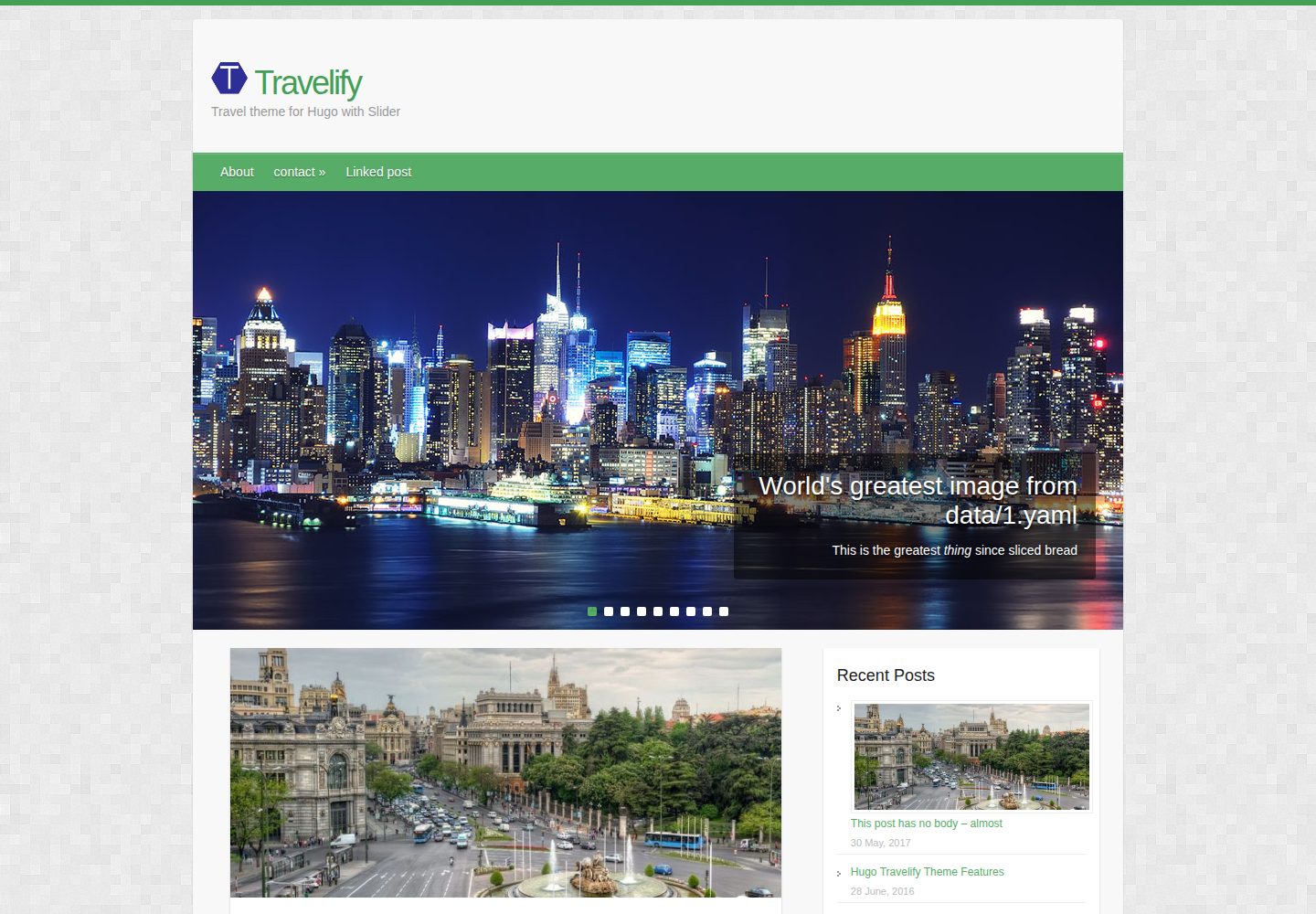
浏览真实页面截图,比较内容排版与手机效果。点击下方缩略图切换,放大查看整页细节。
全部页面与视图 2
截图用于了解视觉与布局,交互效果请以实际项目为准。
采集于 2026-10-03查看来源
值得关注的模板亮点
从已有项目资料中,快速了解它的特点。
首页轮播可自动从最近文章取图,也可手动指定文章或 data/slider 下的 YAML
轮播支持 YouTube、Vimeo、Dailymotion 及自托管 mp4/webm 视频
侧边栏小工具含近期文章、分类、标签、标签云、DuckDuckGo 搜索、作者与 Mailchimp 订阅
支持 Disqus 评论、Google Analytics、社交分享与多作者归档
通过 frontmatter 开关可关闭单页的侧栏、日期行、上下篇链接与评论
模板详细介绍
hugo-travelify-theme 是把 Aigars Silkalns 的 WordPress 主题 Travelify 移植到 Hugo 的版本,仓库采用 MIT 许可,作者为 balaramadurai。主题面向博客类站点,示例站点包含 about、contact 页面以及 post 目录下的多篇示例文章,并附带 banners 图片与 l10n.toml 翻译文件。
功能上,主题通过 config.toml 的 params.slider 控制首页轮播:可开关、可切换自动或手动模式,自动模式从最近若干篇文章中取 banner 图,手动模式则读取文章 frontmatter 的 slider 标记或 data/slider 下的 YAML 文件;轮播支持 YouTube、Vimeo、Dailymotion 或自托管 mp4/webm 视频,README 建议 banner 图使用 1018x460 分辨率。侧边栏小工具包括近期文章、分类、标签、标签云、DuckDuckGo 搜索、作者与 Mailchimp 订阅表单,其中归档小工具在 README 中标注因 Hugo 限制尚未实现。
其他配置项包括 Disqus 评论(可用 frontmatter 的 disable_comments 单页关闭)、Google Analytics、社交账号链接、社交分享按钮(Facebook、Twitter、Google+、LinkedIn)、菜单与嵌套菜单、permalink slug 形式,以及通过 frontmatter 的 disable_profile、disable_widgets、nodateline、noprevnext 控制单页布局与元素。主题字符串集中在 data/l10n.toml,可替换为其他语言。
使用方式为在 Hugo 项目的 themes 目录下 git clone 本仓库,再把 exampleSite 内容复制到站点根目录后运行 hugo server 预览。README 未说明主题的浏览器兼容范围、构建性能或长期维护状态,第三方素材(图片、字体、图标)需按各自许可单独核对。
HugoWordPress博客工具站企业官网
适合你的项目吗?
适用场景
- 搭建以文章列表和首页轮播为入口的个人博客
- 需要多作者归档与作者信息展示的内容站点
- 希望在文章底部接入 Disqus 评论并统计访问的博客
- 为不同语言站点替换 l10n.toml 中的界面字符串
适合人群
- 使用 Hugo 并希望沿用 Travelify 视觉风格的博客作者
- 需要首页图片或视频轮播的内容站点
- 需要侧边栏小工具与邮件订阅入口的博客
- 接受自行配置 Disqus、Google Analytics 与 Mailchimp 的用户
上手与定制指南
结合仓库当前版本的说明,按下面的资料检查内容、配置与运行要求。
- 1
在 Hugo 项目的 themes 目录执行 git clone https://github.com/balaramadurai/hugo-travelify-theme.git
- 2
将 themes/hugo-travelify-theme/exampleSite 下的内容复制到站点根目录,再运行 hugo server 预览
- 3
在 config.toml 中配置轮播开关与数量、Disqus shortname、Google Analytics 及侧边栏小工具
- 4
banner 图建议使用 1018x460 分辨率,图片可放在文章同目录或 static 目录
- 5
Mailchimp 订阅需自行生成表单并填入 mailchimpform 的 action URL
授权与来源资料
使用条件与限制
免费使用 · 保留许可声明本次收录的是公开仓库中采用 MIT 许可的免费版本;免费范围为该版本代码,不代表外部服务或第三方素材免费。
使用时需要遵守
- 允许免费使用、修改、商用和分发该版本代码。
- 分发代码副本或实质性部分时,保留原作者版权声明和完整 MIT 许可声明。
- 代码按现状提供;担保与责任限制以原许可证及适用法律为准。
额外费用与待核对事项
- 邮件订阅功能依赖第三方 Mailchimp 服务,用户须自行注册账号并生成表单 HTML 代码,主题本身不提供订阅后端。
- 评论功能由第三方 Disqus 提供,需自行注册并填入 shortname 才能启用,属于外部服务依赖。
- 访问统计依赖 Google Analytics,需自行申请并填入跟踪 ID,属外部服务。
- 侧边栏 Mailchimp 订阅表单需按 Mailchimp 官方说明获取 action URL 并填入配置,涉及第三方账号。
- 归档小工具尚未实现,README 明确说明因 Hugo 限制该功能不可用,配置中默认关闭。
- 轮播视频若使用 YouTube、Vimeo 或 Dailymotion,需依赖这些第三方平台及其服务条款。
- 演示图片、字体、图标及其他第三方素材需按各自许可核对,不能仅凭代码的 MIT 许可判断。
- 域名、托管、数据库、支付或 AI 等外部服务可能另外收费。
查看原文依据
Permission is hereby granted, free of charge
许可证原文
Subscribe via Email through Mailchimp integration (You have to sign up and generate the HTML code)
README 原文
The comment system is an optional feature powered by Disqus. Enter your *shortname* to enable the comments section under your posts.
README 原文
GoogleAnalytics = ""
README 原文
grab the mailchimpform value by following instructions here - https://mailchimp.com/help/add-a-signup-form-to-your-website/
README 原文
archives = false # This feature is yet to be implemented because of limitations in Hugo's way of working.
README 原文
https://github.com/balaramadurai/hugo-travelify-theme/blob/master/LICENSE.mdhttps://github.com/balaramadurai/hugo-travelify-theme/blob/master/README.mdYou can now add a video (from YouTube or Vimeo or Dailymotion or your own mp4/webm file) in the slider.
README 原文
DeepSeek 根据仓库许可证和 README 整理 ·2026-10-03。结果仅覆盖已读取资料,依赖、图片、字体及后续条款变更以各自原文为准。
项目核对记录与介绍依据
模板资料
- 来源平台
- Hugo Themes
- 资料与维护参考分
- 资料较完整 · 86 / 100
- 技术栈
- Hugo · WordPress
- 网站类型
- 博客 · 工具站 · 企业官网
这个分数如何计算
本站按许可资料(最高30分)、演示链接(12分)、预览图(10分)、Star数(15分)、记录的维护时间(15分)、描述完整度(8分)、功能记录(5分)和分类资料(5分)计算。它不是代码、安全或性能测试,也不是 Google 评分;有链接不代表已实测可用。
这个项目需要核对什么
- 记录的仓库更新时间
- 2025-06-02
- 截图检查日期
- 2026-10-03
已收录演示链接。请用你的内容与屏幕尺寸检查;有演示不代表表单、认证或支付已经可用。
目录记录的主要技术栈是 Hugo。请通过依赖清单和锁文件核对实际版本与托管要求。这些说明基于收录资料,不代表代码审计或部署实测。
查看具体选型方法 →介绍的制作与核对状态
介绍由 AI 辅助整理目录与仓库资料。仓库作者不等于这篇介绍的审核者。
审核声明: [email protected] · 2026-10-04
查看当时使用的来源资料
SHA-256: 7c92cbc371ab0c9d5574d6e569c609695ff05c8844d7fa73dd103ff546d96559
2026-10-03T16:42:06.364Z
来源文件 / 仓库The homepage of this Travelify theme is at [https://themes.gohugo.io/hugo-travelify-theme/](https://themes.gohugo.io/hugo-travelify-theme/).
Some of the important features of Hugo-Travelify-Theme are:
- Automatic slider generation with banner images
- Subscribe via Email through Mailchimp integration (You have to sign up and generate the HTML code)
- Multiple author support (Included in the taxonomy)
- i10n data
- Disqus integration
- logo (with option to switch on or off the title)
- Social media sharing options
- Google Analytics
<br>
Here are some screenshots of the theme:
<br>
<img class="img-responsive" src="https://raw.githubusercontent.com/balaramadurai/hugo-travelify-theme/master/images/screenshot-1.png" />
<img class="img-responsive" src="https://raw.githubusercontent.com/balaramadurai/hugo-travelify-theme/master/images/screenshot-2.png" />
<img class="img-responsive" src="https://raw.githubusercontent.com/balaramadurai/hugo-travelify-theme/master/images/screenshot-3.png" />
## Get the theme
If you have `git` installed, you can do the following at the command-line-interface within the Hugo directory:
```
$ cd themes
$ git clone https://github.com/balaramadurai/hugo-travelify-theme.git
```
You should see a folder called `hugo-travelify-theme` inside the `themes` directory that we created a few moments ago. For more information read the official [setup guide](https://gohugo.io/overview/installing/) of Hugo.
## Setup
In the next step navigate to the `exampleSite` folder at `themes/hugo-travelify-theme/exampleSite/`. Its structure should look similar to this:
```
exampleSite
| config.toml
+---content
| | about.md
| | contact.md
| \---post
| creating-a-new-theme.md
| go-is-for-lovers.md
| hugo-is-for-lovers.md
| linked-post.md
| migrate-from-jekyll.md
| this-post-has-no-body.md
+---data
| l10n.toml
\---static
| new-york-featured.jpg
\---banners
7148951717_9bbf185db3_h-1018x460.jpg
featured-4.jpg
featured-5.jpg
new-york-featured.jpg
placeholder.png
Spain-Plaza-de-Cibeles-Madrid-1018x460.jpg
Spain-Plaza-de-Cibeles-Madrid-670x300.jpg
spain6-1018x460.jpg
```
To get your site running, copy the entire contents of the example site using `cp -r themes/hugo-travelify-theme/exampleSite/* .` into the root folder. (Please refer to http://gohugo.io/overview/quickstart/ for installing a Hugo theme.)
## The `config` file
Now, let us take a look at `config.toml`. Let's take a look at some of the settings.
### 1. Automatic or Manual slider
Using the parameters in the config, the slider can be switched on and off at will and the number of banner images on the carousel can be customized.
```
[params.slider]
enable = true
manual = false
num_features = 4 # The slider picks up the banner images from the N most recent posts, where num_features is N.
```
The slider can be made `manual = true` and in each of the posts you want highlighted on the slider, include `slider = true` in the frontmatter. Another way to add a slideshow to the slider is by creating YAML files in the `data/slider` folder. Check the `exampleSite` for example.
#### Videos in slider
You can now add a video (from YouTube or Vimeo or Dailymotion or your own mp4/webm file) in the slider. (Thanks to [https://github.com/balaramadurai/hugo-travelify-theme/issues/32](Issue #32) for the idea)
*Tip* - For best results in the slider, use **1018x460** resolution for the banner images.
### 2. Google Analytics
```
GoogleAnalytics = ""
```
### 3. Comments
The comment system is an optional feature powered by Disqus. Enter your *shortname* to enable the comments section under your posts.
```
disqusShortname = ""
```
*Tip* - You can disable the comments section for a single page in its `frontmatter`:
```toml
+++
disable_comments = true
+++
```
### 4. Menu & Nested Menus
The entries in the items menu can be customized. First, let us link a post that you've written. We can do this in the `frontmatter` of the post's content file by setting `menu` to `main`.
```
+++
menu = "main"
+++
```
Further, we can add entries that don't link to posts. Back in the `config.toml` you'll find a section for the menus:
```
[[menu.main]]
name = "Contact"
url = "/contact/"
weight = 20
```
Define a label and enter the URL of the resource you want to link. With `before` you can decide whether the link should appear before **or** after all linked posts in the menu. Therefore, `Home` appears before the linked post.
For nested menus, you can use the following format:
```
[[menu.main]]
name = "Contact2"
url = "/contact/"
parent = "Contact"
[[menu.main]]
name = "Contact21"
url = "/contact/"
parent = "Contact2"
weight = 20
[[menu.main]]
name = "Contact22"
url = "/contact/"
parent = "Contact2"
weight = 10
[[menu.main]]
name = "Contact3"
url = "/contact/"
parent = "Contact"
```
### 5. Sidebars
To use the full width of the website you can disable the profile on the left and / or the widgets on the right for a single page in the `frontmatter`:
```toml
+++
disable_profile = true
disable_widgets = true
+++
```
### 6. Tell me who you are
This theme also provides a profile section. Add your social network accounts to the profile section by entering your user name under `social`. The links to your accounts will be created automatically.
### 7. Widgets
You can add widgets to the right sidebar. The following widgets are available:
- recent articles
- Multiple author support
- category list
- tag list
- tag cloud
- Duckduckgo search enabled on your website
You can deactivate them under `params.widgets`:
```
# Enable and disable widgets for the right sidebar
[params.widgets]
recent_articles = true
categories = true
tags = true
tag_cloud = true
archives = false # This feature is yet to be implemented because of limitations in Hugo's way of working.
search = true
author = true
mailchimp = true
mailchimpform = "//mailchimp/url/goes/here"
# grab the mailchimpform value by following instructions here - https://mailchimp.com/help/add-a-signup-form-to-your-website/
# Copy the URL in the action parameter inside the form
# <div id="mc_embed_signup"><form action="https://balaramadurai.us15.list-manage.com/subscribe/post?u=7f4183fa2fe7abe3dc9f4efad&id=49a3dd3745" method="post"
```
### 8. Date line
The date line includes: post date, categories, comments and sharing links. However, if you want certain pages to omit the date line, simply put `nodateline = true` in the front matter for that page.
### 9. Disable previous/next article links and remove tags
To disable the inclusion of a previous/next article link at the bottom of the page, add `noprevnext = true` to `frontmatter`. This feature, along with `nodateline = true`, can be used to create standalone pages that are less "blog-like".
### 10. Translation (l10n)
You don't blog in English and you want to translate the theme into your own language? No problem. Inside the `exampleSite/data` folder you'll find a file `l10n.toml`. It contains all the strings related to the theme. Just replace the original strings with your own.
### 11. Linking thumbnails
After creating a new post you can define a banner by entering the relative path to the image.
```
banner = "banners/placeholder.png"
```
This way you can store the images either in the same folder as your post or in the `static` folder.
*Tip* - For best results in the slider, use **1018x460** resolution for the banner images.
### 12. Social media sharing
You can enable to disable social media sharing buttons selectively using the following options:
```
[params.share]
enable = true
facebook = true
twitter = true
googleplus = true
linkedin = true
```
### 13. Permalink Slugs
You can customize the slugs to look like this
e.g. in the `[permalinks]` section, categories can be set up in these
different ways:
```
categories = "/category/:slug/"
categories = "/categories/:slug/"
```
Thanks to @sandipb with the PR - https://github.com/balaramadurai/hugo-travelify-theme/pull/31
## Nearly finished
To preview your site, run Hugo's built-in local server.
```
$ hugo server
```
Now enter [`localhost:1313`](http://localhost:1313) in the address bar of your browser.
## Contributing to the theme
Found a bug or have an idea for a new feature? Feel free to use the [issue tracker](//github.com/balaramadurai/hugo-travelify-theme/issues) to let me know. Or make a [pull request](//github.com/digitalcraftsman/hugo-travelify-theme/pulls).
## License
This theme is released under the MIT license. For more information read the [license](https://github.com/balaramadurai/hugo-travelify-theme/blob/master/LICENSE.md).
## Acknowledgements
Thanks to
- [Aigars Silkalns](//colorlib.com/travelify/) for creating this theme
- [Steve Francia](//github.com/spf13) for creating Hugo and the awesome community around the project
- [digitalcraftsman](https://github.com/digitalcraftsman) for creating the source code for Icarus theme
- [Anita Nagarajan](http://anitanagarajan.com) for editing this post/README
看看同类模板
对比同技术栈与用途的模板,找到更适合的视觉与内容结构。

hugo-PaperMod
PaperMod 是 Hugo 生态里知名度较高的主题之一,定位很明确:给博客和轻量作品集站点提供一套干净、响应式的阅读界面。
Hugo · 作品集

LoveIt
❤️A clean, elegant but advanced blog theme for Hugo 一个简洁、优雅且高效的 Hugo 主题
Hugo · 博客

hugo-coder
A minimalist blog theme for hugo.
Hugo · 博客

blowfish
Personal Website & Blog Theme for Hugo
Hugo · 博客

hugo-paper
🪺 A simple, clean, customizable Hugo theme
Hugo · 博客

hextra
Hextra 是一个 Hugo 主题,定位在文档站与博客之间:既提供侧边栏导航、目录、面包屑、分页这类文档站结构,也能承载博客内容。
Hugo · 文档