Jekyll blog theme; the repository describes itself as an empty GH-Page theme, usable as a starting point for a personal blog
JekyllBlog
blog-theme — Jekyll Blog Template
By beedcode
A free and open-source blog theme based on Jekyll. The repository describes itself as an empty GH-Page theme, suitable as a starting point for a personal blog and customizable as needed.
Explore the design
Compare the page layouts and mobile experience. Open any screenshot for a closer look.
Desktop homepage1 / 3
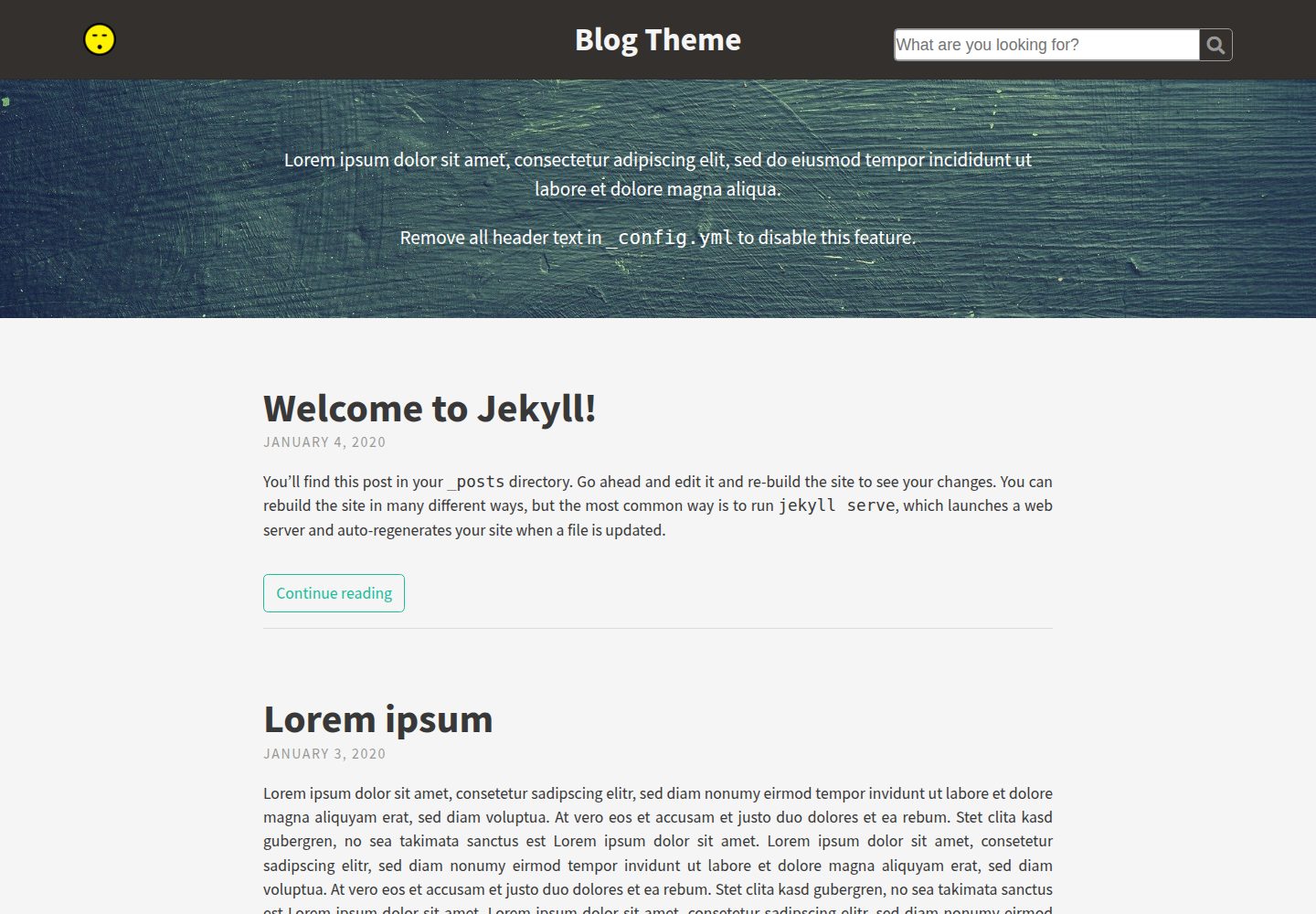
Desktop captureTop of page
Actual screenshot captured by the server browser.
All pages & views 3
Screenshots show visual appearance; interactive behavior may differ.
Recorded 2026-10-03View source
What stands out
A quick read of the recorded project description.
Centralized configuration in _config.yml for site information, header and footer, social icons, analytics scripts, and localization strings
Adjust colors, fonts, and spacing in _sass/base/_variables.scss, with support for Google Fonts
Posts support tags, subtitles, featured images, and KaTeX math formulas wrapped in $$
Pages can be hidden from navigation with hide: true, or ordered with the order field
Search is disabled by default; when enabled, it uses Lunr to search post titles, tags, and content
Template Details
Blog Theme is a free and open-source blog theme based on Jekyll. The repository describes itself as an "empty GH-Page Theme," meaning it provides a runnable basic blog skeleton rather than a fully content-complete site. It is suitable for building a personal blog on GitHub Pages or any Jekyll environment, and site information, header and footer, icons, scripts, color scheme, and typography can be adjusted by modifying variables in _config.yml and _sass.
The theme centrally manages site configuration in _config.yml, including baseurl and url, title, avatar or Gravatar, description, header and footer text, social icons, Google Analytics, Disqus, KaTeX, and localization strings. At the style level, colors, fonts, and spacing are controlled through _sass/base/_variables.scss, and loading Google Fonts is supported.
For content features, posts support tags, subtitles, featured images (feature-img and feature-title), and KaTeX math formulas wrapped in $$. Pages can be hidden from navigation with hide: true, or ordered with the order field. Search is disabled by default; when enabled, it uses Lunr to search post titles, tags, and content. The repository does not provide a dependency manifest, so specific version numbers are not listed here.
JekyllBlog
Is it right for your project?
Use Cases
- Build a personal blog on GitHub Pages and start writing using the blank skeleton provided by the theme
- Replace the theme for an existing Jekyll site and customize the appearance through _config.yml and _sass variables
- Write technical articles containing math formulas and enable KaTeX for typesetting
- Add featured images and subtitles to posts and organize content using tags
- Use Lunr search to find post titles, tags, and content within the site
Suitable For
- Developers familiar with basic Jekyll usage who are willing to customize through configuration files and Sass variables
- Personal bloggers who need a free and open-source blog theme and accept starting from a blank skeleton
- Users who publish posts on GitHub Pages or their own Jekyll environment
Getting started & customization
Use these recorded setup notes alongside the repository instructions for your chosen version.
- 1
After forking and cloning the repository, install Jekyll first, then run bundle install to install the theme dependencies
- 2
Before use, configure baseurl and url in _config.yml, distinguishing between deployments with and without a subpath
- 3
Optional features (avatar, Gravatar, header and footer text, social icons, analytics, Disqus, KaTeX, search, etc.) are enabled or disabled by filling in or leaving the corresponding variables blank
- 4
When using remote_theme, you can import custom variables, theme styles, and custom styles in order in assets/css/main.scss
- 5
The repository does not provide a dependency manifest; before installing and running, verify dependencies against the current repository contents
License & source material
Usage conditions & limitations
Free to use · keep license noticeThis entry covers the free version under the MIT license in the public repository; the free scope is the code of this version and does not mean external services or third-party assets are free.
Must comply with when using
- Free use, modification, commercial use, and distribution of this version's code are permitted.
- When distributing copies or substantial portions of the code, retain the original author's copyright notice and the full MIT license notice.
- The code is provided as is; warranties and limitations of liability are governed by the original license and applicable law.
Additional costs & items to verify
- Google Analytics is an optional feature; you must provide your own tracking ID and accept Google's terms of service and privacy policy.
- Disqus comments are an optional feature; you must register a Disqus account and provide a shortname, and comment data is hosted by a third party.
- Google Fonts is an optional feature; when enabled, the page loads fonts from Google servers, and you must comply with Google's terms of service.
- Search is disabled by default; when enabled, it relies on Lunr to search post titles, tags, and content on the client side.
- Demo images, fonts, icons, and other third-party assets must be checked against their respective licenses and cannot be judged solely by the code's MIT license.
- External services such as domains, hosting, databases, payments, or AI may incur additional charges.
View Original Text Basis
Permission is hereby granted, free of charge
Original License Text
google_analytics | UA-123456-01 | Google Analytics [tracking ID]
Original README
disqus_shortname | shortname | Disqus [shortname]
Original README
google_fonts | "Playfair+Display:400,700
Original README
https://github.com/beedcode/blog-theme/blob/master/LICENSEhttps://github.com/beedcode/blog-theme/blob/master/README.mdThis feature uses [Lunr](https://lunrjs.com/) and searches through the title, tags and content of your posts.
Original README
Compiled by DeepSeek based on repository license and README ·2026-10-03. Results only cover the materials read; dependencies, images, fonts, and subsequent term changes are subject to their respective original texts.
Project checks & description sources
Template Information
- Source platforms
- GitHub
- Documentation and maintenance reference score
- Partly documented · 65 / 100
- Technologies
- Jekyll
- Website type
- Blog
How this score is calculated
Our heuristic uses license records (up to 30), a demo link (12), a preview (10), stars (15), recorded maintenance (15), description completeness (8), feature records (5) and classification data (5). It is not a code, security or performance test, or a Google score. A link does not establish tested functionality.
What to verify for this project
- Repository update recorded
- 2020-01-18
- Screenshot last checked
- 2026-10-03
A demo link is listed. Check it with your own content and viewport sizes; its presence does not confirm that forms, authentication or payments work.
The catalog identifies Jekyll as the primary stack. Check the actual dependency manifest and lockfile for versions and hosting requirements. These notes use recorded metadata, not a code audit or a deployment test.
Use a selection guide →How this description was prepared
AI-assisted description based on catalog records and repository material. Repository authors are not automatically the reviewers of this description.
Review declaration: [email protected] · 2026-10-04
Inspect the recorded source material
SHA-256: 65e4d82d5ec9271c0eb83107a50103167751a3e6ae80c1dc884748378de448a5
2026-10-03T18:05:46.728Z
Source file / repository# Blog Theme  A free and open-source [Jekyll](https://jekyllrb.com) theme. Great for blogs and easy to customize. [Demo](https://beedcode.github.io/blog-theme/) ## Usage 1. Fork and clone the [Blog Theme repo](https://github.com/beedcode/blog-theme): `git clone https://github.com/beedcode/blog-theme` 2. [Install Jekyll](https://jekyllrb.com/docs/installation/): `gem install jekyll` 3. Install the theme's dependencies: `bundle install` 4. Customize the theme (see below) 5. Run the Jekyll server: `jekyll serve` ## Customizing Type Theme Open `_config.yml` in a text editor to change most of the blog's settings. If a variable in this document is marked as "optional", disable the feature by removing all text from the variable. For example, to prevent the avatar from rendering in the header, the avatar line should read: ```yml theme: title: Blog Theme avatar: gravatar: ``` Notice the avatar variable is left intentionally blank. Below is a summary of the configuration options in Type Theme. ### Site configuration The most common configurations, included here for guidance, are: Jekyll website *without* a subpath (such as a GitHub Pages website for a given username): ```yml # SITE CONFIGURATION baseurl: "" url: "https://username.github.io" ``` Jekyll website *with* subpath (like the Type Theme demo page): ```yml # SITE CONFIGURATION baseurl: "/sub-directory" url: "https://username.github.io/" ``` Please configure this in `_config.yml` before using the theme. ### Meta Meta variables hold basic information about your Jekyll site which will be used throughout the site and as meta properties for search engines, browsers, and the site's RSS feed. Change these variables in `_config.yml`: | Variable | Example | Description | Optional | | ----------- | -------------------------------- | ------------------------------------------------------------------------------------------------------------------------------ | -------- | | title | My Jekyll Blog | Name of website | Yes | | avatar | assets/img/avatar-smiley.png | Path of avatar image, to be displayed in the theme's header | Yes | | gravatar | f9879d71855b5ff21e4963273a886bfc | [MD5 hash of your email address](https://secure.gravatar.com/site/implement/hash/) to load your Gravatar in the theme's header | Yes | | description | My blog posts | Short description, primarily used by search engines | Yes | ### Header and footer text Change these variables in `_config.yml`: | Variable | Example | Description | Optional | | ------------------------- | ----------------------------------- | ----------------------------------------------------------------------- | -------- | | header_text | Welcome to my Jekyll blog | HTML (shown below the navigation) with a background colour for emphasis | Yes | | header_text_feature_image | assets/img/blackboard.png | Background image for the header text | Yes | | footer_text | Copyright 2014 | HTML (shown at end of the site) with lighter text | Yes | ### Icons Add your username on selected websites in the icon section of the `_config.yml` file to display the site's icon from [Font Awesome](https://fortawesome.github.io/Font-Awesome/) in the header navigation. All icon variables should be your username enclosed in quotes (e.g. "username"), except for the following variables: | Variable | Example | Description | Optional | | -------------- | ----------------------------------------------- | ------------------------------------------------------ | -------- | | rss | true | Takes boolean value (true/false) to show RSS feed icon | Yes | | email_address | [email protected] | Email address | Yes | | linkedin | https://www.linkedin.com/in/FirstLast | Full URL to profile on LinkedIn | Yes | | stack_exchange | https://stackoverflow.com/users/0000/first-last | Full URL to profile on Stack Exchange | Yes | ### Scripts Change these variables in `_config.yml`: | Variable | Example | Description | Optional | | ---------------- | ------------ | ----------------------------------------------------------------------------------------------------------------------------------- | -------- | | google_analytics | UA-123456-01 | Google Analytics [tracking ID](https://support.google.com/analytics/answer/1032385?hl=en) | Yes | | disqus_shortname | shortname | Disqus [shortname](https://help.disqus.com/customer/portal/articles/466208-what-s-a-shortname-) | Yes | | katex | true | Takes boolean value (true/false) to conditionally load [KaTeX](https://khan.github.io/KaTeX/) scripts required for math typesetting | Yes | Scripts listed here are only loaded if you provide a value in the `_config.yml` file. ### Localization strings Change localization string variables in `_config.yml`. English text used in the theme (such as the "continue reading" label) has been grouped so you can quickly translate the theme or change labels to suit your needs. ### Colours, typography, padding  | Variable | Example | Description | Optional | | ------------ | -------------------------- | ------------------------------------ | ------------------------------------------------------------ | | google_fonts | "Playfair+Display:400,700\ | PT+Sans:400,700,700italic,400italic" | [Google Fonts](https://www.google.com/fonts) to load for use | Navigate to the `_sass > base` directory and open `_variables.scss` to change colours, typography and padding used in the theme with CSS. Once you have loaded a Google Font in `config.yml`, you can integrate the fonts into your CSS by changing the font-family in `_variables.scss`. For example, after loading the Playfair Display and PT Sans fonts from Google: ```css // Typography $font-family-main: 'PT Sans', Helvetica, Arial, sans-serif; $font-family-headings: 'Playfair Display', Helvetica, Arial, sans-serif; ``` Mozilla's [ColorPicker](https://developer.mozilla.org/en-US/docs/Web/CSS/CSS_Colors/Color_picker_tool) is a helpful tool to get your preferred colours in hexadecimal or RGBA form for use in `_variables.scss`. ### Customize style when using the remote_theme If you're using Type Theme as a `remote_theme`, you can override variables and styles. To do so, simply create a `assets/css/main.scss` file on your website with the following content: ```scss // assets/css/main.scss --- --- @import "blog-theme"; ``` `@import "blog-theme";` includes the theme styles, so you can add custom imports before and after it, depending on your needs. Best practice is to put your custom files in the `_sass` folder of your project. Jekyll will automatically look for them there. For example, say you wanted to override some theme variables and add some custom styles, you can create the following files: ```scss // _sass/_variables.scss $background-color: black; ``` ```sass // _sass/_custom.sass // SASS is supported as well, just note the file extension is .sass .feature-image header height: 300px ``` Then import them both into `main.scss`: ```scss // assets/css/main.scss --- --- @import "variables"; @import "blog-theme"; @import "custom"; ``` ## Posts and pages in Type Theme Please refer to the [Jekyll docs for writing posts](https://jekyllrb.com/docs/posts/). Non-standard features are documented below. ### Math typesetting Wrap math expressions with `$$` signs in your posts and make sure you have set the `katex` variable in `_config.yml` to `true` for math typesetting. For inline math typesetting, type your math expression on the *same line* as your content. For example: ```latex Type math within a sentence $$2x^2 + x + c$$ to display inline ``` For display math typesetting, type your math expression on a *new line*. For example: ```latex $$ \bar{y} = {1 \over n} \sum_{i = 1}^{n}y_i $$ ``` Type Theme makes use for [KaTeX](https://khan.github.io/KaTeX/) for typesetting. ### Feature images  Add a feature image by specifying a path to an image in the [front matter](http://jekyllrb.com/docs/frontmatter/) in the form of `feature-img: "img/PATH_TO_IMAGE.png"`. For example: ```yml --- layout: post title: Title feature-img: "assets/img/blackboard.jpg" --- ``` By default, the page title is displayed on top of the feature image, as well as on the browser's tab. You can change the feature image's displayed title by specifying a `feature-title` in the front matter: ```yml --- layout: post title: Title feature-title: Markdown and HTML feature-img: "assets/img/blackboard.jpg" --- ``` ### Hiding pages from navigation In the front matter of a page, add `hide: true` to prevent the page from showing up in the header's navigation bar (visitors can still visit the URL through other means). For example: ```yml --- layout: page title: "Error 404: Page not found" permalink: /404.html hide: true --- ``` ### Sorting pages in navigation You can configure this theme to **sort your pages** in the header's navigation bar. - Set `site_navigation_sort` in theme settings to a property name e.g. `'order'` - In the front matter of a non-hidden page, add `order: n` For example: ```yml --- layout: page title: Team permalink: /team/ order: 4 --- ``` ### Tags Post tags should be placed between `[]` in your post metadata. Separate each tag with a comma. For example: ```yml --- layout: post title: Markdown and HTML tags: [sample, markdown, html] --- ``` A tags listing will be automatically generated using the `tags.html` file provided in Type Theme. If you're not using the tags feature it is safe to delete `tags.html`. ### Search The search feature can be activated in the `_config.yml` file by changing its value from `false` to `true`. ```yml #Scripts search: true ``` Once activated, the search bar will appear in the header. This feature uses [Lunr](https://lunrjs.com/) and searches through the title, tags and content of your posts. ### Subtitles A subtitle can be displayed below your title on permalink post pages. To enable this feature, add `subtitle` to your post metadata. For example: ```yml --- layout: post title: "This is a title" subtitle: "This is a subtitle" --- ``` ## License [The MIT License (MIT)](https://github.com/beedcode/blog-theme/blob/master/LICENSE)
Explore similar templates
Compare previews and descriptions within the same stack and category.

al-folio
A Jekyll academic homepage theme for scholars and researchers, with a clean responsive design and out-of-the-box support for publication lists, project showcases, CVs, and blogs.
Jekyll · Portfolio

minimal-mistakes
Minimal Mistakes is a two-column Jekyll theme for personal sites, blogs, project documentation, or portfolios.
Jekyll · Portfolio

Beautiful Jekyll
Beautiful Jekyll is a mature, easy-to-use Jekyll blog theme maintained by Dean Attali since 2015, with over 50,000 users.
Jekyll · Blog

jekyll-TeXt-theme
A customizable Jekyll theme for personal sites, team sites, blogs, projects, and documentation.
Jekyll · Blog

startbootstrap-clean-blog-jekyll
The official Jekyll version of Start Bootstrap's Clean Blog theme, offering a blog home page, about page, contact page, and sample post pages, with a Formspree-powered contact form.
Jekyll · Blog

So Simple
A minimal reading-oriented Jekyll theme by Michael Rose for personal blogs, portfolios, and long-form reading. It offers multiple layouts, microformat markup, Disqus comments, Google Analytics, Jekyll SEO Tag, three skins, and aggregation by year, category, and tag with a grid view.
Jekyll · Blog