Jekyll 博客主题,仓库自述为空白 GH-Page 主题,可作为个人博客的起点
Jekyll博客
blog-theme — Jekyll 博客模板
作者 beedcode
基于 Jekyll 的免费开源博客主题,仓库自述为空白 GH-Page 主题,适合作为个人博客起点并按需定制。
看看你的网站会是什么样
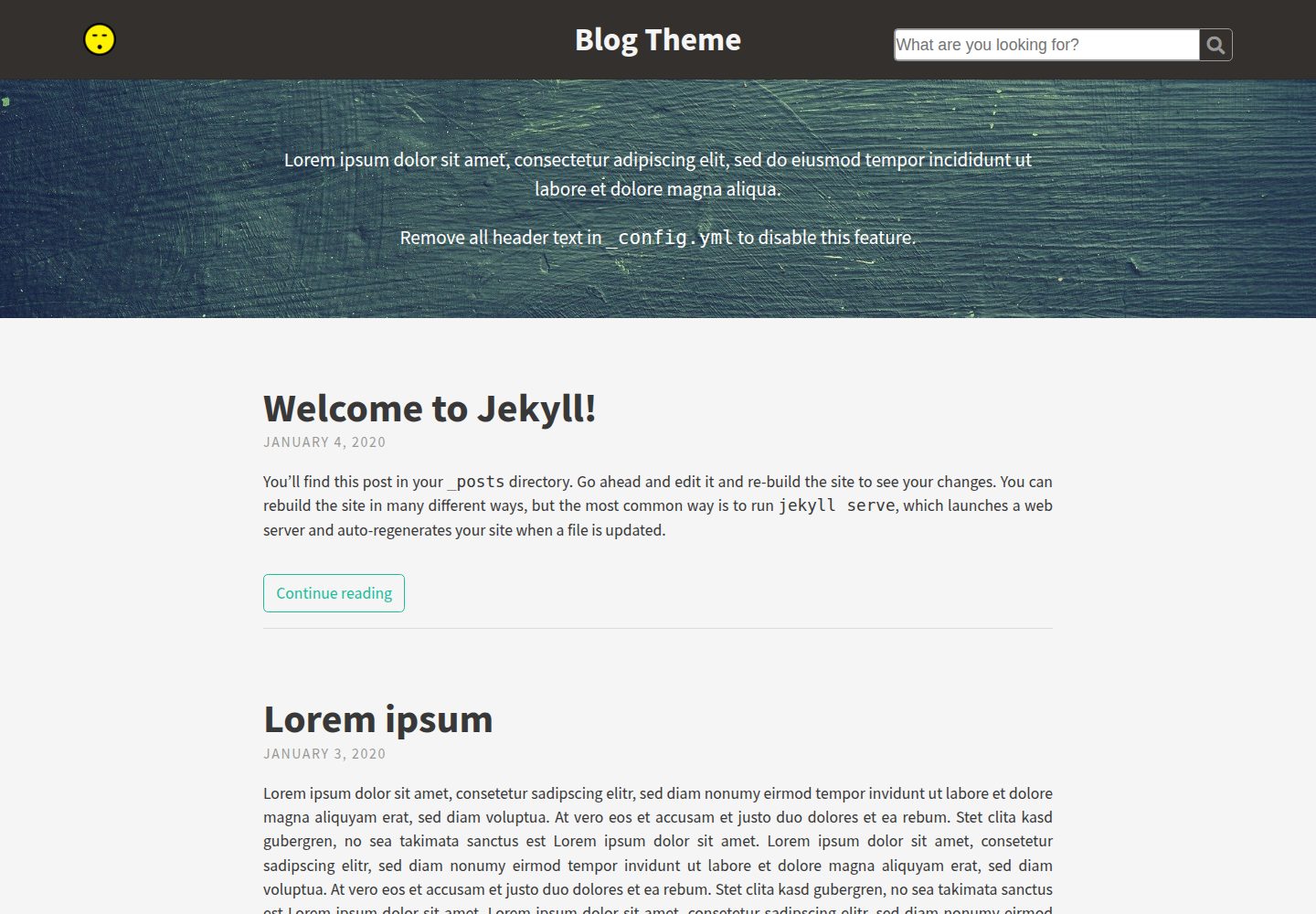
浏览真实页面截图,比较内容排版与手机效果。点击下方缩略图切换,放大查看整页细节。
全部页面与视图 3
截图用于了解视觉与布局,交互效果请以实际项目为准。
采集于 2026-10-03查看来源
值得关注的模板亮点
从已有项目资料中,快速了解它的特点。
通过 _config.yml 集中配置站点信息、页头页脚、社交图标、分析脚本与本地化字符串
在 _sass/base/_variables.scss 中调整颜色、字体与间距,并支持 Google Fonts
文章支持标签、副标题、特色图片,以及通过 $$ 包裹的 KaTeX 数学公式
页面可用 hide: true 从导航隐藏,或用 order 字段排序
搜索功能默认关闭,开启后使用 Lunr 检索文章标题、标签与内容
模板详细介绍
Blog Theme 是一个基于 Jekyll 的免费开源博客主题,仓库自述为“empty GH-Page Theme”,即提供一套可运行的基础博客骨架,而非内容完备的成品站点。它适合用于 GitHub Pages 或任意 Jekyll 环境搭建个人博客,并可通过修改 _config.yml 与 _sass 中的变量调整站点信息、页头页脚、图标、脚本、配色与排版。
主题在 _config.yml 中集中管理站点配置,包括 baseurl 与 url、标题、头像或 Gravatar、描述、页头与页脚文本、社交图标、Google Analytics、Disqus、KaTeX 以及本地化字符串。样式层面通过 _sass/base/_variables.scss 控制颜色、字体与间距,并支持加载 Google Fonts。
内容功能方面,文章支持标签、副标题、特色图片(feature-img 与 feature-title)、通过 $$ 包裹的 KaTeX 数学公式;页面可通过 hide: true 从导航隐藏,也可用 order 字段排序。搜索功能默认关闭,开启后使用 Lunr 检索文章标题、标签与内容。仓库未提供依赖清单,因此不在此列出具体版本号。
Jekyll博客
适合你的项目吗?
适用场景
- 在 GitHub Pages 上搭建个人博客,并使用主题提供的空白骨架开始写作
- 为已有 Jekyll 站点替换主题,通过 _config.yml 与 _sass 变量定制外观
- 撰写包含数学公式的技术文章,并启用 KaTeX 进行排版
- 为文章添加特色图片与副标题,并利用标签组织内容
- 通过 Lunr 搜索在站内查找文章标题、标签与内容
适合人群
- 熟悉 Jekyll 基本用法、愿意通过配置文件与 Sass 变量自行定制的开发者
- 需要免费开源博客主题并接受从空白骨架开始搭建的个人博主
- 在 GitHub Pages 或自有 Jekyll 环境发布文章的用户
上手与定制指南
结合仓库当前版本的说明,按下面的资料检查内容、配置与运行要求。
- 1
Fork 并克隆仓库后,先安装 Jekyll,再执行 bundle install 安装主题依赖
- 2
使用前在 _config.yml 中配置 baseurl 与 url,区分有无子路径的部署方式
- 3
可选功能(头像、Gravatar、页头页脚文本、社交图标、分析、Disqus、KaTeX、搜索等)通过填写或留空对应变量来启用或关闭
- 4
使用 remote_theme 时,可在 assets/css/main.scss 中按顺序导入自定义变量、主题样式与自定义样式
- 5
仓库未提供依赖清单,安装与运行前请以仓库当前内容为准核对依赖
授权与来源资料
使用条件与限制
免费使用 · 保留许可声明本次收录的是公开仓库中采用 MIT 许可的免费版本;免费范围为该版本代码,不代表外部服务或第三方素材免费。
使用时需要遵守
- 允许免费使用、修改、商用和分发该版本代码。
- 分发代码副本或实质性部分时,保留原作者版权声明和完整 MIT 许可声明。
- 代码按现状提供;担保与责任限制以原许可证及适用法律为准。
额外费用与待核对事项
- Google Analytics 为可选功能,需自行提供跟踪 ID 并接受 Google 的服务条款与隐私政策。
- Disqus 评论为可选功能,需注册 Disqus 账号并提供 shortname,评论数据由第三方托管。
- Google Fonts 为可选功能,启用后页面会从 Google 服务器加载字体,需遵守 Google 的服务条款。
- 搜索功能默认关闭,开启后依赖 Lunr 在客户端检索文章标题、标签与内容。
- 演示图片、字体、图标及其他第三方素材需按各自许可核对,不能仅凭代码的 MIT 许可判断。
- 域名、托管、数据库、支付或 AI 等外部服务可能另外收费。
查看原文依据
Permission is hereby granted, free of charge
许可证原文
google_analytics | UA-123456-01 | Google Analytics [tracking ID]
README 原文
disqus_shortname | shortname | Disqus [shortname]
README 原文
google_fonts | "Playfair+Display:400,700
README 原文
https://github.com/beedcode/blog-theme/blob/master/LICENSEhttps://github.com/beedcode/blog-theme/blob/master/README.mdThis feature uses [Lunr](https://lunrjs.com/) and searches through the title, tags and content of your posts.
README 原文
DeepSeek 根据仓库许可证和 README 整理 ·2026-10-03。结果仅覆盖已读取资料,依赖、图片、字体及后续条款变更以各自原文为准。
项目核对记录与介绍依据
模板资料
- 来源平台
- GitHub
- 资料与维护参考分
- 资料一般 · 65 / 100
- 技术栈
- Jekyll
- 网站类型
- 博客
这个分数如何计算
本站按许可资料(最高30分)、演示链接(12分)、预览图(10分)、Star数(15分)、记录的维护时间(15分)、描述完整度(8分)、功能记录(5分)和分类资料(5分)计算。它不是代码、安全或性能测试,也不是 Google 评分;有链接不代表已实测可用。
这个项目需要核对什么
- 记录的仓库更新时间
- 2020-01-18
- 截图检查日期
- 2026-10-03
已收录演示链接。请用你的内容与屏幕尺寸检查;有演示不代表表单、认证或支付已经可用。
目录记录的主要技术栈是 Jekyll。请通过依赖清单和锁文件核对实际版本与托管要求。这些说明基于收录资料,不代表代码审计或部署实测。
查看具体选型方法 →介绍的制作与核对状态
介绍由 AI 辅助整理目录与仓库资料。仓库作者不等于这篇介绍的审核者。
审核声明: [email protected] · 2026-10-04
查看当时使用的来源资料
SHA-256: 65e4d82d5ec9271c0eb83107a50103167751a3e6ae80c1dc884748378de448a5
2026-10-03T18:05:46.728Z
来源文件 / 仓库# Blog Theme  A free and open-source [Jekyll](https://jekyllrb.com) theme. Great for blogs and easy to customize. [Demo](https://beedcode.github.io/blog-theme/) ## Usage 1. Fork and clone the [Blog Theme repo](https://github.com/beedcode/blog-theme): `git clone https://github.com/beedcode/blog-theme` 2. [Install Jekyll](https://jekyllrb.com/docs/installation/): `gem install jekyll` 3. Install the theme's dependencies: `bundle install` 4. Customize the theme (see below) 5. Run the Jekyll server: `jekyll serve` ## Customizing Type Theme Open `_config.yml` in a text editor to change most of the blog's settings. If a variable in this document is marked as "optional", disable the feature by removing all text from the variable. For example, to prevent the avatar from rendering in the header, the avatar line should read: ```yml theme: title: Blog Theme avatar: gravatar: ``` Notice the avatar variable is left intentionally blank. Below is a summary of the configuration options in Type Theme. ### Site configuration The most common configurations, included here for guidance, are: Jekyll website *without* a subpath (such as a GitHub Pages website for a given username): ```yml # SITE CONFIGURATION baseurl: "" url: "https://username.github.io" ``` Jekyll website *with* subpath (like the Type Theme demo page): ```yml # SITE CONFIGURATION baseurl: "/sub-directory" url: "https://username.github.io/" ``` Please configure this in `_config.yml` before using the theme. ### Meta Meta variables hold basic information about your Jekyll site which will be used throughout the site and as meta properties for search engines, browsers, and the site's RSS feed. Change these variables in `_config.yml`: | Variable | Example | Description | Optional | | ----------- | -------------------------------- | ------------------------------------------------------------------------------------------------------------------------------ | -------- | | title | My Jekyll Blog | Name of website | Yes | | avatar | assets/img/avatar-smiley.png | Path of avatar image, to be displayed in the theme's header | Yes | | gravatar | f9879d71855b5ff21e4963273a886bfc | [MD5 hash of your email address](https://secure.gravatar.com/site/implement/hash/) to load your Gravatar in the theme's header | Yes | | description | My blog posts | Short description, primarily used by search engines | Yes | ### Header and footer text Change these variables in `_config.yml`: | Variable | Example | Description | Optional | | ------------------------- | ----------------------------------- | ----------------------------------------------------------------------- | -------- | | header_text | Welcome to my Jekyll blog | HTML (shown below the navigation) with a background colour for emphasis | Yes | | header_text_feature_image | assets/img/blackboard.png | Background image for the header text | Yes | | footer_text | Copyright 2014 | HTML (shown at end of the site) with lighter text | Yes | ### Icons Add your username on selected websites in the icon section of the `_config.yml` file to display the site's icon from [Font Awesome](https://fortawesome.github.io/Font-Awesome/) in the header navigation. All icon variables should be your username enclosed in quotes (e.g. "username"), except for the following variables: | Variable | Example | Description | Optional | | -------------- | ----------------------------------------------- | ------------------------------------------------------ | -------- | | rss | true | Takes boolean value (true/false) to show RSS feed icon | Yes | | email_address | [email protected] | Email address | Yes | | linkedin | https://www.linkedin.com/in/FirstLast | Full URL to profile on LinkedIn | Yes | | stack_exchange | https://stackoverflow.com/users/0000/first-last | Full URL to profile on Stack Exchange | Yes | ### Scripts Change these variables in `_config.yml`: | Variable | Example | Description | Optional | | ---------------- | ------------ | ----------------------------------------------------------------------------------------------------------------------------------- | -------- | | google_analytics | UA-123456-01 | Google Analytics [tracking ID](https://support.google.com/analytics/answer/1032385?hl=en) | Yes | | disqus_shortname | shortname | Disqus [shortname](https://help.disqus.com/customer/portal/articles/466208-what-s-a-shortname-) | Yes | | katex | true | Takes boolean value (true/false) to conditionally load [KaTeX](https://khan.github.io/KaTeX/) scripts required for math typesetting | Yes | Scripts listed here are only loaded if you provide a value in the `_config.yml` file. ### Localization strings Change localization string variables in `_config.yml`. English text used in the theme (such as the "continue reading" label) has been grouped so you can quickly translate the theme or change labels to suit your needs. ### Colours, typography, padding  | Variable | Example | Description | Optional | | ------------ | -------------------------- | ------------------------------------ | ------------------------------------------------------------ | | google_fonts | "Playfair+Display:400,700\ | PT+Sans:400,700,700italic,400italic" | [Google Fonts](https://www.google.com/fonts) to load for use | Navigate to the `_sass > base` directory and open `_variables.scss` to change colours, typography and padding used in the theme with CSS. Once you have loaded a Google Font in `config.yml`, you can integrate the fonts into your CSS by changing the font-family in `_variables.scss`. For example, after loading the Playfair Display and PT Sans fonts from Google: ```css // Typography $font-family-main: 'PT Sans', Helvetica, Arial, sans-serif; $font-family-headings: 'Playfair Display', Helvetica, Arial, sans-serif; ``` Mozilla's [ColorPicker](https://developer.mozilla.org/en-US/docs/Web/CSS/CSS_Colors/Color_picker_tool) is a helpful tool to get your preferred colours in hexadecimal or RGBA form for use in `_variables.scss`. ### Customize style when using the remote_theme If you're using Type Theme as a `remote_theme`, you can override variables and styles. To do so, simply create a `assets/css/main.scss` file on your website with the following content: ```scss // assets/css/main.scss --- --- @import "blog-theme"; ``` `@import "blog-theme";` includes the theme styles, so you can add custom imports before and after it, depending on your needs. Best practice is to put your custom files in the `_sass` folder of your project. Jekyll will automatically look for them there. For example, say you wanted to override some theme variables and add some custom styles, you can create the following files: ```scss // _sass/_variables.scss $background-color: black; ``` ```sass // _sass/_custom.sass // SASS is supported as well, just note the file extension is .sass .feature-image header height: 300px ``` Then import them both into `main.scss`: ```scss // assets/css/main.scss --- --- @import "variables"; @import "blog-theme"; @import "custom"; ``` ## Posts and pages in Type Theme Please refer to the [Jekyll docs for writing posts](https://jekyllrb.com/docs/posts/). Non-standard features are documented below. ### Math typesetting Wrap math expressions with `$$` signs in your posts and make sure you have set the `katex` variable in `_config.yml` to `true` for math typesetting. For inline math typesetting, type your math expression on the *same line* as your content. For example: ```latex Type math within a sentence $$2x^2 + x + c$$ to display inline ``` For display math typesetting, type your math expression on a *new line*. For example: ```latex $$ \bar{y} = {1 \over n} \sum_{i = 1}^{n}y_i $$ ``` Type Theme makes use for [KaTeX](https://khan.github.io/KaTeX/) for typesetting. ### Feature images  Add a feature image by specifying a path to an image in the [front matter](http://jekyllrb.com/docs/frontmatter/) in the form of `feature-img: "img/PATH_TO_IMAGE.png"`. For example: ```yml --- layout: post title: Title feature-img: "assets/img/blackboard.jpg" --- ``` By default, the page title is displayed on top of the feature image, as well as on the browser's tab. You can change the feature image's displayed title by specifying a `feature-title` in the front matter: ```yml --- layout: post title: Title feature-title: Markdown and HTML feature-img: "assets/img/blackboard.jpg" --- ``` ### Hiding pages from navigation In the front matter of a page, add `hide: true` to prevent the page from showing up in the header's navigation bar (visitors can still visit the URL through other means). For example: ```yml --- layout: page title: "Error 404: Page not found" permalink: /404.html hide: true --- ``` ### Sorting pages in navigation You can configure this theme to **sort your pages** in the header's navigation bar. - Set `site_navigation_sort` in theme settings to a property name e.g. `'order'` - In the front matter of a non-hidden page, add `order: n` For example: ```yml --- layout: page title: Team permalink: /team/ order: 4 --- ``` ### Tags Post tags should be placed between `[]` in your post metadata. Separate each tag with a comma. For example: ```yml --- layout: post title: Markdown and HTML tags: [sample, markdown, html] --- ``` A tags listing will be automatically generated using the `tags.html` file provided in Type Theme. If you're not using the tags feature it is safe to delete `tags.html`. ### Search The search feature can be activated in the `_config.yml` file by changing its value from `false` to `true`. ```yml #Scripts search: true ``` Once activated, the search bar will appear in the header. This feature uses [Lunr](https://lunrjs.com/) and searches through the title, tags and content of your posts. ### Subtitles A subtitle can be displayed below your title on permalink post pages. To enable this feature, add `subtitle` to your post metadata. For example: ```yml --- layout: post title: "This is a title" subtitle: "This is a subtitle" --- ``` ## License [The MIT License (MIT)](https://github.com/beedcode/blog-theme/blob/master/LICENSE)
看看同类模板
对比同技术栈与用途的模板,找到更适合的视觉与内容结构。

al-folio
al-folio 是一个面向学者与研究人员的 Jekyll 作品集主题,设计简洁、响应式,适合搭建个人学术主页。
Jekyll · 作品集

minimal-mistakes
:triangular_ruler: Jekyll theme for building a personal site, blog, project documentation, or portfolio.
Jekyll · 作品集

Beautiful Jekyll
Beautiful Jekyll 是一个在 Jekyll 生态中经过长期打磨的博客主题,由 Dean Attali 维护,自 2015 年起积累了超过 5 万用户。
Jekyll · 博客

jekyll-TeXt-theme
💎 🐳 A super customizable Jekyll theme for personal site, team site, blog, project, documentation, etc.
Jekyll · 博客

startbootstrap-clean-blog-jekyll
A Jekyll version of the Clean Blog theme by Start Bootstrap
Jekyll · 博客

So Simple
So Simple 是 Michael Rose 开发的 Jekyll 主题,定位清晰:为文字和图片提供一个干净、可读性强的展示框架。
Jekyll · 博客