Monorepo structure with separate frontend (React) and backend (Express)
ReactStarter
react-express-registration-template — React Starter Template
By bgtti
A full-stack registration and login template based on React, Express, and MongoDB, including separate frontend and backend code and a basic authentication flow.
Explore the design
Compare the page layouts and mobile experience. Open any screenshot for a closer look.
Author preview
Author-provided preview
Preview provided in the project README.
One original preview is available. Open the full image to inspect the design.
Screenshots show visual appearance; interactive behavior may differ.
Recorded 2026-10-02View source
What stands out
A quick read of the recorded project description.
Built-in registration, login, logout, account deletion, and session management flows
Uses bcrypt for password hashing, Passport local strategy for authentication, and express-session for server-side cookie management
Frontend integrates React Router, Redux Toolkit, Axios, and PropTypes
Backend includes Jest, Supertest, mongodb-memory-server tests, and a Postman collection
Plain CSS styling, mobile-first, no UI framework dependencies
Template Details
This is a starter template for full-stack web applications, providing basic implementations of user registration, login, session management, and protected routes. The repository uses a monorepo structure: the frontend is a React application, the backend is an Express application, user data is stored in MongoDB with hashed passwords, and sessions are managed via server-side cookies.
The template includes home, registration, login, dashboard, and terms pages, along with logout and account deletion functionality. The frontend uses React Router for client-side routing, Redux Toolkit for state management, and Axios for requests; the backend uses bcrypt to hash passwords, Passport local strategy for authentication, and express-session for session management. Styling is plain CSS with a mobile-first layout.
The project is currently at version 3. The main differences from earlier versions are the frontend reimplemented in React, added routing, additional test cases, and the inclusion of API documentation and a Postman collection. Version 1 (Express-only template, no database) and version 2 (Express + MongoDB template, basic Jest tests) are preserved in the version_1 and version_2 branches, respectively. The repository is under the Unlicense, so the code can be freely used and modified, but third-party assets such as demo images, fonts, and icons require separate license checks, and external services such as domains, hosting, and databases may incur costs.
ReactStarter
Is it right for your project?
Use Cases
- Rapidly prototyping a full-stack web application with registration and login
- Learning the basic structure of a React and Express project with separated frontend and backend
- Extending the existing authentication flow with dashboard or user management features
- Using as a teaching example to demonstrate session management and protected route implementation
Suitable For
- Frontend or full-stack developers familiar with JavaScript and basic React and Express development
- Individuals or teams needing a freely modifiable authentication starter template
- Learners looking for reference implementations of server-side sessions and password hashing
Getting started & customization
Use these recorded setup notes alongside the repository instructions for your chosen version.
- 1
Node.js and MongoDB must be installed in advance, or use MongoDB Community Server
- 2
Run npm install in the Backend-ExpressJS and Frontend-ReactJS directories separately
- 3
Create a .env file in the Backend-ExpressJS root directory, refer to .env.example and change the session secret
- 4
Run npm run devStart for the backend and npm run dev for the frontend
- 5
Third-party assets such as demo images, fonts, and icons require separate license checks
License & source material
Usage conditions & limitations
Free to use · keep license noticeThis entry covers the free version in the public repository under the Unlicense; the free scope applies to that version's code and does not imply that external services or third-party assets are free.
Must comply with when using
- You are free to copy, modify, publish, use, compile, sell, and distribute this version's code, including for commercial purposes.
- The author waives copyright through a public domain dedication; the legal effect of this dedication depends on the applicable jurisdiction.
- The code is provided as-is; warranties and limitations of liability are governed by the original license and applicable law.
Additional costs & items to verify
- Running the backend requires a locally installed and running MongoDB database service; otherwise the application cannot start or save user data.
- You must create and configure the .env file yourself (including the session secret, etc.); the backend will not run properly without it.
- The default session secret must be changed before use; otherwise session security cannot be guaranteed.
- Demo images, fonts, icons, and other third-party assets require separate license checks and cannot be judged solely by the code's Unlicense.
- External services such as domains, hosting, databases, payments, or AI may incur additional charges.
View Original Text Basis
for any purpose, commercial or non-commercial, and by any means
Original License Text
Make sure you have MongoDB installed in your machine.
Original README
You can create a .env file in the root of the `Backend-ExpressJS` folder
Original README
https://github.com/bgtti/react-express-registration-template/blob/main/LICENSEhttps://github.com/bgtti/react-express-registration-template/blob/main/README.mdDo not forget to change the session secret key.
Original README
Compiled by DeepSeek based on repository license and README ·2026-10-02. Results only cover the materials read; dependencies, images, fonts, and subsequent term changes are subject to their respective original texts.
Project checks & description sources
Template Information
- Source platforms
- GitHub
- Documentation and maintenance reference score
- Partly documented · 65 / 100
- Technologies
- React
- Website type
- Starter
How this score is calculated
Our heuristic uses license records (up to 30), a demo link (12), a preview (10), stars (15), recorded maintenance (15), description completeness (8), feature records (5) and classification data (5). It is not a code, security or performance test, or a Google score. A link does not establish tested functionality.
What to verify for this project
- Repository update recorded
- 2025-03-31
- Screenshot last checked
- 2026-10-02
No demo link is recorded. Use the repository instructions to evaluate the project locally; the screenshot alone cannot establish interactive behavior.
The catalog identifies React as the primary stack. Check the actual dependency manifest and lockfile for versions and hosting requirements. These notes use recorded metadata, not a code audit or a deployment test.
Use a selection guide →How this description was prepared
AI-assisted description based on catalog records and repository material. Repository authors are not automatically the reviewers of this description.
Automatically checked against source and license rules; no manual editorial review.
Inspect the recorded source material
SHA-256: e95a3aa2df93ef923f0a010d1e8e425a707b3481f88d916aea4f9afa70bd91f3
2026-10-02T09:08:15.376Z
Source file / repository<div align="center">
<br>
<h1><b>Fullstack Registration Template</b></h1>
<strong>Fullstack Auth Template</strong>
</div>
<br>
<table align="center" style="border-collapse:separate;">
<tr>
<td style="background: #344955; border-radius:20px; border: 5px solid transparent"><small>Express JS</small></td>
<td style="background: #344955; border-radius:20px"><small>MongoDB</small></td>
<td style="background: #344955; border-radius:20px"><small>React JS</small></td>
<td style="background: #344955; border-radius:20px"><small>Jest JS</small></td>
<td style="background: #344955; border-radius:20px"><small>Supertest</small></td>
<td style="background: #344955; border-radius:20px"><small>Postman</small></td>
</tr>
</table>
<hr>

<hr>
# Table of Contents
- [Introduction](#introduction)
- [Functionality](#functionality)
- [Tech Stack and Tools](#tech-stack-and-tools)
- [Installation](#installation)
- [Project Structure and Documentation](#project-structure-and-documentation)
- [Frontend-ReactJS](#frontend-reactjs)
- [Backend-ExpressJS](#backend-expressjs)
- [readmeAssets](#readmeassets)
- [The App](#the-app)
- [Versioning and branches](#versioning-and-branches)
- [About and license](#about-and-license)
<br>
# Introduction
A full-stack boilerplate project featuring user signup, login, session management, and protected routes. Built with **Express.js**, **MongoDB**, and **React.js**.
This monorepo contains separate frontend and backend apps, structured to help you kickstart a fullstack web app with authentication.
The codebase is clean and modular, with a straightforward folder structure and clear documentation, making it easy to build upon and extend with your own features.
## Fuctionality
This project contains the base functionality and styling for:
- Homepage
- Signup page
- Login page
- Dashboard page
- Terms and conditions page
- Logout functionality
- Delete account functionality
## Tech Stack and Tools
**Backend:**
- bcrypt – password hashing
- passport – local authentication strategy
- express-session – session management
- jest, supertest, and mongodb-memory-server – testing
**Frontend:**
- React Router – client-side routing
- Redux Toolkit – state management
- Axios – HTTP requests
- PropTypes – prop validation
**Styling:**
Plain CSS (no frameworks), UI built mobile-first.
# Installation
<details>
<summary>1. Clone this repository</summary>
>\
> More information on how to clone this repository [available here](https://docs.github.com/en/repositories/creating-and-managing-repositories/cloning-a-repository)
><br/><br/>
</details>
<details>
<summary>2. Open the Back-end and Front-end terminals</summary>
>\
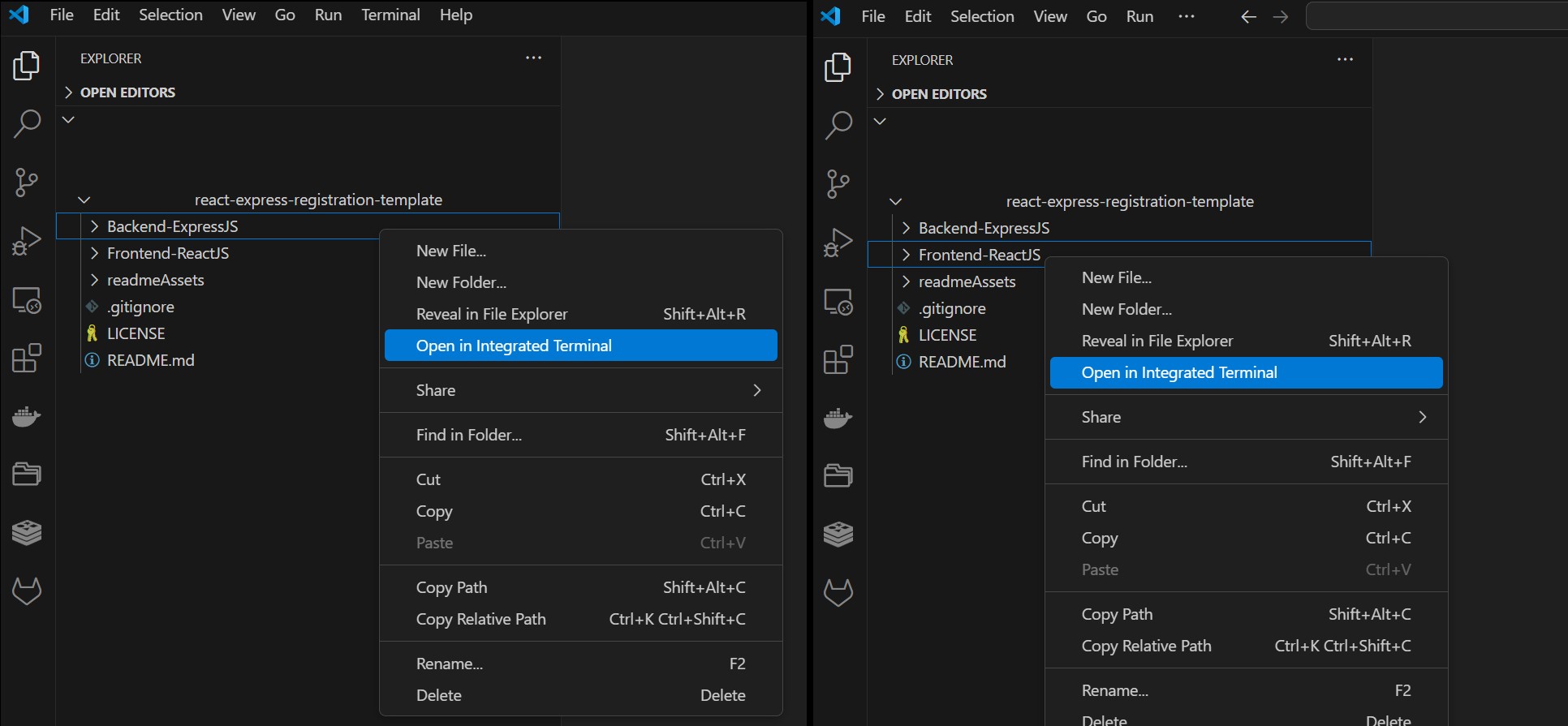
> If using Visual Studio Code, right-click on each folder and select **Open in Integraded Terminal**.
>
>
>
><br/><br/>
</details>
<details>
<summary>2. Install dependencies</summary>
>\
> Make sure you have MongoDB installed in your machine. If you do not, I recommend using the MongoDB Community Server Download [available here](https://www.mongodb.com/try/download/community). (Date: 24 March 2025). You should also have NodeJS installed.
> Next, install the app dependencies for both the Back- and Front-end apps.
>
> **Backend-ExpressJS**
> ```pwsh
>cd Backend-ExpressJS
>npm install
>```
> **Frontend-ReactJS**
> ```pwsh
>cd Frontend-ReactJS
>npm install
>```
><br/><br/>
</details>
<details>
<summary>3. Create an env file</summary>
>\
> You can create a .env file in the root of the `Backend-ExpressJS` folder, the content should be similar to that of the .env.example file provided.
>
> Do not forget to change the session secret key.
><br/><br/>
</details>
<details>
<summary>4. Run both apps</summary>
>\
> **Backend-ExpressJS**
> ```pwsh
>npm run devStart
>```
> **Frontend-ReactJS**
> ```pwsh
>npm run dev
>```
>
>
>
><br/><br/>
</details>
<br/>
# Project Structure and Documentation
This repo contains both the front- and back-ends of the application, and each app contains its own documentation (`readme.md` files). From the root directory, apart from the `.gitignore` and `LICENSE`, you will find the following folders:
## Frontend-ReactJS
Contains the front-end part of the application.
You can see detailed information about the front-end app [in it's documentation](Frontend-ReactJS/README.md).
## Backend-ExpressJS
Contains the back-end part of the application.
You can see detailed information about the the server and testing [in it's documentation](Backend-ExpressJS/README.md).
The back-end directory also includes a Postman collection, as well as a test file which runs with Jest.
## readmeAssets
Contains the images used in this readme file.
# The template
The apps contains basic registration functionality and placeholder text/image thought to be used as a starter template in other Express + React projects.
It uses server-side cookies (with express-session), manages authorization (using passport), and saves user registration information (with hashed passwords) to a mongoDB database.

# Versioning and branches
This is the project's version 3.
Main difference between this and previous versions:
- react implementation: previous versions used ExpressJS for the UI as well
- routes: new routes implemented
- testing: more test cases included
- documentation: api documentation and postman collections included
The Version 1 of this project (in Express JS only, with no database, using templates) is available in the branch named `version_1`.
The Version 2 of this project (express JS with mongoDB, using templates, with basic jest testing) is available in the branch named `version_2`.
# About and license
This is the first draft of an app template in React/Express. This draft solely uses Express with ejs templates.
This is a personal project completed by the author, which you are welcome to use and modify at your discretion.
Explore similar templates
Compare previews and descriptions within the same stack and category.
ant-design-pro
Ant Design Pro is an enterprise-grade React admin scaffold built on React 19, Umi Max 4, and antd 6 with TypeScript.
React · Admin dashboard

react-boilerplate
A production-grade React + Redux starter for experienced developers, integrating Redux, redux-saga, styled-components, and react-router, with offline-first and PWA support, CLI code generation, and built-in testing and CI configuration. Requires Node.js v8.15.1 and npm v5 or higher; not suitable for beginners.
React · Starter

fastapi-react
A Cookiecutter template for FastAPI + React (TypeScript) full-stack projects, integrating PostgreSQL, SQLAlchemy, Alembic, Celery, Redis, JWT authentication, a react-admin admin panel, and a Docker Compose development environment with Nginx reverse proxy.
React · Admin dashboard

shadcn-landing-page
A free React landing page template built with TypeScript, Tailwind and Shadcn/UI, offering 16 ready-to-use sections such as Navbar, Hero, Pricing, FAQ and Footer, with responsive layout, dark mode and meta tags.
React · Corporate Website
start-ui-web
Start UI [web] is an opinionated full-stack starter from the BearStudio team, built on Node.js, TypeScript, React, and TanStack Start, with Tailwind CSS, shadcn/ui, React Hook Form, oRPC, Prisma, and Better Auth.
React · Starter

React-Landing-Page-Template
A React single-page landing page template for startups and service businesses, with copy and image references centralized in data.json, assets in public/img/, styles in public/css/, and a contact form that requires your own EmailJS service ID, template ID, and Public Key.
React · Corporate Website