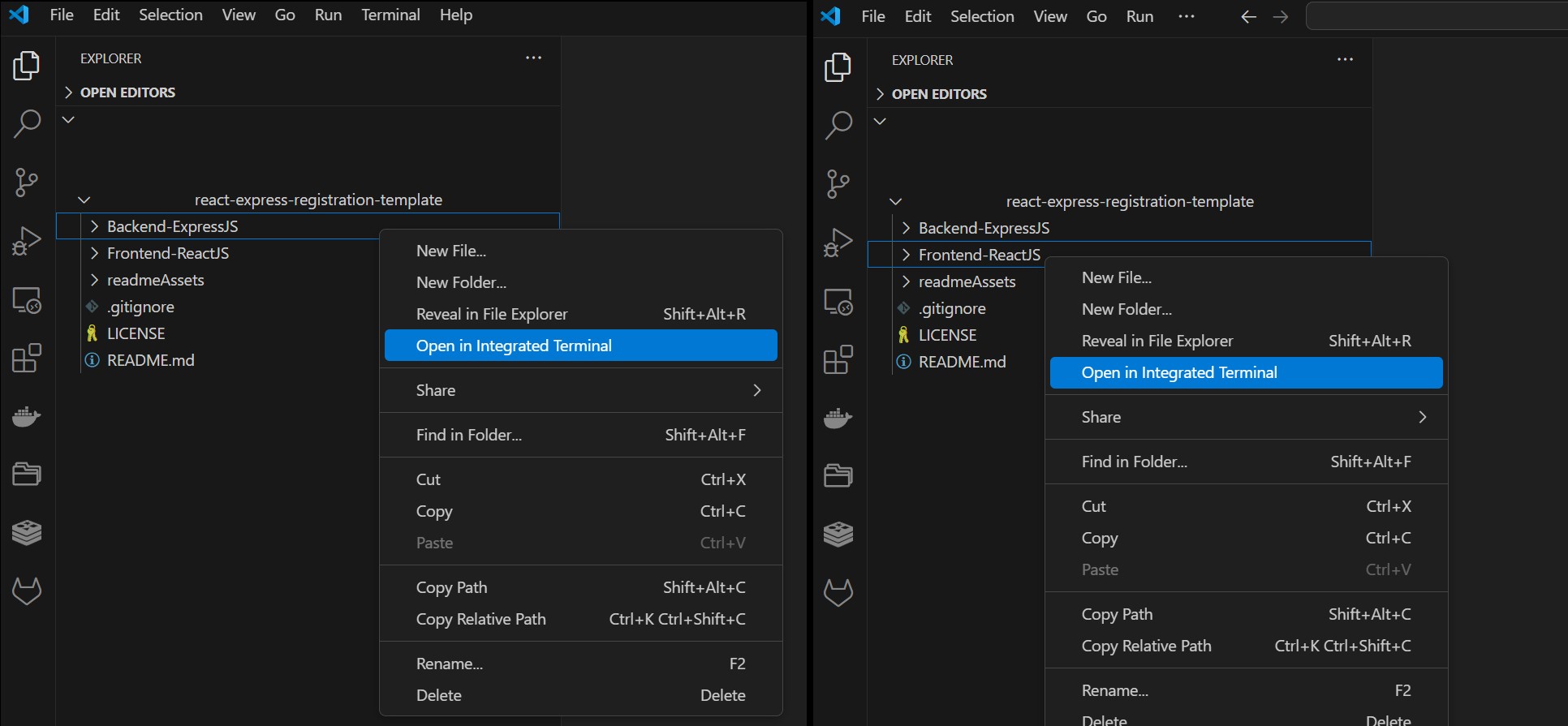
前后端分离的 monorepo 结构,前端 React、后端 Express 各自独立
React启动器
react-express-registration-template — React 启动器模板
作者 bgtti
基于 React、Express 与 MongoDB 的全栈注册登录模板,包含前后端分离代码与基础认证流程。
看看你的网站会是什么样
浏览真实页面截图,比较内容排版与手机效果。点击下方缩略图切换,放大查看整页细节。
目前有 1 张原始预览,可打开完整图片查看设计细节。
截图用于了解视觉与布局,交互效果请以实际项目为准。
采集于 2026-10-02查看来源
值得关注的模板亮点
从已有项目资料中,快速了解它的特点。
内置注册、登录、登出、删除账户与会话管理流程
使用 bcrypt 哈希密码,passport 本地策略认证,express-session 管理服务端 cookie
前端集成 React Router、Redux Toolkit、Axios 与 PropTypes
后端附带 Jest、Supertest、mongodb-memory-server 测试及 Postman 集合
样式为原生 CSS,移动优先,无 UI 框架依赖
模板详细介绍
这是一个面向全栈 Web 应用的启动模板,提供用户注册、登录、会话管理与受保护路由的基础实现。仓库采用 monorepo 结构,前端为 React 应用,后端为 Express 应用,用户数据以哈希密码形式存入 MongoDB,会话通过服务端 cookie 管理。
模板包含首页、注册页、登录页、仪表盘页、条款页,以及登出和删除账户功能。前端使用 React Router 处理客户端路由、Redux Toolkit 管理状态、Axios 发起请求;后端使用 bcrypt 哈希密码、passport 本地策略做认证、express-session 管理会话。样式为原生 CSS,采用移动优先的布局。
项目当前为第 3 版,与早期版本的主要差异在于前端改用 React 实现、新增路由、补充测试用例,并加入 API 文档与 Postman 集合。第 1 版(仅 Express 模板、无数据库)和第 2 版(Express + MongoDB 模板、基础 Jest 测试)分别保留在 version_1 和 version_2 分支。仓库采用 Unlicense 许可,代码可自由使用与修改,但演示图片、字体、图标等第三方素材需单独核对许可,域名、托管、数据库等外部服务也可能产生费用。
React启动器
适合你的项目吗?
适用场景
- 需要快速搭建带注册登录功能的全栈 Web 应用原型
- 学习 React 与 Express 前后端分离项目的基本结构
- 在现有认证流程基础上扩展仪表盘或用户管理功能
- 作为教学示例,演示会话管理与受保护路由的实现方式
适合人群
- 熟悉 JavaScript 与基础 React、Express 开发的前端或全栈开发者
- 需要可自由修改的认证启动模板的个人或团队
- 希望参考服务端会话与密码哈希实现方式的学习者
上手与定制指南
结合仓库当前版本的说明,按下面的资料检查内容、配置与运行要求。
- 1
需预先安装 Node.js 与 MongoDB,或使用 MongoDB Community Server
- 2
分别在 Backend-ExpressJS 和 Frontend-ReactJS 目录执行 npm install
- 3
在 Backend-ExpressJS 根目录创建 .env 文件,参考 .env.example 并修改 session secret
- 4
后端运行 npm run devStart,前端运行 npm run dev
- 5
演示图片、字体、图标等第三方素材需按各自许可单独核对
授权与来源资料
使用条件与限制
免费使用 · 保留许可声明本次收录的是公开仓库中采用 Unlicense 许可的免费版本;免费范围为该版本代码,不代表外部服务或第三方素材免费。
使用时需要遵守
- 允许免费复制、修改、发布、使用、编译、销售和分发该版本代码,包括商业用途。
- 作者通过公有领域贡献声明放弃相关版权;该声明的法律效果取决于适用司法辖区。
- 代码按现状提供;担保与责任限制以原许可证及适用法律为准。
额外费用与待核对事项
- 运行后端需要在本机安装并运行 MongoDB 数据库服务,否则应用无法启动或保存用户数据。
- 必须自行创建并配置 .env 文件(含 session secret 等),未配置时后端无法正常运行。
- 使用前必须修改默认的 session secret,否则会话安全性无法保证。
- 演示图片、字体、图标及其他第三方素材需按各自许可核对,不能仅凭代码的 Unlicense 许可判断。
- 域名、托管、数据库、支付或 AI 等外部服务可能另外收费。
查看原文依据
for any purpose, commercial or non-commercial, and by any means
许可证原文
Make sure you have MongoDB installed in your machine.
README 原文
You can create a .env file in the root of the `Backend-ExpressJS` folder
README 原文
https://github.com/bgtti/react-express-registration-template/blob/main/LICENSEhttps://github.com/bgtti/react-express-registration-template/blob/main/README.mdDo not forget to change the session secret key.
README 原文
DeepSeek 根据仓库许可证和 README 整理 ·2026-10-02。结果仅覆盖已读取资料,依赖、图片、字体及后续条款变更以各自原文为准。
项目核对记录与介绍依据
模板资料
- 来源平台
- GitHub
- 资料与维护参考分
- 资料一般 · 65 / 100
- 技术栈
- React
- 网站类型
- 启动器
这个分数如何计算
本站按许可资料(最高30分)、演示链接(12分)、预览图(10分)、Star数(15分)、记录的维护时间(15分)、描述完整度(8分)、功能记录(5分)和分类资料(5分)计算。它不是代码、安全或性能测试,也不是 Google 评分;有链接不代表已实测可用。
这个项目需要核对什么
- 记录的仓库更新时间
- 2025-03-31
- 截图检查日期
- 2026-10-02
目前没有记录演示链接。请依据仓库说明在本地评估;仅凭截图无法确认交互行为。
目录记录的主要技术栈是 React。请通过依赖清单和锁文件核对实际版本与托管要求。这些说明基于收录资料,不代表代码审计或部署实测。
查看具体选型方法 →介绍的制作与核对状态
介绍由 AI 辅助整理目录与仓库资料。仓库作者不等于这篇介绍的审核者。
已完成服务器许可规则与 AI 来源核对;未经过人工编辑审核。
查看当时使用的来源资料
SHA-256: e95a3aa2df93ef923f0a010d1e8e425a707b3481f88d916aea4f9afa70bd91f3
2026-10-02T09:08:15.376Z
来源文件 / 仓库<div align="center">
<br>
<h1><b>Fullstack Registration Template</b></h1>
<strong>Fullstack Auth Template</strong>
</div>
<br>
<table align="center" style="border-collapse:separate;">
<tr>
<td style="background: #344955; border-radius:20px; border: 5px solid transparent"><small>Express JS</small></td>
<td style="background: #344955; border-radius:20px"><small>MongoDB</small></td>
<td style="background: #344955; border-radius:20px"><small>React JS</small></td>
<td style="background: #344955; border-radius:20px"><small>Jest JS</small></td>
<td style="background: #344955; border-radius:20px"><small>Supertest</small></td>
<td style="background: #344955; border-radius:20px"><small>Postman</small></td>
</tr>
</table>
<hr>

<hr>
# Table of Contents
- [Introduction](#introduction)
- [Functionality](#functionality)
- [Tech Stack and Tools](#tech-stack-and-tools)
- [Installation](#installation)
- [Project Structure and Documentation](#project-structure-and-documentation)
- [Frontend-ReactJS](#frontend-reactjs)
- [Backend-ExpressJS](#backend-expressjs)
- [readmeAssets](#readmeassets)
- [The App](#the-app)
- [Versioning and branches](#versioning-and-branches)
- [About and license](#about-and-license)
<br>
# Introduction
A full-stack boilerplate project featuring user signup, login, session management, and protected routes. Built with **Express.js**, **MongoDB**, and **React.js**.
This monorepo contains separate frontend and backend apps, structured to help you kickstart a fullstack web app with authentication.
The codebase is clean and modular, with a straightforward folder structure and clear documentation, making it easy to build upon and extend with your own features.
## Fuctionality
This project contains the base functionality and styling for:
- Homepage
- Signup page
- Login page
- Dashboard page
- Terms and conditions page
- Logout functionality
- Delete account functionality
## Tech Stack and Tools
**Backend:**
- bcrypt – password hashing
- passport – local authentication strategy
- express-session – session management
- jest, supertest, and mongodb-memory-server – testing
**Frontend:**
- React Router – client-side routing
- Redux Toolkit – state management
- Axios – HTTP requests
- PropTypes – prop validation
**Styling:**
Plain CSS (no frameworks), UI built mobile-first.
# Installation
<details>
<summary>1. Clone this repository</summary>
>\
> More information on how to clone this repository [available here](https://docs.github.com/en/repositories/creating-and-managing-repositories/cloning-a-repository)
><br/><br/>
</details>
<details>
<summary>2. Open the Back-end and Front-end terminals</summary>
>\
> If using Visual Studio Code, right-click on each folder and select **Open in Integraded Terminal**.
>
>
>
><br/><br/>
</details>
<details>
<summary>2. Install dependencies</summary>
>\
> Make sure you have MongoDB installed in your machine. If you do not, I recommend using the MongoDB Community Server Download [available here](https://www.mongodb.com/try/download/community). (Date: 24 March 2025). You should also have NodeJS installed.
> Next, install the app dependencies for both the Back- and Front-end apps.
>
> **Backend-ExpressJS**
> ```pwsh
>cd Backend-ExpressJS
>npm install
>```
> **Frontend-ReactJS**
> ```pwsh
>cd Frontend-ReactJS
>npm install
>```
><br/><br/>
</details>
<details>
<summary>3. Create an env file</summary>
>\
> You can create a .env file in the root of the `Backend-ExpressJS` folder, the content should be similar to that of the .env.example file provided.
>
> Do not forget to change the session secret key.
><br/><br/>
</details>
<details>
<summary>4. Run both apps</summary>
>\
> **Backend-ExpressJS**
> ```pwsh
>npm run devStart
>```
> **Frontend-ReactJS**
> ```pwsh
>npm run dev
>```
>
>
>
><br/><br/>
</details>
<br/>
# Project Structure and Documentation
This repo contains both the front- and back-ends of the application, and each app contains its own documentation (`readme.md` files). From the root directory, apart from the `.gitignore` and `LICENSE`, you will find the following folders:
## Frontend-ReactJS
Contains the front-end part of the application.
You can see detailed information about the front-end app [in it's documentation](Frontend-ReactJS/README.md).
## Backend-ExpressJS
Contains the back-end part of the application.
You can see detailed information about the the server and testing [in it's documentation](Backend-ExpressJS/README.md).
The back-end directory also includes a Postman collection, as well as a test file which runs with Jest.
## readmeAssets
Contains the images used in this readme file.
# The template
The apps contains basic registration functionality and placeholder text/image thought to be used as a starter template in other Express + React projects.
It uses server-side cookies (with express-session), manages authorization (using passport), and saves user registration information (with hashed passwords) to a mongoDB database.

# Versioning and branches
This is the project's version 3.
Main difference between this and previous versions:
- react implementation: previous versions used ExpressJS for the UI as well
- routes: new routes implemented
- testing: more test cases included
- documentation: api documentation and postman collections included
The Version 1 of this project (in Express JS only, with no database, using templates) is available in the branch named `version_1`.
The Version 2 of this project (express JS with mongoDB, using templates, with basic jest testing) is available in the branch named `version_2`.
# About and license
This is the first draft of an app template in React/Express. This draft solely uses Express with ejs templates.
This is a personal project completed by the author, which you are welcome to use and modify at your discretion.
看看同类模板
对比同技术栈与用途的模板,找到更适合的视觉与内容结构。
ant-design-pro
Ant Design Pro 是 Ant Design 官方推出的企业级中后台前端脚手架,基于 React 19、Umi Max 4 和 antd 6 构建,内置 TypeScript 支持。
React · 后台

react-boilerplate
react-boilerplate 是一个为有一定 React 和 Redux 经验的开发者设计的启动器,目标是快速搭建可扩展、离线优先的 Web 应用。
React · 启动器

fastapi-react
fastapi-react 是一个基于 Cookiecutter 的模板,用于快速搭建 FastAPI 与 React(TypeScript)的全栈项目。
React · 后台

shadcn-landing-page
Free Landing page template using Shadcn, React, Typescript and Tailwind
React · 企业官网
start-ui-web
Start UI [web] 是 BearStudio 团队维护的一个有主见的全栈启动器,用于快速搭建 Web 应用。
React · 启动器
React-Landing-Page-Template
A simple react one page landing page templates for startups/companies
React · 企业官网