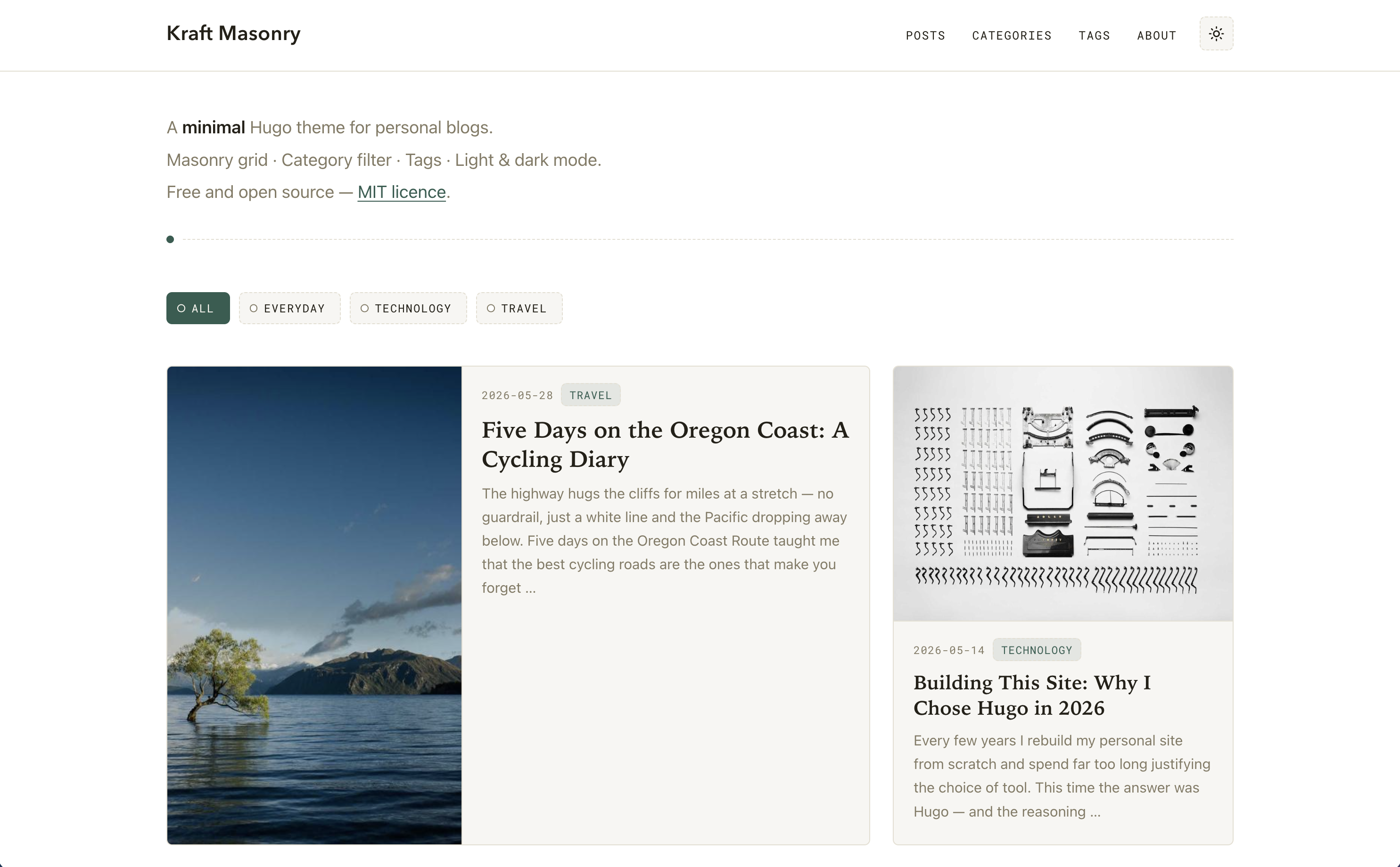
Homepage uses a CSS Grid masonry layout and automatically fills gaps via grid-auto-flow: dense
HugoBlog
hugo-kraft-masonry — Hugo Blog Template
By biccio
Kraft Masonry is a minimal Hugo theme for personal blogs. The homepage uses a CSS Grid masonry layout and supports client-side category filtering, with no npm, Sass, or external CDN dependencies.
Explore the design
Compare the page layouts and mobile experience. Open any screenshot for a closer look.
Author preview
Author-provided preview
Preview provided in the project README.
One original preview is available. Open the full image to inspect the design.
Screenshots show visual appearance; interactive behavior may differ.
Recorded 2026-10-12View source
What stands out
A quick read of the recorded project description.
Some cards span two columns to form bento-style wide cards; wide cards display image and text side by side at ≥760px
Purely client-side category filtering; clicking a category button filters cards instantly without a page refresh
Built-in light/dark mode with system preference detection and manual switching; the choice is saved to localStorage
No npm, Sass, external fonts, or CDN dependencies; CSS and JS are processed through Hugo Pipes
Provides an {{< img >}} shortcode supporting left/right/center/full alignment, captions, and width overrides
Template Details
Kraft Masonry is a Hugo theme for personal blogs. The homepage uses a CSS Grid masonry layout, automatically filling gaps via `grid-auto-flow: dense`, and lets some cards span two columns to form bento-style wide cards. The top of the homepage includes the site title, a multi-line subtitle that supports Markdown, and a purely client-side category filter bar. Post cards are ordered by date descending, with the number controlled by `homepagePostLimit`. A single post uses the classic title-plus-content layout, with a clickable tag list at the bottom. The theme includes light and dark modes, supports system preference detection and manual switching, and persists the choice to localStorage.
The theme does not depend on npm, Sass, external fonts, or a CDN; all CSS and JS are processed through Hugo Pipes. It provides an `{{< img >}}` shortcode for inline images in content, supporting left, right, center, and full alignment, plus optional captions and width overrides; floated images revert to full width on mobile. For structured data, the homepage always outputs a WebSite entity, optionally enabling a site link search box via `params.website_ld`, and outputs a Person entity via `params.person_ld`; each post can also output JSON-LD via a `schema` block in front matter. Comments are optional and only appear at the bottom of posts when an EchoThread API key is configured.
The theme requires Hugo 0.143.0 or later, with the extended version recommended. Installation supports Git submodule or copying the theme folder directly. The exampleSite directory contains a ready-to-run example site with six sample posts across three categories (Viaggi, Tecnologia, Vita quotidiana) and multiple tags. Interface strings are provided in Italian and English and can be extended via the i18n directory.
Usage limitations: homepage category filtering is entirely client-side and does not involve server-side queries; the frequency of wide cards is determined by default from title length, permalink length, and the day-of-year of the date, and can also be forced in front matter with `featured`; card summaries are ultimately truncated to 200 characters for normal cards and 240 characters for wide cards. Licenses for third-party assets such as demo images, fonts, and icons must be checked separately; the MIT license for the code itself does not cover these assets.
HugoBlog
Is it right for your project?
Use Cases
- Building a personal blog homepage that displays posts as a stream of image-and-text cards
- Needing to quickly filter the post list by category without refreshing the page each time
- Wanting a blog that offers both light and dark appearances and follows system preference
- Inserting inline images with alignment and captions within post content
- Adding JSON-LD structured data to the blog homepage or posts to enhance search result presentation
Suitable For
- Developers or writers building personal blogs with Hugo
- Those who prefer a static site build process with no npm and no external CDN dependencies
- Blog projects that need a masonry-style card homepage and client-side category filtering
- Those who want interface strings in Italian or English and can extend other languages as needed
Getting started & customization
Use these recorded setup notes alongside the repository instructions for your chosen version.
- 1
Requires Hugo 0.143.0 or later; the extended version is recommended.
- 2
The theme can be added via Git submodule to themes/hugo-kraft-masonry, or by setting the theme parameter in hugo.toml.
- 3
The exampleSite directory contains a ready-to-run example site; copy its contents and run hugo server to preview.
- 4
Comments are disabled by default and only appear when an EchoThread API key is configured in params.echothread.apiKey.
- 5
Third-party assets such as demo images, fonts, and icons must be checked separately under their respective licenses; the code's MIT license does not cover these assets.
License & source material
Usage conditions & limitations
Free to use · keep license noticeThis entry covers the free version under the MIT license in the public repository; the free scope is the code of that version and does not mean external services or third-party assets are free.
Must comply with when using
- The code of this version may be used, modified, used commercially, and distributed free of charge.
- When distributing copies or substantial portions of the code, retain the original author's copyright notice and the full MIT license notice.
- The code is provided as is; warranties and limitations of liability are governed by the original license and applicable law.
Additional costs & items to verify
- Demo images, fonts, icons, and other third-party assets must be checked under their respective licenses and cannot be judged solely by the code's MIT license.
- External services such as domains, hosting, databases, payments, or AI may incur separate charges.
- Comments are optional and require an EchoThread API key to enable; when not set, no comment HTML is output.
- Google Analytics is optional and requires a GA4 measurement ID; gtag.js is injected only in production builds, and local previews do not send traffic.
- Homepage category filtering does not update the URL; filtered views cannot be shared via link and are not indexed by search engines.
- `/posts/` has no built-in pagination; as the number of posts grows, you need to add Hugo's `.Paginate` in list.html yourself.
- Title fonts rely on system fonts; on Linux these fonts are usually not installed, so it falls back to a generic sans-serif, and cross-platform appearance may be inconsistent.
- Card summaries are truncated: 200 characters for normal cards and 240 characters for wide (featured) cards, even if the summary field is longer.
- With `grid-auto-flow: dense`, later posts may appear visually before earlier ones; reading and Tab order still follow the markup (date order).
View Original Text Basis
Permission is hereby granted, free of charge
Original License Text
**EchoThread comments** — opt-in comment section per post; set `params.echothread.apiKey` to enable
Original README
`params.googleAnalytics` | — | GA4 measurement ID (e.g. `G-XXXXXXXXXX`). When set, the `gtag.js` snippet is injected in `<head>` — only on production builds
Original README
The homepage category filter does not update the URL, so a filtered view is not shareable via link and not indexed by search engines.
Original README
No built-in pagination on `/posts/`. If your post count grows, add Hugo's standard `.Paginate` to `layouts/_default/list.html`.
Original README
`--font-title` relies on system fonts. On Linux, "Avenir Next", "Century Gothic", and "Futura" are rarely installed and the stack falls back to a generic sans-serif.
Original README
the theme truncates the final string to **200 characters** for normal cards and **240 characters** for wide (`featured`) cards.
Original README
https://github.com/biccio/hugo-kraft-masonry/blob/main/LICENSEhttps://github.com/biccio/hugo-kraft-masonry/blob/main/README.mdto fill gaps left by wide cards, the browser may display a later post visually before an earlier one. Reading / tab order always follows the markup (date order).
Original README
Compiled by DeepSeek based on repository license and README ·2026-10-12. Results only cover the materials read; dependencies, images, fonts, and subsequent term changes are subject to their respective original texts.
Project checks & description sources
Template Information
- Source platforms
- GitHub
- Documentation and maintenance reference score
- Partly documented · 68 / 100
- Technologies
- Hugo
- Website type
- Blog
How this score is calculated
Our heuristic uses license records (up to 30), a demo link (12), a preview (10), stars (15), recorded maintenance (15), description completeness (8), feature records (5) and classification data (5). It is not a code, security or performance test, or a Google score. A link does not establish tested functionality.
What to verify for this project
- Repository update recorded
- 2026-06-30
- Screenshot last checked
- 2026-10-12
No demo link is recorded. Use the repository instructions to evaluate the project locally; the screenshot alone cannot establish interactive behavior.
The catalog identifies Hugo as the primary stack. Check the actual dependency manifest and lockfile for versions and hosting requirements. These notes use recorded metadata, not a code audit or a deployment test.
Use a selection guide →How this description was prepared
AI-assisted description based on catalog records and repository material. Repository authors are not automatically the reviewers of this description.
Review declaration: [email protected] · 2026-10-13
Inspect the recorded source material
SHA-256: ed8ab39fdfd0d9da3d428b31c12c1449f7136a57176dc2561e68f555ed02f5ac
2026-10-12T08:56:19.323Z
Source file / repository# Kraft Masonry
A minimal Hugo theme for personal blogs.
**Homepage**: site title in the top-left header, a hero area with one or more subtitle lines (markdown formatting supported), a client-side category filter, and a CSS Grid masonry with automatic bento-style tiling — some cards span two columns and display their image and text side by side. **Single posts**: classic title-and-content layout with a clickable tag list at the bottom. Full **light / dark mode** support with system detection and a manual toggle.
No npm, no Sass, no external fonts or CDN dependencies. CSS and JS are processed entirely through Hugo Pipes.
---
## Screenshots

***

---
## Features
- **Masonry homepage** — CSS Grid with `grid-auto-flow: dense` for automatic gap filling
- **Bento-style wide cards** — selected cards span 2 columns with image and text side by side
- **Client-side category filter** — instant filtering by category, no page reload
- **Tag taxonomy** — tag list at the bottom of each post, clickable tag cloud at `/tags/`
- **Light / dark mode** — system preference detection + manual toggle persisted to `localStorage`
- **Responsive** — 3 / 2 / 1 column breakpoints, with an optional toggle to hide the hero on mobile
- **Inline image shortcode** — `{{< img >}}` with `left` / `right` / `center` / `full` alignment, optional caption and width override; floats collapse gracefully on mobile
- **Structured data** — optional JSON-LD (schema.org) per post, from a `schema` front-matter block; `WebSite` entity always emitted on the homepage (enables Sitelinks Search Box via `params.website_ld`); optional `Person` entity via `params.person_ld`
- **EchoThread comments** — opt-in comment section per post; set `params.echothread.apiKey` to enable
- **No external dependencies** — system font stacks, Hugo Pipes for CSS/JS minification and fingerprinting
- **i18n ready** — Italian and English string files included; add more via `i18n/`
---
## Requirements
Hugo **0.143.0** or later (extended edition recommended for future Sass support).
---
## Installation
### Option A — Git submodule (recommended)
```bash
cd your-site
git submodule add https://github.com/YOUR_USERNAME/hugo-kraft-masonry.git themes/hugo-kraft-masonry
```
Then in your `hugo.toml`:
```toml
theme = "hugo-kraft-masonry"
```
### Option B — Direct copy
Copy the `hugo-kraft-masonry/` folder (excluding `exampleSite/`) into your site's `themes/` directory.
### Try the demo site
The `exampleSite/` directory contains a ready-to-run site with six sample posts across three categories ("Viaggi", "Tecnologia", "Vita quotidiana") and multiple tags.
```bash
mkdir my-site && cd my-site
git submodule add https://github.com/YOUR_USERNAME/hugo-kraft-masonry.git themes/hugo-kraft-masonry
cp -r themes/hugo-kraft-masonry/exampleSite/* .
hugo server
```
---
## Configuration
A minimal `hugo.toml`:
```toml
baseURL = "https://example.com/"
title = "My Blog"
theme = "hugo-kraft-masonry"
# i18n: set to "it" for Italian UI strings, "en" for English
defaultContentLanguage = "en"
[taxonomies]
category = "categories"
tag = "tags"
[params]
description = "A personal blog about travel, tech, and everyday life."
author = "Your Name"
[params.hero]
subtitle = [
"A **minimal** Hugo theme for personal blogs.",
"Masonry grid · Category filter · Tags · Light & dark mode.",
"Free and open source — [MIT licence](https://github.com/YOUR_USERNAME/hugo-kraft-masonry/blob/main/LICENSE)."
]
```
### All parameters
| Parameter | Default | Description |
|---|---|---|
| `params.hero.subtitle` | — | Array of strings rendered below the site header as the homepage hero. Each element is a separate line, processed through Hugo's `markdownify` — inline Markdown is fully supported: `**bold**`, `*italic*`, `[link](url)`, and raw HTML (requires `markup.goldmark.renderer.unsafe = true`). The hero is **not shown** if this key is absent. |
| `params.disableDescriptionMobile` | `false` | When `true`, hides the homepage hero / intro block (the `hero.subtitle` lines) on viewports ≤ 640px. The hero stays visible on tablet and desktop. Handy for surfacing the post grid immediately on small screens. Implemented by adding the `hero--hide-mobile` class to the hero in `layouts/index.html`, which a `@media (max-width: 640px)` rule in `main.css` sets to `display: none`. |
| `params.description` | — | Fallback meta description for pages that don't define their own. |
| `params.author` | site `title` | Displayed in the right footer span when `params.footer.right` is not set. |
| `params.footer.left` | `© <year> <site title>` | Left span of the footer. Accepts inline Markdown (`**bold**`, `[link](url)`, HTML entities). Rendered with Hugo's `markdownify`. |
| `params.footer.right` | i18n `builtWith` + `params.author` | Right span of the footer. Accepts inline Markdown. Rendered with Hugo's `markdownify`. |
| `params.dateFormat` | `:date_long` | Layout for the **visible** post date, rendered with Hugo's locale-aware `time.Format`. Use a predefined token — `:date_full`, `:date_long` (e.g. *June 19, 2026* / *19 giugno 2026*), `:date_medium`, `:date_short` — or a custom Go layout, e.g. `02/01/2006` → *19/06/2026* (numeric, day-first). Month and weekday names are localized to the page language; the `<time datetime>` attribute always stays ISO 8601. For per-language formats, set it under `[languages.xx.params]`. |
| `params.mainSections` | `["posts"]` | Content sections treated as "posts" for the homepage masonry grid. |
| `params.homepagePostLimit` | `12` | Maximum number of posts shown in the homepage grid, sorted by date descending. |
| `params.enableCategoryFilter` | `true` | Show / hide the category filter bar and its JS on the homepage. |
| `params.wideCardEvery` | `4` | Controls wide-card frequency when `featured` is not set in front matter. A card is made wide when `(len(title) + len(permalink) + date.YearDay) mod wideCardEvery == 0`. Default: roughly 1 in 4 cards. |
| `params.googleAnalytics` | — | GA4 measurement ID (e.g. `G-XXXXXXXXXX`). When set, the `gtag.js` snippet is injected in `<head>` — only on production builds (`hugo --environment production` / `HUGO_ENV=production`), so local/preview traffic isn't tracked. |
| `params.echothread.apiKey` | — | EchoThread API key from your dashboard. When set, the comment widget is rendered at the bottom of every post. Leave unset to disable comments entirely. |
| `params.echothread.shortname` | — | Your EchoThread shortname (the `data-shortname` attribute on the widget). |
| `params.echothread.theme` | `auto` | Widget colour scheme: `auto` (follows OS preference), `light`, or `dark`. |
| `params.echothread.accentColor` | — | Optional hex colour for the widget accent (e.g. `#2f5d50` to match the theme default). |
| `params.website_ld.search_url_template` | — | Enables Sitelinks Search Box rich result. Must contain `{search_term_string}`. See [Homepage WebSite structured data](#homepage-website-structured-data). |
| `params.person_ld.*` | — | Person JSON-LD for the homepage. See [Homepage Person structured data](#homepage-person-structured-data) for all sub-keys. |
---
## Post front matter
```yaml
---
title: "My Post Title"
date: 2026-06-01
categories: ["travel"] # one or more categories
tags: ["gravel", "italy"] # one or more tags
image: "https://..." # cover image URL (optional)
featured: true # force this card to be wide (optional)
summary: "A hand-written summary shown in the card instead of the auto-generated one." # optional
---
Opening paragraph — used as the card abstract when no summary field is set.
<!--more-->
Rest of the post body.
```
### Cover image
Two lookup strategies, in priority order:
1. **Page bundle resource**: if the post is a [page bundle](https://gohugo.io/content-management/page-bundles/) and contains a file whose name starts with `cover`, `feature`, or `thumbnail` (e.g. `cover.jpg`), it is used automatically.
2. **`image` front matter parameter**: an absolute URL or site-root path.
If neither is present the card is shown without an image (text adjusts automatically).
### Abstract
The card abstract comes from Hugo's `.Summary`, processed through three fallback strategies in priority order:
1. **`summary` front matter field** — write the abstract directly in the post header. Hugo uses this verbatim, giving you full control over wording without touching the post body:
```yaml
summary: "A concise, hand-crafted description shown in the homepage card."
```
2. **`<!--more-->` marker** — everything before the marker becomes the summary. The marker also controls where Hugo truncates the post on list pages.
3. **Automatic** — Hugo takes the first ~70 words of the body if neither of the above is present.
Regardless of the source, the theme truncates the final string to **200 characters** for normal cards and **240 characters** for wide (`featured`) cards. This means a long `summary` field or a lengthy `<!--more-->` section will still be cut off at those limits in the card — they only affect what text is available before truncation, not the truncation itself.
---
## Inline images
Use the `{{< img >}}` shortcode to insert images anywhere in the body of a post with explicit alignment. Hugo's standard Markdown `![]()` syntax still works and produces a centred block image, but the shortcode adds float support and captions.
```
{{< img src="photo.jpg" alt="Alt text" align="left" caption="Optional caption" >}}
{{< img src="/images/map.png" alt="Map" align="right" width="280px" >}}
{{< img src="panorama.jpg" alt="Landscape" align="full" >}}
```
| Parameter | Default | Description |
|---|---|---|
| `src` | *(required)* | Path or URL of the image. |
| `alt` | `""` | Alternative text for accessibility. |
| `align` | `center` | `left` — float left, text wraps right. `right` — float right, text wraps left. `center` — centred block. `full` — 100 % content width. |
| `caption` | — | Optional caption rendered in `<figcaption>` (monospace, muted, centred). |
| `width` | — | Explicit width override, e.g. `300px` or `50%`. Overrides the default 42 % float width. |
Floating images (`left` / `right`) are 42 % wide (max 420 px) on desktop and revert to full-width on viewports ≤ 600 px. To stop text wrapping after a float, insert an empty paragraph with the `img-clear` class:
```html
<div class="img-clear"></div>
```
---
## Wide cards (bento tiling)
Cards with the `post-card--wide` class span 2 grid columns. On screens ≥ 760 px the image and text are displayed side by side; below that breakpoint (or on single-column mobile) they stack normally.
**Which cards are wide?** Decided per post in this order:
1. **Front matter override** (explicit, stable):
```yaml
featured: true # always wide
featured: false # never wide
```
2. **Deterministic pseudo-random** (when `featured` is not set): computed from `len(title) + len(permalink) + date.YearDay` modulo `params.wideCardEvery` (default `4`). The result is stable across rebuilds — layout does not shift between deploys.
> **Note on `grid-auto-flow: dense`**: to fill gaps left by wide cards, the browser may display a later post visually before an earlier one. Reading / tab order always follows the markup (date order). If you want strict visual order, remove `dense` from the masonry rule in `assets/css/main.css` — gaps will remain empty instead.
---
## Category filter
The filter bar above the grid is purely **client-side** (no page reload):
1. `partials/category-filter.html` renders one button per category in `.Site.Taxonomies.categories`, with `data-filter="<slug>"`.
2. `partials/post-card.html` adds `data-categories="slug1 slug2 ..."` to each card.
3. `assets/js/filter.js` listens for clicks and toggles the `hidden` attribute on non-matching cards.
Slugs are generated with Hugo's `urlize` function on both sides, so mixed-case category names always match correctly.
Without JS the filter bar is visible but inert — all posts remain shown. For JS-free category browsing the dedicated `/categories/<slug>/` pages (linked from card tags and from `/categories/`) remain available.
---
## Tag taxonomy
With `[taxonomies] tag = "tags"` in `hugo.toml`, Hugo automatically generates:
- **`/tags/`** — alphabetical tag cloud with post counts.
- **`/tags/<slug>/`** — masonry grid of all posts carrying that tag, with a `# Tag Name · N posts` header.
Tags are linked from the footer of each single post (shown only when `tags` is defined in front matter and the page type is not `page`). Hovering a tag pill fills it with the accent colour — the same interaction as the active category filter button.
---
## Footer
The footer has two configurable spans — left and right — set via `[params.footer]` in `hugo.toml`. Both accept inline Markdown and are rendered with Hugo's `markdownify`.
```toml
[params.footer]
left = "© 2026 My Blog"
right = "Built with [Hugo](https://gohugo.io) & **Kraft Masonry**"
```
If either key is omitted, the theme falls back to its default:
- **left** — `© <current year> <site title>` (auto-updated each build)
- **right** — the i18n `builtWith` string followed by `params.author` (or the site title if `author` is not set)
---
## Google Analytics
Set `params.googleAnalytics` in `hugo.toml` to your GA4 measurement ID to enable tracking:
```toml
[params]
googleAnalytics = "G-XXXXXXXXXX"
```
The `gtag.js` snippet is injected in `<head>` (see `layouts/partials/google-analytics.html`) only when building with `hugo --environment production` or `HUGO_ENV=production`, so `hugo server` and preview builds don't send traffic. Leave the parameter unset to disable analytics entirely.
---
## Comments (EchoThread)
[EchoThread](https://echothread.io) is a privacy-first, lightweight comment service (no ads, no tracking, < 15 KB). Set `params.echothread.apiKey` in `hugo.toml` to render the widget at the bottom of every post:
```toml
[params.echothread]
apiKey = "YOUR_API_KEY" # from echothread.io dashboard (required)
shortname = "yourshortname" # your EchoThread shortname (required)
theme = "auto" # auto | light | dark (default: auto)
accentColor = "#2f5d50" # optional — match your brand colour
```
Leave the block absent (or omit `apiKey`) to disable comments entirely — no HTML is emitted.
Each post's comment thread is identified by `File.UniqueID` (an MD5 of the source file path), so threads survive URL changes. `data-page-url` and `data-page-title` are passed automatically for the dashboard view. The widget language follows the page's Hugo language code (`data-lang`).
---
## Structured data (JSON-LD)
Any post can carry an optional `schema` front-matter block, which the theme renders as a `<script type="application/ld+json">` (schema.org) in `<head>` — improving SEO and rich-result eligibility. Page-derived fields (headline, dates, URL, cover image, word count, language) are filled in automatically; the block adds the semantic metadata. Front-matter `type` keys map to the JSON-LD `@type`, and omitted fields fall back to site values (`params.author`, the site title as publisher, the site language). Pages without a `schema` block emit nothing.
```yaml
schema:
type: "BlogPosting" # JSON-LD @type (default: BlogPosting)
inLanguage: "en-us" # default: site language
articleSection: "Technology" # default: first category
author:
name: "Jane Doe"
url: "https://example.com/about/"
publisher:
name: "My Blog"
url: "https://example.com/"
keywords: ["hugo", "performance"] # default: post tags
about: # entities the post is about
- type: "SoftwareApplication"
name: "Hugo"
sameAs: "https://gohugo.io/"
mentions: # entities merely mentioned
- type: "Person"
name: "Ada Lovelace"
sameAs: "https://en.wikipedia.org/wiki/Ada_Lovelace"
```
The JSON is assembled with Hugo's `dict`/`slice` and serialised with `jsonify`, so quoting and escaping are always valid. See `layouts/partials/schema.html`, and validate output with Google's [Rich Results Test](https://search.google.com/test/rich-results) or [Schema Markup Validator](https://validator.schema.org/).
---
## Homepage WebSite structured data
A `schema.org/WebSite` `<script type="application/ld+json">` block is **always emitted** on the homepage using the site title and `baseURL` — no configuration required. This is the type that Google's Rich Results Test detects on the homepage.
Optionally, add a `SearchAction` (Sitelinks Search Box) by setting `search_url_template`. The URL must point to a real search endpoint on your site and must contain the literal placeholder `{search_term_string}`:
```toml
[params.website_ld]
search_url_template = "https://example.org/?q={search_term_string}"
```
The resulting JSON-LD:
```json
{
"@context": "https://schema.org",
"@type": "WebSite",
"name": "My Blog",
"url": "https://example.org/",
"potentialAction": {
"@type": "SearchAction",
"target": {
"@type": "EntryPoint",
"urlTemplate": "https://example.org/?q={search_term_string}"
},
"query-input": "required name=search_term_string"
}
}
```
Google may show a search box directly in search results (Sitelinks Search Box) if it decides the site qualifies. Leave `search_url_template` absent to omit the `potentialAction`.
> **Note:** `schema.org/Person` (via `params.person_ld`) is indexed by Google and contributes to the Knowledge Graph, but is not a rich-result type — it will not appear as a "detected item" in the Rich Results Test. The `WebSite` block above is what makes the test show a detected item on the homepage.
---
## Homepage Person structured data
Set `[params.person_ld]` in `hugo.toml` to emit a `schema.org/Person` `<script type="application/ld+json">` block in the `<head>` of the **homepage only**. All fields are optional — only those present are included in the output. The `address` sub-object is omitted when no `address_*` key is set.
```toml
[params.person_ld]
person_name = "John Doe"
person_family_name = "Doe"
person_given_name = "John"
person_image = "https://example.org/john_doe.webp"
person_telephone = "+491231234567"
person_email = "[email protected]"
person_url = "https://john_doe.example.org/"
person_vatid = "DE123456789"
person_knows_language = ["de-DE", "en-US"]
address_street = "Am Hauptbahnhof"
address_postal_code = "60329"
address_locality = "Frankfurt am Main"
address_region = "Hesse"
address_country = "DE"
```
| TOML key | schema.org property | Notes |
|---|---|---|
| `person_name` | `name` | Full display name. |
| `person_family_name` | `familyName` | |
| `person_given_name` | `givenName` | |
| `person_image` | `image` | Absolute URL of the person's photo. |
| `person_telephone` | `telephone` | Include country code, e.g. `+491231234567`. |
| `person_email` | `email` | |
| `person_url` | `url` | Canonical URL of the person's website or profile. |
| `person_vatid` | `vatID` | VAT identification number. |
| `person_knows_language` | `knowsLanguage` | Array of BCP 47 language tags, e.g. `["de-DE", "en-US"]`. |
| `address_street` | `address.streetAddress` | Implies a `PostalAddress` sub-object. |
| `address_postal_code` | `address.postalCode` | |
| `address_locality` | `address.addressLocality` | City / town. |
| `address_region` | `address.addressRegion` | State, county, or region. |
| `address_country` | `address.addressCountry` | ISO 3166-1 alpha-2 country code, e.g. `DE`. |
The object is assembled with Hugo's `dict` and serialised with `jsonify` (same approach as the per-post `schema.html`). Validate the output with Google's [Rich Results Test](https://search.google.com/test/rich-results) or [Schema Markup Validator](https://validator.schema.org/). Leave the block absent to disable homepage structured data entirely.
---
## Light / dark mode
- On load, an **inline blocking script** in `<head>` (`partials/theme-init.html`) sets `data-theme="light"` or `"dark"` on `<html>` before the first paint, reading `localStorage` first, then `prefers-color-scheme`. No flash.
- The **sun / moon toggle button** in the header (SVG icons, no icon font) flips `data-theme` and persists the choice to `localStorage`.
- **Without JS**, a `@media (prefers-color-scheme: dark)` rule applies the dark palette automatically when the OS is in dark mode.
Both themes are defined as CSS custom properties:
```css
:root { /* light theme */ }
:root[data-theme="dark"] { /* dark theme */ }
```
---
## Typography & design tokens
All colours, fonts, and key dimensions are defined as CSS custom properties in `assets/css/main.css`. Override any of them without touching the rest of the stylesheet:
```css
:root {
/* Colours — light theme */
--color-bg: #ffffff;
--color-surface: #f7f6f2;
--color-ink: #232017;
--color-muted: #837a64;
--color-accent: #2f5d50;
--color-on-accent: #fbf8f1;
--color-line: #e4dfd1;
/* Font stacks */
--font-title: "Avenir Next", "Century Gothic", "Futura", "Trebuchet MS", sans-serif;
--font-display: "Iowan Old Style", "Palatino Linotype", "Source Serif Pro", Georgia, serif;
--font-body: -apple-system, BlinkMacSystemFont, "Segoe UI", Helvetica, Arial, sans-serif;
--font-mono: "IBM Plex Mono", "SF Mono", "Roboto Mono", Consolas, monospace;
}
```
Three intentionally different typefaces:
- **`--font-title`** (geometric sans) — site logo in the header
- **`--font-display`** (serif) — post titles in cards and single pages
- **`--font-body`** (system sans) — body text
To use a self-hosted custom font (e.g. for GDPR / privacy reasons), add `@font-face` rules at the top of `main.css` and update the relevant `--font-*` variable.
---
## File structure
```
hugo-kraft-masonry/
├── archetypes/
│ └── default.md # default front matter for "hugo new"
├── assets/
│ ├── css/main.css # all styles (design tokens in :root)
│ └── js/
│ ├── filter.js # client-side category filter
│ └── theme-toggle.js # light/dark toggle
├── i18n/
│ ├── en.toml # English UI strings
│ └── it.toml # Italian UI strings
├── layouts/
│ ├── 404.html
│ ├── index.html # homepage: hero + filter + masonry
│ ├── _default/
│ │ ├── baseof.html # shared HTML skeleton
│ │ ├── list.html # sections, category pages, tag pages
│ │ └── single.html # classic post layout + tag footer
│ ├── shortcodes/
│ │ └── img.html # inline image with alignment (left/right/center/full)
│ └── partials/
│ ├── category-filter.html
│ ├── comments-echothread.html # EchoThread widget (params.echothread.apiKey)
│ ├── footer.html
│ ├── google-analytics.html # GA4 snippet (params.googleAnalytics, production only)
│ ├── head.html
│ ├── header.html # site logo + nav + light/dark toggle
│ ├── post-card.html # masonry card (normal + wide)
│ ├── schema.html # JSON-LD structured data (per post)
│ ├── schema-homepage.html # JSON-LD Person data (homepage only, params.person_ld)
│ ├── schema-website.html # JSON-LD WebSite data (homepage always, SearchAction via params.website_ld)
│ └── theme-init.html # inline blocking script (no flash)
├── exampleSite/ # demo site with sample posts
├── theme.toml
├── LICENSE
└── README.md
```
---
## Netlify deployment
`exampleSite/netlify.toml` provides a ready-to-use deployment configuration:
```toml
[build]
publish = "public"
command = "hugo --gc --minify"
[build.environment]
HUGO_VERSION = "0.143.0"
[context.production.environment]
HUGO_ENV = "production"
[context.deploy-preview]
command = "hugo --gc --minify --buildFuture -b $DEPLOY_PRIME_URL"
```
Copy it to your site root alongside `hugo.toml`.
---
## i18n
The theme ships with English (`en.toml`) and Italian (`it.toml`) UI strings (navigation labels, filter text, tag counts, etc.). Set `defaultContentLanguage` in `hugo.toml` to select the active locale. To add a new language, create `i18n/<code>.toml` with the same keys.
---
## Known limitations
- The homepage category filter does not update the URL, so a filtered view is not shareable via link and not indexed by search engines. Dedicated `/categories/<slug>/` pages remain available for that.
- No built-in pagination on `/posts/`. If your post count grows, add Hugo's standard `.Paginate` to `layouts/_default/list.html`.
- `--font-title` relies on system fonts. On Linux, "Avenir Next", "Century Gothic", and "Futura" are rarely installed and the stack falls back to a generic sans-serif. For a consistent cross-platform appearance, self-host a geometric sans (e.g. [Jost](https://fonts.google.com/specimen/Jost), [DM Sans](https://fonts.google.com/specimen/DM+Sans)) and update `--font-title`.
---
## License
MIT — see [LICENSE](LICENSE).
Explore similar templates
Compare previews and descriptions within the same stack and category.

hugo-PaperMod
A fast, clean, responsive Hugo theme for blogs and lightweight portfolios, with three layout modes (Regular, Home-Info, Profile), automatic and manual light/dark themes, Fuse.js client-side search, multilingual support, and built-in Open Graph, Twitter Cards, and Schema.org data.
Hugo · Portfolio

LoveIt
LoveIt is a clean, elegant, and feature-rich Hugo blog theme derived from LeaveIt and KeepIt, MIT-licensed. It offers light/dark modes, responsive layout, multilingual support, and search via Lunr.js or Algolia.
Hugo · Blog

hugo-coder
hugo-coder is a minimalist Hugo blog theme maintained by luizdepra under the MIT license. It provides a clean, text-focused blog appearance, configuration documentation in the docs directory, and a complete exampleSite with hugo.toml.
Hugo · Blog

blowfish
Blowfish is a Hugo personal website and blog theme built with Tailwind CSS 4, focused on lightness, simplicity, and content-first presentation.
Hugo · Blog

hugo-paper
hugo-paper is a simple, clean, and customizable Hugo blog theme configured through config.toml or hugo.toml.
Hugo · Blog

hextra
Hextra is a Hugo theme for documentation and blog sites, built on Hugo and Tailwind CSS with design referencing Nextra.
Hugo · Documentation