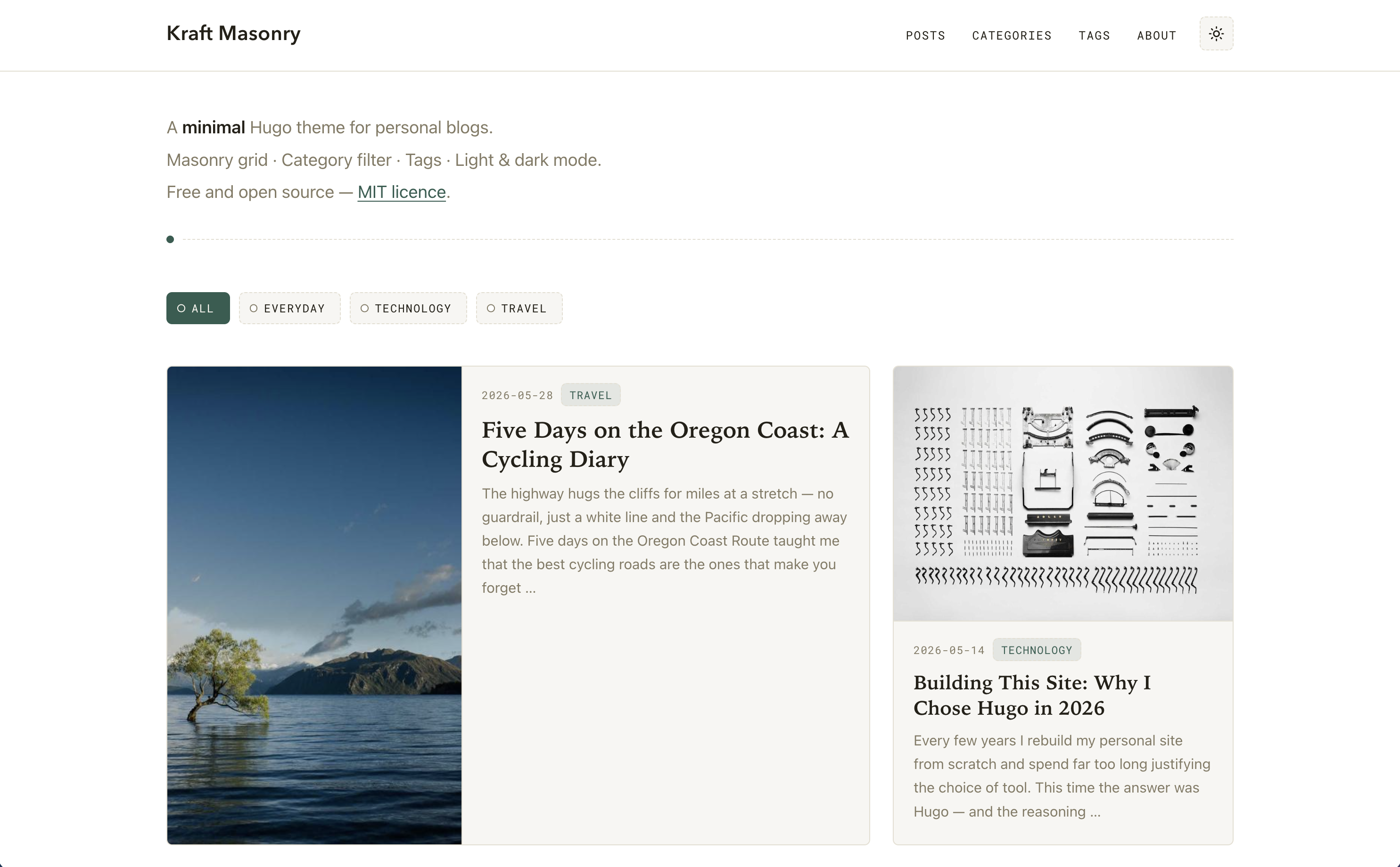
首页使用 CSS Grid 砌体布局,并通过 grid-auto-flow: dense 自动填补空隙
Hugo博客
hugo-kraft-masonry — Hugo 博客模板
作者 biccio
Kraft Masonry 是一个基于 Hugo 的极简个人博客主题,首页使用 CSS Grid 砌体布局并支持客户端分类筛选,无 npm、Sass 或外部 CDN 依赖。
看看你的网站会是什么样
浏览真实页面截图,比较内容排版与手机效果。点击下方缩略图切换,放大查看整页细节。
目前有 1 张原始预览,可打开完整图片查看设计细节。
截图用于了解视觉与布局,交互效果请以实际项目为准。
采集于 2026-10-12查看来源
值得关注的模板亮点
从已有项目资料中,快速了解它的特点。
部分卡片横跨两列形成 bento 式宽卡,宽卡在 ≥760px 时图文并排显示
纯客户端分类筛选,点击分类按钮即时过滤卡片,无需页面刷新
内置浅色/深色模式,支持系统偏好检测和手动切换,选择保存到 localStorage
无 npm、Sass、外部字体或 CDN 依赖,CSS 与 JS 通过 Hugo Pipes 处理
提供 {{< img >}} 短代码,支持 left/right/center/full 对齐、说明文字和宽度覆盖
模板详细介绍
Kraft Masonry 是面向个人博客的 Hugo 主题,首页采用 CSS Grid 砌体布局,通过 `grid-auto-flow: dense` 自动填补空隙,并让部分卡片横跨两列形成 bento 式宽卡。首页顶部包含站点标题、支持 Markdown 的多行副标题以及纯客户端分类筛选栏,文章卡片按日期倒序排列,数量由 `homepagePostLimit` 控制。单篇文章为标题加内容的经典布局,底部提供可点击的标签列表。主题内置浅色与深色模式,支持系统偏好检测和手动切换,并可将选择持久化到 localStorage。
主题不依赖 npm、Sass、外部字体或 CDN,CSS 与 JS 全部通过 Hugo Pipes 处理。它提供 `{{< img >}}` 短代码用于正文内联图片,支持 left、right、center、full 对齐以及可选说明文字和宽度覆盖;浮动图片在移动端会恢复为全宽。结构化数据方面,首页始终输出 WebSite 实体,可选通过 `params.website_ld` 启用站点链接搜索框,通过 `params.person_ld` 输出 Person 实体,每篇文章也可通过 front matter 中的 `schema` 块输出 JSON-LD。评论功能为可选,需配置 EchoThread 的 API key 才会在文章底部显示。
主题要求 Hugo 0.143.0 或更高版本,推荐使用 extended 版本。安装方式支持 Git submodule 或直接复制主题文件夹。exampleSite 目录包含一个可直接运行的示例站点,内含三篇分类(Viaggi、Tecnologia、Vita quotidiana)下的六篇示例文章和多个标签。界面字符串提供意大利语和英语文件,可通过 i18n 目录扩展。
使用限制方面:首页分类筛选完全在客户端进行,不涉及服务端查询;宽卡片的出现频率默认由标题长度、永久链接长度和日期年积日计算决定,也可在 front matter 中用 `featured` 强制指定;卡片摘要最终会被截断为普通卡 200 字符、宽卡 240 字符。演示图片、字体、图标等第三方素材的许可需单独核对,代码本身的 MIT 许可不覆盖这些素材。
Hugo博客
适合你的项目吗?
适用场景
- 搭建以图文卡片流展示文章的个人博客首页
- 需要按分类快速筛选文章列表,且不希望每次筛选都刷新页面
- 希望博客同时提供浅色和深色外观,并跟随系统偏好
- 在文章正文中插入带对齐方式和说明文字的内联图片
- 为博客首页或文章添加 JSON-LD 结构化数据以增强搜索结果展示
适合人群
- 使用 Hugo 构建个人博客的开发者或写作者
- 偏好无 npm、无外部 CDN 依赖的静态站点构建流程
- 需要砌体式卡片首页和客户端分类筛选的博客项目
- 希望界面字符串支持意大利语或英语,并可按需扩展其他语言
上手与定制指南
结合仓库当前版本的说明,按下面的资料检查内容、配置与运行要求。
- 1
需要 Hugo 0.143.0 或更高版本,推荐使用 extended 版本。
- 2
可通过 Git submodule 将主题添加到 themes/hugo-kraft-masonry,或在 hugo.toml 中设置 theme 参数。
- 3
exampleSite 目录包含可直接运行的示例站点,复制其内容后运行 hugo server 即可预览。
- 4
评论功能默认关闭,需在 params.echothread.apiKey 中配置 EchoThread API key 才会显示。
- 5
演示图片、字体、图标等第三方素材需按各自许可单独核对,代码的 MIT 许可不覆盖这些素材。
授权与来源资料
使用条件与限制
免费使用 · 保留许可声明本次收录的是公开仓库中采用 MIT 许可的免费版本;免费范围为该版本代码,不代表外部服务或第三方素材免费。
使用时需要遵守
- 允许免费使用、修改、商用和分发该版本代码。
- 分发代码副本或实质性部分时,保留原作者版权声明和完整 MIT 许可声明。
- 代码按现状提供;担保与责任限制以原许可证及适用法律为准。
额外费用与待核对事项
- 演示图片、字体、图标及其他第三方素材需按各自许可核对,不能仅凭代码的 MIT 许可判断。
- 域名、托管、数据库、支付或 AI 等外部服务可能另外收费。
- 评论功能为可选,需配置 EchoThread 的 API key 才能启用;未设置时不会输出任何评论 HTML。
- Google Analytics 为可选,需提供 GA4 测量 ID;仅在 production 构建时注入 gtag.js,本地预览不发送流量。
- 首页分类筛选不更新 URL,筛选后的视图无法通过链接分享,也不会被搜索引擎索引。
- `/posts/` 没有内置分页;文章数量增长时需自行在 list.html 中添加 Hugo 的 `.Paginate`。
- 标题字体依赖系统字体;在 Linux 上这些字体通常未安装,会回退到通用无衬线字体,跨平台外观可能不一致。
- 卡片摘要会被截断:普通卡 200 字符,宽卡(featured)240 字符,即使 summary 字段更长也会被截断。
- 使用 `grid-auto-flow: dense` 时,较晚的文章可能在视觉上先于较早的文章显示;阅读与 Tab 顺序仍按标记(日期顺序)。
查看原文依据
Permission is hereby granted, free of charge
许可证原文
**EchoThread comments** — opt-in comment section per post; set `params.echothread.apiKey` to enable
README 原文
`params.googleAnalytics` | — | GA4 measurement ID (e.g. `G-XXXXXXXXXX`). When set, the `gtag.js` snippet is injected in `<head>` — only on production builds
README 原文
The homepage category filter does not update the URL, so a filtered view is not shareable via link and not indexed by search engines.
README 原文
No built-in pagination on `/posts/`. If your post count grows, add Hugo's standard `.Paginate` to `layouts/_default/list.html`.
README 原文
`--font-title` relies on system fonts. On Linux, "Avenir Next", "Century Gothic", and "Futura" are rarely installed and the stack falls back to a generic sans-serif.
README 原文
the theme truncates the final string to **200 characters** for normal cards and **240 characters** for wide (`featured`) cards.
README 原文
https://github.com/biccio/hugo-kraft-masonry/blob/main/LICENSEhttps://github.com/biccio/hugo-kraft-masonry/blob/main/README.mdto fill gaps left by wide cards, the browser may display a later post visually before an earlier one. Reading / tab order always follows the markup (date order).
README 原文
DeepSeek 根据仓库许可证和 README 整理 ·2026-10-12。结果仅覆盖已读取资料,依赖、图片、字体及后续条款变更以各自原文为准。
项目核对记录与介绍依据
模板资料
- 来源平台
- GitHub
- 资料与维护参考分
- 资料一般 · 68 / 100
- 技术栈
- Hugo
- 网站类型
- 博客
这个分数如何计算
本站按许可资料(最高30分)、演示链接(12分)、预览图(10分)、Star数(15分)、记录的维护时间(15分)、描述完整度(8分)、功能记录(5分)和分类资料(5分)计算。它不是代码、安全或性能测试,也不是 Google 评分;有链接不代表已实测可用。
这个项目需要核对什么
- 记录的仓库更新时间
- 2026-06-30
- 截图检查日期
- 2026-10-12
目前没有记录演示链接。请依据仓库说明在本地评估;仅凭截图无法确认交互行为。
目录记录的主要技术栈是 Hugo。请通过依赖清单和锁文件核对实际版本与托管要求。这些说明基于收录资料,不代表代码审计或部署实测。
查看具体选型方法 →介绍的制作与核对状态
介绍由 AI 辅助整理目录与仓库资料。仓库作者不等于这篇介绍的审核者。
审核声明: [email protected] · 2026-10-13
查看当时使用的来源资料
SHA-256: ed8ab39fdfd0d9da3d428b31c12c1449f7136a57176dc2561e68f555ed02f5ac
2026-10-12T08:56:19.323Z
来源文件 / 仓库# Kraft Masonry
A minimal Hugo theme for personal blogs.
**Homepage**: site title in the top-left header, a hero area with one or more subtitle lines (markdown formatting supported), a client-side category filter, and a CSS Grid masonry with automatic bento-style tiling — some cards span two columns and display their image and text side by side. **Single posts**: classic title-and-content layout with a clickable tag list at the bottom. Full **light / dark mode** support with system detection and a manual toggle.
No npm, no Sass, no external fonts or CDN dependencies. CSS and JS are processed entirely through Hugo Pipes.
---
## Screenshots

***

---
## Features
- **Masonry homepage** — CSS Grid with `grid-auto-flow: dense` for automatic gap filling
- **Bento-style wide cards** — selected cards span 2 columns with image and text side by side
- **Client-side category filter** — instant filtering by category, no page reload
- **Tag taxonomy** — tag list at the bottom of each post, clickable tag cloud at `/tags/`
- **Light / dark mode** — system preference detection + manual toggle persisted to `localStorage`
- **Responsive** — 3 / 2 / 1 column breakpoints, with an optional toggle to hide the hero on mobile
- **Inline image shortcode** — `{{< img >}}` with `left` / `right` / `center` / `full` alignment, optional caption and width override; floats collapse gracefully on mobile
- **Structured data** — optional JSON-LD (schema.org) per post, from a `schema` front-matter block; `WebSite` entity always emitted on the homepage (enables Sitelinks Search Box via `params.website_ld`); optional `Person` entity via `params.person_ld`
- **EchoThread comments** — opt-in comment section per post; set `params.echothread.apiKey` to enable
- **No external dependencies** — system font stacks, Hugo Pipes for CSS/JS minification and fingerprinting
- **i18n ready** — Italian and English string files included; add more via `i18n/`
---
## Requirements
Hugo **0.143.0** or later (extended edition recommended for future Sass support).
---
## Installation
### Option A — Git submodule (recommended)
```bash
cd your-site
git submodule add https://github.com/YOUR_USERNAME/hugo-kraft-masonry.git themes/hugo-kraft-masonry
```
Then in your `hugo.toml`:
```toml
theme = "hugo-kraft-masonry"
```
### Option B — Direct copy
Copy the `hugo-kraft-masonry/` folder (excluding `exampleSite/`) into your site's `themes/` directory.
### Try the demo site
The `exampleSite/` directory contains a ready-to-run site with six sample posts across three categories ("Viaggi", "Tecnologia", "Vita quotidiana") and multiple tags.
```bash
mkdir my-site && cd my-site
git submodule add https://github.com/YOUR_USERNAME/hugo-kraft-masonry.git themes/hugo-kraft-masonry
cp -r themes/hugo-kraft-masonry/exampleSite/* .
hugo server
```
---
## Configuration
A minimal `hugo.toml`:
```toml
baseURL = "https://example.com/"
title = "My Blog"
theme = "hugo-kraft-masonry"
# i18n: set to "it" for Italian UI strings, "en" for English
defaultContentLanguage = "en"
[taxonomies]
category = "categories"
tag = "tags"
[params]
description = "A personal blog about travel, tech, and everyday life."
author = "Your Name"
[params.hero]
subtitle = [
"A **minimal** Hugo theme for personal blogs.",
"Masonry grid · Category filter · Tags · Light & dark mode.",
"Free and open source — [MIT licence](https://github.com/YOUR_USERNAME/hugo-kraft-masonry/blob/main/LICENSE)."
]
```
### All parameters
| Parameter | Default | Description |
|---|---|---|
| `params.hero.subtitle` | — | Array of strings rendered below the site header as the homepage hero. Each element is a separate line, processed through Hugo's `markdownify` — inline Markdown is fully supported: `**bold**`, `*italic*`, `[link](url)`, and raw HTML (requires `markup.goldmark.renderer.unsafe = true`). The hero is **not shown** if this key is absent. |
| `params.disableDescriptionMobile` | `false` | When `true`, hides the homepage hero / intro block (the `hero.subtitle` lines) on viewports ≤ 640px. The hero stays visible on tablet and desktop. Handy for surfacing the post grid immediately on small screens. Implemented by adding the `hero--hide-mobile` class to the hero in `layouts/index.html`, which a `@media (max-width: 640px)` rule in `main.css` sets to `display: none`. |
| `params.description` | — | Fallback meta description for pages that don't define their own. |
| `params.author` | site `title` | Displayed in the right footer span when `params.footer.right` is not set. |
| `params.footer.left` | `© <year> <site title>` | Left span of the footer. Accepts inline Markdown (`**bold**`, `[link](url)`, HTML entities). Rendered with Hugo's `markdownify`. |
| `params.footer.right` | i18n `builtWith` + `params.author` | Right span of the footer. Accepts inline Markdown. Rendered with Hugo's `markdownify`. |
| `params.dateFormat` | `:date_long` | Layout for the **visible** post date, rendered with Hugo's locale-aware `time.Format`. Use a predefined token — `:date_full`, `:date_long` (e.g. *June 19, 2026* / *19 giugno 2026*), `:date_medium`, `:date_short` — or a custom Go layout, e.g. `02/01/2006` → *19/06/2026* (numeric, day-first). Month and weekday names are localized to the page language; the `<time datetime>` attribute always stays ISO 8601. For per-language formats, set it under `[languages.xx.params]`. |
| `params.mainSections` | `["posts"]` | Content sections treated as "posts" for the homepage masonry grid. |
| `params.homepagePostLimit` | `12` | Maximum number of posts shown in the homepage grid, sorted by date descending. |
| `params.enableCategoryFilter` | `true` | Show / hide the category filter bar and its JS on the homepage. |
| `params.wideCardEvery` | `4` | Controls wide-card frequency when `featured` is not set in front matter. A card is made wide when `(len(title) + len(permalink) + date.YearDay) mod wideCardEvery == 0`. Default: roughly 1 in 4 cards. |
| `params.googleAnalytics` | — | GA4 measurement ID (e.g. `G-XXXXXXXXXX`). When set, the `gtag.js` snippet is injected in `<head>` — only on production builds (`hugo --environment production` / `HUGO_ENV=production`), so local/preview traffic isn't tracked. |
| `params.echothread.apiKey` | — | EchoThread API key from your dashboard. When set, the comment widget is rendered at the bottom of every post. Leave unset to disable comments entirely. |
| `params.echothread.shortname` | — | Your EchoThread shortname (the `data-shortname` attribute on the widget). |
| `params.echothread.theme` | `auto` | Widget colour scheme: `auto` (follows OS preference), `light`, or `dark`. |
| `params.echothread.accentColor` | — | Optional hex colour for the widget accent (e.g. `#2f5d50` to match the theme default). |
| `params.website_ld.search_url_template` | — | Enables Sitelinks Search Box rich result. Must contain `{search_term_string}`. See [Homepage WebSite structured data](#homepage-website-structured-data). |
| `params.person_ld.*` | — | Person JSON-LD for the homepage. See [Homepage Person structured data](#homepage-person-structured-data) for all sub-keys. |
---
## Post front matter
```yaml
---
title: "My Post Title"
date: 2026-06-01
categories: ["travel"] # one or more categories
tags: ["gravel", "italy"] # one or more tags
image: "https://..." # cover image URL (optional)
featured: true # force this card to be wide (optional)
summary: "A hand-written summary shown in the card instead of the auto-generated one." # optional
---
Opening paragraph — used as the card abstract when no summary field is set.
<!--more-->
Rest of the post body.
```
### Cover image
Two lookup strategies, in priority order:
1. **Page bundle resource**: if the post is a [page bundle](https://gohugo.io/content-management/page-bundles/) and contains a file whose name starts with `cover`, `feature`, or `thumbnail` (e.g. `cover.jpg`), it is used automatically.
2. **`image` front matter parameter**: an absolute URL or site-root path.
If neither is present the card is shown without an image (text adjusts automatically).
### Abstract
The card abstract comes from Hugo's `.Summary`, processed through three fallback strategies in priority order:
1. **`summary` front matter field** — write the abstract directly in the post header. Hugo uses this verbatim, giving you full control over wording without touching the post body:
```yaml
summary: "A concise, hand-crafted description shown in the homepage card."
```
2. **`<!--more-->` marker** — everything before the marker becomes the summary. The marker also controls where Hugo truncates the post on list pages.
3. **Automatic** — Hugo takes the first ~70 words of the body if neither of the above is present.
Regardless of the source, the theme truncates the final string to **200 characters** for normal cards and **240 characters** for wide (`featured`) cards. This means a long `summary` field or a lengthy `<!--more-->` section will still be cut off at those limits in the card — they only affect what text is available before truncation, not the truncation itself.
---
## Inline images
Use the `{{< img >}}` shortcode to insert images anywhere in the body of a post with explicit alignment. Hugo's standard Markdown `![]()` syntax still works and produces a centred block image, but the shortcode adds float support and captions.
```
{{< img src="photo.jpg" alt="Alt text" align="left" caption="Optional caption" >}}
{{< img src="/images/map.png" alt="Map" align="right" width="280px" >}}
{{< img src="panorama.jpg" alt="Landscape" align="full" >}}
```
| Parameter | Default | Description |
|---|---|---|
| `src` | *(required)* | Path or URL of the image. |
| `alt` | `""` | Alternative text for accessibility. |
| `align` | `center` | `left` — float left, text wraps right. `right` — float right, text wraps left. `center` — centred block. `full` — 100 % content width. |
| `caption` | — | Optional caption rendered in `<figcaption>` (monospace, muted, centred). |
| `width` | — | Explicit width override, e.g. `300px` or `50%`. Overrides the default 42 % float width. |
Floating images (`left` / `right`) are 42 % wide (max 420 px) on desktop and revert to full-width on viewports ≤ 600 px. To stop text wrapping after a float, insert an empty paragraph with the `img-clear` class:
```html
<div class="img-clear"></div>
```
---
## Wide cards (bento tiling)
Cards with the `post-card--wide` class span 2 grid columns. On screens ≥ 760 px the image and text are displayed side by side; below that breakpoint (or on single-column mobile) they stack normally.
**Which cards are wide?** Decided per post in this order:
1. **Front matter override** (explicit, stable):
```yaml
featured: true # always wide
featured: false # never wide
```
2. **Deterministic pseudo-random** (when `featured` is not set): computed from `len(title) + len(permalink) + date.YearDay` modulo `params.wideCardEvery` (default `4`). The result is stable across rebuilds — layout does not shift between deploys.
> **Note on `grid-auto-flow: dense`**: to fill gaps left by wide cards, the browser may display a later post visually before an earlier one. Reading / tab order always follows the markup (date order). If you want strict visual order, remove `dense` from the masonry rule in `assets/css/main.css` — gaps will remain empty instead.
---
## Category filter
The filter bar above the grid is purely **client-side** (no page reload):
1. `partials/category-filter.html` renders one button per category in `.Site.Taxonomies.categories`, with `data-filter="<slug>"`.
2. `partials/post-card.html` adds `data-categories="slug1 slug2 ..."` to each card.
3. `assets/js/filter.js` listens for clicks and toggles the `hidden` attribute on non-matching cards.
Slugs are generated with Hugo's `urlize` function on both sides, so mixed-case category names always match correctly.
Without JS the filter bar is visible but inert — all posts remain shown. For JS-free category browsing the dedicated `/categories/<slug>/` pages (linked from card tags and from `/categories/`) remain available.
---
## Tag taxonomy
With `[taxonomies] tag = "tags"` in `hugo.toml`, Hugo automatically generates:
- **`/tags/`** — alphabetical tag cloud with post counts.
- **`/tags/<slug>/`** — masonry grid of all posts carrying that tag, with a `# Tag Name · N posts` header.
Tags are linked from the footer of each single post (shown only when `tags` is defined in front matter and the page type is not `page`). Hovering a tag pill fills it with the accent colour — the same interaction as the active category filter button.
---
## Footer
The footer has two configurable spans — left and right — set via `[params.footer]` in `hugo.toml`. Both accept inline Markdown and are rendered with Hugo's `markdownify`.
```toml
[params.footer]
left = "© 2026 My Blog"
right = "Built with [Hugo](https://gohugo.io) & **Kraft Masonry**"
```
If either key is omitted, the theme falls back to its default:
- **left** — `© <current year> <site title>` (auto-updated each build)
- **right** — the i18n `builtWith` string followed by `params.author` (or the site title if `author` is not set)
---
## Google Analytics
Set `params.googleAnalytics` in `hugo.toml` to your GA4 measurement ID to enable tracking:
```toml
[params]
googleAnalytics = "G-XXXXXXXXXX"
```
The `gtag.js` snippet is injected in `<head>` (see `layouts/partials/google-analytics.html`) only when building with `hugo --environment production` or `HUGO_ENV=production`, so `hugo server` and preview builds don't send traffic. Leave the parameter unset to disable analytics entirely.
---
## Comments (EchoThread)
[EchoThread](https://echothread.io) is a privacy-first, lightweight comment service (no ads, no tracking, < 15 KB). Set `params.echothread.apiKey` in `hugo.toml` to render the widget at the bottom of every post:
```toml
[params.echothread]
apiKey = "YOUR_API_KEY" # from echothread.io dashboard (required)
shortname = "yourshortname" # your EchoThread shortname (required)
theme = "auto" # auto | light | dark (default: auto)
accentColor = "#2f5d50" # optional — match your brand colour
```
Leave the block absent (or omit `apiKey`) to disable comments entirely — no HTML is emitted.
Each post's comment thread is identified by `File.UniqueID` (an MD5 of the source file path), so threads survive URL changes. `data-page-url` and `data-page-title` are passed automatically for the dashboard view. The widget language follows the page's Hugo language code (`data-lang`).
---
## Structured data (JSON-LD)
Any post can carry an optional `schema` front-matter block, which the theme renders as a `<script type="application/ld+json">` (schema.org) in `<head>` — improving SEO and rich-result eligibility. Page-derived fields (headline, dates, URL, cover image, word count, language) are filled in automatically; the block adds the semantic metadata. Front-matter `type` keys map to the JSON-LD `@type`, and omitted fields fall back to site values (`params.author`, the site title as publisher, the site language). Pages without a `schema` block emit nothing.
```yaml
schema:
type: "BlogPosting" # JSON-LD @type (default: BlogPosting)
inLanguage: "en-us" # default: site language
articleSection: "Technology" # default: first category
author:
name: "Jane Doe"
url: "https://example.com/about/"
publisher:
name: "My Blog"
url: "https://example.com/"
keywords: ["hugo", "performance"] # default: post tags
about: # entities the post is about
- type: "SoftwareApplication"
name: "Hugo"
sameAs: "https://gohugo.io/"
mentions: # entities merely mentioned
- type: "Person"
name: "Ada Lovelace"
sameAs: "https://en.wikipedia.org/wiki/Ada_Lovelace"
```
The JSON is assembled with Hugo's `dict`/`slice` and serialised with `jsonify`, so quoting and escaping are always valid. See `layouts/partials/schema.html`, and validate output with Google's [Rich Results Test](https://search.google.com/test/rich-results) or [Schema Markup Validator](https://validator.schema.org/).
---
## Homepage WebSite structured data
A `schema.org/WebSite` `<script type="application/ld+json">` block is **always emitted** on the homepage using the site title and `baseURL` — no configuration required. This is the type that Google's Rich Results Test detects on the homepage.
Optionally, add a `SearchAction` (Sitelinks Search Box) by setting `search_url_template`. The URL must point to a real search endpoint on your site and must contain the literal placeholder `{search_term_string}`:
```toml
[params.website_ld]
search_url_template = "https://example.org/?q={search_term_string}"
```
The resulting JSON-LD:
```json
{
"@context": "https://schema.org",
"@type": "WebSite",
"name": "My Blog",
"url": "https://example.org/",
"potentialAction": {
"@type": "SearchAction",
"target": {
"@type": "EntryPoint",
"urlTemplate": "https://example.org/?q={search_term_string}"
},
"query-input": "required name=search_term_string"
}
}
```
Google may show a search box directly in search results (Sitelinks Search Box) if it decides the site qualifies. Leave `search_url_template` absent to omit the `potentialAction`.
> **Note:** `schema.org/Person` (via `params.person_ld`) is indexed by Google and contributes to the Knowledge Graph, but is not a rich-result type — it will not appear as a "detected item" in the Rich Results Test. The `WebSite` block above is what makes the test show a detected item on the homepage.
---
## Homepage Person structured data
Set `[params.person_ld]` in `hugo.toml` to emit a `schema.org/Person` `<script type="application/ld+json">` block in the `<head>` of the **homepage only**. All fields are optional — only those present are included in the output. The `address` sub-object is omitted when no `address_*` key is set.
```toml
[params.person_ld]
person_name = "John Doe"
person_family_name = "Doe"
person_given_name = "John"
person_image = "https://example.org/john_doe.webp"
person_telephone = "+491231234567"
person_email = "[email protected]"
person_url = "https://john_doe.example.org/"
person_vatid = "DE123456789"
person_knows_language = ["de-DE", "en-US"]
address_street = "Am Hauptbahnhof"
address_postal_code = "60329"
address_locality = "Frankfurt am Main"
address_region = "Hesse"
address_country = "DE"
```
| TOML key | schema.org property | Notes |
|---|---|---|
| `person_name` | `name` | Full display name. |
| `person_family_name` | `familyName` | |
| `person_given_name` | `givenName` | |
| `person_image` | `image` | Absolute URL of the person's photo. |
| `person_telephone` | `telephone` | Include country code, e.g. `+491231234567`. |
| `person_email` | `email` | |
| `person_url` | `url` | Canonical URL of the person's website or profile. |
| `person_vatid` | `vatID` | VAT identification number. |
| `person_knows_language` | `knowsLanguage` | Array of BCP 47 language tags, e.g. `["de-DE", "en-US"]`. |
| `address_street` | `address.streetAddress` | Implies a `PostalAddress` sub-object. |
| `address_postal_code` | `address.postalCode` | |
| `address_locality` | `address.addressLocality` | City / town. |
| `address_region` | `address.addressRegion` | State, county, or region. |
| `address_country` | `address.addressCountry` | ISO 3166-1 alpha-2 country code, e.g. `DE`. |
The object is assembled with Hugo's `dict` and serialised with `jsonify` (same approach as the per-post `schema.html`). Validate the output with Google's [Rich Results Test](https://search.google.com/test/rich-results) or [Schema Markup Validator](https://validator.schema.org/). Leave the block absent to disable homepage structured data entirely.
---
## Light / dark mode
- On load, an **inline blocking script** in `<head>` (`partials/theme-init.html`) sets `data-theme="light"` or `"dark"` on `<html>` before the first paint, reading `localStorage` first, then `prefers-color-scheme`. No flash.
- The **sun / moon toggle button** in the header (SVG icons, no icon font) flips `data-theme` and persists the choice to `localStorage`.
- **Without JS**, a `@media (prefers-color-scheme: dark)` rule applies the dark palette automatically when the OS is in dark mode.
Both themes are defined as CSS custom properties:
```css
:root { /* light theme */ }
:root[data-theme="dark"] { /* dark theme */ }
```
---
## Typography & design tokens
All colours, fonts, and key dimensions are defined as CSS custom properties in `assets/css/main.css`. Override any of them without touching the rest of the stylesheet:
```css
:root {
/* Colours — light theme */
--color-bg: #ffffff;
--color-surface: #f7f6f2;
--color-ink: #232017;
--color-muted: #837a64;
--color-accent: #2f5d50;
--color-on-accent: #fbf8f1;
--color-line: #e4dfd1;
/* Font stacks */
--font-title: "Avenir Next", "Century Gothic", "Futura", "Trebuchet MS", sans-serif;
--font-display: "Iowan Old Style", "Palatino Linotype", "Source Serif Pro", Georgia, serif;
--font-body: -apple-system, BlinkMacSystemFont, "Segoe UI", Helvetica, Arial, sans-serif;
--font-mono: "IBM Plex Mono", "SF Mono", "Roboto Mono", Consolas, monospace;
}
```
Three intentionally different typefaces:
- **`--font-title`** (geometric sans) — site logo in the header
- **`--font-display`** (serif) — post titles in cards and single pages
- **`--font-body`** (system sans) — body text
To use a self-hosted custom font (e.g. for GDPR / privacy reasons), add `@font-face` rules at the top of `main.css` and update the relevant `--font-*` variable.
---
## File structure
```
hugo-kraft-masonry/
├── archetypes/
│ └── default.md # default front matter for "hugo new"
├── assets/
│ ├── css/main.css # all styles (design tokens in :root)
│ └── js/
│ ├── filter.js # client-side category filter
│ └── theme-toggle.js # light/dark toggle
├── i18n/
│ ├── en.toml # English UI strings
│ └── it.toml # Italian UI strings
├── layouts/
│ ├── 404.html
│ ├── index.html # homepage: hero + filter + masonry
│ ├── _default/
│ │ ├── baseof.html # shared HTML skeleton
│ │ ├── list.html # sections, category pages, tag pages
│ │ └── single.html # classic post layout + tag footer
│ ├── shortcodes/
│ │ └── img.html # inline image with alignment (left/right/center/full)
│ └── partials/
│ ├── category-filter.html
│ ├── comments-echothread.html # EchoThread widget (params.echothread.apiKey)
│ ├── footer.html
│ ├── google-analytics.html # GA4 snippet (params.googleAnalytics, production only)
│ ├── head.html
│ ├── header.html # site logo + nav + light/dark toggle
│ ├── post-card.html # masonry card (normal + wide)
│ ├── schema.html # JSON-LD structured data (per post)
│ ├── schema-homepage.html # JSON-LD Person data (homepage only, params.person_ld)
│ ├── schema-website.html # JSON-LD WebSite data (homepage always, SearchAction via params.website_ld)
│ └── theme-init.html # inline blocking script (no flash)
├── exampleSite/ # demo site with sample posts
├── theme.toml
├── LICENSE
└── README.md
```
---
## Netlify deployment
`exampleSite/netlify.toml` provides a ready-to-use deployment configuration:
```toml
[build]
publish = "public"
command = "hugo --gc --minify"
[build.environment]
HUGO_VERSION = "0.143.0"
[context.production.environment]
HUGO_ENV = "production"
[context.deploy-preview]
command = "hugo --gc --minify --buildFuture -b $DEPLOY_PRIME_URL"
```
Copy it to your site root alongside `hugo.toml`.
---
## i18n
The theme ships with English (`en.toml`) and Italian (`it.toml`) UI strings (navigation labels, filter text, tag counts, etc.). Set `defaultContentLanguage` in `hugo.toml` to select the active locale. To add a new language, create `i18n/<code>.toml` with the same keys.
---
## Known limitations
- The homepage category filter does not update the URL, so a filtered view is not shareable via link and not indexed by search engines. Dedicated `/categories/<slug>/` pages remain available for that.
- No built-in pagination on `/posts/`. If your post count grows, add Hugo's standard `.Paginate` to `layouts/_default/list.html`.
- `--font-title` relies on system fonts. On Linux, "Avenir Next", "Century Gothic", and "Futura" are rarely installed and the stack falls back to a generic sans-serif. For a consistent cross-platform appearance, self-host a geometric sans (e.g. [Jost](https://fonts.google.com/specimen/Jost), [DM Sans](https://fonts.google.com/specimen/DM+Sans)) and update `--font-title`.
---
## License
MIT — see [LICENSE](LICENSE).
看看同类模板
对比同技术栈与用途的模板,找到更适合的视觉与内容结构。

hugo-PaperMod
PaperMod 是 Hugo 生态里知名度较高的主题之一,定位很明确:给博客和轻量作品集站点提供一套干净、响应式的阅读界面。
Hugo · 作品集

LoveIt
❤️A clean, elegant but advanced blog theme for Hugo 一个简洁、优雅且高效的 Hugo 主题
Hugo · 博客

hugo-coder
A minimalist blog theme for hugo.
Hugo · 博客

blowfish
Personal Website & Blog Theme for Hugo
Hugo · 博客

hugo-paper
🪺 A simple, clean, customizable Hugo theme
Hugo · 博客

hextra
Hextra 是一个 Hugo 主题,定位在文档站与博客之间:既提供侧边栏导航、目录、面包屑、分页这类文档站结构,也能承载博客内容。
Hugo · 文档