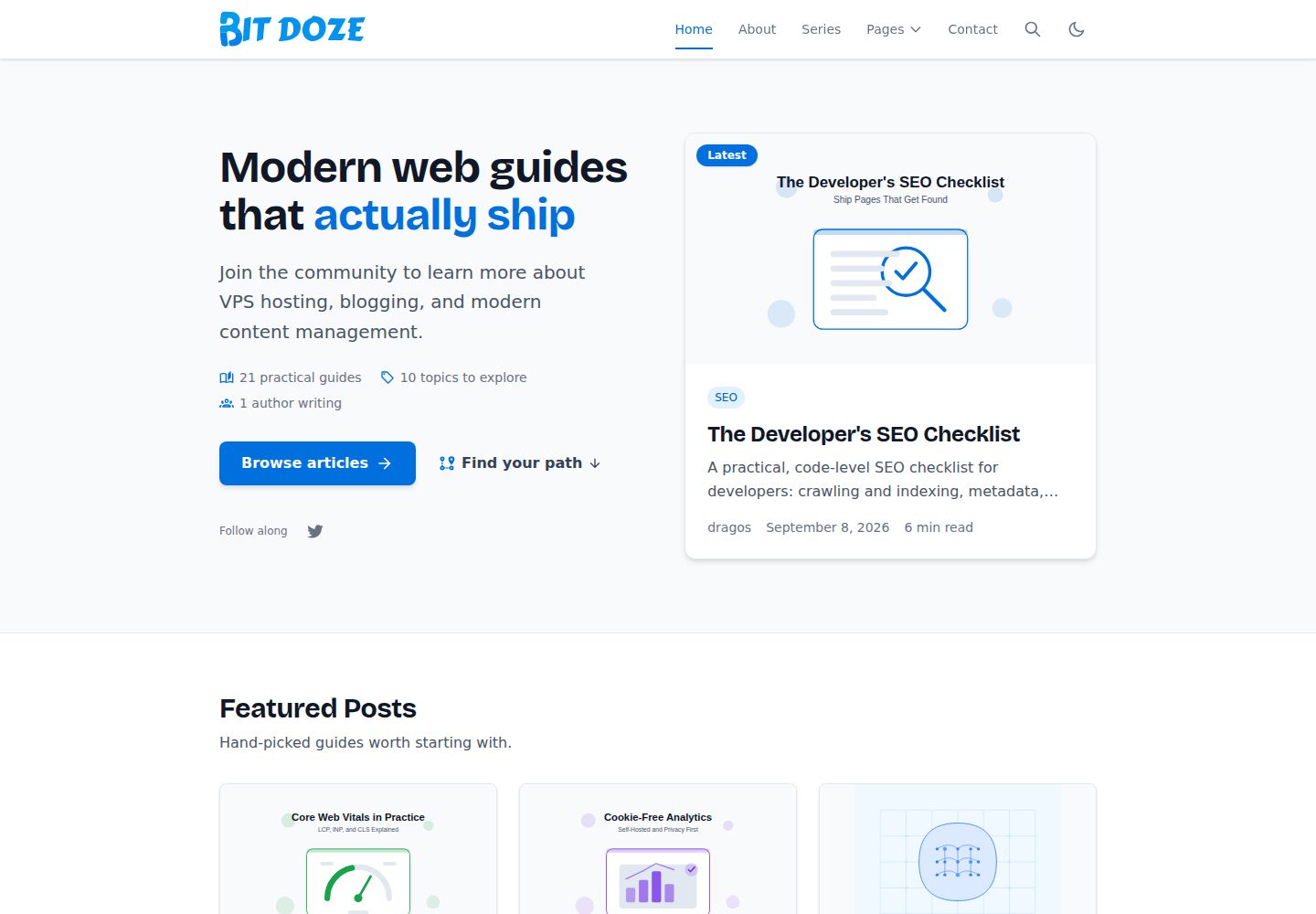
Blog theme built on Astro, supporting content collections for posts, authors, categories, tags, and series
AstroBlog
bitdoze-astro-theme — Astro Blog Template
By bitdoze
Bitdoze Astro Blog Theme is a responsive blog theme built on Astro, supporting tags, categories, series, and featured posts, with built-in client-side search, RSS, and sitemap.
Explore the design
Compare the page layouts and mobile experience. Open any screenshot for a closer look.
Desktop homepage1 / 3
Desktop captureTop of page
Actual screenshot captured by the server browser.
All pages & views 3
Screenshots show visual appearance; interactive behavior may differ.
Recorded 2026-09-30View source
What stands out
A quick read of the recorded project description.
Homepage composed of sections including Hero, featured posts, popular topics, latest posts, learning paths, and explore content, with section copy and toggles centralized in src/config/site.ts
Built-in client-side search based on Fuse.js, indexing approximately the first 4000 characters of each post's body
Automatically generates RSS and sitemap, supports MDX and Astro Icon
Uses Tailwind CSS, with brand color scales and heading fonts defined as CSS variables that can be overridden in @theme
Provides pagination, featured post marking (featured: true), and an inline script to reduce style flicker
Template Details
This is a blog theme for Astro, maintained by bitdoze in the repository and licensed under MIT. The theme is organized around blog content, providing content collections for posts, authors, categories, tags, and series. The homepage is assembled from sections including Hero, featured posts, popular topics, latest posts, learning paths, and explore content. Section copy, counts, and toggles are configured centrally in src/config/site.ts.
Functionally, the theme includes client-side search (based on Fuse.js, indexing approximately the first 4000 characters of each post's body), pagination, automatic RSS and sitemap generation, MDX support, Astro Icon icons, and an inline script to reduce style flicker during loading. Styling uses Tailwind CSS, with brand color scales and heading fonts defined as CSS variables in src/styles/global.css, which can be overridden via @theme.
There are several explicit usage constraints: Node.js 22.12.0 or newer and npm 10.8.2 or newer are required; search depends on JavaScript; the contact form's default action is "#", is disabled, and shows a notice, requiring you to configure a form endpoint yourself; licenses for third-party assets such as demo images and fonts must be verified separately and cannot be assumed from the code's MIT license alone.
AstroBlog
Is it right for your project?
Use Cases
- Building a personal or team blog organized by posts, categories, tags, and series
- Sites that need basic blog features such as client-side search, RSS, and sitemap
- Projects where you want to adjust homepage sections, navigation, and site copy from a single configuration file
- Blogs that write content in MDX and need to embed components in Markdown
Suitable For
- Developers familiar with Astro and Tailwind CSS who are willing to configure site information and content themselves
- Teams that need a blog theme under the MIT license that can be freely modified and distributed
- Text-focused blog sites that accept that search depends on JavaScript
Getting started & customization
Use these recorded setup notes alongside the repository instructions for your chosen version.
- 1
Requires Node.js 22.12.0 or newer and npm 10.8.2 or newer
- 2
Create a site via GitHub's Use this template button or git clone, then run npm install and npm run dev
- 3
Update src/config/site.ts, src/config/menu.json, src/config/social.json, and src/config/config.json to configure site identity, navigation, social links, and the contact form
- 4
For production, set the SITE_URL environment variable; local builds fall back to a default address
- 5
The contact form's default action is "#", is disabled, and must be replaced with a real form endpoint; licenses for third-party assets such as demo images and fonts must be verified separately
License & source material
Usage conditions & limitations
Free to use · keep license noticeThis entry covers the free version under the MIT license in the public repository; the free scope is the code of this version and does not imply that external services or third-party assets are free.
Must comply with when using
- You may use, modify, commercially use, and distribute the code of this version for free.
- When distributing copies or substantial portions of the code, retain the original author's copyright notice and the full MIT license notice.
- The code is provided as is; warranties and limitations of liability are governed by the original license and applicable law.
Additional costs & items to verify
- Running and building require Node.js 22.12.0 or newer and npm 10.8.2 or newer; lower versions cannot install dependencies or build the site.
- Search is implemented client-side and depends on JavaScript; search is unavailable when JavaScript is disabled.
- The search index covers only approximately the first 4000 characters of each post's body; content beyond that is not searchable, and full-text indexing is not yet implemented.
- The contact form's default action is "#", is disabled, and shows a notice; it requires configuring an endpoint that can receive POST requests before use.
- The theme is a static site and does not include email sending; form submission handling, success notices, and error recovery must be handled by the endpoint you configure.
- When deploying to a subpath, absolute links written manually in Markdown content are not rewritten; it is recommended to use root-relative links under a root deployment.
- The Cache-Control response header set for the search endpoint is stripped by most CDNs and static hosts; caching must be configured separately on the host side.
- Repository content is treated as trusted build input; content from external CMSs or user submissions must be validated and isolated by you and cannot go directly into the build.
- Demo images, fonts, icons, and other third-party assets must be verified under their respective licenses and cannot be assumed from the code's MIT license alone.
- External services such as domains, hosting, databases, payments, or AI may incur additional charges.
View Original Text Basis
Permission is hereby granted, free of charge
Original License Text
Node.js 22.12.0 or newer (declared in `package.json` `engines` and pinned in `.node-version`)
Original README
Client-side search with Fuse.js
Original README
the index covers roughly the first 4,000 characters of each post body — full-text indexing is deferred
Original README
The default `"#"` action keeps the form disabled with a visible notice
Original README
This theme is static and ships no mailer. Handling submissions, success messages, and error recovery is the responsibility of the endpoint you configure.
Original README
absolute links you write yourself inside Markdown content (for example `[Blog](/blog/)`) are not rewritten; prefer root-relative content links on root deployments.
Original README
The `Cache-Control` header the search endpoint sets on its response is not portable across CDNs; most static hosts strip response headers from flat files.
Original README
https://github.com/bitdoze/bitdoze-astro-theme/blob/main/LICENSEhttps://github.com/bitdoze/bitdoze-astro-theme/blob/main/README.mdContent from an external CMS or user submissions does not share that trust and needs its own validation and ingestion boundary before it reaches a build.
Original README
Compiled by DeepSeek based on repository license and README ·2026-10-02. Results only cover the materials read; dependencies, images, fonts, and subsequent term changes are subject to their respective original texts.
Project checks & description sources
Template Information
- Source platforms
- GitHub
- Documentation and maintenance reference score
- More documented · 87 / 100
- Technologies
- Astro
- Website type
- Blog
How this score is calculated
Our heuristic uses license records (up to 30), a demo link (12), a preview (10), stars (15), recorded maintenance (15), description completeness (8), feature records (5) and classification data (5). It is not a code, security or performance test, or a Google score. A link does not establish tested functionality.
What to verify for this project
- Repository update recorded
- 2026-09-10
- Screenshot last checked
- 2026-10-02
A demo link is listed. Check it with your own content and viewport sizes; its presence does not confirm that forms, authentication or payments work.
The catalog identifies Astro as the primary stack. Check the actual dependency manifest and lockfile for versions and hosting requirements. These notes use recorded metadata, not a code audit or a deployment test.
Use a selection guide →How this description was prepared
AI-assisted description based on catalog records and repository material. Repository authors are not automatically the reviewers of this description.
Automatically checked against source and license rules; no manual editorial review.
Inspect the recorded source material
SHA-256: 3b494ae2053993589f025d7f5a4f0e1ce9f68941112ed90b81be437df3328ba3
2026-10-02T15:25:29.645Z
Source file / repository# Bitdoze Astro Blog Theme
A modern, responsive blog theme for Astro with support for tags, categories, series, and featured posts. This theme is designed to be fast, SEO-friendly, and easy to customize.
## Features
- 🚀 **Built with Astro** - Benefit from Astro's speed and flexibility
- 📱 **Fully Responsive** - Looks great on all devices
- 🎨 **Customizable** - One logo-anchored accent ramp and swappable font tokens drive links, buttons, focus rings, and chips, and one config file (`src/config/site.ts`) owns identity, hero, homepage, footer, and page copy
- 🔍 **SEO Optimized** - Meta tags, Open Graph, and JSON-LD
- 📝 **Blog Ready** - Support for posts, categories, tags, and series
- ⭐ **Featured Posts** - An optional `featured` flag surfaces editor's picks in a three-column homepage grid
- 🧩 **Homepage Sections** - Hero, Featured, Latest, Learning paths, Explore, and Popular Topics, with the hero, featured, and latest posts deduped automatically
- 🔎 **Search Functionality** - Client-side search with Fuse.js
- 📊 **Pagination** - For blog posts, categories, tags, and authors
- 📰 **RSS Feed** - Automatically generated RSS feed
- 🗺️ **Sitemap** - Automatically generated sitemap
- 🖋️ **MDX Support** - Use components in your markdown
- 🔤 **Typography** - Self-hosted display face for headings, system stack for body copy, balanced prose with Tailwind CSS
- 🌙 **Icons** - Easy icon usage with Astro Icon
- 💡 **FOUC Prevention** - Inline scripts to minimize flash of unstyled content and theme inconsistencies on load.
## Project Structure
```
├── public/ # Static assets
├── src/
│ ├── assets/ # Images and other assets
│ ├── config/ # Site configuration
│ ├── content/ # Content collections (blog posts, authors, etc.)
│ ├── layouts/ # Layout components
│ ├── pages/ # Page components and routes
│ ├── styles/ # Global styles
│ └── utils/ # Utility functions
├── astro.config.mjs # Astro configuration
├── package.json # Dependencies and scripts
```
### Key Directories and Files
- **src/config/**: Contains configuration files for the site, menus, and social links
- **src/content/**: Contains all content collections (blog posts, authors, pages)
- **src/layouts/**: Contains layout components used throughout the site
- **src/pages/**: Contains all page components and defines the routing structure
## Components
The theme includes several reusable components:
- **Layout.astro**: Main layout component with header and footer
- **PostLayout.astro**: Layout for blog posts with metadata and content
- **Header/Footer**: Navigation and site information
- **Pagination**: For navigating through multiple pages of content
- **Search**: Client-side search functionality (requires JavaScript; the index covers roughly the first 4,000 characters of each post body — full-text indexing is deferred, see `src/pages/search.json.ts`)
- **Author Card**: Display author information
- **Post Card**: Display post previews in lists, used by Latest, Featured, archives, and search
- **Homepage Sections**: `FeaturedPosts`, `LearningPaths`, and `PopularTopics` compose the homepage from real content and the `homepage` flags in `src/config/site.ts`
- **Tag/Category Cloud**: Display and filter by tags or categories
## Getting Started
Work through the tasks below in order. Each step links to the reference section with the details.
1. **Preview the theme.** Run `npm install && npm run dev` and open `http://localhost:4321`. Try the theme toggle, a mobile viewport, the Featured Posts grid, and the MDX widget examples in `src/content/posts/artificial-intelligence-guide.mdx`, `src/content/posts/vps-hosting-docker-and-caddy.mdx`, and `src/content/posts/developer-seo-checklist.mdx`.
2. **Create your site.** The fastest path is GitHub's **Use this template** button; alternatively clone over HTTPS (`git clone https://github.com/bitdoze/bitdoze-astro-theme.git my-blog`). Install dependencies on Node 22.12 or newer (see [Installation](#installation)).
3. **Rebrand.** Update `src/config/site.ts` — identity, hero, homepage sections, footer titles, and listing/utility page copy — then `src/config/menu.json` and `src/config/social.json` (see [Configuration](#configuration)).
4. **Create your first content.** Add a post, an author, a series, and an ordinary page (see [Creating Content](#creating-content) and [Adding New Pages](#adding-new-pages)).
5. **Remove demo content.** Delete the demo posts, authors, and pages you do not need; empty collections render as empty lists rather than failing. The About page is a dedicated content entry at `src/content/about/index.md` — replace it rather than leaving the placeholder.
6. **Configure contact, origin, and SEO defaults.** Set a real contact endpoint (see [Contact form](#contact-form)), point `SITE_URL` at your production origin, and review the metadata defaults in `src/config/site.ts`.
7. **Deploy and smoke-test.** Build and deploy (see [Deployment](#deployment)), then verify navigation, search, RSS, and the custom 404 page on the live host.
8. **Update from a release.** Read [CHANGELOG.md](CHANGELOG.md) before pulling a new version; releases call out any changed configuration or content contracts.
### Prerequisites
- Node.js 22.12.0 or newer (declared in `package.json` `engines` and pinned in `.node-version`)
- npm 10.8.2 or newer
The theme targets **Astro 7.x**. When upgrading Astro, check [CHANGELOG.md](CHANGELOG.md) and update the official integrations together.
### Installation
1. Create your site from this theme — use GitHub's **Use this template** button, or clone over HTTPS:
```bash
git clone https://github.com/bitdoze/bitdoze-astro-theme.git my-blog
cd my-blog
```
2. Install dependencies:
```bash
npm install
```
3. Start the development server:
```bash
npm run dev
```
4. Open your browser and visit `http://localhost:4321`
### Configuration
Tailor the theme to your needs by updating the following configuration files. Content and copy are not scattered through components: `site.ts` is the single source for headings, sublines, section titles, and calls to action, and the sibling files own navigation, social links, and contact details.
1. **Site URL**:
* Set the `SITE_URL` environment variable in production. It falls back to `https://www.bitdoze.com` for local builds.
2. **Primary Site Metadata & Settings**:
* Update `src/config/site.ts` for essential site details such as:
* **Identity**: `title`, `description`, `author`, `brandName`, `logo`, and logo dimensions.
* **Hero**: `hero.title`, `hero.titleAccent`, `hero.primaryCta` / `hero.secondaryCta`, `hero.statsLabels`, and `heroDescription`.
* **Homepage**: the `showFeaturedPosts` / `showTaxonomyCards` / `showPopularTopics` toggles, plus section copy and limits (`homepage.featured`, `homepage.latest`, `homepage.learningPaths`), configured tags (`homepage.popularTopics`), and the Explore cards (`homepage.explore`).
* **Footer**: column titles (`footer.exploreTitle`, `footer.latestTitle`).
* **Pages**: headings, meta descriptions, and visible sublines for Blog, Categories, Tags, Authors, Series, Contact, Search, and 404 (`pages.*`).
* `ogImage`, `postsPerPage`, `favicons`, and the `noindex` policy.
3. **Menus**:
* Modify `src/config/menu.json` to define navigation links for the header and footer.
4. **Social Media Links**:
* Update `src/config/social.json` with your social media profile URLs.
5. **Contact Configuration (`src/config/config.json`)**:
* Set `params.contact_form_action` to your form endpoint.
* Add only the public address, email, and phone details you want displayed.
* The default `"#"` action keeps the form disabled with a visible notice — see [Contact form](#contact-form).
### Homepage
The homepage is composed from real content in this order:
1. **Hero** — the newest published post, with proof counts and entry points.
2. **Featured Posts** — up to `homepage.featured.limit` posts flagged `featured: true` in a three-column grid, newest first (the hero post is skipped).
3. **Popular Topics** — configured tags with their most recent posts in a full-width band. Columns prefer posts not already shown in the hero or featured grid, then backfill so they still render on small archives; a post never appears in two columns.
4. **Latest Articles** — the newest remaining posts, excluding series and featured entries, with a link to the full archive.
5. **Learning paths** — series in position order plus the largest categories; each path needs at least two entries, with a link to all series.
6. **Explore Content** — links to categories, authors, and tags.
The hero, Popular Topics, and Learning paths render as full-width tinted bands, so the page alternates between white and tinted sections; the footer continues the same surface. Every section's copy, limits, tags, and toggles live in `homepage` in `src/config/site.ts`; the header and footer navigation live in `src/config/menu.json`, and social and contact details in `src/config/social.json` and `src/config/config.json`.
### Creating Content
#### Blog Posts
Create a new `.md` or `.mdx` file in `src/content/posts/` with the following frontmatter:
```md
---
title: "Your Post Title"
meta_title: "SEO Title (optional)"
description: "Post description for SEO"
date: 2023-06-01
image: "../../assets/images/your-image.jpg"
authors: ["author-id"]
categories: ["category-name"]
tags: ["tag1", "tag2"]
series:
name: "Series Name"
position: 1
slug: "optional/custom-path"
canonical: "https://example.com/original-article/"
draft: false
featured: true
---
Your post content goes here...
```
Set `featured: true` to surface a post in the homepage **Featured Posts** grid
(up to three, newest first, never repeating the hero post). The section is
controlled by `homepage.showFeaturedPosts` in `src/config/site.ts`.
#### Authors
Create a new `.md` file in `src/content/authors/` with the following frontmatter:
```md
---
title: "Author Name"
meta_title: "Author Name - Astro Blog Theme"
image: "../../assets/images/authors/author-image.jpg"
description: "Author description"
social:
facebook: "https://facebook.com/username"
twitter: "https://twitter.com/username"
website: "https://example.com"
---
Author bio goes here...
```
## Customization
### Styling
This theme uses **Tailwind CSS v4** for styling, which emphasizes a CSS-first, minimal-configuration approach.
**Key Styling Files:**
* **`src/styles/global.css`**: This is the central file for Tailwind CSS setup and custom styles.
* Tailwind's core styles (base, components, utilities) are imported via `@import "tailwindcss";`.
* The `@tailwindcss/typography` plugin is included using `@plugin "@tailwindcss/typography";`.
* You can customize the theme by modifying the CSS variables defined in this file, which control colors, fonts, and other aspects.
* **Brand tokens**: `--color-accent-50…950` is the brand ramp (anchored on the logo azure) used for links, buttons, focus rings, chips, and text selection, and `--font-display` is the heading face (Bricolage Grotesque, self-hosted in `Layout.astro`). Body copy stays on the system stack. Override either token in the `@theme` block to rebrand.
* You can also add your own custom CSS rules here.
* **`astro.config.mjs`**: The `@tailwindcss/vite` plugin is integrated here, but typically requires no direct configuration for v4 unless you have very specific needs.
**Advanced Customization (Optional):**
Tailwind CSS v4 is CSS-first and does **not** automatically detect a `tailwind.config.js` file. For most customization, stay in `src/styles/global.css` and use the CSS-first `@theme` directive:
```css
@theme {
--color-brand: #009cef;
}
```
If you need a legacy JavaScript config (for example, a Tailwind v3 plugin that requires JS configuration), load it explicitly with `@config` in `src/styles/global.css`:
```css
@import "tailwindcss";
@config "../../tailwind.config.js";
```
Refer to the [official Tailwind CSS documentation](https://tailwindcss.com/docs) for details on `@theme` and `@config`.
### Adding New Pages
Create a new `.astro` file in the `src/pages/` directory. The file path will determine the URL.
## Contact form
The contact page renders a deliverable form only after you configure a real endpoint. While `params.contact_form_action` in `src/config/config.json` stays at its default `"#"`, the page shows a "not configured" notice and the submit button is disabled, so visitors cannot submit messages into the void.
To go live:
1. Set `params.contact_form_action` to an endpoint that accepts `POST` requests — your own backend or a form service.
2. Add only the public address, email, and phone details you want displayed.
This theme is static and ships no mailer. Handling submissions, success messages, and error recovery is the responsibility of the endpoint you configure.
## Deployment
Build your site for production:
```bash
npm run build
```
The static output is written to the `dist/` directory, ready to deploy to any static hosting platform. Build and serve on Node.js 22.12.0 or newer, matching the [prerequisites](#prerequisites).
Run the complete local verification suite:
```bash
npm run verify
```
This runs Astro type checking, unit tests, and the production build. Draft and future-dated posts are excluded from routes, search, RSS, series navigation, and homepage widgets.
Three things to configure on your host before going live:
- **Root-domain or subpath hosting.** Root deployments work out of the box. Subpath deployments (for example `example.com/blog/`) are supported through Astro's `base` setting — navigation, taxonomy links, pagination, favicons, RSS autodiscovery, and search are base-aware, and this is covered by a `/theme/` smoke build. One caveat: absolute links you write yourself inside Markdown content (for example `[Blog](/blog/)`) are not rewritten; prefer root-relative content links on root deployments.
- **Custom 404.** The theme ships `src/pages/404.astro` (content from `src/content/pages/404.md`). Configure your host to serve it for unknown routes with a real 404 status; `astro preview` behavior is not proof for every provider.
- **Cache headers.** The `Cache-Control` header the search endpoint sets on its response is not portable across CDNs; most static hosts strip response headers from flat files. Configure caching for HTML, hashed assets, and `/search.json` in your host's settings.
## Performance
The theme stays lean by default: fully static pages, no client framework runtime, a system font stack for body copy plus one self-hosted variable display face for headings, syntax highlighting done at build time, responsive covers that lazy-load in cards (the article cover loads eagerly), and a click-to-load facade for YouTube embeds instead of immediate iframes.
Budget snapshot of the demo build, September 2026 (gzip estimates): shared CSS ~13 KB, and the client-side search bundle ~11 KB plus its JSON index (~33 KB for the 21-post demo — the index grows with the number and length of your posts). The search page carries that bundle and is heavier than ordinary pages. These are build-output snapshots, not Core Web Vitals results; measure your own deployment.
## Security
Repository content — posts, pages, MDX, and configuration — is a trusted build input: it runs at build time like any other code in the project. Content from an external CMS or user submissions does not share that trust and needs its own validation and ingestion boundary before it reaches a build. To report a security issue, see [SECURITY.md](SECURITY.md).
## License
This project is licensed under the MIT License - see the [LICENSE](LICENSE) file for details.
## Acknowledgments
- Built with [Astro](https://astro.build)
- Styled with [Tailwind CSS](https://tailwindcss.com)
- Icons from [Astro Icon](https://github.com/natemoo-re/astro-icon)
- Search functionality with [Fuse.js](https://fusejs.io)
Explore similar templates
Compare previews and descriptions within the same stack and category.

astrowind
AstroWind is a free, open-source Astro starter theme using Astro and Tailwind CSS, released under the MIT license.
Astro · Blog

astro-paper
AstroPaper is a minimal, responsive, accessible, and SEO-friendly Astro blog theme. Articles are stored as Markdown/MDX in src/content/posts/, with subdirectories affecting URLs.
Astro · Blog

fuwari
Fuwari is a static blog template built with Astro and Tailwind CSS for personal blogs. It manages posts as Markdown files in src/content/posts/, with frontmatter for title, date, description, cover, tags, categories, draft status, and language.
Astro · Blog

Firefly
Firefly is a clean personal blog theme forked from Astro and Fuwari, offering four background modes, single/double sidebar and list/grid layouts, Pagefind client-side full-text search, and a six-language UI.
Astro · Blog

astro-theme-cactus
Astro Cactus is an Astro-based blog and portfolio theme that uses Markdown/MDX content collections to manage posts, notes, and tags, with frontmatter type-checked by a schema.
Astro · Portfolio

astrofy
Astrofy is a free and open-source personal portfolio website template built with Astro and TailwindCSS, with built-in blog, CV timeline, project showcase, store, and RSS feed modules.
Astro · Portfolio