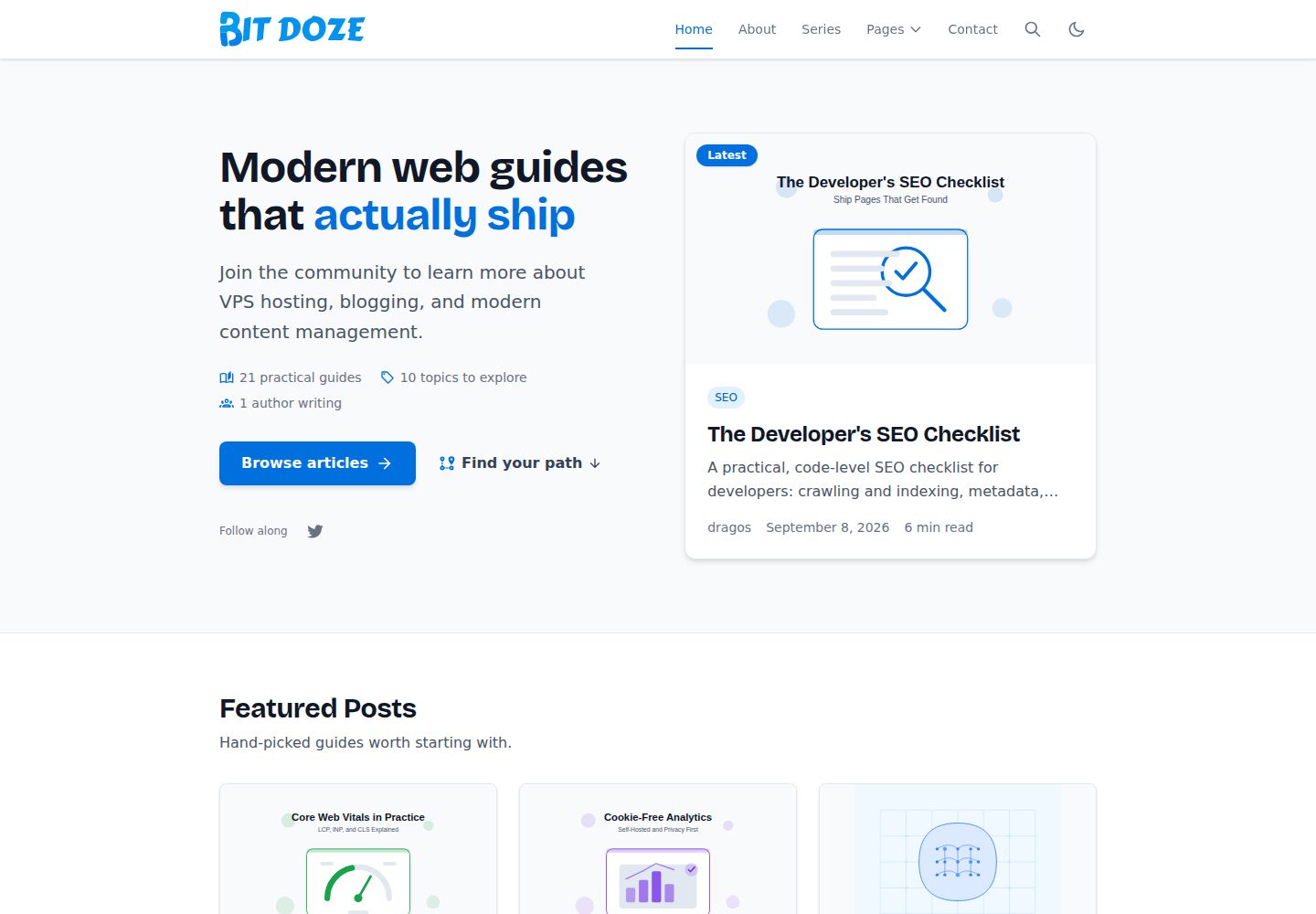
基于 Astro 构建的博客主题,支持文章、作者、分类、标签与系列等内容集合
Astro博客
bitdoze-astro-theme — Astro 博客模板
作者 bitdoze
Bitdoze Astro Blog Theme 是一个基于 Astro 的响应式博客主题,支持标签、分类、系列与精选文章,内置客户端搜索、RSS 与站点地图。
看看你的网站会是什么样
浏览真实页面截图,比较内容排版与手机效果。点击下方缩略图切换,放大查看整页细节。
全部页面与视图 3
截图用于了解视觉与布局,交互效果请以实际项目为准。
采集于 2026-09-30查看来源
值得关注的模板亮点
从已有项目资料中,快速了解它的特点。
首页由 Hero、精选文章、热门话题、最新文章、学习路径与探索内容等区块组成,区块文案与开关集中在 src/config/site.ts
内置基于 Fuse.js 的客户端搜索,索引覆盖每篇文章正文约前 4000 个字符
自动生成 RSS 与站点地图,支持 MDX 与 Astro Icon
使用 Tailwind CSS,品牌色阶与标题字体以 CSS 变量定义,可在 @theme 中覆盖
提供分页、精选文章标记(featured: true)与减少样式闪烁的内联脚本
模板详细介绍
这是一个面向 Astro 的博客主题,仓库由 bitdoze 维护,采用 MIT 许可。主题围绕博客内容组织,提供文章、作者、分类、标签与系列等内容集合,首页由 Hero、精选文章、热门话题、最新文章、学习路径与探索内容等区块拼装,区块文案、数量与开关集中在 src/config/site.ts 中配置。
功能层面,主题包含客户端搜索(基于 Fuse.js,索引覆盖每篇文章正文约前 4000 个字符)、分页、RSS 与站点地图自动生成、MDX 支持、Astro Icon 图标,以及用于减少加载时样式闪烁的内联脚本。样式使用 Tailwind CSS,品牌色阶与标题字体以 CSS 变量形式定义在 src/styles/global.css 中,可通过 @theme 覆盖。
使用上有若干明确限制:需要 Node.js 22.12.0 或更新版本、npm 10.8.2 或更新版本;搜索依赖 JavaScript;联系表单默认 action 为 "#",处于禁用状态并显示提示,需自行配置表单端点;演示图片、字体等第三方素材的许可需单独核对,不能仅凭代码的 MIT 许可判断。
Astro博客
适合你的项目吗?
适用场景
- 搭建以文章、分类、标签和系列组织的个人或团队博客
- 需要客户端搜索、RSS 与站点地图等基础博客功能的站点
- 希望集中在一个配置文件里调整首页区块、导航与站点文案的项目
- 使用 MDX 编写内容并需要在 Markdown 中嵌入组件的博客
适合人群
- 熟悉 Astro 与 Tailwind CSS、愿意自行配置站点信息与内容的开发者
- 需要 MIT 许可下可自由修改和分发的博客主题的团队
- 以文字内容为主、接受搜索依赖 JavaScript 的博客站点
上手与定制指南
结合仓库当前版本的说明,按下面的资料检查内容、配置与运行要求。
- 1
需要 Node.js 22.12.0 或更新版本、npm 10.8.2 或更新版本
- 2
通过 GitHub 的 Use this template 按钮或 git clone 创建站点,然后运行 npm install 与 npm run dev
- 3
更新 src/config/site.ts、src/config/menu.json、src/config/social.json 与 src/config/config.json 完成站点身份、导航、社交链接与联系表单配置
- 4
生产环境需设置 SITE_URL 环境变量,本地构建会回退到默认地址
- 5
联系表单默认 action 为 "#",处于禁用状态,需替换为真实表单端点;演示图片、字体等第三方素材需单独核对许可
授权与来源资料
使用条件与限制
免费使用 · 保留许可声明本次收录的是公开仓库中采用 MIT 许可的免费版本;免费范围为该版本代码,不代表外部服务或第三方素材免费。
使用时需要遵守
- 允许免费使用、修改、商用和分发该版本代码。
- 分发代码副本或实质性部分时,保留原作者版权声明和完整 MIT 许可声明。
- 代码按现状提供;担保与责任限制以原许可证及适用法律为准。
额外费用与待核对事项
- 运行与构建需要 Node.js 22.12.0 或更新版本,并需 npm 10.8.2 或更新版本;低于该版本无法安装依赖或构建站点。
- 搜索为客户端实现,依赖 JavaScript;禁用 JavaScript 时搜索功能不可用。
- 搜索索引仅覆盖每篇文章正文约前 4000 个字符,超出部分不会被检索到,全文索引尚未实现。
- 联系表单默认 action 为 "#",处于禁用状态并显示提示,需自行配置可接收 POST 的端点后才能使用。
- 主题为静态站点且不含邮件发送功能,表单提交处理、成功提示与错误恢复均需由使用者自行配置的端点负责。
- 子路径部署时,Markdown 内容中自行编写的绝对链接不会被重写,建议在根部署下使用根相对链接。
- 搜索端点设置的 Cache-Control 响应头在多数 CDN 与静态主机上会被剥离,需在主机侧另行配置缓存。
- 仓库内容被视为可信构建输入;来自外部 CMS 或用户提交的内容需自行做校验与隔离,不能直接进入构建。
- 演示图片、字体、图标及其他第三方素材需按各自许可核对,不能仅凭代码的 MIT 许可判断。
- 域名、托管、数据库、支付或 AI 等外部服务可能另外收费。
查看原文依据
Permission is hereby granted, free of charge
许可证原文
Node.js 22.12.0 or newer (declared in `package.json` `engines` and pinned in `.node-version`)
README 原文
Client-side search with Fuse.js
README 原文
the index covers roughly the first 4,000 characters of each post body — full-text indexing is deferred
README 原文
The default `"#"` action keeps the form disabled with a visible notice
README 原文
This theme is static and ships no mailer. Handling submissions, success messages, and error recovery is the responsibility of the endpoint you configure.
README 原文
absolute links you write yourself inside Markdown content (for example `[Blog](/blog/)`) are not rewritten; prefer root-relative content links on root deployments.
README 原文
The `Cache-Control` header the search endpoint sets on its response is not portable across CDNs; most static hosts strip response headers from flat files.
README 原文
https://github.com/bitdoze/bitdoze-astro-theme/blob/main/LICENSEhttps://github.com/bitdoze/bitdoze-astro-theme/blob/main/README.mdContent from an external CMS or user submissions does not share that trust and needs its own validation and ingestion boundary before it reaches a build.
README 原文
DeepSeek 根据仓库许可证和 README 整理 ·2026-10-02。结果仅覆盖已读取资料,依赖、图片、字体及后续条款变更以各自原文为准。
项目核对记录与介绍依据
模板资料
- 来源平台
- GitHub
- 资料与维护参考分
- 资料较完整 · 87 / 100
- 技术栈
- Astro
- 网站类型
- 博客
这个分数如何计算
本站按许可资料(最高30分)、演示链接(12分)、预览图(10分)、Star数(15分)、记录的维护时间(15分)、描述完整度(8分)、功能记录(5分)和分类资料(5分)计算。它不是代码、安全或性能测试,也不是 Google 评分;有链接不代表已实测可用。
这个项目需要核对什么
- 记录的仓库更新时间
- 2026-09-10
- 截图检查日期
- 2026-10-02
已收录演示链接。请用你的内容与屏幕尺寸检查;有演示不代表表单、认证或支付已经可用。
目录记录的主要技术栈是 Astro。请通过依赖清单和锁文件核对实际版本与托管要求。这些说明基于收录资料,不代表代码审计或部署实测。
查看具体选型方法 →介绍的制作与核对状态
介绍由 AI 辅助整理目录与仓库资料。仓库作者不等于这篇介绍的审核者。
已完成服务器许可规则与 AI 来源核对;未经过人工编辑审核。
查看当时使用的来源资料
SHA-256: 3b494ae2053993589f025d7f5a4f0e1ce9f68941112ed90b81be437df3328ba3
2026-10-02T15:25:29.645Z
来源文件 / 仓库# Bitdoze Astro Blog Theme
A modern, responsive blog theme for Astro with support for tags, categories, series, and featured posts. This theme is designed to be fast, SEO-friendly, and easy to customize.
## Features
- 🚀 **Built with Astro** - Benefit from Astro's speed and flexibility
- 📱 **Fully Responsive** - Looks great on all devices
- 🎨 **Customizable** - One logo-anchored accent ramp and swappable font tokens drive links, buttons, focus rings, and chips, and one config file (`src/config/site.ts`) owns identity, hero, homepage, footer, and page copy
- 🔍 **SEO Optimized** - Meta tags, Open Graph, and JSON-LD
- 📝 **Blog Ready** - Support for posts, categories, tags, and series
- ⭐ **Featured Posts** - An optional `featured` flag surfaces editor's picks in a three-column homepage grid
- 🧩 **Homepage Sections** - Hero, Featured, Latest, Learning paths, Explore, and Popular Topics, with the hero, featured, and latest posts deduped automatically
- 🔎 **Search Functionality** - Client-side search with Fuse.js
- 📊 **Pagination** - For blog posts, categories, tags, and authors
- 📰 **RSS Feed** - Automatically generated RSS feed
- 🗺️ **Sitemap** - Automatically generated sitemap
- 🖋️ **MDX Support** - Use components in your markdown
- 🔤 **Typography** - Self-hosted display face for headings, system stack for body copy, balanced prose with Tailwind CSS
- 🌙 **Icons** - Easy icon usage with Astro Icon
- 💡 **FOUC Prevention** - Inline scripts to minimize flash of unstyled content and theme inconsistencies on load.
## Project Structure
```
├── public/ # Static assets
├── src/
│ ├── assets/ # Images and other assets
│ ├── config/ # Site configuration
│ ├── content/ # Content collections (blog posts, authors, etc.)
│ ├── layouts/ # Layout components
│ ├── pages/ # Page components and routes
│ ├── styles/ # Global styles
│ └── utils/ # Utility functions
├── astro.config.mjs # Astro configuration
├── package.json # Dependencies and scripts
```
### Key Directories and Files
- **src/config/**: Contains configuration files for the site, menus, and social links
- **src/content/**: Contains all content collections (blog posts, authors, pages)
- **src/layouts/**: Contains layout components used throughout the site
- **src/pages/**: Contains all page components and defines the routing structure
## Components
The theme includes several reusable components:
- **Layout.astro**: Main layout component with header and footer
- **PostLayout.astro**: Layout for blog posts with metadata and content
- **Header/Footer**: Navigation and site information
- **Pagination**: For navigating through multiple pages of content
- **Search**: Client-side search functionality (requires JavaScript; the index covers roughly the first 4,000 characters of each post body — full-text indexing is deferred, see `src/pages/search.json.ts`)
- **Author Card**: Display author information
- **Post Card**: Display post previews in lists, used by Latest, Featured, archives, and search
- **Homepage Sections**: `FeaturedPosts`, `LearningPaths`, and `PopularTopics` compose the homepage from real content and the `homepage` flags in `src/config/site.ts`
- **Tag/Category Cloud**: Display and filter by tags or categories
## Getting Started
Work through the tasks below in order. Each step links to the reference section with the details.
1. **Preview the theme.** Run `npm install && npm run dev` and open `http://localhost:4321`. Try the theme toggle, a mobile viewport, the Featured Posts grid, and the MDX widget examples in `src/content/posts/artificial-intelligence-guide.mdx`, `src/content/posts/vps-hosting-docker-and-caddy.mdx`, and `src/content/posts/developer-seo-checklist.mdx`.
2. **Create your site.** The fastest path is GitHub's **Use this template** button; alternatively clone over HTTPS (`git clone https://github.com/bitdoze/bitdoze-astro-theme.git my-blog`). Install dependencies on Node 22.12 or newer (see [Installation](#installation)).
3. **Rebrand.** Update `src/config/site.ts` — identity, hero, homepage sections, footer titles, and listing/utility page copy — then `src/config/menu.json` and `src/config/social.json` (see [Configuration](#configuration)).
4. **Create your first content.** Add a post, an author, a series, and an ordinary page (see [Creating Content](#creating-content) and [Adding New Pages](#adding-new-pages)).
5. **Remove demo content.** Delete the demo posts, authors, and pages you do not need; empty collections render as empty lists rather than failing. The About page is a dedicated content entry at `src/content/about/index.md` — replace it rather than leaving the placeholder.
6. **Configure contact, origin, and SEO defaults.** Set a real contact endpoint (see [Contact form](#contact-form)), point `SITE_URL` at your production origin, and review the metadata defaults in `src/config/site.ts`.
7. **Deploy and smoke-test.** Build and deploy (see [Deployment](#deployment)), then verify navigation, search, RSS, and the custom 404 page on the live host.
8. **Update from a release.** Read [CHANGELOG.md](CHANGELOG.md) before pulling a new version; releases call out any changed configuration or content contracts.
### Prerequisites
- Node.js 22.12.0 or newer (declared in `package.json` `engines` and pinned in `.node-version`)
- npm 10.8.2 or newer
The theme targets **Astro 7.x**. When upgrading Astro, check [CHANGELOG.md](CHANGELOG.md) and update the official integrations together.
### Installation
1. Create your site from this theme — use GitHub's **Use this template** button, or clone over HTTPS:
```bash
git clone https://github.com/bitdoze/bitdoze-astro-theme.git my-blog
cd my-blog
```
2. Install dependencies:
```bash
npm install
```
3. Start the development server:
```bash
npm run dev
```
4. Open your browser and visit `http://localhost:4321`
### Configuration
Tailor the theme to your needs by updating the following configuration files. Content and copy are not scattered through components: `site.ts` is the single source for headings, sublines, section titles, and calls to action, and the sibling files own navigation, social links, and contact details.
1. **Site URL**:
* Set the `SITE_URL` environment variable in production. It falls back to `https://www.bitdoze.com` for local builds.
2. **Primary Site Metadata & Settings**:
* Update `src/config/site.ts` for essential site details such as:
* **Identity**: `title`, `description`, `author`, `brandName`, `logo`, and logo dimensions.
* **Hero**: `hero.title`, `hero.titleAccent`, `hero.primaryCta` / `hero.secondaryCta`, `hero.statsLabels`, and `heroDescription`.
* **Homepage**: the `showFeaturedPosts` / `showTaxonomyCards` / `showPopularTopics` toggles, plus section copy and limits (`homepage.featured`, `homepage.latest`, `homepage.learningPaths`), configured tags (`homepage.popularTopics`), and the Explore cards (`homepage.explore`).
* **Footer**: column titles (`footer.exploreTitle`, `footer.latestTitle`).
* **Pages**: headings, meta descriptions, and visible sublines for Blog, Categories, Tags, Authors, Series, Contact, Search, and 404 (`pages.*`).
* `ogImage`, `postsPerPage`, `favicons`, and the `noindex` policy.
3. **Menus**:
* Modify `src/config/menu.json` to define navigation links for the header and footer.
4. **Social Media Links**:
* Update `src/config/social.json` with your social media profile URLs.
5. **Contact Configuration (`src/config/config.json`)**:
* Set `params.contact_form_action` to your form endpoint.
* Add only the public address, email, and phone details you want displayed.
* The default `"#"` action keeps the form disabled with a visible notice — see [Contact form](#contact-form).
### Homepage
The homepage is composed from real content in this order:
1. **Hero** — the newest published post, with proof counts and entry points.
2. **Featured Posts** — up to `homepage.featured.limit` posts flagged `featured: true` in a three-column grid, newest first (the hero post is skipped).
3. **Popular Topics** — configured tags with their most recent posts in a full-width band. Columns prefer posts not already shown in the hero or featured grid, then backfill so they still render on small archives; a post never appears in two columns.
4. **Latest Articles** — the newest remaining posts, excluding series and featured entries, with a link to the full archive.
5. **Learning paths** — series in position order plus the largest categories; each path needs at least two entries, with a link to all series.
6. **Explore Content** — links to categories, authors, and tags.
The hero, Popular Topics, and Learning paths render as full-width tinted bands, so the page alternates between white and tinted sections; the footer continues the same surface. Every section's copy, limits, tags, and toggles live in `homepage` in `src/config/site.ts`; the header and footer navigation live in `src/config/menu.json`, and social and contact details in `src/config/social.json` and `src/config/config.json`.
### Creating Content
#### Blog Posts
Create a new `.md` or `.mdx` file in `src/content/posts/` with the following frontmatter:
```md
---
title: "Your Post Title"
meta_title: "SEO Title (optional)"
description: "Post description for SEO"
date: 2023-06-01
image: "../../assets/images/your-image.jpg"
authors: ["author-id"]
categories: ["category-name"]
tags: ["tag1", "tag2"]
series:
name: "Series Name"
position: 1
slug: "optional/custom-path"
canonical: "https://example.com/original-article/"
draft: false
featured: true
---
Your post content goes here...
```
Set `featured: true` to surface a post in the homepage **Featured Posts** grid
(up to three, newest first, never repeating the hero post). The section is
controlled by `homepage.showFeaturedPosts` in `src/config/site.ts`.
#### Authors
Create a new `.md` file in `src/content/authors/` with the following frontmatter:
```md
---
title: "Author Name"
meta_title: "Author Name - Astro Blog Theme"
image: "../../assets/images/authors/author-image.jpg"
description: "Author description"
social:
facebook: "https://facebook.com/username"
twitter: "https://twitter.com/username"
website: "https://example.com"
---
Author bio goes here...
```
## Customization
### Styling
This theme uses **Tailwind CSS v4** for styling, which emphasizes a CSS-first, minimal-configuration approach.
**Key Styling Files:**
* **`src/styles/global.css`**: This is the central file for Tailwind CSS setup and custom styles.
* Tailwind's core styles (base, components, utilities) are imported via `@import "tailwindcss";`.
* The `@tailwindcss/typography` plugin is included using `@plugin "@tailwindcss/typography";`.
* You can customize the theme by modifying the CSS variables defined in this file, which control colors, fonts, and other aspects.
* **Brand tokens**: `--color-accent-50…950` is the brand ramp (anchored on the logo azure) used for links, buttons, focus rings, chips, and text selection, and `--font-display` is the heading face (Bricolage Grotesque, self-hosted in `Layout.astro`). Body copy stays on the system stack. Override either token in the `@theme` block to rebrand.
* You can also add your own custom CSS rules here.
* **`astro.config.mjs`**: The `@tailwindcss/vite` plugin is integrated here, but typically requires no direct configuration for v4 unless you have very specific needs.
**Advanced Customization (Optional):**
Tailwind CSS v4 is CSS-first and does **not** automatically detect a `tailwind.config.js` file. For most customization, stay in `src/styles/global.css` and use the CSS-first `@theme` directive:
```css
@theme {
--color-brand: #009cef;
}
```
If you need a legacy JavaScript config (for example, a Tailwind v3 plugin that requires JS configuration), load it explicitly with `@config` in `src/styles/global.css`:
```css
@import "tailwindcss";
@config "../../tailwind.config.js";
```
Refer to the [official Tailwind CSS documentation](https://tailwindcss.com/docs) for details on `@theme` and `@config`.
### Adding New Pages
Create a new `.astro` file in the `src/pages/` directory. The file path will determine the URL.
## Contact form
The contact page renders a deliverable form only after you configure a real endpoint. While `params.contact_form_action` in `src/config/config.json` stays at its default `"#"`, the page shows a "not configured" notice and the submit button is disabled, so visitors cannot submit messages into the void.
To go live:
1. Set `params.contact_form_action` to an endpoint that accepts `POST` requests — your own backend or a form service.
2. Add only the public address, email, and phone details you want displayed.
This theme is static and ships no mailer. Handling submissions, success messages, and error recovery is the responsibility of the endpoint you configure.
## Deployment
Build your site for production:
```bash
npm run build
```
The static output is written to the `dist/` directory, ready to deploy to any static hosting platform. Build and serve on Node.js 22.12.0 or newer, matching the [prerequisites](#prerequisites).
Run the complete local verification suite:
```bash
npm run verify
```
This runs Astro type checking, unit tests, and the production build. Draft and future-dated posts are excluded from routes, search, RSS, series navigation, and homepage widgets.
Three things to configure on your host before going live:
- **Root-domain or subpath hosting.** Root deployments work out of the box. Subpath deployments (for example `example.com/blog/`) are supported through Astro's `base` setting — navigation, taxonomy links, pagination, favicons, RSS autodiscovery, and search are base-aware, and this is covered by a `/theme/` smoke build. One caveat: absolute links you write yourself inside Markdown content (for example `[Blog](/blog/)`) are not rewritten; prefer root-relative content links on root deployments.
- **Custom 404.** The theme ships `src/pages/404.astro` (content from `src/content/pages/404.md`). Configure your host to serve it for unknown routes with a real 404 status; `astro preview` behavior is not proof for every provider.
- **Cache headers.** The `Cache-Control` header the search endpoint sets on its response is not portable across CDNs; most static hosts strip response headers from flat files. Configure caching for HTML, hashed assets, and `/search.json` in your host's settings.
## Performance
The theme stays lean by default: fully static pages, no client framework runtime, a system font stack for body copy plus one self-hosted variable display face for headings, syntax highlighting done at build time, responsive covers that lazy-load in cards (the article cover loads eagerly), and a click-to-load facade for YouTube embeds instead of immediate iframes.
Budget snapshot of the demo build, September 2026 (gzip estimates): shared CSS ~13 KB, and the client-side search bundle ~11 KB plus its JSON index (~33 KB for the 21-post demo — the index grows with the number and length of your posts). The search page carries that bundle and is heavier than ordinary pages. These are build-output snapshots, not Core Web Vitals results; measure your own deployment.
## Security
Repository content — posts, pages, MDX, and configuration — is a trusted build input: it runs at build time like any other code in the project. Content from an external CMS or user submissions does not share that trust and needs its own validation and ingestion boundary before it reaches a build. To report a security issue, see [SECURITY.md](SECURITY.md).
## License
This project is licensed under the MIT License - see the [LICENSE](LICENSE) file for details.
## Acknowledgments
- Built with [Astro](https://astro.build)
- Styled with [Tailwind CSS](https://tailwindcss.com)
- Icons from [Astro Icon](https://github.com/natemoo-re/astro-icon)
- Search functionality with [Fuse.js](https://fusejs.io)
看看同类模板
对比同技术栈与用途的模板,找到更适合的视觉与内容结构。

astrowind
⭕️ AstroWind: A free template using Astro v7 and Tailwind CSS v4. Astro starter theme.
Astro · 博客

astro-paper
A minimal, accessible and SEO-friendly Astro blog theme.
Astro · 博客

fuwari
✨A static blog template built with Astro.
Astro · 博客

Firefly
Firefly 是一款基于 Astro 的静态博客主题,由 CuteLeaf 在 saicaca 的 Fuwari 模板基础上二次开发,主打清新美观的视觉风格。
Astro · 博客

astro-theme-cactus
A simple Astro theme. Use it to create your blog or website.
Astro · 作品集

astrofy
Astrofy is a free and open-source template for your Personal Portfolio Website built with Astro and TailwindCS…
Astro · 作品集