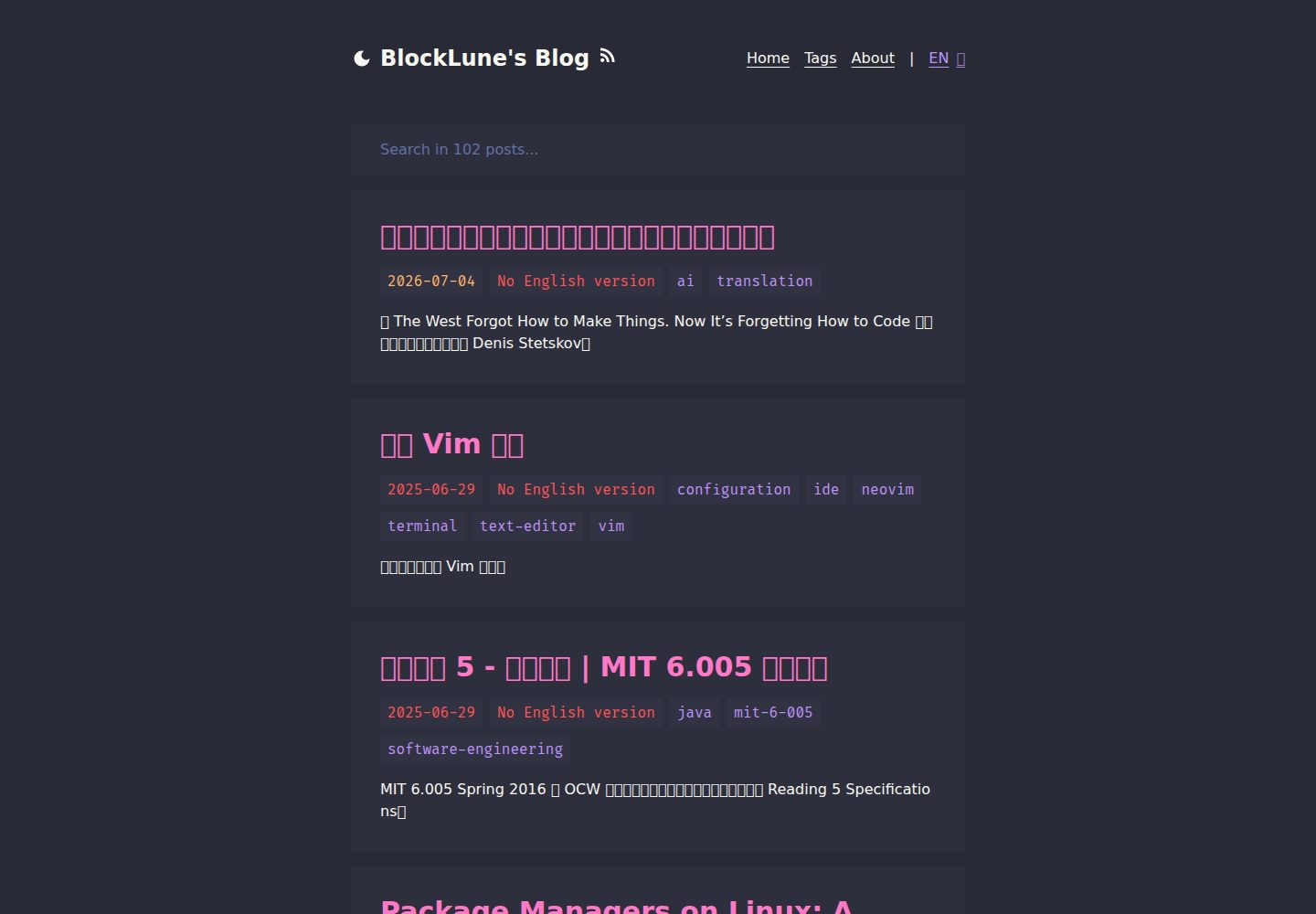
Dracula color scheme, clean interface, responsive on desktop and mobile
AstroBlog
astro-dracula-blog — Astro Blog Template
By BlockLune
A Dracula-themed blog template built with Astro, supporting Chinese and English bilingual content, full-text search, RSS, and automatic generation of llms.txt.
Explore the design
Compare the page layouts and mobile experience. Open any screenshot for a closer look.
Desktop homepage1 / 3
Desktop captureTop of page
Actual screenshot captured by the server browser.
All pages & views 3
Screenshots show visual appearance; interactive behavior may differ.
Recorded 2026-10-02View source
What stands out
A quick read of the recorded project description.
Built-in Chinese and English bilingual content structure, with the same article corresponding to en/zh directories
Fuzzy search based on fuse.js, plus RSS, sitemap, and automatically generated llms.txt
Supports KaTeX math formulas, Callouts, and article table of contents
Dynamically generates Open Graph images for each article and supports per-article license settings
Provides the pnpm new command to create articles or drafts, with configurable Frontmatter fields
Template Details
Astro Dracula Blog is a personal blog template written in Astro, using the Dracula color scheme, with a clean interface and mobile responsiveness. Content is stored as Markdown files in the en and zh directories under src/content/posts. The Chinese and English versions of the same article use the same filename, and the default language is switched via the i18n configuration. The template includes fuzzy search based on fuse.js, KaTeX math rendering, Callouts, article table of contents, RSS and sitemap, and dynamically generates Open Graph images for each article.
Before use, you need to modify the site information in src/config.ts, replace the avatar and the content of the about page, and delete the sample articles and the default icons under public. Article Frontmatter supports title, tags, date, updated, license, licenseLink, and ogImageUrl fields. You can create new articles or drafts with the pnpm new command, but that command generates an empty slug for purely Chinese titles, resulting in a filename of Untitled.md.
The template's default language is English. To switch to Chinese, you need to modify both defaultLang in src/utils/i18n.ts and the redirect rules in public/_redirects. The public/_redirects in the repository targets Netlify; when using another hosting platform, you need to replace or delete it. The project uses the MIT license, but third-party assets such as demo images, fonts, and icons need to be checked separately for licensing.
AstroBlog
Is it right for your project?
Use Cases
- Building a personal technical blog or note site written in Markdown
- Blogs that need to maintain both Chinese and English versions of content
- Static sites that want to use the Dracula color scheme and include search and RSS
- Writing scenarios that require rendering math formulas or using Callouts in articles
Suitable For
- Developers familiar with Astro or willing to modify configuration files according to the documentation
- Personal bloggers who mainly write in Markdown and need bilingual Chinese-English output
- Users who prefer the Dracula dark color scheme and a clean typographic style
Getting started & customization
Use these recorded setup notes alongside the repository instructions for your chosen version.
- 1
Edit src/config.ts to configure basic site information, and optionally set umami analytics and search engine verification there
- 2
Replace src/assets/avatar.webp with your own avatar, and rewrite about.md under en and zh in src/content/info
- 3
Delete the sample articles in src/content/posts, and organize your own Chinese and English articles by en/zh directories and identical filenames
- 4
Delete public/_redirects and the default icons under public, and switch to your hosting platform's redirect configuration and icons
- 5
When switching the default language to Chinese, you need to modify both defaultLang in src/utils/i18n.ts and public/_redirects
License & source material
Usage conditions & limitations
Free to use · keep license noticeThis entry covers the free version in the public repository under the MIT license; the free scope is the code of this version and does not mean that external services or third-party assets are free.
Must comply with when using
- Free use, modification, commercial use, and distribution of this version's code are permitted.
- When distributing copies or substantial portions of the code, retain the original author's copyright notice and the full MIT license notice.
- The code is provided as is; warranties and limitations of liability are governed by the original license and applicable law.
Additional costs & items to verify
- When using the template, you need to retain the original license information on the about page and, as far as possible, retain a link to this project.
- The public/_redirects included in the repository targets Netlify; when using another hosting platform, you need to delete or replace it with your own redirect configuration.
- Creating an article with a purely Chinese title via pnpm new generates an empty slug, resulting in a filename of Untitled.md, which must be handled manually.
- Demo images, fonts, icons, and other third-party assets need to be checked under their respective licenses; they cannot be judged solely by the code's MIT license.
- External services such as domains, hosting, databases, payments, or AI may incur additional charges.
View Original Text Basis
Permission is hereby granted, free of charge
Original License Text
Please retain the license information contained therein and, if possible, the url for this project
Original README
Remove `public/_redirects` and use your own Netlify redirect configuration.
Original README
https://github.com/BlockLune/astro-dracula-blog/blob/main/LICENSEhttps://github.com/BlockLune/astro-dracula-blog/blob/main/README.mdan empty slug will be generated for a full Chinese title like “你好,世界”, which will result in a file called `Untitled.md`.
Original README
Compiled by DeepSeek based on repository license and README ·2026-10-03. Results only cover the materials read; dependencies, images, fonts, and subsequent term changes are subject to their respective original texts.
Project checks & description sources
Template Information
- Source platforms
- GitHub
- Documentation and maintenance reference score
- More documented · 87 / 100
- Technologies
- Astro
- Website type
- Blog
How this score is calculated
Our heuristic uses license records (up to 30), a demo link (12), a preview (10), stars (15), recorded maintenance (15), description completeness (8), feature records (5) and classification data (5). It is not a code, security or performance test, or a Google score. A link does not establish tested functionality.
What to verify for this project
- Repository update recorded
- 2026-09-13
- Screenshot last checked
- 2026-10-03
A demo link is listed. Check it with your own content and viewport sizes; its presence does not confirm that forms, authentication or payments work.
The catalog identifies Astro as the primary stack. Check the actual dependency manifest and lockfile for versions and hosting requirements. These notes use recorded metadata, not a code audit or a deployment test.
Use a selection guide →How this description was prepared
AI-assisted description based on catalog records and repository material. Repository authors are not automatically the reviewers of this description.
Review declaration: [email protected] · 2026-10-04
Inspect the recorded source material
SHA-256: 9f6b6a07dca0759c0c635a6efce1f613aa1eb3490868ee2f2275c76d2082c7b4
2026-10-03T10:18:04.573Z
Source file / repository# Astro Dracula Blog
<p>
<a href="https://blocklune.cc"><strong>🛑 Live Demo</strong></a> /
<a href="docs/gallery.md"><strong>🖼️Gallery</strong></a> /
<strong>🌏 English</strong> /
<a href="docs/readme_zh.md"><strong>🌏 简体中文</strong></a>
</p>
🌟 A fast and simple blog system with dracula theme built with Astro v5.
[](docs/gallery.md)
## :fire: Features
- [x] :rocket: Fast & High Performance
- [x] :star: Simple & Clean Design
- [x] :iphone: Responsive Design
- [x] :vampire_man: Dracula Theme
- [x] :zap: Animations created with [Motion](https://motion.dev) (the original Framer Motion)
- [x] :mag: Fuzzy Search built with [fuse.js](https://www.fusejs.io/)
- [x] :world_map: Sitemap & RSS Feed
- [x] :spider_web: SEO-Friendly
- [x] :robot: Auto [llms.txt](https://llmstxt.org/) generation (LLMs-Friendly)
- [x] :earth_asia: I18n-Supported (`zh` & `en`)
- [x] :triangular_ruler: Katex-based mathematical formula rendering
- [x] :octocat: [Callouts](https://github.com/lin-stephanie/satteri-callouts)
- [x] :book: TOC (Table of Contents)
- [x] :framed_picture: Dynamic Open Graph Generation for Posts
- [x] :copyright: Project under MIT License & Support License customization for each post
## :white_check_mark: Lighthouse Score
<p aligh="center">
<a href="https://pagespeed.web.dev/analysis/https-blocklune-cc/72o0c25cxa?form_factor=desktop">
<img alt="Astro Dracula Blog Lighthouse Score" src="docs/img/lighthouse-score.png" />
</a>
</p>
## :rocket: How To Use
File structure:
```text
.
├── astro.config.mjs
├── package.json
├── public/
├── src/
│ ├── assets/
│ │ └── avatar.webp
│ ├── components/
│ ├── config.ts
│ ├── content.config.ts
│ ├── content/
│ │ ├── drafts/
│ │ │ └── ...
│ │ ├── info/
│ │ │ ├── en/
│ │ │ │ └── about.md
│ │ │ └── zh/
│ │ │ └── about.md
│ │ └── posts/
│ │ ├── en/
│ │ │ └── example-post.md
│ │ └── zh/
│ │ └── example-post.md
│ ├── middleware.ts
│ ├── pages/
│ ├── schemas/
│ ├── styles/
│ └── utils/
├── tailwind.config.mjs
└── tsconfig.json
```
To use this theme, follow these steps:
1. Edit `src/config.ts` to configure the basic information for your site. You can also configure your [umami](https://umami.is/) analytics and search engine verifications here.
2. Replace `src/assets/avatar.webp` with your own avatar.
3. Rewrite your own about page text in `src/content/info/en/about.md` & `src/info/zh/about.md` (**📌Note: Please retain the license information contained therein and, if possible, the url for this project❤️.**).
4. Delete my posts in `src/content/posts` and write your own. Currently the theme supports both Chinese and English languages, for different language versions of the same post, you need to make sure they are located in the `en` and `zh` directories and use the same filename.
5. Remove `public/_redirects` and use your own Netlify redirect configuration.
6. Remove the icons in `public` and use your own. The commands below may be helpful:
```bash
# https://github.com/yy4382/yfi.moe/blob/main/app/blog/src/components/modules/head/Favicon.astro
mkdir magic
magick logo.png -resize 16 ./magic/favicon-16.png
magick logo.png -resize 32 ./magic/favicon-32.png
magick logo.png -resize 48 ./magic/icon-48.png
magick logo.png -resize 96 ./magic/icon-96.png
magick logo.png -resize 144 ./magic/icon-144.png
magick logo.png -resize 192 ./magic/icon-192.png
magick logo.png -resize 256 ./magic/icon-256.png
magick logo.png -resize 384 ./magic/icon-384.png
magick logo.png -resize 512 ./magic/icon-512.png
magick logo.png -resize 120 ./magic/apple-touch-icon-120.png
magick logo.png -resize 152 ./magic/apple-touch-icon-152.png
magick logo.png -resize 167 ./magic/apple-touch-icon-167.png
magick logo.png -resize 180 ./magic/apple-touch-icon-180.png
magick ./magic/favicon-32.png ./magic/favicon-16.png ./magic/favicon.ico
```
### Write a New Post
To start writing a new post, you can use the `pnpm new` command (see below), or follow these steps:
1. Create a file in `src/content/posts/en` if you are writing the English version of a post, say `hello-world.md`.
2. Edit the file `src/content/posts/en/hello-world.md` like this:
```text
---
title: Hello World
tags:
- hello
- my-first-post
date: 2024-11-12 18:50:00
---
Hello! This is my first post!
<!--more-->
I'm writing my first post!
```
Currently, Frontmatter supports the following properties
- `title`: the title of a post
- `tags`: the tags of a post
- `date`: the published date of a post
- `updated`: the updated date of a post
- `license`: the license of a post, set to `none` to disable the license for a specific post
- `licenseLink`: the license link
- `ogImageUrl`: specify an Open Graph image for a specific post
### Customize License
To customize default license, edit the `src/config.ts` file. To customize the license for a specific post, edit the `license` property in the Frontmatter of the post file.
### Customize Color Scheme
To customize the color scheme of this theme, edit the following files:
- `src/components/style/prose.astro`
- `src/styles/global.css`
- `tailwind.config.mjs`
### I18n Configuration
Currently this theme supports both Chinese and English, and uses English as its default language.
To switch it to Chinese:
- Edit `src/utils/i18n.ts`:
```ts
export const defaultLang: Lang = "zh";
```
- Edit `public/_redirects` (Make sure these are at the end of the file):
```text
/ /en 302! Language=en
/ /zh 302!
```
### Useful Commands
```bash
# install dependencies
pnpm install
# start the dev server
pnpm dev
# build the project
pnpm build
# preview (after the build)
pnpm preview
# create a new post (or draft)
pnpm new
```
More detailed usage of `pnpm new` (The output of `pnpm new --help`):
```text
Usage: pnpm new [options] <post-title>
Options:
-l, --lang <en|zh> Set the language (default: en)
-d, --draft Create a draft post (default: false)
-m, --mdx Use MDX format (default: false)
-h, --help Show this help message
Example:
pnpm new "Hello World"
pnpm new -l zh "你好,世界"
```
> [!Caution]
> Due to [the slug generation library used](https://www.npmjs.com/package/slugify), an empty slug will be generated for a full Chinese title like “你好,世界”, which will result in a file called `Untitled.md`.
## :books: The Story
This is my fourth attempt at building a blog system. My journey began at the tender age of 14, when I first dabbled in creating a blog. I learned the basics of HTML in a junior high computer class, and furthered my knowledge through resources such as [doyoudo](https://www.bilibili.com/video/BV1gp411f7j6). My first attempt at blogging was a simple static site created with HTML & CSS, no JavaScript, and hosted on GitHub Pages.
As I approached college, I experimented with [Hexo](https://hexo.io/) and the [Icarus](https://ppoffice.github.io/hexo-theme-icarus/) theme for my second blog. For the third iteration, I continued using Hexo, but this time with the [NexT](https://theme-next.js.org/) theme. Using a framework like Hexo greatly streamlines the blogging process, allowing me to focus on content creation. However, I have always felt the "weight" of using a framework.
Determined to create a blog that was truly my own, I decided to build one from the ground up. And here it is!
The blog is mainly built with [Astro](https://astro.build/) with [React](https://react.dev/) components. I chose Astro because it is super fast. The color scheme is inspired by [Dracula](https://draculatheme.com/). I use [Tailwind CSS](https://tailwindcss.com/) for styling and [Tailwind Typography](https://github.com/tailwindlabs/tailwindcss-typography) for typography. And I do some animations with [Motion](https://motion.dev) (the original Framer Motion).
## :link: References
- [Dracula Theme](https://draculatheme.com/contribute)
- [overreacted.io - Dan's blog](https://overreacted.io/)
- [bearblog.dev](https://bearblog.dev/)
- [Astro Docs](https://docs.astro.build/)
Explore similar templates
Compare previews and descriptions within the same stack and category.

astrowind
AstroWind is a free, open-source Astro starter theme using Astro and Tailwind CSS, released under the MIT license.
Astro · Blog

astro-paper
AstroPaper is a minimal, responsive, accessible, and SEO-friendly Astro blog theme. Articles are stored as Markdown/MDX in src/content/posts/, with subdirectories affecting URLs.
Astro · Blog

fuwari
Fuwari is a static blog template built with Astro and Tailwind CSS for personal blogs. It manages posts as Markdown files in src/content/posts/, with frontmatter for title, date, description, cover, tags, categories, draft status, and language.
Astro · Blog

Firefly
Firefly is a clean personal blog theme forked from Astro and Fuwari, offering four background modes, single/double sidebar and list/grid layouts, Pagefind client-side full-text search, and a six-language UI.
Astro · Blog

astro-theme-cactus
Astro Cactus is an Astro-based blog and portfolio theme that uses Markdown/MDX content collections to manage posts, notes, and tags, with frontmatter type-checked by a schema.
Astro · Portfolio

astrofy
Astrofy is a free and open-source personal portfolio website template built with Astro and TailwindCSS, with built-in blog, CV timeline, project showcase, store, and RSS feed modules.
Astro · Portfolio