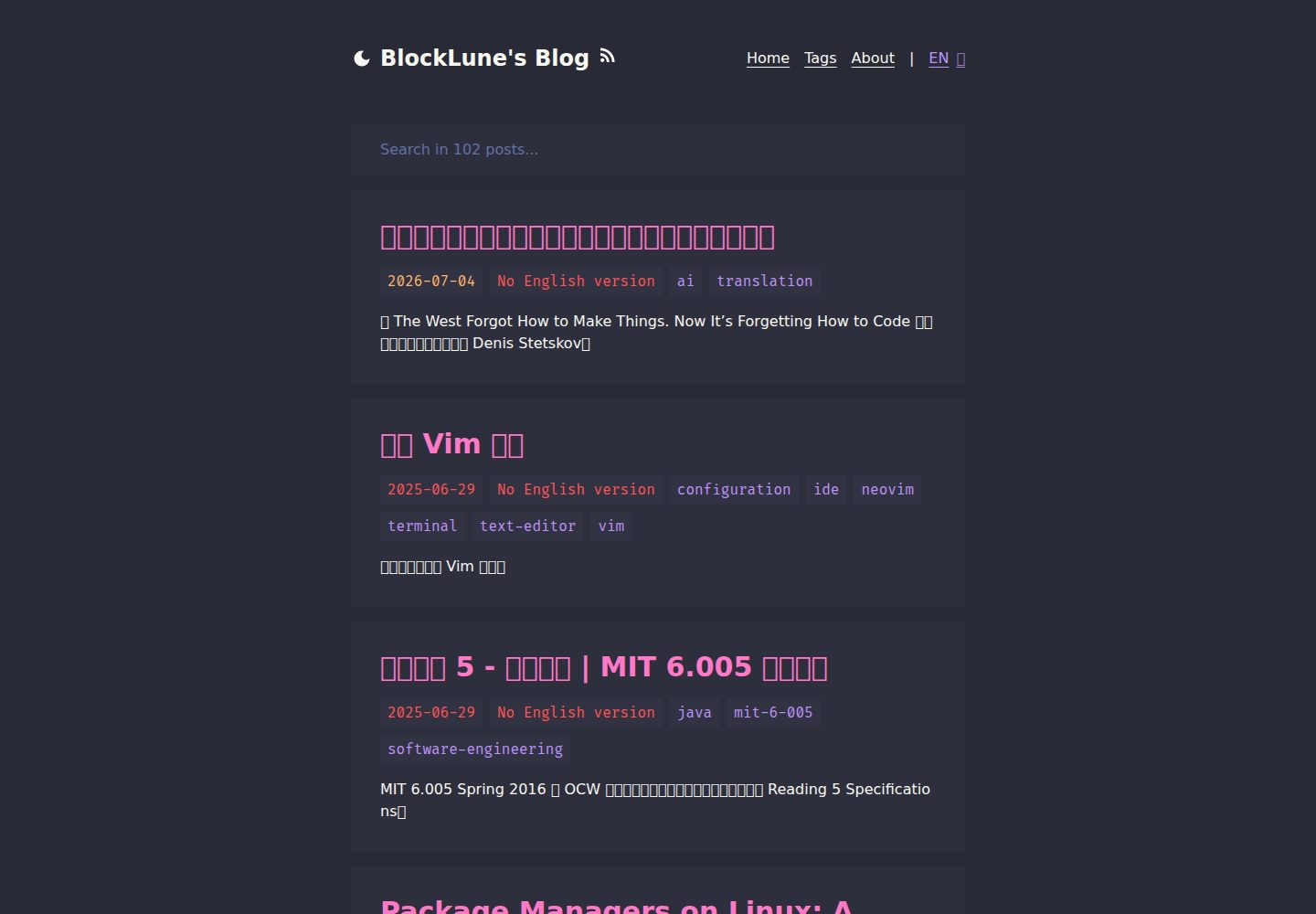
Dracula 配色方案,界面简洁并适配桌面与移动端
Astro博客
astro-dracula-blog — Astro 博客模板
作者 BlockLune
基于 Astro 构建的 Dracula 主题博客模板,支持中英文双语、全文搜索、RSS 与自动生成 llms.txt。
看看你的网站会是什么样
浏览真实页面截图,比较内容排版与手机效果。点击下方缩略图切换,放大查看整页细节。
全部页面与视图 3
截图用于了解视觉与布局,交互效果请以实际项目为准。
采集于 2026-10-02查看来源
值得关注的模板亮点
从已有项目资料中,快速了解它的特点。
内置中英文双语内容结构,同一篇文章按 en/zh 目录对应
基于 fuse.js 的模糊搜索,以及 RSS、sitemap 和自动生成的 llms.txt
支持 KaTeX 数学公式、Callouts 与文章目录
为每篇文章动态生成 Open Graph 图片,并支持逐篇设置许可协议
提供 pnpm new 命令创建文章或草稿,Frontmatter 字段可配置
模板详细介绍
Astro Dracula Blog 是一个用 Astro 编写的个人博客模板,采用 Dracula 配色方案,界面简洁并适配移动端。内容以 Markdown 文件形式存放在 src/content/posts 下的 en 与 zh 目录中,同一篇文章的中英文版本使用相同文件名,通过 i18n 配置切换默认语言。模板内置基于 fuse.js 的模糊搜索、KaTeX 数学公式渲染、Callouts、文章目录、RSS 与 sitemap,并为每篇文章动态生成 Open Graph 图片。
使用前需要修改 src/config.ts 中的站点信息、替换头像与 about 页面内容,并删除示例文章和 public 下的默认图标。文章 Frontmatter 支持 title、tags、date、updated、license、licenseLink 与 ogImageUrl 字段,可通过 pnpm new 命令创建新文章或草稿,但该命令对纯中文标题会生成空 slug,导致文件名为 Untitled.md。
模板的默认语言为英文,切换为中文需要同时修改 src/utils/i18n.ts 中的 defaultLang 和 public/_redirects 的跳转规则。仓库中 public/_redirects 面向 Netlify,使用其他托管平台时需要替换或删除。项目采用 MIT 许可,但演示图片、字体、图标等第三方素材需单独核对授权。
Astro博客
适合你的项目吗?
适用场景
- 搭建以 Markdown 写作的个人技术博客或笔记站点
- 需要同时维护中英文两个语言版本内容的博客
- 希望使用 Dracula 配色、并包含搜索与 RSS 的静态站点
- 在文章中需要渲染数学公式或使用提示块(Callouts)的写作场景
适合人群
- 熟悉 Astro 或愿意按文档修改配置文件的开发者
- 以 Markdown 为主要写作方式、需要中英双语输出的个人博主
- 偏好 Dracula 深色配色与简洁排版风格的用户
上手与定制指南
结合仓库当前版本的说明,按下面的资料检查内容、配置与运行要求。
- 1
编辑 src/config.ts 配置站点基本信息,并可在此设置 umami 统计与搜索引擎验证
- 2
替换 src/assets/avatar.webp 为自己的头像,并重写 src/content/info 下 en 与 zh 的 about.md
- 3
删除 src/content/posts 中的示例文章,按 en/zh 目录和相同文件名组织自己的中英文文章
- 4
删除 public/_redirects 与 public 下的默认图标,改用自己托管平台的跳转配置和图标
- 5
切换默认语言为中文时,需同时修改 src/utils/i18n.ts 的 defaultLang 和 public/_redirects
授权与来源资料
使用条件与限制
免费使用 · 保留许可声明本次收录的是公开仓库中采用 MIT 许可的免费版本;免费范围为该版本代码,不代表外部服务或第三方素材免费。
使用时需要遵守
- 允许免费使用、修改、商用和分发该版本代码。
- 分发代码副本或实质性部分时,保留原作者版权声明和完整 MIT 许可声明。
- 代码按现状提供;担保与责任限制以原许可证及适用法律为准。
额外费用与待核对事项
- 使用模板时,需在 about 页面中保留原有的许可信息,并尽可能保留本项目链接。
- 仓库自带的 public/_redirects 面向 Netlify,使用其他托管平台时需删除或替换为自己的跳转配置。
- 使用 pnpm new 创建纯中文标题文章时会生成空 slug,导致文件名为 Untitled.md,需手动处理。
- 演示图片、字体、图标及其他第三方素材需按各自许可核对,不能仅凭代码的 MIT 许可判断。
- 域名、托管、数据库、支付或 AI 等外部服务可能另外收费。
查看原文依据
Permission is hereby granted, free of charge
许可证原文
Please retain the license information contained therein and, if possible, the url for this project
README 原文
Remove `public/_redirects` and use your own Netlify redirect configuration.
README 原文
https://github.com/BlockLune/astro-dracula-blog/blob/main/LICENSEhttps://github.com/BlockLune/astro-dracula-blog/blob/main/README.mdan empty slug will be generated for a full Chinese title like “你好,世界”, which will result in a file called `Untitled.md`.
README 原文
DeepSeek 根据仓库许可证和 README 整理 ·2026-10-03。结果仅覆盖已读取资料,依赖、图片、字体及后续条款变更以各自原文为准。
项目核对记录与介绍依据
模板资料
- 来源平台
- GitHub
- 资料与维护参考分
- 资料较完整 · 87 / 100
- 技术栈
- Astro
- 网站类型
- 博客
这个分数如何计算
本站按许可资料(最高30分)、演示链接(12分)、预览图(10分)、Star数(15分)、记录的维护时间(15分)、描述完整度(8分)、功能记录(5分)和分类资料(5分)计算。它不是代码、安全或性能测试,也不是 Google 评分;有链接不代表已实测可用。
这个项目需要核对什么
- 记录的仓库更新时间
- 2026-09-13
- 截图检查日期
- 2026-10-03
已收录演示链接。请用你的内容与屏幕尺寸检查;有演示不代表表单、认证或支付已经可用。
目录记录的主要技术栈是 Astro。请通过依赖清单和锁文件核对实际版本与托管要求。这些说明基于收录资料,不代表代码审计或部署实测。
查看具体选型方法 →介绍的制作与核对状态
介绍由 AI 辅助整理目录与仓库资料。仓库作者不等于这篇介绍的审核者。
审核声明: [email protected] · 2026-10-04
查看当时使用的来源资料
SHA-256: 9f6b6a07dca0759c0c635a6efce1f613aa1eb3490868ee2f2275c76d2082c7b4
2026-10-03T10:18:04.573Z
来源文件 / 仓库# Astro Dracula Blog
<p>
<a href="https://blocklune.cc"><strong>🛑 Live Demo</strong></a> /
<a href="docs/gallery.md"><strong>🖼️Gallery</strong></a> /
<strong>🌏 English</strong> /
<a href="docs/readme_zh.md"><strong>🌏 简体中文</strong></a>
</p>
🌟 A fast and simple blog system with dracula theme built with Astro v5.
[](docs/gallery.md)
## :fire: Features
- [x] :rocket: Fast & High Performance
- [x] :star: Simple & Clean Design
- [x] :iphone: Responsive Design
- [x] :vampire_man: Dracula Theme
- [x] :zap: Animations created with [Motion](https://motion.dev) (the original Framer Motion)
- [x] :mag: Fuzzy Search built with [fuse.js](https://www.fusejs.io/)
- [x] :world_map: Sitemap & RSS Feed
- [x] :spider_web: SEO-Friendly
- [x] :robot: Auto [llms.txt](https://llmstxt.org/) generation (LLMs-Friendly)
- [x] :earth_asia: I18n-Supported (`zh` & `en`)
- [x] :triangular_ruler: Katex-based mathematical formula rendering
- [x] :octocat: [Callouts](https://github.com/lin-stephanie/satteri-callouts)
- [x] :book: TOC (Table of Contents)
- [x] :framed_picture: Dynamic Open Graph Generation for Posts
- [x] :copyright: Project under MIT License & Support License customization for each post
## :white_check_mark: Lighthouse Score
<p aligh="center">
<a href="https://pagespeed.web.dev/analysis/https-blocklune-cc/72o0c25cxa?form_factor=desktop">
<img alt="Astro Dracula Blog Lighthouse Score" src="docs/img/lighthouse-score.png" />
</a>
</p>
## :rocket: How To Use
File structure:
```text
.
├── astro.config.mjs
├── package.json
├── public/
├── src/
│ ├── assets/
│ │ └── avatar.webp
│ ├── components/
│ ├── config.ts
│ ├── content.config.ts
│ ├── content/
│ │ ├── drafts/
│ │ │ └── ...
│ │ ├── info/
│ │ │ ├── en/
│ │ │ │ └── about.md
│ │ │ └── zh/
│ │ │ └── about.md
│ │ └── posts/
│ │ ├── en/
│ │ │ └── example-post.md
│ │ └── zh/
│ │ └── example-post.md
│ ├── middleware.ts
│ ├── pages/
│ ├── schemas/
│ ├── styles/
│ └── utils/
├── tailwind.config.mjs
└── tsconfig.json
```
To use this theme, follow these steps:
1. Edit `src/config.ts` to configure the basic information for your site. You can also configure your [umami](https://umami.is/) analytics and search engine verifications here.
2. Replace `src/assets/avatar.webp` with your own avatar.
3. Rewrite your own about page text in `src/content/info/en/about.md` & `src/info/zh/about.md` (**📌Note: Please retain the license information contained therein and, if possible, the url for this project❤️.**).
4. Delete my posts in `src/content/posts` and write your own. Currently the theme supports both Chinese and English languages, for different language versions of the same post, you need to make sure they are located in the `en` and `zh` directories and use the same filename.
5. Remove `public/_redirects` and use your own Netlify redirect configuration.
6. Remove the icons in `public` and use your own. The commands below may be helpful:
```bash
# https://github.com/yy4382/yfi.moe/blob/main/app/blog/src/components/modules/head/Favicon.astro
mkdir magic
magick logo.png -resize 16 ./magic/favicon-16.png
magick logo.png -resize 32 ./magic/favicon-32.png
magick logo.png -resize 48 ./magic/icon-48.png
magick logo.png -resize 96 ./magic/icon-96.png
magick logo.png -resize 144 ./magic/icon-144.png
magick logo.png -resize 192 ./magic/icon-192.png
magick logo.png -resize 256 ./magic/icon-256.png
magick logo.png -resize 384 ./magic/icon-384.png
magick logo.png -resize 512 ./magic/icon-512.png
magick logo.png -resize 120 ./magic/apple-touch-icon-120.png
magick logo.png -resize 152 ./magic/apple-touch-icon-152.png
magick logo.png -resize 167 ./magic/apple-touch-icon-167.png
magick logo.png -resize 180 ./magic/apple-touch-icon-180.png
magick ./magic/favicon-32.png ./magic/favicon-16.png ./magic/favicon.ico
```
### Write a New Post
To start writing a new post, you can use the `pnpm new` command (see below), or follow these steps:
1. Create a file in `src/content/posts/en` if you are writing the English version of a post, say `hello-world.md`.
2. Edit the file `src/content/posts/en/hello-world.md` like this:
```text
---
title: Hello World
tags:
- hello
- my-first-post
date: 2024-11-12 18:50:00
---
Hello! This is my first post!
<!--more-->
I'm writing my first post!
```
Currently, Frontmatter supports the following properties
- `title`: the title of a post
- `tags`: the tags of a post
- `date`: the published date of a post
- `updated`: the updated date of a post
- `license`: the license of a post, set to `none` to disable the license for a specific post
- `licenseLink`: the license link
- `ogImageUrl`: specify an Open Graph image for a specific post
### Customize License
To customize default license, edit the `src/config.ts` file. To customize the license for a specific post, edit the `license` property in the Frontmatter of the post file.
### Customize Color Scheme
To customize the color scheme of this theme, edit the following files:
- `src/components/style/prose.astro`
- `src/styles/global.css`
- `tailwind.config.mjs`
### I18n Configuration
Currently this theme supports both Chinese and English, and uses English as its default language.
To switch it to Chinese:
- Edit `src/utils/i18n.ts`:
```ts
export const defaultLang: Lang = "zh";
```
- Edit `public/_redirects` (Make sure these are at the end of the file):
```text
/ /en 302! Language=en
/ /zh 302!
```
### Useful Commands
```bash
# install dependencies
pnpm install
# start the dev server
pnpm dev
# build the project
pnpm build
# preview (after the build)
pnpm preview
# create a new post (or draft)
pnpm new
```
More detailed usage of `pnpm new` (The output of `pnpm new --help`):
```text
Usage: pnpm new [options] <post-title>
Options:
-l, --lang <en|zh> Set the language (default: en)
-d, --draft Create a draft post (default: false)
-m, --mdx Use MDX format (default: false)
-h, --help Show this help message
Example:
pnpm new "Hello World"
pnpm new -l zh "你好,世界"
```
> [!Caution]
> Due to [the slug generation library used](https://www.npmjs.com/package/slugify), an empty slug will be generated for a full Chinese title like “你好,世界”, which will result in a file called `Untitled.md`.
## :books: The Story
This is my fourth attempt at building a blog system. My journey began at the tender age of 14, when I first dabbled in creating a blog. I learned the basics of HTML in a junior high computer class, and furthered my knowledge through resources such as [doyoudo](https://www.bilibili.com/video/BV1gp411f7j6). My first attempt at blogging was a simple static site created with HTML & CSS, no JavaScript, and hosted on GitHub Pages.
As I approached college, I experimented with [Hexo](https://hexo.io/) and the [Icarus](https://ppoffice.github.io/hexo-theme-icarus/) theme for my second blog. For the third iteration, I continued using Hexo, but this time with the [NexT](https://theme-next.js.org/) theme. Using a framework like Hexo greatly streamlines the blogging process, allowing me to focus on content creation. However, I have always felt the "weight" of using a framework.
Determined to create a blog that was truly my own, I decided to build one from the ground up. And here it is!
The blog is mainly built with [Astro](https://astro.build/) with [React](https://react.dev/) components. I chose Astro because it is super fast. The color scheme is inspired by [Dracula](https://draculatheme.com/). I use [Tailwind CSS](https://tailwindcss.com/) for styling and [Tailwind Typography](https://github.com/tailwindlabs/tailwindcss-typography) for typography. And I do some animations with [Motion](https://motion.dev) (the original Framer Motion).
## :link: References
- [Dracula Theme](https://draculatheme.com/contribute)
- [overreacted.io - Dan's blog](https://overreacted.io/)
- [bearblog.dev](https://bearblog.dev/)
- [Astro Docs](https://docs.astro.build/)
看看同类模板
对比同技术栈与用途的模板,找到更适合的视觉与内容结构。

astrowind
⭕️ AstroWind: A free template using Astro v7 and Tailwind CSS v4. Astro starter theme.
Astro · 博客

astro-paper
A minimal, accessible and SEO-friendly Astro blog theme.
Astro · 博客

fuwari
✨A static blog template built with Astro.
Astro · 博客

Firefly
Firefly 是一款基于 Astro 的静态博客主题,由 CuteLeaf 在 saicaca 的 Fuwari 模板基础上二次开发,主打清新美观的视觉风格。
Astro · 博客

astro-theme-cactus
A simple Astro theme. Use it to create your blog or website.
Astro · 作品集

astrofy
Astrofy is a free and open-source template for your Personal Portfolio Website built with Astro and TailwindCS…
Astro · 作品集