Written in TypeScript and SCSS, bundled with Webpack
ReactAdmin dashboard
admin-template-for-react — React Admin dashboard Template
By bndynet
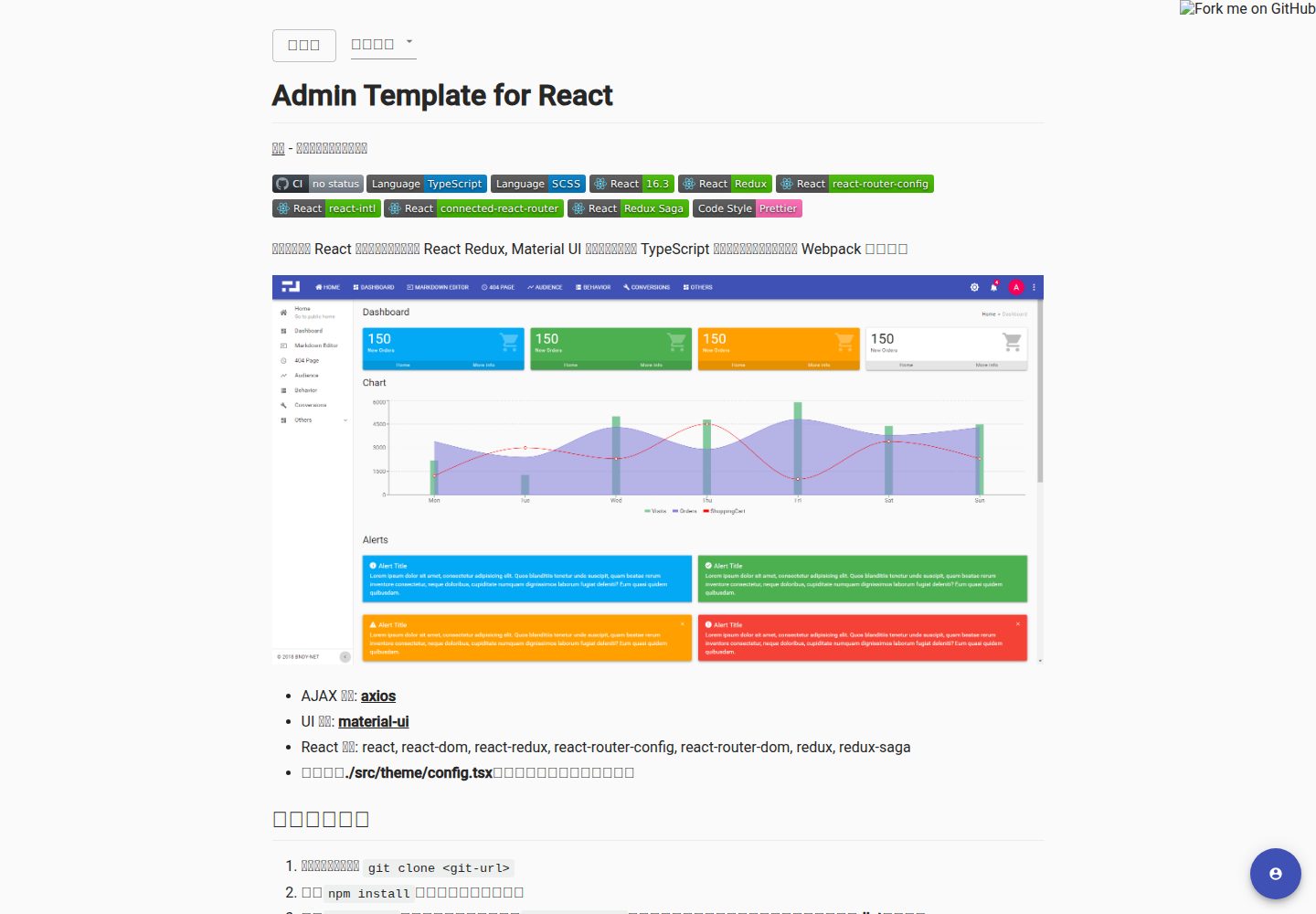
A backend management template based on React, Redux, Redux Saga, React Router, and Material UI, with built-in OAuth login and internationalization, built using TypeScript and Webpack.
Explore the design
Compare the page layouts and mobile experience. Open any screenshot for a closer look.
Desktop homepage1 / 2
Desktop captureTop of page
Actual screenshot captured by the server browser.
All pages & views 2
Screenshots show visual appearance; interactive behavior may differ.
Recorded 2026-09-30View source
What stands out
A quick read of the recorded project description.
Integrates React Redux, Redux Saga, React Router, and Material UI
Built-in react-intl-universal internationalization solution
Provides configuration examples for three OAuth login methods: GitHub, authorization code, and password
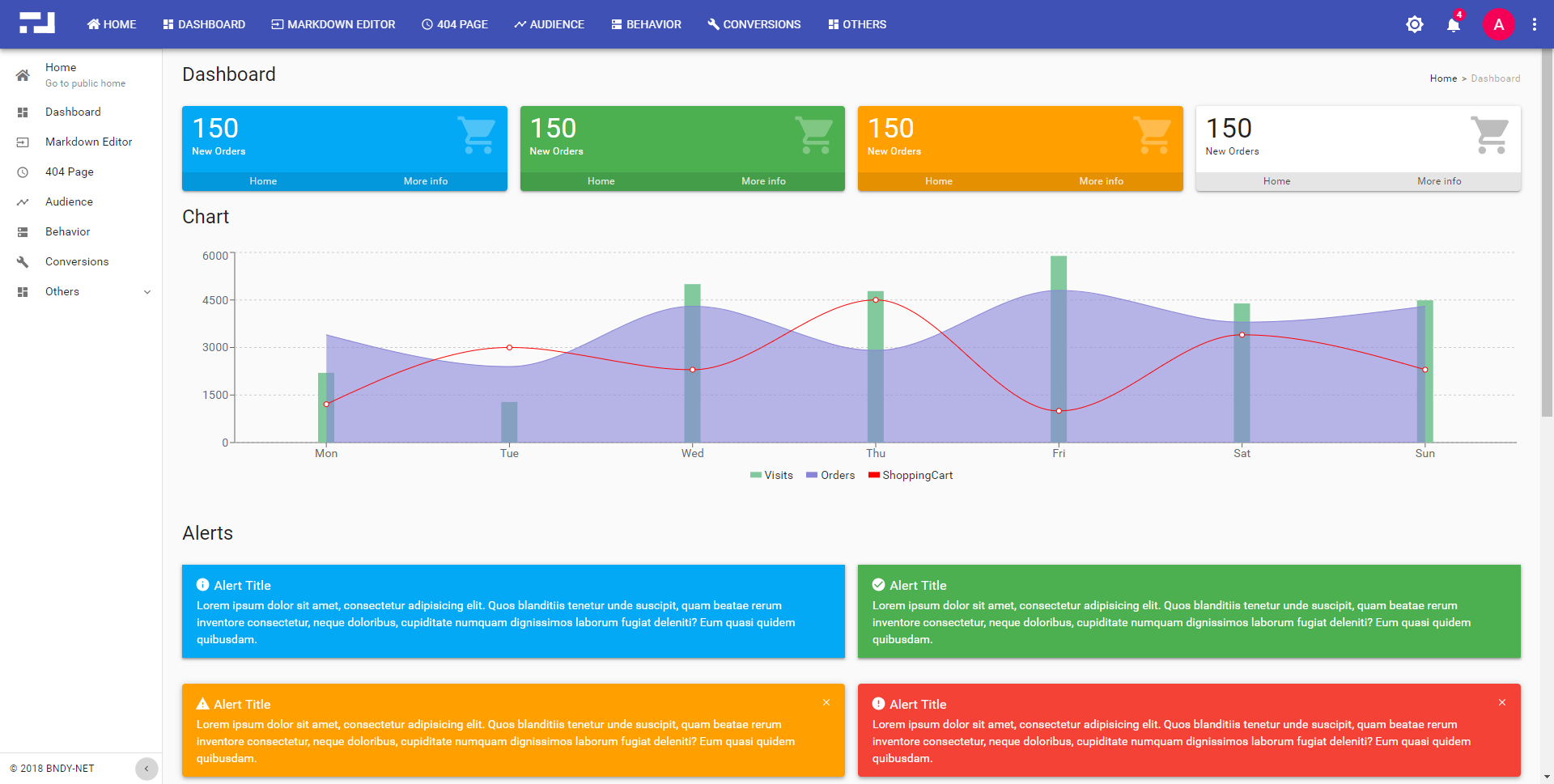
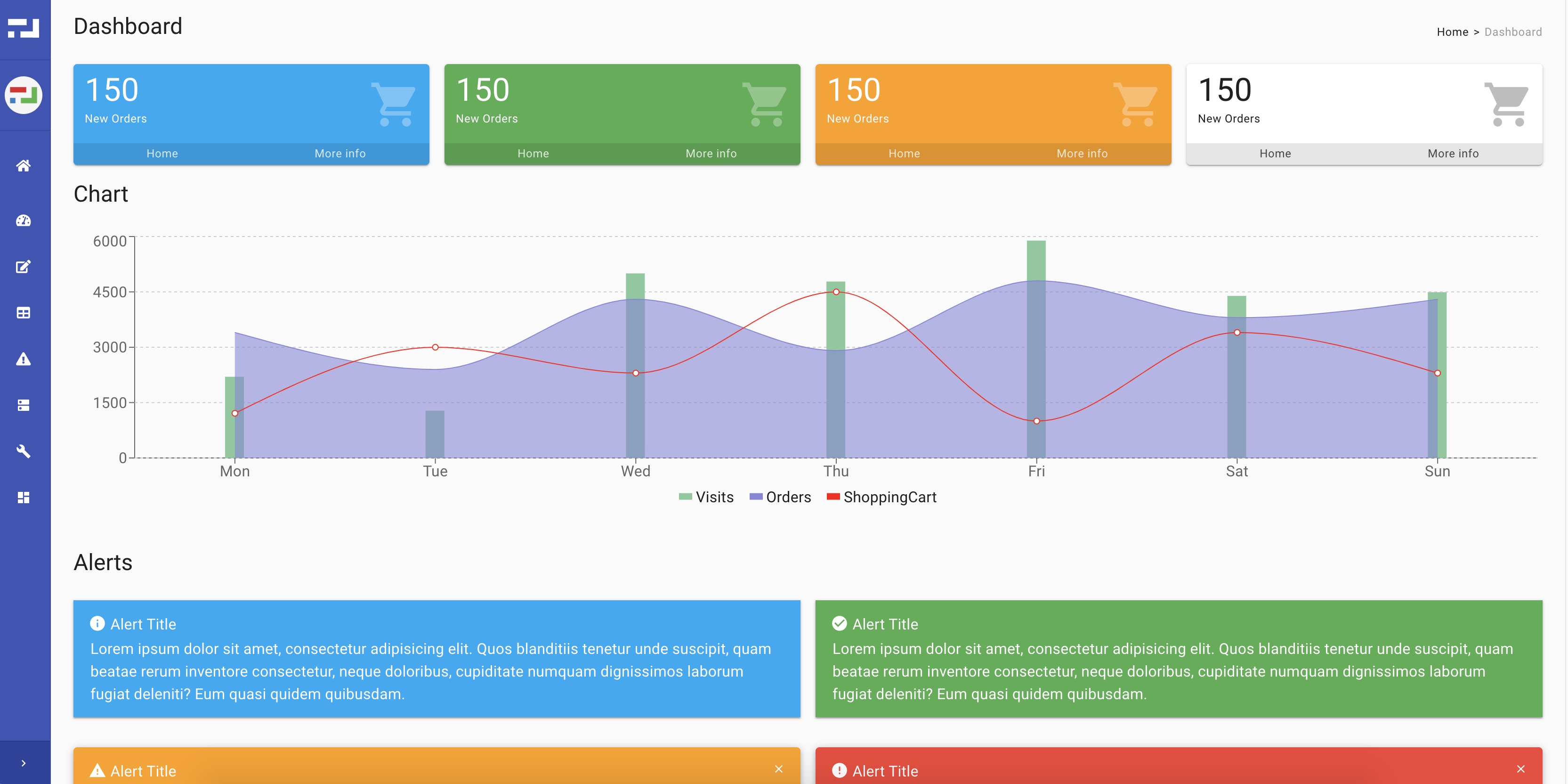
Includes two backend shells: classic layout and collapsed sidebar layout
Provides Material UI-based components such as Alert, Loading, and DataTable
Template Details
This is a React starter template for backend management interfaces, written in TypeScript, styled with SCSS, and bundled with Webpack. It combines React, React Redux, Redux Saga, React Router, and Material UI, integrates react-intl-universal for internationalization, and provides configuration examples for OAuth login.
The template includes two backend shells: a classic layout and a collapsed sidebar layout. It offers Material UI-based components such as Alert, Loading, MiniCard, Notifier, Overlay, Panel, Tag, and DataTable, as well as a resource service with access tokens and an auth service that reads the current user. The theme can be adjusted in src/theme/config.tsx.
Configuration is split by environment: app.common, app.dev, and app.prod correspond to common, local, and production configurations respectively; app.github, app.auth-code, and app.auth-password are examples of different authorization methods; app.mock is for local development without a login system. New environments can be added by creating app.[env_name].tsx to override configuration.
Usage limitations: The repository was last updated in 2023, the React version noted in the README is 16.3, and the dependencies and build approach are relatively old. The demo site allows login with any account, for demonstration only, and does not represent real authentication logic.
ReactBackend
Is it right for your project?
Use Cases
- Quickly building a React backend management interface with a login flow
- Projects that want to organize state and asynchronous logic with Redux and Redux Saga
- Needing multilingual support and building interfaces based on Material UI
- Needing to split application configuration by development, production, and other environments
Suitable For
- Teams developing backend systems with React and TypeScript
- Projects needing reference OAuth login configuration examples
- Developers wanting to unify backend component styles with Material UI
- Starter projects requiring internationalization and multi-environment configuration
Getting started & customization
Use these recorded setup notes alongside the repository instructions for your chosen version.
- 1
After cloning the repository, run npm install to install dependencies
- 2
npm start launches the development server; npm run build outputs production code to the dist directory
- 3
Adjust application configuration in src/config/app.common.tsx and the corresponding environment files
- 4
The theme can be customized in src/theme/config.tsx
- 5
When there is no local login system, refer to the app.mock.tsx configuration
License & source material
Usage conditions & limitations
Free to use · keep license noticeThis entry covers the free version under the MIT license in the public repository; the free scope is the code of this version and does not mean external services or third-party assets are free.
Must comply with when using
- Allows free use, modification, commercial use, and distribution of this version's code.
- When distributing copies or substantial portions of the code, retain the original author's copyright notice and the full MIT license notice.
- The code is provided as is; warranties and limitations of liability are governed by the original license and applicable law.
Additional costs & items to verify
- If there is no login system for local development, you can use the app.mock.tsx configuration; this mode is for local development only and does not represent real authentication logic.
- The GitHub authorization configuration is an example; actual use requires connecting to the GitHub OAuth service and configuring the corresponding credentials.
- The authorization code mode configuration is an example; actual login requires connecting to an external OAuth authorization server.
- The password mode configuration is an example; actual login requires connecting to an external OAuth authorization server.
- Debugging with VS Code requires installing Visual Studio Code and the Debugger for Chrome extension, which are external tool dependencies.
- Demo images, fonts, icons, and other third-party assets must be checked against their respective licenses and cannot be judged solely by the code's MIT license.
- External services such as domain names, hosting, databases, payments, or AI may incur additional charges.
View Original Text Basis
Permission is hereby granted, free of charge
Original License Text
app.mock.tsx - _just for local development without login system_
Original README
app.github.tsx - _example for github authorization_
Original README
app.auth-code.tsx - _example for authorization code grant type_
Original README
app.auth-password.tsx - _example for password grant type_
Original README
https://github.com/bndynet/admin-template-for-react/blob/master/LICENSEhttps://github.com/bndynet/admin-template-for-react/blob/master/README.mdRequires **[Visual Studio Code](https://code.visualstudio.com/)** as IDE and extension **[Debugger for Chrome](https://marketplace.visualstudio.com/items?itemName=msjsdiag.debugger-for-chrome)**
Original README
Compiled by DeepSeek based on repository license and README ·2026-09-30. Results only cover the materials read; dependencies, images, fonts, and subsequent term changes are subject to their respective original texts.
Project checks & description sources
Template Information
- Source platforms
- GitHub
- Documentation and maintenance reference score
- Partly documented · 72 / 100
- Technologies
- React
- Website type
- Admin dashboard
How this score is calculated
Our heuristic uses license records (up to 30), a demo link (12), a preview (10), stars (15), recorded maintenance (15), description completeness (8), feature records (5) and classification data (5). It is not a code, security or performance test, or a Google score. A link does not establish tested functionality.
What to verify for this project
- Repository update recorded
- 2023-01-03
- Screenshot last checked
- 2026-09-30
A demo link is listed. Check it with your own content and viewport sizes; its presence does not confirm that forms, authentication or payments work.
The catalog identifies React as the primary stack. Check the actual dependency manifest and lockfile for versions and hosting requirements. These notes use recorded metadata, not a code audit or a deployment test.
Use a selection guide →How this description was prepared
AI-assisted description based on catalog records and repository material. Repository authors are not automatically the reviewers of this description.
Automatically checked against source and license rules; no manual editorial review.
Inspect the recorded source material
SHA-256: ba47ee36aeea92d274853dee2cb4deb3a438b5228f47a67a790d0028d1cb5554
2026-09-30T09:29:41.132Z
Source file / repository# Admin Template for React
[DEMO](https://bndynet.github.io/admin-template-for-react/) - Type any account to log in









[](https://github.com/prettier/prettier)
A starter admin template with React, React Redux, Material UI and TypeScript that packages using Webpack and integrates a minimal project structure.
**Classic Layout**
**Popular Layout**
- AJAX component: **[axios](https://github.com/axios/axios)**
- UI component: **[material-ui](https://material-ui.com/)**
- REACT stack: react, react-dom, react-redux, react-router-config, react-router-dom, redux, redux-saga, react-intl-universal
- You can custom theme in **./src/theme/config.tsx** file
## ❯ Getting Started
1. Clone repo `git clone <git-url>`
2. `npm install` to install all dependencies
3. `npm start` to start web server or `npm run build` to build production code into **dist** folder
## ❯ Development
### Application Configuration Examples
- ./src/config/app.common.tsx - _all common configurations_
- ./src/config/app.dev.tsx - _configurations used in local_
- ./src/config/app.prod.tsx - _configurations used in production_
- ./src/config/app.github.tsx - _example for github authorization_
- ./src/config/app.auth-code.tsx - _example for authorization code grant type_
- ./src/config/app.auth-password.tsx - _example for password grant type_
- ./src/config/app.mock.tsx - _just for local development without login system_
### Customize more environments
1. New file **./src/config/app.[env_name].tsx** to override your configurations
2. Recommend to import configurations in **app.dev.tsx**
```ts
import config = require('./app.your-env');
```
Or add below code in **./src/config/index.tsx** or **./index.html** to freeze your environment
```ts
window.__APP_ENV__ = 'your-env';
```
3. `npm start` and `npm run build` will always use the environment you defined
### Components based on Material UI or some else
`Alert`, `Loading`, `MiniCard`, `Notifier`, `Overlay`, `Panel`, `Tag`, `DataTable`, ...
### i18n/l10n Support
```tsx
import * as intl from 'react-intl-universal';
const message = intl.get('i18nKey');
```
### Available Services
- `import { service as resourceService } from "app/service/resource";` to call APIs which has appended access token in request header
- `import { getState as getAuthState } from "app/service/auth";` to get current user information
### Debug with **Chrome** in **Visual Studio Code**
1. Requires **[Visual Studio Code](https://code.visualstudio.com/)** as IDE and extension **[Debugger for Chrome](https://marketplace.visualstudio.com/items?itemName=msjsdiag.debugger-for-chrome)**
1. `npm start` to run application
1. Click menu **Debug** > **Start Debugging** to debug with generated **.vscode/launch.json** file as below:
```json
{
"version": "0.2.0",
"configurations": [
{
"type": "chrome",
"request": "launch",
"name": "Launch Chrome against localhost",
"url": "http://localhost:8080",
"webRoot": "${workspaceFolder}"
}
]
}
```
1. Set breakpoints in your **vscode** and operate in the new Chrome window **Start Debugging** opened
### Recommendatory extensions for **Chrome**
- React Developer Tools
- Redux DevTools
Above extensions will show you the **Actions**, **States** and **Reducers** in **Chrome** console.
Explore similar templates
Compare previews and descriptions within the same stack and category.
ant-design-pro
Ant Design Pro is an enterprise-grade React admin scaffold built on React 19, Umi Max 4, and antd 6 with TypeScript.
React · Admin dashboard

coreui-free-react-admin-template
CoreUI's free React admin template, built on React and the CoreUI component library, provides dashboard layouts, sidebar navigation, routing, and example views. It includes .cursorrules, ARCHITECTURE.md, and DEVELOPMENT.md context files, plus JSDoc comments and PropTypes, to support AI-assisted development.
React · Admin dashboard

fastapi-react
A Cookiecutter template for FastAPI + React (TypeScript) full-stack projects, integrating PostgreSQL, SQLAlchemy, Alembic, Celery, Redis, JWT authentication, a react-admin admin panel, and a Docker Compose development environment with Nginx reverse proxy.
React · Admin dashboard

react-antd-admin-template
A React + Ant Design admin template for mid- and back-office products, with built-in login/logout, dynamic routing, permission checks, and user management.
React · Admin dashboard

react-saas-template
A React and Material-UI template for SaaS or admin websites, offering dashboard, chart, blog, payment, and file upload components. It uses Create-React-App, React-Router, Recharts, React-Stripe-js, React-Dropzone, and React-Cropper, with theme colors centralized in src/theme.js.
React · Admin dashboard

react-material-admin
React Material Admin is an MIT-licensed React admin template by Flatlogic, built on Material-UI. It provides dashboards, charts, tables, authentication, profile, and notification pages, with three color themes and responsive layouts.
React · Admin dashboard