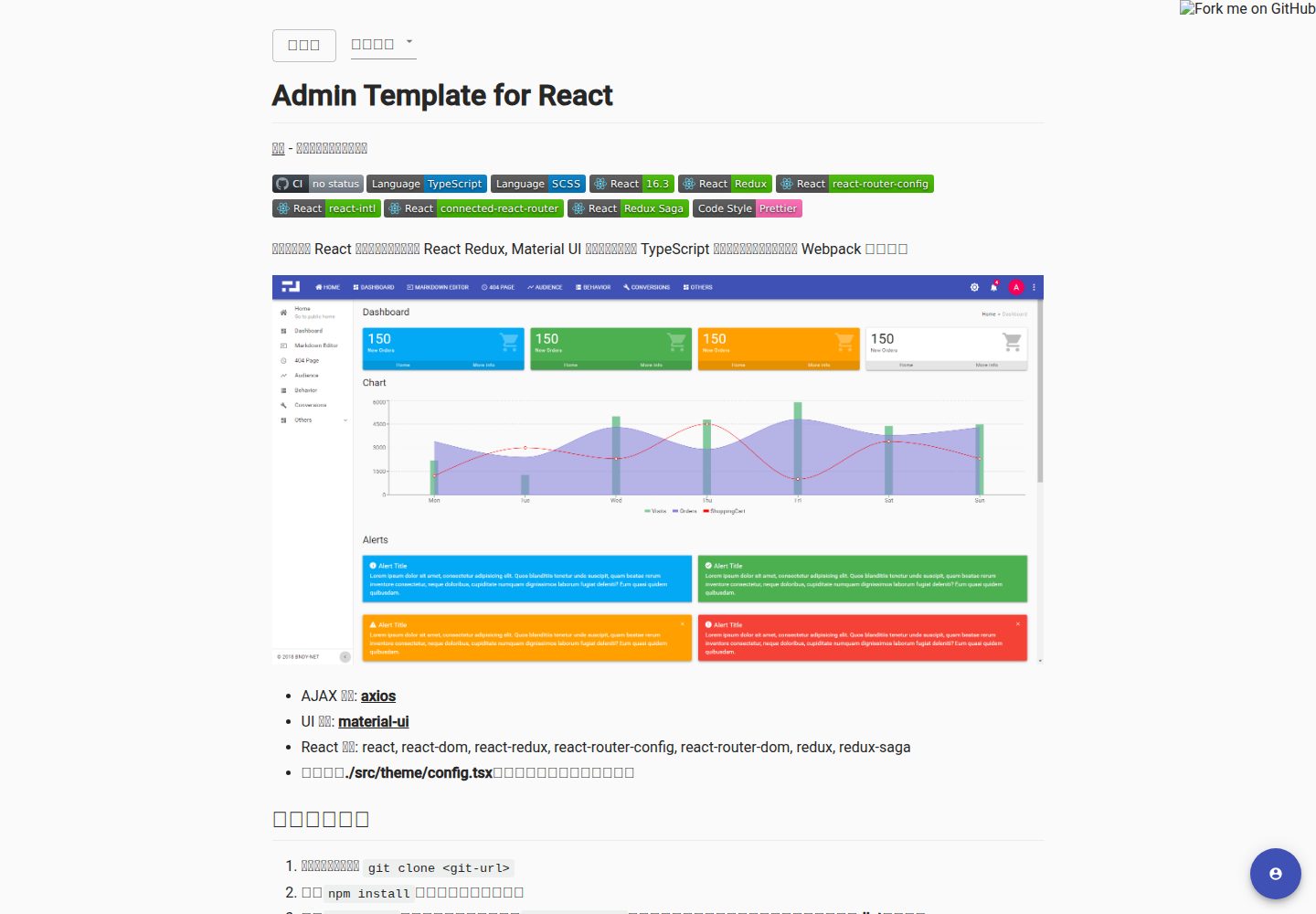
使用 TypeScript 与 SCSS 编写,通过 Webpack 打包
React后台
admin-template-for-react — React 后台模板
作者 bndynet
基于 React、Redux、Redux Saga、React Router 与 Material UI 的后台管理模板,内置 OAuth 登录与国际化,使用 TypeScript 和 Webpack 构建。
看看你的网站会是什么样
浏览真实页面截图,比较内容排版与手机效果。点击下方缩略图切换,放大查看整页细节。
全部页面与视图 2
截图用于了解视觉与布局,交互效果请以实际项目为准。
采集于 2026-09-30查看来源
值得关注的模板亮点
从已有项目资料中,快速了解它的特点。
集成 React Redux、Redux Saga、React Router 与 Material UI
内置 react-intl-universal 国际化方案
提供 GitHub、授权码、密码三种 OAuth 登录配置示例
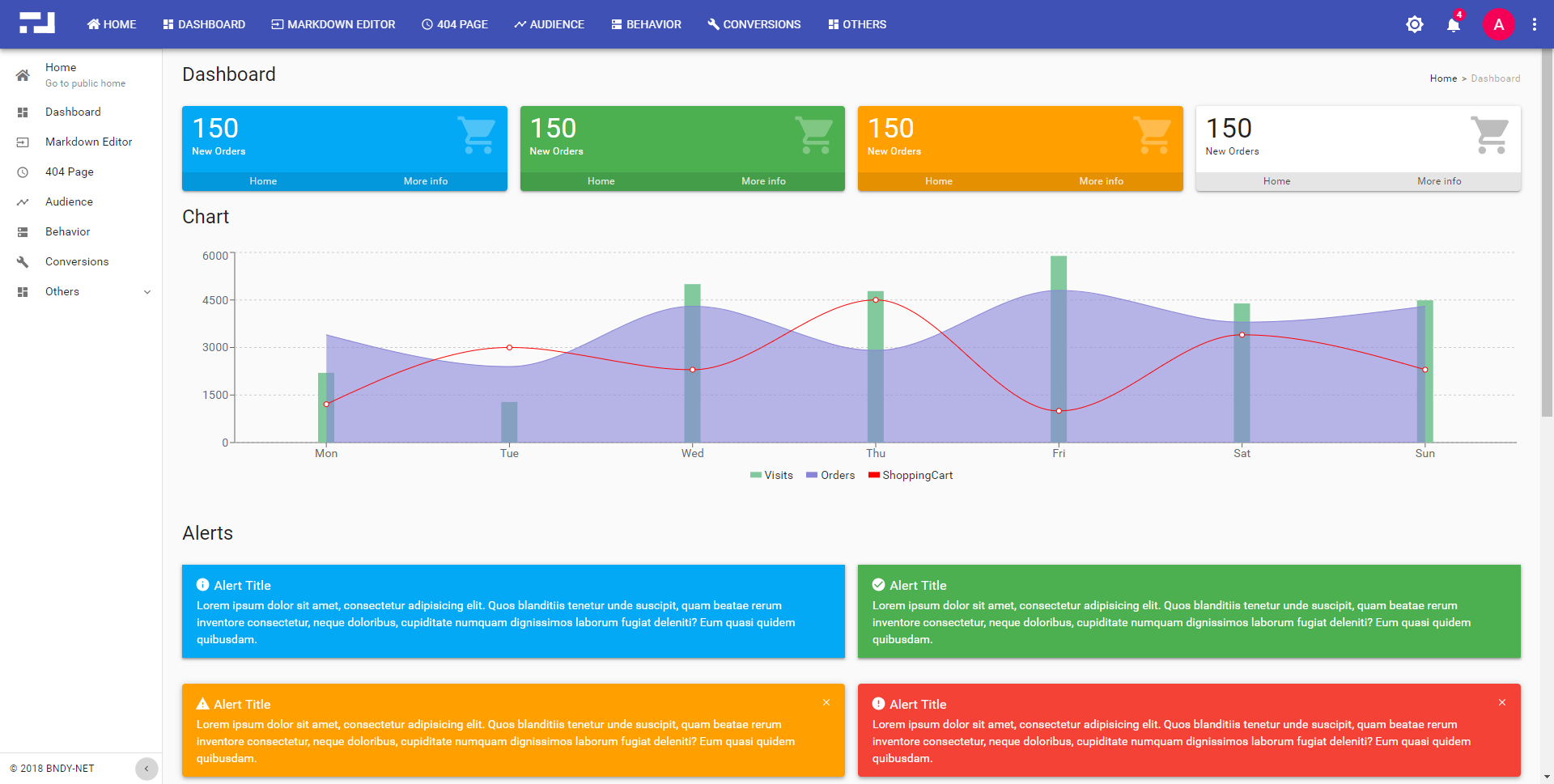
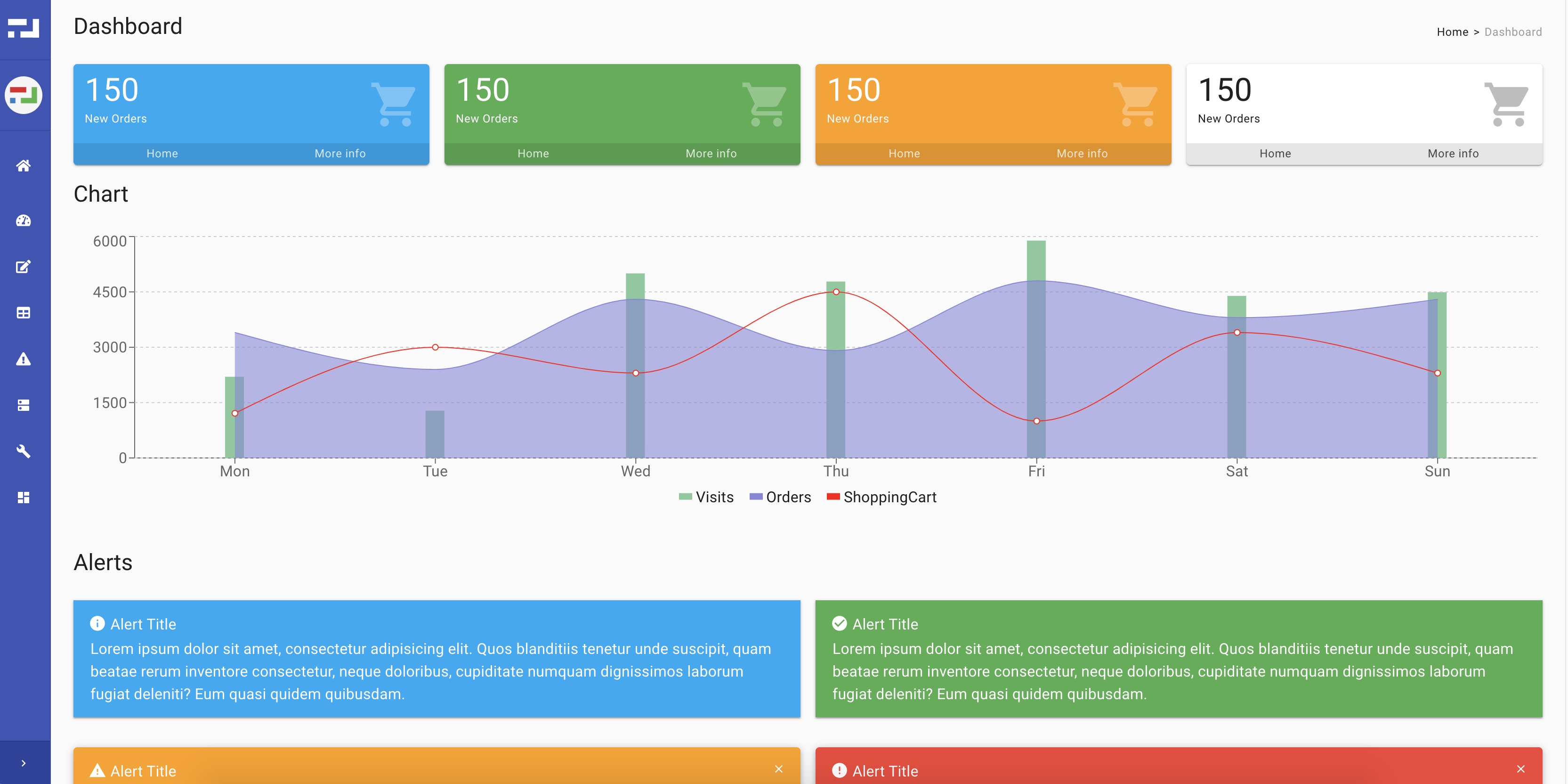
包含经典布局与侧栏收起布局两种后台外壳
提供 Alert、Loading、DataTable 等基于 Material UI 的组件
模板详细介绍
这是一个面向后台管理界面的 React 起步模板,代码使用 TypeScript 编写、样式使用 SCSS,通过 Webpack 打包。它把 React、React Redux、Redux Saga、React Router 与 Material UI 组合在一起,并集成 react-intl-universal 做国际化,同时提供 OAuth 登录的配置示例。
模板包含经典布局和侧栏收起布局两种后台外壳,提供 Alert、Loading、MiniCard、Notifier、Overlay、Panel、Tag、DataTable 等基于 Material UI 的组件,以及带访问令牌的 resource 服务和读取当前用户的 auth 服务。主题可在 src/theme/config.tsx 中调整。
配置按环境拆分:app.common、app.dev、app.prod 分别对应通用、本地和生产配置,app.github、app.auth-code、app.auth-password 是不同授权方式的示例,app.mock 用于没有登录系统的本地开发。新增环境可创建 app.[env_name].tsx 覆盖配置。
使用限制:仓库最近更新于 2023 年,README 中标注的 React 版本为 16.3,依赖与构建方式相对较早;演示站点允许输入任意账号登录,仅用于展示,不代表真实鉴权逻辑。
React后台
适合你的项目吗?
适用场景
- 需要快速搭建带登录流程的 React 后台管理界面
- 希望以 Redux 与 Redux Saga 组织状态和异步逻辑的项目
- 需要多语言支持并基于 Material UI 构建界面
- 需要按开发、生产等环境拆分应用配置
适合人群
- 使用 React 与 TypeScript 开发后台系统的团队
- 需要参考 OAuth 登录配置示例的项目
- 希望以 Material UI 统一后台组件风格的开发者
- 需要国际化与多环境配置的起始项目
上手与定制指南
结合仓库当前版本的说明,按下面的资料检查内容、配置与运行要求。
- 1
克隆仓库后执行 npm install 安装依赖
- 2
npm start 启动开发服务器,npm run build 将生产代码输出到 dist 目录
- 3
在 src/config/app.common.tsx 及对应环境文件中调整应用配置
- 4
主题可在 src/theme/config.tsx 中自定义
- 5
本地无登录系统时可参考 app.mock.tsx 配置
授权与来源资料
使用条件与限制
免费使用 · 保留许可声明本次收录的是公开仓库中采用 MIT 许可的免费版本;免费范围为该版本代码,不代表外部服务或第三方素材免费。
使用时需要遵守
- 允许免费使用、修改、商用和分发该版本代码。
- 分发代码副本或实质性部分时,保留原作者版权声明和完整 MIT 许可声明。
- 代码按现状提供;担保与责任限制以原许可证及适用法律为准。
额外费用与待核对事项
- 本地开发若无登录系统,可使用 app.mock.tsx 配置;该模式仅用于本地开发,不代表真实鉴权逻辑。
- GitHub 授权配置为示例,实际使用需自行接入 GitHub OAuth 服务并配置相应凭据。
- 授权码模式配置为示例,需对接外部 OAuth 授权服务器才能实际登录。
- 密码模式配置为示例,需对接外部 OAuth 授权服务器才能实际登录。
- 使用 VS Code 调试需安装 Visual Studio Code 及 Debugger for Chrome 扩展,属于外部工具依赖。
- 演示图片、字体、图标及其他第三方素材需按各自许可核对,不能仅凭代码的 MIT 许可判断。
- 域名、托管、数据库、支付或 AI 等外部服务可能另外收费。
查看原文依据
Permission is hereby granted, free of charge
许可证原文
app.mock.tsx - _just for local development without login system_
README 原文
app.github.tsx - _example for github authorization_
README 原文
app.auth-code.tsx - _example for authorization code grant type_
README 原文
app.auth-password.tsx - _example for password grant type_
README 原文
https://github.com/bndynet/admin-template-for-react/blob/master/LICENSEhttps://github.com/bndynet/admin-template-for-react/blob/master/README.mdRequires **[Visual Studio Code](https://code.visualstudio.com/)** as IDE and extension **[Debugger for Chrome](https://marketplace.visualstudio.com/items?itemName=msjsdiag.debugger-for-chrome)**
README 原文
DeepSeek 根据仓库许可证和 README 整理 ·2026-09-30。结果仅覆盖已读取资料,依赖、图片、字体及后续条款变更以各自原文为准。
项目核对记录与介绍依据
模板资料
- 来源平台
- GitHub
- 资料与维护参考分
- 资料一般 · 72 / 100
- 技术栈
- React
- 网站类型
- 后台
这个分数如何计算
本站按许可资料(最高30分)、演示链接(12分)、预览图(10分)、Star数(15分)、记录的维护时间(15分)、描述完整度(8分)、功能记录(5分)和分类资料(5分)计算。它不是代码、安全或性能测试,也不是 Google 评分;有链接不代表已实测可用。
这个项目需要核对什么
- 记录的仓库更新时间
- 2023-01-03
- 截图检查日期
- 2026-09-30
已收录演示链接。请用你的内容与屏幕尺寸检查;有演示不代表表单、认证或支付已经可用。
目录记录的主要技术栈是 React。请通过依赖清单和锁文件核对实际版本与托管要求。这些说明基于收录资料,不代表代码审计或部署实测。
查看具体选型方法 →介绍的制作与核对状态
介绍由 AI 辅助整理目录与仓库资料。仓库作者不等于这篇介绍的审核者。
已完成服务器许可规则与 AI 来源核对;未经过人工编辑审核。
查看当时使用的来源资料
SHA-256: ba47ee36aeea92d274853dee2cb4deb3a438b5228f47a67a790d0028d1cb5554
2026-09-30T09:29:41.132Z
来源文件 / 仓库# Admin Template for React
[DEMO](https://bndynet.github.io/admin-template-for-react/) - Type any account to log in









[](https://github.com/prettier/prettier)
A starter admin template with React, React Redux, Material UI and TypeScript that packages using Webpack and integrates a minimal project structure.
**Classic Layout**
**Popular Layout**
- AJAX component: **[axios](https://github.com/axios/axios)**
- UI component: **[material-ui](https://material-ui.com/)**
- REACT stack: react, react-dom, react-redux, react-router-config, react-router-dom, redux, redux-saga, react-intl-universal
- You can custom theme in **./src/theme/config.tsx** file
## ❯ Getting Started
1. Clone repo `git clone <git-url>`
2. `npm install` to install all dependencies
3. `npm start` to start web server or `npm run build` to build production code into **dist** folder
## ❯ Development
### Application Configuration Examples
- ./src/config/app.common.tsx - _all common configurations_
- ./src/config/app.dev.tsx - _configurations used in local_
- ./src/config/app.prod.tsx - _configurations used in production_
- ./src/config/app.github.tsx - _example for github authorization_
- ./src/config/app.auth-code.tsx - _example for authorization code grant type_
- ./src/config/app.auth-password.tsx - _example for password grant type_
- ./src/config/app.mock.tsx - _just for local development without login system_
### Customize more environments
1. New file **./src/config/app.[env_name].tsx** to override your configurations
2. Recommend to import configurations in **app.dev.tsx**
```ts
import config = require('./app.your-env');
```
Or add below code in **./src/config/index.tsx** or **./index.html** to freeze your environment
```ts
window.__APP_ENV__ = 'your-env';
```
3. `npm start` and `npm run build` will always use the environment you defined
### Components based on Material UI or some else
`Alert`, `Loading`, `MiniCard`, `Notifier`, `Overlay`, `Panel`, `Tag`, `DataTable`, ...
### i18n/l10n Support
```tsx
import * as intl from 'react-intl-universal';
const message = intl.get('i18nKey');
```
### Available Services
- `import { service as resourceService } from "app/service/resource";` to call APIs which has appended access token in request header
- `import { getState as getAuthState } from "app/service/auth";` to get current user information
### Debug with **Chrome** in **Visual Studio Code**
1. Requires **[Visual Studio Code](https://code.visualstudio.com/)** as IDE and extension **[Debugger for Chrome](https://marketplace.visualstudio.com/items?itemName=msjsdiag.debugger-for-chrome)**
1. `npm start` to run application
1. Click menu **Debug** > **Start Debugging** to debug with generated **.vscode/launch.json** file as below:
```json
{
"version": "0.2.0",
"configurations": [
{
"type": "chrome",
"request": "launch",
"name": "Launch Chrome against localhost",
"url": "http://localhost:8080",
"webRoot": "${workspaceFolder}"
}
]
}
```
1. Set breakpoints in your **vscode** and operate in the new Chrome window **Start Debugging** opened
### Recommendatory extensions for **Chrome**
- React Developer Tools
- Redux DevTools
Above extensions will show you the **Actions**, **States** and **Reducers** in **Chrome** console.
看看同类模板
对比同技术栈与用途的模板,找到更适合的视觉与内容结构。
ant-design-pro
Ant Design Pro 是 Ant Design 官方推出的企业级中后台前端脚手架,基于 React 19、Umi Max 4 和 antd 6 构建,内置 TypeScript 支持。
React · 后台

coreui-free-react-admin-template
Free React Admin & Dashboard Template Built for AI-Assisted Development
React · 后台

fastapi-react
fastapi-react 是一个基于 Cookiecutter 的模板,用于快速搭建 FastAPI 与 React(TypeScript)的全栈项目。
React · 后台

react-antd-admin-template
一个基于React+Antd的后台管理模版,在线预览https://nlrx-wjc.github.io/react-antd-admin-template/
React · 后台

react-saas-template
🌊 Template for building an SaaS / admin website using React + Material-UI
React · 后台

react-material-admin
☄️React Material Admin is a React template built with Material-UI
React · 后台